Overview
December 2012 2.1
GPGPU-Sim Tutorial (MICRO 2012)
2: GPGPU-Sim Overview
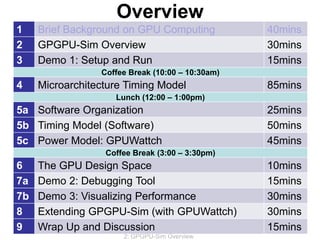
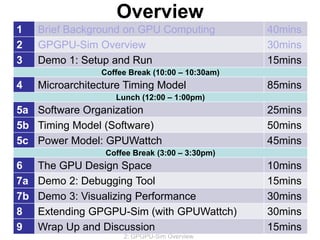
1 Brief Background on GPU Computing 40mins
2 GPGPU-Sim Overview 30mins
3 Demo 1: Setup and Run 15mins
Coffee Break (10:00 – 10:30am)
4 Microarchitecture Timing Model 85mins
Lunch (12:00 – 1:00pm)
5a Software Organization 25mins
5b Timing Model (Software) 50mins
5c Power Model: GPUWattch 45mins
Coffee Break (3:00 – 3:30pm)
6 The GPU Design Space 10mins
7a Demo 2: Debugging Tool 15mins
7b Demo 3: Visualizing Performance 30mins
8 Extending GPGPU-Sim (with GPUWattch) 30mins
9 Wrap Up and Discussion 15mins
Outline
• What GPGPU-Sim simulates
– Functional model for
PTX/SASS + CUDA/OpenCL
– Timing model for the compute part of a GPU
– New: Power model: GPUWattch
• Interface with CUDA applications
• What is new in GPGPU-Sim 3.1.2?
• Roadmap
December 2012 2.2
GPGPU-Sim Tutorial (MICRO 2012)
2: GPGPU-Sim Overview
Session Objective
• After this session, you will be able to:
1. Summarize what GPGPU-Sim simulates
2. Describe how GPGPU-Sim interfaces with
CUDA applications and supports SASS
3. Summarize the advances between
GPGPU-Sim 2.1.1b and 3.1.2
December 2012 2.3
GPGPU-Sim Tutorial (MICRO 2012)
2: GPGPU-Sim Overview
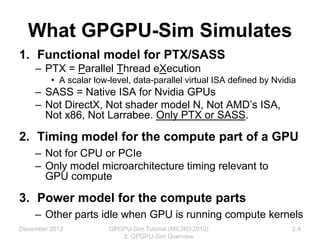
What GPGPU-Sim Simulates
1. Functional model for PTX/SASS
– PTX = Parallel Thread eXecution
• A scalar low-level, data-parallel virtual ISA defined by Nvidia
– SASS = Native ISA for Nvidia GPUs
– Not DirectX, Not shader model N, Not AMD’s ISA,
Not x86, Not Larrabee. Only PTX or SASS.
2. Timing model for the compute part of a GPU
– Not for CPU or PCIe
– Only model microarchitecture timing relevant to
GPU compute
3. Power model for the compute parts
– Other parts idle when GPU is running compute kernels
December 2012 2.4
GPGPU-Sim Tutorial (MICRO 2012)
2: GPGPU-Sim Overview
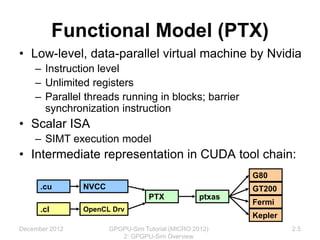
Functional Model (PTX)
• Low-level, data-parallel virtual machine by Nvidia
– Instruction level
– Unlimited registers
– Parallel threads running in blocks; barrier
synchronization instruction
• Scalar ISA
– SIMT execution model
• Intermediate representation in CUDA tool chain:
.cu
.cl
NVCC
OpenCL Drv
PTX ptxas
G80
GT200
Fermi
Kepler
December 2012 2.5
GPGPU-Sim Tutorial (MICRO 2012)
2: GPGPU-Sim Overview
for (int d = blockDim.x; d > 0; d /= 2)
{
__syncthreads();
if (tid < d) {
float f0 = shared[tid];
float f1 = shared[tid + d];
if (f1 < f0)
shared[tid] = f1;
}
}
$Lt_0_6146:
bar.sync 0;
setp.le.s32 %p3, %r7, %r1;
@%p3 bra $Lt_0_6402;
ld.shared.f32 %f3, [%rd9+0];
add.s32 %r9, %r7, %r1;
cvt.s64.s32 %rd18, %r9;
mul.lo.u64 %rd19, %rd18, 4;
add.u64 %rd20, %rd6, %rd19;
ld.shared.f32 %f4, [%rd20+0];
setp.gt.f32 %p4, %f3, %f4;
@!%p4 bra $Lt_0_6914;
st.shared.f32 [%rd9+0], %f4;
$Lt_0_6914:
$Lt_0_6402:
shr.s32 %r10, %r7, 31;
mov.s32 %r11, 1;
and.b32 %r12, %r10, %r11;
add.s32 %r13, %r12, %r7;
shr.s32 %r7, %r13, 1;
mov.u32 %r14, 0;
setp.gt.s32 %p5, %r7, %r14;
@%p5 bra $Lt_0_6146;
• Scalar PTX ISA
• Scalar control flow (if-branch, for-loops)
• Parallel Intrinsic (__syncthreads())
• Register allocation not done in PTX
// some initialization code omitted
Functional Model (PTX)
December 2012 2.6
GPGPU-Sim Tutorial (MICRO 2012)
2: GPGPU-Sim Overview
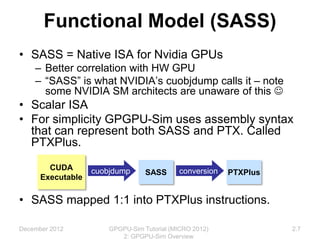
Functional Model (SASS)
• SASS = Native ISA for Nvidia GPUs
– Better correlation with HW GPU
– “SASS” is what NVIDIA’s cuobjdump calls it – note
some NVIDIA SM architects are unaware of this 
• Scalar ISA
• For simplicity GPGPU-Sim uses assembly syntax
that can represent both SASS and PTX. Called
PTXPlus.
• SASS mapped 1:1 into PTXPlus instructions.
CUDA
Executable
cuobjdump SASS conversion PTXPlus
December 2012 2.7
GPGPU-Sim Tutorial (MICRO 2012)
2: GPGPU-Sim Overview
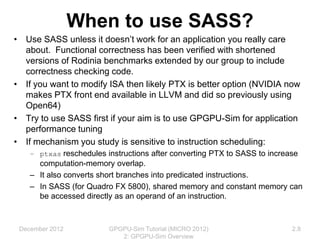
When to use SASS?
• Use SASS unless it doesn’t work for an application you really care
about. Functional correctness has been verified with shortened
versions of Rodinia benchmarks extended by our group to include
correctness checking code.
• If you want to modify ISA then likely PTX is better option (NVIDIA now
makes PTX front end available in LLVM and did so previously using
Open64)
• Try to use SASS first if your aim is to use GPGPU-Sim for application
performance tuning
• If mechanism you study is sensitive to instruction scheduling:
– ptxas reschedules instructions after converting PTX to SASS to increase
computation-memory overlap.
– It also converts short branches into predicated instructions.
– In SASS (for Quadro FX 5800), shared memory and constant memory can
be accessed directly as an operand of an instruction.
December 2012 2.8
GPGPU-Sim Tutorial (MICRO 2012)
2: GPGPU-Sim Overview
PTX vs. SASS
PTX
$Lt_25_13570:
ld.global.s32 %r9, [%rd5+0];
add.s32 %r10, %r9, %r8;
ld.global.s32 %r11, [%rd5+1024];
add.s32 %r8, %r11, %r10;
add.u32 %r5, %r7, %r5;
add.u64 %rd5, %rd5, %rd6;
ld.param.u32 %r6, [size];
setp.lt.u32 %p2, %r5, %r6;
@%p2 bra $Lt_25_13570;
...
mov.u32 %r12, 127;
setp.gt.u32 %p3, %r3, %r12;
@%p3 bra $Lt_25_14082;
ld.shared.s32 %r13, [%rd10+512];
add.s32 %r8, %r13, %r8;
st.shared.s32 [%rd10+0], %r8;
$Lt_25_14082:
bar.sync 0;
SASS (PTXPlus)
l0x00000060:
add.half.u32 $r7, $r4, 0x00000400;
ld.global.u32 $r8, [$r4];
ld.global.u32 $r7, [$r7];
add.half.u32 $r0, $r5, $r0;
add.half.u32 $r6, $r8, $r6;
set.gt.u32.u32 $p0/$o127, s[0x0020], $r0;
add.half.u32 $r6, $r7, $r6;
add.half.u32 $r4, $r4, $r3;
@$p0.ne bra l0x00000060;
...
set.gt.u32.u32 $p0/$o127, $r2, const [0x0000];
@$p0.equ add.u32 $ofs2, $ofs1, 0x00000230;
@$p0.equ add.u32 $r6, s[$ofs2+0x0000], $r6;
@$p0.equ mov.u32 s[$ofs1+0x0030], $r6;
bar.sync 0x00000000;
December 2012 GPGPU-Sim Tutorial (MICRO 2012)
2: GPGPU-Sim Overview
2.9
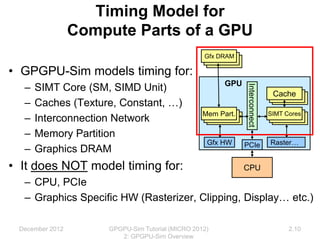
Timing Model for
Compute Parts of a GPU
• GPGPU-Sim models timing for:
– SIMT Core (SM, SIMD Unit)
– Caches (Texture, Constant, …)
– Interconnection Network
– Memory Partition
– Graphics DRAM
• It does NOT model timing for:
– CPU, PCIe
– Graphics Specific HW (Rasterizer, Clipping, Display… etc.)
GPU
PCIe
Interconnect
Gfx DRAM
Mem Part. SIMT Cores
Cache
Raster…
Gfx HW
CPU
December 2012 2.10
GPGPU-Sim Tutorial (MICRO 2012)
2: GPGPU-Sim Overview
Timing Model for
GPU Micro-architecture
• GPGPU-Sim simulates the
timing model of a GPU
running each launched
CUDA kernel.
– Reports # cycles spent
running the kernels.
– Exclude any time spent on
data transfer on PCIe bus.
– CPU may run concurrently
with asynchronous kernel
launches.
Time
GPU HW
CPU
Async. Kernel Launch
Done
GPU HW
Done
CPU
GPU HW
Sync. Kernel Launch
Done
CPU
Blocking
GPGPU-Sim
GPGPU-Sim
GPGPU-Sim
December 2012 2.11
GPGPU-Sim Tutorial (MICRO 2012)
2: GPGPU-Sim Overview
Timing Model for
GPU Micro-architecture
• GPGPU-Sim is a detailed cycle-level simulator:
– Cycle-level model for each part of the microarchitecture
– Research focused
• Ignoring rare corner cases to reduce complexity
– CUDA manual provides some hints. NVIDIA IEEE
Micro articles provide other hints. In most cases we
can only guess at details. Guesses “informed” by
studying patents and microbenchmarking.
GPGPU-Sim w/ SASS is ~0.98
correlated to the real HW.
December 2012 2.12
GPGPU-Sim Tutorial (MICRO 2012)
2: GPGPU-Sim Overview
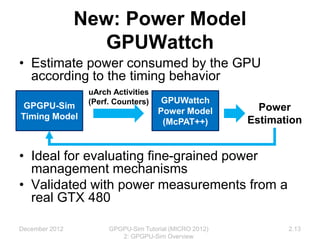
New: Power Model
GPUWattch
• Estimate power consumed by the GPU
according to the timing behavior
• Ideal for evaluating fine-grained power
management mechanisms
• Validated with power measurements from a
real GTX 480
December 2012 GPGPU-Sim Tutorial (MICRO 2012)
2: GPGPU-Sim Overview
2.13
GPGPU-Sim
Timing Model
uArch Activities
(Perf. Counters) GPUWattch
Power Model
(McPAT++)
Power
Estimation
Interfacing GPGPU-Sim to
Applications
• GPGPU-Sim compiles into a shared runtime
library and implements the API:
– libcudart.so  CUDA runtime API
– libOpenCL.so  OpenCL API
• Static Linking no longer supported.
• Modify your LD_LIBRARY_PATH to run your
CUDA app on GPGPU-Sim (See Manual)
– Need a config file (gpgpusim.config), an
interconnection config file and a McPAT config as well
We provide the config files for modeling:
- Quadro FX 5800 (GT200)
- Geforce GTX 480 and Tesla C2050 (Fermi)
December 2012 2.14
GPGPU-Sim Tutorial (MICRO 2012)
2: GPGPU-Sim Overview
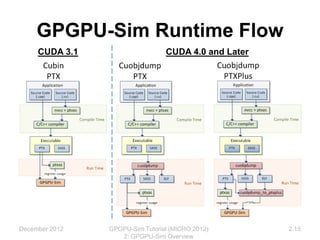
GPGPU-Sim Runtime Flow
CUDA 3.1 CUDA 4.0 and Later
December 2012 2.15
GPGPU-Sim Tutorial (MICRO 2012)
2: GPGPU-Sim Overview
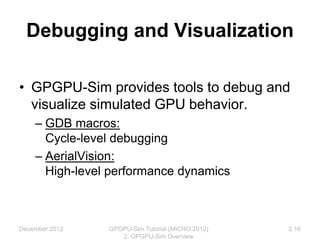
Debugging and Visualization
• GPGPU-Sim provides tools to debug and
visualize simulated GPU behavior.
– GDB macros:
Cycle-level debugging
– AerialVision:
High-level performance dynamics
December 2012 2.16
GPGPU-Sim Tutorial (MICRO 2012)
2: GPGPU-Sim Overview
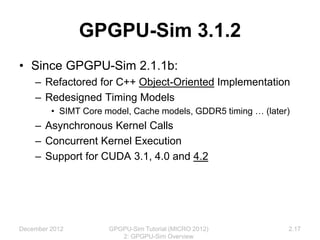
GPGPU-Sim 3.1.2
• Since GPGPU-Sim 2.1.1b:
– Refactored for C++ Object-Oriented Implementation
– Redesigned Timing Models
• SIMT Core model, Cache models, GDDR5 timing … (later)
– Asynchronous Kernel Calls
– Concurrent Kernel Execution
– Support for CUDA 3.1, 4.0 and 4.2
December 2012 2.17
GPGPU-Sim Tutorial (MICRO 2012)
2: GPGPU-Sim Overview
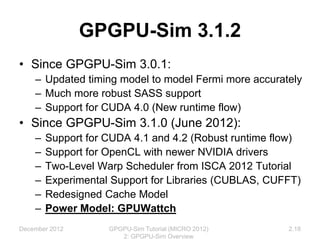
GPGPU-Sim 3.1.2
• Since GPGPU-Sim 3.0.1:
– Updated timing model to model Fermi more accurately
– Much more robust SASS support
– Support for CUDA 4.0 (New runtime flow)
• Since GPGPU-Sim 3.1.0 (June 2012):
– Support for CUDA 4.1 and 4.2 (Robust runtime flow)
– Support for OpenCL with newer NVIDIA drivers
– Two-Level Warp Scheduler from ISCA 2012 Tutorial
– Experimental Support for Libraries (CUBLAS, CUFFT)
– Redesigned Cache Model
– Power Model: GPUWattch
December 2012 GPGPU-Sim Tutorial (MICRO 2012)
2: GPGPU-Sim Overview
2.18
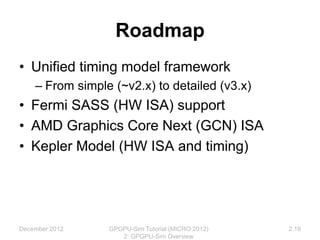
Roadmap
• Unified timing model framework
– From simple (~v2.x) to detailed (v3.x)
• Fermi SASS (HW ISA) support
• AMD Graphics Core Next (GCN) ISA
• Kepler Model (HW ISA and timing)
December 2012 2.19
GPGPU-Sim Tutorial (MICRO 2012)
2: GPGPU-Sim Overview
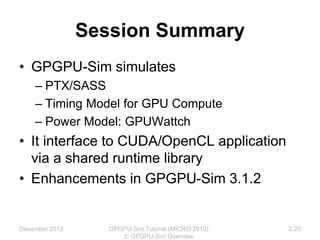
Session Summary
• GPGPU-Sim simulates
– PTX/SASS
– Timing Model for GPU Compute
– Power Model: GPUWattch
• It interface to CUDA/OpenCL application
via a shared runtime library
• Enhancements in GPGPU-Sim 3.1.2
December 2012 2.20
GPGPU-Sim Tutorial (MICRO 2012)
2: GPGPU-Sim Overview
Overview
December 2012 2.21
GPGPU-Sim Tutorial (MICRO 2012)
2: GPGPU-Sim Overview
1 Brief Background on GPU Computing 40mins
2 GPGPU-Sim Overview 30mins
3 Demo 1: Setup and Run 15mins
Coffee Break (10:00 – 10:30am)
4 Microarchitecture Timing Model 85mins
Lunch (12:00 – 1:00pm)
5a Software Organization 25mins
5b Timing Model (Software) 50mins
5c Power Model: GPUWattch 45mins
Coffee Break (3:00 – 3:30pm)
6 The GPU Design Space 10mins
7a Demo 2: Debugging Tool 15mins
7b Demo 3: Visualizing Performance 30mins
8 Extending GPGPU-Sim (with GPUWattch) 30mins
9 Wrap Up and Discussion 15mins

2-GPGPU-Sim-Overview.pptx

  • 1.
    Overview December 2012 2.1 GPGPU-SimTutorial (MICRO 2012) 2: GPGPU-Sim Overview 1 Brief Background on GPU Computing 40mins 2 GPGPU-Sim Overview 30mins 3 Demo 1: Setup and Run 15mins Coffee Break (10:00 – 10:30am) 4 Microarchitecture Timing Model 85mins Lunch (12:00 – 1:00pm) 5a Software Organization 25mins 5b Timing Model (Software) 50mins 5c Power Model: GPUWattch 45mins Coffee Break (3:00 – 3:30pm) 6 The GPU Design Space 10mins 7a Demo 2: Debugging Tool 15mins 7b Demo 3: Visualizing Performance 30mins 8 Extending GPGPU-Sim (with GPUWattch) 30mins 9 Wrap Up and Discussion 15mins
  • 2.
    Outline • What GPGPU-Simsimulates – Functional model for PTX/SASS + CUDA/OpenCL – Timing model for the compute part of a GPU – New: Power model: GPUWattch • Interface with CUDA applications • What is new in GPGPU-Sim 3.1.2? • Roadmap December 2012 2.2 GPGPU-Sim Tutorial (MICRO 2012) 2: GPGPU-Sim Overview
  • 3.
    Session Objective • Afterthis session, you will be able to: 1. Summarize what GPGPU-Sim simulates 2. Describe how GPGPU-Sim interfaces with CUDA applications and supports SASS 3. Summarize the advances between GPGPU-Sim 2.1.1b and 3.1.2 December 2012 2.3 GPGPU-Sim Tutorial (MICRO 2012) 2: GPGPU-Sim Overview
  • 4.
    What GPGPU-Sim Simulates 1.Functional model for PTX/SASS – PTX = Parallel Thread eXecution • A scalar low-level, data-parallel virtual ISA defined by Nvidia – SASS = Native ISA for Nvidia GPUs – Not DirectX, Not shader model N, Not AMD’s ISA, Not x86, Not Larrabee. Only PTX or SASS. 2. Timing model for the compute part of a GPU – Not for CPU or PCIe – Only model microarchitecture timing relevant to GPU compute 3. Power model for the compute parts – Other parts idle when GPU is running compute kernels December 2012 2.4 GPGPU-Sim Tutorial (MICRO 2012) 2: GPGPU-Sim Overview
  • 5.
    Functional Model (PTX) •Low-level, data-parallel virtual machine by Nvidia – Instruction level – Unlimited registers – Parallel threads running in blocks; barrier synchronization instruction • Scalar ISA – SIMT execution model • Intermediate representation in CUDA tool chain: .cu .cl NVCC OpenCL Drv PTX ptxas G80 GT200 Fermi Kepler December 2012 2.5 GPGPU-Sim Tutorial (MICRO 2012) 2: GPGPU-Sim Overview
  • 6.
    for (int d= blockDim.x; d > 0; d /= 2) { __syncthreads(); if (tid < d) { float f0 = shared[tid]; float f1 = shared[tid + d]; if (f1 < f0) shared[tid] = f1; } } $Lt_0_6146: bar.sync 0; setp.le.s32 %p3, %r7, %r1; @%p3 bra $Lt_0_6402; ld.shared.f32 %f3, [%rd9+0]; add.s32 %r9, %r7, %r1; cvt.s64.s32 %rd18, %r9; mul.lo.u64 %rd19, %rd18, 4; add.u64 %rd20, %rd6, %rd19; ld.shared.f32 %f4, [%rd20+0]; setp.gt.f32 %p4, %f3, %f4; @!%p4 bra $Lt_0_6914; st.shared.f32 [%rd9+0], %f4; $Lt_0_6914: $Lt_0_6402: shr.s32 %r10, %r7, 31; mov.s32 %r11, 1; and.b32 %r12, %r10, %r11; add.s32 %r13, %r12, %r7; shr.s32 %r7, %r13, 1; mov.u32 %r14, 0; setp.gt.s32 %p5, %r7, %r14; @%p5 bra $Lt_0_6146; • Scalar PTX ISA • Scalar control flow (if-branch, for-loops) • Parallel Intrinsic (__syncthreads()) • Register allocation not done in PTX // some initialization code omitted Functional Model (PTX) December 2012 2.6 GPGPU-Sim Tutorial (MICRO 2012) 2: GPGPU-Sim Overview
  • 7.
    Functional Model (SASS) •SASS = Native ISA for Nvidia GPUs – Better correlation with HW GPU – “SASS” is what NVIDIA’s cuobjdump calls it – note some NVIDIA SM architects are unaware of this  • Scalar ISA • For simplicity GPGPU-Sim uses assembly syntax that can represent both SASS and PTX. Called PTXPlus. • SASS mapped 1:1 into PTXPlus instructions. CUDA Executable cuobjdump SASS conversion PTXPlus December 2012 2.7 GPGPU-Sim Tutorial (MICRO 2012) 2: GPGPU-Sim Overview
  • 8.
    When to useSASS? • Use SASS unless it doesn’t work for an application you really care about. Functional correctness has been verified with shortened versions of Rodinia benchmarks extended by our group to include correctness checking code. • If you want to modify ISA then likely PTX is better option (NVIDIA now makes PTX front end available in LLVM and did so previously using Open64) • Try to use SASS first if your aim is to use GPGPU-Sim for application performance tuning • If mechanism you study is sensitive to instruction scheduling: – ptxas reschedules instructions after converting PTX to SASS to increase computation-memory overlap. – It also converts short branches into predicated instructions. – In SASS (for Quadro FX 5800), shared memory and constant memory can be accessed directly as an operand of an instruction. December 2012 2.8 GPGPU-Sim Tutorial (MICRO 2012) 2: GPGPU-Sim Overview
  • 9.
    PTX vs. SASS PTX $Lt_25_13570: ld.global.s32%r9, [%rd5+0]; add.s32 %r10, %r9, %r8; ld.global.s32 %r11, [%rd5+1024]; add.s32 %r8, %r11, %r10; add.u32 %r5, %r7, %r5; add.u64 %rd5, %rd5, %rd6; ld.param.u32 %r6, [size]; setp.lt.u32 %p2, %r5, %r6; @%p2 bra $Lt_25_13570; ... mov.u32 %r12, 127; setp.gt.u32 %p3, %r3, %r12; @%p3 bra $Lt_25_14082; ld.shared.s32 %r13, [%rd10+512]; add.s32 %r8, %r13, %r8; st.shared.s32 [%rd10+0], %r8; $Lt_25_14082: bar.sync 0; SASS (PTXPlus) l0x00000060: add.half.u32 $r7, $r4, 0x00000400; ld.global.u32 $r8, [$r4]; ld.global.u32 $r7, [$r7]; add.half.u32 $r0, $r5, $r0; add.half.u32 $r6, $r8, $r6; set.gt.u32.u32 $p0/$o127, s[0x0020], $r0; add.half.u32 $r6, $r7, $r6; add.half.u32 $r4, $r4, $r3; @$p0.ne bra l0x00000060; ... set.gt.u32.u32 $p0/$o127, $r2, const [0x0000]; @$p0.equ add.u32 $ofs2, $ofs1, 0x00000230; @$p0.equ add.u32 $r6, s[$ofs2+0x0000], $r6; @$p0.equ mov.u32 s[$ofs1+0x0030], $r6; bar.sync 0x00000000; December 2012 GPGPU-Sim Tutorial (MICRO 2012) 2: GPGPU-Sim Overview 2.9
  • 10.
    Timing Model for ComputeParts of a GPU • GPGPU-Sim models timing for: – SIMT Core (SM, SIMD Unit) – Caches (Texture, Constant, …) – Interconnection Network – Memory Partition – Graphics DRAM • It does NOT model timing for: – CPU, PCIe – Graphics Specific HW (Rasterizer, Clipping, Display… etc.) GPU PCIe Interconnect Gfx DRAM Mem Part. SIMT Cores Cache Raster… Gfx HW CPU December 2012 2.10 GPGPU-Sim Tutorial (MICRO 2012) 2: GPGPU-Sim Overview
  • 11.
    Timing Model for GPUMicro-architecture • GPGPU-Sim simulates the timing model of a GPU running each launched CUDA kernel. – Reports # cycles spent running the kernels. – Exclude any time spent on data transfer on PCIe bus. – CPU may run concurrently with asynchronous kernel launches. Time GPU HW CPU Async. Kernel Launch Done GPU HW Done CPU GPU HW Sync. Kernel Launch Done CPU Blocking GPGPU-Sim GPGPU-Sim GPGPU-Sim December 2012 2.11 GPGPU-Sim Tutorial (MICRO 2012) 2: GPGPU-Sim Overview
  • 12.
    Timing Model for GPUMicro-architecture • GPGPU-Sim is a detailed cycle-level simulator: – Cycle-level model for each part of the microarchitecture – Research focused • Ignoring rare corner cases to reduce complexity – CUDA manual provides some hints. NVIDIA IEEE Micro articles provide other hints. In most cases we can only guess at details. Guesses “informed” by studying patents and microbenchmarking. GPGPU-Sim w/ SASS is ~0.98 correlated to the real HW. December 2012 2.12 GPGPU-Sim Tutorial (MICRO 2012) 2: GPGPU-Sim Overview
  • 13.
    New: Power Model GPUWattch •Estimate power consumed by the GPU according to the timing behavior • Ideal for evaluating fine-grained power management mechanisms • Validated with power measurements from a real GTX 480 December 2012 GPGPU-Sim Tutorial (MICRO 2012) 2: GPGPU-Sim Overview 2.13 GPGPU-Sim Timing Model uArch Activities (Perf. Counters) GPUWattch Power Model (McPAT++) Power Estimation
  • 14.
    Interfacing GPGPU-Sim to Applications •GPGPU-Sim compiles into a shared runtime library and implements the API: – libcudart.so  CUDA runtime API – libOpenCL.so  OpenCL API • Static Linking no longer supported. • Modify your LD_LIBRARY_PATH to run your CUDA app on GPGPU-Sim (See Manual) – Need a config file (gpgpusim.config), an interconnection config file and a McPAT config as well We provide the config files for modeling: - Quadro FX 5800 (GT200) - Geforce GTX 480 and Tesla C2050 (Fermi) December 2012 2.14 GPGPU-Sim Tutorial (MICRO 2012) 2: GPGPU-Sim Overview
  • 15.
    GPGPU-Sim Runtime Flow CUDA3.1 CUDA 4.0 and Later December 2012 2.15 GPGPU-Sim Tutorial (MICRO 2012) 2: GPGPU-Sim Overview
  • 16.
    Debugging and Visualization •GPGPU-Sim provides tools to debug and visualize simulated GPU behavior. – GDB macros: Cycle-level debugging – AerialVision: High-level performance dynamics December 2012 2.16 GPGPU-Sim Tutorial (MICRO 2012) 2: GPGPU-Sim Overview
  • 17.
    GPGPU-Sim 3.1.2 • SinceGPGPU-Sim 2.1.1b: – Refactored for C++ Object-Oriented Implementation – Redesigned Timing Models • SIMT Core model, Cache models, GDDR5 timing … (later) – Asynchronous Kernel Calls – Concurrent Kernel Execution – Support for CUDA 3.1, 4.0 and 4.2 December 2012 2.17 GPGPU-Sim Tutorial (MICRO 2012) 2: GPGPU-Sim Overview
  • 18.
    GPGPU-Sim 3.1.2 • SinceGPGPU-Sim 3.0.1: – Updated timing model to model Fermi more accurately – Much more robust SASS support – Support for CUDA 4.0 (New runtime flow) • Since GPGPU-Sim 3.1.0 (June 2012): – Support for CUDA 4.1 and 4.2 (Robust runtime flow) – Support for OpenCL with newer NVIDIA drivers – Two-Level Warp Scheduler from ISCA 2012 Tutorial – Experimental Support for Libraries (CUBLAS, CUFFT) – Redesigned Cache Model – Power Model: GPUWattch December 2012 GPGPU-Sim Tutorial (MICRO 2012) 2: GPGPU-Sim Overview 2.18
  • 19.
    Roadmap • Unified timingmodel framework – From simple (~v2.x) to detailed (v3.x) • Fermi SASS (HW ISA) support • AMD Graphics Core Next (GCN) ISA • Kepler Model (HW ISA and timing) December 2012 2.19 GPGPU-Sim Tutorial (MICRO 2012) 2: GPGPU-Sim Overview
  • 20.
    Session Summary • GPGPU-Simsimulates – PTX/SASS – Timing Model for GPU Compute – Power Model: GPUWattch • It interface to CUDA/OpenCL application via a shared runtime library • Enhancements in GPGPU-Sim 3.1.2 December 2012 2.20 GPGPU-Sim Tutorial (MICRO 2012) 2: GPGPU-Sim Overview
  • 21.
    Overview December 2012 2.21 GPGPU-SimTutorial (MICRO 2012) 2: GPGPU-Sim Overview 1 Brief Background on GPU Computing 40mins 2 GPGPU-Sim Overview 30mins 3 Demo 1: Setup and Run 15mins Coffee Break (10:00 – 10:30am) 4 Microarchitecture Timing Model 85mins Lunch (12:00 – 1:00pm) 5a Software Organization 25mins 5b Timing Model (Software) 50mins 5c Power Model: GPUWattch 45mins Coffee Break (3:00 – 3:30pm) 6 The GPU Design Space 10mins 7a Demo 2: Debugging Tool 15mins 7b Demo 3: Visualizing Performance 30mins 8 Extending GPGPU-Sim (with GPUWattch) 30mins 9 Wrap Up and Discussion 15mins