Bartłomiej Filipek
www.bfilipek.com
mail@bfilipek.com
   How does this work?
   General architecture
   Advices
   Tools


                           The lecture will not cover the
                           technical details about the gpu, it
                           shows only overview needed to
                           understand current technologies
                           and standads.
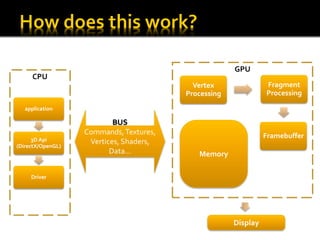
GPU
      CPU
                                           Vertex               Fragment
                                         Processing             Processing

   application

                           BUS
                   Commands, Textures,                          Framebuffer
      3D Api        Vertices, Shaders,
(DirectX/OpenGL)
                          Data…             Memory

     Driver


                                                      Display
Vertex units
                Vertex
              Processing


                                               Memory/textures


              Fragment
              Processing


As we can see, previous architectures
matched vertex/fragment „fixed” chain… so at
the beginning all the data was processed in      Pixel units
„vertex units” and then it was moved to
fragment units.
   SISD – Single Instruction Single Data
     Standard way… one instruction is being executed
      per single data.

   SIMD – Single Instruction Multiple Data
     Instruction is being executed per several data –
     like for one 4D vector (128 bits)

   MIMD – Multiple Instructions Multiple Data
     Parrarel processing!
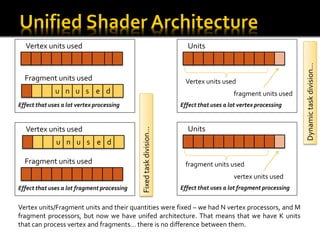
Vertex units used                                                   Units


                                                                                                                 Dynamic task division…
  Fragment units used                                                 Vertex units used
              u n u s e d                                                                fragment units used
Effect that uses a lot vertex processing                            Effect that uses a lot vertex processing


  Vertex units used                                                   Units

                                             Fixed task division…
               u n u s e d

  Fragment units used                                                 fragment units used
                                                                                         vertex units used
Effect that uses a lot fragment processing                          Effect that uses a lot fragment processing


Vertex units/Fragment units and their quantities were fixed – we had N vertex processors, and M
fragment processors, but now we have unifed architecture. That means that we have K units
that can process vertex and fragments… there is no difference between them.
Controller


                                        Stream processors


As we can see there are no
vertex/fragment units… instead there     Shared memory
are stream processors that can handle
both vertex and fragments… and even
more.
   Scalars… not Vectors!
     Stream processor uses only one data per
        instruction.
       But we have a lot of SP!
       SP gives far more great flexibility.
       GPGPU
       SIMT – Single Instruction Multiple Threads
   New architecture - NV
   DX11, OpenCL
   Miltithreaded Rendering
     Rendering commands can be called from difrent threads

   3 000 000 000 transistors!
   End of 2009? End of winter 2010? Never?


   Double precission callculations cost twice as much as float,
    not ten times as it was before!
   Debugging – one can debug gpu directly from VisualStudio
Fragment
Vertex       Shader
Shader


         Geometry
          Shader


                       CUDA
Unified Shader         OpenCL
                       DirectX Compute
                       ATI Stream
   General-purpose computing on graphics
    processing units
   Kernels – code that will be executed on the
    GPU
   Not only graphics but also:
     Physics
        ▪ Fluids
        ▪ Collisions
        ▪ N-body simulations…
       Financial
       Speach/Pattern recognition
       Phenomena modelling – weather…
       Neural nets
       AI
   Use as few as possible:
       calculations
       Huge textures – mimpaps instead
       interpolators
       Data
       Rendering state changes
       Dynamic Vertex Buffers
       Textures… use texture atlases maybe
       Texture fetches
   Use more:
     Batches
     Triangle stripes
   Use Maths
         Uniform sphere:
         p = sqrt(Rx^2 + Ry^2 +   (Rz + 1)^2) =
             sqrt(Rx^2 + Ry^2 +   Rz^2 + 2Rz + 1);
         R vector is normalized   so: Rx^2 + Ry^2 + Rz^2   = 1
         p = sqrt(2 * (Rz + 1))   = 1.414*sqrt(Rz + 1)

                                                                 Calculte this before it
                                                                 is send to the gpu!
   Reduce calculation on uniform vars!
        half4 main(float2 diffuse : TEXCOORD0,
                   uniform sampler2D diffuseTex,
                  uniform half4 g_OverbrightColor) {
                 return tex2D(diffuseTex, diffuse) * g_OverbrightColor * 3.0;
        }

   Normalize
dot(normalize(N), normalize(L)) uses two sqrts!
but:
(N/|N|) dot (L/|L|) = (N dot L) / (|N| * |L|) = (N dot L) / (sqrt( (N dot N) *
(L dot L) ) = (N dot L) * rsq( (N dot N) * (L dot L) )
Now we have only one sqrt – three dots are much cheaper than sqrt
   Texture lookups:
     ~ 10 : 1 (ALU:Sampler)
     Normalization cube map
     Single „Dot” is not worth texture lookups…
     But calculation of NormalDistribution… YES!


   Early Z-Test
     Depth-only Rendering, then full scene (for the
     second time)
   Lighten number of attributes – „pack” them as possible.
     float4 myData is better than:
      ▪ float3 myDataOne;
      ▪ float1 myDataTwo;

   But do not pack in interpolators
     Use as few scalars as possible
     When vectors are packed no optimalizations can be performed

   What do you really need?
     Normal, binormal, tangent… no! You need only two of them!
     Binormal = normal _Cross_ Tangent
PerfKit
   •For DirectX mostly
   •Little support for OpenGL – via glExpert

PiX for Windows
•Shows everything! But only for Windows, DirectX…


  AMD GPU Perf


          Similar to Pix, but for
          OpenGL… 800$ ;(
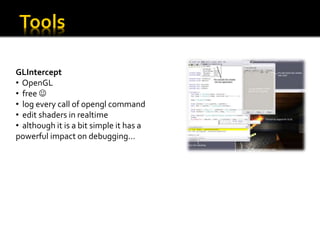
GLIntercept
• OpenGL
• free 
• log every call of opengl command
• edit shaders in realtime
• although it is a bit simple it has a
powerful impact on debugging…
GPU ShaderAnalyzer
• free, from AMD!
• glsl/hlsl
• shows number of asm instructions
• ALU, TEX instructions, etc..
• bottlenecks
FXComposer, by
NVidia

                                ShaderDesigner
                                by TyphoonLabs

                 RenderMonkey
                 by AMD/ATI
   PPAM – slajdy -
                  PARALLEL PROCESSING AND APPLIED MATHEMATICS, Wrocław 2009


   Developer.nvidia.com
   glintercept.nutty.org
   developer.amd.com
   Nvidia GeForce GTX 260/280 Review
GPU - how can we use it?

GPU - how can we use it?

  • 1.
  • 2.
    How does this work?  General architecture  Advices  Tools The lecture will not cover the technical details about the gpu, it shows only overview needed to understand current technologies and standads.
  • 3.
    GPU CPU Vertex Fragment Processing Processing application BUS Commands, Textures, Framebuffer 3D Api Vertices, Shaders, (DirectX/OpenGL) Data… Memory Driver Display
  • 4.
    Vertex units Vertex Processing Memory/textures Fragment Processing As we can see, previous architectures matched vertex/fragment „fixed” chain… so at the beginning all the data was processed in Pixel units „vertex units” and then it was moved to fragment units.
  • 5.
    SISD – Single Instruction Single Data  Standard way… one instruction is being executed per single data.  SIMD – Single Instruction Multiple Data  Instruction is being executed per several data – like for one 4D vector (128 bits)  MIMD – Multiple Instructions Multiple Data  Parrarel processing!
  • 6.
    Vertex units used Units Dynamic task division… Fragment units used Vertex units used u n u s e d fragment units used Effect that uses a lot vertex processing Effect that uses a lot vertex processing Vertex units used Units Fixed task division… u n u s e d Fragment units used fragment units used vertex units used Effect that uses a lot fragment processing Effect that uses a lot fragment processing Vertex units/Fragment units and their quantities were fixed – we had N vertex processors, and M fragment processors, but now we have unifed architecture. That means that we have K units that can process vertex and fragments… there is no difference between them.
  • 7.
    Controller Stream processors As we can see there are no vertex/fragment units… instead there Shared memory are stream processors that can handle both vertex and fragments… and even more.
  • 8.
    Scalars… not Vectors!  Stream processor uses only one data per instruction.  But we have a lot of SP!  SP gives far more great flexibility.  GPGPU  SIMT – Single Instruction Multiple Threads
  • 9.
    New architecture - NV  DX11, OpenCL  Miltithreaded Rendering  Rendering commands can be called from difrent threads  3 000 000 000 transistors!  End of 2009? End of winter 2010? Never?  Double precission callculations cost twice as much as float, not ten times as it was before!  Debugging – one can debug gpu directly from VisualStudio
  • 10.
    Fragment Vertex Shader Shader Geometry Shader CUDA Unified Shader OpenCL DirectX Compute ATI Stream
  • 11.
    General-purpose computing on graphics processing units  Kernels – code that will be executed on the GPU  Not only graphics but also:  Physics ▪ Fluids ▪ Collisions ▪ N-body simulations…  Financial  Speach/Pattern recognition  Phenomena modelling – weather…  Neural nets  AI
  • 12.
    Use as few as possible:  calculations  Huge textures – mimpaps instead  interpolators  Data  Rendering state changes  Dynamic Vertex Buffers  Textures… use texture atlases maybe  Texture fetches  Use more:  Batches  Triangle stripes
  • 13.
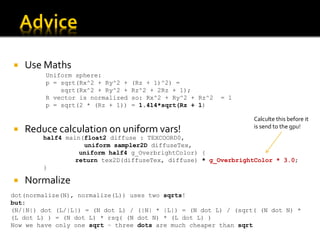
    Use Maths Uniform sphere: p = sqrt(Rx^2 + Ry^2 + (Rz + 1)^2) = sqrt(Rx^2 + Ry^2 + Rz^2 + 2Rz + 1); R vector is normalized so: Rx^2 + Ry^2 + Rz^2 = 1 p = sqrt(2 * (Rz + 1)) = 1.414*sqrt(Rz + 1) Calculte this before it is send to the gpu!  Reduce calculation on uniform vars! half4 main(float2 diffuse : TEXCOORD0, uniform sampler2D diffuseTex, uniform half4 g_OverbrightColor) { return tex2D(diffuseTex, diffuse) * g_OverbrightColor * 3.0; }  Normalize dot(normalize(N), normalize(L)) uses two sqrts! but: (N/|N|) dot (L/|L|) = (N dot L) / (|N| * |L|) = (N dot L) / (sqrt( (N dot N) * (L dot L) ) = (N dot L) * rsq( (N dot N) * (L dot L) ) Now we have only one sqrt – three dots are much cheaper than sqrt
  • 14.
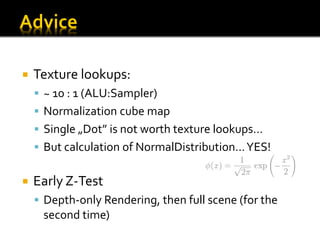
    Texture lookups:  ~ 10 : 1 (ALU:Sampler)  Normalization cube map  Single „Dot” is not worth texture lookups…  But calculation of NormalDistribution… YES!  Early Z-Test  Depth-only Rendering, then full scene (for the second time)
  • 15.
    Lighten number of attributes – „pack” them as possible.  float4 myData is better than: ▪ float3 myDataOne; ▪ float1 myDataTwo;  But do not pack in interpolators  Use as few scalars as possible  When vectors are packed no optimalizations can be performed  What do you really need?  Normal, binormal, tangent… no! You need only two of them!  Binormal = normal _Cross_ Tangent
  • 16.
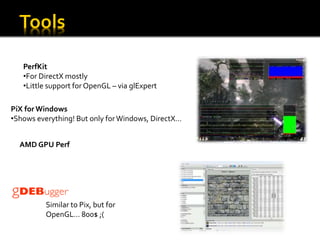
    PerfKit •For DirectX mostly •Little support for OpenGL – via glExpert PiX for Windows •Shows everything! But only for Windows, DirectX… AMD GPU Perf Similar to Pix, but for OpenGL… 800$ ;(
  • 17.
    GLIntercept • OpenGL • free • log every call of opengl command • edit shaders in realtime • although it is a bit simple it has a powerful impact on debugging…
  • 18.
    GPU ShaderAnalyzer • free,from AMD! • glsl/hlsl • shows number of asm instructions • ALU, TEX instructions, etc.. • bottlenecks
  • 19.
    FXComposer, by NVidia ShaderDesigner by TyphoonLabs RenderMonkey by AMD/ATI
  • 20.
    PPAM – slajdy - PARALLEL PROCESSING AND APPLIED MATHEMATICS, Wrocław 2009  Developer.nvidia.com  glintercept.nutty.org  developer.amd.com  Nvidia GeForce GTX 260/280 Review