Chunked
Edwin de Jonge
Statistics Netherlands / UseR! 2016
What is chunked?
Short answer:
for data in text files
Process Data in GB-sized Text Files:
(pre)Process text files to:
select columns
filter rows
derive new variables
Save result into:
Another text file
A database
Option 1: Read data with R
Use:
read.csv uh, readr::read_csv
datatable::fread
Fast reading of data into memory!
However. . .
You will need a lot of RAM!
Text files tend to be 1 to 100 Gb.
Even though these procedures use memory mapping the
resulting data.frame does not!
development cycle of processing script is long. . .
Option 2: Use unix tools
Good choice!
sed
awk
grep
fast processing!
However. . .
It is nice to stay in R-universe (one data-processing tool)
Instead of learning at least 3 extra tools sed, awk and grep
voodoo.
Does it work on my OS/shell?
I want to use dplyr verbs! (dplyr-deprivation. . . )
Option 3: Import data in DB
Import data into DB
Use DB tool to import data.
Process database with dplyr.
However
It is not really a R, but a DB solution
May be not efficient.
Process in chunks?
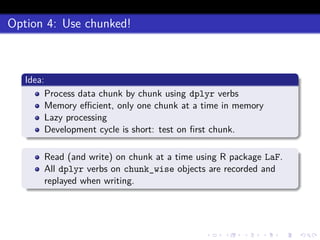
Option 4: Use chunked!
Idea:
Process data chunk by chunk using dplyr verbs
Memory efficient, only one chunk at a time in memory
Lazy processing
Development cycle is short: test on first chunk.
Read (and write) on chunk at a time using R package LaF.
All dplyr verbs on chunk_wise objects are recorded and
replayed when writing.
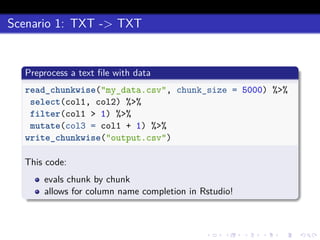
Scenario 1: TXT -> TXT
Preprocess a text file with data
read_chunkwise("my_data.csv", chunk_size = 5000) %>%
select(col1, col2) %>%
filter(col1 > 1) %>%
mutate(col3 = col1 + 1) %>%
write_chunkwise("output.csv")
This code:
evals chunk by chunk
allows for column name completion in Rstudio!
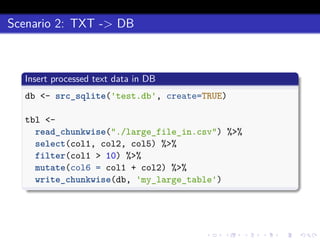
Scenario 2: TXT -> DB
Insert processed text data in DB
db <- src_sqlite('test.db', create=TRUE)
tbl <-
read_chunkwise("./large_file_in.csv") %>%
select(col1, col2, col5) %>%
filter(col1 > 10) %>%
mutate(col6 = col1 + col2) %>%
write_chunkwise(db, 'my_large_table')
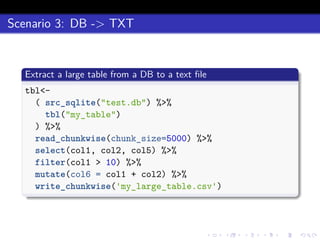
Scenario 3: DB -> TXT
Extract a large table from a DB to a text file
tbl<-
( src_sqlite("test.db") %>%
tbl("my_table")
) %>%
read_chunkwise(chunk_size=5000) %>%
select(col1, col2, col5) %>%
filter(col1 > 10) %>%
mutate(col6 = col1 + col2) %>%
write_chunkwise('my_large_table.csv')
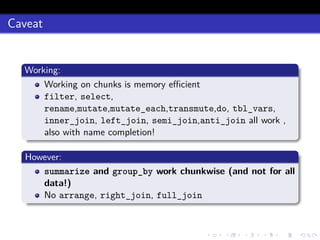
Caveat
Working:
Working on chunks is memory efficient
filter, select,
rename,mutate,mutate_each,transmute,do, tbl_vars,
inner_join, left_join, semi_join,anti_join all work ,
also with name completion!
However:
summarize and group_by work chunkwise (and not for all
data!)
No arrange, right_join, full_join
Thank you!
Interested?
install.packages("chunked")
Or visit http://github.com/edwindj/chunked

Chunked, dplyr for large text files

  • 1.
    Chunked Edwin de Jonge StatisticsNetherlands / UseR! 2016
  • 2.
    What is chunked? Shortanswer: for data in text files
  • 3.
    Process Data inGB-sized Text Files: (pre)Process text files to: select columns filter rows derive new variables Save result into: Another text file A database
  • 4.
    Option 1: Readdata with R Use: read.csv uh, readr::read_csv datatable::fread Fast reading of data into memory! However. . . You will need a lot of RAM! Text files tend to be 1 to 100 Gb. Even though these procedures use memory mapping the resulting data.frame does not! development cycle of processing script is long. . .
  • 5.
    Option 2: Useunix tools Good choice! sed awk grep fast processing! However. . . It is nice to stay in R-universe (one data-processing tool) Instead of learning at least 3 extra tools sed, awk and grep voodoo. Does it work on my OS/shell? I want to use dplyr verbs! (dplyr-deprivation. . . )
  • 6.
    Option 3: Importdata in DB Import data into DB Use DB tool to import data. Process database with dplyr. However It is not really a R, but a DB solution May be not efficient.
  • 7.
  • 8.
    Option 4: Usechunked! Idea: Process data chunk by chunk using dplyr verbs Memory efficient, only one chunk at a time in memory Lazy processing Development cycle is short: test on first chunk. Read (and write) on chunk at a time using R package LaF. All dplyr verbs on chunk_wise objects are recorded and replayed when writing.
  • 9.
    Scenario 1: TXT-> TXT Preprocess a text file with data read_chunkwise("my_data.csv", chunk_size = 5000) %>% select(col1, col2) %>% filter(col1 > 1) %>% mutate(col3 = col1 + 1) %>% write_chunkwise("output.csv") This code: evals chunk by chunk allows for column name completion in Rstudio!
  • 10.
    Scenario 2: TXT-> DB Insert processed text data in DB db <- src_sqlite('test.db', create=TRUE) tbl <- read_chunkwise("./large_file_in.csv") %>% select(col1, col2, col5) %>% filter(col1 > 10) %>% mutate(col6 = col1 + col2) %>% write_chunkwise(db, 'my_large_table')
  • 11.
    Scenario 3: DB-> TXT Extract a large table from a DB to a text file tbl<- ( src_sqlite("test.db") %>% tbl("my_table") ) %>% read_chunkwise(chunk_size=5000) %>% select(col1, col2, col5) %>% filter(col1 > 10) %>% mutate(col6 = col1 + col2) %>% write_chunkwise('my_large_table.csv')
  • 12.
    Caveat Working: Working on chunksis memory efficient filter, select, rename,mutate,mutate_each,transmute,do, tbl_vars, inner_join, left_join, semi_join,anti_join all work , also with name completion! However: summarize and group_by work chunkwise (and not for all data!) No arrange, right_join, full_join
  • 13.