Export Data
using
R Studio
Rupak Roy
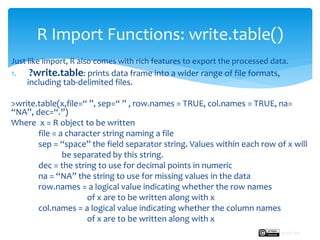
Just like import, R also comes with rich features to export the processed data.
1. ?write.table: prints data frame into a wider range of file formats,
including tab-delimited files.
>write.table(x,file=“ ”, sep=“ ” , row.names = TRUE, col.names = TRUE, na=
“NA”, dec=“.”)
Where x = R object to be written
file = a character string naming a file
sep = “space” the field separator string. Values within each row of x will
be separated by this string.
dec = the string to use for decimal points in numeric
na = “NA” the string to use for missing values in the data
row.names = a logical value indicating whether the row names
of x are to be written along with x
col.names = a logical value indicating whether the column names
of x are to be written along with x
R Import Functions: write.table()
Rupak Roy
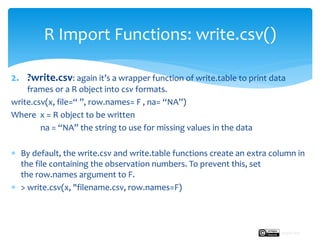
2. ?write.csv: again it’s a wrapper function of write.table to print data
frames or a R object into csv formats.
write.csv(x, file=“ ”, row.names= F , na= “NA”)
Where x = R object to be written
na = “NA” the string to use for missing values in the data
 By default, the write.csv and write.table functions create an extra column in
the file containing the observation numbers. To prevent this, set
the row.names argument to F.
 > write.csv(x, "filename.csv, row.names=F)
R Import Functions: write.csv()
Rupak Roy
3. ?writeLines: writes text line to a file i.e. prints the entire row as one line
>writeLines(X, file=“ ”, sep = “,")
Where x = R object to be written, example: product$reviews_column
file = “filename” character string value to used to save the file
sep = “,” character string to be written to the connection after each
line of text.
R Import Functions: writeLines()
Rupak Roy
write.table()
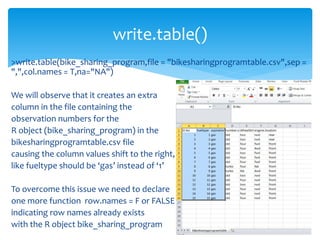
>write.table(bike_sharing_program,file = "bikesharingprogramtable.csv",sep =
",",col.names = T,na="NA")
We will observe that it creates an extra
column in the file containing the
observation numbers for the
R object (bike_sharing_program) in the
bikesharingprogramtable.csv file
causing the column values shift to the right,
like fueltype should be ‘gas’ instead of ‘1’
To overcome this issue we need to declare
one more function row.names = F or FALSE
indicating row names already exists
with the R object bike_sharing_program
write.table()
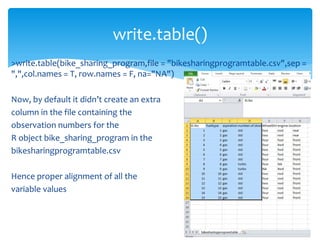
>write.table(bike_sharing_program,file = "bikesharingprogramtable.csv",sep =
",",col.names = T, row.names = F, na="NA")
Now, by default it didn’t create an extra
column in the file containing the
observation numbers for the
R object bike_sharing_program in the
bikesharingprogramtable.csv
Hence proper alignment of all the
variable values
write.csv()
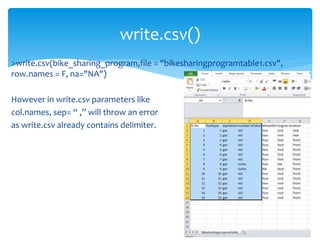
>write.csv(bike_sharing_program,file = "bikesharingprogramtable1.csv",
row.names = F, na="NA")
However in write.csv parameters like
col.names, sep= “ ,” will throw an error
as write.csv already contains delimiter.
writeLines()
>str(bike_sharing_program)
To perform writeLines() we need character variables/data type. So we will
convert one of the variables for example ‘aspiration’ into character data type
>bike_sharing_program$aspiration<-
as.character(bike_sharing_program$aspiration)
>str(bike_sharing_program$aspiration)
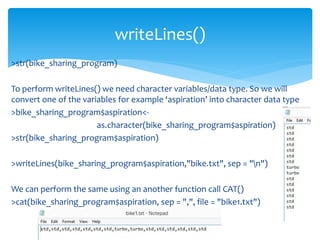
>writeLines(bike_sharing_program$aspiration,"bike.txt", sep = "n")
We can perform the same using an another function call CAT()
>cat(bike_sharing_program$aspiration, sep = ",", file = "bike1.txt")
Next:
We will see how to perform import and export in the lab
session.
Import & Export Data
Rupak Roy

Export Data using R Studio

  • 1.
  • 2.
    Just like import,R also comes with rich features to export the processed data. 1. ?write.table: prints data frame into a wider range of file formats, including tab-delimited files. >write.table(x,file=“ ”, sep=“ ” , row.names = TRUE, col.names = TRUE, na= “NA”, dec=“.”) Where x = R object to be written file = a character string naming a file sep = “space” the field separator string. Values within each row of x will be separated by this string. dec = the string to use for decimal points in numeric na = “NA” the string to use for missing values in the data row.names = a logical value indicating whether the row names of x are to be written along with x col.names = a logical value indicating whether the column names of x are to be written along with x R Import Functions: write.table() Rupak Roy
  • 3.
    2. ?write.csv: againit’s a wrapper function of write.table to print data frames or a R object into csv formats. write.csv(x, file=“ ”, row.names= F , na= “NA”) Where x = R object to be written na = “NA” the string to use for missing values in the data  By default, the write.csv and write.table functions create an extra column in the file containing the observation numbers. To prevent this, set the row.names argument to F.  > write.csv(x, "filename.csv, row.names=F) R Import Functions: write.csv() Rupak Roy
  • 4.
    3. ?writeLines: writestext line to a file i.e. prints the entire row as one line >writeLines(X, file=“ ”, sep = “,") Where x = R object to be written, example: product$reviews_column file = “filename” character string value to used to save the file sep = “,” character string to be written to the connection after each line of text. R Import Functions: writeLines() Rupak Roy
  • 5.
    write.table() >write.table(bike_sharing_program,file = "bikesharingprogramtable.csv",sep= ",",col.names = T,na="NA") We will observe that it creates an extra column in the file containing the observation numbers for the R object (bike_sharing_program) in the bikesharingprogramtable.csv file causing the column values shift to the right, like fueltype should be ‘gas’ instead of ‘1’ To overcome this issue we need to declare one more function row.names = F or FALSE indicating row names already exists with the R object bike_sharing_program
  • 6.
    write.table() >write.table(bike_sharing_program,file = "bikesharingprogramtable.csv",sep= ",",col.names = T, row.names = F, na="NA") Now, by default it didn’t create an extra column in the file containing the observation numbers for the R object bike_sharing_program in the bikesharingprogramtable.csv Hence proper alignment of all the variable values
  • 7.
    write.csv() >write.csv(bike_sharing_program,file = "bikesharingprogramtable1.csv", row.names= F, na="NA") However in write.csv parameters like col.names, sep= “ ,” will throw an error as write.csv already contains delimiter.
  • 8.
    writeLines() >str(bike_sharing_program) To perform writeLines()we need character variables/data type. So we will convert one of the variables for example ‘aspiration’ into character data type >bike_sharing_program$aspiration<- as.character(bike_sharing_program$aspiration) >str(bike_sharing_program$aspiration) >writeLines(bike_sharing_program$aspiration,"bike.txt", sep = "n") We can perform the same using an another function call CAT() >cat(bike_sharing_program$aspiration, sep = ",", file = "bike1.txt")
  • 9.
    Next: We will seehow to perform import and export in the lab session. Import & Export Data Rupak Roy