Chapter 5
Linked Lists
Dr. Muhammad Hanif Durad
Department of Computer and Information Sciences
Pakistan Institute Engineering and Applied Sciences
hanif@pieas.edu.pk
Some slides have bee adapted with thanks from some other lectures
available on Internet. It made my life easier, as life is always
miserable at PIEAS (Sir Muhammad Yusaf Kakakhil )
Dr. Hanif Durad 2
Lecture Outline
 Abstract Data Types (ADTs)
 Arrays: pluses and minuses
 Singly Linked Lists
 Examples of Linked Lists
 Operations on Linked Lists
 Header Linked Lists
 Circular Linked Lists
 Doubly Linked Lists
 The Polynomial ADT
33
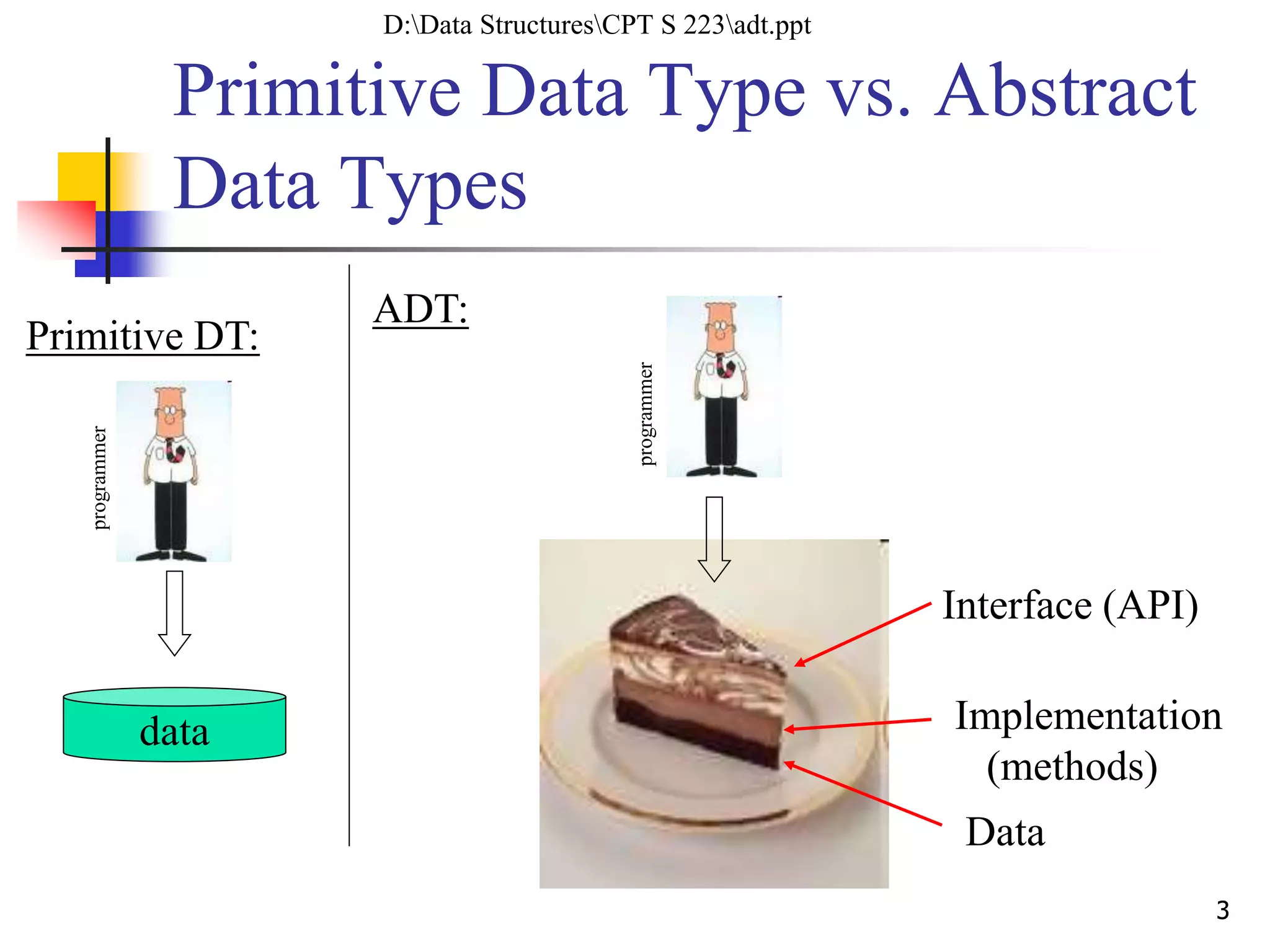
Primitive Data Type vs. Abstract
Data Types
data
programmer
Primitive DT:
programmer
ADT:
Interface (API)
Implementation
(methods)
Data
D:Data StructuresCPT S 223adt.ppt
44
Abstract Data Types (ADTs)
 ADT is a set of objects together with a set of operations.
 “Abstract” in that implementation of operations not specified in ADT
definition
 E.g., List
 Insert, delete, search, sort
 C++ class perfect for ADTs
 Can change ADT implementation details without breaking code
using ADT
4
Arrays: pluses and minuses
 + Fast element access.
 -- Impossible to resize.
 Many applications require resizing!
 Required size not always immediately
available.
Dr. Hanif Durad 5
D:Data StructuresHanif_SearchLinked ListsLinkedLists.ppt, P-1
Arrays: pluses and minuses
 To insert or remove an element at an interior location in an
Array requires shifting of data and is an O(n) operation.
6
D:Data StructuresHanif_SearchLinked Lists 10. Linked Lists.ppt, P-2
Definition of Singly Linked Lists
 A linked list is a sequence of items (objects)
where every item is linked to the next.
 Graphically:
data data data data
head_ptr tail_ptr
D:Data StructuresHanif_SearchLinked Lists lecture6.ppt, P-2
8
Definition Details
 Each item has a data part (one or more data
members), and a link that points to the next item
 One natural way to implement the link is as a
pointer; that is, the link is the address of the next
item in the list
 It makes good sense to view each item as an object,
that is, as an instance of a class.
 We call that class: Node
 The last item does not point to anything. We set its
link member to NULL. This is denoted graphically
by a self-loop
9
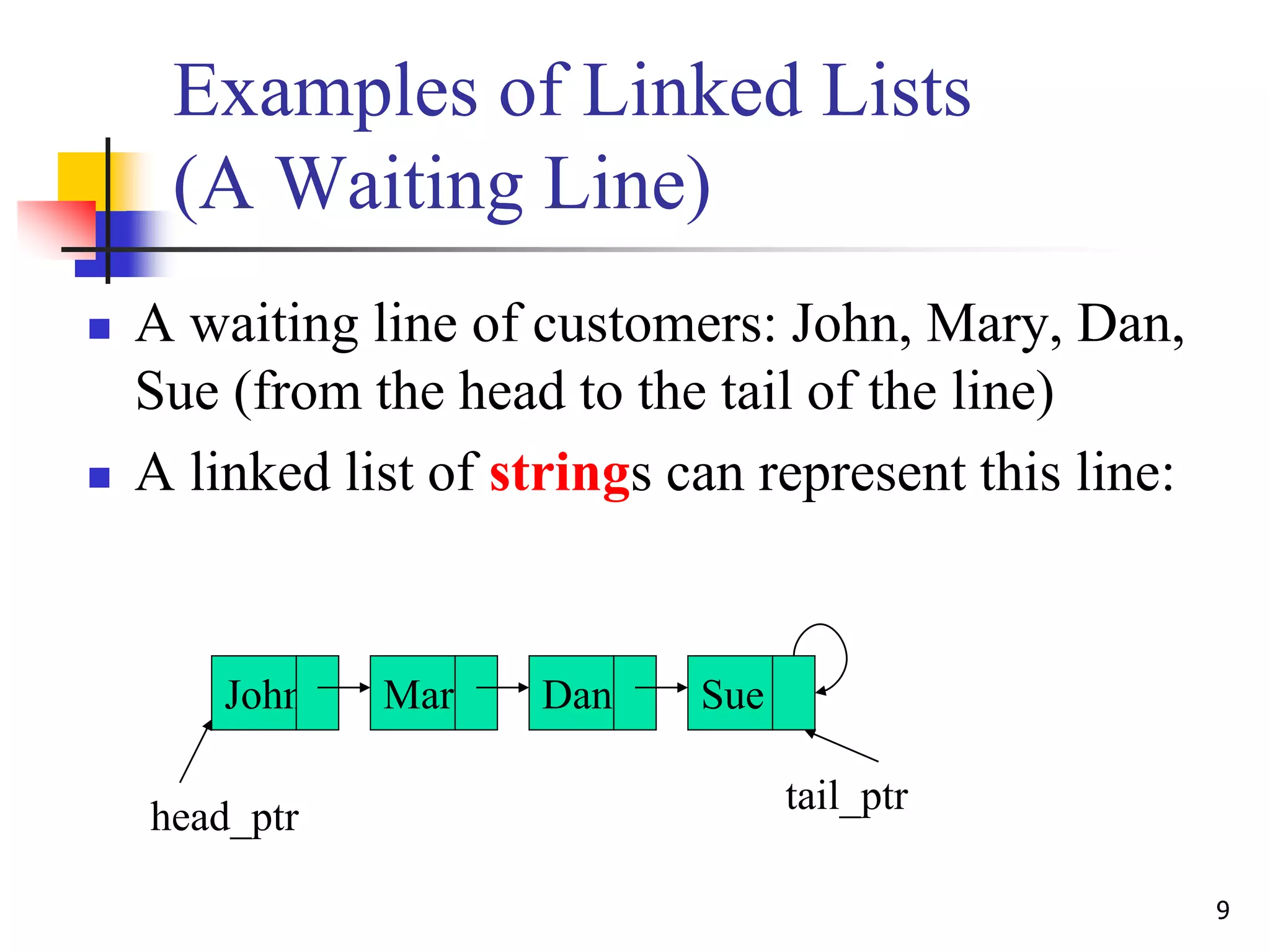
Examples of Linked Lists
(A Waiting Line)
 A waiting line of customers: John, Mary, Dan,
Sue (from the head to the tail of the line)
 A linked list of strings can represent this line:
John Mary Dan Sue
head_ptr
tail_ptr
10
Examples of Linked Lists
(A Stack of Numbers)
 A stack of numbers (from top to bottom):
10, 8, 6, 8, 2
 A linked list of ints can represent this stack:
10 8 6 2
head_ptr tail_ptr
8
11
Examples of Linked Lists
(A Set of Non-redundant Elements)
 A set of characters: a, b, d, f, c
 A linked list of chars can represent this set:
a b d c
head_ptr tail_ptr
f
12
Examples of Linked Lists
(A Sorted Set of Non-redundant Elements)
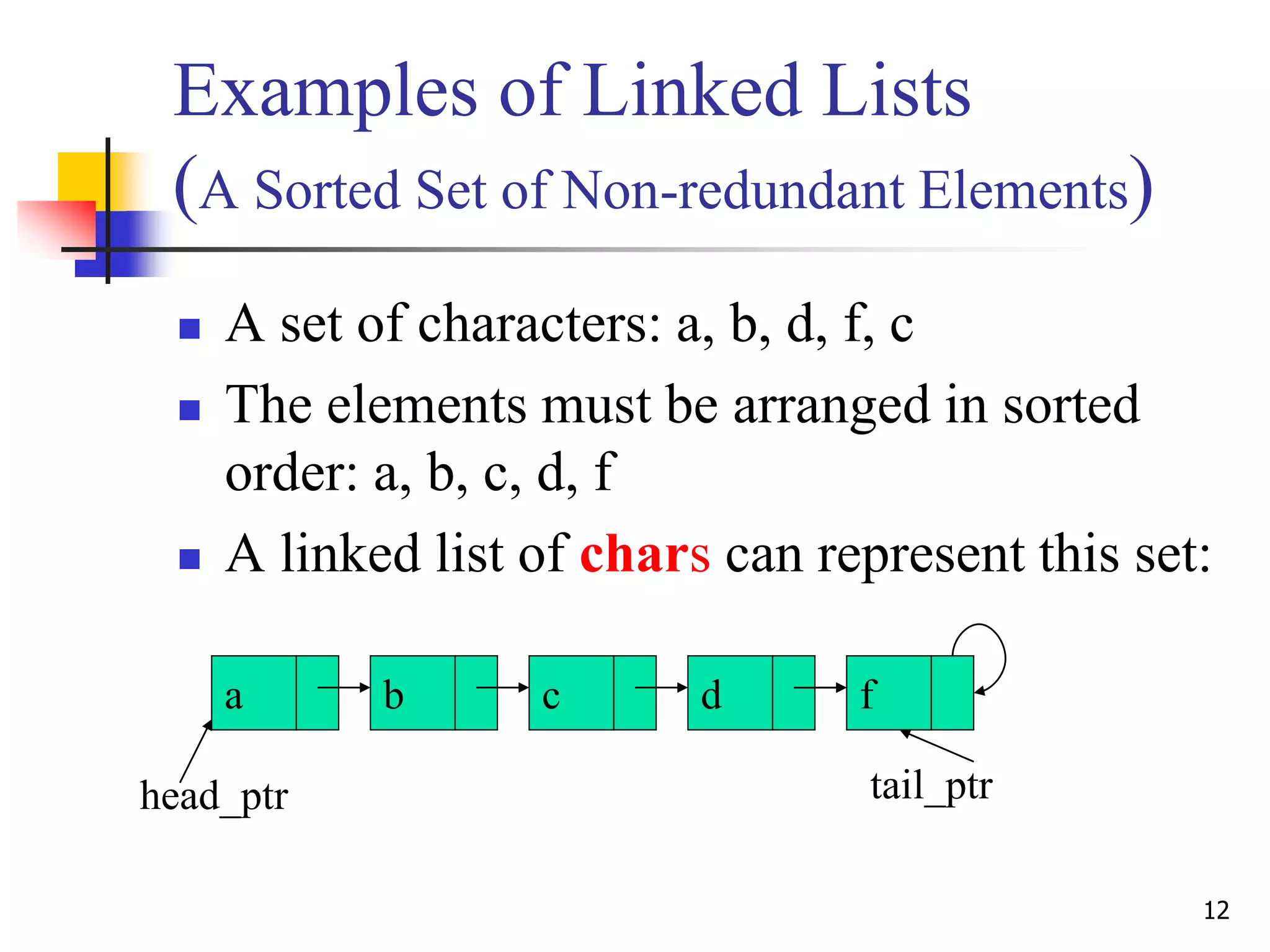
 A set of characters: a, b, d, f, c
 The elements must be arranged in sorted
order: a, b, c, d, f
 A linked list of chars can represent this set:
a b c f
head_ptr tail_ptr
d
13
Examples of Linked Lists
(A Polynomial)
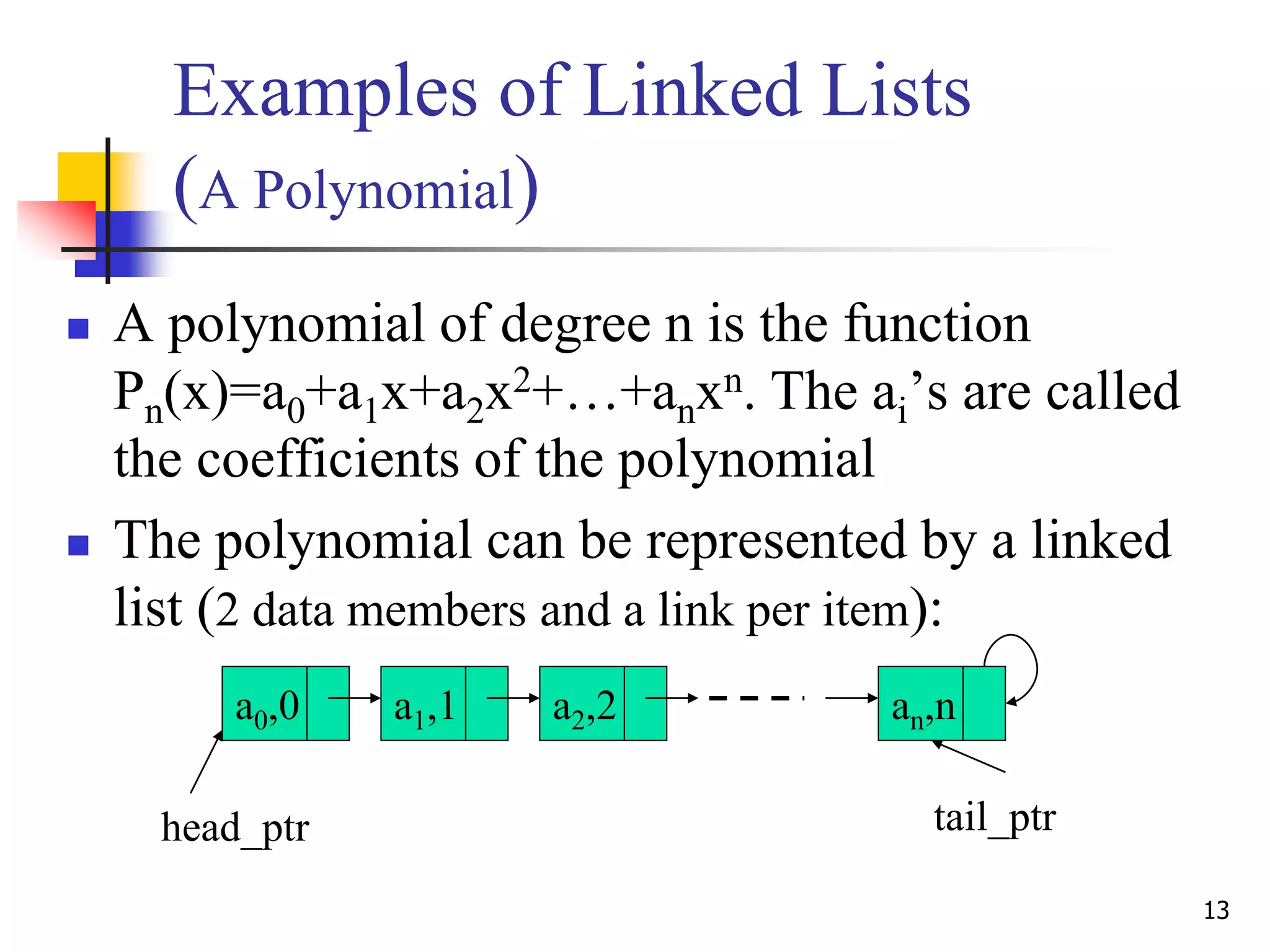
 A polynomial of degree n is the function
Pn(x)=a0+a1x+a2x2+…+anxn. The ai’s are called
the coefficients of the polynomial
 The polynomial can be represented by a linked
list (2 data members and a link per item):
a0,0 a1,1 a2,2 an,n
head_ptr tail_ptr
14
Operations on Linked Lists
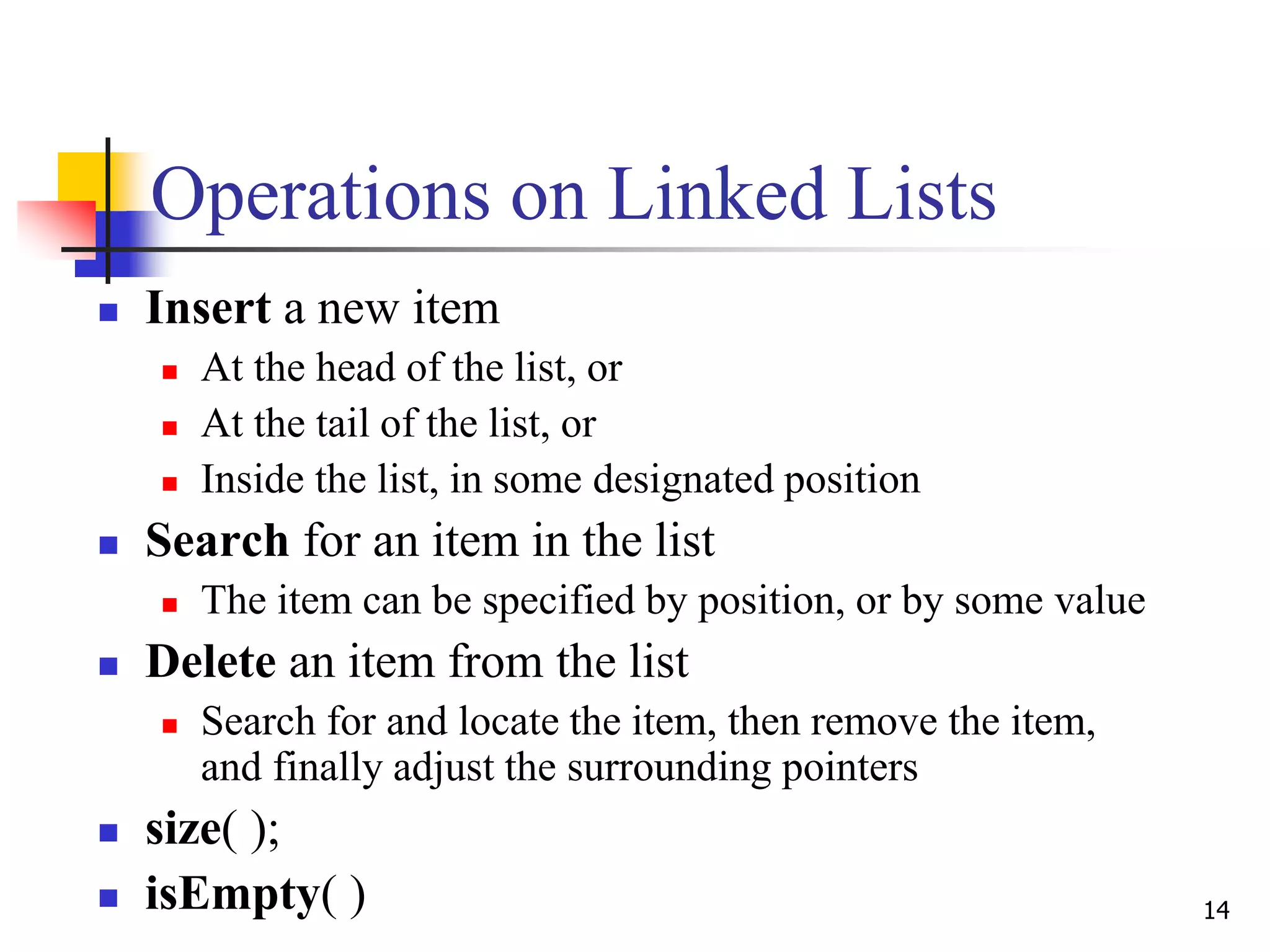
 Insert a new item
 At the head of the list, or
 At the tail of the list, or
 Inside the list, in some designated position
 Search for an item in the list
 The item can be specified by position, or by some value
 Delete an item from the list
 Search for and locate the item, then remove the item,
and finally adjust the surrounding pointers
 size( );
 isEmpty( )
15
Insert– At the Head
• Insert a new data A. Call new: newPtr
List before insertion:
• After insertion to head:
data data data data
head_ptr tail_ptr
A
data data data data
head_ptr tail_ptr
A
•The link value in the new item = old head_ptr
•The new value of head_ptr = newPtr
16
Insert – at the Tail
• Insert a new data A. Call new: newPtr
List before insertion
• After insertion to tail:
data data data data
head_ptr tail_ptr
A
data data data data
head_ptr tail_ptr
A
•The link value in the new item = NULL
•The link value of the old last item = newPtr
17
Insert – inside the List
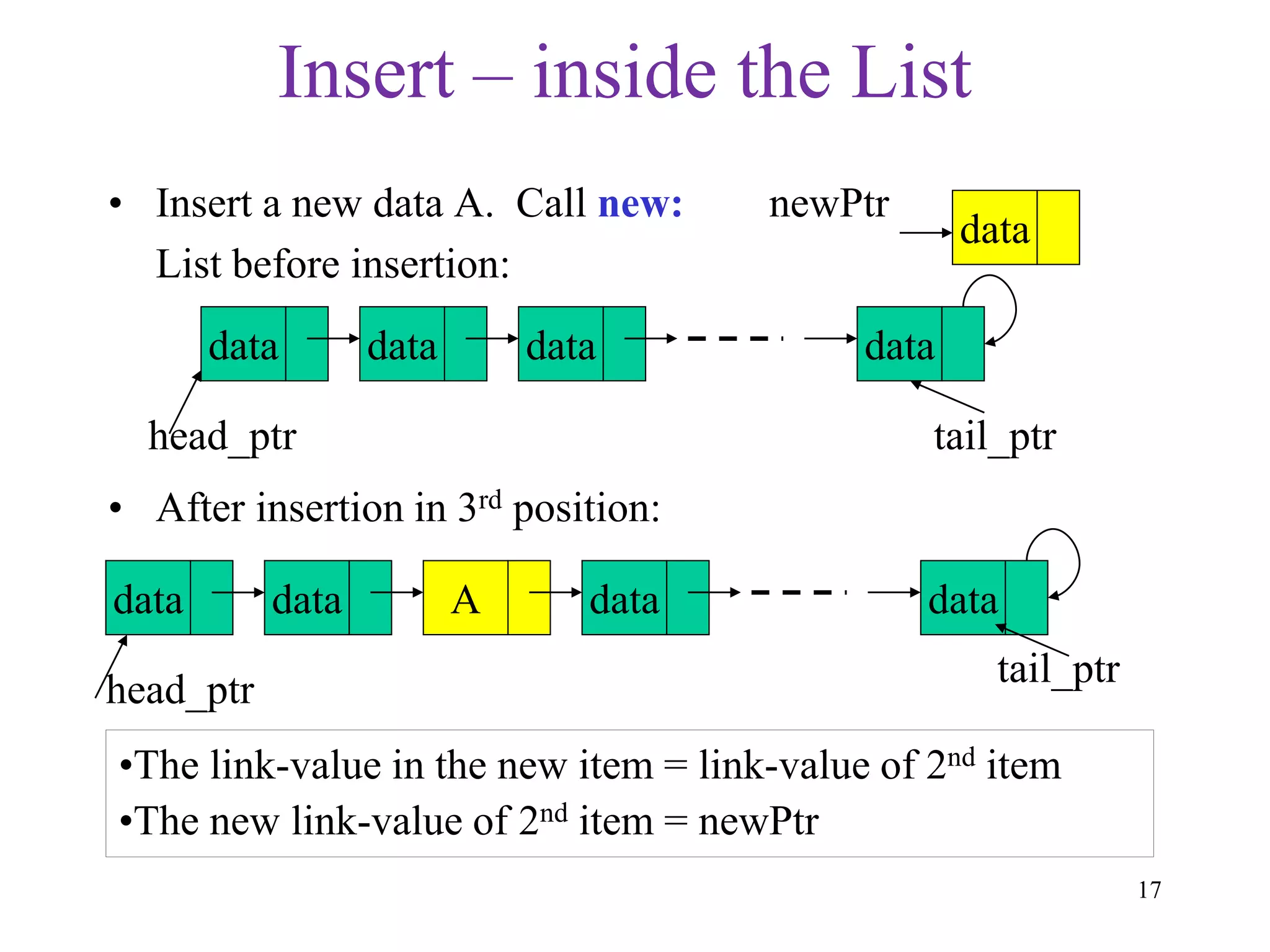
• Insert a new data A. Call new: newPtr
List before insertion:
• After insertion in 3rd position:
data data data data
head_ptr tail_ptr
data
data A data data
head_ptr
tail_ptr
data
•The link-value in the new item = link-value of 2nd item
•The new link-value of 2nd item = newPtr
18
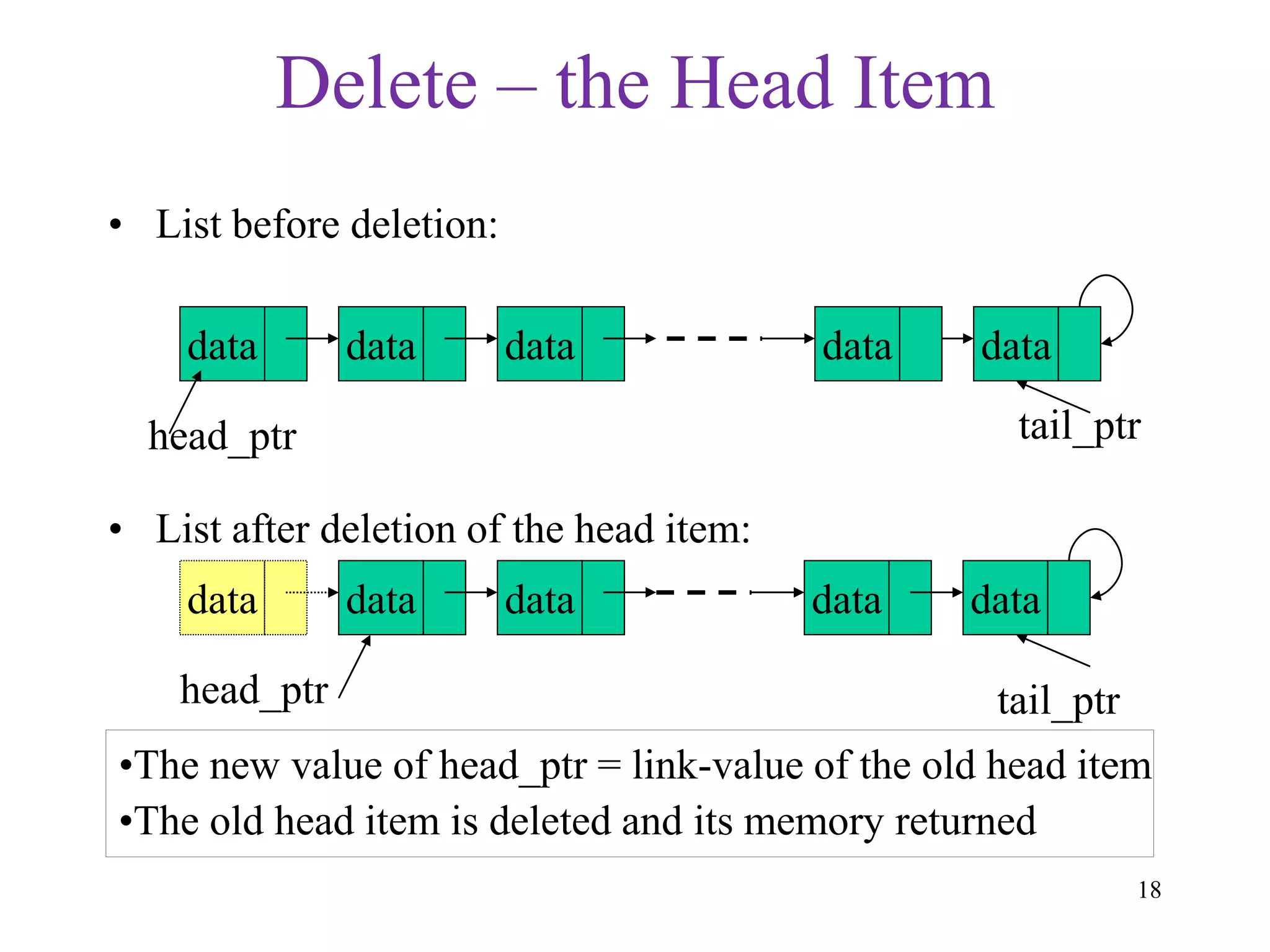
Delete – the Head Item
• List before deletion:
• List after deletion of the head item:
data data data data
head_ptr tail_ptr
data data data data
head_ptr tail_ptr
data
•The new value of head_ptr = link-value of the old head item
•The old head item is deleted and its memory returned
data
19
Delete – the Tail Item
• List before deletion:
• List after deletion of the tail item:
data data data data
head_ptr
tail_ptr
data data data
head_ptr tail_ptr
•New value of tail_ptr = link-value of the 3rd from last item
•New link-value of new last item = NULL.
data
datadata
20
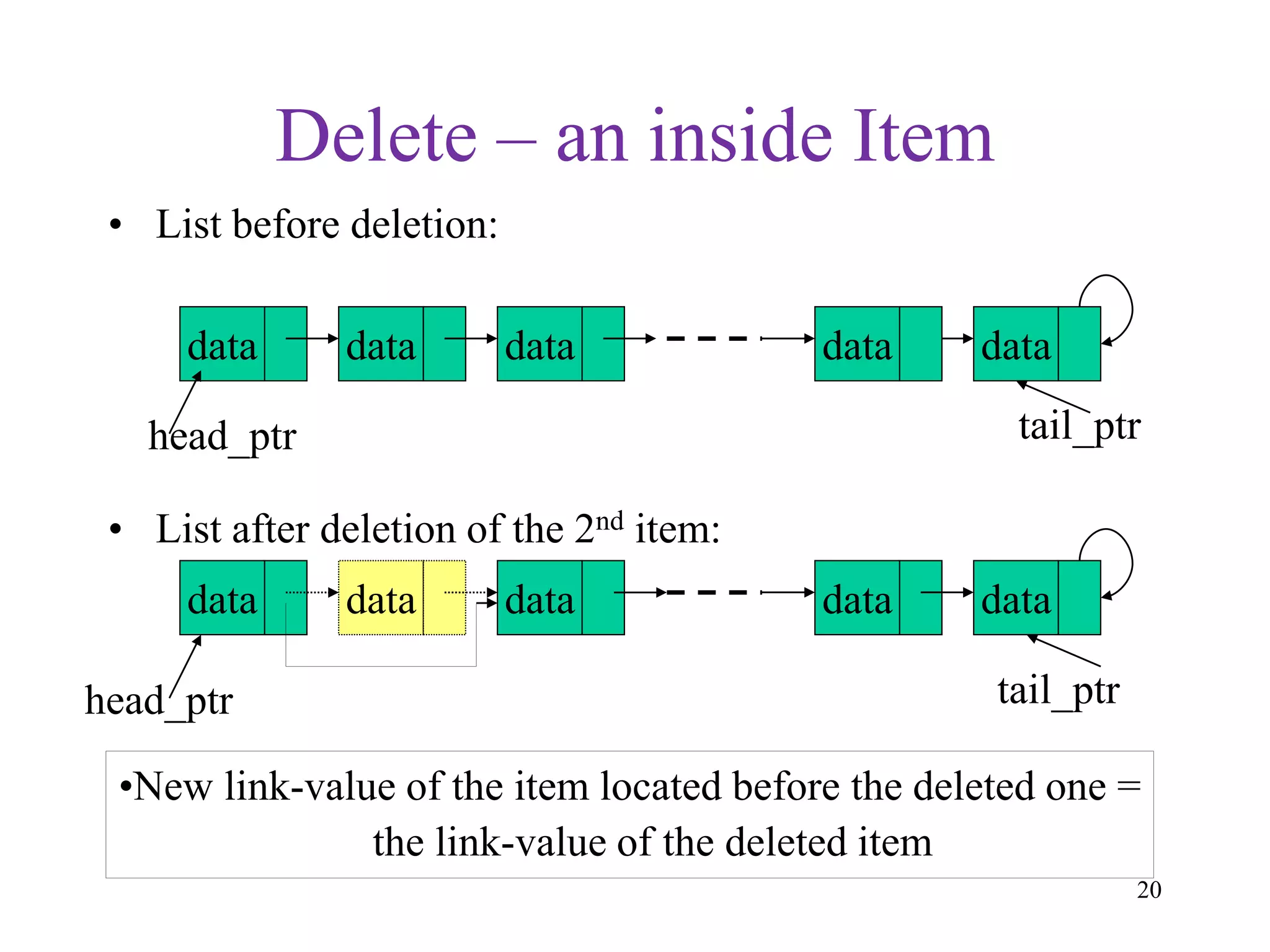
Delete – an inside Item
• List before deletion:
• List after deletion of the 2nd item:
data data data data
head_ptr tail_ptr
data data
head_ptr tail_ptr
•New link-value of the item located before the deleted one =
the link-value of the deleted item
data
data datadata
21
size() and isEmpty()
 We need to scan the items in the list from the head_ptr
to the last item marked by its link-value being NULL
 Count the number of items in the scan, and return the
count. This is the size().
 Alternatively, keep a counter of the number of item,
which gets updated after each insert/delete. The function
size( ) returns that counter
 If head_ptr is NULL, isEmpty() returns true; else, it
returns false.
22
Searching for an Item
 Suppose you want to find the item whose data value is A
 You have to search sequentially starting from the head
item rightward until the first item whose data member is
equal to A is found.
 At each item searched, a comparison between the data
member and A is performed.
CS 103 23
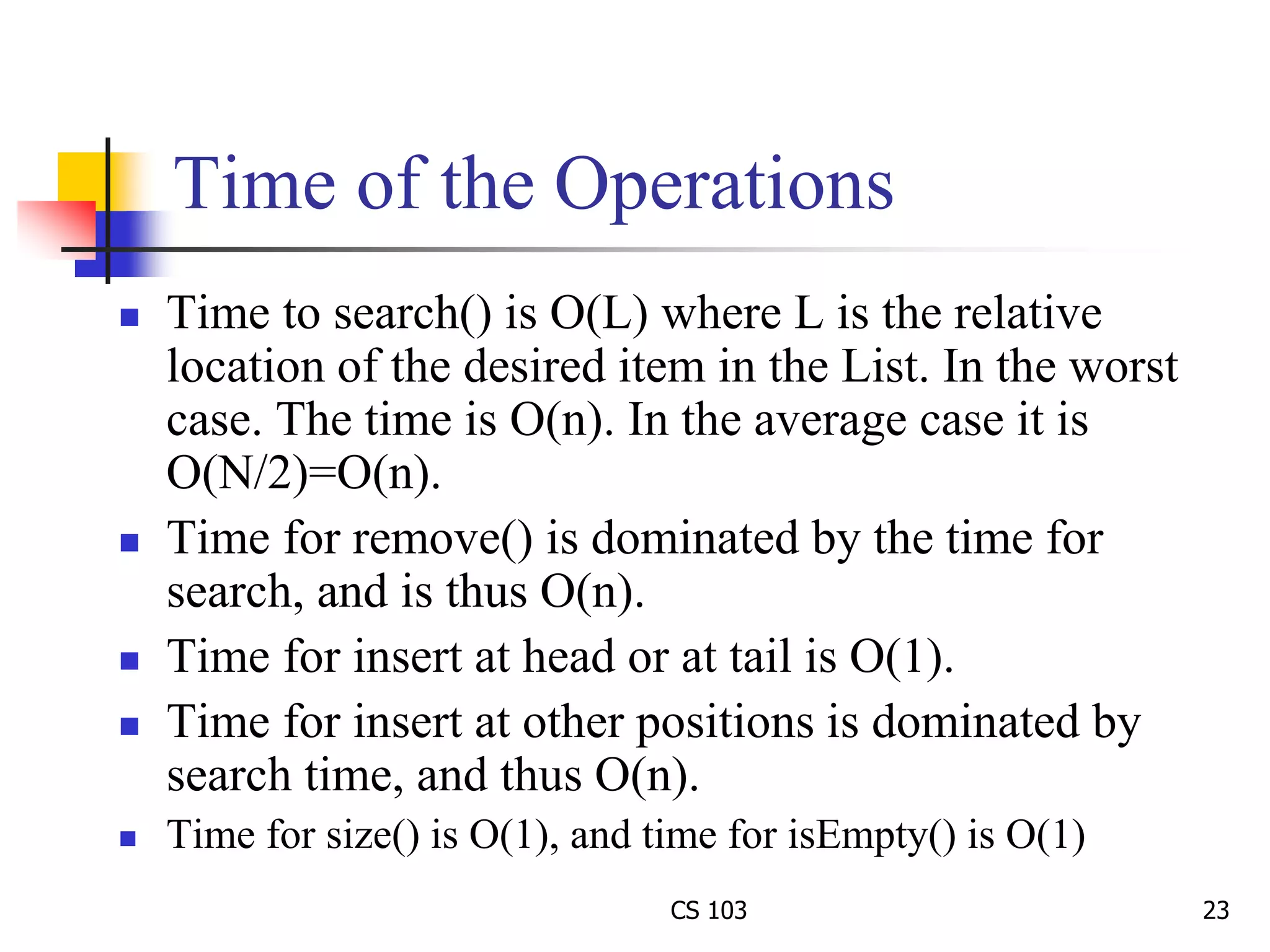
Time of the Operations
 Time to search() is O(L) where L is the relative
location of the desired item in the List. In the worst
case. The time is O(n). In the average case it is
O(N/2)=O(n).
 Time for remove() is dominated by the time for
search, and is thus O(n).
 Time for insert at head or at tail is O(1).
 Time for insert at other positions is dominated by
search time, and thus O(n).
 Time for size() is O(1), and time for isEmpty() is O(1)
Implementation
Notes
Dr. Hanif Durad 24
25
Implementation of an Item
 Each item is a collection of data and pointer
fields, and should be able to support some basic
operations such as changing its link value and
returning its member data
 Therefore, a good implementation of an item is a
class
 The class will be called Node
26
Class Node Design for Item
 The member variables of Node are:
 The data field(s)
 The link pointer, which will be called next
 The functions are:
Function Action Why Needed
getNext( ) returns the link. for navigation
getData( ) returns the data for search
setNext(Node *ptr) sets link to ptr for insert/delete
setData(type x) sets data to x. to modify data
contents
27
Class Node Type
 class Node {
private:
int data; // different data type for other apps
Node *next; // the link pointer to next item
public:
Node(int x=0;Node * ptr=NULL); // constructor
int getData( );
Node *getNext( );
void setData(int x);
void setNext(Node *ptr);
};
28
Class Node Implementation
 Node::Node(int x, Node *p){ data=x; next=p;};
 int Node::getData( ){return data;};
 Node * Node::getNext( ){return next;};
 void Node::setData(int x) {data=x;};
 void Node::setNext(Node *ptr){next=ptr;};
29
Implementation of Linked List
 A linked list is a collection of Node objects, and
must support a number of operations
 Therefore, it is sensible to implement a linked list
as a class
 The class name for it is List
30
Class Design for List
 The member variables are:
 Node *head_ptr; Node *tail_ptr;
 int numOfItems;
 Member functions
 Node * search(int x); Node * itemAt(int position);
 void removeHead(); void removeTail();
void remove(int x);
 void insertHead(int x); void insertTail(int x);
void insert(Node *p, int x) // inserts item after the item
// pointed to by p
 int size( ); Node *getHead( ); Node getTail( );
 bool isEmpty( );
31
Class List Type
 class List {
private:
Node *head_ptr; Node *tail_ptr; int numOfItems;
public:
List( ); // constructor
int size( ); Node *getHead( ); Node *getTail( );
bool isEmpty( );
Node *search(int x); Node *itemAt(int position);
void removeHead(); void removeTail();
void remove(int x); // delete leftmost item having x
void insertHead(int x); void insertTail(int x);
void insert(Node *p, int x);
};
32
Implementation of Class List
 List::List( ){head_ptr= NULL; tail_ptr=NULL;
numOfItems=0;};
 int List::size( ){return numOfItems;};
 Node * List::getHead( ) {return head_ptr;};
 Node * List::getTail( ) {return tail_ptr;};
 bool List::isEmpty() {return (numOfItem==0);};
33
Implementation of search( )
 Node *List::search(int x){
Node * currentPtr = getHead( );
while (currentPtr != NULL){
if (currentPtr->getData( ) == x)
return currentPtr;
else
currentPtr = currentPtr->getNext();
}
return NULL; // Now x is not, so return NULL
};
34
Implementation of itemAt( )
 Node *List::itemAt(int position){
if (position<0 || position>=numOfItems)
return NULL;
Node * currentPtr = getHead( );
for(int k=0;k != position; k++)
currentPtr = currentPtr -> getNext( );
return currentPtr;
};
35
Implementation of removeHead( )
 void List::removeHead( ){
if (numOfItems == 0)
return;
Node * currentPtr = getHead( );
head_ptr=head_ptr->getNext( );
delete currentPtr;
numOfItems--;
};
36
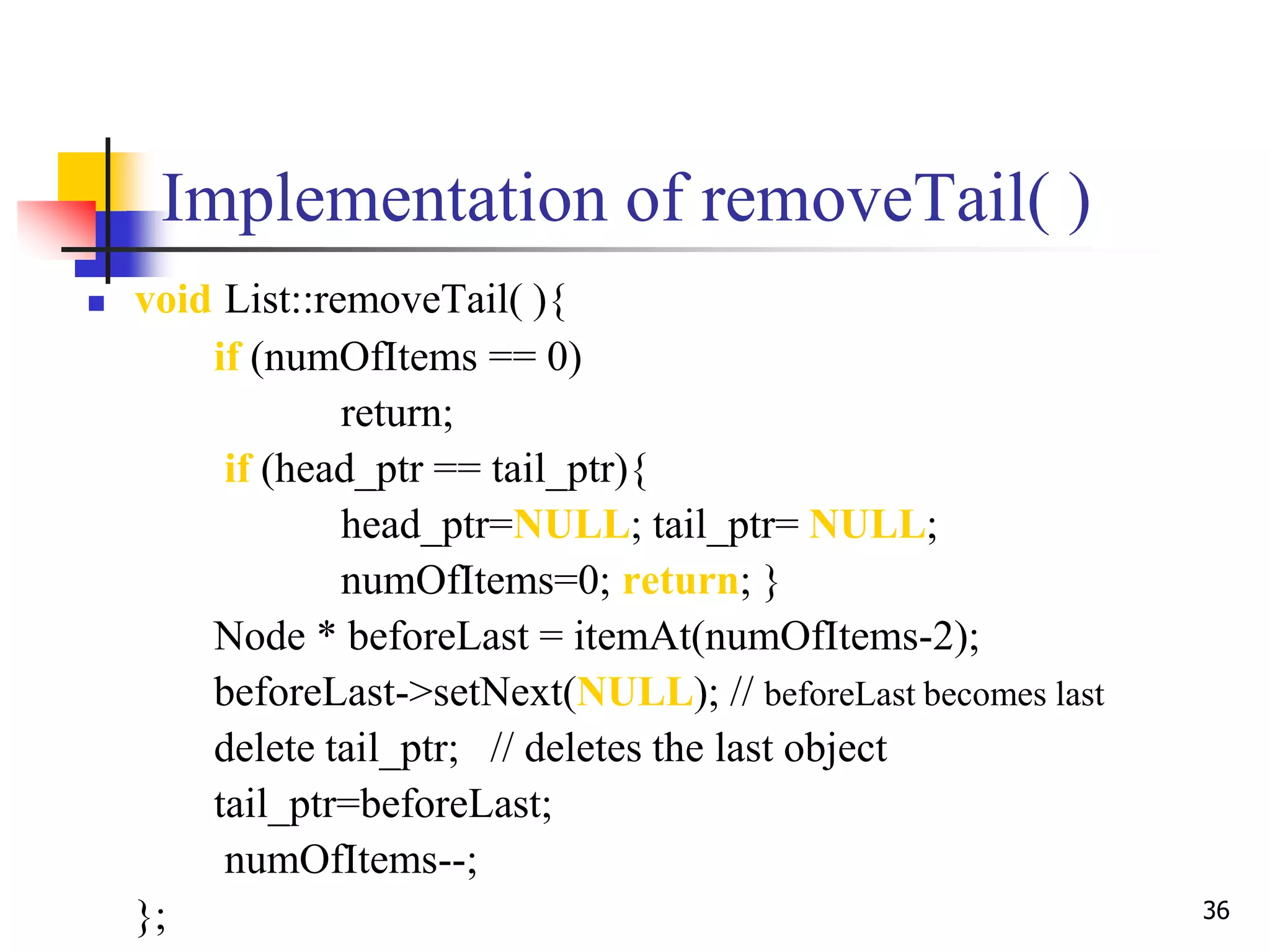
Implementation of removeTail( )
 void List::removeTail( ){
if (numOfItems == 0)
return;
if (head_ptr == tail_ptr){
head_ptr=NULL; tail_ptr= NULL;
numOfItems=0; return; }
Node * beforeLast = itemAt(numOfItems-2);
beforeLast->setNext(NULL); // beforeLast becomes last
delete tail_ptr; // deletes the last object
tail_ptr=beforeLast;
numOfItems--;
};
37
Implementation of remove( )
 void List::remove(int x){
if (numOfItems == 0) return;
if (head_ptr==tail_ptr && head_ptr->getData()==x){
head_ptr=NULL; tail_ptr= NULL; numOfItems=0; return; }
Node * beforePtr=head_ptr; // beforePtr trails currentPtr
Node * currentPtr=head_ptr->getNext();
Node * tail = getTail();
while (currentPtr != tail)
if (currentPtr->getData( ) == x){ // x is found. Do the bypass
beforePtr->setNext(currentPtr->getNext());
delete currentPtr; numOfItems--; }
else { // x is not found yet. Forward beforePtr & currentPtr.
beforePtr = currentPtr;
currentPtr = currentPtr->getNext(); }
38
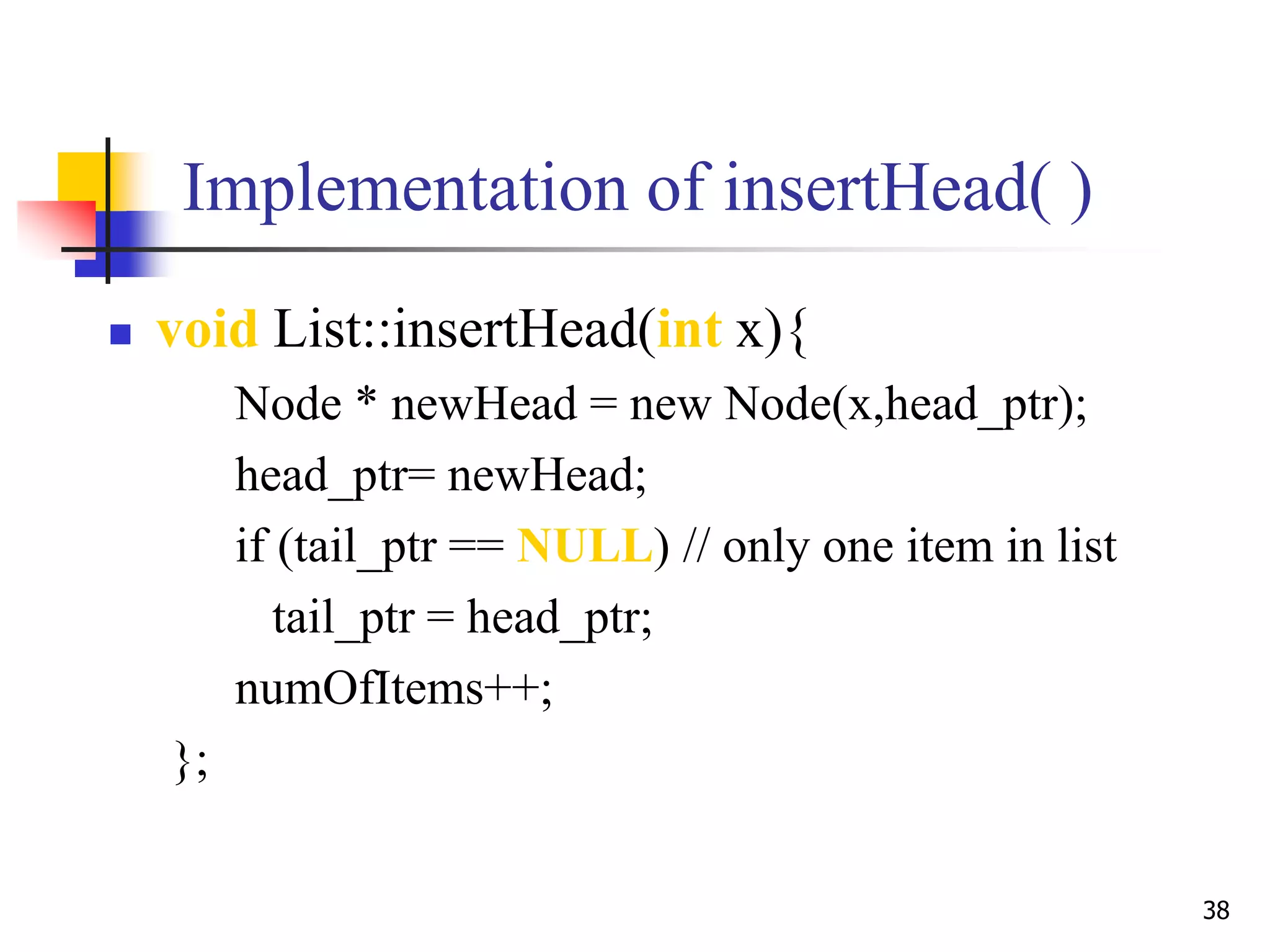
Implementation of insertHead( )
 void List::insertHead(int x){
Node * newHead = new Node(x,head_ptr);
head_ptr= newHead;
if (tail_ptr == NULL) // only one item in list
tail_ptr = head_ptr;
numOfItems++;
};
39
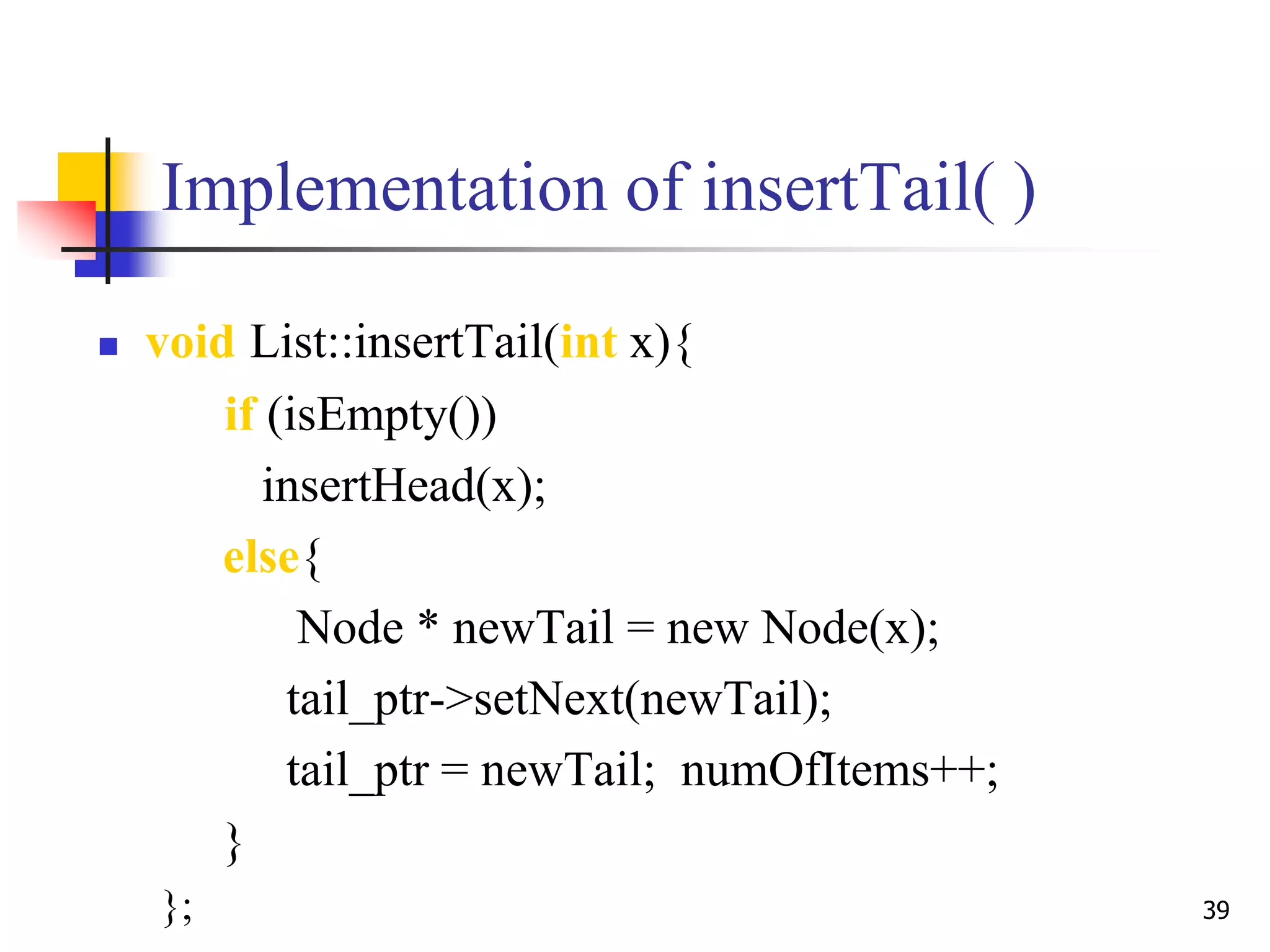
Implementation of insertTail( )
 void List::insertTail(int x){
if (isEmpty())
insertHead(x);
else{
Node * newTail = new Node(x);
tail_ptr->setNext(newTail);
tail_ptr = newTail; numOfItems++;
}
};
40
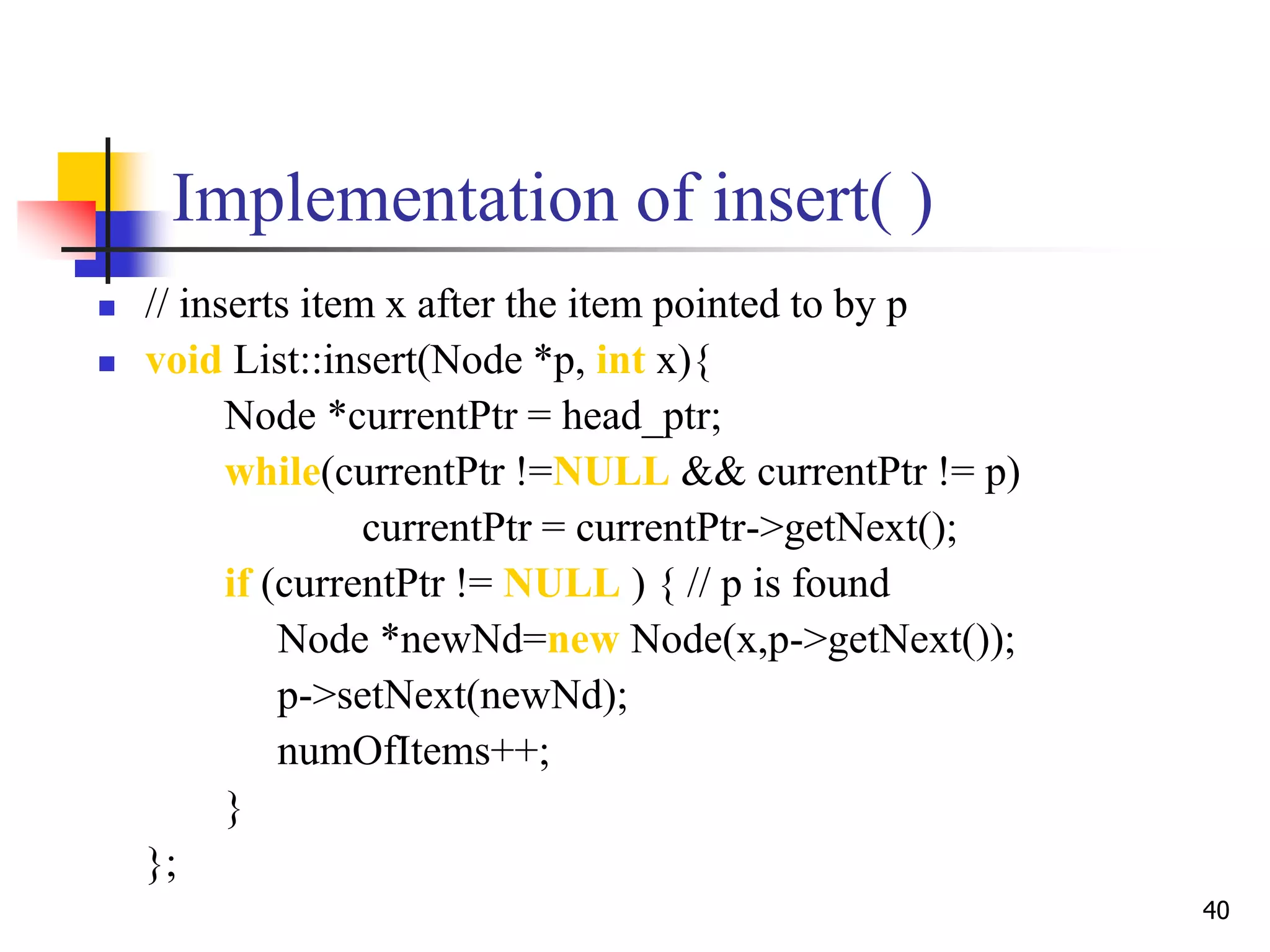
Implementation of insert( )
 // inserts item x after the item pointed to by p
 void List::insert(Node *p, int x){
Node *currentPtr = head_ptr;
while(currentPtr !=NULL && currentPtr != p)
currentPtr = currentPtr->getNext();
if (currentPtr != NULL ) { // p is found
Node *newNd=new Node(x,p->getNext());
p->setNext(newNd);
numOfItems++;
}
};
Header Linked Lists
Dr. Hanif Durad 41
Dummy Head Nodes
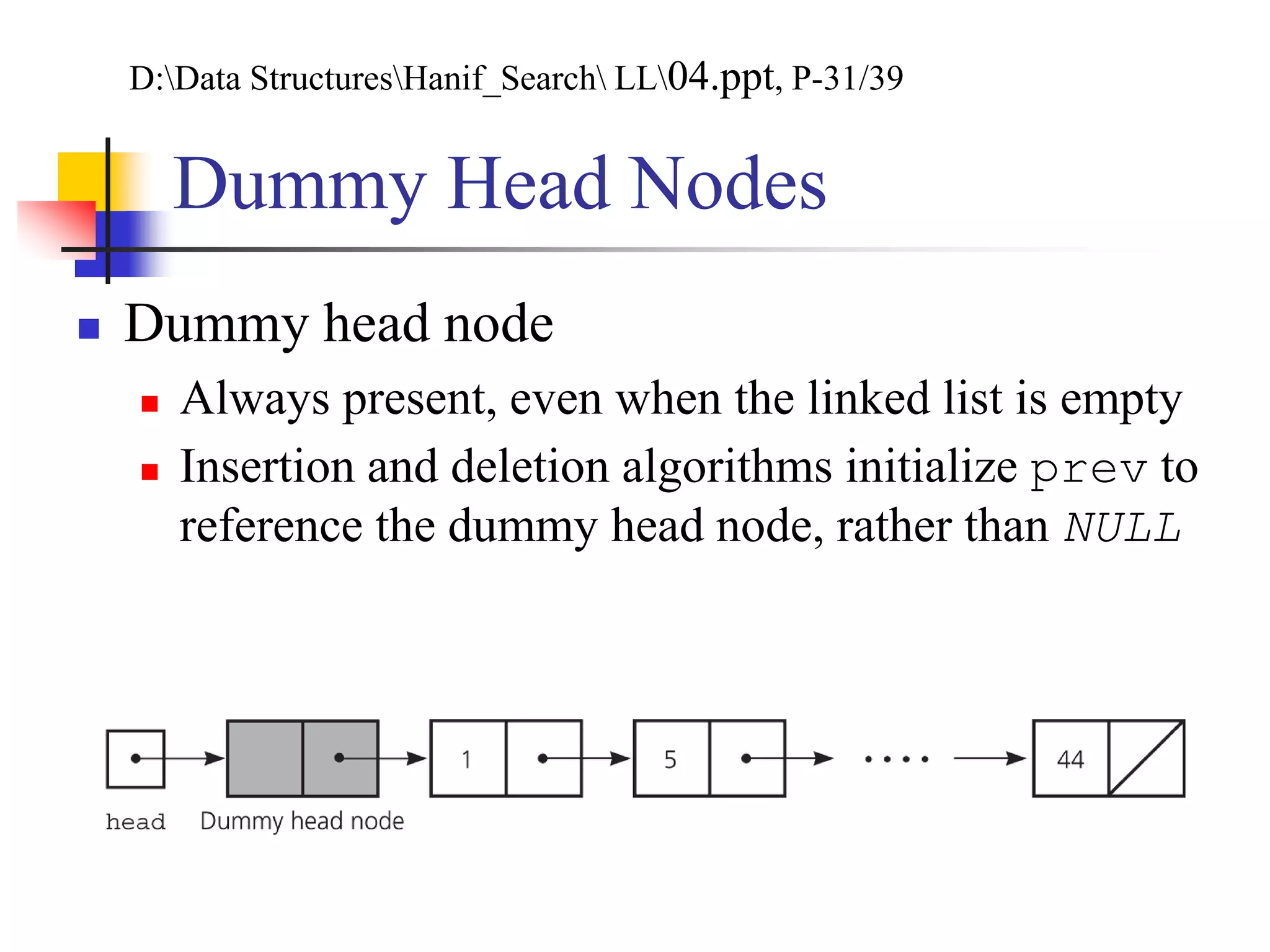
 Dummy head node
 Always present, even when the linked list is empty
 Insertion and deletion algorithms initialize prev to
reference the dummy head node, rather than NULL
D:Data StructuresHanif_Search LL04.ppt, P-31/39
Header Linked Lists
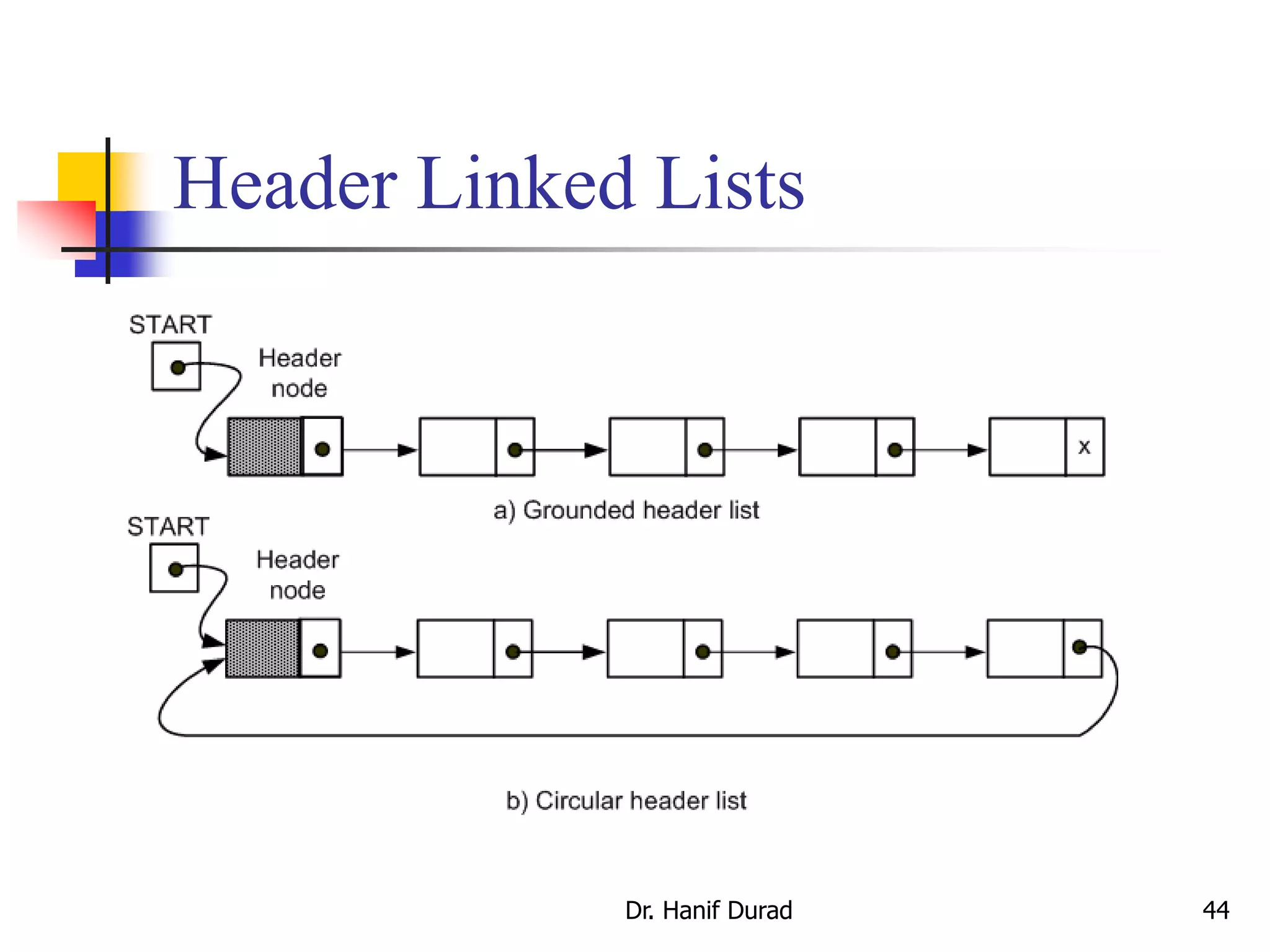
 A header linked list is a linked list which always contains a
special node, called the header or sentinel node, at the beginning
of the list. The following are two widely used header lists:
 A grounder header list is a header list where the last node contains
the null pointer.
 A circular header list where the last node points back to the header
node.
 The header record may also be used to store information about the
entire file.
Dr. Hanif Durad 43
D:Data StructuresHanif_Search Data+Structures2.ppt, P-9 & 11
Header Linked Lists
Dr. Hanif Durad 44
Circular Linked Lists
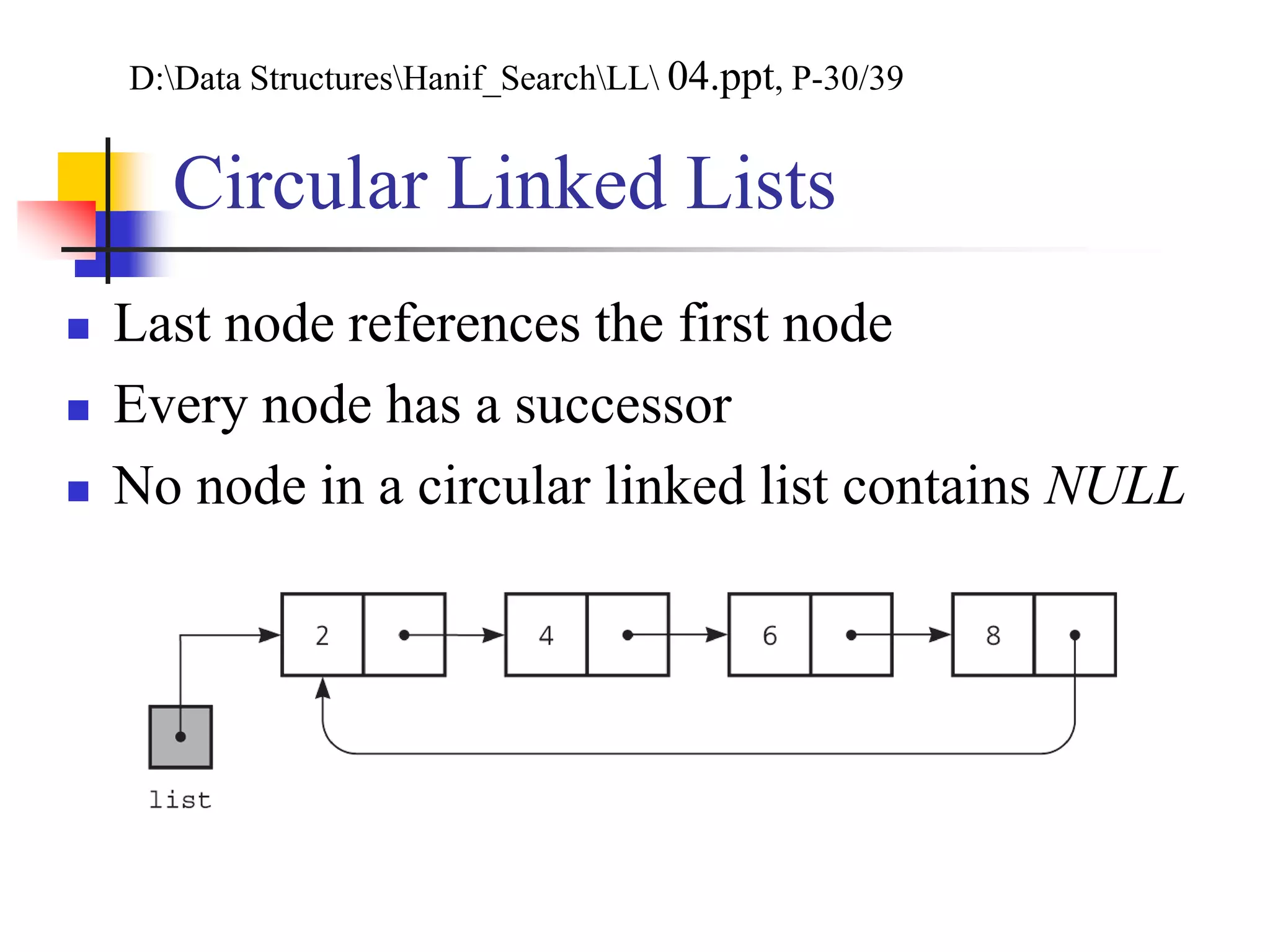
 Last node references the first node
 Every node has a successor
 No node in a circular linked list contains NULL
D:Data StructuresHanif_SearchLL 04.ppt, P-30/39
Circular Linked Lists
 Last node references the first node
 Every node has a successor
 No node in a circular linked list contains NULL
Doubly Linked
Lists
Dr. Hanif Durad 47
Doubly linked list
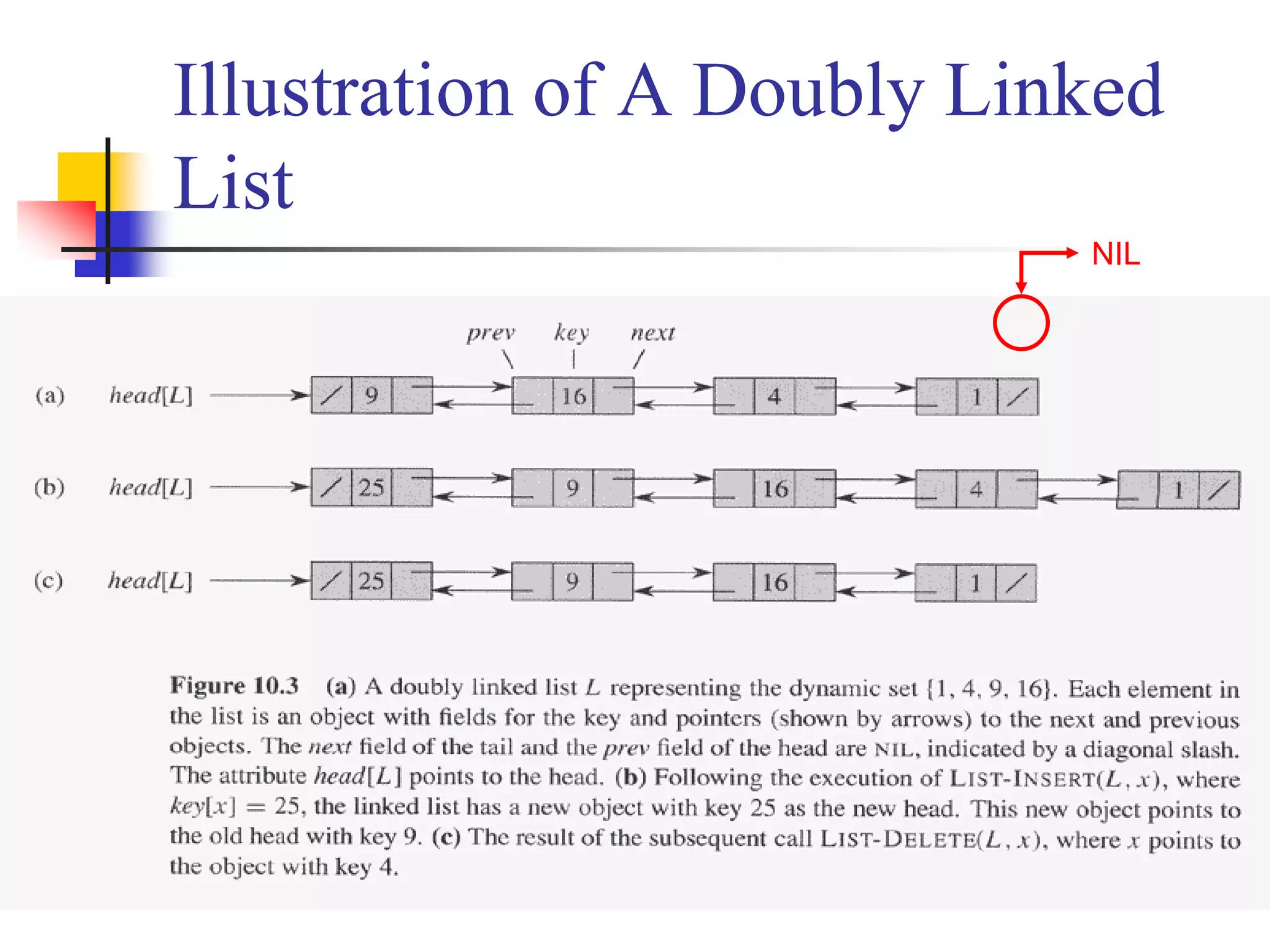
 A linked list is a data structure in which the objects are arranged
in linear order
 The order in a linked list is determined by pointers in each object
 Doubly linked list
 Each element is an object with a key field and two other pointer fields:
next and prev, among other satellite fields. Given an element x
 next[x] points to its successor
 if x is the last element (called tail), next[x] = NIL
 prev[x] points to its predecessor
 if x is the first element (called head), prev[x] = NIL
 An attribute head[L] points to the first element of the list
 if head[L] = NIL, the list is empty
D:DSAL5165 Advanced Algorithm and Programming Languageunit09.ppt
Doubly linked list
 Singly linked list: omit the prev pointer in each
element
 Sorted linked list: the linear order of the list
corresponds to the linear order of keys stored in
elements of the list
 The minimum element is the head
 The maximum element is the tail
 Circular linked list: the prev pointer of the head points
to the tail, and the next pointer of the tail points to the
head
Illustration of A Doubly Linked
List
NIL
Searching A Linked List
 LIST-SEARCH(L, k): finds the first element with key k in list L
by a simple linear search, returning a pointer to this element
 If no object with key k appears in the list, then NIL is
returned
Illustration of LIST-SEARCH
head[L] 9/ 16 4 1 /
x
LIST-SEARCH(L, 4)
x x
x  head[L]while x  NIL and key[x]  4x  next[x]while x  NIL and key[x]  4x  next[x]while x  NIL and key[x]  4
return x
How about LIST-SEARCH(L, 7)?
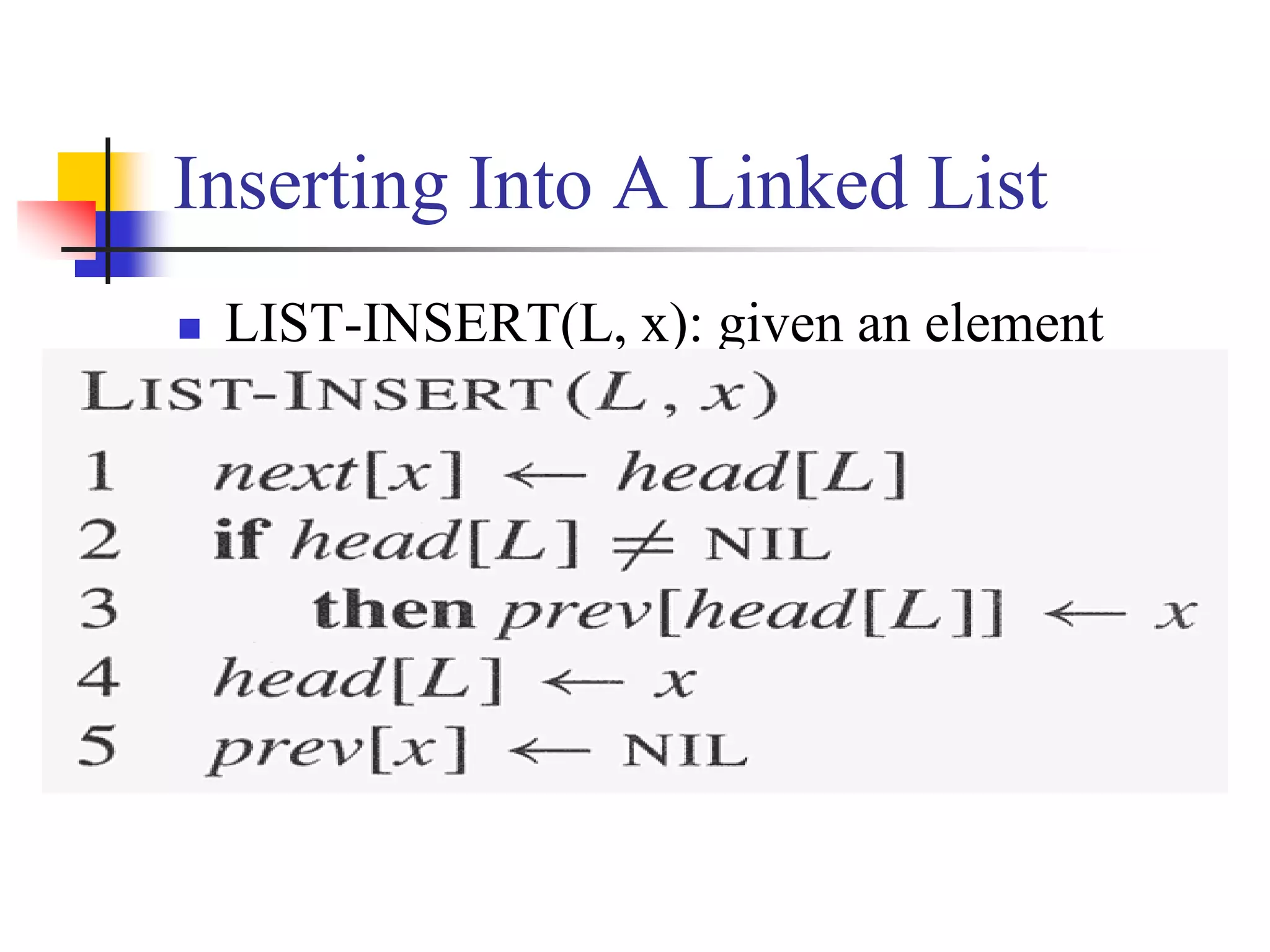
Inserting Into A Linked List
 LIST-INSERT(L, x): given an element
pointed by x, splice x onto the front of the
linked list
Illustration of LIST-INSERT
head[L] 9/ 16 4 1 /
x 25/ next[x]head[L]prev[head[L]]  xhead[L]  xprev[x]  NIL
LIST-INSERT(L, x)
Deleting From A Linked List
 LIST-DELETE(L, x): given an element
pointed by x, remove x from the linked list
Illustration of LIST-DELETE
head[L]
9/ 16 4 1 /25/
x
next[prev[x]]  next[x]
prev[x] next[x]
LIST-DELETE(L, x)
prev[next[x]]  prev[x]
Need garbage collection for x
Linked Lists and
Polynomials
Dr. Hanif Durad 57
D:Data StructuresCOMP171 Data Structures and Algorithmlist.ppt
Example: The Polynomial ADT
 An ADT for single-variable polynomials
 Array implementation


N
i
i
i xaxf
0
)(
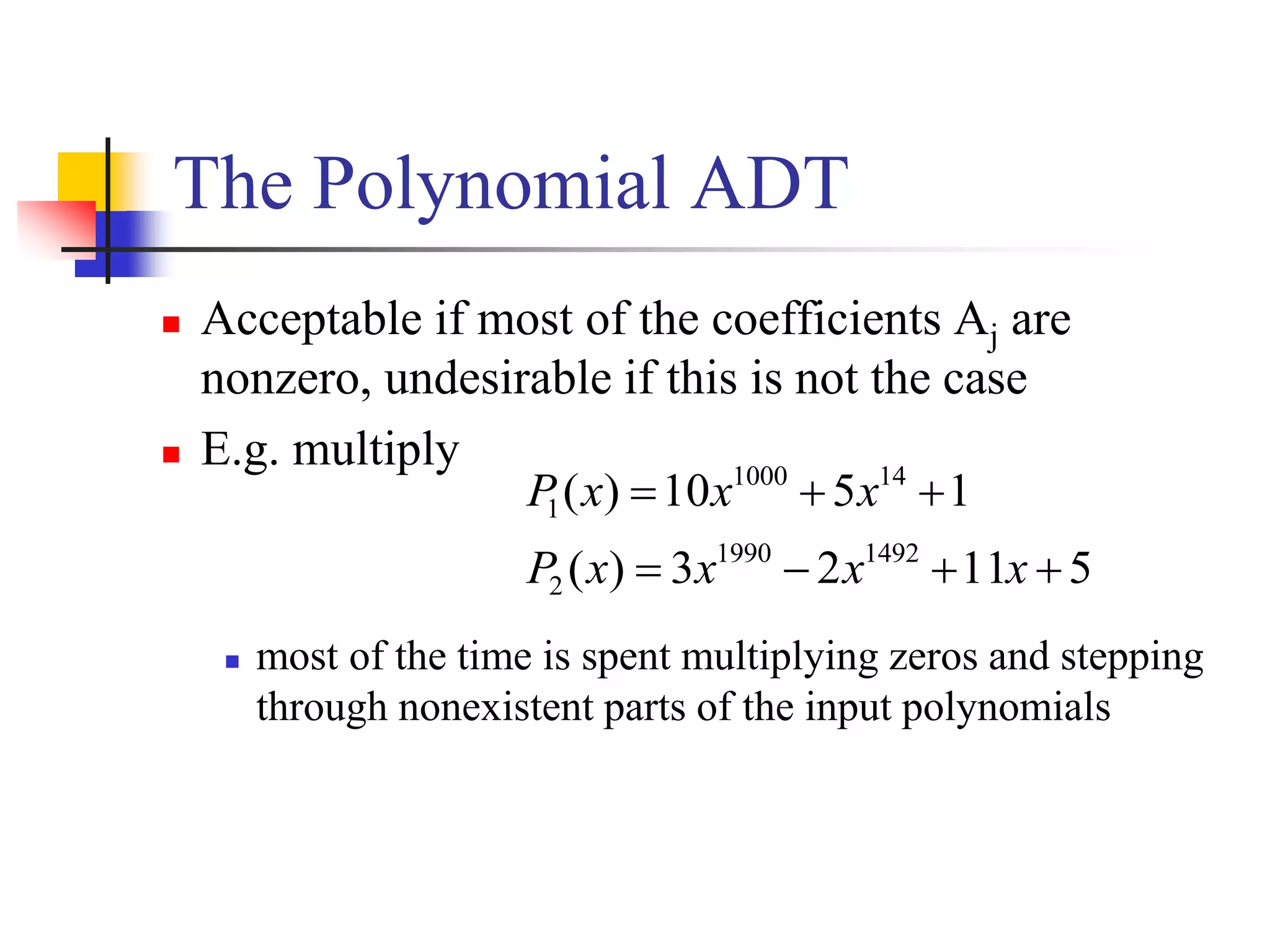
The Polynomial ADT
 Acceptable if most of the coefficients Aj are
nonzero, undesirable if this is not the case
 E.g. multiply
 most of the time is spent multiplying zeros and stepping
through nonexistent parts of the input polynomials
51123)(
1510)(
14921990
2
141000
1


xxxxP
xxxP
The Polynomial ADT…
 Each term is contained in one cell, and the cells are
sorted in decreasing order of exponents
coef expon link
3 14 2 8 1 0
a
8 14 -3 10 10 6
b
11 14
d
a->expon == b->expon
3 14 2 8 1 0
a
8 14 -3 10 10 6
b
11 14
d
a->expon < b->expon-3 10
Adding Polynomials (1/2)
Morelists.ppt,6/24
3 14 2 8 1 0
a
8 14 -3 10 10 6
b
11 14
a->expon > b->expon
-3 10
d
2 8
Adding Polynomials (2/2)

Chapter 5 ds

  • 1.
    Chapter 5 Linked Lists Dr.Muhammad Hanif Durad Department of Computer and Information Sciences Pakistan Institute Engineering and Applied Sciences hanif@pieas.edu.pk Some slides have bee adapted with thanks from some other lectures available on Internet. It made my life easier, as life is always miserable at PIEAS (Sir Muhammad Yusaf Kakakhil )
  • 2.
    Dr. Hanif Durad2 Lecture Outline  Abstract Data Types (ADTs)  Arrays: pluses and minuses  Singly Linked Lists  Examples of Linked Lists  Operations on Linked Lists  Header Linked Lists  Circular Linked Lists  Doubly Linked Lists  The Polynomial ADT
  • 3.
    33 Primitive Data Typevs. Abstract Data Types data programmer Primitive DT: programmer ADT: Interface (API) Implementation (methods) Data D:Data StructuresCPT S 223adt.ppt
  • 4.
    44 Abstract Data Types(ADTs)  ADT is a set of objects together with a set of operations.  “Abstract” in that implementation of operations not specified in ADT definition  E.g., List  Insert, delete, search, sort  C++ class perfect for ADTs  Can change ADT implementation details without breaking code using ADT 4
  • 5.
    Arrays: pluses andminuses  + Fast element access.  -- Impossible to resize.  Many applications require resizing!  Required size not always immediately available. Dr. Hanif Durad 5 D:Data StructuresHanif_SearchLinked ListsLinkedLists.ppt, P-1
  • 6.
    Arrays: pluses andminuses  To insert or remove an element at an interior location in an Array requires shifting of data and is an O(n) operation. 6 D:Data StructuresHanif_SearchLinked Lists 10. Linked Lists.ppt, P-2
  • 7.
    Definition of SinglyLinked Lists  A linked list is a sequence of items (objects) where every item is linked to the next.  Graphically: data data data data head_ptr tail_ptr D:Data StructuresHanif_SearchLinked Lists lecture6.ppt, P-2
  • 8.
    8 Definition Details  Eachitem has a data part (one or more data members), and a link that points to the next item  One natural way to implement the link is as a pointer; that is, the link is the address of the next item in the list  It makes good sense to view each item as an object, that is, as an instance of a class.  We call that class: Node  The last item does not point to anything. We set its link member to NULL. This is denoted graphically by a self-loop
  • 9.
    9 Examples of LinkedLists (A Waiting Line)  A waiting line of customers: John, Mary, Dan, Sue (from the head to the tail of the line)  A linked list of strings can represent this line: John Mary Dan Sue head_ptr tail_ptr
  • 10.
    10 Examples of LinkedLists (A Stack of Numbers)  A stack of numbers (from top to bottom): 10, 8, 6, 8, 2  A linked list of ints can represent this stack: 10 8 6 2 head_ptr tail_ptr 8
  • 11.
    11 Examples of LinkedLists (A Set of Non-redundant Elements)  A set of characters: a, b, d, f, c  A linked list of chars can represent this set: a b d c head_ptr tail_ptr f
  • 12.
    12 Examples of LinkedLists (A Sorted Set of Non-redundant Elements)  A set of characters: a, b, d, f, c  The elements must be arranged in sorted order: a, b, c, d, f  A linked list of chars can represent this set: a b c f head_ptr tail_ptr d
  • 13.
    13 Examples of LinkedLists (A Polynomial)  A polynomial of degree n is the function Pn(x)=a0+a1x+a2x2+…+anxn. The ai’s are called the coefficients of the polynomial  The polynomial can be represented by a linked list (2 data members and a link per item): a0,0 a1,1 a2,2 an,n head_ptr tail_ptr
  • 14.
    14 Operations on LinkedLists  Insert a new item  At the head of the list, or  At the tail of the list, or  Inside the list, in some designated position  Search for an item in the list  The item can be specified by position, or by some value  Delete an item from the list  Search for and locate the item, then remove the item, and finally adjust the surrounding pointers  size( );  isEmpty( )
  • 15.
    15 Insert– At theHead • Insert a new data A. Call new: newPtr List before insertion: • After insertion to head: data data data data head_ptr tail_ptr A data data data data head_ptr tail_ptr A •The link value in the new item = old head_ptr •The new value of head_ptr = newPtr
  • 16.
    16 Insert – atthe Tail • Insert a new data A. Call new: newPtr List before insertion • After insertion to tail: data data data data head_ptr tail_ptr A data data data data head_ptr tail_ptr A •The link value in the new item = NULL •The link value of the old last item = newPtr
  • 17.
    17 Insert – insidethe List • Insert a new data A. Call new: newPtr List before insertion: • After insertion in 3rd position: data data data data head_ptr tail_ptr data data A data data head_ptr tail_ptr data •The link-value in the new item = link-value of 2nd item •The new link-value of 2nd item = newPtr
  • 18.
    18 Delete – theHead Item • List before deletion: • List after deletion of the head item: data data data data head_ptr tail_ptr data data data data head_ptr tail_ptr data •The new value of head_ptr = link-value of the old head item •The old head item is deleted and its memory returned data
  • 19.
    19 Delete – theTail Item • List before deletion: • List after deletion of the tail item: data data data data head_ptr tail_ptr data data data head_ptr tail_ptr •New value of tail_ptr = link-value of the 3rd from last item •New link-value of new last item = NULL. data datadata
  • 20.
    20 Delete – aninside Item • List before deletion: • List after deletion of the 2nd item: data data data data head_ptr tail_ptr data data head_ptr tail_ptr •New link-value of the item located before the deleted one = the link-value of the deleted item data data datadata
  • 21.
    21 size() and isEmpty() We need to scan the items in the list from the head_ptr to the last item marked by its link-value being NULL  Count the number of items in the scan, and return the count. This is the size().  Alternatively, keep a counter of the number of item, which gets updated after each insert/delete. The function size( ) returns that counter  If head_ptr is NULL, isEmpty() returns true; else, it returns false.
  • 22.
    22 Searching for anItem  Suppose you want to find the item whose data value is A  You have to search sequentially starting from the head item rightward until the first item whose data member is equal to A is found.  At each item searched, a comparison between the data member and A is performed.
  • 23.
    CS 103 23 Timeof the Operations  Time to search() is O(L) where L is the relative location of the desired item in the List. In the worst case. The time is O(n). In the average case it is O(N/2)=O(n).  Time for remove() is dominated by the time for search, and is thus O(n).  Time for insert at head or at tail is O(1).  Time for insert at other positions is dominated by search time, and thus O(n).  Time for size() is O(1), and time for isEmpty() is O(1)
  • 24.
  • 25.
    25 Implementation of anItem  Each item is a collection of data and pointer fields, and should be able to support some basic operations such as changing its link value and returning its member data  Therefore, a good implementation of an item is a class  The class will be called Node
  • 26.
    26 Class Node Designfor Item  The member variables of Node are:  The data field(s)  The link pointer, which will be called next  The functions are: Function Action Why Needed getNext( ) returns the link. for navigation getData( ) returns the data for search setNext(Node *ptr) sets link to ptr for insert/delete setData(type x) sets data to x. to modify data contents
  • 27.
    27 Class Node Type class Node { private: int data; // different data type for other apps Node *next; // the link pointer to next item public: Node(int x=0;Node * ptr=NULL); // constructor int getData( ); Node *getNext( ); void setData(int x); void setNext(Node *ptr); };
  • 28.
    28 Class Node Implementation Node::Node(int x, Node *p){ data=x; next=p;};  int Node::getData( ){return data;};  Node * Node::getNext( ){return next;};  void Node::setData(int x) {data=x;};  void Node::setNext(Node *ptr){next=ptr;};
  • 29.
    29 Implementation of LinkedList  A linked list is a collection of Node objects, and must support a number of operations  Therefore, it is sensible to implement a linked list as a class  The class name for it is List
  • 30.
    30 Class Design forList  The member variables are:  Node *head_ptr; Node *tail_ptr;  int numOfItems;  Member functions  Node * search(int x); Node * itemAt(int position);  void removeHead(); void removeTail(); void remove(int x);  void insertHead(int x); void insertTail(int x); void insert(Node *p, int x) // inserts item after the item // pointed to by p  int size( ); Node *getHead( ); Node getTail( );  bool isEmpty( );
  • 31.
    31 Class List Type class List { private: Node *head_ptr; Node *tail_ptr; int numOfItems; public: List( ); // constructor int size( ); Node *getHead( ); Node *getTail( ); bool isEmpty( ); Node *search(int x); Node *itemAt(int position); void removeHead(); void removeTail(); void remove(int x); // delete leftmost item having x void insertHead(int x); void insertTail(int x); void insert(Node *p, int x); };
  • 32.
    32 Implementation of ClassList  List::List( ){head_ptr= NULL; tail_ptr=NULL; numOfItems=0;};  int List::size( ){return numOfItems;};  Node * List::getHead( ) {return head_ptr;};  Node * List::getTail( ) {return tail_ptr;};  bool List::isEmpty() {return (numOfItem==0);};
  • 33.
    33 Implementation of search()  Node *List::search(int x){ Node * currentPtr = getHead( ); while (currentPtr != NULL){ if (currentPtr->getData( ) == x) return currentPtr; else currentPtr = currentPtr->getNext(); } return NULL; // Now x is not, so return NULL };
  • 34.
    34 Implementation of itemAt()  Node *List::itemAt(int position){ if (position<0 || position>=numOfItems) return NULL; Node * currentPtr = getHead( ); for(int k=0;k != position; k++) currentPtr = currentPtr -> getNext( ); return currentPtr; };
  • 35.
    35 Implementation of removeHead()  void List::removeHead( ){ if (numOfItems == 0) return; Node * currentPtr = getHead( ); head_ptr=head_ptr->getNext( ); delete currentPtr; numOfItems--; };
  • 36.
    36 Implementation of removeTail()  void List::removeTail( ){ if (numOfItems == 0) return; if (head_ptr == tail_ptr){ head_ptr=NULL; tail_ptr= NULL; numOfItems=0; return; } Node * beforeLast = itemAt(numOfItems-2); beforeLast->setNext(NULL); // beforeLast becomes last delete tail_ptr; // deletes the last object tail_ptr=beforeLast; numOfItems--; };
  • 37.
    37 Implementation of remove()  void List::remove(int x){ if (numOfItems == 0) return; if (head_ptr==tail_ptr && head_ptr->getData()==x){ head_ptr=NULL; tail_ptr= NULL; numOfItems=0; return; } Node * beforePtr=head_ptr; // beforePtr trails currentPtr Node * currentPtr=head_ptr->getNext(); Node * tail = getTail(); while (currentPtr != tail) if (currentPtr->getData( ) == x){ // x is found. Do the bypass beforePtr->setNext(currentPtr->getNext()); delete currentPtr; numOfItems--; } else { // x is not found yet. Forward beforePtr & currentPtr. beforePtr = currentPtr; currentPtr = currentPtr->getNext(); }
  • 38.
    38 Implementation of insertHead()  void List::insertHead(int x){ Node * newHead = new Node(x,head_ptr); head_ptr= newHead; if (tail_ptr == NULL) // only one item in list tail_ptr = head_ptr; numOfItems++; };
  • 39.
    39 Implementation of insertTail()  void List::insertTail(int x){ if (isEmpty()) insertHead(x); else{ Node * newTail = new Node(x); tail_ptr->setNext(newTail); tail_ptr = newTail; numOfItems++; } };
  • 40.
    40 Implementation of insert()  // inserts item x after the item pointed to by p  void List::insert(Node *p, int x){ Node *currentPtr = head_ptr; while(currentPtr !=NULL && currentPtr != p) currentPtr = currentPtr->getNext(); if (currentPtr != NULL ) { // p is found Node *newNd=new Node(x,p->getNext()); p->setNext(newNd); numOfItems++; } };
  • 41.
  • 42.
    Dummy Head Nodes Dummy head node  Always present, even when the linked list is empty  Insertion and deletion algorithms initialize prev to reference the dummy head node, rather than NULL D:Data StructuresHanif_Search LL04.ppt, P-31/39
  • 43.
    Header Linked Lists A header linked list is a linked list which always contains a special node, called the header or sentinel node, at the beginning of the list. The following are two widely used header lists:  A grounder header list is a header list where the last node contains the null pointer.  A circular header list where the last node points back to the header node.  The header record may also be used to store information about the entire file. Dr. Hanif Durad 43 D:Data StructuresHanif_Search Data+Structures2.ppt, P-9 & 11
  • 44.
  • 45.
    Circular Linked Lists Last node references the first node  Every node has a successor  No node in a circular linked list contains NULL D:Data StructuresHanif_SearchLL 04.ppt, P-30/39
  • 46.
    Circular Linked Lists Last node references the first node  Every node has a successor  No node in a circular linked list contains NULL
  • 47.
  • 48.
    Doubly linked list A linked list is a data structure in which the objects are arranged in linear order  The order in a linked list is determined by pointers in each object  Doubly linked list  Each element is an object with a key field and two other pointer fields: next and prev, among other satellite fields. Given an element x  next[x] points to its successor  if x is the last element (called tail), next[x] = NIL  prev[x] points to its predecessor  if x is the first element (called head), prev[x] = NIL  An attribute head[L] points to the first element of the list  if head[L] = NIL, the list is empty D:DSAL5165 Advanced Algorithm and Programming Languageunit09.ppt
  • 49.
    Doubly linked list Singly linked list: omit the prev pointer in each element  Sorted linked list: the linear order of the list corresponds to the linear order of keys stored in elements of the list  The minimum element is the head  The maximum element is the tail  Circular linked list: the prev pointer of the head points to the tail, and the next pointer of the tail points to the head
  • 50.
    Illustration of ADoubly Linked List NIL
  • 51.
    Searching A LinkedList  LIST-SEARCH(L, k): finds the first element with key k in list L by a simple linear search, returning a pointer to this element  If no object with key k appears in the list, then NIL is returned
  • 52.
    Illustration of LIST-SEARCH head[L]9/ 16 4 1 / x LIST-SEARCH(L, 4) x x x  head[L]while x  NIL and key[x]  4x  next[x]while x  NIL and key[x]  4x  next[x]while x  NIL and key[x]  4 return x How about LIST-SEARCH(L, 7)?
  • 53.
    Inserting Into ALinked List  LIST-INSERT(L, x): given an element pointed by x, splice x onto the front of the linked list
  • 54.
    Illustration of LIST-INSERT head[L]9/ 16 4 1 / x 25/ next[x]head[L]prev[head[L]]  xhead[L]  xprev[x]  NIL LIST-INSERT(L, x)
  • 55.
    Deleting From ALinked List  LIST-DELETE(L, x): given an element pointed by x, remove x from the linked list
  • 56.
    Illustration of LIST-DELETE head[L] 9/16 4 1 /25/ x next[prev[x]]  next[x] prev[x] next[x] LIST-DELETE(L, x) prev[next[x]]  prev[x] Need garbage collection for x
  • 57.
    Linked Lists and Polynomials Dr.Hanif Durad 57 D:Data StructuresCOMP171 Data Structures and Algorithmlist.ppt
  • 58.
    Example: The PolynomialADT  An ADT for single-variable polynomials  Array implementation   N i i i xaxf 0 )(
  • 59.
    The Polynomial ADT Acceptable if most of the coefficients Aj are nonzero, undesirable if this is not the case  E.g. multiply  most of the time is spent multiplying zeros and stepping through nonexistent parts of the input polynomials 51123)( 1510)( 14921990 2 141000 1   xxxxP xxxP
  • 60.
    The Polynomial ADT… Each term is contained in one cell, and the cells are sorted in decreasing order of exponents coef expon link
  • 61.
    3 14 28 1 0 a 8 14 -3 10 10 6 b 11 14 d a->expon == b->expon 3 14 2 8 1 0 a 8 14 -3 10 10 6 b 11 14 d a->expon < b->expon-3 10 Adding Polynomials (1/2) Morelists.ppt,6/24
  • 62.
    3 14 28 1 0 a 8 14 -3 10 10 6 b 11 14 a->expon > b->expon -3 10 d 2 8 Adding Polynomials (2/2)

Editor's Notes

  • #4 Washington State University
  • #5 Washington State University