


LINKED LISTS
DATA STRUCTURES
AND ALGORITHMS
1
WHAT IS A LIST?
 A list is a collection of items:
 It can have an arbitrary length
 Objects / elements can be inserted or removed at
arbitrary locations in the list
 A list can be traversed in order one item at a time
2
LIST AS AN ADT
 A list is a finite sequence (possibly empty) of
elements with basic operations that vary from
one application to another.
 Basic operations commonly include:
 Construction: Allocate and initialize a list object
(usually empty)
 Empty: Check if list is empty
 Insert: Add an item to the list at any point
 Delete: Remove an item from the list at any point
 Traverse: Visiting each node of list
3
VARIATIONS OF LINKED LISTS
 Singly linked lists
 Circular linked lists
 Doubly linked lists
 Circular doubly linked list
4
LINKED LIST
Minimal Requirements
 Locate the first element
 Given the location of any list element, find its successor
 Determine if at the end of the list
5
LINKED LIST TERMINOLOGIES
 Traversal of List
 Means to visit every element or node in the list
beginning from first to last.
 Predecessor and Successor
 In the list of elements, for any location n, (n-1) is
predecessor and (n+1) is successor
 In other words, for any location n in the list, the left
element is predecessor and the right element is
successor.
 Also, the first element does not have predecessor
and the last element does not have successor. 6
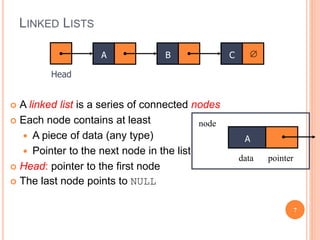
LINKED LISTS
 A linked list is a series of connected nodes
 Each node contains at least
 A piece of data (any type)
 Pointer to the next node in the list
 Head: pointer to the first node
 The last node points to NULL
A 
Head
B C
A
data pointer
node
7
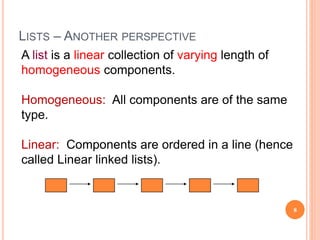
LISTS – ANOTHER PERSPECTIVE
A list is a linear collection of varying length of
homogeneous components.
Homogeneous: All components are of the same
type.
Linear: Components are ordered in a line (hence
called Linear linked lists).
8
ARRAYS VS LISTS
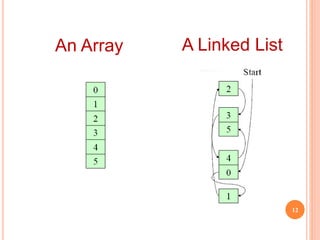
• Arrays are lists that have a fixed size in memory.
• The programmer must keep track of the length of the
array
• No matter how many elements of the array are used
in a program, the array has the same amount of
allocated space.
• Array elements are stored in successive memory
locations. Also, order of elements stored in array is
same logically and physically.
9
• A linked list takes up only as much space in memory
as is needed for the length of the list.
• The list expands or contracts as you add or delete
elements.
• In linked list the elements are not stored in successive
memory location
• Elements can be added to (or deleted from) either
end, or added to (or deleted from)the middle of the
list.
ARRAYS VS LISTS
10
ARRAY VERSUS LINKED LISTS
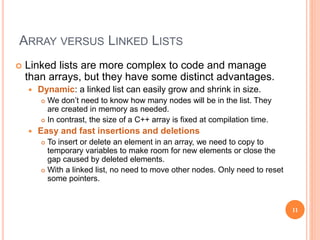
 Linked lists are more complex to code and manage
than arrays, but they have some distinct advantages.
 Dynamic: a linked list can easily grow and shrink in size.
 We don’t need to know how many nodes will be in the list. They
are created in memory as needed.
 In contrast, the size of a C++ array is fixed at compilation time.
 Easy and fast insertions and deletions
 To insert or delete an element in an array, we need to copy to
temporary variables to make room for new elements or close the
gap caused by deleted elements.
 With a linked list, no need to move other nodes. Only need to reset
some pointers.
11
A Linked List
12
An Array
BASIC OPERATIONS OF LINKED LIST
 Linked List, a linear collection of data items, called
nodes, where order is given y means of pointers.
 Elements:
 Each node is divided into two parts:
 Information
 Link ( pointing towards the next node)
 (Common) Operations of Linked List
 IsEmpty: determine whether or not the list is empty
 InsertNode: insert a new node at a particular position
 FindNode: find a node with a given value
 DeleteNode: delete a node with a given value
 DisplayList: print all the nodes in the list
13
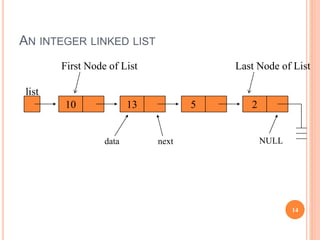
AN INTEGER LINKED LIST
list
10 13 5 2
First Node of List
data next NULL
Last Node of List
14
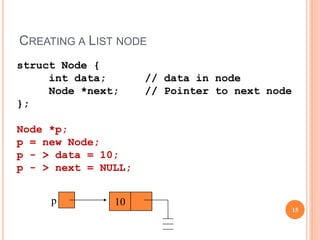
CREATING A LIST NODE
p 10
struct Node {
int data; // data in node
Node *next; // Pointer to next node
};
Node *p;
p = new Node;
p - > data = 10;
p - > next = NULL;
15
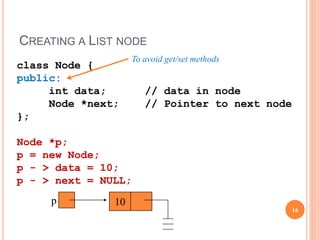
CREATING A LIST NODE
p 10
class Node {
public:
int data; // data in node
Node *next; // Pointer to next node
};
Node *p;
p = new Node;
p - > data = 10;
p - > next = NULL;
16
To avoid get/set methods
THE NULL POINTER
NULL is a special pointer value that does not reference
any memory cell.
If a pointer is not currently in use, it should be set to
NULL so that one can determine that it is not pointing
to a valid address:
int *p;
p = NULL;
17
18
Singly Linked List
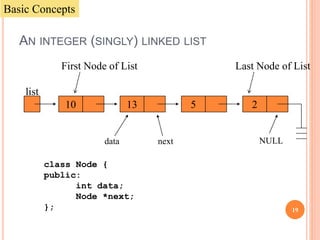
AN INTEGER (SINGLY) LINKED LIST
list
10 13 5 2
First Node of List
data next NULL
Last Node of List
class Node {
public:
int data;
Node *next;
};
Basic Concepts
19
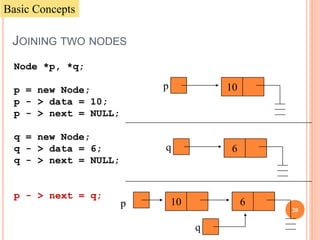
JOINING TWO NODES
Node *p, *q;
p = new Node;
p - > data = 10;
p - > next = NULL;
q = new Node;
q - > data = 6;
q - > next = NULL;
p - > next = q;
p 10
q 6
6p 10
q
Basic Concepts
20
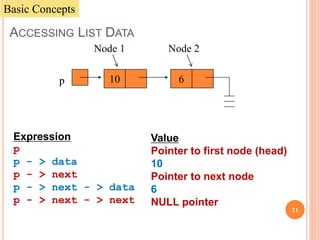
ACCESSING LIST DATA
Expression
p
p - > data
p - > next
p - > next - > data
p - > next - > next
6p 10
Node 1 Node 2
Value
Pointer to first node (head)
10
Pointer to next node
6
NULL pointer
Basic Concepts
21
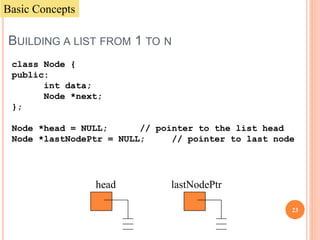
BUILDING A LIST FROM 1 TO N
class Node {
public:
int data;
Node *next;
};
Node *head = NULL; // pointer to the list head
Node *lastNodePtr = NULL; // pointer to last node
head lastNodePtr
Basic Concepts
23
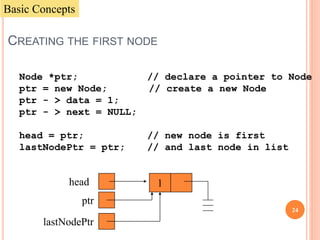
CREATING THE FIRST NODE
Node *ptr; // declare a pointer to Node
ptr = new Node; // create a new Node
ptr - > data = 1;
ptr - > next = NULL;
head = ptr; // new node is first
lastNodePtr = ptr; // and last node in list
head 1
ptr
lastNodePtr
Basic Concepts
24
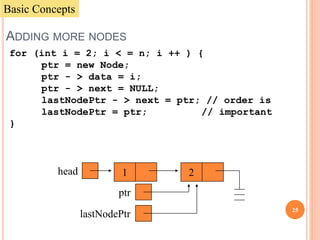
ADDING MORE NODES
for (int i = 2; i < = n; i ++ ) {
ptr = new Node;
ptr - > data = i;
ptr - > next = NULL;
lastNodePtr - > next = ptr; // order is
lastNodePtr = ptr; // important
}
2head 1
ptr
lastNodePtr
Basic Concepts
25
2head 1
ptr
lastNodePtr
2head 1
ptr
lastNodePtr
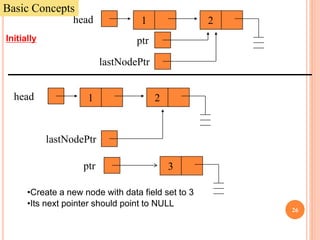
3
•Create a new node with data field set to 3
•Its next pointer should point to NULL
Initially
Basic Concepts
26
2head 1
ptr
lastNodePtr
2head 1
ptr
lastNodePtr
3
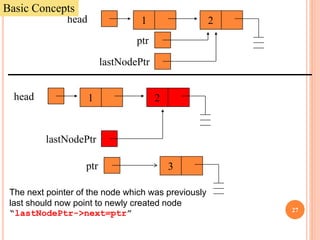
The next pointer of the node which was previously
last should now point to newly created node
“lastNodePtr->next=ptr”
Basic Concepts
27
2head 1
ptr
lastNodePtr
2head 1
ptr
lastNodePtr
3
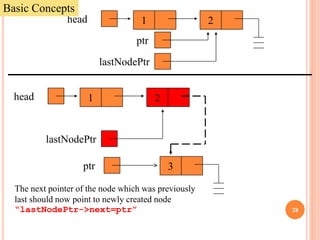
The next pointer of the node which was previously
last should now point to newly created node
“lastNodePtr->next=ptr”
Basic Concepts
28
2head 1
ptr
lastNodePtr
2head 1
ptr
lastNodePtr
3
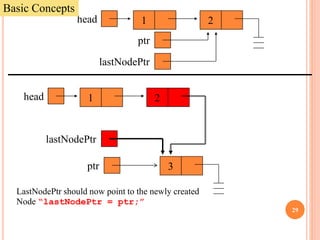
LastNodePtr should now point to the newly created
Node “lastNodePtr = ptr;”
Basic Concepts
29
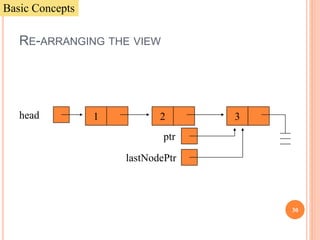
3head 1
ptr
lastNodePtr
2
RE-ARRANGING THE VIEW
Basic Concepts
30
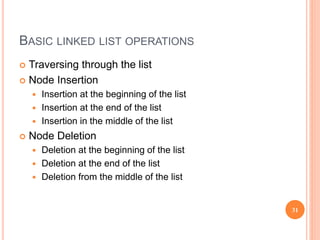
BASIC LINKED LIST OPERATIONS
 Traversing through the list
 Node Insertion
 Insertion at the beginning of the list
 Insertion at the end of the list
 Insertion in the middle of the list
 Node Deletion
 Deletion at the beginning of the list
 Deletion at the end of the list
 Deletion from the middle of the list
31
32
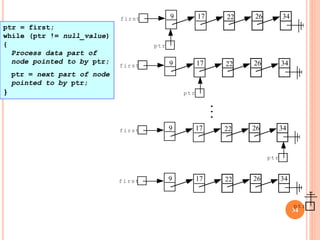
Traversing the list
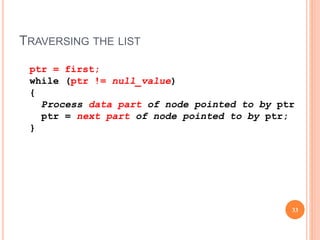
TRAVERSING THE LIST
33
ptr = first;
while (ptr != null_value)
{
Process data part of node pointed to by ptr
ptr = next part of node pointed to by ptr;
}
34
9 17 22 26 34first
ptr
9 17 22 26 34first
ptr
..
.
9 17 22 26 34first
ptr
9 17 22 26 34first
ptr
ptr = first;
while (ptr != null_value)
{
Process data part of
node pointed to by ptr;
ptr = next part of node
pointed to by ptr;
}
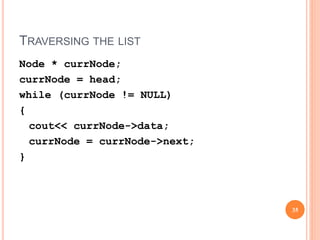
TRAVERSING THE LIST
35
Node * currNode;
currNode = head;
while (currNode != NULL)
{
cout<< currNode->data;
currNode = currNode->next;
}
NODE INSERTION
 Insertion at the beginning of the list
 Insertion at the end of the list
 Insertion in the middle of the list
36
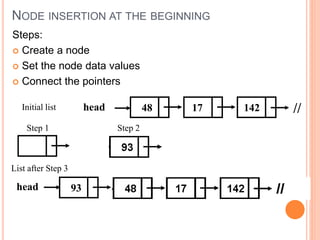
NODE INSERTION AT THE BEGINNING
Steps:
 Create a node
 Set the node data values
 Connect the pointers
48 17 142head //
Step 1 Step 2
Initial list
List after Step 3
head 93
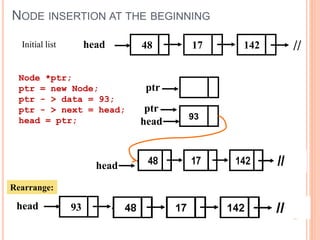
NODE INSERTION AT THE BEGINNING
48 17 142head //Initial list
head
Node *ptr;
ptr = new Node;
ptr - > data = 93;
ptr - > next = head;
head = ptr; 93
head 93
Rearrange:
ptr
ptr
head
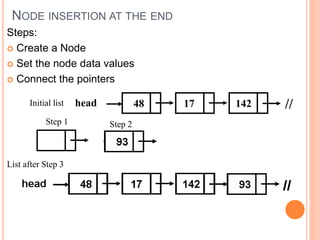
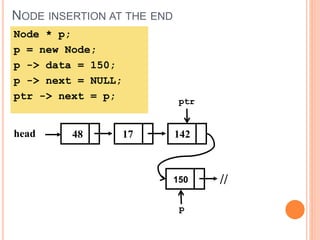
NODE INSERTION AT THE END
Steps:
 Create a Node
 Set the node data values
 Connect the pointers
48 17 142head //
Step 1 Step 2
List after Step 3
Initial list
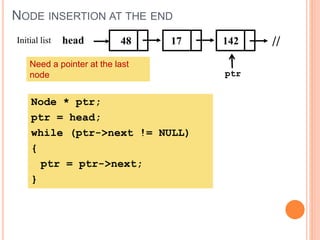
NODE INSERTION AT THE END
48 17 142head //Initial list
ptr
Node * ptr;
ptr = head;
while (ptr->next != NULL)
{
ptr = ptr->next;
}
Need a pointer at the last
node
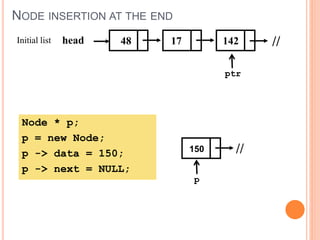
NODE INSERTION AT THE END
48 17 142head //Initial list
ptr
Node * p;
p = new Node;
p -> data = 150;
p -> next = NULL;
150 //
p
NODE INSERTION AT THE END
48 17 142head
ptr
Node * p;
p = new Node;
p -> data = 150;
p -> next = NULL;
ptr -> next = p;
150 //
p
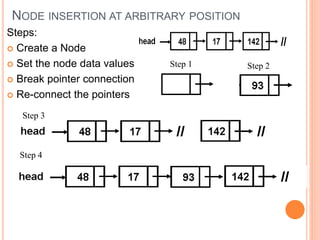
NODE INSERTION AT ARBITRARY POSITION
Steps:
 Create a Node
 Set the node data values
 Break pointer connection
 Re-connect the pointers
Step 1 Step 2
Step 3
Step 4
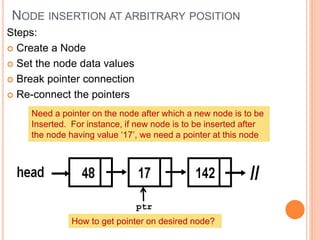
NODE INSERTION AT ARBITRARY POSITION
Steps:
 Create a Node
 Set the node data values
 Break pointer connection
 Re-connect the pointers
Need a pointer on the node after which a new node is to be
Inserted. For instance, if new node is to be inserted after
the node having value ‘17’, we need a pointer at this node
ptr
How to get pointer on desired node?
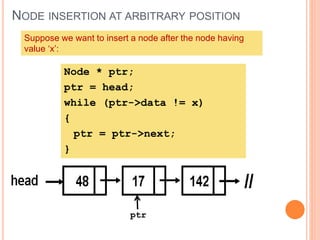
NODE INSERTION AT ARBITRARY POSITION
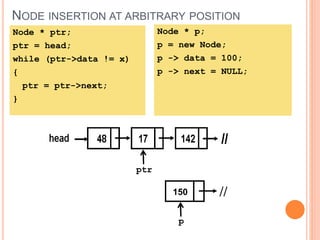
Suppose we want to insert a node after the node having
value ‘x’:
ptr
Node * ptr;
ptr = head;
while (ptr->data != x)
{
ptr = ptr->next;
}
NODE INSERTION AT ARBITRARY POSITION
ptr
Node * ptr;
ptr = head;
while (ptr->data != x)
{
ptr = ptr->next;
}
Node * p;
p = new Node;
p -> data = 100;
p -> next = NULL;
150 //
p
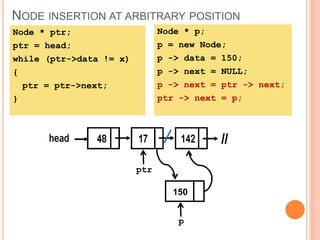
NODE INSERTION AT ARBITRARY POSITION
ptr
Node * ptr;
ptr = head;
while (ptr->data != x)
{
ptr = ptr->next;
}
Node * p;
p = new Node;
p -> data = 150;
p -> next = NULL;
p -> next = ptr -> next;
ptr -> next = p;
150
p
NODE DELETION
 Deleting from the beginning of the list
 Deleting from the end of the list
 Deleting from the middle of the list
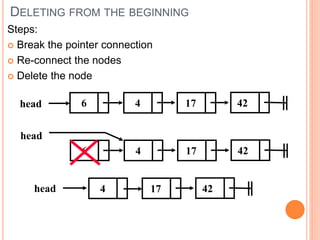
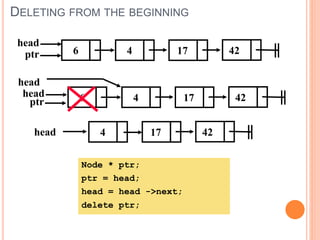
DELETING FROM THE BEGINNING
Steps:
 Break the pointer connection
 Re-connect the nodes
 Delete the node
4 17head 426
4 17
head
426
4 17head 42
DELETING FROM THE BEGINNING
4 17
head
426
head
4 17 426
4 17head 42
Node * ptr;
ptr = head;
head = head ->next;
delete ptr;
ptr
ptr
head
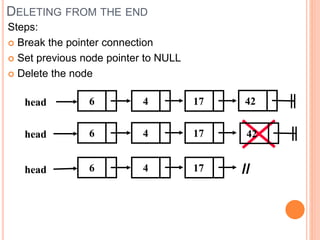
DELETING FROM THE END
Steps:
 Break the pointer connection
 Set previous node pointer to NULL
 Delete the node
4 17head 426
4 17head 426
4 176head
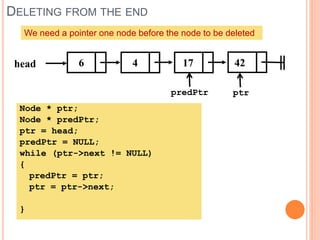
DELETING FROM THE END
4 17head 426
We need a pointer one node before the node to be deleted
predPtr
Node * ptr;
Node * predPtr;
ptr = head;
predPtr = NULL;
while (ptr->next != NULL)
{
predPtr = ptr;
ptr = ptr->next;
}
ptr
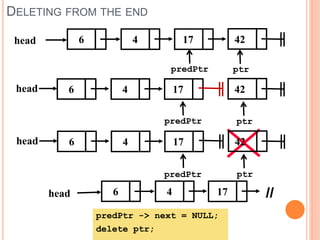
DELETING FROM THE END
4 176head
predPtr -> next = NULL;
delete ptr;
4 17head 426
predPtr ptr
4 17head 426
predPtr ptr
4 17head 426
predPtr ptr
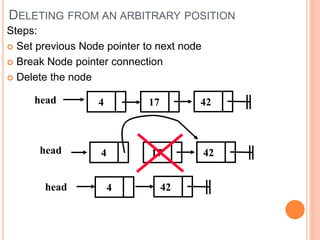
DELETING FROM AN ARBITRARY POSITION
Steps:
 Set previous Node pointer to next node
 Break Node pointer connection
 Delete the node
4 17 42head
4 17head 42
4head 42
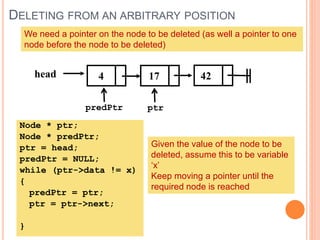
DELETING FROM AN ARBITRARY POSITION
4 17 42head
We need a pointer on the node to be deleted (as well a pointer to one
node before the node to be deleted)
predPtr ptr
Node * ptr;
Node * predPtr;
ptr = head;
predPtr = NULL;
while (ptr->data != x)
{
predPtr = ptr;
ptr = ptr->next;
}
Given the value of the node to be
deleted, assume this to be variable
‘x’
Keep moving a pointer until the
required node is reached
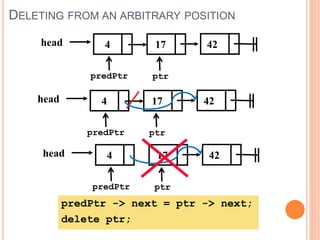
DELETING FROM AN ARBITRARY POSITION
4 17 42head
predPtr ptr
predPtr -> next = ptr -> next;
delete ptr;
4 17 42head
predPtr ptr
4 17 42head
predPtr ptr
PROS AND CONS OF LINKED LISTS
• Access any item as long as external link to first item
maintained
• Insert new item without shifting
• Delete existing item without shifting
• Can expand/contract as necessary
• Overhead of links: used only internally, pure overhead
• No longer have direct access to each element of the
list
• We must go through first element, and then second,
and then third, etc. 57

Linked lists a

  • 1.
  • 2.
    WHAT IS ALIST?  A list is a collection of items:  It can have an arbitrary length  Objects / elements can be inserted or removed at arbitrary locations in the list  A list can be traversed in order one item at a time 2
  • 3.
    LIST AS ANADT  A list is a finite sequence (possibly empty) of elements with basic operations that vary from one application to another.  Basic operations commonly include:  Construction: Allocate and initialize a list object (usually empty)  Empty: Check if list is empty  Insert: Add an item to the list at any point  Delete: Remove an item from the list at any point  Traverse: Visiting each node of list 3
  • 4.
    VARIATIONS OF LINKEDLISTS  Singly linked lists  Circular linked lists  Doubly linked lists  Circular doubly linked list 4
  • 5.
    LINKED LIST Minimal Requirements Locate the first element  Given the location of any list element, find its successor  Determine if at the end of the list 5
  • 6.
    LINKED LIST TERMINOLOGIES Traversal of List  Means to visit every element or node in the list beginning from first to last.  Predecessor and Successor  In the list of elements, for any location n, (n-1) is predecessor and (n+1) is successor  In other words, for any location n in the list, the left element is predecessor and the right element is successor.  Also, the first element does not have predecessor and the last element does not have successor. 6
  • 7.
    LINKED LISTS  Alinked list is a series of connected nodes  Each node contains at least  A piece of data (any type)  Pointer to the next node in the list  Head: pointer to the first node  The last node points to NULL A  Head B C A data pointer node 7
  • 8.
    LISTS – ANOTHERPERSPECTIVE A list is a linear collection of varying length of homogeneous components. Homogeneous: All components are of the same type. Linear: Components are ordered in a line (hence called Linear linked lists). 8
  • 9.
    ARRAYS VS LISTS •Arrays are lists that have a fixed size in memory. • The programmer must keep track of the length of the array • No matter how many elements of the array are used in a program, the array has the same amount of allocated space. • Array elements are stored in successive memory locations. Also, order of elements stored in array is same logically and physically. 9
  • 10.
    • A linkedlist takes up only as much space in memory as is needed for the length of the list. • The list expands or contracts as you add or delete elements. • In linked list the elements are not stored in successive memory location • Elements can be added to (or deleted from) either end, or added to (or deleted from)the middle of the list. ARRAYS VS LISTS 10
  • 11.
    ARRAY VERSUS LINKEDLISTS  Linked lists are more complex to code and manage than arrays, but they have some distinct advantages.  Dynamic: a linked list can easily grow and shrink in size.  We don’t need to know how many nodes will be in the list. They are created in memory as needed.  In contrast, the size of a C++ array is fixed at compilation time.  Easy and fast insertions and deletions  To insert or delete an element in an array, we need to copy to temporary variables to make room for new elements or close the gap caused by deleted elements.  With a linked list, no need to move other nodes. Only need to reset some pointers. 11
  • 12.
  • 13.
    BASIC OPERATIONS OFLINKED LIST  Linked List, a linear collection of data items, called nodes, where order is given y means of pointers.  Elements:  Each node is divided into two parts:  Information  Link ( pointing towards the next node)  (Common) Operations of Linked List  IsEmpty: determine whether or not the list is empty  InsertNode: insert a new node at a particular position  FindNode: find a node with a given value  DeleteNode: delete a node with a given value  DisplayList: print all the nodes in the list 13
  • 14.
    AN INTEGER LINKEDLIST list 10 13 5 2 First Node of List data next NULL Last Node of List 14
  • 15.
    CREATING A LISTNODE p 10 struct Node { int data; // data in node Node *next; // Pointer to next node }; Node *p; p = new Node; p - > data = 10; p - > next = NULL; 15
  • 16.
    CREATING A LISTNODE p 10 class Node { public: int data; // data in node Node *next; // Pointer to next node }; Node *p; p = new Node; p - > data = 10; p - > next = NULL; 16 To avoid get/set methods
  • 17.
    THE NULL POINTER NULLis a special pointer value that does not reference any memory cell. If a pointer is not currently in use, it should be set to NULL so that one can determine that it is not pointing to a valid address: int *p; p = NULL; 17
  • 18.
  • 19.
    AN INTEGER (SINGLY)LINKED LIST list 10 13 5 2 First Node of List data next NULL Last Node of List class Node { public: int data; Node *next; }; Basic Concepts 19
  • 20.
    JOINING TWO NODES Node*p, *q; p = new Node; p - > data = 10; p - > next = NULL; q = new Node; q - > data = 6; q - > next = NULL; p - > next = q; p 10 q 6 6p 10 q Basic Concepts 20
  • 21.
    ACCESSING LIST DATA Expression p p- > data p - > next p - > next - > data p - > next - > next 6p 10 Node 1 Node 2 Value Pointer to first node (head) 10 Pointer to next node 6 NULL pointer Basic Concepts 21
  • 22.
    BUILDING A LISTFROM 1 TO N class Node { public: int data; Node *next; }; Node *head = NULL; // pointer to the list head Node *lastNodePtr = NULL; // pointer to last node head lastNodePtr Basic Concepts 23
  • 23.
    CREATING THE FIRSTNODE Node *ptr; // declare a pointer to Node ptr = new Node; // create a new Node ptr - > data = 1; ptr - > next = NULL; head = ptr; // new node is first lastNodePtr = ptr; // and last node in list head 1 ptr lastNodePtr Basic Concepts 24
  • 24.
    ADDING MORE NODES for(int i = 2; i < = n; i ++ ) { ptr = new Node; ptr - > data = i; ptr - > next = NULL; lastNodePtr - > next = ptr; // order is lastNodePtr = ptr; // important } 2head 1 ptr lastNodePtr Basic Concepts 25
  • 25.
    2head 1 ptr lastNodePtr 2head 1 ptr lastNodePtr 3 •Createa new node with data field set to 3 •Its next pointer should point to NULL Initially Basic Concepts 26
  • 26.
    2head 1 ptr lastNodePtr 2head 1 ptr lastNodePtr 3 Thenext pointer of the node which was previously last should now point to newly created node “lastNodePtr->next=ptr” Basic Concepts 27
  • 27.
    2head 1 ptr lastNodePtr 2head 1 ptr lastNodePtr 3 Thenext pointer of the node which was previously last should now point to newly created node “lastNodePtr->next=ptr” Basic Concepts 28
  • 28.
    2head 1 ptr lastNodePtr 2head 1 ptr lastNodePtr 3 LastNodePtrshould now point to the newly created Node “lastNodePtr = ptr;” Basic Concepts 29
  • 29.
  • 30.
    BASIC LINKED LISTOPERATIONS  Traversing through the list  Node Insertion  Insertion at the beginning of the list  Insertion at the end of the list  Insertion in the middle of the list  Node Deletion  Deletion at the beginning of the list  Deletion at the end of the list  Deletion from the middle of the list 31
  • 31.
  • 32.
    TRAVERSING THE LIST 33 ptr= first; while (ptr != null_value) { Process data part of node pointed to by ptr ptr = next part of node pointed to by ptr; }
  • 33.
    34 9 17 2226 34first ptr 9 17 22 26 34first ptr .. . 9 17 22 26 34first ptr 9 17 22 26 34first ptr ptr = first; while (ptr != null_value) { Process data part of node pointed to by ptr; ptr = next part of node pointed to by ptr; }
  • 34.
    TRAVERSING THE LIST 35 Node* currNode; currNode = head; while (currNode != NULL) { cout<< currNode->data; currNode = currNode->next; }
  • 35.
    NODE INSERTION  Insertionat the beginning of the list  Insertion at the end of the list  Insertion in the middle of the list 36
  • 36.
    NODE INSERTION ATTHE BEGINNING Steps:  Create a node  Set the node data values  Connect the pointers 48 17 142head // Step 1 Step 2 Initial list List after Step 3 head 93
  • 37.
    NODE INSERTION ATTHE BEGINNING 48 17 142head //Initial list head Node *ptr; ptr = new Node; ptr - > data = 93; ptr - > next = head; head = ptr; 93 head 93 Rearrange: ptr ptr head
  • 38.
    NODE INSERTION ATTHE END Steps:  Create a Node  Set the node data values  Connect the pointers 48 17 142head // Step 1 Step 2 List after Step 3 Initial list
  • 39.
    NODE INSERTION ATTHE END 48 17 142head //Initial list ptr Node * ptr; ptr = head; while (ptr->next != NULL) { ptr = ptr->next; } Need a pointer at the last node
  • 40.
    NODE INSERTION ATTHE END 48 17 142head //Initial list ptr Node * p; p = new Node; p -> data = 150; p -> next = NULL; 150 // p
  • 41.
    NODE INSERTION ATTHE END 48 17 142head ptr Node * p; p = new Node; p -> data = 150; p -> next = NULL; ptr -> next = p; 150 // p
  • 42.
    NODE INSERTION ATARBITRARY POSITION Steps:  Create a Node  Set the node data values  Break pointer connection  Re-connect the pointers Step 1 Step 2 Step 3 Step 4
  • 43.
    NODE INSERTION ATARBITRARY POSITION Steps:  Create a Node  Set the node data values  Break pointer connection  Re-connect the pointers Need a pointer on the node after which a new node is to be Inserted. For instance, if new node is to be inserted after the node having value ‘17’, we need a pointer at this node ptr How to get pointer on desired node?
  • 44.
    NODE INSERTION ATARBITRARY POSITION Suppose we want to insert a node after the node having value ‘x’: ptr Node * ptr; ptr = head; while (ptr->data != x) { ptr = ptr->next; }
  • 45.
    NODE INSERTION ATARBITRARY POSITION ptr Node * ptr; ptr = head; while (ptr->data != x) { ptr = ptr->next; } Node * p; p = new Node; p -> data = 100; p -> next = NULL; 150 // p
  • 46.
    NODE INSERTION ATARBITRARY POSITION ptr Node * ptr; ptr = head; while (ptr->data != x) { ptr = ptr->next; } Node * p; p = new Node; p -> data = 150; p -> next = NULL; p -> next = ptr -> next; ptr -> next = p; 150 p
  • 47.
    NODE DELETION  Deletingfrom the beginning of the list  Deleting from the end of the list  Deleting from the middle of the list
  • 48.
    DELETING FROM THEBEGINNING Steps:  Break the pointer connection  Re-connect the nodes  Delete the node 4 17head 426 4 17 head 426 4 17head 42
  • 49.
    DELETING FROM THEBEGINNING 4 17 head 426 head 4 17 426 4 17head 42 Node * ptr; ptr = head; head = head ->next; delete ptr; ptr ptr head
  • 50.
    DELETING FROM THEEND Steps:  Break the pointer connection  Set previous node pointer to NULL  Delete the node 4 17head 426 4 17head 426 4 176head
  • 51.
    DELETING FROM THEEND 4 17head 426 We need a pointer one node before the node to be deleted predPtr Node * ptr; Node * predPtr; ptr = head; predPtr = NULL; while (ptr->next != NULL) { predPtr = ptr; ptr = ptr->next; } ptr
  • 52.
    DELETING FROM THEEND 4 176head predPtr -> next = NULL; delete ptr; 4 17head 426 predPtr ptr 4 17head 426 predPtr ptr 4 17head 426 predPtr ptr
  • 53.
    DELETING FROM ANARBITRARY POSITION Steps:  Set previous Node pointer to next node  Break Node pointer connection  Delete the node 4 17 42head 4 17head 42 4head 42
  • 54.
    DELETING FROM ANARBITRARY POSITION 4 17 42head We need a pointer on the node to be deleted (as well a pointer to one node before the node to be deleted) predPtr ptr Node * ptr; Node * predPtr; ptr = head; predPtr = NULL; while (ptr->data != x) { predPtr = ptr; ptr = ptr->next; } Given the value of the node to be deleted, assume this to be variable ‘x’ Keep moving a pointer until the required node is reached
  • 55.
    DELETING FROM ANARBITRARY POSITION 4 17 42head predPtr ptr predPtr -> next = ptr -> next; delete ptr; 4 17 42head predPtr ptr 4 17 42head predPtr ptr
  • 56.
    PROS AND CONSOF LINKED LISTS • Access any item as long as external link to first item maintained • Insert new item without shifting • Delete existing item without shifting • Can expand/contract as necessary • Overhead of links: used only internally, pure overhead • No longer have direct access to each element of the list • We must go through first element, and then second, and then third, etc. 57