DATA STRUCTURES AND
ALGORITHM
Linked
List
Disclaimer Statement
◻ In preparation of these slides, materials have been
taken from different online sources in the shape of
books, websites, research papers and presentations etc.
However, the author does not have any intention to take
any benefit of these in her/his own name. This lecture
(audio, video, slides etc) is prepared and delivered only
for educational purposes and is not intended to infringe
upon the copyrighted material. Sources have been
acknowledged where applicable. The views expressed
are presenter’s alone and do not necessarily represent
actual author(s) or the institution.
Definition - List
3
◻ A list is a collection of items that has a
particular order
� It can have an arbitrary length
� Objects / elements can be inserted or removed at
arbitrary locations in the list
� A list can be traversed in order one item at a time
List Overview
4
◻ Linked lists
� Abstract data type (ADT)
◻ Basic operations of linked lists
� Insert, find, delete, print, etc.
◻ Variations of linked lists
� Singly linked lists
� Circular linked lists
� Doubly linked lists
� Circular doubly linked list
Linked List Terminologies
5
◻ Traversal of List
� Means to visit every element or node in the list
beginning from first to last.
◻ Predecessor and Successor
� In the list of elements, for any location n, (n-1) is
predecessor and (n+1) is successor.
� In other words, for any location n in the list, the left
element is predecessor and the right element is
successor.
� Also, the first element does not have predecessor and
the last element does not have successor.
Linked Lists
6
◻ A linked list is a series of connected nodes
◻ Each node contains at least
� A piece of data (any type)
� Pointer to the next node in the list
◻ Head: pointer to the first node
◻ The last node points to NULL
A ∅
Head
B C
A
data pointer
node
Lists – Another perspective
7
❑A list is a linear collection of varying length of
homogeneous components.
❑Homogeneous: All components are of the
same type.
❑Linear: Components are ordered in a line
(hence called Linear linked lists).
Arrays are lists..
Arrays Vs Lists
8
• Arrays are lists that have a fixed size in memory.
• The programmer must keep track of the length of the
array
• No matter how many elements of the array are used
in a program, the array has the same amount of
allocated space.
• Array elements are stored in successive memory
locations. Also, order of elements stored in array is
same logically and physically.
• A linked list takes up only as much space in memory
as is needed for the length of the list.
• The list expands or contracts as you add or delete
elements.
• In linked list the elements are not stored in successive
memory location
• Elements can be added to (or deleted from) either
end, or added to (or deleted from)the middle of the
list.
Arrays Vs Lists
9
Array versus Linked Lists
10
◻ Linked lists are more complex to code and manage
than arrays, but they have some distinct advantages.
� Dynamic: a linked list can easily grow and shrink in size.
■ We don’t need to know how many nodes will be in the list.
They are created in memory as needed.
■ In contrast, the size of a C++ array is fixed at compilation
time.
� Easy and fast insertions and deletions
■ To insert or delete an element in an array, we need to copy
to temporary variables to make room for new elements or
close the gap caused by deleted elements.
■ With a linked list, no need to move other nodes. Only need
to reset some pointers.
An Array
11
A Linked List
Array versus Linked Lists
Basic Operations of Linked List
12
◻ Operations of Linked List
� IsEmpty: determine whether or not the list is
empty
� InsertNode: insert a new node at a particular
position
� FindNode: find a node with a given value
� DeleteNode: delete a node with a given value
� DisplayList: print all the nodes in the list
An integer linked list
13
list
10 13 5 2
First Node of List
data next NULL
Last Node of List
Creating a List node
14
p 10
struct Node {
int data; // data in node
Node *next; // Pointer to next node
};
Node *p;
p = new Node;
p - > data = 10;
p - > next = NULL;
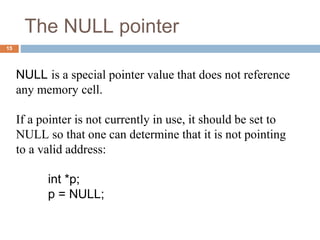
The NULL pointer
15
NULL is a special pointer value that does not reference
any memory cell.
If a pointer is not currently in use, it should be set to
NULL so that one can determine that it is not pointing
to a valid address:
int *p;
p = NULL;
Insert at First
Insert at End
Insert in middle/random position
Adding node to a List
Adding a node to a list
17
Node *p, *q;
p = new Node;
p - > data = 10;
p - > next = NULL;
q = new Node;
q - > data = 6;
q - > next = NULL;
p - > next = q;
p 10
q 6
6
p 10
q
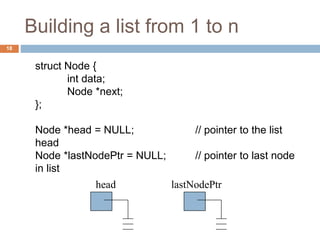
Building a list from 1 to n
18
struct Node {
int data;
Node *next;
};
Node *head = NULL; // pointer to the list
head
Node *lastNodePtr = NULL; // pointer to last node
in list
head lastNodePtr
Creating the first node
19
Node *ptr; // declare a pointer to Node
ptr = new Node; // create a new Node
ptr - > data = 1;
ptr - > next = NULL;
head = ptr; // new node is first
lastNodePtr = ptr; // and last node in list
head 1
ptr
lastNodePtr
Insert at beginning
◻ Insert at beginning is same as in stacks.
Adding an Element to the front
of a Linked List
Adding an Element to the front
of a Linked List
Adding an Element to the front
of a Linked List
Adding an Element to the front
of a Linked List
Inserting at End
◻ Inserting at end is same as we covered in
queues
2
head 1
lastNodePtr
Initially
2
head 1
ptr
lastNodePtr
3
•Create a new node with data field set to 3
•Its next pointer should point to NULL
2
head 1
ptr
lastNodePtr
3
•The next pointer of the node which was
previously last should now point to newly created
node “lastNodePtr->next=ptr”
27
2
head 1
lastNodePtr
2
head 1
ptr
lastNodePtr
3
•The next pointer of the node which was
previously last should now point to newly created
node “lastNodePtr->next=ptr”
•LastNodePtr should now point to the newly
created Node “lastNodePtr = ptr;”
28
2
head 1
ptr
lastNodePtr
2
head 1
ptr
lastNodePtr
3
•LastNodePtr should now point to the newly
created Node “lastNodePtr = ptr;”
29
3
head 1
ptr
lastNodePtr
2
Re-arranging the view
30
Accessing List Data
31
Expression
p
p - > data
p - > next
p - > next - > data
p - > next - > next
6
p 10
Node 1 Node 2
Value
Pointer to first node (head)
10
Pointer to next node
6
NULL pointer
Adding more nodes
32
{
ptr = new Node; //create new node
ptr - > data = i;
ptr - > next = NULL;
lastNodePtr - > next = ptr; // order is
lastNodePtr = ptr; // important
}
2
head 1
ptr
lastNodePtr
Inserting a node randomly
Random Insert
34
8
head 2 5
prevNode currNode
Step 1: Determine where you want to insert a node.
Step 2: Create a new node:
Node *ptr;
ptr = new Node;
ptr - > data = 6;
ptr
6 ?
Node *ptr, *currNode, *prevNode ;
ptr = new Node;
ptr->data = 6;
ptr->next = NULL;
prevNode = head;
currNode = head->next;
While (currNode->data < ptr->data)
{
prevNode = currNode;
currNode = currNode->next;
}
Note:
when this loop terminates prevNode and currNode are at a
place where insertion will take place. Only the “LINKS” or
pointers of the list remain to be adjusted
35
Continuing the insert
36
Step 3: Make the new node point to the current Node pointer.
ptr - > next = currNode;
Step 4: Make previous node point to the new node:
prevNode - > next = ptr;
8
head 2 5
prevNode
currNode
ptr
6
Now The new link has been added in the linked list
Deletion from Front
Deletion from Last
Random Deletion
Deletion
◻ Deletion from front:
� Same as stack or queue
� Head = head->next
Deleting a node from a list
39
8
head 2 5
prevNode delNode
Step 1: Redirect pointer from the Node before the one to be deleted
to point to the Node after the one to be deleted.
prevNode - > next = delNode - > next;
8
head 2 5
prevNode delNode
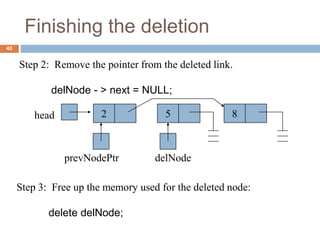
Finishing the deletion
40
Step 2: Remove the pointer from the deleted link.
delNode - > next = NULL;
8
head 2 5
prevNodePtr delNode
Step 3: Free up the memory used for the deleted node:
delete delNode;
List Operations - Summarized
41
Traversing a Linked List
42
Insertion in a Linked List
43
Deletion from a Linked List
44

DS_LinkedList.pptx

  • 1.
  • 2.
    Disclaimer Statement ◻ Inpreparation of these slides, materials have been taken from different online sources in the shape of books, websites, research papers and presentations etc. However, the author does not have any intention to take any benefit of these in her/his own name. This lecture (audio, video, slides etc) is prepared and delivered only for educational purposes and is not intended to infringe upon the copyrighted material. Sources have been acknowledged where applicable. The views expressed are presenter’s alone and do not necessarily represent actual author(s) or the institution.
  • 3.
    Definition - List 3 ◻A list is a collection of items that has a particular order � It can have an arbitrary length � Objects / elements can be inserted or removed at arbitrary locations in the list � A list can be traversed in order one item at a time
  • 4.
    List Overview 4 ◻ Linkedlists � Abstract data type (ADT) ◻ Basic operations of linked lists � Insert, find, delete, print, etc. ◻ Variations of linked lists � Singly linked lists � Circular linked lists � Doubly linked lists � Circular doubly linked list
  • 5.
    Linked List Terminologies 5 ◻Traversal of List � Means to visit every element or node in the list beginning from first to last. ◻ Predecessor and Successor � In the list of elements, for any location n, (n-1) is predecessor and (n+1) is successor. � In other words, for any location n in the list, the left element is predecessor and the right element is successor. � Also, the first element does not have predecessor and the last element does not have successor.
  • 6.
    Linked Lists 6 ◻ Alinked list is a series of connected nodes ◻ Each node contains at least � A piece of data (any type) � Pointer to the next node in the list ◻ Head: pointer to the first node ◻ The last node points to NULL A ∅ Head B C A data pointer node
  • 7.
    Lists – Anotherperspective 7 ❑A list is a linear collection of varying length of homogeneous components. ❑Homogeneous: All components are of the same type. ❑Linear: Components are ordered in a line (hence called Linear linked lists). Arrays are lists..
  • 8.
    Arrays Vs Lists 8 •Arrays are lists that have a fixed size in memory. • The programmer must keep track of the length of the array • No matter how many elements of the array are used in a program, the array has the same amount of allocated space. • Array elements are stored in successive memory locations. Also, order of elements stored in array is same logically and physically.
  • 9.
    • A linkedlist takes up only as much space in memory as is needed for the length of the list. • The list expands or contracts as you add or delete elements. • In linked list the elements are not stored in successive memory location • Elements can be added to (or deleted from) either end, or added to (or deleted from)the middle of the list. Arrays Vs Lists 9
  • 10.
    Array versus LinkedLists 10 ◻ Linked lists are more complex to code and manage than arrays, but they have some distinct advantages. � Dynamic: a linked list can easily grow and shrink in size. ■ We don’t need to know how many nodes will be in the list. They are created in memory as needed. ■ In contrast, the size of a C++ array is fixed at compilation time. � Easy and fast insertions and deletions ■ To insert or delete an element in an array, we need to copy to temporary variables to make room for new elements or close the gap caused by deleted elements. ■ With a linked list, no need to move other nodes. Only need to reset some pointers.
  • 11.
    An Array 11 A LinkedList Array versus Linked Lists
  • 12.
    Basic Operations ofLinked List 12 ◻ Operations of Linked List � IsEmpty: determine whether or not the list is empty � InsertNode: insert a new node at a particular position � FindNode: find a node with a given value � DeleteNode: delete a node with a given value � DisplayList: print all the nodes in the list
  • 13.
    An integer linkedlist 13 list 10 13 5 2 First Node of List data next NULL Last Node of List
  • 14.
    Creating a Listnode 14 p 10 struct Node { int data; // data in node Node *next; // Pointer to next node }; Node *p; p = new Node; p - > data = 10; p - > next = NULL;
  • 15.
    The NULL pointer 15 NULLis a special pointer value that does not reference any memory cell. If a pointer is not currently in use, it should be set to NULL so that one can determine that it is not pointing to a valid address: int *p; p = NULL;
  • 16.
    Insert at First Insertat End Insert in middle/random position Adding node to a List
  • 17.
    Adding a nodeto a list 17 Node *p, *q; p = new Node; p - > data = 10; p - > next = NULL; q = new Node; q - > data = 6; q - > next = NULL; p - > next = q; p 10 q 6 6 p 10 q
  • 18.
    Building a listfrom 1 to n 18 struct Node { int data; Node *next; }; Node *head = NULL; // pointer to the list head Node *lastNodePtr = NULL; // pointer to last node in list head lastNodePtr
  • 19.
    Creating the firstnode 19 Node *ptr; // declare a pointer to Node ptr = new Node; // create a new Node ptr - > data = 1; ptr - > next = NULL; head = ptr; // new node is first lastNodePtr = ptr; // and last node in list head 1 ptr lastNodePtr
  • 20.
    Insert at beginning ◻Insert at beginning is same as in stacks.
  • 21.
    Adding an Elementto the front of a Linked List
  • 22.
    Adding an Elementto the front of a Linked List
  • 23.
    Adding an Elementto the front of a Linked List
  • 24.
    Adding an Elementto the front of a Linked List
  • 25.
    Inserting at End ◻Inserting at end is same as we covered in queues 2 head 1 lastNodePtr Initially
  • 26.
    2 head 1 ptr lastNodePtr 3 •Create anew node with data field set to 3 •Its next pointer should point to NULL
  • 27.
    2 head 1 ptr lastNodePtr 3 •The nextpointer of the node which was previously last should now point to newly created node “lastNodePtr->next=ptr” 27
  • 28.
    2 head 1 lastNodePtr 2 head 1 ptr lastNodePtr 3 •Thenext pointer of the node which was previously last should now point to newly created node “lastNodePtr->next=ptr” •LastNodePtr should now point to the newly created Node “lastNodePtr = ptr;” 28
  • 29.
    2 head 1 ptr lastNodePtr 2 head 1 ptr lastNodePtr 3 •LastNodePtrshould now point to the newly created Node “lastNodePtr = ptr;” 29
  • 30.
  • 31.
    Accessing List Data 31 Expression p p- > data p - > next p - > next - > data p - > next - > next 6 p 10 Node 1 Node 2 Value Pointer to first node (head) 10 Pointer to next node 6 NULL pointer
  • 32.
    Adding more nodes 32 { ptr= new Node; //create new node ptr - > data = i; ptr - > next = NULL; lastNodePtr - > next = ptr; // order is lastNodePtr = ptr; // important } 2 head 1 ptr lastNodePtr
  • 33.
  • 34.
    Random Insert 34 8 head 25 prevNode currNode Step 1: Determine where you want to insert a node. Step 2: Create a new node: Node *ptr; ptr = new Node; ptr - > data = 6; ptr 6 ?
  • 35.
    Node *ptr, *currNode,*prevNode ; ptr = new Node; ptr->data = 6; ptr->next = NULL; prevNode = head; currNode = head->next; While (currNode->data < ptr->data) { prevNode = currNode; currNode = currNode->next; } Note: when this loop terminates prevNode and currNode are at a place where insertion will take place. Only the “LINKS” or pointers of the list remain to be adjusted 35
  • 36.
    Continuing the insert 36 Step3: Make the new node point to the current Node pointer. ptr - > next = currNode; Step 4: Make previous node point to the new node: prevNode - > next = ptr; 8 head 2 5 prevNode currNode ptr 6 Now The new link has been added in the linked list
  • 37.
    Deletion from Front Deletionfrom Last Random Deletion Deletion
  • 38.
    ◻ Deletion fromfront: � Same as stack or queue � Head = head->next
  • 39.
    Deleting a nodefrom a list 39 8 head 2 5 prevNode delNode Step 1: Redirect pointer from the Node before the one to be deleted to point to the Node after the one to be deleted. prevNode - > next = delNode - > next; 8 head 2 5 prevNode delNode
  • 40.
    Finishing the deletion 40 Step2: Remove the pointer from the deleted link. delNode - > next = NULL; 8 head 2 5 prevNodePtr delNode Step 3: Free up the memory used for the deleted node: delete delNode;
  • 41.
    List Operations -Summarized 41
  • 42.
  • 43.
    Insertion in aLinked List 43
  • 44.
    Deletion from aLinked List 44