Chapter 2
Instructions: Language
of the Computer
Data Representation
Integers
A decimal example
  2734 = 2 * 103 + 7 * 102 + 3 * 101 + 4 * 100
A binary example
  [01011]2 = 0 * 24 + 1 * 23 + 0 * 22 + 1 * 21 + 1 * 20 = [11] 10

Unsigned
 Unsigned integers are positive
    (or to be more precise, do not have a sign)


     Using 32 bits
        0 to +4,294,967,295


                                 Chapter 2 — Instructions: Language of the Computer — 2
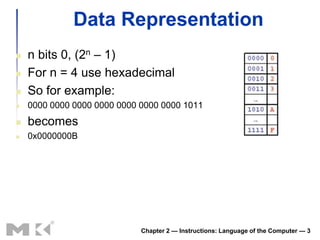
Data Representation
   n bits 0, (2n – 1)
   For n = 4 use hexadecimal
   So for example:
   0000 0000 0000 0000 0000 0000 0000 1011
   becomes
   0x0000000B


                             Chapter 2 — Instructions: Language of the Computer — 3
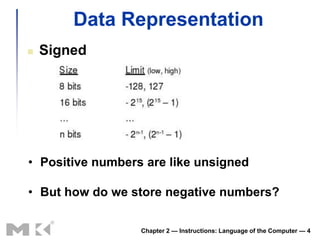
Data Representation
   Signed


• Positive numbers are like unsigned

• But how do we store negative numbers?

                  Chapter 2 — Instructions: Language of the Computer — 4
How do we store negative numbers?
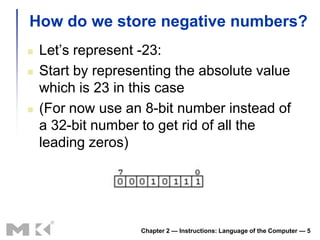
   Let’s represent -23:
   Start by representing the absolute value
    which is 23 in this case
   (For now use an 8-bit number instead of
    a 32-bit number to get rid of all the
    leading zeros)


                    Chapter 2 — Instructions: Language of the Computer — 5
Negative Numbers
   Could leave leftmost bit for sign
      0 for positive, 1 for negative

      Lead to problems
      Two zeros (0 and -0) which can be a big problem

         Could create infinite loops

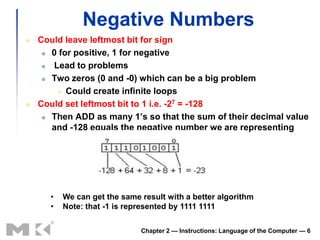
   Could set leftmost bit to 1 i.e. -27 = -128
      Then ADD as many 1’s so that the sum of their decimal value

       and -128 equals the negative number we are representing


      •   We can get the same result with a better algorithm
      •   Note: that -1 is represented by 1111 1111

                              Chapter 2 — Instructions: Language of the Computer — 6
2’s Complement
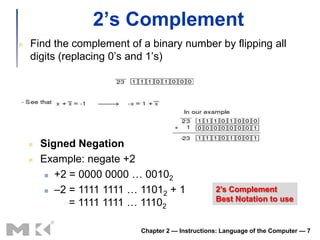
   Find the complement of a binary number by flipping all
    digits (replacing 0’s and 1’s)


       Signed Negation
       Example: negate +2
          +2 = 0000 0000 … 00102

          –2 = 1111 1111 … 11012 + 1              2’s Complement
                                                   Best Notation to use
              = 1111 1111 … 11102

                            Chapter 2 — Instructions: Language of the Computer — 7
2s-Complement Signed Integers
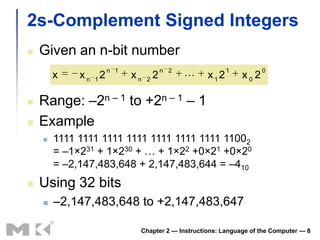
   Given an n-bit number
                      n 1                n 2             1          0
        x    x n 12         xn   2
                                     2            x12       x0 2

   Range: –2n – 1 to +2n – 1 – 1
   Example
       1111 1111 1111 1111 1111 1111 1111 11002
        = –1×231 + 1×230 + … + 1×22 +0×21 +0×20
        = –2,147,483,648 + 2,147,483,644 = –410
   Using 32 bits
       –2,147,483,648 to +2,147,483,647

                             Chapter 2 — Instructions: Language of the Computer — 8
2s-Complement Signed Integers
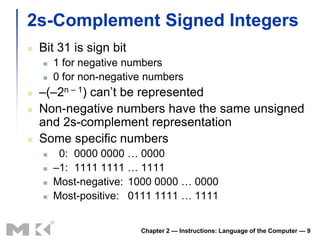
   Bit 31 is sign bit
       1 for negative numbers
       0 for non-negative numbers
   –(–2n – 1) can’t be represented
   Non-negative numbers have the same unsigned
    and 2s-complement representation
   Some specific numbers
        0: 0000 0000 … 0000
       –1: 1111 1111 … 1111
       Most-negative: 1000 0000 … 0000
       Most-positive: 0111 1111 … 1111


                         Chapter 2 — Instructions: Language of the Computer — 9
Sign Extension
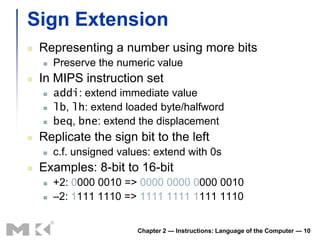
   Representing a number using more bits
       Preserve the numeric value
   In MIPS instruction set
       addi: extend immediate value
       lb, lh: extend loaded byte/halfword
       beq, bne: extend the displacement
   Replicate the sign bit to the left
       c.f. unsigned values: extend with 0s
   Examples: 8-bit to 16-bit
       +2: 0000 0010 => 0000 0000 0000 0010
       –2: 1111 1110 => 1111 1111 1111 1110


                          Chapter 2 — Instructions: Language of the Computer — 10
Data Representation
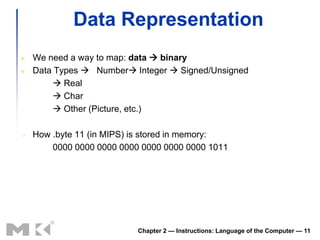
   We need a way to map: data  binary
   Data Types  Number Integer  Signed/Unsigned
          Real
          Char
          Other (Picture, etc.)

   How .byte 11 (in MIPS) is stored in memory:
        0000 0000 0000 0000 0000 0000 0000 1011


                           Chapter 2 — Instructions: Language of the Computer — 11
“Byte Ordering” (Endianess)
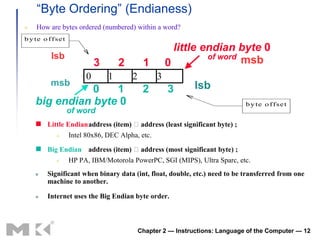
    How are bytes ordered (numbered) within a word?
b y te o f f se t
                                                         little endian byte 0
           lsb                                                   of word
                                                                         msb
                             3       2        1        0
                         0       1       2         3
           msb                                                 lsb
               0   1                          2        3
    big endian byte 0                                                          b y te o f f se t
                    of word
     Little Endianaddress (item) address (least significant byte) ;
                   Intel 80x86, DEC Alpha, etc.

     Big Endian address (item) address (most significant byte) ;
                   HP PA, IBM/Motorola PowerPC, SGI (MIPS), Ultra Sparc, etc.
        Significant when binary data (int, float, double, etc.) need to be transferred from one
         machine to another.

        Internet uses the Big Endian byte order.


                                             Chapter 2 — Instructions: Language of the Computer — 12
Memory Operands
   Main memory used for composite data
       Arrays, structures, dynamic data
   To apply arithmetic operations
       Load values from memory into registers
       Store result from register to memory
   Memory is byte addressed
       Each address identifies an 8-bit byte
   Words are aligned in memory
       Address must be a multiple of 4
   MIPS is Big Endian
       Most-significant byte at least address of a word
       c.f. Little Endian: least-significant byte at least address


                           Chapter 2 — Instructions: Language of the Computer — 13
Memory Operand Example 1
   C code:
    g = h + A[8];
      g in $s1, h in $s2, base address of A in $s3

   Compiled MIPS code:
       Index 8 requires offset of 32
            4 bytes per word
    lw $t0, 32($s3)                        # load word
    add $s1, $s2, $t0
         offset                 base register


                           Chapter 2 — Instructions: Language of the Computer — 14
Memory Operand Example 2
   C code:
    A[12] = h + A[8];
      h in $s2, base address of A in $s3

   Compiled MIPS code:
     Index 8 requires offset of 32
    lw $t0, 32($s3)             # load word
    add $t0, $s2, $t0
    sw $t0, 48($s3)             # store word


                      Chapter 2 — Instructions: Language of the Computer — 15
Registers vs. Memory
   Registers are faster to access than
    memory
   Operating on memory data requires loads
    and stores
       More instructions to be executed
   Compiler must use registers for variables
    as much as possible
       Only spill to memory for less frequently used
        variables
       Register optimization is important!

                       Chapter 2 — Instructions: Language of the Computer — 16
Immediate Operands
   Constant data specified in an instruction
    addi $s3, $s3, 4
   No subtract immediate instruction
       Just use a negative constant
        addi $s2, $s1, -1
   Design Principle 3: Make the common
    case fast
       Small constants are common
       Immediate operand avoids a load instruction

                      Chapter 2 — Instructions: Language of the Computer — 17
The Constant Zero
   MIPS register 0 ($zero) is the constant 0
       Cannot be overwritten
   Useful for common operations
       E.g., move between registers
        add $t2, $s1, $zero


                      Chapter 2 — Instructions: Language of the Computer — 18
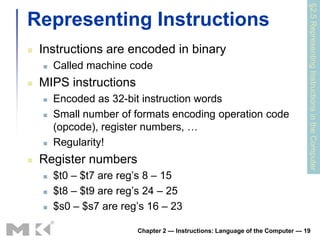
§2.5 Representing Instructions in the Computer
Representing Instructions
   Instructions are encoded in binary
       Called machine code
   MIPS instructions
       Encoded as 32-bit instruction words
       Small number of formats encoding operation code
        (opcode), register numbers, …
       Regularity!
   Register numbers
       $t0 – $t7 are reg’s 8 – 15
       $t8 – $t9 are reg’s 24 – 25
       $s0 – $s7 are reg’s 16 – 23

                         Chapter 2 — Instructions: Language of the Computer — 19
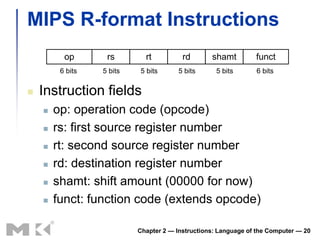
MIPS R-format Instructions
          op       rs        rt          rd       shamt         funct
         6 bits   5 bits   5 bits       5 bits      5 bits      6 bits


   Instruction fields
       op: operation code (opcode)
       rs: first source register number
       rt: second source register number
       rd: destination register number
       shamt: shift amount (00000 for now)
       funct: function code (extends opcode)

                           Chapter 2 — Instructions: Language of the Computer — 20
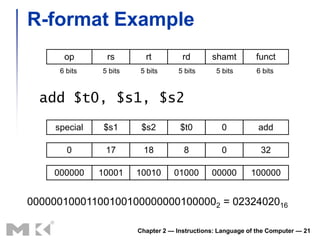
R-format Example
      op       rs        rt          rd       shamt         funct
     6 bits   5 bits   5 bits       5 bits      5 bits      6 bits


  add $t0, $s1, $s2
    special    $s1      $s2         $t0          0           add

       0       17       18           8           0            32

    000000    10001    10010      01000       00000        100000


000000100011001001000000001000002 = 0232402016

                       Chapter 2 — Instructions: Language of the Computer — 21
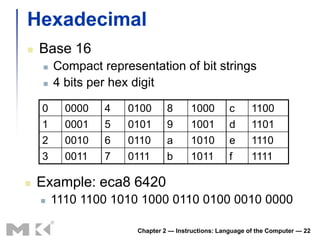
Hexadecimal
   Base 16
       Compact representation of bit strings
       4 bits per hex digit

    0     0000   4   0100       8      1000         c      1100
    1     0001   5   0101       9      1001         d      1101
    2     0010   6   0110       a      1010         e      1110
    3     0011   7   0111       b      1011         f      1111

   Example: eca8 6420
       1110 1100 1010 1000 0110 0100 0010 0000

                       Chapter 2 — Instructions: Language of the Computer — 22
MIPS I-format Instructions
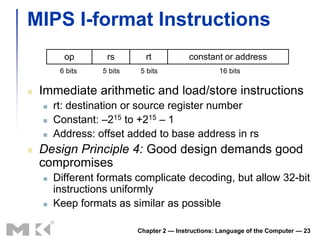
          op       rs        rt            constant or address
         6 bits   5 bits   5 bits                    16 bits

   Immediate arithmetic and load/store instructions
       rt: destination or source register number
       Constant: –215 to +215 – 1
       Address: offset added to base address in rs
   Design Principle 4: Good design demands good
    compromises
       Different formats complicate decoding, but allow 32-bit
        instructions uniformly
       Keep formats as similar as possible

                           Chapter 2 — Instructions: Language of the Computer — 23
Stored Program Computers
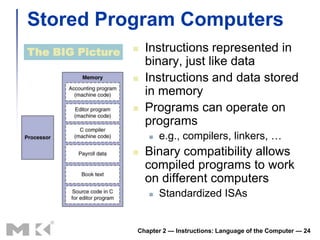
The BIG Picture      Instructions represented in
                      binary, just like data
                     Instructions and data stored
                      in memory
                     Programs can operate on
                      programs
                         e.g., compilers, linkers, …
                     Binary compatibility allows
                      compiled programs to work
                      on different computers
                         Standardized ISAs


                  Chapter 2 — Instructions: Language of the Computer — 24
§2.6 Logical Operations
Logical Operations
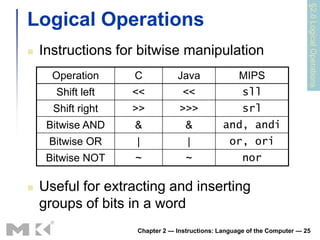
   Instructions for bitwise manipulation
      Operation     C           Java                MIPS
      Shift left    <<            <<                 sll
      Shift right   >>           >>>                 srl
     Bitwise AND    &              &           and, andi
     Bitwise OR     |              |             or, ori
     Bitwise NOT    ~              ~                 nor

   Useful for extracting and inserting
    groups of bits in a word
                    Chapter 2 — Instructions: Language of the Computer — 25
Shift Operations
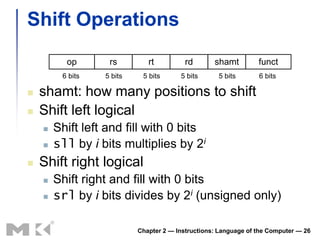
          op       rs         rt          rd       shamt         funct
         6 bits   5 bits    5 bits      5 bits      5 bits       6 bits

   shamt: how many positions to shift
   Shift left logical
       Shift left and fill with 0 bits
       sll by i bits multiplies by 2i
   Shift right logical
       Shift right and fill with 0 bits
       srl by i bits divides by 2i (unsigned only)

                           Chapter 2 — Instructions: Language of the Computer — 26
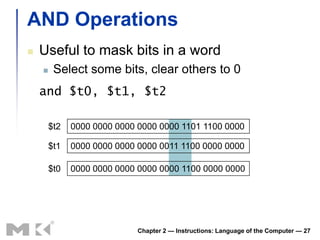
AND Operations
   Useful to mask bits in a word
        Select some bits, clear others to 0
    and $t0, $t1, $t2

        $t2   0000 0000 0000 0000 0000 1101 1100 0000

        $t1   0000 0000 0000 0000 0011 1100 0000 0000

        $t0   0000 0000 0000 0000 0000 1100 0000 0000


                             Chapter 2 — Instructions: Language of the Computer — 27
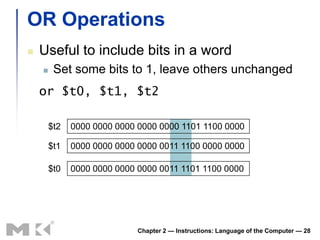
OR Operations
   Useful to include bits in a word
        Set some bits to 1, leave others unchanged
    or $t0, $t1, $t2

        $t2   0000 0000 0000 0000 0000 1101 1100 0000

        $t1   0000 0000 0000 0000 0011 1100 0000 0000

        $t0   0000 0000 0000 0000 0011 1101 1100 0000


                             Chapter 2 — Instructions: Language of the Computer — 28
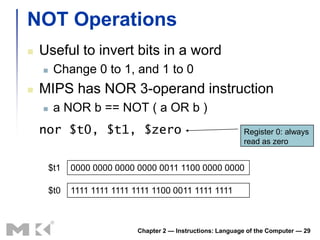
NOT Operations
   Useful to invert bits in a word
        Change 0 to 1, and 1 to 0
   MIPS has NOR 3-operand instruction
        a NOR b == NOT ( a OR b )
    nor $t0, $t1, $zero                                        Register 0: always
                                                               read as zero


        $t1   0000 0000 0000 0000 0011 1100 0000 0000

        $t0   1111 1111 1111 1111 1100 0011 1111 1111


                              Chapter 2 — Instructions: Language of the Computer — 29
§2.7 Instructions for Making Decisions
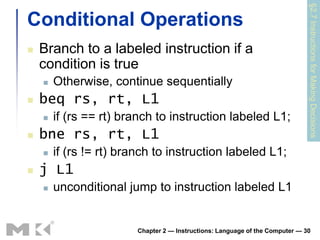
Conditional Operations
   Branch to a labeled instruction if a
    condition is true
       Otherwise, continue sequentially
   beq rs, rt, L1
       if (rs == rt) branch to instruction labeled L1;
   bne rs, rt, L1
       if (rs != rt) branch to instruction labeled L1;
   j L1
       unconditional jump to instruction labeled L1


                        Chapter 2 — Instructions: Language of the Computer — 30

Chapter 2 Part2 A

  • 1.
  • 2.
    Data Representation Integers A decimalexample  2734 = 2 * 103 + 7 * 102 + 3 * 101 + 4 * 100 A binary example  [01011]2 = 0 * 24 + 1 * 23 + 0 * 22 + 1 * 21 + 1 * 20 = [11] 10 Unsigned  Unsigned integers are positive  (or to be more precise, do not have a sign)  Using 32 bits  0 to +4,294,967,295 Chapter 2 — Instructions: Language of the Computer — 2
  • 3.
    Data Representation  n bits 0, (2n – 1)  For n = 4 use hexadecimal  So for example:  0000 0000 0000 0000 0000 0000 0000 1011  becomes  0x0000000B Chapter 2 — Instructions: Language of the Computer — 3
  • 4.
    Data Representation  Signed • Positive numbers are like unsigned • But how do we store negative numbers? Chapter 2 — Instructions: Language of the Computer — 4
  • 5.
    How do westore negative numbers?  Let’s represent -23:  Start by representing the absolute value which is 23 in this case  (For now use an 8-bit number instead of a 32-bit number to get rid of all the leading zeros) Chapter 2 — Instructions: Language of the Computer — 5
  • 6.
    Negative Numbers  Could leave leftmost bit for sign  0 for positive, 1 for negative  Lead to problems  Two zeros (0 and -0) which can be a big problem  Could create infinite loops  Could set leftmost bit to 1 i.e. -27 = -128  Then ADD as many 1’s so that the sum of their decimal value and -128 equals the negative number we are representing • We can get the same result with a better algorithm • Note: that -1 is represented by 1111 1111 Chapter 2 — Instructions: Language of the Computer — 6
  • 7.
    2’s Complement  Find the complement of a binary number by flipping all digits (replacing 0’s and 1’s)  Signed Negation  Example: negate +2  +2 = 0000 0000 … 00102  –2 = 1111 1111 … 11012 + 1 2’s Complement Best Notation to use = 1111 1111 … 11102 Chapter 2 — Instructions: Language of the Computer — 7
  • 8.
    2s-Complement Signed Integers  Given an n-bit number n 1 n 2 1 0 x x n 12 xn 2 2  x12 x0 2  Range: –2n – 1 to +2n – 1 – 1  Example  1111 1111 1111 1111 1111 1111 1111 11002 = –1×231 + 1×230 + … + 1×22 +0×21 +0×20 = –2,147,483,648 + 2,147,483,644 = –410  Using 32 bits  –2,147,483,648 to +2,147,483,647 Chapter 2 — Instructions: Language of the Computer — 8
  • 9.
    2s-Complement Signed Integers  Bit 31 is sign bit  1 for negative numbers  0 for non-negative numbers  –(–2n – 1) can’t be represented  Non-negative numbers have the same unsigned and 2s-complement representation  Some specific numbers  0: 0000 0000 … 0000  –1: 1111 1111 … 1111  Most-negative: 1000 0000 … 0000  Most-positive: 0111 1111 … 1111 Chapter 2 — Instructions: Language of the Computer — 9
  • 10.
    Sign Extension  Representing a number using more bits  Preserve the numeric value  In MIPS instruction set  addi: extend immediate value  lb, lh: extend loaded byte/halfword  beq, bne: extend the displacement  Replicate the sign bit to the left  c.f. unsigned values: extend with 0s  Examples: 8-bit to 16-bit  +2: 0000 0010 => 0000 0000 0000 0010  –2: 1111 1110 => 1111 1111 1111 1110 Chapter 2 — Instructions: Language of the Computer — 10
  • 11.
    Data Representation  We need a way to map: data  binary  Data Types  Number Integer  Signed/Unsigned  Real  Char  Other (Picture, etc.)  How .byte 11 (in MIPS) is stored in memory: 0000 0000 0000 0000 0000 0000 0000 1011 Chapter 2 — Instructions: Language of the Computer — 11
  • 12.
    “Byte Ordering” (Endianess)  How are bytes ordered (numbered) within a word? b y te o f f se t little endian byte 0 lsb of word msb 3 2 1 0 0 1 2 3 msb lsb 0 1 2 3 big endian byte 0 b y te o f f se t of word  Little Endianaddress (item) address (least significant byte) ;  Intel 80x86, DEC Alpha, etc.  Big Endian address (item) address (most significant byte) ;  HP PA, IBM/Motorola PowerPC, SGI (MIPS), Ultra Sparc, etc.  Significant when binary data (int, float, double, etc.) need to be transferred from one machine to another.  Internet uses the Big Endian byte order. Chapter 2 — Instructions: Language of the Computer — 12
  • 13.
    Memory Operands  Main memory used for composite data  Arrays, structures, dynamic data  To apply arithmetic operations  Load values from memory into registers  Store result from register to memory  Memory is byte addressed  Each address identifies an 8-bit byte  Words are aligned in memory  Address must be a multiple of 4  MIPS is Big Endian  Most-significant byte at least address of a word  c.f. Little Endian: least-significant byte at least address Chapter 2 — Instructions: Language of the Computer — 13
  • 14.
    Memory Operand Example1  C code: g = h + A[8];  g in $s1, h in $s2, base address of A in $s3  Compiled MIPS code:  Index 8 requires offset of 32  4 bytes per word lw $t0, 32($s3) # load word add $s1, $s2, $t0 offset base register Chapter 2 — Instructions: Language of the Computer — 14
  • 15.
    Memory Operand Example2  C code: A[12] = h + A[8];  h in $s2, base address of A in $s3  Compiled MIPS code:  Index 8 requires offset of 32 lw $t0, 32($s3) # load word add $t0, $s2, $t0 sw $t0, 48($s3) # store word Chapter 2 — Instructions: Language of the Computer — 15
  • 16.
    Registers vs. Memory  Registers are faster to access than memory  Operating on memory data requires loads and stores  More instructions to be executed  Compiler must use registers for variables as much as possible  Only spill to memory for less frequently used variables  Register optimization is important! Chapter 2 — Instructions: Language of the Computer — 16
  • 17.
    Immediate Operands  Constant data specified in an instruction addi $s3, $s3, 4  No subtract immediate instruction  Just use a negative constant addi $s2, $s1, -1  Design Principle 3: Make the common case fast  Small constants are common  Immediate operand avoids a load instruction Chapter 2 — Instructions: Language of the Computer — 17
  • 18.
    The Constant Zero  MIPS register 0 ($zero) is the constant 0  Cannot be overwritten  Useful for common operations  E.g., move between registers add $t2, $s1, $zero Chapter 2 — Instructions: Language of the Computer — 18
  • 19.
    §2.5 Representing Instructionsin the Computer Representing Instructions  Instructions are encoded in binary  Called machine code  MIPS instructions  Encoded as 32-bit instruction words  Small number of formats encoding operation code (opcode), register numbers, …  Regularity!  Register numbers  $t0 – $t7 are reg’s 8 – 15  $t8 – $t9 are reg’s 24 – 25  $s0 – $s7 are reg’s 16 – 23 Chapter 2 — Instructions: Language of the Computer — 19
  • 20.
    MIPS R-format Instructions op rs rt rd shamt funct 6 bits 5 bits 5 bits 5 bits 5 bits 6 bits  Instruction fields  op: operation code (opcode)  rs: first source register number  rt: second source register number  rd: destination register number  shamt: shift amount (00000 for now)  funct: function code (extends opcode) Chapter 2 — Instructions: Language of the Computer — 20
  • 21.
    R-format Example op rs rt rd shamt funct 6 bits 5 bits 5 bits 5 bits 5 bits 6 bits add $t0, $s1, $s2 special $s1 $s2 $t0 0 add 0 17 18 8 0 32 000000 10001 10010 01000 00000 100000 000000100011001001000000001000002 = 0232402016 Chapter 2 — Instructions: Language of the Computer — 21
  • 22.
    Hexadecimal  Base 16  Compact representation of bit strings  4 bits per hex digit 0 0000 4 0100 8 1000 c 1100 1 0001 5 0101 9 1001 d 1101 2 0010 6 0110 a 1010 e 1110 3 0011 7 0111 b 1011 f 1111  Example: eca8 6420  1110 1100 1010 1000 0110 0100 0010 0000 Chapter 2 — Instructions: Language of the Computer — 22
  • 23.
    MIPS I-format Instructions op rs rt constant or address 6 bits 5 bits 5 bits 16 bits  Immediate arithmetic and load/store instructions  rt: destination or source register number  Constant: –215 to +215 – 1  Address: offset added to base address in rs  Design Principle 4: Good design demands good compromises  Different formats complicate decoding, but allow 32-bit instructions uniformly  Keep formats as similar as possible Chapter 2 — Instructions: Language of the Computer — 23
  • 24.
    Stored Program Computers TheBIG Picture  Instructions represented in binary, just like data  Instructions and data stored in memory  Programs can operate on programs  e.g., compilers, linkers, …  Binary compatibility allows compiled programs to work on different computers  Standardized ISAs Chapter 2 — Instructions: Language of the Computer — 24
  • 25.
    §2.6 Logical Operations LogicalOperations  Instructions for bitwise manipulation Operation C Java MIPS Shift left << << sll Shift right >> >>> srl Bitwise AND & & and, andi Bitwise OR | | or, ori Bitwise NOT ~ ~ nor  Useful for extracting and inserting groups of bits in a word Chapter 2 — Instructions: Language of the Computer — 25
  • 26.
    Shift Operations op rs rt rd shamt funct 6 bits 5 bits 5 bits 5 bits 5 bits 6 bits  shamt: how many positions to shift  Shift left logical  Shift left and fill with 0 bits  sll by i bits multiplies by 2i  Shift right logical  Shift right and fill with 0 bits  srl by i bits divides by 2i (unsigned only) Chapter 2 — Instructions: Language of the Computer — 26
  • 27.
    AND Operations  Useful to mask bits in a word  Select some bits, clear others to 0 and $t0, $t1, $t2 $t2 0000 0000 0000 0000 0000 1101 1100 0000 $t1 0000 0000 0000 0000 0011 1100 0000 0000 $t0 0000 0000 0000 0000 0000 1100 0000 0000 Chapter 2 — Instructions: Language of the Computer — 27
  • 28.
    OR Operations  Useful to include bits in a word  Set some bits to 1, leave others unchanged or $t0, $t1, $t2 $t2 0000 0000 0000 0000 0000 1101 1100 0000 $t1 0000 0000 0000 0000 0011 1100 0000 0000 $t0 0000 0000 0000 0000 0011 1101 1100 0000 Chapter 2 — Instructions: Language of the Computer — 28
  • 29.
    NOT Operations  Useful to invert bits in a word  Change 0 to 1, and 1 to 0  MIPS has NOR 3-operand instruction  a NOR b == NOT ( a OR b ) nor $t0, $t1, $zero Register 0: always read as zero $t1 0000 0000 0000 0000 0011 1100 0000 0000 $t0 1111 1111 1111 1111 1100 0011 1111 1111 Chapter 2 — Instructions: Language of the Computer — 29
  • 30.
    §2.7 Instructions forMaking Decisions Conditional Operations  Branch to a labeled instruction if a condition is true  Otherwise, continue sequentially  beq rs, rt, L1  if (rs == rt) branch to instruction labeled L1;  bne rs, rt, L1  if (rs != rt) branch to instruction labeled L1;  j L1  unconditional jump to instruction labeled L1 Chapter 2 — Instructions: Language of the Computer — 30