Computer Organization
and Architecture
Carl Hamacher, Zvonko Vranesic, Safwat
Zaky,
Computer Organization, 5th
Edition,
Tata McGraw Hill, 2002.
Module-1
Machine Instructions and
Programs
Numbers, Arithmetic
Operations, and
Characters
Introduction
 Computers are built using logic circuits
that operate on information
represented by two- valued
electrical signals
 Labelled as 0 and 1
 We define the amount of information
represented by such a signal as a bit of
information, where bit stands for binary
digit.
 The most natural way to represent a
Number Representation
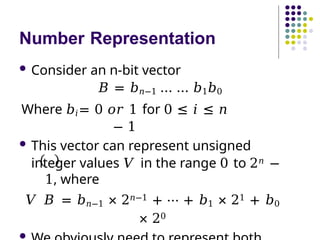
 Consider an n-bit vector
𝐵 = 𝑏𝑛−1 … … 𝑏1𝑏0
Where 𝑏𝑖= 0 𝑜𝑟 1 for 0 ≤ 𝑖 ≤ 𝑛
− 1
 This vector can represent unsigned
integer values 𝑉 in the range 0 to 2𝑛 −
1, where
𝑉 𝐵 = 𝑏𝑛−1 × 2𝑛−1 + ⋯ + 𝑏1 × 21 + 𝑏0
× 20

Signed Integer
 3 major representations:
 Sign-and-magnitude
 1’s complement
 2’s complement
 Assumptions:
 4-bit machine word
 16 different values can be represented
 Roughly half are positive, half are
negative
Sign-and-Magnitude Representation
1011
1101
1100
0100
0010
+1
+2
0011 +3
+4
0101
+5
0110
+6
+7
1000 0111
-0
1010
1001
-1
-3
-2
-4
-5
-6
-7
+0
1111 0000
1110
0001
0 100 = + 4
1 100 = - 4
+
-
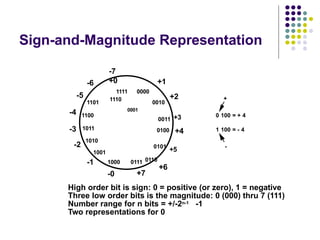
High order bit is sign: 0 = positive (or zero), 1 = negative
Three low order bits is the magnitude: 0 (000) thru 7 (111)
Number range for n bits = +/-2n-1 -1
Two representations for 0
1’s Complement Representation
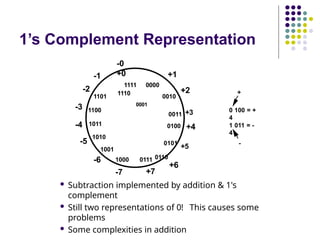
 Subtraction implemented by addition & 1's
complement
 Still two representations of 0! This causes some
problems
 Some complexities in addition
1011
1101
1100
0100
0010
+1
+2
0011 +3
+4
0101
+5
0110
+6
+7
1000 0111
-7
1010
1001
-6
-4
-5
-3
-2
-1
-0
+0
1111 0000
1110
0001
0 100 = +
4
1 011 = -
4
+
-
2’s Complement Representation
1011
1101
1100
0100
0010
+1
+2
0011 +3
+4
0101
+5
0110
+6
+7
1000 0111
-8
1010
1001
-7
-5
-6
-4
-3
-2
-1
+0
1111 0000
1110
0001
0 100 = +
4
1 100 = -
4
+
-
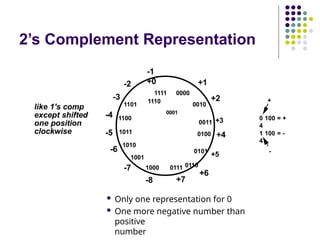
 Only one representation for 0
 One more negative number than
positive
number
like 1's comp
except shifted
one position
clockwise
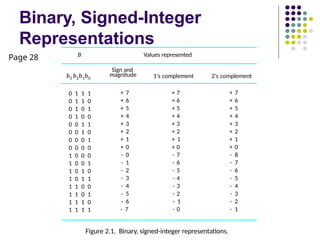
Binary, Signed-Integer
Representations
0 1 1 1 + 7 + 7 + 7
0 1 1 0 + 6 + 6 + 6
0 1 0 1 + 5 + 5 + 5
0 1 0 0 + 4 + 4 + 4
0 0 1 1 + 3 + 3 + 3
0 0 1 0 + 2 + 2 + 2
0 0 0 1 + 1 + 1 + 1
0 0 0 0 + 0 + 0 + 0
1 0 0 0 - 0 - 7 - 8
1 0 0 1 - 1 - 6 - 7
1 0 1 0 - 2 - 5 - 6
1 0 1 1 - 3 - 4 - 5
1 1 0 0 - 4 - 3 - 4
1 1 0 1 - 5 - 2 - 3
1 1 1 0 - 6 - 1 - 2
1 1 1 1 - 7 - 0 - 1
b3 b2b1b0
Sign and
magnitude 1's complement 2's complement
B Values represented
Figure 2.1. Binary, signed-integer representations.
Page 28
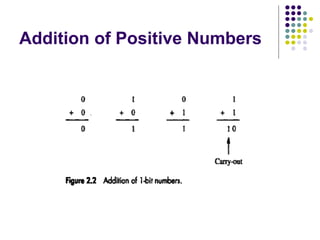
Addition of Positive Numbers
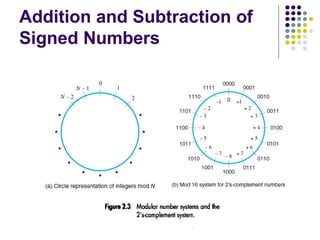
Addition and Subtraction of
Signed Numbers
Addition and Subtraction – 2’s
Complement
 To add two numbers, add their n-bit
representations, ignoring the carry-out
signal from the most significant bit (MSB)
position. The sum will be the algebraically
correct value in the 2’s complement
representation as long as the answer is in
the range −2𝑛−1 through +2𝑛−1 − 1.
Addition and Subtraction – 2’s
Complement..
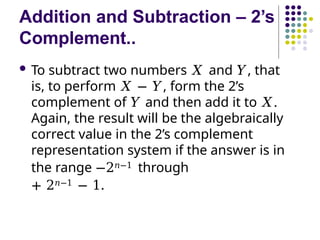
 To subtract two numbers 𝑋 and 𝑌, that
is, to perform 𝑋 − 𝑌, form the 2’s
complement of 𝑌 and then add it to 𝑋.
Again, the result will be the algebraically
correct value in the 2’s complement
representation system if the answer is in
the range −2𝑛−1 through
+ 2𝑛−1 − 1.
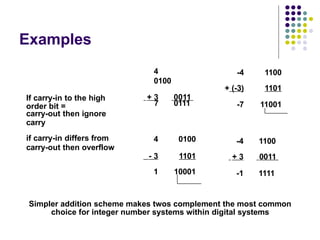
Examples
4
0100
+ 3 0011
If carry-in to the high
carry-out then ignore
7 0111
if carry-in differs from 4 0100
- 3 1101
1 10001
-4 1100
+ (-3) 1101
-7 11001
-4 1100
+ 3 0011
-1 1111
order bit =
carry
carry-out then overflow
Simpler addition scheme makes twos complement the most common
choice for integer number systems within digital systems
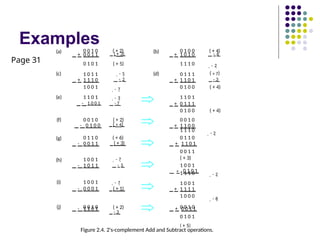
Examples
- 2
1 1 1 0
0 1 1 0
+ 1 1 0 1
0 0 1 1
( + 3)
1 0 0 1
+ 0 1 0 1
(a) 0 0 1 0
+ 0 0 1 1
( + 2)
( + 3) (b) 0 1 0 0
+ 1 0 1 0
( + 4)
- 6
0 1 0 1 ( + 5) 1 1 1 0 - 2
(c) 1 0 1 1
+ 1 1 1 0
- 5
- 2
(d) 0 1 1 1
+ 1 1 0 1
( + 7)
- 3
1 0 0 1 - 7 0 1 0 0 ( + 4)
(e) 1 1 0 1 - 3 1 1 0 1
- 1 0 0 1 - 7 + 0 1 1 1
0 1 0 0 ( + 4)
(f) 0 0 1 0 ( + 2) 0 0 1 0
- 0 1 0 0 ( + 4) + 1 1 0 0
+ 0 0 1 1
0 1 0 1
( + 5)
0 1 1 0
- 0 0 1 1
1 0 0 1
- 1 0 1 1
( + 6)
( + 3)
- 7
- 5
- 3
- 1 1 0 1
1 1 1 0 - 2
(i) 1 0 0 1 - 7 1 0 0 1
- 0 0 0 1 ( + 1) + 1 1 1 1
1 0 0 0 - 8
(j) 0 0 1 0 ( + 2) 0 0 1 0
(g)
(h)
Figure 2.4. 2's-complement Add and Subtract operations.
Page 31
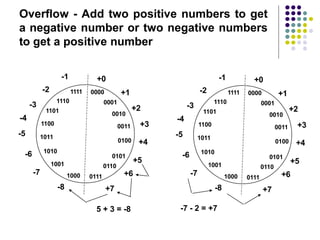
Overflow - Add two positive numbers to get
a negative number or two negative numbers
to get a positive number
5 + 3 = -8 -7 - 2 = +7
0010
0011
1000
0100
1010
1001
1011
0111
1110
1101
1100
1111
+0
0000
0001
+1
+2
+3
+4
+5
0101
0110
+6
+7
-8
-7
-6
-4
-5
-3
-2
-1
0010
0011
1000
0100
1010
1001
1011
0111
1110
1101
1100
1111
+0
0000
0001
+1
+2
+3
+4
+5
0101
0110
+6
+7
-8
-7
-6
-4
-5
-3
-2
-1
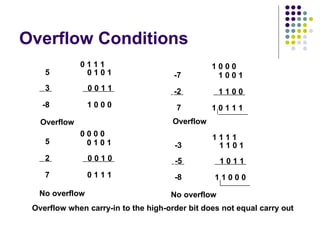
Overflow Conditions
5 0 1 0 1
3 0 0 1 1
-8 1 0 0 0
Overflow
5
0 0 0 0
0 1 0 1
2 0 0 1 0
7 0 1 1 1
0 1 1 1
-7
-2
7
Overflow
1 0 0 0
1 0 0 1
1 1 0 0
1 0 1 1 1
1 1 1 1
-3 1 1 0 1
-5 1 0 1 1
-8 1 1 0 0 0
No overflow No overflow
Overflow when carry-in to the high-order bit does not equal carry out
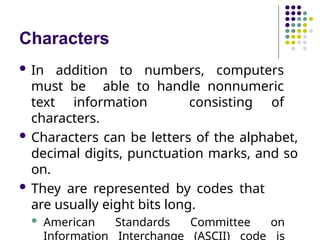
Characters
 In addition to numbers, computers
must be able to handle nonnumeric
text information consisting of
characters.
 Characters can be letters of the alphabet,
decimal digits, punctuation marks, and so
on.
 They are represented by codes that
are usually eight bits long.
 American Standards Committee on
Information Interchange (ASCII) code is
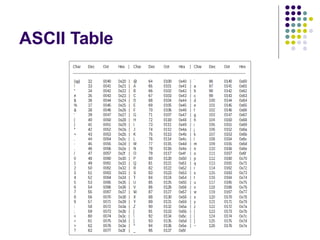
ASCII Table
Memory Locations,
and
Addresses
Memory Locations and
Addresses
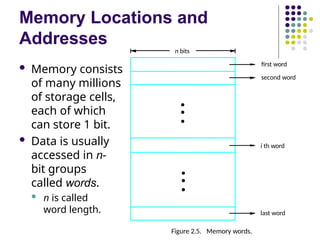
 Memory consists
of many millions
of storage cells,
each of which
can store 1 bit.
 Data is usually
accessed in n-
bit groups
called words.
 n is called
word length.
second word
first word
Figure 2.5. Memory words.
n bits
last word
i th word
•
•
•
•
•
•
Memory Locations and
Addresses..
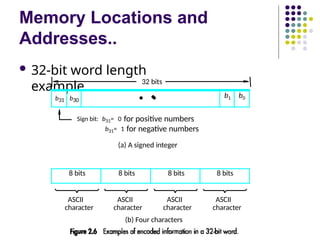
 32-bit word length
example
(b) Four characters
ASCII
character
ASCII
character
ASCII
character
ASCII
character
Sign bit: b31= 0 for positive numbers
b31= 1 for negative numbers
(a) A signed integer
32 bits
8 bits 8 bits 8 bits 8 bits
•
b31 b30
•
•
b1 b0
Memory Locations and
Addresses..
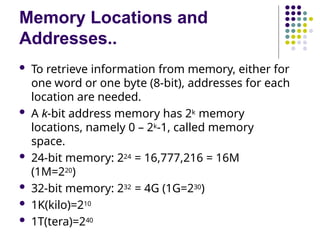
 To retrieve information from memory, either for
one word or one byte (8-bit), addresses for each
location are needed.
 A k-bit address memory has 2k memory
locations, namely 0 – 2k-1, called memory
space.
 24-bit memory: 224 = 16,777,216 = 16M
(1M=220)
 32-bit memory: 232 = 4G (1G=230)
 1K(kilo)=210
 1T(tera)=240
Byte Addressability
 A byte is always 8 bits, but the word length
typically ranges from 16 to 64 bits.
 It is impractical to assign distinct addresses
to individual bit locations in the memory.
 The most practical assignment is to have
successive addresses refer to successive byte
locations in the memory – byte-addressable
memory.
 Byte locations have addresses 0, 1, 2, … If word
length is 32 bits, they successive words are
located at addresses 0, 4, 8,…
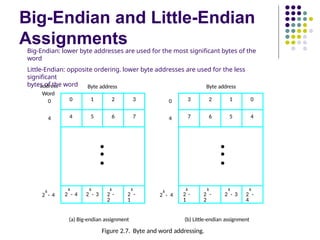
Big-Endian and Little-Endian
Assignments
0 1 2 3
4 5 6 7
•
•
•
k
2 - 4
k
2 - 3
k
2 -
2
k
2 -
1
k
2 - 4
k
2 - 4
0
0
4
3 2 1 0
7 6 5 4
•
•
•
k
2 -
1
k
2 -
2
k
2 - 3
k
2 -
4
Byte address Byte address
(a) Big-endian assignment (b) Little-endian assignment
Figure 2.7. Byte and word addressing.
4
address
Big-Endian: lower byte addresses are used for the most significant bytes of the
word
Little-Endian: opposite ordering. lower byte addresses are used for the less
significant
bytes of the word
Word
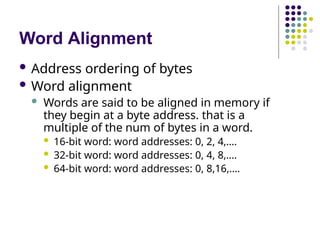
Word Alignment
 Address ordering of bytes
 Word alignment
 Words are said to be aligned in memory if
they begin at a byte address. that is a
multiple of the num of bytes in a word.
 16-bit word: word addresses: 0, 2, 4,….
 32-bit word: word addresses: 0, 4, 8,….
 64-bit word: word addresses: 0, 8,16,….
Accessing numbers, characters,
and character strings
 A number usually occupies one word.
 It can be accessed in the memory by specifying
its word address.
 Similarly, individual characters can be
accessed by their byte address.
 It is necessary to handle character strings
of variable length.
 The beginning of the string is indicated by
giving the
address of the byte containing its first
character.
 Successive byte locations contain
successive characters of the string.
Accessing numbers, characters,
and character strings..
 There are two ways to indicate the
length of the string.
 A special control character with the
meaning "end of string" can be used as
the last character in the string.
 Or a separate memory word location
or processor register can contain a
number indicating the length of the
string in bytes.
Memory Operations
 Load (or Read or Fetch)
 Copy the content. The memory content
doesn’t change.
 Address – Load
 Registers can be used
 Store (or Write)
 Overwrite the content in memory
 Address and Data – Store
 Registers can be used
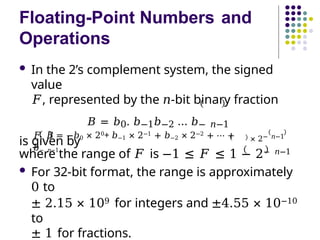
Floating-Point Numbers and
Operations
 In the 2’s complement system, the signed
value
𝐹, represented by the 𝑛-bit binary fraction
𝐵 = 𝑏0. 𝑏−1𝑏−2 … 𝑏− 𝑛−1
is given by
𝐹 𝐵 = −𝑏0 × 20+ 𝑏−1 × 2−1 + 𝑏−2 × 2−2 + ⋯ +
𝑏− 𝑛−1
× 2− 𝑛−1
where the range of 𝐹 is −1 ≤ 𝐹 ≤ 1 − 2− 𝑛−1
 For 32-bit format, the range is approximately
0 to
± 2.15 × 10⁹ for integers and ±4.55 × 10⁻¹⁰
to
± 1 for fractions.
IEEE Standard for Floating-
Point Numbers
 A binary floating-point number can
be represented by
 A sign for the number
 Some significant bits
 A signed scale factor exponent for an
implied base of 2
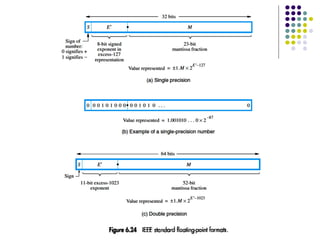
 The basic IEEE format is a 32-bit
representation, shown in Figure 6.24a
 Based on 2008 version of IEEE (Institute of Electrical
and Electronics Engineers) Standard 754, labelled 754-
2008
IEEE Standard for Floating-
Point Numbers..
 The leftmost bit represents the sign, 𝑆, for
the number.
 The next 8 bits, 𝐸′, represent the signed
exponent of the scale factor (with an
implied base of 2)
 The remaining 23 bits, 𝑀, are the
fractional part of the significant bits.
IEEE Standard for Floating-
Point Numbers..
 The full 24-bit string, B, of significant bits,
called the mantissa, always has a leading
1, with the binary point immediately to
its right.
 Therefore, the mantissa
𝐵 = 1. 𝑀 = 1. 𝑏−1𝑏−2 … 𝑏−23
has the value
V 𝐵 = 1+ 𝑏−1 × 2−1 + 𝑏−2 × 2−2 + ⋯ + 𝑏−23 ×
2−23
 By convention, when the binary point is
IEEE Standard for Floating-
Point Numbers..
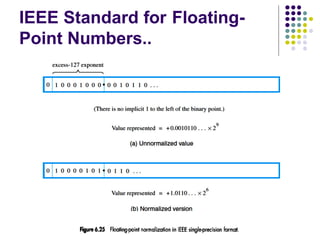
 Instead of the actual signed
exponent, 𝐸, the value stored in the
exponent field is an unsigned integer 𝐸
′ = 𝐸 + 127.
 This is called the excess-127 format.
 𝐸′ is in the range 0 ≤ 𝐸′ ≤ 255.
 The use of the excess-127
representation for exponents simplifies
comparison of the relative sizes of two
floating-point numbers.
IEEE Standard for Floating-
Point Numbers..
 32-bit representation – single-
precision
 8-bit excess-127 exponent 𝐸′ with range 1
≤
𝐸′ ≤
254 for normal values
 0 and 255 indicate special values
 The actual exponent, 𝐸′, is in the range
−126
≤ 𝐸′
≤
127 providing scale factors of 2−126 to 2127
(approximately 10±38).
 The 54-bit mantissa provides a precision equivalent
to
about 7 decimal digits
IEEE Standard for Floating-
Point Numbers..
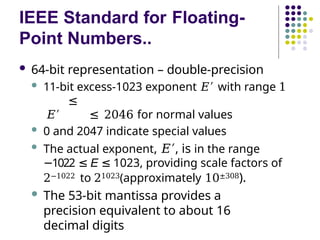
 64-bit representation – double-precision
 11-bit excess-1023 exponent 𝐸′ with range 1
≤
𝐸′ ≤ 2046 for normal values
 0 and 2047 indicate special values
 The actual exponent, 𝐸′, is in the range
1022
− ≤ E ≤ 1023, providing scale factors of
2−1022 to 21023(approximately 10±308).
 The 53-bit mantissa provides a
precision equivalent to about 16
decimal digits
IEEE Standard for Floating-
Point Numbers..
IEEE Standard for Floating-
Point Numbers..
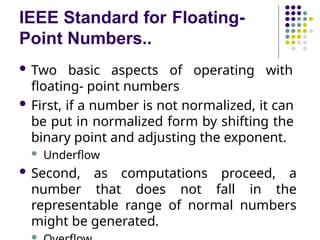
 Two basic aspects of operating with
floating- point numbers
 First, if a number is not normalized, it can
be put in normalized form by shifting the
binary point and adjusting the exponent.
 Underflow
 Second, as computations proceed, a
number that does not fall in the
representable range of normal numbers
might be generated.

Special Values
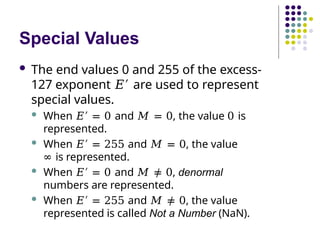
 The end values 0 and 255 of the excess-
127 exponent 𝐸′ are used to represent
special values.
 When 𝐸′ = 0 and 𝑀 = 0, the value 0 is
represented.
 When 𝐸′ = 255 and 𝑀 = 0, the value
∞ is represented.
 When 𝐸′ = 0 and 𝑀 ≠ 0, denormal
numbers are represented.
 When 𝐸′ = 255 and 𝑀 ≠ 0, the value
represented is called Not a Number (NaN).
Instructions & Instruction Sequencing
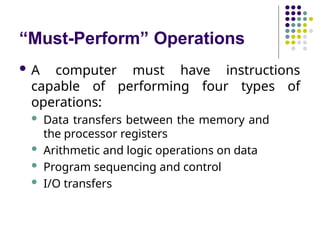
“Must-Perform” Operations
 A computer must have instructions
capable of performing four types of
operations:
 Data transfers between the memory and
the processor registers
 Arithmetic and logic operations on data
 Program sequencing and control
 I/O transfers
Register Transfer Notation
 Identify a location by a symbolic name
standing for its hardware binary address
 Names for addresses of memory location may
be LOC, PLACE, A, VAR2
 Processor register names may be R0, R5
 I/O register names may be DATAIN,
OUTSTATUS
 Contents of a location are denoted by placing
square brackets around the name of the
location
 R1 [LOC]
←
 R3 [R1]+[R2]
←
Assembly Language Notation
 Represent machine instructions
and programs.
 Move LOC, R1 = R1 [LOC]
←
 Add R1, R2, R3 = R3 [R1]+[R2]
←
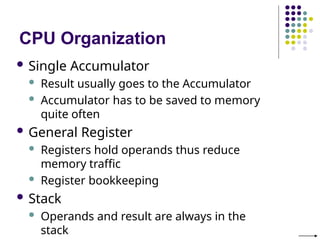
CPU Organization
 Single Accumulator
 Result usually goes to the Accumulator
 Accumulator has to be saved to memory
quite often
 General Register
 Registers hold operands thus reduce
memory traffic
 Register bookkeeping
 Stack
 Operands and result are always in the
stack
Basic Instruction Types
 Three-Address Instructions
 Add R1, R2, R3 R3 ← R1
+ R2
 Two-Address Instructions
 Add R1, R2 R2 ← R1 + R2
 One-Address Instructions
 Add M
 Zero-Address
Instructions
 Add
 RISC Instructions
AC ← AC + [M]
TOS ← TOS + (TOS – 1)
 Lots of registers. Memory is restricted to Load &
Store
Opcode Operand(s) or Address(es)
Basic Instruction Types..
Example: Evaluate (A+B)  (C+D)
 Three-Address
1. Add
2. Add
3. Multipl
y
A, B, R1
C, D, R2
R1, R2, X
; R1 ← [A] + [B]
; R2 ← [C] + [D]
; X ← [R1]  [R2]
Basic Instruction Types..
Example: Evaluate (A+B)  (C+D)
 Two-Address
1. Move A, R1 ; R1 ← [A]
2. Add B, R1 ; R1 ← [R1] + [B]
3. Move C, R2 ; R2 ← [C]
4. Add D, R2 ; R2 ← [R2] + [D]
5. Multiply R1, R2 ; R2 ← [R1]  [R2]
6. Move R2, X ; X ← [R2]
Basic Instruction Types..
Example: Evaluate (A+B)  (C+D)
 One-Address
1. Load
A
2. Add
B
3. Store
T
4. Load
C
5. Add
D
; AC ← A
; AC ← AC + B
; T ← AC
; AC ← [C]
; AC ← AC + [D]
; AC ← AC  [T]
; X ← AC
Basic Instruction Types..
Example: Evaluate (A+B)  (C+D)
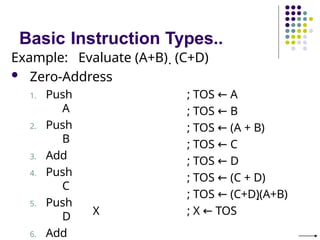
 Zero-Address
1. Push
A
2. Push
B
3. Add
4. Push
C
5. Push
D
6. Add
X
; TOS ← A
; TOS ← B
; TOS ← (A + B)
; TOS ← C
; TOS ← D
; TOS ← (C + D)
; TOS ← (C+D)(A+B)
; X ← TOS
Basic Instruction
Types..
Example: Evaluate (A+B)  (C+D)
 RISC
1.
Load
A, R1 ; R1 ← [A]
2.
Load
B, R2 ; R2 ← [B]
3.
Load
C, R3 ; R3 ← [C]
4.
Load
D, R4 ; R4 ← [D]
5. Add R1, R2 ; R2 ← R1 + R2
6. Add R3, R4 ; R4 ← R3 + R4
7. R2, R4 ; R4 ← R2  R4
Using Registers
 Registers are faster
 Shorter instructions
 The number of registers is smaller, only few
bits are needed to specify the register (e.g.
32 registers need 5 bits)
 Potential speedup
 Minimize the frequency with which data
is moved back and forth between the
memory and processor registers.
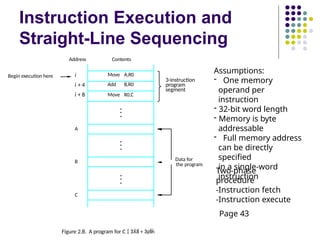
Instruction Execution and
Straight-Line Sequencing
Move A,R0
Add B,R0
Move R0,C
i
i + 4
i + 8
Begin execution here
Address Contents
C
B
A
the program
Data for
3-instruction
program
segment
Figure 2.8. A program for C   + 
Assumptions:
- One memory
operand per
instruction
- 32-bit word length
- Memory is byte
addressable
- Full memory address
can be directly
specified
in a single-word
instruction
Two-phase
procedure
-Instruction fetch
-Instruction execute
Page 43
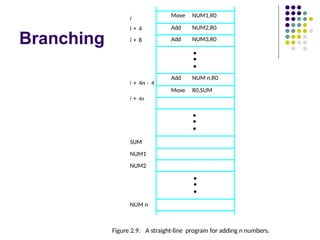
Branching
NUM n
Figure 2.9. A straight-line program for adding n numbers.
SUM
NUM1
NUM2
Move NUM1,R0
Add NUM2,R0
Add NUM3,R0
•
•
•
Add NUM n,R0
Move R0,SUM
•
•
•
•
•
•
i
i + 4n - 4
i + 4n
i + 4
i + 8
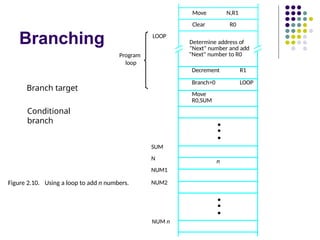
Branching
N,R1
Move
NUM n
NUM2
SUM
N
NUM1
Figure 2.10. Using a loop to add n numbers.
LOOP
Program
loop
Clear R0
Determine address of
"Next" number and add
"Next" number to R0
Decrement R1
Branch>0 LOOP
Move
R0,SUM
•
•
•
n
•
•
•
Branch target
Conditional
branch
Condition Codes
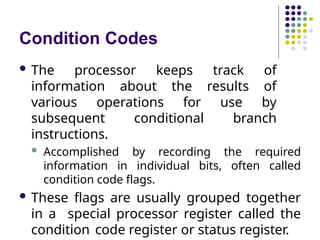
 The processor keeps track of
information about the results of
various operations for use by
subsequent conditional branch
instructions.
 Accomplished by recording the required
information in individual bits, often called
condition code flags.
 These flags are usually grouped together
in a special processor register called the
condition code register or status register.
Condition Codes
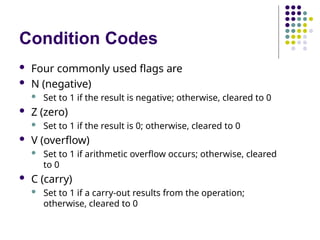
 Four commonly used flags are
 N (negative)
 Set to 1 if the result is negative; otherwise, cleared to 0
 Z (zero)
 Set to 1 if the result is 0; otherwise, cleared to 0
 V (overflow)
 Set to 1 if arithmetic overflow occurs; otherwise, cleared
to 0
 C (carry)
 Set to 1 if a carry-out results from the operation;
otherwise, cleared to 0
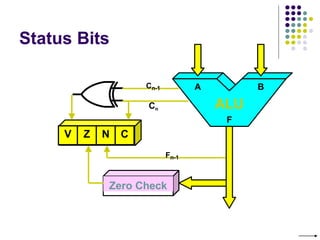
Status Bits
V Z N C
Zero Check
Cn
Cn-1
Fn-1
A B
ALU
F

MODULE-1(b) - Machine-Instructions-and-Programs.pptx

  • 1.
    Computer Organization and Architecture CarlHamacher, Zvonko Vranesic, Safwat Zaky, Computer Organization, 5th Edition, Tata McGraw Hill, 2002.
  • 2.
  • 3.
  • 4.
    Introduction  Computers arebuilt using logic circuits that operate on information represented by two- valued electrical signals  Labelled as 0 and 1  We define the amount of information represented by such a signal as a bit of information, where bit stands for binary digit.  The most natural way to represent a
  • 5.
    Number Representation  Consideran n-bit vector 𝐵 = 𝑏𝑛−1 … … 𝑏1𝑏0 Where 𝑏𝑖= 0 𝑜𝑟 1 for 0 ≤ 𝑖 ≤ 𝑛 − 1  This vector can represent unsigned integer values 𝑉 in the range 0 to 2𝑛 − 1, where 𝑉 𝐵 = 𝑏𝑛−1 × 2𝑛−1 + ⋯ + 𝑏1 × 21 + 𝑏0 × 20 
  • 6.
    Signed Integer  3major representations:  Sign-and-magnitude  1’s complement  2’s complement  Assumptions:  4-bit machine word  16 different values can be represented  Roughly half are positive, half are negative
  • 7.
    Sign-and-Magnitude Representation 1011 1101 1100 0100 0010 +1 +2 0011 +3 +4 0101 +5 0110 +6 +7 10000111 -0 1010 1001 -1 -3 -2 -4 -5 -6 -7 +0 1111 0000 1110 0001 0 100 = + 4 1 100 = - 4 + - High order bit is sign: 0 = positive (or zero), 1 = negative Three low order bits is the magnitude: 0 (000) thru 7 (111) Number range for n bits = +/-2n-1 -1 Two representations for 0
  • 8.
    1’s Complement Representation Subtraction implemented by addition & 1's complement  Still two representations of 0! This causes some problems  Some complexities in addition 1011 1101 1100 0100 0010 +1 +2 0011 +3 +4 0101 +5 0110 +6 +7 1000 0111 -7 1010 1001 -6 -4 -5 -3 -2 -1 -0 +0 1111 0000 1110 0001 0 100 = + 4 1 011 = - 4 + -
  • 9.
    2’s Complement Representation 1011 1101 1100 0100 0010 +1 +2 0011+3 +4 0101 +5 0110 +6 +7 1000 0111 -8 1010 1001 -7 -5 -6 -4 -3 -2 -1 +0 1111 0000 1110 0001 0 100 = + 4 1 100 = - 4 + -  Only one representation for 0  One more negative number than positive number like 1's comp except shifted one position clockwise
  • 10.
    Binary, Signed-Integer Representations 0 11 1 + 7 + 7 + 7 0 1 1 0 + 6 + 6 + 6 0 1 0 1 + 5 + 5 + 5 0 1 0 0 + 4 + 4 + 4 0 0 1 1 + 3 + 3 + 3 0 0 1 0 + 2 + 2 + 2 0 0 0 1 + 1 + 1 + 1 0 0 0 0 + 0 + 0 + 0 1 0 0 0 - 0 - 7 - 8 1 0 0 1 - 1 - 6 - 7 1 0 1 0 - 2 - 5 - 6 1 0 1 1 - 3 - 4 - 5 1 1 0 0 - 4 - 3 - 4 1 1 0 1 - 5 - 2 - 3 1 1 1 0 - 6 - 1 - 2 1 1 1 1 - 7 - 0 - 1 b3 b2b1b0 Sign and magnitude 1's complement 2's complement B Values represented Figure 2.1. Binary, signed-integer representations. Page 28
  • 11.
  • 12.
    Addition and Subtractionof Signed Numbers
  • 13.
    Addition and Subtraction– 2’s Complement  To add two numbers, add their n-bit representations, ignoring the carry-out signal from the most significant bit (MSB) position. The sum will be the algebraically correct value in the 2’s complement representation as long as the answer is in the range −2𝑛−1 through +2𝑛−1 − 1.
  • 14.
    Addition and Subtraction– 2’s Complement..  To subtract two numbers 𝑋 and 𝑌, that is, to perform 𝑋 − 𝑌, form the 2’s complement of 𝑌 and then add it to 𝑋. Again, the result will be the algebraically correct value in the 2’s complement representation system if the answer is in the range −2𝑛−1 through + 2𝑛−1 − 1.
  • 15.
    Examples 4 0100 + 3 0011 Ifcarry-in to the high carry-out then ignore 7 0111 if carry-in differs from 4 0100 - 3 1101 1 10001 -4 1100 + (-3) 1101 -7 11001 -4 1100 + 3 0011 -1 1111 order bit = carry carry-out then overflow Simpler addition scheme makes twos complement the most common choice for integer number systems within digital systems
  • 16.
    Examples - 2 1 11 0 0 1 1 0 + 1 1 0 1 0 0 1 1 ( + 3) 1 0 0 1 + 0 1 0 1 (a) 0 0 1 0 + 0 0 1 1 ( + 2) ( + 3) (b) 0 1 0 0 + 1 0 1 0 ( + 4) - 6 0 1 0 1 ( + 5) 1 1 1 0 - 2 (c) 1 0 1 1 + 1 1 1 0 - 5 - 2 (d) 0 1 1 1 + 1 1 0 1 ( + 7) - 3 1 0 0 1 - 7 0 1 0 0 ( + 4) (e) 1 1 0 1 - 3 1 1 0 1 - 1 0 0 1 - 7 + 0 1 1 1 0 1 0 0 ( + 4) (f) 0 0 1 0 ( + 2) 0 0 1 0 - 0 1 0 0 ( + 4) + 1 1 0 0 + 0 0 1 1 0 1 0 1 ( + 5) 0 1 1 0 - 0 0 1 1 1 0 0 1 - 1 0 1 1 ( + 6) ( + 3) - 7 - 5 - 3 - 1 1 0 1 1 1 1 0 - 2 (i) 1 0 0 1 - 7 1 0 0 1 - 0 0 0 1 ( + 1) + 1 1 1 1 1 0 0 0 - 8 (j) 0 0 1 0 ( + 2) 0 0 1 0 (g) (h) Figure 2.4. 2's-complement Add and Subtract operations. Page 31
  • 17.
    Overflow - Addtwo positive numbers to get a negative number or two negative numbers to get a positive number 5 + 3 = -8 -7 - 2 = +7 0010 0011 1000 0100 1010 1001 1011 0111 1110 1101 1100 1111 +0 0000 0001 +1 +2 +3 +4 +5 0101 0110 +6 +7 -8 -7 -6 -4 -5 -3 -2 -1 0010 0011 1000 0100 1010 1001 1011 0111 1110 1101 1100 1111 +0 0000 0001 +1 +2 +3 +4 +5 0101 0110 +6 +7 -8 -7 -6 -4 -5 -3 -2 -1
  • 18.
    Overflow Conditions 5 01 0 1 3 0 0 1 1 -8 1 0 0 0 Overflow 5 0 0 0 0 0 1 0 1 2 0 0 1 0 7 0 1 1 1 0 1 1 1 -7 -2 7 Overflow 1 0 0 0 1 0 0 1 1 1 0 0 1 0 1 1 1 1 1 1 1 -3 1 1 0 1 -5 1 0 1 1 -8 1 1 0 0 0 No overflow No overflow Overflow when carry-in to the high-order bit does not equal carry out
  • 19.
    Characters  In additionto numbers, computers must be able to handle nonnumeric text information consisting of characters.  Characters can be letters of the alphabet, decimal digits, punctuation marks, and so on.  They are represented by codes that are usually eight bits long.  American Standards Committee on Information Interchange (ASCII) code is
  • 20.
  • 21.
  • 22.
    Memory Locations and Addresses Memory consists of many millions of storage cells, each of which can store 1 bit.  Data is usually accessed in n- bit groups called words.  n is called word length. second word first word Figure 2.5. Memory words. n bits last word i th word • • • • • •
  • 23.
    Memory Locations and Addresses.. 32-bit word length example (b) Four characters ASCII character ASCII character ASCII character ASCII character Sign bit: b31= 0 for positive numbers b31= 1 for negative numbers (a) A signed integer 32 bits 8 bits 8 bits 8 bits 8 bits • b31 b30 • • b1 b0
  • 24.
    Memory Locations and Addresses.. To retrieve information from memory, either for one word or one byte (8-bit), addresses for each location are needed.  A k-bit address memory has 2k memory locations, namely 0 – 2k-1, called memory space.  24-bit memory: 224 = 16,777,216 = 16M (1M=220)  32-bit memory: 232 = 4G (1G=230)  1K(kilo)=210  1T(tera)=240
  • 25.
    Byte Addressability  Abyte is always 8 bits, but the word length typically ranges from 16 to 64 bits.  It is impractical to assign distinct addresses to individual bit locations in the memory.  The most practical assignment is to have successive addresses refer to successive byte locations in the memory – byte-addressable memory.  Byte locations have addresses 0, 1, 2, … If word length is 32 bits, they successive words are located at addresses 0, 4, 8,…
  • 26.
    Big-Endian and Little-Endian Assignments 01 2 3 4 5 6 7 • • • k 2 - 4 k 2 - 3 k 2 - 2 k 2 - 1 k 2 - 4 k 2 - 4 0 0 4 3 2 1 0 7 6 5 4 • • • k 2 - 1 k 2 - 2 k 2 - 3 k 2 - 4 Byte address Byte address (a) Big-endian assignment (b) Little-endian assignment Figure 2.7. Byte and word addressing. 4 address Big-Endian: lower byte addresses are used for the most significant bytes of the word Little-Endian: opposite ordering. lower byte addresses are used for the less significant bytes of the word Word
  • 27.
    Word Alignment  Addressordering of bytes  Word alignment  Words are said to be aligned in memory if they begin at a byte address. that is a multiple of the num of bytes in a word.  16-bit word: word addresses: 0, 2, 4,….  32-bit word: word addresses: 0, 4, 8,….  64-bit word: word addresses: 0, 8,16,….
  • 28.
    Accessing numbers, characters, andcharacter strings  A number usually occupies one word.  It can be accessed in the memory by specifying its word address.  Similarly, individual characters can be accessed by their byte address.  It is necessary to handle character strings of variable length.  The beginning of the string is indicated by giving the address of the byte containing its first character.  Successive byte locations contain successive characters of the string.
  • 29.
    Accessing numbers, characters, andcharacter strings..  There are two ways to indicate the length of the string.  A special control character with the meaning "end of string" can be used as the last character in the string.  Or a separate memory word location or processor register can contain a number indicating the length of the string in bytes.
  • 30.
    Memory Operations  Load(or Read or Fetch)  Copy the content. The memory content doesn’t change.  Address – Load  Registers can be used  Store (or Write)  Overwrite the content in memory  Address and Data – Store  Registers can be used
  • 31.
    Floating-Point Numbers and Operations In the 2’s complement system, the signed value 𝐹, represented by the 𝑛-bit binary fraction 𝐵 = 𝑏0. 𝑏−1𝑏−2 … 𝑏− 𝑛−1 is given by 𝐹 𝐵 = −𝑏0 × 20+ 𝑏−1 × 2−1 + 𝑏−2 × 2−2 + ⋯ + 𝑏− 𝑛−1 × 2− 𝑛−1 where the range of 𝐹 is −1 ≤ 𝐹 ≤ 1 − 2− 𝑛−1  For 32-bit format, the range is approximately 0 to ± 2.15 × 10⁹ for integers and ±4.55 × 10⁻¹⁰ to ± 1 for fractions.
  • 32.
    IEEE Standard forFloating- Point Numbers  A binary floating-point number can be represented by  A sign for the number  Some significant bits  A signed scale factor exponent for an implied base of 2  The basic IEEE format is a 32-bit representation, shown in Figure 6.24a  Based on 2008 version of IEEE (Institute of Electrical and Electronics Engineers) Standard 754, labelled 754- 2008
  • 34.
    IEEE Standard forFloating- Point Numbers..  The leftmost bit represents the sign, 𝑆, for the number.  The next 8 bits, 𝐸′, represent the signed exponent of the scale factor (with an implied base of 2)  The remaining 23 bits, 𝑀, are the fractional part of the significant bits.
  • 35.
    IEEE Standard forFloating- Point Numbers..  The full 24-bit string, B, of significant bits, called the mantissa, always has a leading 1, with the binary point immediately to its right.  Therefore, the mantissa 𝐵 = 1. 𝑀 = 1. 𝑏−1𝑏−2 … 𝑏−23 has the value V 𝐵 = 1+ 𝑏−1 × 2−1 + 𝑏−2 × 2−2 + ⋯ + 𝑏−23 × 2−23  By convention, when the binary point is
  • 36.
    IEEE Standard forFloating- Point Numbers..  Instead of the actual signed exponent, 𝐸, the value stored in the exponent field is an unsigned integer 𝐸 ′ = 𝐸 + 127.  This is called the excess-127 format.  𝐸′ is in the range 0 ≤ 𝐸′ ≤ 255.  The use of the excess-127 representation for exponents simplifies comparison of the relative sizes of two floating-point numbers.
  • 37.
    IEEE Standard forFloating- Point Numbers..  32-bit representation – single- precision  8-bit excess-127 exponent 𝐸′ with range 1 ≤ 𝐸′ ≤ 254 for normal values  0 and 255 indicate special values  The actual exponent, 𝐸′, is in the range −126 ≤ 𝐸′ ≤ 127 providing scale factors of 2−126 to 2127 (approximately 10±38).  The 54-bit mantissa provides a precision equivalent to about 7 decimal digits
  • 38.
    IEEE Standard forFloating- Point Numbers..  64-bit representation – double-precision  11-bit excess-1023 exponent 𝐸′ with range 1 ≤ 𝐸′ ≤ 2046 for normal values  0 and 2047 indicate special values  The actual exponent, 𝐸′, is in the range 1022 − ≤ E ≤ 1023, providing scale factors of 2−1022 to 21023(approximately 10±308).  The 53-bit mantissa provides a precision equivalent to about 16 decimal digits
  • 39.
    IEEE Standard forFloating- Point Numbers..
  • 40.
    IEEE Standard forFloating- Point Numbers..  Two basic aspects of operating with floating- point numbers  First, if a number is not normalized, it can be put in normalized form by shifting the binary point and adjusting the exponent.  Underflow  Second, as computations proceed, a number that does not fall in the representable range of normal numbers might be generated. 
  • 41.
    Special Values  Theend values 0 and 255 of the excess- 127 exponent 𝐸′ are used to represent special values.  When 𝐸′ = 0 and 𝑀 = 0, the value 0 is represented.  When 𝐸′ = 255 and 𝑀 = 0, the value ∞ is represented.  When 𝐸′ = 0 and 𝑀 ≠ 0, denormal numbers are represented.  When 𝐸′ = 255 and 𝑀 ≠ 0, the value represented is called Not a Number (NaN).
  • 42.
  • 43.
    “Must-Perform” Operations  Acomputer must have instructions capable of performing four types of operations:  Data transfers between the memory and the processor registers  Arithmetic and logic operations on data  Program sequencing and control  I/O transfers
  • 44.
    Register Transfer Notation Identify a location by a symbolic name standing for its hardware binary address  Names for addresses of memory location may be LOC, PLACE, A, VAR2  Processor register names may be R0, R5  I/O register names may be DATAIN, OUTSTATUS  Contents of a location are denoted by placing square brackets around the name of the location  R1 [LOC] ←  R3 [R1]+[R2] ←
  • 45.
    Assembly Language Notation Represent machine instructions and programs.  Move LOC, R1 = R1 [LOC] ←  Add R1, R2, R3 = R3 [R1]+[R2] ←
  • 46.
    CPU Organization  SingleAccumulator  Result usually goes to the Accumulator  Accumulator has to be saved to memory quite often  General Register  Registers hold operands thus reduce memory traffic  Register bookkeeping  Stack  Operands and result are always in the stack
  • 47.
    Basic Instruction Types Three-Address Instructions  Add R1, R2, R3 R3 ← R1 + R2  Two-Address Instructions  Add R1, R2 R2 ← R1 + R2  One-Address Instructions  Add M  Zero-Address Instructions  Add  RISC Instructions AC ← AC + [M] TOS ← TOS + (TOS – 1)  Lots of registers. Memory is restricted to Load & Store Opcode Operand(s) or Address(es)
  • 48.
    Basic Instruction Types.. Example:Evaluate (A+B)  (C+D)  Three-Address 1. Add 2. Add 3. Multipl y A, B, R1 C, D, R2 R1, R2, X ; R1 ← [A] + [B] ; R2 ← [C] + [D] ; X ← [R1]  [R2]
  • 49.
    Basic Instruction Types.. Example:Evaluate (A+B)  (C+D)  Two-Address 1. Move A, R1 ; R1 ← [A] 2. Add B, R1 ; R1 ← [R1] + [B] 3. Move C, R2 ; R2 ← [C] 4. Add D, R2 ; R2 ← [R2] + [D] 5. Multiply R1, R2 ; R2 ← [R1]  [R2] 6. Move R2, X ; X ← [R2]
  • 50.
    Basic Instruction Types.. Example:Evaluate (A+B)  (C+D)  One-Address 1. Load A 2. Add B 3. Store T 4. Load C 5. Add D ; AC ← A ; AC ← AC + B ; T ← AC ; AC ← [C] ; AC ← AC + [D] ; AC ← AC  [T] ; X ← AC
  • 51.
    Basic Instruction Types.. Example:Evaluate (A+B)  (C+D)  Zero-Address 1. Push A 2. Push B 3. Add 4. Push C 5. Push D 6. Add X ; TOS ← A ; TOS ← B ; TOS ← (A + B) ; TOS ← C ; TOS ← D ; TOS ← (C + D) ; TOS ← (C+D)(A+B) ; X ← TOS
  • 52.
    Basic Instruction Types.. Example: Evaluate(A+B)  (C+D)  RISC 1. Load A, R1 ; R1 ← [A] 2. Load B, R2 ; R2 ← [B] 3. Load C, R3 ; R3 ← [C] 4. Load D, R4 ; R4 ← [D] 5. Add R1, R2 ; R2 ← R1 + R2 6. Add R3, R4 ; R4 ← R3 + R4 7. R2, R4 ; R4 ← R2  R4
  • 53.
    Using Registers  Registersare faster  Shorter instructions  The number of registers is smaller, only few bits are needed to specify the register (e.g. 32 registers need 5 bits)  Potential speedup  Minimize the frequency with which data is moved back and forth between the memory and processor registers.
  • 54.
    Instruction Execution and Straight-LineSequencing Move A,R0 Add B,R0 Move R0,C i i + 4 i + 8 Begin execution here Address Contents C B A the program Data for 3-instruction program segment Figure 2.8. A program for C   +  Assumptions: - One memory operand per instruction - 32-bit word length - Memory is byte addressable - Full memory address can be directly specified in a single-word instruction Two-phase procedure -Instruction fetch -Instruction execute Page 43
  • 55.
    Branching NUM n Figure 2.9.A straight-line program for adding n numbers. SUM NUM1 NUM2 Move NUM1,R0 Add NUM2,R0 Add NUM3,R0 • • • Add NUM n,R0 Move R0,SUM • • • • • • i i + 4n - 4 i + 4n i + 4 i + 8
  • 56.
    Branching N,R1 Move NUM n NUM2 SUM N NUM1 Figure 2.10.Using a loop to add n numbers. LOOP Program loop Clear R0 Determine address of "Next" number and add "Next" number to R0 Decrement R1 Branch>0 LOOP Move R0,SUM • • • n • • • Branch target Conditional branch
  • 57.
    Condition Codes  Theprocessor keeps track of information about the results of various operations for use by subsequent conditional branch instructions.  Accomplished by recording the required information in individual bits, often called condition code flags.  These flags are usually grouped together in a special processor register called the condition code register or status register.
  • 58.
    Condition Codes  Fourcommonly used flags are  N (negative)  Set to 1 if the result is negative; otherwise, cleared to 0  Z (zero)  Set to 1 if the result is 0; otherwise, cleared to 0  V (overflow)  Set to 1 if arithmetic overflow occurs; otherwise, cleared to 0  C (carry)  Set to 1 if a carry-out results from the operation; otherwise, cleared to 0
  • 59.
    Status Bits V ZN C Zero Check Cn Cn-1 Fn-1 A B ALU F