Chapter 2
Instructions: Language
of the Computer
Basic Blocks
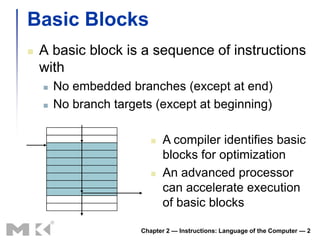
   A basic block is a sequence of instructions
    with
       No embedded branches (except at end)
       No branch targets (except at beginning)

                             A compiler identifies basic
                              blocks for optimization
                             An advanced processor
                              can accelerate execution
                              of basic blocks

                       Chapter 2 — Instructions: Language of the Computer — 2
More Conditional Operations
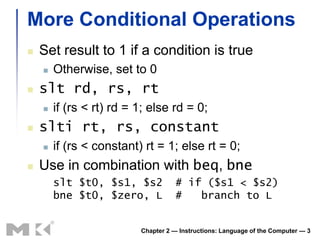
   Set result to 1 if a condition is true
       Otherwise, set to 0
   slt rd, rs, rt
       if (rs < rt) rd = 1; else rd = 0;
   slti rt, rs, constant
       if (rs < constant) rt = 1; else rt = 0;
   Use in combination with beq, bne
        slt $t0, $s1, $s2           # if ($s1 < $s2)
        bne $t0, $zero, L           #   branch to L


                          Chapter 2 — Instructions: Language of the Computer — 3
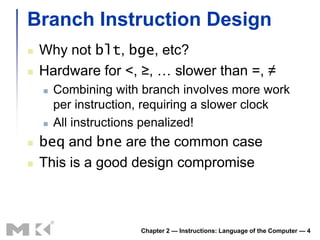
Branch Instruction Design
   Why not blt, bge, etc?
   Hardware for <, ≥, … slower than =, ≠
       Combining with branch involves more work
        per instruction, requiring a slower clock
       All instructions penalized!
   beq and bne are the common case
   This is a good design compromise


                       Chapter 2 — Instructions: Language of the Computer — 4
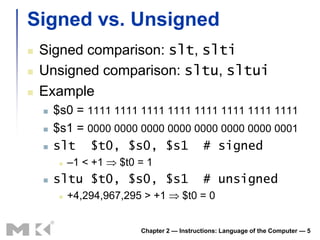
Signed vs. Unsigned
   Signed comparison: slt, slti
   Unsigned comparison: sltu, sltui
   Example
       $s0 = 1111 1111 1111 1111 1111 1111 1111 1111
       $s1 = 0000 0000 0000 0000 0000 0000 0000 0001
       slt $t0, $s0, $s1 # signed
            –1 < +1   $t0 = 1
       sltu $t0, $s0, $s1                    # unsigned
            +4,294,967,295 > +1        $t0 = 0


                           Chapter 2 — Instructions: Language of the Computer — 5
§2.8 Supporting Procedures in Computer Hardware
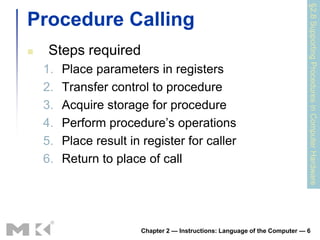
Procedure Calling
    Steps required
    1.   Place parameters in registers
    2.   Transfer control to procedure
    3.   Acquire storage for procedure
    4.   Perform procedure’s operations
    5.   Place result in register for caller
    6.   Return to place of call


                        Chapter 2 — Instructions: Language of the Computer — 6
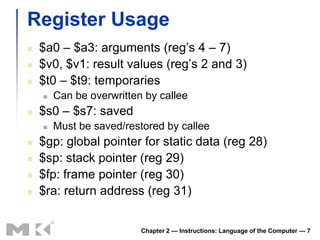
Register Usage
   $a0 – $a3: arguments (reg’s 4 – 7)
   $v0, $v1: result values (reg’s 2 and 3)
   $t0 – $t9: temporaries
       Can be overwritten by callee
   $s0 – $s7: saved
       Must be saved/restored by callee
   $gp: global pointer for static data (reg 28)
   $sp: stack pointer (reg 29)
   $fp: frame pointer (reg 30)
   $ra: return address (reg 31)


                          Chapter 2 — Instructions: Language of the Computer — 7
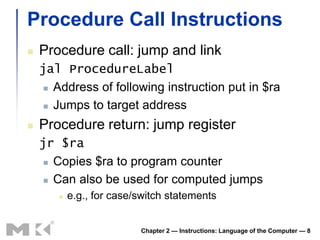
Procedure Call Instructions
   Procedure call: jump and link
    jal ProcedureLabel
      Address of following instruction put in $ra

      Jumps to target address

   Procedure return: jump register
    jr $ra
      Copies $ra to program counter

      Can also be used for computed jumps

          e.g., for case/switch statements


                          Chapter 2 — Instructions: Language of the Computer — 8
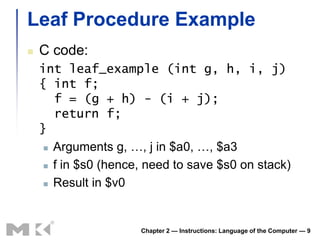
Leaf Procedure Example
   C code:
    int leaf_example (int g, h, i, j)
    { int f;
       f = (g + h) - (i + j);
       return f;
    }
      Arguments g, …, j in $a0, …, $a3

      f in $s0 (hence, need to save $s0 on stack)

      Result in $v0


                      Chapter 2 — Instructions: Language of the Computer — 9
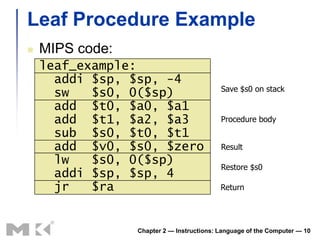
Leaf Procedure Example
   MIPS code:
    leaf_example:
      addi $sp, $sp, -4
                                           Save $s0 on stack
      sw   $s0, 0($sp)
      add $t0, $a0, $a1
      add $t1, $a2, $a3                    Procedure body
      sub $s0, $t0, $t1
      add $v0, $s0, $zero                  Result
      lw   $s0, 0($sp)                     Restore $s0
      addi $sp, $sp, 4
      jr   $ra                             Return


                 Chapter 2 — Instructions: Language of the Computer — 10
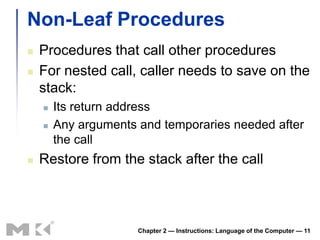
Non-Leaf Procedures
   Procedures that call other procedures
   For nested call, caller needs to save on the
    stack:
       Its return address
       Any arguments and temporaries needed after
        the call
   Restore from the stack after the call


                      Chapter 2 — Instructions: Language of the Computer — 11
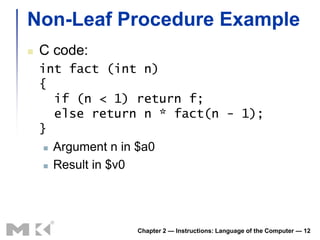
Non-Leaf Procedure Example
   C code:
    int fact (int n)
    {
       if (n < 1) return f;
       else return n * fact(n - 1);
    }
      Argument n in $a0

      Result in $v0


                 Chapter 2 — Instructions: Language of the Computer — 12
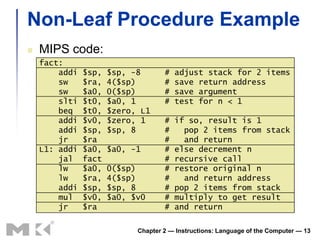
Non-Leaf Procedure Example
   MIPS code:
    fact:
        addi   $sp,   $sp, -8       #   adjust stack for 2 items
        sw     $ra,   4($sp)        #   save return address
        sw     $a0,   0($sp)        #   save argument
        slti   $t0,   $a0, 1        #   test for n < 1
        beq    $t0,   $zero, L1
        addi   $v0,   $zero, 1      #   if so, result is 1
        addi   $sp,   $sp, 8        #     pop 2 items from stack
        jr     $ra                  #     and return
    L1: addi   $a0,   $a0, -1       #   else decrement n
        jal    fact                 #   recursive call
        lw     $a0,   0($sp)        #   restore original n
        lw     $ra,   4($sp)        #     and return address
        addi   $sp,   $sp, 8        #   pop 2 items from stack
        mul    $v0,   $a0, $v0      #   multiply to get result
        jr     $ra                  #   and return

                            Chapter 2 — Instructions: Language of the Computer — 13
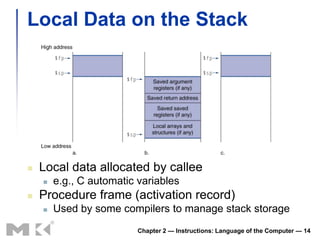
Local Data on the Stack


   Local data allocated by callee
       e.g., C automatic variables
   Procedure frame (activation record)
       Used by some compilers to manage stack storage
                          Chapter 2 — Instructions: Language of the Computer — 14
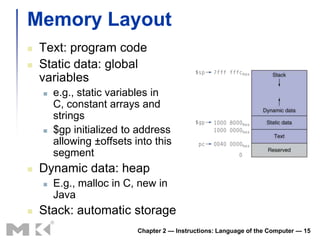
Memory Layout
   Text: program code
   Static data: global
    variables
       e.g., static variables in
        C, constant arrays and
        strings
       $gp initialized to address
        allowing ±offsets into this
        segment
   Dynamic data: heap
       E.g., malloc in C, new in
        Java
   Stack: automatic storage
                           Chapter 2 — Instructions: Language of the Computer — 15
§2.9 Communicating with People
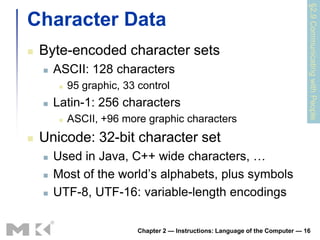
Character Data
   Byte-encoded character sets
       ASCII: 128 characters
            95 graphic, 33 control
       Latin-1: 256 characters
            ASCII, +96 more graphic characters
   Unicode: 32-bit character set
       Used in Java, C++ wide characters, …
       Most of the world’s alphabets, plus symbols
       UTF-8, UTF-16: variable-length encodings

                            Chapter 2 — Instructions: Language of the Computer — 16
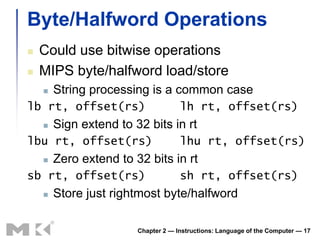
Byte/Halfword Operations
   Could use bitwise operations
   MIPS byte/halfword load/store
       String processing is a common case
lb rt, offset(rs)                    lh rt, offset(rs)
       Sign extend to 32 bits in rt
lbu rt, offset(rs)                   lhu rt, offset(rs)
       Zero extend to 32 bits in rt
sb rt, offset(rs)                    sh rt, offset(rs)
       Store just rightmost byte/halfword

                        Chapter 2 — Instructions: Language of the Computer — 17
String Copy Example
   C code (naïve):
      Null-terminated string
    void strcpy (char x[], char y[])
    { int i;
       i = 0;
       while ((x[i]=y[i])!='0')
           i += 1;
    }
      Addresses of x, y in $a0, $a1

      i in $s0


                      Chapter 2 — Instructions: Language of the Computer — 18
String Copy Example
   MIPS code:
    strcpy:
        addi   $sp,   $sp, -4            #   adjust stack for 1 item
        sw     $s0,   0($sp)             #   save $s0
        add    $s0,   $zero, $zero       #   i = 0
    L1: add    $t1,   $s0, $a1           #   addr of y[i] in $t1
        lbu    $t2,   0($t1)             #   $t2 = y[i]
        add    $t3,   $s0, $a0           #   addr of x[i] in $t3
        sb     $t2,   0($t3)             #   x[i] = y[i]
        beq    $t2,   $zero, L2          #   exit loop if y[i] == 0
        addi   $s0,   $s0, 1             #   i = i + 1
        j      L1                        #   next iteration of loop
    L2: lw     $s0,   0($sp)             #   restore saved $s0
        addi   $sp,   $sp, 4             #   pop 1 item from stack
        jr     $ra                       #   and return


                               Chapter 2 — Instructions: Language of the Computer — 19
§2.10 MIPS Addressing for 32-Bit Immediates and Addresses
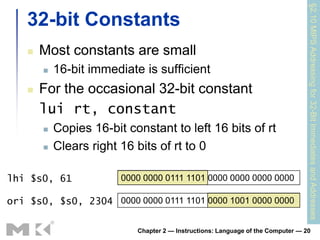
    32-bit Constants
       Most constants are small
           16-bit immediate is sufficient
       For the occasional 32-bit constant
        lui rt, constant
           Copies 16-bit constant to left 16 bits of rt
           Clears right 16 bits of rt to 0

lhi $s0, 61              0000 0000 0111 1101 0000 0000 0000 0000

ori $s0, $s0, 2304 0000 0000 0111 1101 0000 1001 0000 0000

                            Chapter 2 — Instructions: Language of the Computer — 20
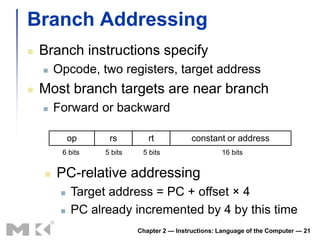
Branch Addressing
   Branch instructions specify
       Opcode, two registers, target address
   Most branch targets are near branch
       Forward or backward

             op     rs         rt            constant or address
         6 bits    5 bits    5 bits                   16 bits


       PC-relative addressing
            Target address = PC + offset × 4
            PC already incremented by 4 by this time
                            Chapter 2 — Instructions: Language of the Computer — 21
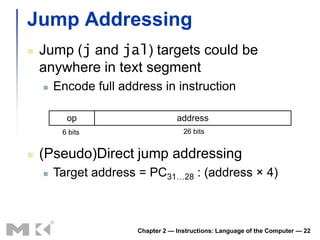
Jump Addressing
   Jump (j and jal) targets could be
    anywhere in text segment
       Encode full address in instruction

          op                       address
         6 bits                      26 bits


   (Pseudo)Direct jump addressing
       Target address = PC31…28 : (address × 4)


                       Chapter 2 — Instructions: Language of the Computer — 22
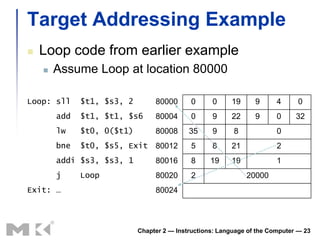
Target Addressing Example
   Loop code from earlier example
       Assume Loop at location 80000

Loop: sll     $t1, $s3, 2        80000       0     0     19      9      4      0
        add   $t1, $t1, $s6      80004       0     9     22      9      0     32
        lw    $t0, 0($t1)        80008      35     9      8             0
        bne   $t0, $s5, Exit 80012           5     8     21             2
        addi $s3, $s3, 1         80016       8     19    19             1
        j     Loop               80020       2                20000
Exit: …                          80024


                            Chapter 2 — Instructions: Language of the Computer — 23
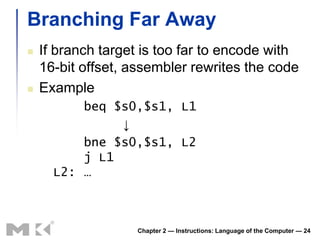
Branching Far Away
   If branch target is too far to encode with
    16-bit offset, assembler rewrites the code
   Example
          beq $s0,$s1, L1
               ↓
          bne $s0,$s1, L2
          j L1
      L2: …


                   Chapter 2 — Instructions: Language of the Computer — 24
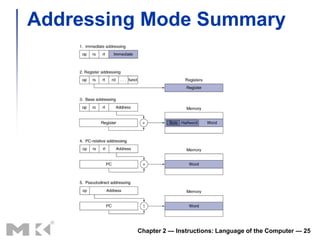
Addressing Mode Summary


         Chapter 2 — Instructions: Language of the Computer — 25
§2.11 Parallelism and Instructions: Synchronization
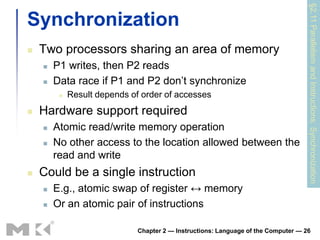
Synchronization
   Two processors sharing an area of memory
       P1 writes, then P2 reads
       Data race if P1 and P2 don’t synchronize
            Result depends of order of accesses
   Hardware support required
       Atomic read/write memory operation
       No other access to the location allowed between the
        read and write
   Could be a single instruction
       E.g., atomic swap of register ↔ memory
       Or an atomic pair of instructions

                              Chapter 2 — Instructions: Language of the Computer — 26
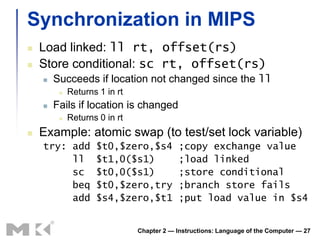
Synchronization in MIPS
   Load linked: ll rt, offset(rs)
   Store conditional: sc rt, offset(rs)
       Succeeds if location not changed since the ll
            Returns 1 in rt
       Fails if location is changed
            Returns 0 in rt
   Example: atomic swap (to test/set lock variable)
    try: add        $t0,$zero,$s4           ;copy exchange value
         ll         $t1,0($s1)              ;load linked
         sc         $t0,0($s1)              ;store conditional
         beq        $t0,$zero,try           ;branch store fails
         add        $s4,$zero,$t1           ;put load value in $s4


                               Chapter 2 — Instructions: Language of the Computer — 27
§2.12 Translating and Starting a Program
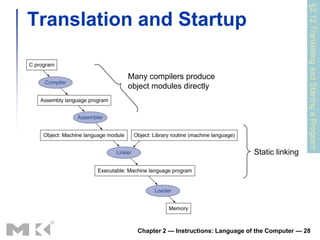
Translation and Startup

          Many compilers produce
          object modules directly


                                                 Static linking


            Chapter 2 — Instructions: Language of the Computer — 28
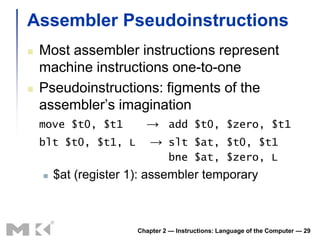
Assembler Pseudoinstructions
   Most assembler instructions represent
    machine instructions one-to-one
   Pseudoinstructions: figments of the
    assembler’s imagination
    move $t0, $t1   → add $t0, $zero, $t1
    blt $t0, $t1, L → slt $at, $t0, $t1
                                bne $at, $zero, L
       $at (register 1): assembler temporary


                       Chapter 2 — Instructions: Language of the Computer — 29
Producing an Object Module
   Assembler (or compiler) translates program into
    machine instructions
   Provides information for building a complete
    program from the pieces
       Header: described contents of object module
       Text segment: translated instructions
       Static data segment: data allocated for the life of the
        program
       Relocation info: for contents that depend on absolute
        location of loaded program
       Symbol table: global definitions and external refs
       Debug info: for associating with source code

                          Chapter 2 — Instructions: Language of the Computer — 30
Linking Object Modules
   Produces an executable image
    1. Merges segments
    2. Resolve labels (determine their addresses)
    3. Patch location-dependent and external refs
   Could leave location dependencies for
    fixing by a relocating loader
       But with virtual memory, no need to do this
       Program can be loaded into absolute location
        in virtual memory space

                      Chapter 2 — Instructions: Language of the Computer — 31

C:\Fakepath\Chapter 2 Part2 B

  • 1.
  • 2.
    Basic Blocks  A basic block is a sequence of instructions with  No embedded branches (except at end)  No branch targets (except at beginning)  A compiler identifies basic blocks for optimization  An advanced processor can accelerate execution of basic blocks Chapter 2 — Instructions: Language of the Computer — 2
  • 3.
    More Conditional Operations  Set result to 1 if a condition is true  Otherwise, set to 0  slt rd, rs, rt  if (rs < rt) rd = 1; else rd = 0;  slti rt, rs, constant  if (rs < constant) rt = 1; else rt = 0;  Use in combination with beq, bne slt $t0, $s1, $s2 # if ($s1 < $s2) bne $t0, $zero, L # branch to L Chapter 2 — Instructions: Language of the Computer — 3
  • 4.
    Branch Instruction Design  Why not blt, bge, etc?  Hardware for <, ≥, … slower than =, ≠  Combining with branch involves more work per instruction, requiring a slower clock  All instructions penalized!  beq and bne are the common case  This is a good design compromise Chapter 2 — Instructions: Language of the Computer — 4
  • 5.
    Signed vs. Unsigned  Signed comparison: slt, slti  Unsigned comparison: sltu, sltui  Example  $s0 = 1111 1111 1111 1111 1111 1111 1111 1111  $s1 = 0000 0000 0000 0000 0000 0000 0000 0001  slt $t0, $s0, $s1 # signed  –1 < +1 $t0 = 1  sltu $t0, $s0, $s1 # unsigned  +4,294,967,295 > +1 $t0 = 0 Chapter 2 — Instructions: Language of the Computer — 5
  • 6.
    §2.8 Supporting Proceduresin Computer Hardware Procedure Calling  Steps required 1. Place parameters in registers 2. Transfer control to procedure 3. Acquire storage for procedure 4. Perform procedure’s operations 5. Place result in register for caller 6. Return to place of call Chapter 2 — Instructions: Language of the Computer — 6
  • 7.
    Register Usage  $a0 – $a3: arguments (reg’s 4 – 7)  $v0, $v1: result values (reg’s 2 and 3)  $t0 – $t9: temporaries  Can be overwritten by callee  $s0 – $s7: saved  Must be saved/restored by callee  $gp: global pointer for static data (reg 28)  $sp: stack pointer (reg 29)  $fp: frame pointer (reg 30)  $ra: return address (reg 31) Chapter 2 — Instructions: Language of the Computer — 7
  • 8.
    Procedure Call Instructions  Procedure call: jump and link jal ProcedureLabel  Address of following instruction put in $ra  Jumps to target address  Procedure return: jump register jr $ra  Copies $ra to program counter  Can also be used for computed jumps  e.g., for case/switch statements Chapter 2 — Instructions: Language of the Computer — 8
  • 9.
    Leaf Procedure Example  C code: int leaf_example (int g, h, i, j) { int f; f = (g + h) - (i + j); return f; }  Arguments g, …, j in $a0, …, $a3  f in $s0 (hence, need to save $s0 on stack)  Result in $v0 Chapter 2 — Instructions: Language of the Computer — 9
  • 10.
    Leaf Procedure Example  MIPS code: leaf_example: addi $sp, $sp, -4 Save $s0 on stack sw $s0, 0($sp) add $t0, $a0, $a1 add $t1, $a2, $a3 Procedure body sub $s0, $t0, $t1 add $v0, $s0, $zero Result lw $s0, 0($sp) Restore $s0 addi $sp, $sp, 4 jr $ra Return Chapter 2 — Instructions: Language of the Computer — 10
  • 11.
    Non-Leaf Procedures  Procedures that call other procedures  For nested call, caller needs to save on the stack:  Its return address  Any arguments and temporaries needed after the call  Restore from the stack after the call Chapter 2 — Instructions: Language of the Computer — 11
  • 12.
    Non-Leaf Procedure Example  C code: int fact (int n) { if (n < 1) return f; else return n * fact(n - 1); }  Argument n in $a0  Result in $v0 Chapter 2 — Instructions: Language of the Computer — 12
  • 13.
    Non-Leaf Procedure Example  MIPS code: fact: addi $sp, $sp, -8 # adjust stack for 2 items sw $ra, 4($sp) # save return address sw $a0, 0($sp) # save argument slti $t0, $a0, 1 # test for n < 1 beq $t0, $zero, L1 addi $v0, $zero, 1 # if so, result is 1 addi $sp, $sp, 8 # pop 2 items from stack jr $ra # and return L1: addi $a0, $a0, -1 # else decrement n jal fact # recursive call lw $a0, 0($sp) # restore original n lw $ra, 4($sp) # and return address addi $sp, $sp, 8 # pop 2 items from stack mul $v0, $a0, $v0 # multiply to get result jr $ra # and return Chapter 2 — Instructions: Language of the Computer — 13
  • 14.
    Local Data onthe Stack  Local data allocated by callee  e.g., C automatic variables  Procedure frame (activation record)  Used by some compilers to manage stack storage Chapter 2 — Instructions: Language of the Computer — 14
  • 15.
    Memory Layout  Text: program code  Static data: global variables  e.g., static variables in C, constant arrays and strings  $gp initialized to address allowing ±offsets into this segment  Dynamic data: heap  E.g., malloc in C, new in Java  Stack: automatic storage Chapter 2 — Instructions: Language of the Computer — 15
  • 16.
    §2.9 Communicating withPeople Character Data  Byte-encoded character sets  ASCII: 128 characters  95 graphic, 33 control  Latin-1: 256 characters  ASCII, +96 more graphic characters  Unicode: 32-bit character set  Used in Java, C++ wide characters, …  Most of the world’s alphabets, plus symbols  UTF-8, UTF-16: variable-length encodings Chapter 2 — Instructions: Language of the Computer — 16
  • 17.
    Byte/Halfword Operations  Could use bitwise operations  MIPS byte/halfword load/store  String processing is a common case lb rt, offset(rs) lh rt, offset(rs)  Sign extend to 32 bits in rt lbu rt, offset(rs) lhu rt, offset(rs)  Zero extend to 32 bits in rt sb rt, offset(rs) sh rt, offset(rs)  Store just rightmost byte/halfword Chapter 2 — Instructions: Language of the Computer — 17
  • 18.
    String Copy Example  C code (naïve):  Null-terminated string void strcpy (char x[], char y[]) { int i; i = 0; while ((x[i]=y[i])!='0') i += 1; }  Addresses of x, y in $a0, $a1  i in $s0 Chapter 2 — Instructions: Language of the Computer — 18
  • 19.
    String Copy Example  MIPS code: strcpy: addi $sp, $sp, -4 # adjust stack for 1 item sw $s0, 0($sp) # save $s0 add $s0, $zero, $zero # i = 0 L1: add $t1, $s0, $a1 # addr of y[i] in $t1 lbu $t2, 0($t1) # $t2 = y[i] add $t3, $s0, $a0 # addr of x[i] in $t3 sb $t2, 0($t3) # x[i] = y[i] beq $t2, $zero, L2 # exit loop if y[i] == 0 addi $s0, $s0, 1 # i = i + 1 j L1 # next iteration of loop L2: lw $s0, 0($sp) # restore saved $s0 addi $sp, $sp, 4 # pop 1 item from stack jr $ra # and return Chapter 2 — Instructions: Language of the Computer — 19
  • 20.
    §2.10 MIPS Addressingfor 32-Bit Immediates and Addresses 32-bit Constants  Most constants are small  16-bit immediate is sufficient  For the occasional 32-bit constant lui rt, constant  Copies 16-bit constant to left 16 bits of rt  Clears right 16 bits of rt to 0 lhi $s0, 61 0000 0000 0111 1101 0000 0000 0000 0000 ori $s0, $s0, 2304 0000 0000 0111 1101 0000 1001 0000 0000 Chapter 2 — Instructions: Language of the Computer — 20
  • 21.
    Branch Addressing  Branch instructions specify  Opcode, two registers, target address  Most branch targets are near branch  Forward or backward op rs rt constant or address 6 bits 5 bits 5 bits 16 bits  PC-relative addressing  Target address = PC + offset × 4  PC already incremented by 4 by this time Chapter 2 — Instructions: Language of the Computer — 21
  • 22.
    Jump Addressing  Jump (j and jal) targets could be anywhere in text segment  Encode full address in instruction op address 6 bits 26 bits  (Pseudo)Direct jump addressing  Target address = PC31…28 : (address × 4) Chapter 2 — Instructions: Language of the Computer — 22
  • 23.
    Target Addressing Example  Loop code from earlier example  Assume Loop at location 80000 Loop: sll $t1, $s3, 2 80000 0 0 19 9 4 0 add $t1, $t1, $s6 80004 0 9 22 9 0 32 lw $t0, 0($t1) 80008 35 9 8 0 bne $t0, $s5, Exit 80012 5 8 21 2 addi $s3, $s3, 1 80016 8 19 19 1 j Loop 80020 2 20000 Exit: … 80024 Chapter 2 — Instructions: Language of the Computer — 23
  • 24.
    Branching Far Away  If branch target is too far to encode with 16-bit offset, assembler rewrites the code  Example beq $s0,$s1, L1 ↓ bne $s0,$s1, L2 j L1 L2: … Chapter 2 — Instructions: Language of the Computer — 24
  • 25.
    Addressing Mode Summary Chapter 2 — Instructions: Language of the Computer — 25
  • 26.
    §2.11 Parallelism andInstructions: Synchronization Synchronization  Two processors sharing an area of memory  P1 writes, then P2 reads  Data race if P1 and P2 don’t synchronize  Result depends of order of accesses  Hardware support required  Atomic read/write memory operation  No other access to the location allowed between the read and write  Could be a single instruction  E.g., atomic swap of register ↔ memory  Or an atomic pair of instructions Chapter 2 — Instructions: Language of the Computer — 26
  • 27.
    Synchronization in MIPS  Load linked: ll rt, offset(rs)  Store conditional: sc rt, offset(rs)  Succeeds if location not changed since the ll  Returns 1 in rt  Fails if location is changed  Returns 0 in rt  Example: atomic swap (to test/set lock variable) try: add $t0,$zero,$s4 ;copy exchange value ll $t1,0($s1) ;load linked sc $t0,0($s1) ;store conditional beq $t0,$zero,try ;branch store fails add $s4,$zero,$t1 ;put load value in $s4 Chapter 2 — Instructions: Language of the Computer — 27
  • 28.
    §2.12 Translating andStarting a Program Translation and Startup Many compilers produce object modules directly Static linking Chapter 2 — Instructions: Language of the Computer — 28
  • 29.
    Assembler Pseudoinstructions  Most assembler instructions represent machine instructions one-to-one  Pseudoinstructions: figments of the assembler’s imagination move $t0, $t1 → add $t0, $zero, $t1 blt $t0, $t1, L → slt $at, $t0, $t1 bne $at, $zero, L  $at (register 1): assembler temporary Chapter 2 — Instructions: Language of the Computer — 29
  • 30.
    Producing an ObjectModule  Assembler (or compiler) translates program into machine instructions  Provides information for building a complete program from the pieces  Header: described contents of object module  Text segment: translated instructions  Static data segment: data allocated for the life of the program  Relocation info: for contents that depend on absolute location of loaded program  Symbol table: global definitions and external refs  Debug info: for associating with source code Chapter 2 — Instructions: Language of the Computer — 30
  • 31.
    Linking Object Modules  Produces an executable image 1. Merges segments 2. Resolve labels (determine their addresses) 3. Patch location-dependent and external refs  Could leave location dependencies for fixing by a relocating loader  But with virtual memory, no need to do this  Program can be loaded into absolute location in virtual memory space Chapter 2 — Instructions: Language of the Computer — 31