Lecture 02
Number Systems
Overview of Programming
CSE115: Computing Concepts
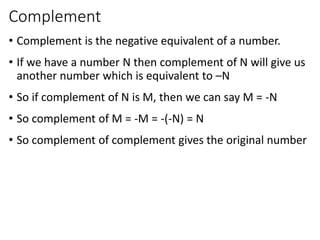
Complement
• Complement is the negative equivalent of a number.
• If we have a number N then complement of N will give us
another number which is equivalent to –N
• So if complement of N is M, then we can say M = -N
• So complement of M = -M = -(-N) = N
• So complement of complement gives the original number
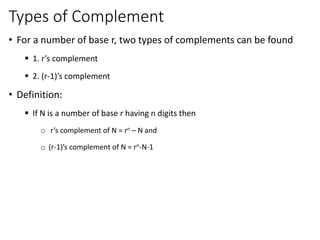
Types of Complement
• For a number of base r, two types of complements can be found
 1. r’s complement
 2. (r-1)’s complement
• Definition:
 If N is a number of base r having n digits then
o r’s complement of N = rn – N and
o (r-1)’s complement of N = rn-N-1
Example
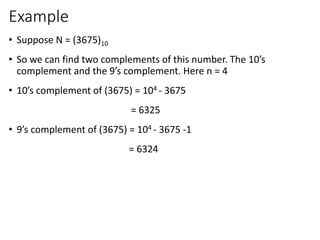
• Suppose N = (3675)10
• So we can find two complements of this number. The 10’s
complement and the 9’s complement. Here n = 4
• 10’s complement of (3675) = 104 - 3675
= 6325
• 9’s complement of (3675) = 104 - 3675 -1
= 6324
Short cut way to find (r-1)’s complement
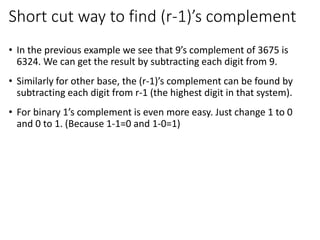
• In the previous example we see that 9’s complement of 3675 is
6324. We can get the result by subtracting each digit from 9.
• Similarly for other base, the (r-1)’s complement can be found by
subtracting each digit from r-1 (the highest digit in that system).
• For binary 1’s complement is even more easy. Just change 1 to 0
and 0 to 1. (Because 1-1=0 and 1-0=1)
Example
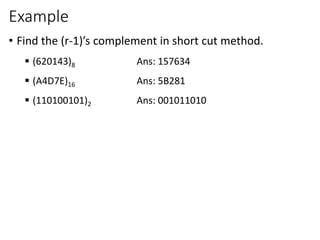
• Find the (r-1)’s complement in short cut method.
 (620143)8 Ans: 157634
 (A4D7E)16 Ans: 5B281
 (110100101)2 Ans: 001011010
Short cut way to find r’s complement
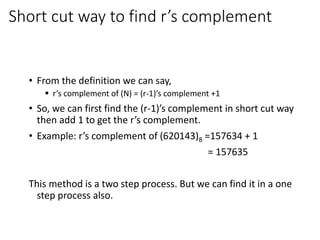
• From the definition we can say,
 r’s complement of (N) = (r-1)’s complement +1
• So, we can first find the (r-1)’s complement in short cut way
then add 1 to get the r’s complement.
• Example: r’s complement of (620143)8 =157634 + 1
= 157635
This method is a two step process. But we can find it in a one
step process also.
Short cut way to find r’s complement
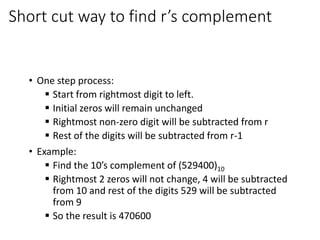
• One step process:
 Start from rightmost digit to left.
 Initial zeros will remain unchanged
 Rightmost non-zero digit will be subtracted from r
 Rest of the digits will be subtracted from r-1
• Example:
 Find the 10’s complement of (529400)10
 Rightmost 2 zeros will not change, 4 will be subtracted
from 10 and rest of the digits 529 will be subtracted
from 9
 So the result is 470600
Example
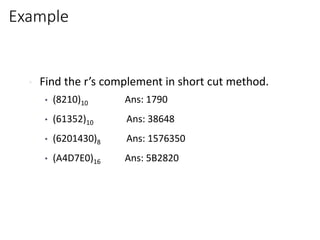
• Find the r’s complement in short cut method.
• (8210)10 Ans: 1790
• (61352)10 Ans: 38648
• (6201430)8 Ans: 1576350
• (A4D7E0)16 Ans: 5B2820
Example for binary
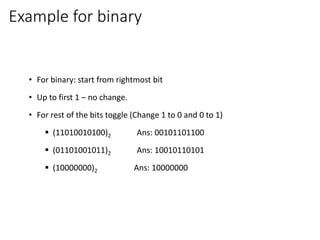
• For binary: start from rightmost bit
• Up to first 1 – no change.
• For rest of the bits toggle (Change 1 to 0 and 0 to 1)
 (11010010100)2 Ans: 00101101100
 (01101001011)2 Ans: 10010110101
 (10000000)2 Ans: 10000000
Use of Complement
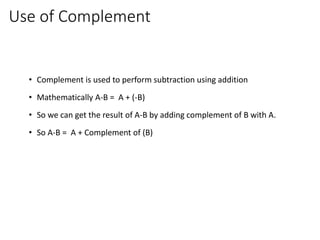
• Complement is used to perform subtraction using addition
• Mathematically A-B = A + (-B)
• So we can get the result of A-B by adding complement of B with A.
• So A-B = A + Complement of (B)
Addition and Subtraction
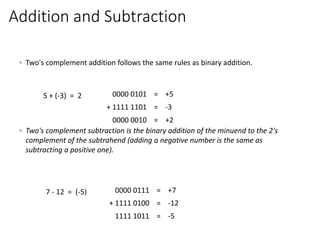
◦ Two's complement addition follows the same rules as binary addition.
◦ Two's complement subtraction is the binary addition of the minuend to the 2's
complement of the subtrahend (adding a negative number is the same as
subtracting a positive one).
5 + (-3) = 2 0000 0101 = +5
+ 1111 1101 = -3
0000 0010 = +2
7 - 12 = (-5) 0000 0111 = +7
+ 1111 0100 = -12
1111 1011 = -5
Section 2
Introduction to programming
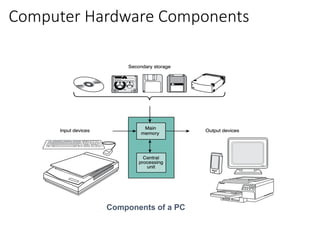
Computer Hardware Components
Components of a PC
Input / Output Devices
•Input Devices
• Accepts information from the user and
transforms it to digital codes that the computer
can process
• Example: keyboard, mouse, scanner
•Output Devices
• An interface by which the computer conveys
the output to the user
• Example: monitor, printer
Main Memory
• A semiconductor device which stores the information
necessary for a program to run.
• 2 types
• ROM (Read Only Memory)
• Contains information that is necessary for the computer to boot up
• The information stays there permanently even when the computer is
turned off.
• RAM (Random Access Memory)
• Contains instruction or data needed for a program to run
• Gets erased when the computer is turned off.
Central Processing Unit (CPU)
• Does most of the work in executing a program
• The CPU inside a PC is usually the microprocessor
• 3 main parts:
• Control Unit
• Fetch instructions from main memory and put them in the instruction register
• ALU (Arithmetic Logic Unit)
• Execute arithmetic operations
• Registers
• Temporarily store instructions or data fetched from memory
Storage Devices
• A magnetic device used to store a large amount of
information.
• Store the software components or data needed
for the computer to execute its tasks.
• Can be “read only” or “writable”.
• Example: Hard drive, CD ROM, floppy disks
Network Devices
• Connect a computer to the other computers.
• Enable the users to access data or execute
programs remotely.
• Example: modem, Ethernet card
Natural language
• Our everyday-language; spoken and written
• Not 100% needed to understand:
• “Do you want to buy this computer ?” remains comprehensible
• Depends on circumstances; the context:
• “Do you like one ?” doesn't make sense on its own. It needs a situation
around it:
• someone holding a bouquet of flowers: you might take one
• someone pointing to an expensive car: your opinion is asked
• someone 'offers' you an oily cloth to sneeze: you don't take it
Semantics and Syntax
• Semantics – the meaning of the language within a given
context
• Syntax - Syntax are the rules to join words
together in forming a correct expression or phrase.
• In natural languages it is often possible to assemble a
sentence in more than one correct ways.
What is Programming?
• Programming is instructing a computer to do something for you with the help of
a programming language
• The two roles of a programming language:
• Technical: It instructs the computer to perform tasks.
• Conceptual: It is a framework within which we organize our ideas about
things and processes.
• In programming, we deal with two kind of things:
• Data - representing 'objects' we want to manipulate
• Procedures -'descriptions' or 'rules' that define how to manipulate data.
Programming Language
• A programming language contains instructions for the
computer to perform a specific action or a specific task:
• 'Calculate the sum of the numbers from 1 to 10‘
• 'Print “I like programming”‘
• 'Output the current time'
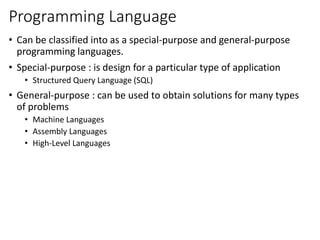
Programming Language
• Can be classified into as a special-purpose and general-purpose
programming languages.
• Special-purpose : is design for a particular type of application
• Structured Query Language (SQL)
• General-purpose : can be used to obtain solutions for many types
of problems
• Machine Languages
• Assembly Languages
• High-Level Languages
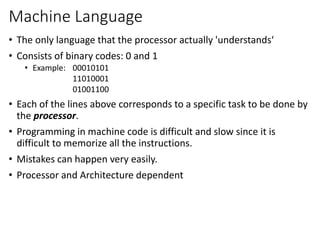
Machine Language
• The only language that the processor actually 'understands‘
• Consists of binary codes: 0 and 1
• Example: 00010101
11010001
01001100
• Each of the lines above corresponds to a specific task to be done by
the processor.
• Programming in machine code is difficult and slow since it is
difficult to memorize all the instructions.
• Mistakes can happen very easily.
• Processor and Architecture dependent
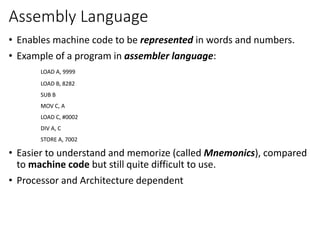
Assembly Language
• Enables machine code to be represented in words and numbers.
• Example of a program in assembler language:
LOAD A, 9999
LOAD B, 8282
SUB B
MOV C, A
LOAD C, #0002
DIV A, C
STORE A, 7002
• Easier to understand and memorize (called Mnemonics), compared
to machine code but still quite difficult to use.
• Processor and Architecture dependent
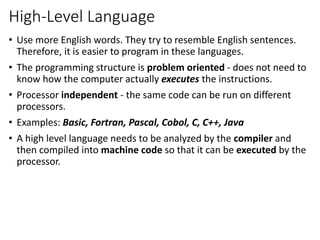
High-Level Language
• Use more English words. They try to resemble English sentences.
Therefore, it is easier to program in these languages.
• The programming structure is problem oriented - does not need to
know how the computer actually executes the instructions.
• Processor independent - the same code can be run on different
processors.
• Examples: Basic, Fortran, Pascal, Cobol, C, C++, Java
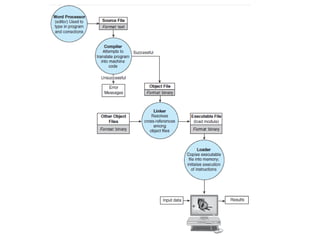
• A high level language needs to be analyzed by the compiler and
then compiled into machine code so that it can be executed by the
processor.
C Programming Language
Why 'C' ?
• Because based on 'B'; developed at Bell Laboratories
• Developed by Dennis Ritchie at Bell Laboratories in the
1960s
• In cooperation with Ken Thomson it was used for Unix
systems
• The C Language was only vaguely defined, not
standardized, so that almost everyone had his own
perception of it, to such an extend that an urgent need
for a standard code was creeping up
C Programming Language
• In 1983, the American National Standards Institute (ANSI)
set up X3J11, a Technical Committee to draft a proposal
for the ANSI standard, which was approved in 1989 and
referred to as the ANSI/ISO 9899 : 1990 or simply the
ANSI C, which is now the global standard for C.
• This standard was updated in 1999; but there is no
compiler yet
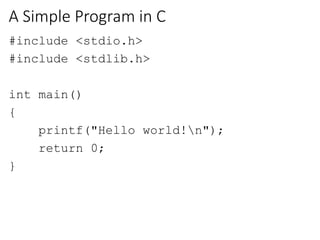
A Simple Program in C
#include <stdio.h>
#include <stdlib.h>
int main()
{
printf("Hello world!n");
return 0;
}
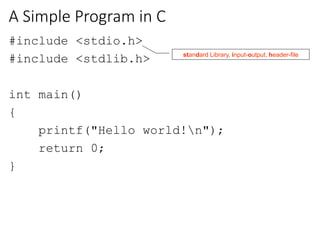
A Simple Program in C
#include <stdio.h>
#include <stdlib.h>
int main()
{
printf("Hello world!n");
return 0;
}
standard Library, input-output, header-file
A Simple Program in C
#include <stdio.h>
#include <stdlib.h>
int main()
{
printf("Hello world!n");
return 0;
}
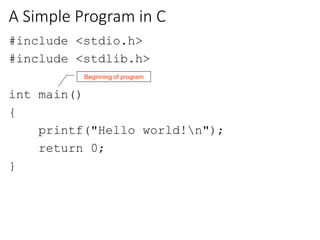
Beginning of program
A Simple Program in C
#include <stdio.h>
#include <stdlib.h>
int main()
{
printf("Hello world!n");
return 0;
}
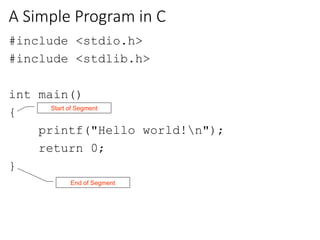
End of Segment
Start of Segment
A Simple Program in C
#include <stdio.h>
#include <stdlib.h>
int main()
{
printf("Hello world!n");
return 0;
}
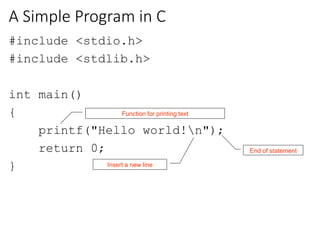
Function for printing text
End of statement
Insert a new line
Output
Hello world!

Cse115 lecture02overviewofprogramming

  • 1.
    Lecture 02 Number Systems Overviewof Programming CSE115: Computing Concepts
  • 2.
    Complement • Complement isthe negative equivalent of a number. • If we have a number N then complement of N will give us another number which is equivalent to –N • So if complement of N is M, then we can say M = -N • So complement of M = -M = -(-N) = N • So complement of complement gives the original number
  • 3.
    Types of Complement •For a number of base r, two types of complements can be found  1. r’s complement  2. (r-1)’s complement • Definition:  If N is a number of base r having n digits then o r’s complement of N = rn – N and o (r-1)’s complement of N = rn-N-1
  • 4.
    Example • Suppose N= (3675)10 • So we can find two complements of this number. The 10’s complement and the 9’s complement. Here n = 4 • 10’s complement of (3675) = 104 - 3675 = 6325 • 9’s complement of (3675) = 104 - 3675 -1 = 6324
  • 5.
    Short cut wayto find (r-1)’s complement • In the previous example we see that 9’s complement of 3675 is 6324. We can get the result by subtracting each digit from 9. • Similarly for other base, the (r-1)’s complement can be found by subtracting each digit from r-1 (the highest digit in that system). • For binary 1’s complement is even more easy. Just change 1 to 0 and 0 to 1. (Because 1-1=0 and 1-0=1)
  • 6.
    Example • Find the(r-1)’s complement in short cut method.  (620143)8 Ans: 157634  (A4D7E)16 Ans: 5B281  (110100101)2 Ans: 001011010
  • 7.
    Short cut wayto find r’s complement • From the definition we can say,  r’s complement of (N) = (r-1)’s complement +1 • So, we can first find the (r-1)’s complement in short cut way then add 1 to get the r’s complement. • Example: r’s complement of (620143)8 =157634 + 1 = 157635 This method is a two step process. But we can find it in a one step process also.
  • 8.
    Short cut wayto find r’s complement • One step process:  Start from rightmost digit to left.  Initial zeros will remain unchanged  Rightmost non-zero digit will be subtracted from r  Rest of the digits will be subtracted from r-1 • Example:  Find the 10’s complement of (529400)10  Rightmost 2 zeros will not change, 4 will be subtracted from 10 and rest of the digits 529 will be subtracted from 9  So the result is 470600
  • 9.
    Example • Find ther’s complement in short cut method. • (8210)10 Ans: 1790 • (61352)10 Ans: 38648 • (6201430)8 Ans: 1576350 • (A4D7E0)16 Ans: 5B2820
  • 10.
    Example for binary •For binary: start from rightmost bit • Up to first 1 – no change. • For rest of the bits toggle (Change 1 to 0 and 0 to 1)  (11010010100)2 Ans: 00101101100  (01101001011)2 Ans: 10010110101  (10000000)2 Ans: 10000000
  • 11.
    Use of Complement •Complement is used to perform subtraction using addition • Mathematically A-B = A + (-B) • So we can get the result of A-B by adding complement of B with A. • So A-B = A + Complement of (B)
  • 12.
    Addition and Subtraction ◦Two's complement addition follows the same rules as binary addition. ◦ Two's complement subtraction is the binary addition of the minuend to the 2's complement of the subtrahend (adding a negative number is the same as subtracting a positive one). 5 + (-3) = 2 0000 0101 = +5 + 1111 1101 = -3 0000 0010 = +2 7 - 12 = (-5) 0000 0111 = +7 + 1111 0100 = -12 1111 1011 = -5
  • 13.
  • 14.
  • 15.
    Input / OutputDevices •Input Devices • Accepts information from the user and transforms it to digital codes that the computer can process • Example: keyboard, mouse, scanner •Output Devices • An interface by which the computer conveys the output to the user • Example: monitor, printer
  • 16.
    Main Memory • Asemiconductor device which stores the information necessary for a program to run. • 2 types • ROM (Read Only Memory) • Contains information that is necessary for the computer to boot up • The information stays there permanently even when the computer is turned off. • RAM (Random Access Memory) • Contains instruction or data needed for a program to run • Gets erased when the computer is turned off.
  • 17.
    Central Processing Unit(CPU) • Does most of the work in executing a program • The CPU inside a PC is usually the microprocessor • 3 main parts: • Control Unit • Fetch instructions from main memory and put them in the instruction register • ALU (Arithmetic Logic Unit) • Execute arithmetic operations • Registers • Temporarily store instructions or data fetched from memory
  • 18.
    Storage Devices • Amagnetic device used to store a large amount of information. • Store the software components or data needed for the computer to execute its tasks. • Can be “read only” or “writable”. • Example: Hard drive, CD ROM, floppy disks
  • 19.
    Network Devices • Connecta computer to the other computers. • Enable the users to access data or execute programs remotely. • Example: modem, Ethernet card
  • 20.
    Natural language • Oureveryday-language; spoken and written • Not 100% needed to understand: • “Do you want to buy this computer ?” remains comprehensible • Depends on circumstances; the context: • “Do you like one ?” doesn't make sense on its own. It needs a situation around it: • someone holding a bouquet of flowers: you might take one • someone pointing to an expensive car: your opinion is asked • someone 'offers' you an oily cloth to sneeze: you don't take it
  • 21.
    Semantics and Syntax •Semantics – the meaning of the language within a given context • Syntax - Syntax are the rules to join words together in forming a correct expression or phrase. • In natural languages it is often possible to assemble a sentence in more than one correct ways.
  • 22.
    What is Programming? •Programming is instructing a computer to do something for you with the help of a programming language • The two roles of a programming language: • Technical: It instructs the computer to perform tasks. • Conceptual: It is a framework within which we organize our ideas about things and processes. • In programming, we deal with two kind of things: • Data - representing 'objects' we want to manipulate • Procedures -'descriptions' or 'rules' that define how to manipulate data.
  • 23.
    Programming Language • Aprogramming language contains instructions for the computer to perform a specific action or a specific task: • 'Calculate the sum of the numbers from 1 to 10‘ • 'Print “I like programming”‘ • 'Output the current time'
  • 24.
    Programming Language • Canbe classified into as a special-purpose and general-purpose programming languages. • Special-purpose : is design for a particular type of application • Structured Query Language (SQL) • General-purpose : can be used to obtain solutions for many types of problems • Machine Languages • Assembly Languages • High-Level Languages
  • 25.
    Machine Language • Theonly language that the processor actually 'understands‘ • Consists of binary codes: 0 and 1 • Example: 00010101 11010001 01001100 • Each of the lines above corresponds to a specific task to be done by the processor. • Programming in machine code is difficult and slow since it is difficult to memorize all the instructions. • Mistakes can happen very easily. • Processor and Architecture dependent
  • 26.
    Assembly Language • Enablesmachine code to be represented in words and numbers. • Example of a program in assembler language: LOAD A, 9999 LOAD B, 8282 SUB B MOV C, A LOAD C, #0002 DIV A, C STORE A, 7002 • Easier to understand and memorize (called Mnemonics), compared to machine code but still quite difficult to use. • Processor and Architecture dependent
  • 27.
    High-Level Language • Usemore English words. They try to resemble English sentences. Therefore, it is easier to program in these languages. • The programming structure is problem oriented - does not need to know how the computer actually executes the instructions. • Processor independent - the same code can be run on different processors. • Examples: Basic, Fortran, Pascal, Cobol, C, C++, Java • A high level language needs to be analyzed by the compiler and then compiled into machine code so that it can be executed by the processor.
  • 29.
    C Programming Language Why'C' ? • Because based on 'B'; developed at Bell Laboratories • Developed by Dennis Ritchie at Bell Laboratories in the 1960s • In cooperation with Ken Thomson it was used for Unix systems • The C Language was only vaguely defined, not standardized, so that almost everyone had his own perception of it, to such an extend that an urgent need for a standard code was creeping up
  • 30.
    C Programming Language •In 1983, the American National Standards Institute (ANSI) set up X3J11, a Technical Committee to draft a proposal for the ANSI standard, which was approved in 1989 and referred to as the ANSI/ISO 9899 : 1990 or simply the ANSI C, which is now the global standard for C. • This standard was updated in 1999; but there is no compiler yet
  • 31.
    A Simple Programin C #include <stdio.h> #include <stdlib.h> int main() { printf("Hello world!n"); return 0; }
  • 32.
    A Simple Programin C #include <stdio.h> #include <stdlib.h> int main() { printf("Hello world!n"); return 0; } standard Library, input-output, header-file
  • 33.
    A Simple Programin C #include <stdio.h> #include <stdlib.h> int main() { printf("Hello world!n"); return 0; } Beginning of program
  • 34.
    A Simple Programin C #include <stdio.h> #include <stdlib.h> int main() { printf("Hello world!n"); return 0; } End of Segment Start of Segment
  • 35.
    A Simple Programin C #include <stdio.h> #include <stdlib.h> int main() { printf("Hello world!n"); return 0; } Function for printing text End of statement Insert a new line
  • 36.