METHODS OF DATA COLLECTION
AND PRESENTATION
Chapter 2
What is data?
• refers to facts or figures from which conclusion
can be drawn.
• information collected, organized, analyzed, and
interpret by statisticians.
• needed whenever we undertake studies or
researches which are designed to answer
particular problems, or to provide a base with
which certain decisions may be formulated.
Kinds of Statistical Data
• Qualitative data - classificatory data
ex. Sex, religion, citizenship
• Quantitative data - either counts or measures
ex. Weekly allowance
Note: Qualitative data can be transformed into quantitative
data by coding; ex. Female=1, Male=0
• Primary data - to information gathered directly
from an original source
• Secondary data - refer to information taken from
published or unpublished data which were
previously gathered by other individuals or
agencies
Advantages of primary over secondary
data:
1. Primary data frequently give detailed
definitions of terms and accurate statistical
units used in the experiment or in the survey.
2. Primary data lend more relevance to the
researcher's study because of his direct
participation in the project.
3. Primary data are more reliable because of their
first-hand nature.
Methods of Data Collection
1. Survey method - the desired information is
obtained either through personal interview of or by
distributing questionnaires to respondents.
2. Observations method - the desired information is
obtained by observing and recording the behavior
of persons, organizations, etc. but only at the time
of occurrence.
- Direct observation can be used to discover
a variety of types of information including aspects
of social and economic behavior.
3. Experimental method - used when the
objective is to determine the cause and effect
relationship of certain variables under
controlled conditions.
Experimental data are used to test hypotheses
on significance of effects of one or more
controlled variables on certain characteristics of
the unit of analysis.
Methods of Data Collection
Forms of Data Presentation
• Textual Presentation
- an expository form describing a set of
information.
- a useful manner of presenting limited
amounts of information.
Example:
The carabao or kalabaw in Filipino
is a type of water buffalo in our
country. The carabaos are usually
associated with farmers because
these animals are used in farms.
Their life span is about 18 to 20
years. A female carabao can give on
calf each year.
Now is the time for you to shine!
Join
SEARCH for the GOLDEN DIVA
June 12, 2010, 6pm @ Plaza Musica
1st Prize - 20, 000 Php
2nd Prize – 15, 000 Php
3rs Prize – 10, 000 Php
The Republic of the
Philippines has more than
7 000 islands.
BEST REVIEW CENTER
Passing Rate
98% LET (Licensure Exam for Teachers)
96% Nursing Board Exam
AVAIL NOW OF THE DISCOUNT!
• the process of condensing classified data and
arranging them in a table.
Types of tables
1. General or reference table - used mainly as a
repository of information; its primary purpose is
to present data in such a way that individual
items may easily be found by a reader; it is often
placed in an appendix.
b) Tabular Presentation
Forms of Data Presentation
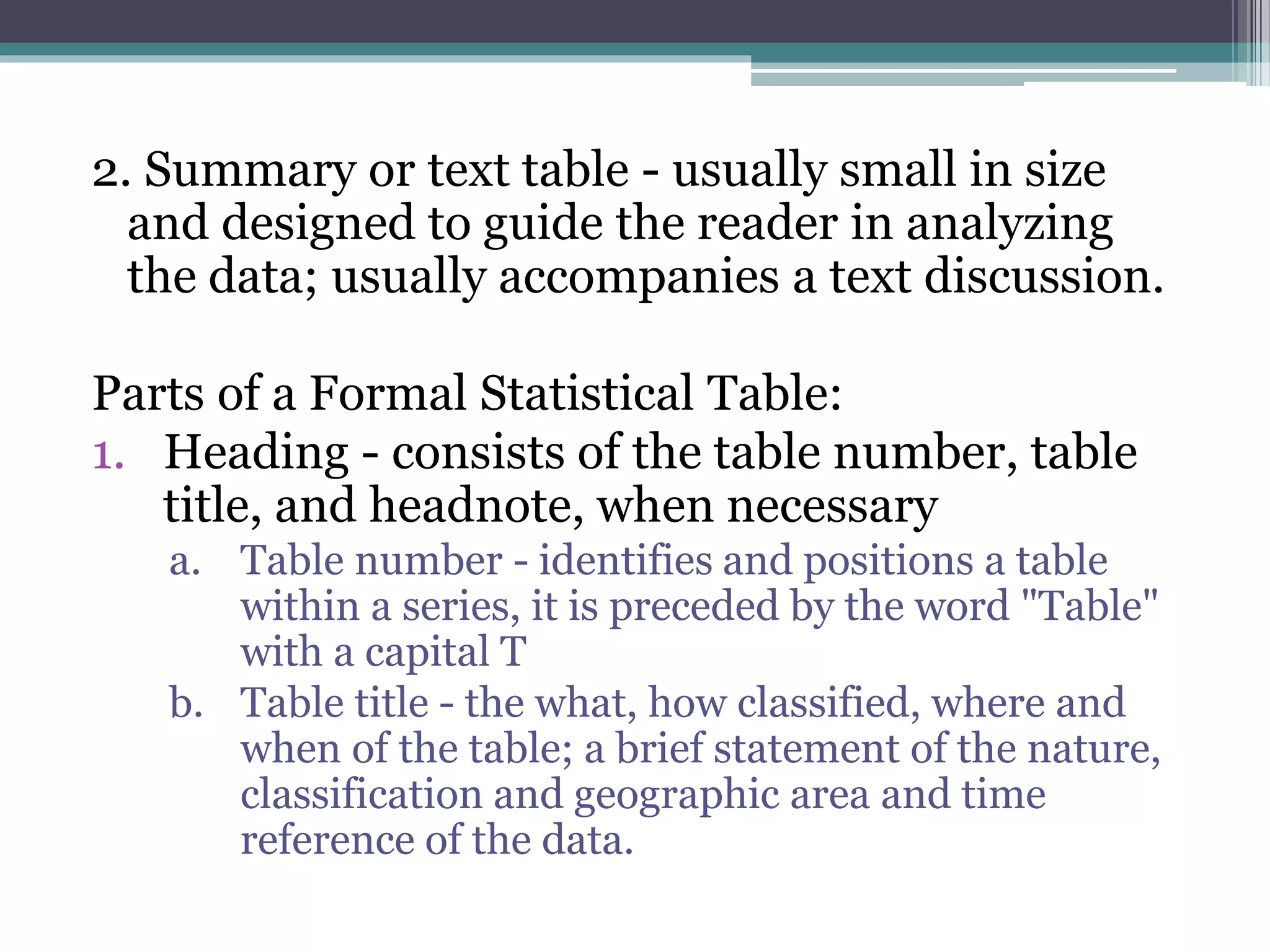
2. Summary or text table - usually small in size
and designed to guide the reader in analyzing
the data; usually accompanies a text discussion.
Parts of a Formal Statistical Table:
1. Heading - consists of the table number, table
title, and headnote, when necessary
a. Table number - identifies and positions a table
within a series, it is preceded by the word "Table"
with a capital T
b. Table title - the what, how classified, where and
when of the table; a brief statement of the nature,
classification and geographic area and time
reference of the data.
c. Headnote - not a necessary part; statement is
enclosed in brackets [ ] or in parentheses and
appearing between the table title and the top rule
of the table; or after the title
2. Boxhead - portion of the table which consists
of the spanner and column heads or captions
describing the data in each column
a. Column head - basic unit of the boxhead;
descriptive title placed directly above the column
to which it refers
b. Spanner head - title under which column heads are
further classified
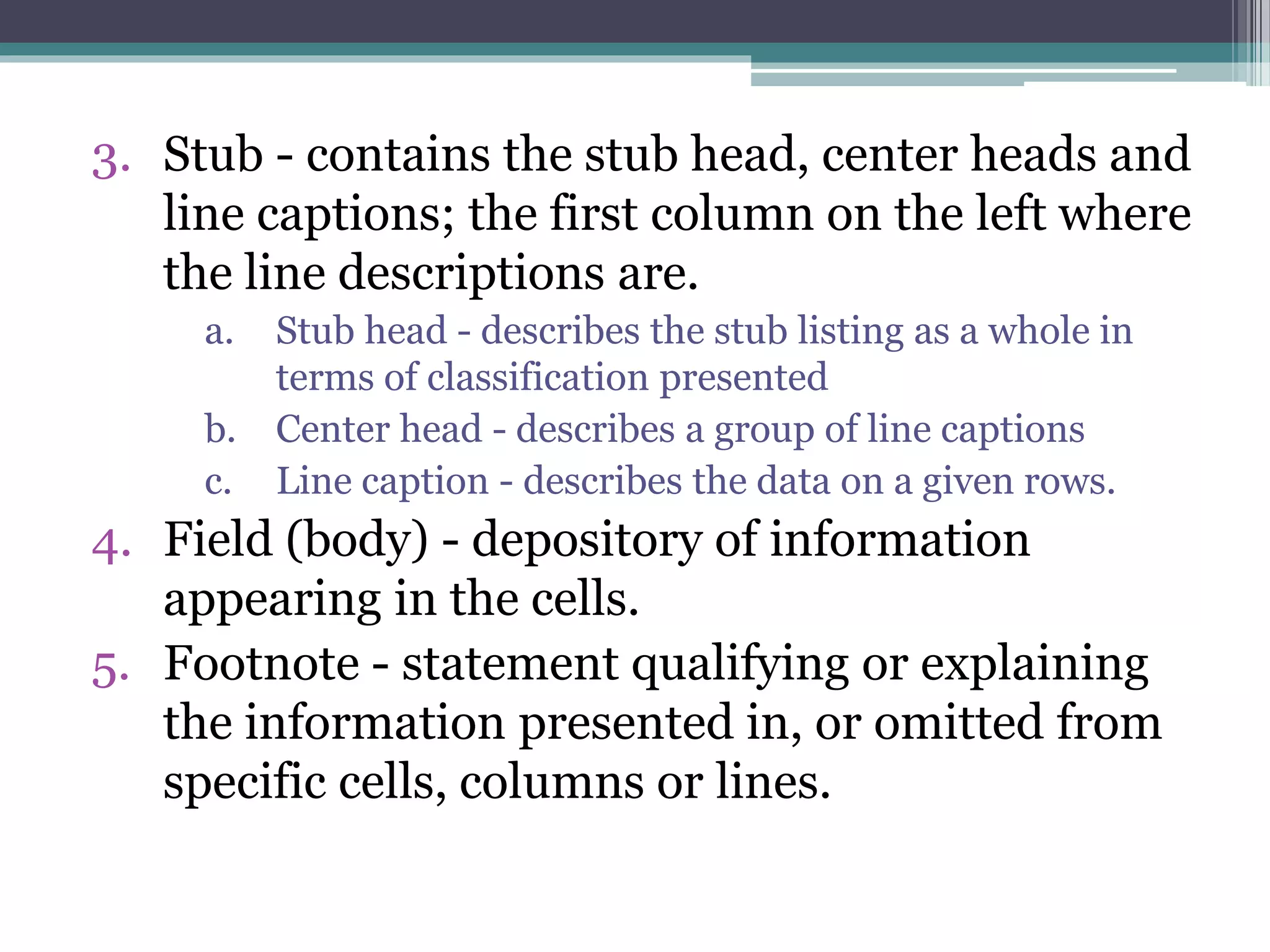
3. Stub - contains the stub head, center heads and
line captions; the first column on the left where
the line descriptions are.
a. Stub head - describes the stub listing as a whole in
terms of classification presented
b. Center head - describes a group of line captions
c. Line caption - describes the data on a given rows.
4. Field (body) - depository of information
appearing in the cells.
5. Footnote - statement qualifying or explaining
the information presented in, or omitted from
specific cells, columns or lines.
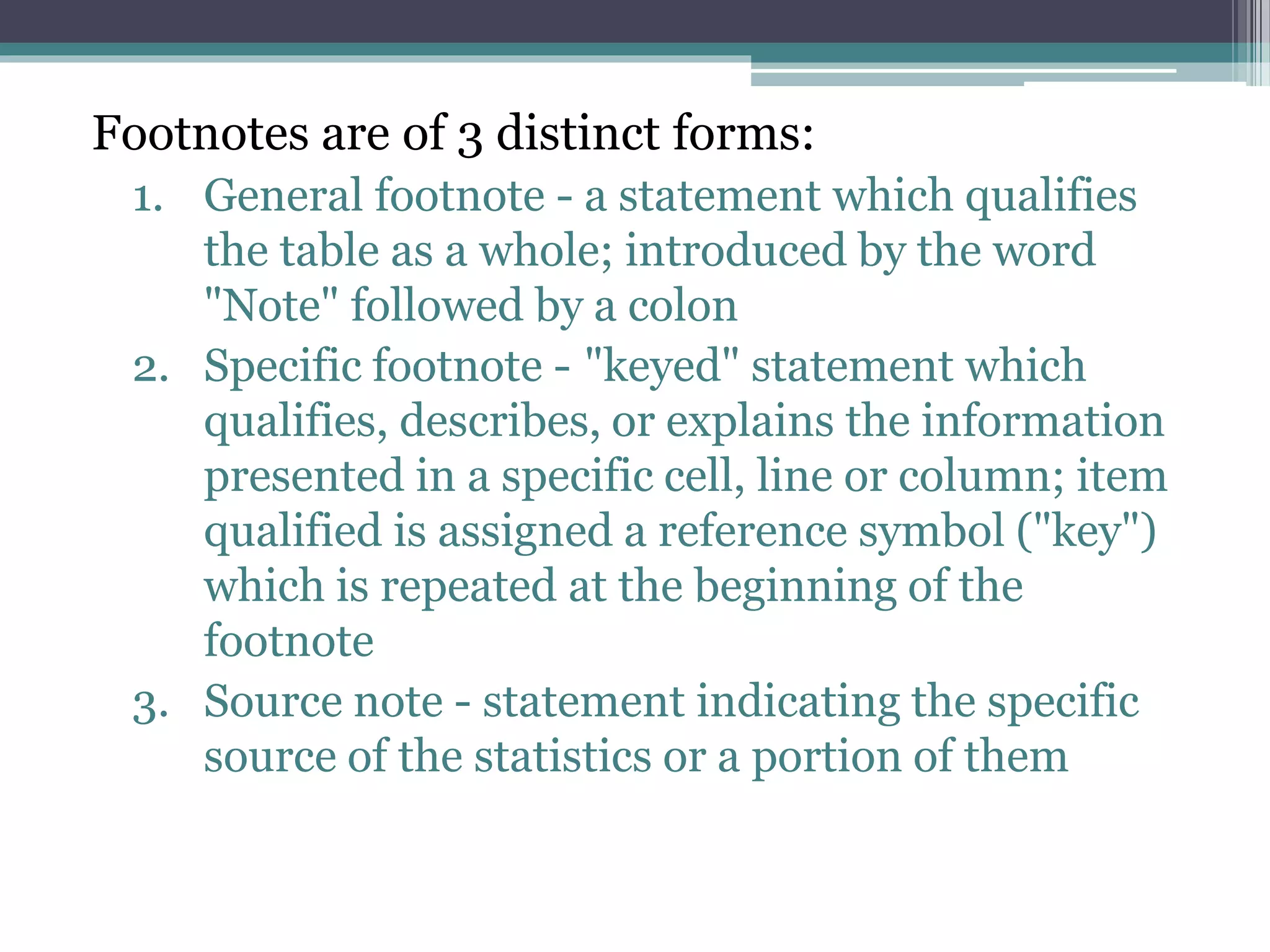
Footnotes are of 3 distinct forms:
1. General footnote - a statement which qualifies
the table as a whole; introduced by the word
"Note" followed by a colon
2. Specific footnote - "keyed" statement which
qualifies, describes, or explains the information
presented in a specific cell, line or column; item
qualified is assigned a reference symbol ("key")
which is repeated at the beginning of the
footnote
3. Source note - statement indicating the specific
source of the statistics or a portion of them
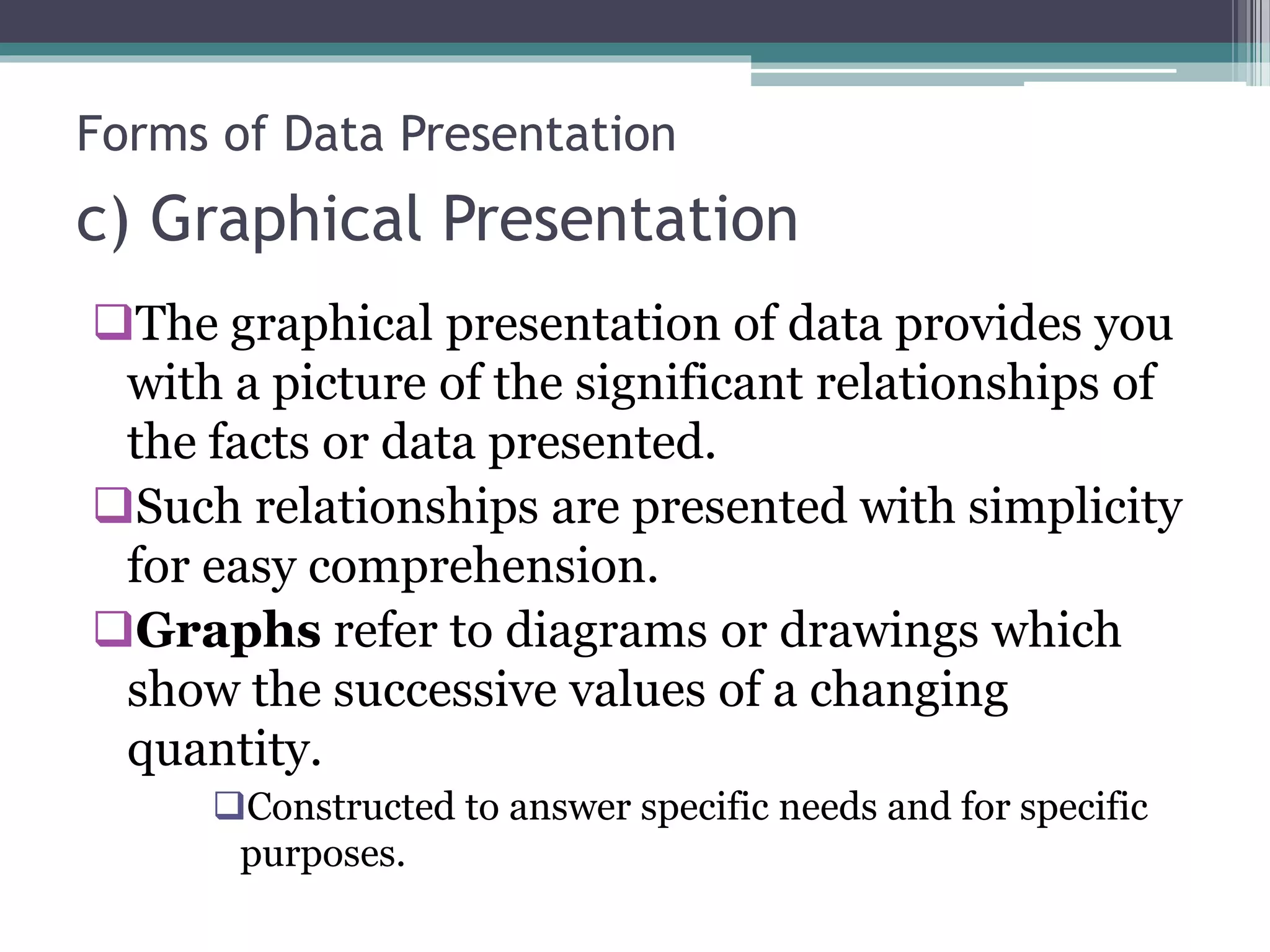
c) Graphical Presentation
The graphical presentation of data provides you
with a picture of the significant relationships of
the facts or data presented.
Such relationships are presented with simplicity
for easy comprehension.
Graphs refer to diagrams or drawings which
show the successive values of a changing
quantity.
Constructed to answer specific needs and for specific
purposes.
Forms of Data Presentation
1) Line Chart
 The curve or line chart is the oldest, simplest, most
familiar, and most widely used method of
presenting statistics graphically.
 The fluctuations or movement of this line show the
variations in the trend.
 The variation is presented using a continuous line
to show the continuity of the data presented.
 Used when we wish to know how one value
changes with respect to another value over
successive periods of time.
Forms of Data Presentation
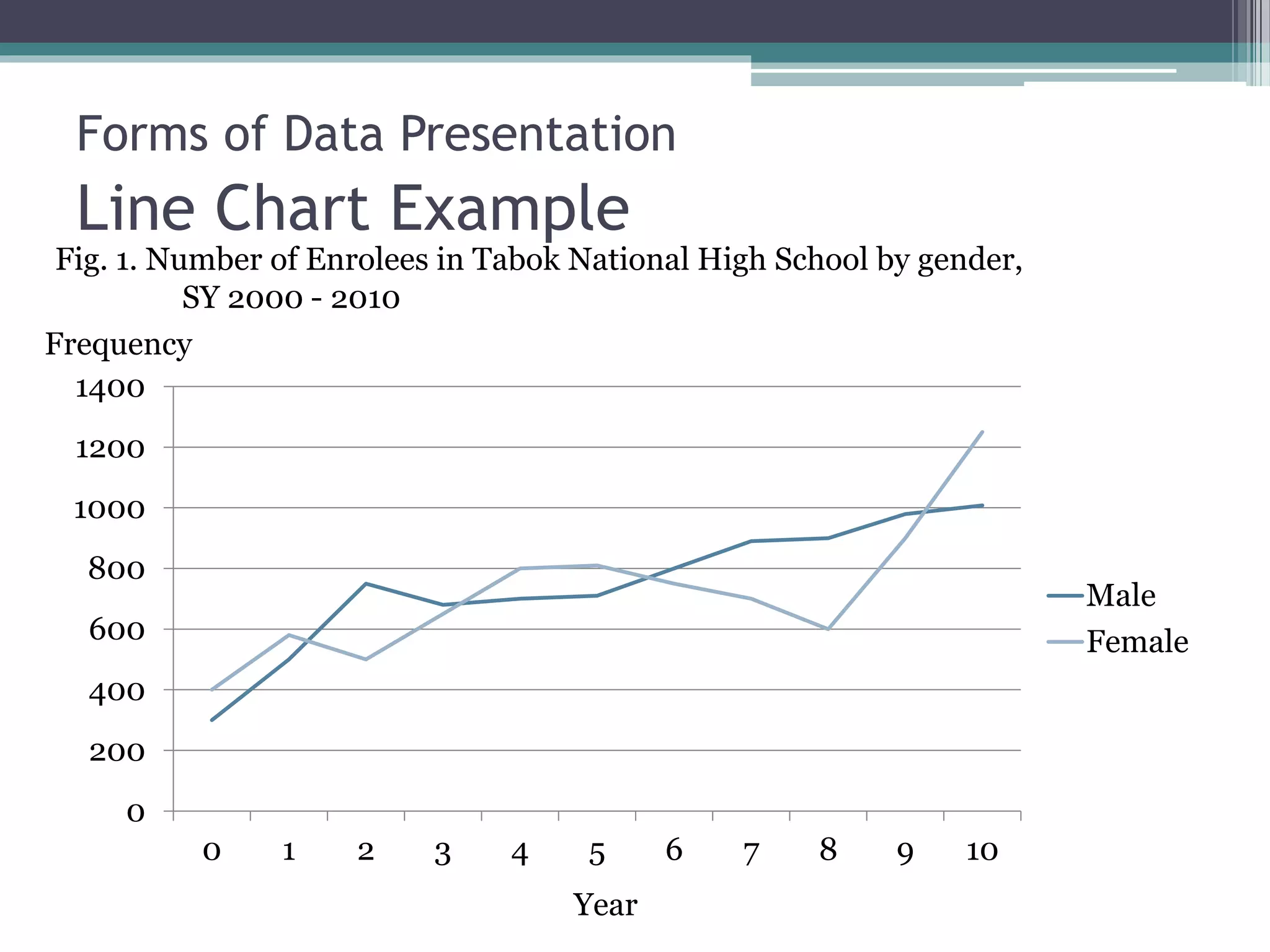
Line Chart Example
0
200
400
600
800
1000
1200
1400
0 1 2 3 4 5 6 7 8 9 10
Male
Female
Fig. 1. Number of Enrolees in Tabok National High School by gender,
SY 2000 - 2010
Frequency
Year
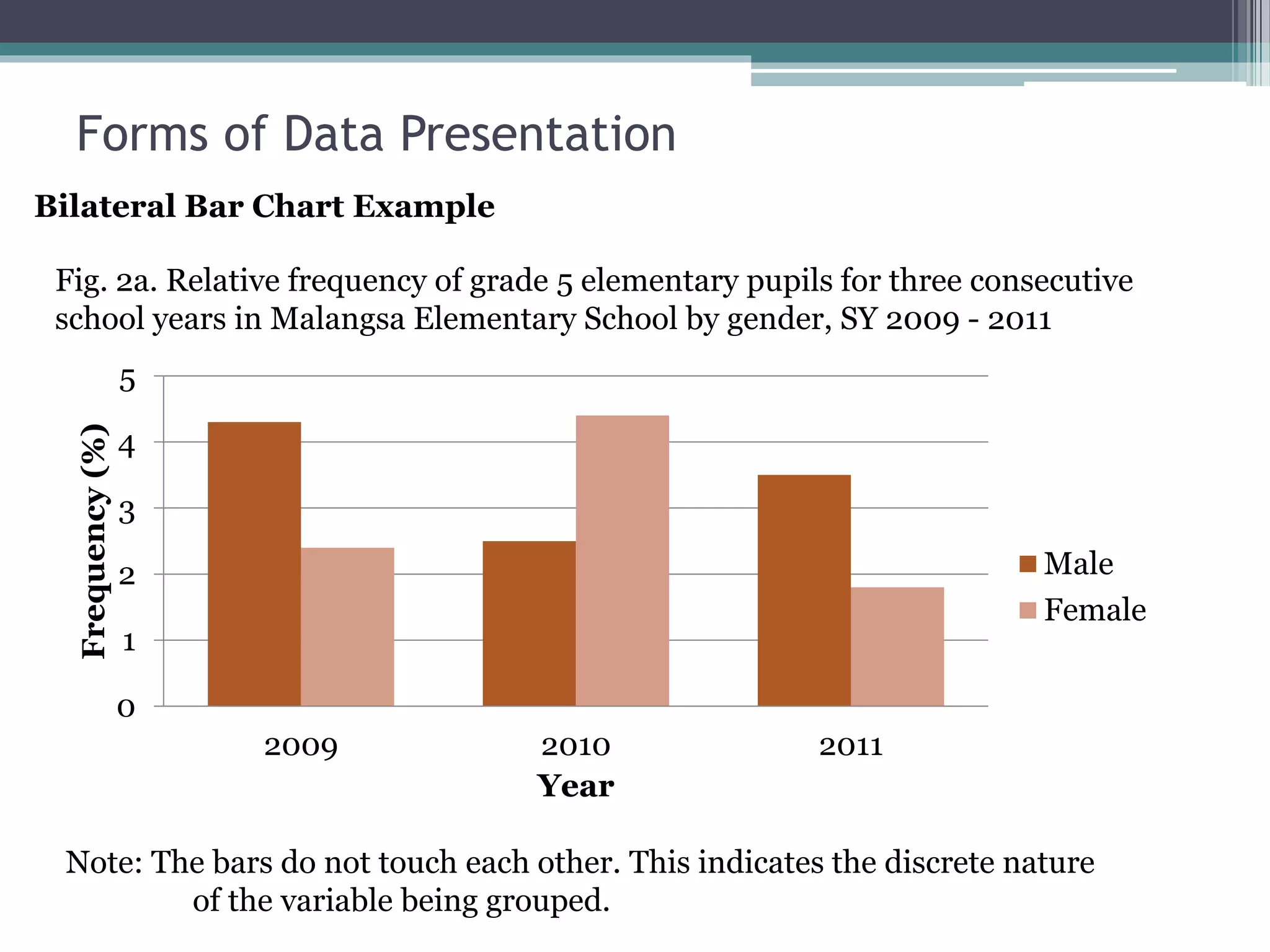
Forms of Data Presentation
2) Column Chart (Vertical Bar Chart)
 Its primary purpose is to depict numerical values
of a given item over a period of time.
 These values, either absolute or percent, are
represented by the height of the column.
 preferable to the line chart when a sharper
delineation of trend is to be shown.
 Used to compare magnitudes
 Types:
 Single bar graph
 Bilateral bar graph – used when the characteristics
are opposite in nature and are to be compared.
 Multiple Bar Graphs – three or more bars
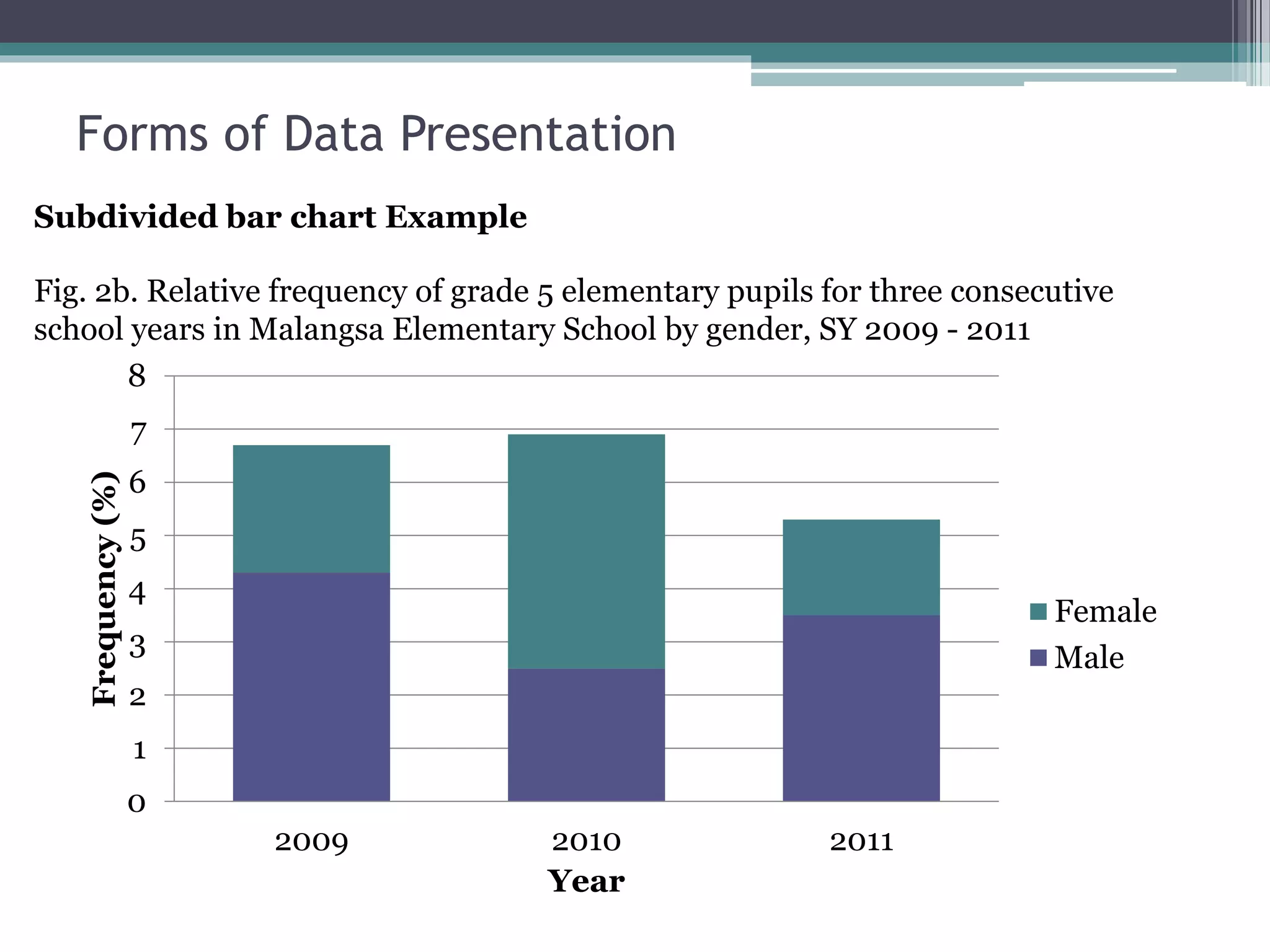
 Subdivided bar graph
Forms of Data Presentation
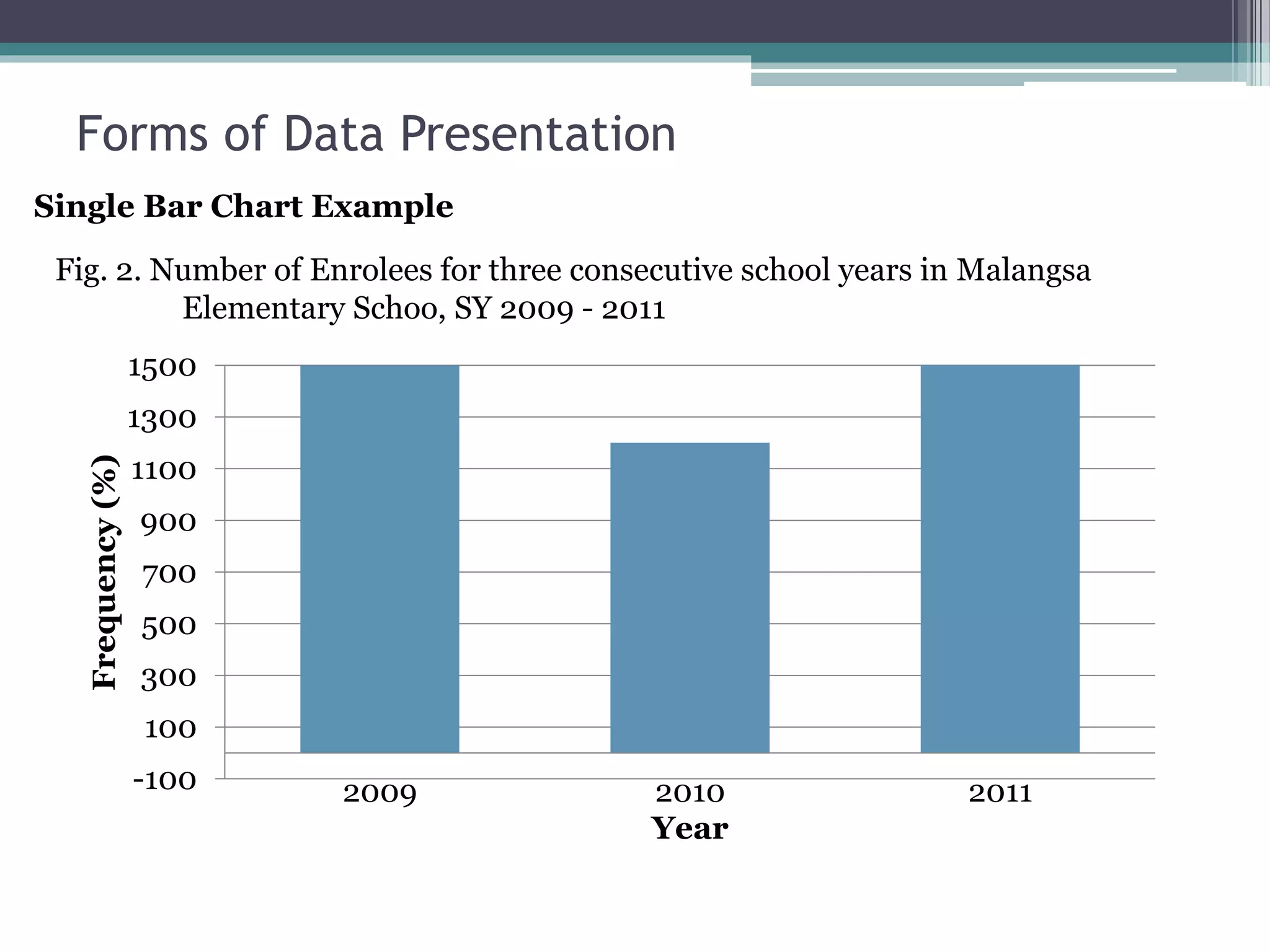
Single Bar Chart Example
-100
100
300
500
700
900
1100
1300
1500
2009 2010 2011
Frequency(%)
Year
Fig. 2. Number of Enrolees for three consecutive school years in Malangsa
Elementary Schoo, SY 2009 - 2011
Forms of Data Presentation
0
1
2
3
4
5
2009 2010 2011
Frequency(%)
Year
Male
Female
Fig. 2a. Relative frequency of grade 5 elementary pupils for three consecutive
school years in Malangsa Elementary School by gender, SY 2009 - 2011
Note: The bars do not touch each other. This indicates the discrete nature
of the variable being grouped.
Bilateral Bar Chart Example
Forms of Data Presentation
Fig. 2b. Relative frequency of grade 5 elementary pupils for three consecutive
school years in Malangsa Elementary School by gender, SY 2009 - 2011
0
1
2
3
4
5
6
7
8
2009 2010 2011
Frequency(%)
Year
Female
Male
Subdivided bar chart Example
Forms of Data Presentation
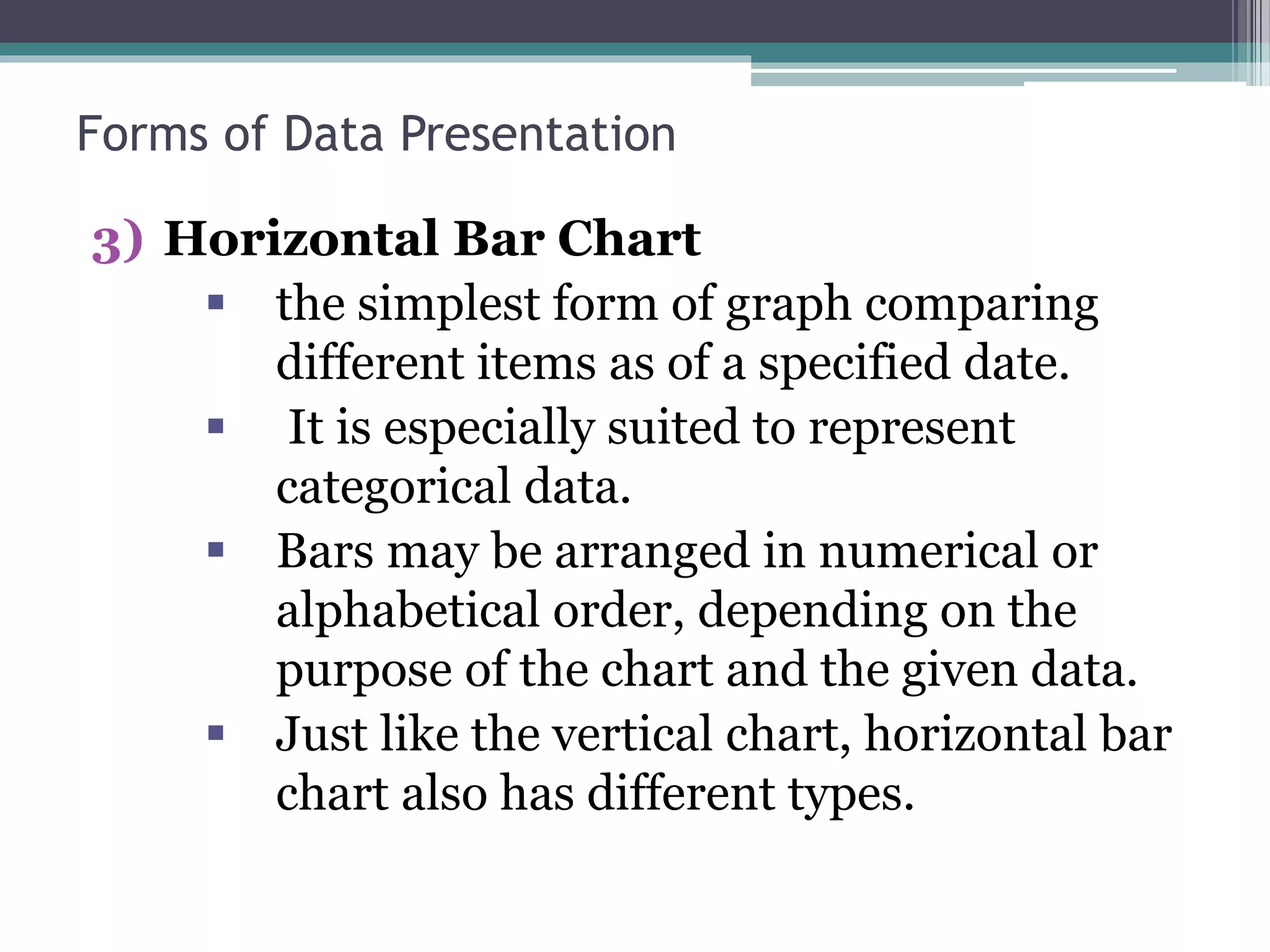
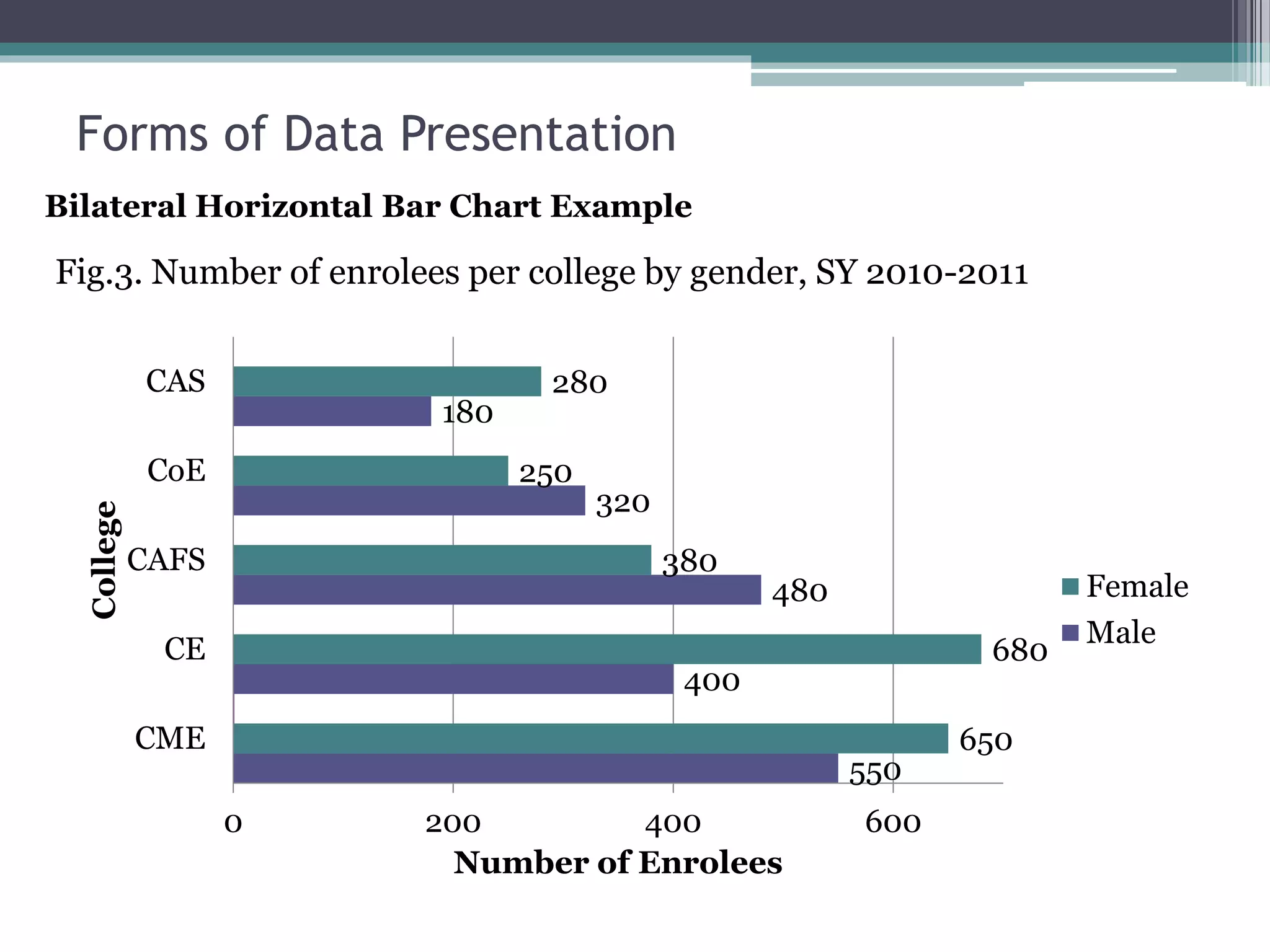
3) Horizontal Bar Chart
 the simplest form of graph comparing
different items as of a specified date.
 It is especially suited to represent
categorical data.
 Bars may be arranged in numerical or
alphabetical order, depending on the
purpose of the chart and the given data.
 Just like the vertical chart, horizontal bar
chart also has different types.
Forms of Data Presentation
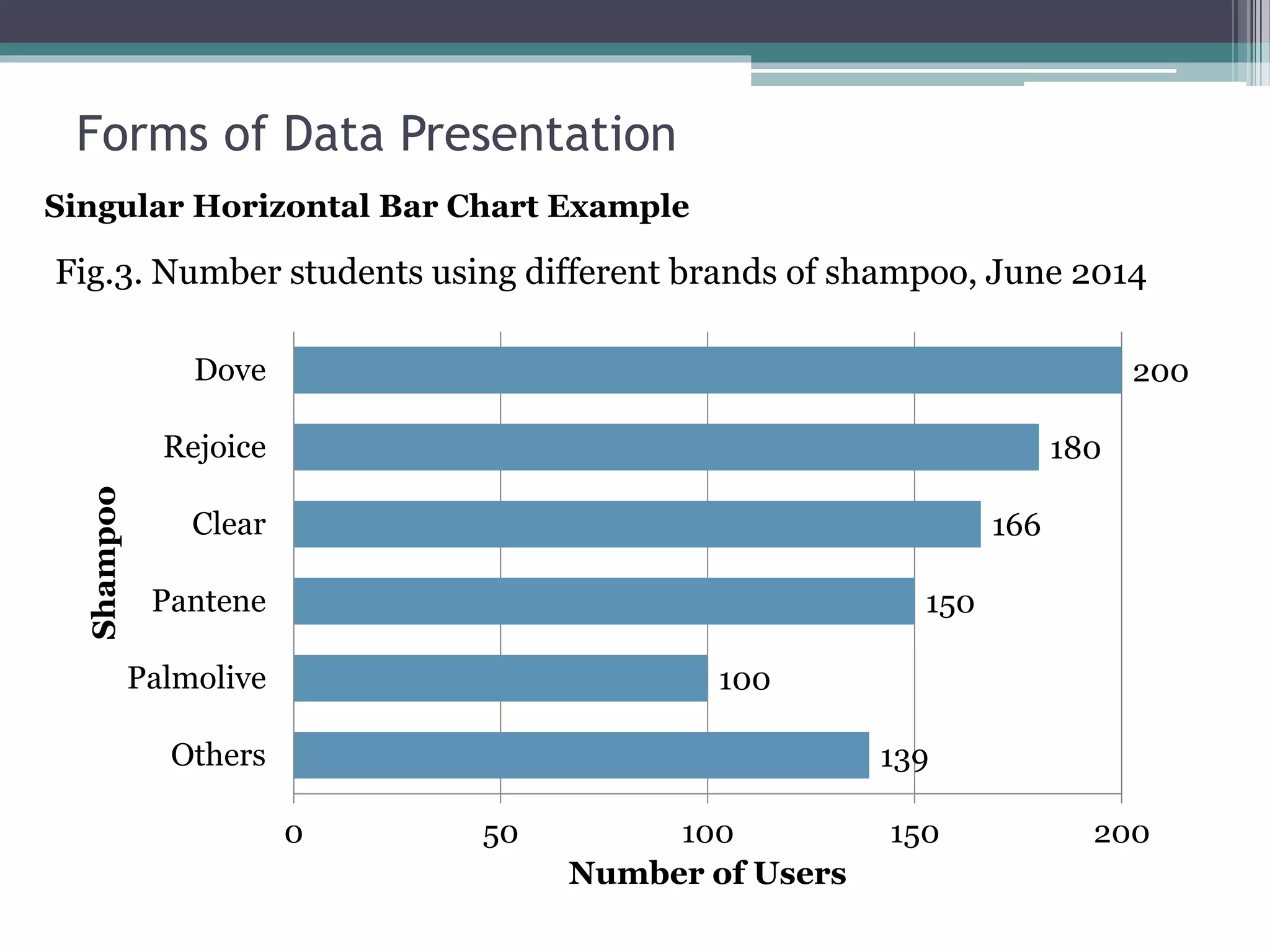
139
100
150
166
180
200
0 50 100 150 200
Others
Palmolive
Pantene
Clear
Rejoice
Dove
Number of Users
Shampoo
Singular Horizontal Bar Chart Example
Fig.3. Number students using different brands of shampoo, June 2014
Forms of Data Presentation
550
400
480
320
180
650
680
380
250
280
0 200 400 600
CME
CE
CAFS
CoE
CAS
Number of Enrolees
College
Female
Male
Fig.3. Number of enrolees per college by gender, SY 2010-2011
Bilateral Horizontal Bar Chart Example
Forms of Data Presentation
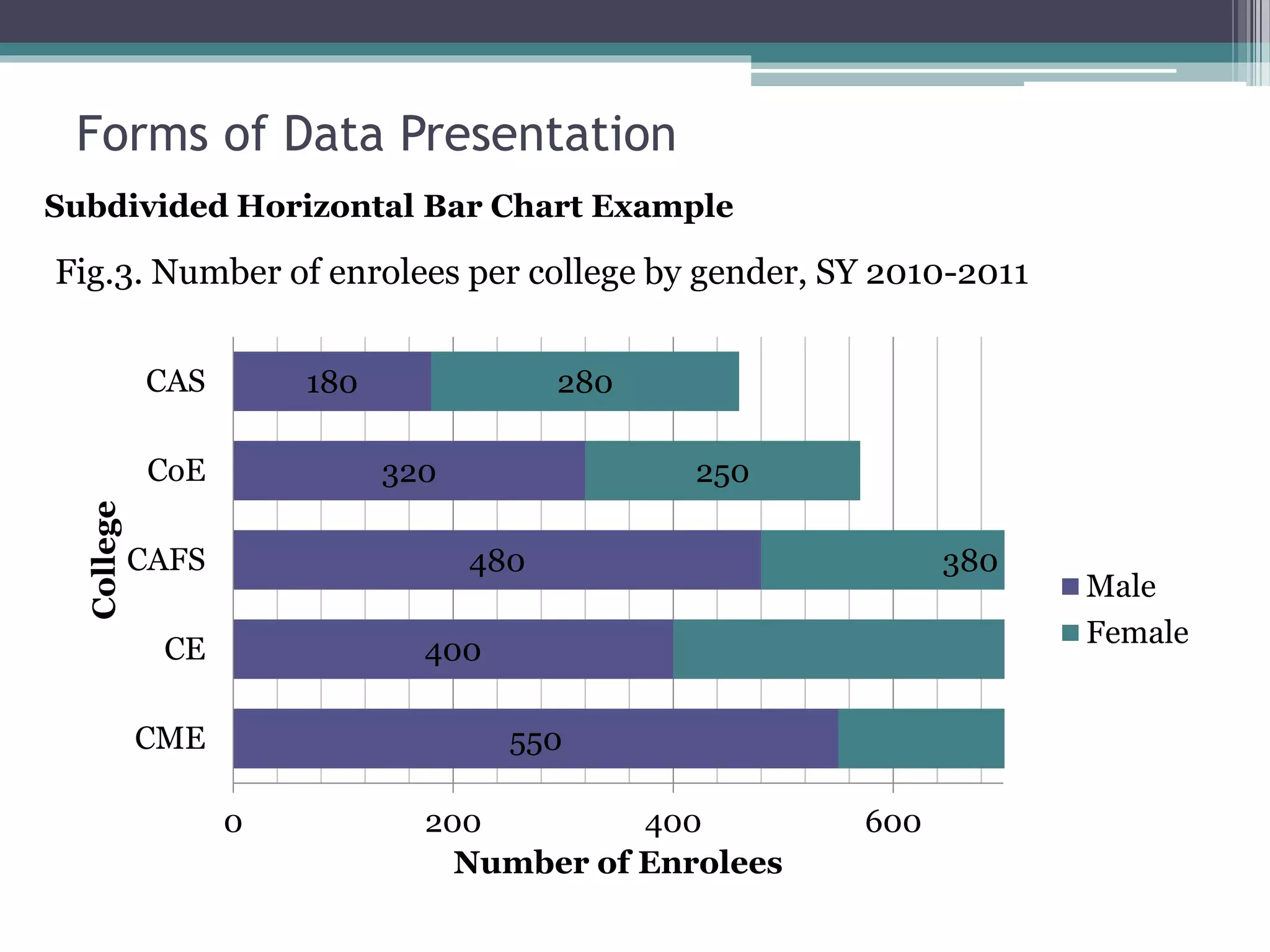
550
400
480
320
180
380
250
280
0 200 400 600
CME
CE
CAFS
CoE
CAS
Number of Enrolees
College
Male
Female
Subdivided Horizontal Bar Chart Example
Fig.3. Number of enrolees per college by gender, SY 2010-2011
Forms of Data Presentation
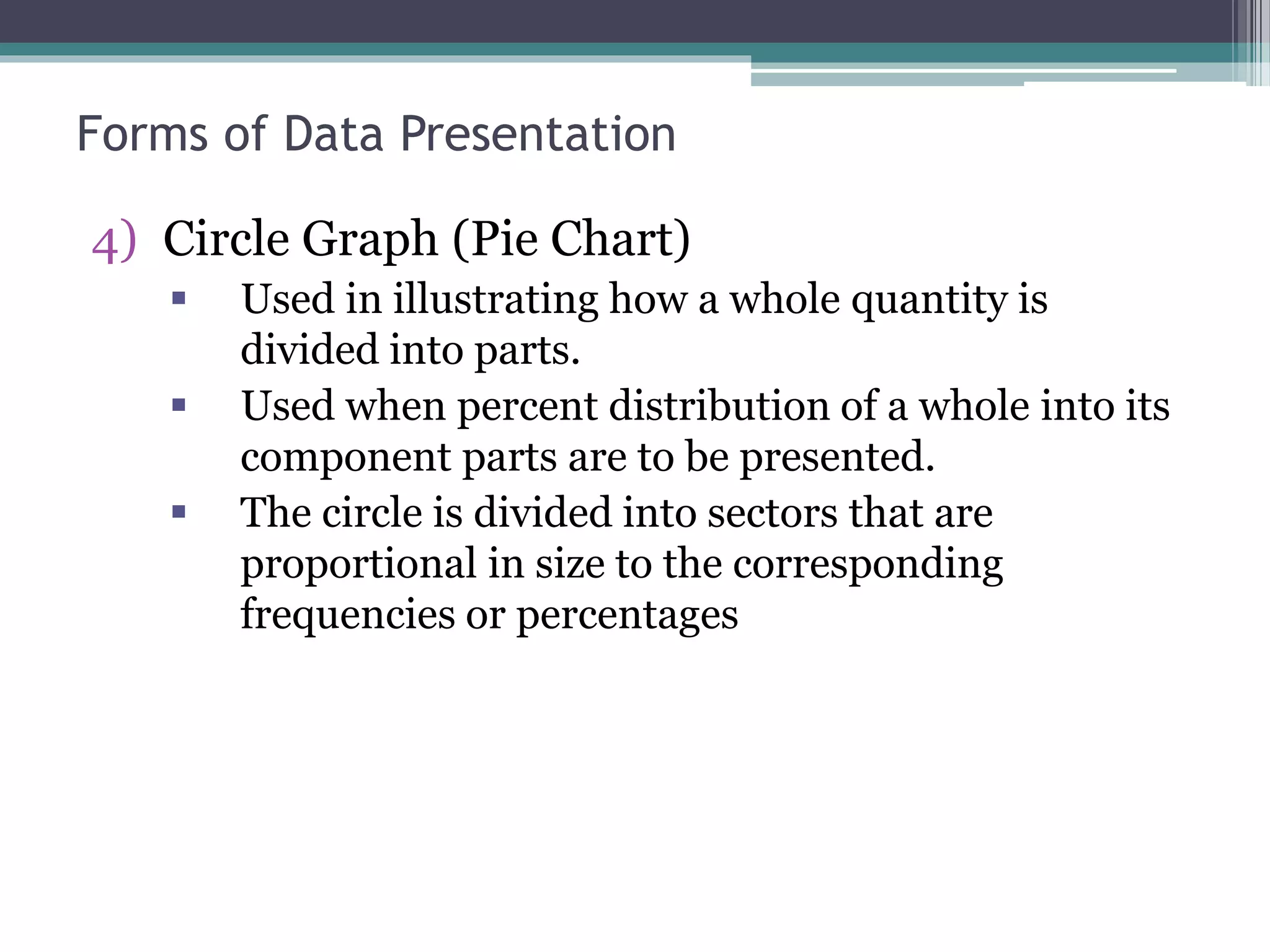
4) Circle Graph (Pie Chart)
 Used in illustrating how a whole quantity is
divided into parts.
 Used when percent distribution of a whole into its
component parts are to be presented.
 The circle is divided into sectors that are
proportional in size to the corresponding
frequencies or percentages
Forms of Data Presentation
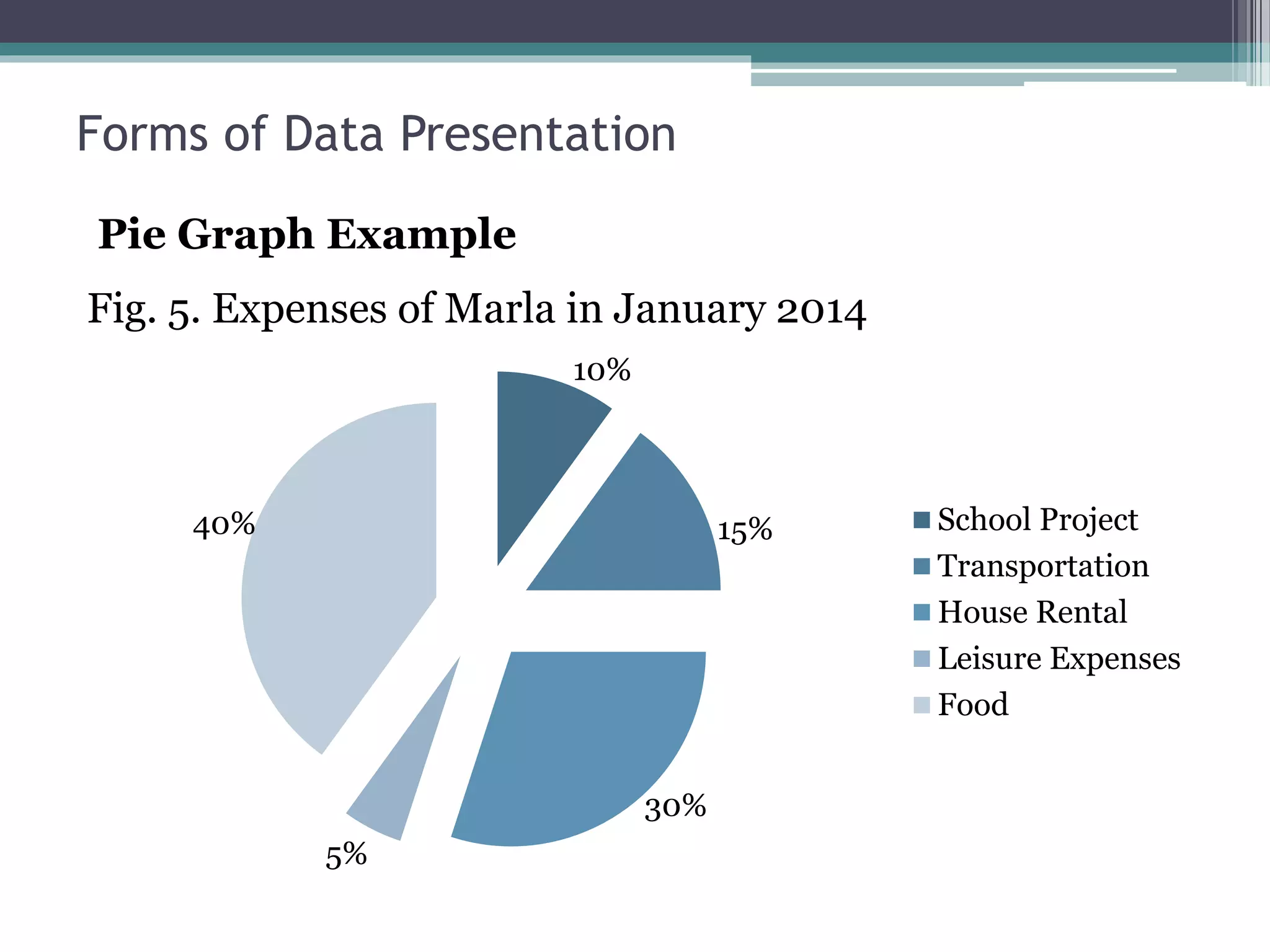
10%
15%
30%
5%
40% School Project
Transportation
House Rental
Leisure Expenses
Food
Pie Graph Example
Fig. 5. Expenses of Marla in January 2014
Forms of Data Presentation
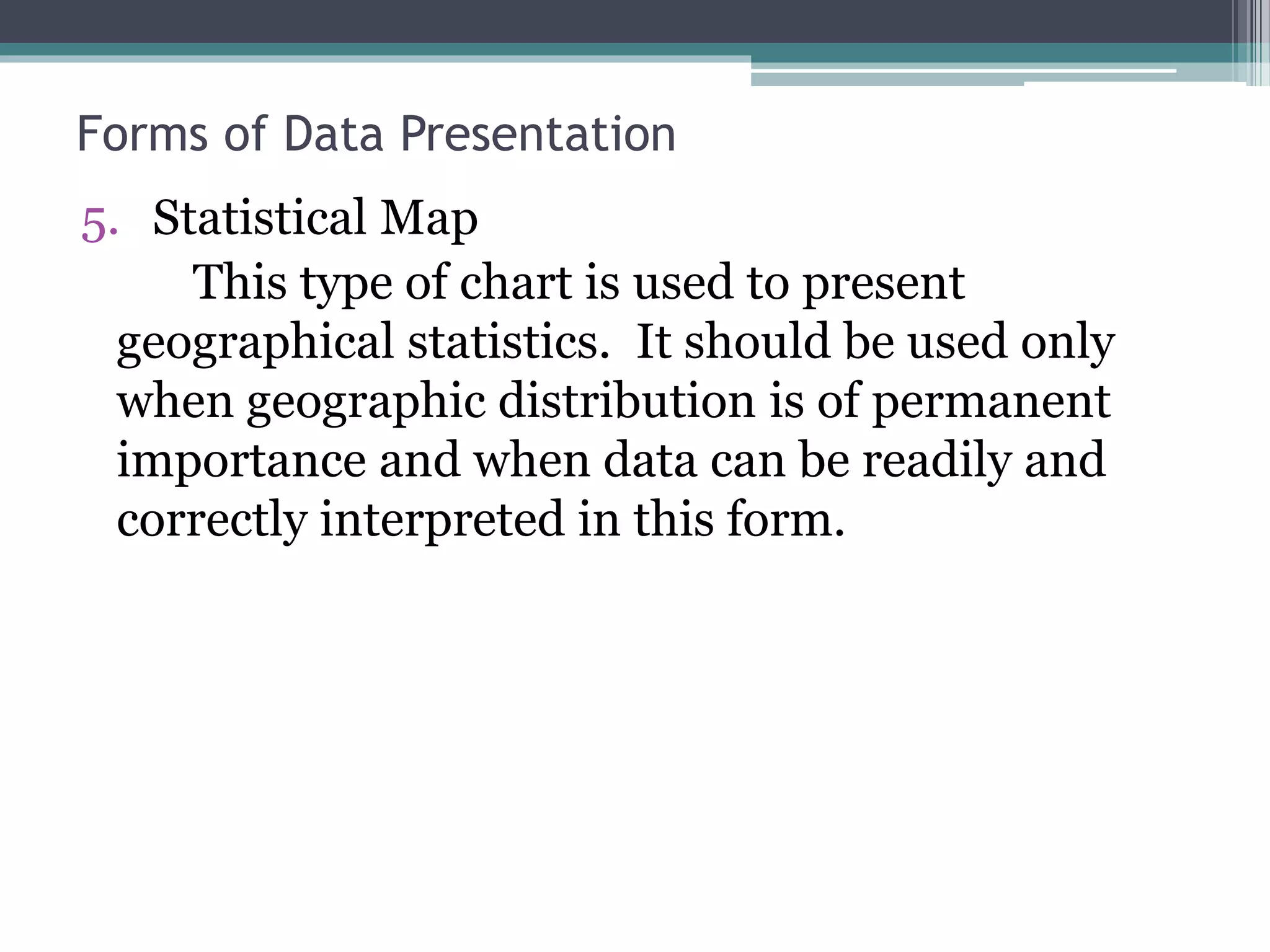
5. Statistical Map
This type of chart is used to present
geographical statistics. It should be used only
when geographic distribution is of permanent
importance and when data can be readily and
correctly interpreted in this form.
Forms of Data Presentation
Principles of Excellent Graphs
 The graph should not distort the data.
 The graph should not contain unnecessary
adornments (sometimes referred to as chart junk).
 The scale on the vertical axis should begin at zero.
 All axes should be properly labeled.
 The graph should contain a title.
 The simplest possible graph should be used for a
given set of data.
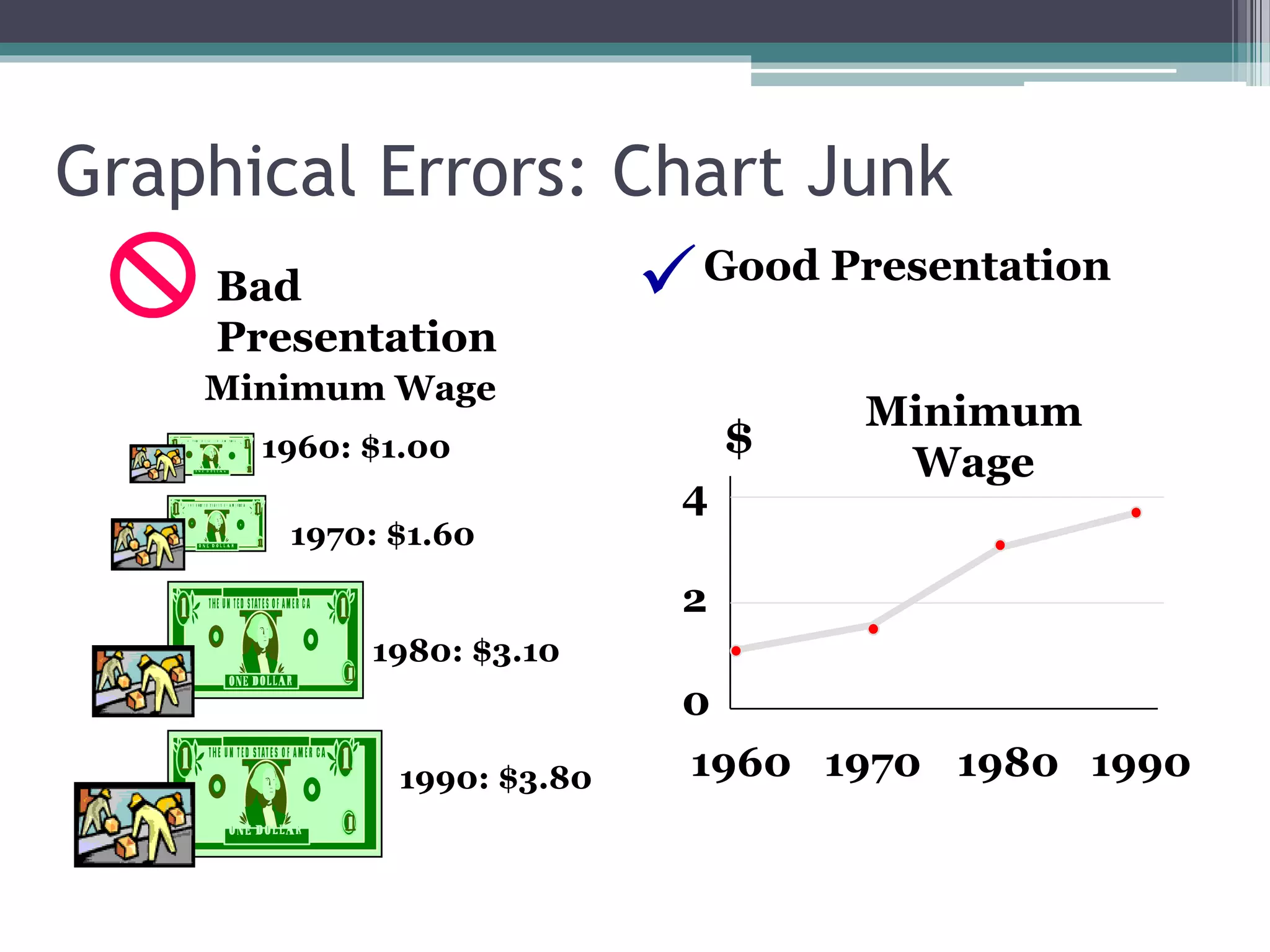
Graphical Errors: Chart Junk
1960: $1.00
1970: $1.60
1980: $3.10
1990: $3.80
Minimum Wage
Bad
Presentation
Minimum
Wage
0
2
4
1960 1970 1980 1990
$
Good Presentation
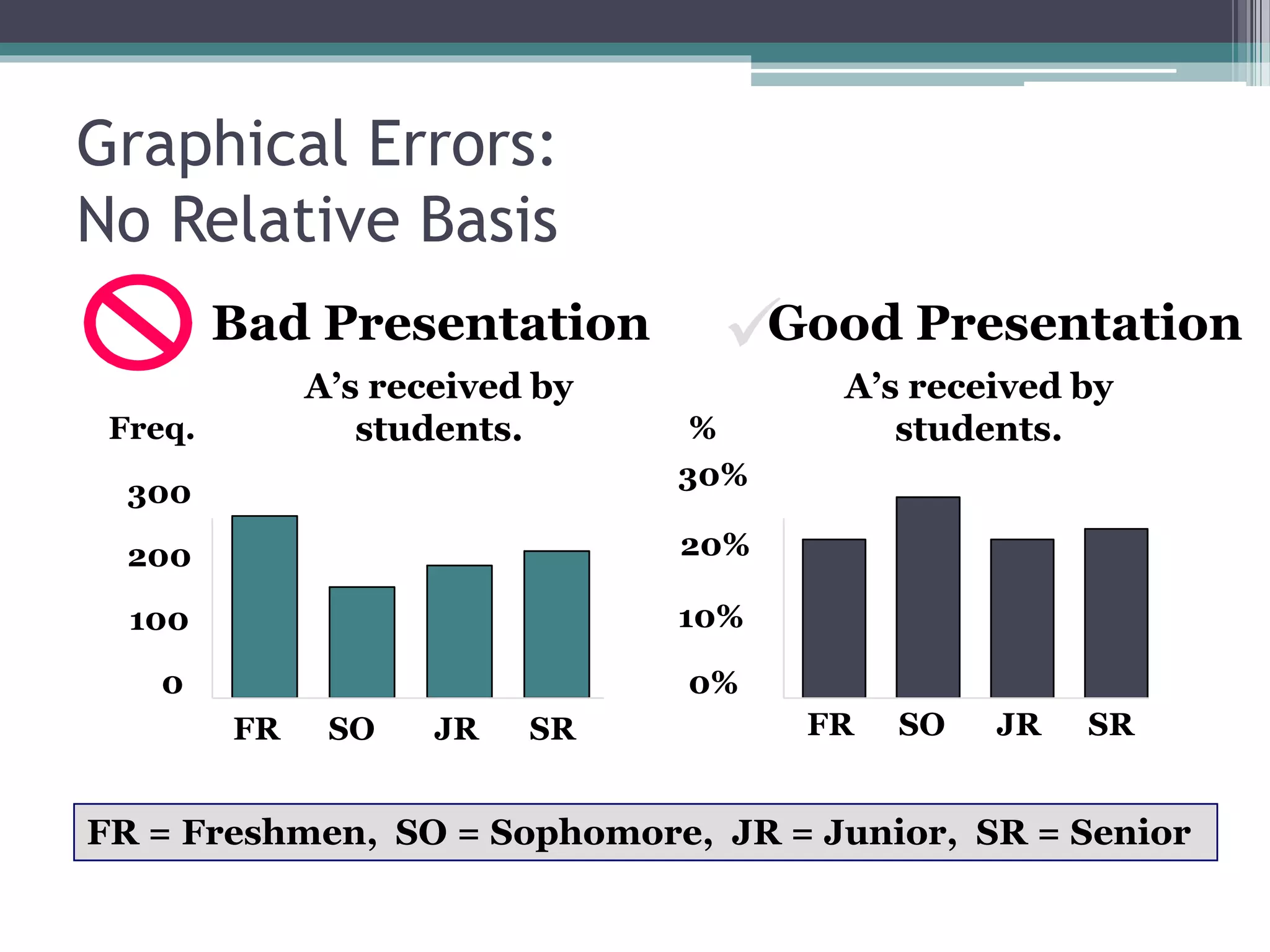
Graphical Errors:
No Relative Basis
A’s received by
students.
A’s received by
students.
Bad Presentation
0
200
300
FR SO JR SR
Freq.
10%
30%
FR SO JR SR
FR = Freshmen, SO = Sophomore, JR = Junior, SR = Senior

100
20%
0%
%
Good Presentation
Graphical Errors:
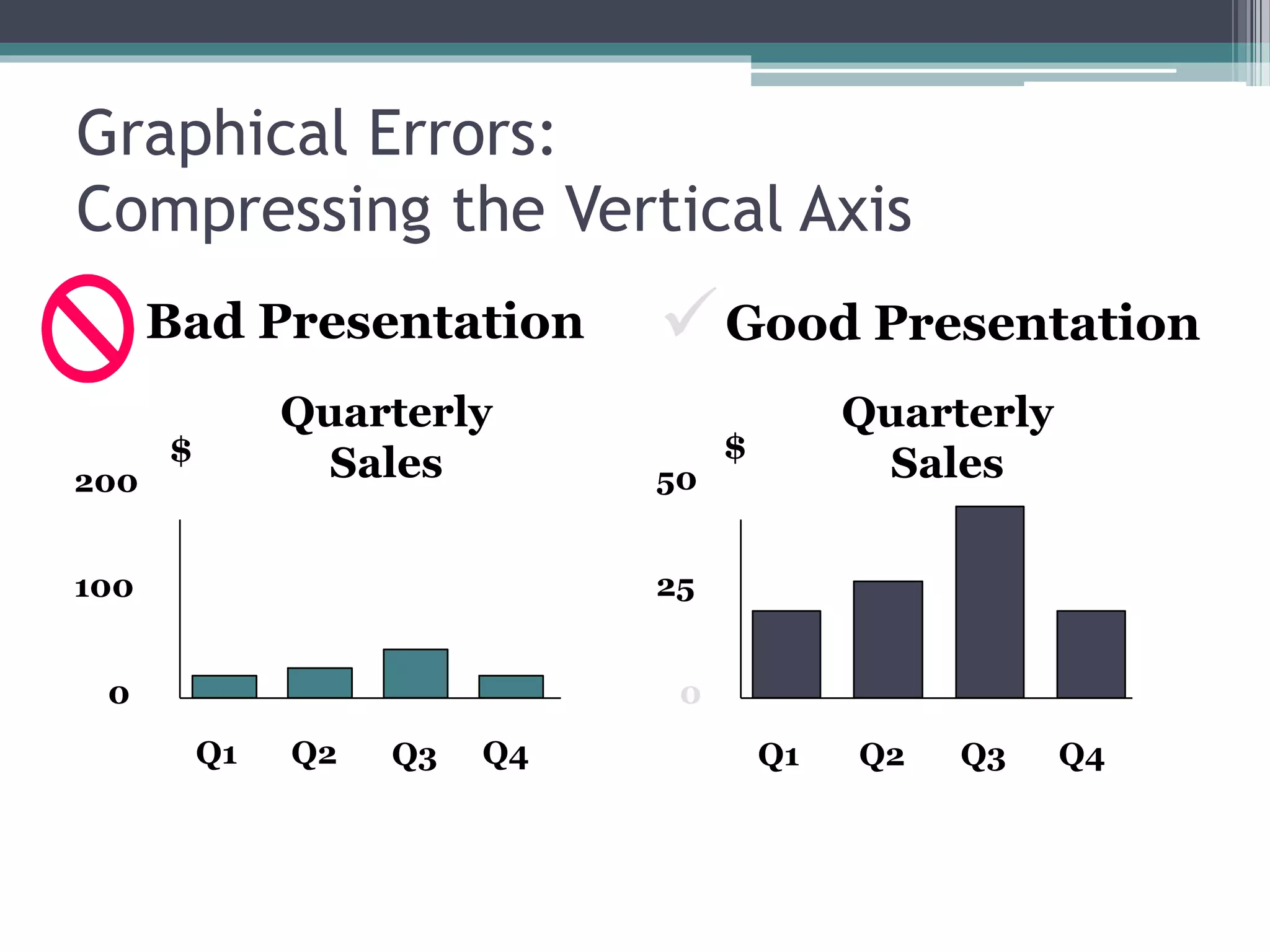
Compressing the Vertical Axis
Good Presentation
Quarterly
Sales
Quarterly
Sales
Bad Presentation
0
25
50
Q1 Q2 Q3 Q4
$
0
100
200
Q1 Q2 Q3 Q4
$

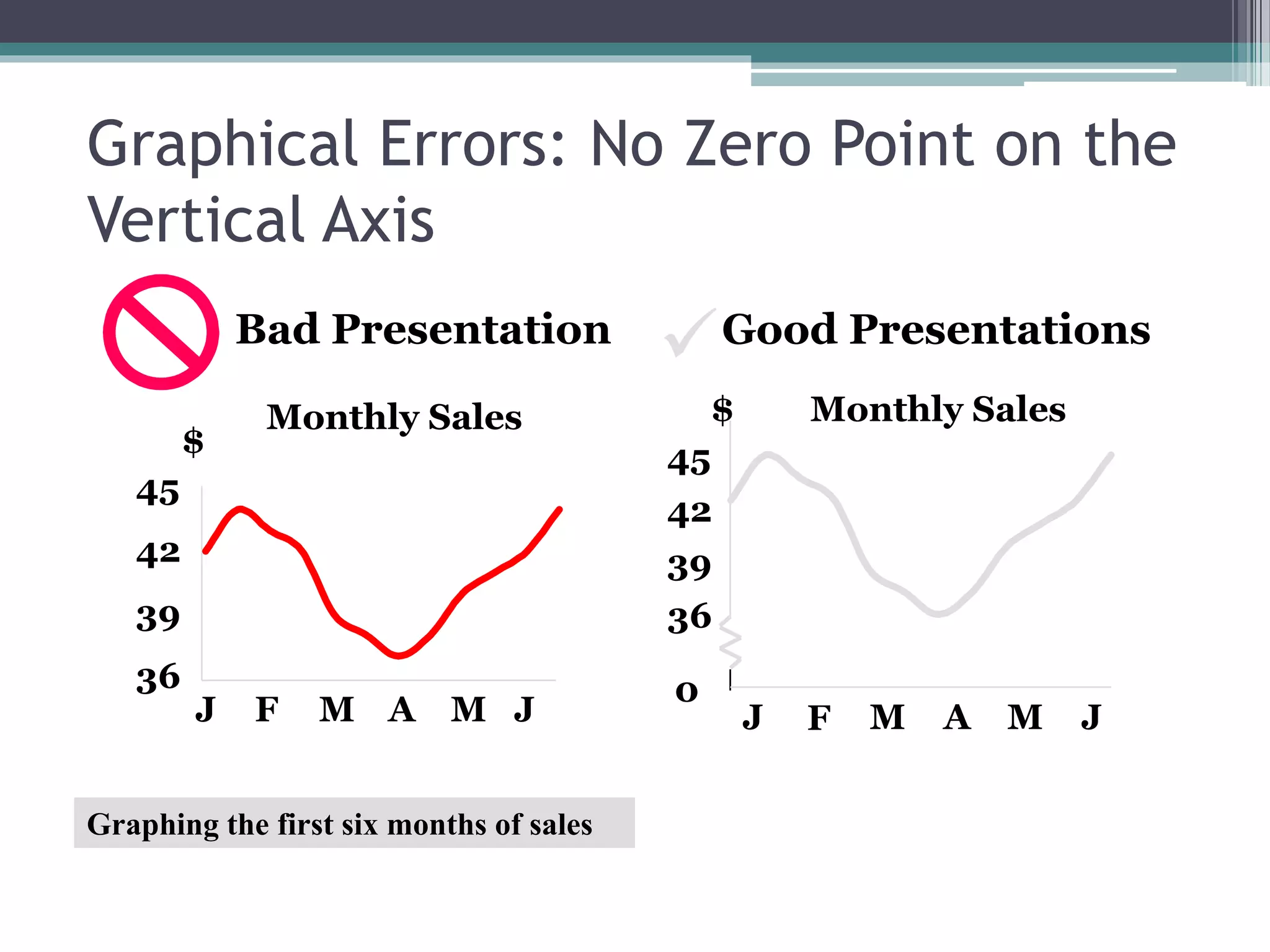
Graphical Errors: No Zero Point on the
Vertical Axis
Monthly Sales
36
39
42
45
J F M A M J
$
Graphing the first six months of sales
Monthly Sales
0
39
42
45
J F M A M J
$
36
Good PresentationsBad Presentation
Chap 2-33
Some Additional Considerations in
Constructing Tables and Charts
 Tables MUST have a Table Number and Table
Title
 Charts MUST have Figure Number and Figure
Title
 If one is using a secondary data, he MUST
indicate a SOURCE NOTE below the table or
chart
 Titles MUST be concise
 In a chart, the length of the Y-axis is shorter than
the X-axis (Y-axis about ¾ of the X-axis)

Chapter 2

  • 1.
    METHODS OF DATACOLLECTION AND PRESENTATION Chapter 2
  • 2.
    What is data? •refers to facts or figures from which conclusion can be drawn. • information collected, organized, analyzed, and interpret by statisticians. • needed whenever we undertake studies or researches which are designed to answer particular problems, or to provide a base with which certain decisions may be formulated.
  • 3.
    Kinds of StatisticalData • Qualitative data - classificatory data ex. Sex, religion, citizenship • Quantitative data - either counts or measures ex. Weekly allowance Note: Qualitative data can be transformed into quantitative data by coding; ex. Female=1, Male=0 • Primary data - to information gathered directly from an original source • Secondary data - refer to information taken from published or unpublished data which were previously gathered by other individuals or agencies
  • 4.
    Advantages of primaryover secondary data: 1. Primary data frequently give detailed definitions of terms and accurate statistical units used in the experiment or in the survey. 2. Primary data lend more relevance to the researcher's study because of his direct participation in the project. 3. Primary data are more reliable because of their first-hand nature.
  • 5.
    Methods of DataCollection 1. Survey method - the desired information is obtained either through personal interview of or by distributing questionnaires to respondents. 2. Observations method - the desired information is obtained by observing and recording the behavior of persons, organizations, etc. but only at the time of occurrence. - Direct observation can be used to discover a variety of types of information including aspects of social and economic behavior.
  • 6.
    3. Experimental method- used when the objective is to determine the cause and effect relationship of certain variables under controlled conditions. Experimental data are used to test hypotheses on significance of effects of one or more controlled variables on certain characteristics of the unit of analysis. Methods of Data Collection
  • 7.
    Forms of DataPresentation • Textual Presentation - an expository form describing a set of information. - a useful manner of presenting limited amounts of information.
  • 8.
    Example: The carabao orkalabaw in Filipino is a type of water buffalo in our country. The carabaos are usually associated with farmers because these animals are used in farms. Their life span is about 18 to 20 years. A female carabao can give on calf each year. Now is the time for you to shine! Join SEARCH for the GOLDEN DIVA June 12, 2010, 6pm @ Plaza Musica 1st Prize - 20, 000 Php 2nd Prize – 15, 000 Php 3rs Prize – 10, 000 Php The Republic of the Philippines has more than 7 000 islands. BEST REVIEW CENTER Passing Rate 98% LET (Licensure Exam for Teachers) 96% Nursing Board Exam AVAIL NOW OF THE DISCOUNT!
  • 9.
    • the processof condensing classified data and arranging them in a table. Types of tables 1. General or reference table - used mainly as a repository of information; its primary purpose is to present data in such a way that individual items may easily be found by a reader; it is often placed in an appendix. b) Tabular Presentation Forms of Data Presentation
  • 10.
    2. Summary ortext table - usually small in size and designed to guide the reader in analyzing the data; usually accompanies a text discussion. Parts of a Formal Statistical Table: 1. Heading - consists of the table number, table title, and headnote, when necessary a. Table number - identifies and positions a table within a series, it is preceded by the word "Table" with a capital T b. Table title - the what, how classified, where and when of the table; a brief statement of the nature, classification and geographic area and time reference of the data.
  • 11.
    c. Headnote -not a necessary part; statement is enclosed in brackets [ ] or in parentheses and appearing between the table title and the top rule of the table; or after the title 2. Boxhead - portion of the table which consists of the spanner and column heads or captions describing the data in each column a. Column head - basic unit of the boxhead; descriptive title placed directly above the column to which it refers b. Spanner head - title under which column heads are further classified
  • 12.
    3. Stub -contains the stub head, center heads and line captions; the first column on the left where the line descriptions are. a. Stub head - describes the stub listing as a whole in terms of classification presented b. Center head - describes a group of line captions c. Line caption - describes the data on a given rows. 4. Field (body) - depository of information appearing in the cells. 5. Footnote - statement qualifying or explaining the information presented in, or omitted from specific cells, columns or lines.
  • 13.
    Footnotes are of3 distinct forms: 1. General footnote - a statement which qualifies the table as a whole; introduced by the word "Note" followed by a colon 2. Specific footnote - "keyed" statement which qualifies, describes, or explains the information presented in a specific cell, line or column; item qualified is assigned a reference symbol ("key") which is repeated at the beginning of the footnote 3. Source note - statement indicating the specific source of the statistics or a portion of them
  • 14.
    c) Graphical Presentation Thegraphical presentation of data provides you with a picture of the significant relationships of the facts or data presented. Such relationships are presented with simplicity for easy comprehension. Graphs refer to diagrams or drawings which show the successive values of a changing quantity. Constructed to answer specific needs and for specific purposes. Forms of Data Presentation
  • 15.
    1) Line Chart The curve or line chart is the oldest, simplest, most familiar, and most widely used method of presenting statistics graphically.  The fluctuations or movement of this line show the variations in the trend.  The variation is presented using a continuous line to show the continuity of the data presented.  Used when we wish to know how one value changes with respect to another value over successive periods of time. Forms of Data Presentation
  • 16.
    Line Chart Example 0 200 400 600 800 1000 1200 1400 01 2 3 4 5 6 7 8 9 10 Male Female Fig. 1. Number of Enrolees in Tabok National High School by gender, SY 2000 - 2010 Frequency Year Forms of Data Presentation
  • 17.
    2) Column Chart(Vertical Bar Chart)  Its primary purpose is to depict numerical values of a given item over a period of time.  These values, either absolute or percent, are represented by the height of the column.  preferable to the line chart when a sharper delineation of trend is to be shown.  Used to compare magnitudes  Types:  Single bar graph  Bilateral bar graph – used when the characteristics are opposite in nature and are to be compared.  Multiple Bar Graphs – three or more bars  Subdivided bar graph Forms of Data Presentation
  • 18.
    Single Bar ChartExample -100 100 300 500 700 900 1100 1300 1500 2009 2010 2011 Frequency(%) Year Fig. 2. Number of Enrolees for three consecutive school years in Malangsa Elementary Schoo, SY 2009 - 2011 Forms of Data Presentation
  • 19.
    0 1 2 3 4 5 2009 2010 2011 Frequency(%) Year Male Female Fig.2a. Relative frequency of grade 5 elementary pupils for three consecutive school years in Malangsa Elementary School by gender, SY 2009 - 2011 Note: The bars do not touch each other. This indicates the discrete nature of the variable being grouped. Bilateral Bar Chart Example Forms of Data Presentation
  • 20.
    Fig. 2b. Relativefrequency of grade 5 elementary pupils for three consecutive school years in Malangsa Elementary School by gender, SY 2009 - 2011 0 1 2 3 4 5 6 7 8 2009 2010 2011 Frequency(%) Year Female Male Subdivided bar chart Example Forms of Data Presentation
  • 21.
    3) Horizontal BarChart  the simplest form of graph comparing different items as of a specified date.  It is especially suited to represent categorical data.  Bars may be arranged in numerical or alphabetical order, depending on the purpose of the chart and the given data.  Just like the vertical chart, horizontal bar chart also has different types. Forms of Data Presentation
  • 22.
    139 100 150 166 180 200 0 50 100150 200 Others Palmolive Pantene Clear Rejoice Dove Number of Users Shampoo Singular Horizontal Bar Chart Example Fig.3. Number students using different brands of shampoo, June 2014 Forms of Data Presentation
  • 23.
    550 400 480 320 180 650 680 380 250 280 0 200 400600 CME CE CAFS CoE CAS Number of Enrolees College Female Male Fig.3. Number of enrolees per college by gender, SY 2010-2011 Bilateral Horizontal Bar Chart Example Forms of Data Presentation
  • 24.
    550 400 480 320 180 380 250 280 0 200 400600 CME CE CAFS CoE CAS Number of Enrolees College Male Female Subdivided Horizontal Bar Chart Example Fig.3. Number of enrolees per college by gender, SY 2010-2011 Forms of Data Presentation
  • 25.
    4) Circle Graph(Pie Chart)  Used in illustrating how a whole quantity is divided into parts.  Used when percent distribution of a whole into its component parts are to be presented.  The circle is divided into sectors that are proportional in size to the corresponding frequencies or percentages Forms of Data Presentation
  • 26.
    10% 15% 30% 5% 40% School Project Transportation HouseRental Leisure Expenses Food Pie Graph Example Fig. 5. Expenses of Marla in January 2014 Forms of Data Presentation
  • 27.
    5. Statistical Map Thistype of chart is used to present geographical statistics. It should be used only when geographic distribution is of permanent importance and when data can be readily and correctly interpreted in this form. Forms of Data Presentation
  • 28.
    Principles of ExcellentGraphs  The graph should not distort the data.  The graph should not contain unnecessary adornments (sometimes referred to as chart junk).  The scale on the vertical axis should begin at zero.  All axes should be properly labeled.  The graph should contain a title.  The simplest possible graph should be used for a given set of data.
  • 29.
    Graphical Errors: ChartJunk 1960: $1.00 1970: $1.60 1980: $3.10 1990: $3.80 Minimum Wage Bad Presentation Minimum Wage 0 2 4 1960 1970 1980 1990 $ Good Presentation
  • 30.
    Graphical Errors: No RelativeBasis A’s received by students. A’s received by students. Bad Presentation 0 200 300 FR SO JR SR Freq. 10% 30% FR SO JR SR FR = Freshmen, SO = Sophomore, JR = Junior, SR = Senior  100 20% 0% % Good Presentation
  • 31.
    Graphical Errors: Compressing theVertical Axis Good Presentation Quarterly Sales Quarterly Sales Bad Presentation 0 25 50 Q1 Q2 Q3 Q4 $ 0 100 200 Q1 Q2 Q3 Q4 $ 
  • 32.
    Graphical Errors: NoZero Point on the Vertical Axis Monthly Sales 36 39 42 45 J F M A M J $ Graphing the first six months of sales Monthly Sales 0 39 42 45 J F M A M J $ 36 Good PresentationsBad Presentation
  • 33.
    Chap 2-33 Some AdditionalConsiderations in Constructing Tables and Charts  Tables MUST have a Table Number and Table Title  Charts MUST have Figure Number and Figure Title  If one is using a secondary data, he MUST indicate a SOURCE NOTE below the table or chart  Titles MUST be concise  In a chart, the length of the Y-axis is shorter than the X-axis (Y-axis about ¾ of the X-axis)