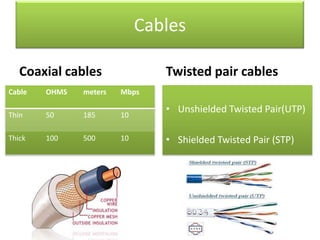
Cables
Coaxial cables

Twisted pair cables

Cable

OHMS

meters

Mbps

Thin

50

185

10

Thick

100

500

10

• Unshielded Twisted Pair(UTP)

• Shielded Twisted Pair (STP)
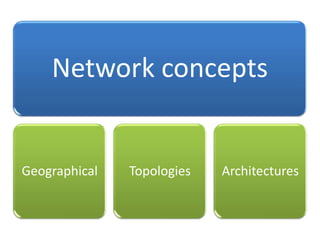
Network concepts

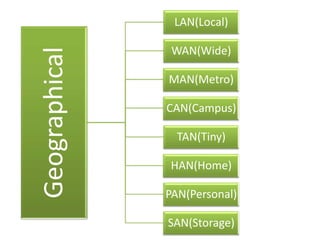
Geographical

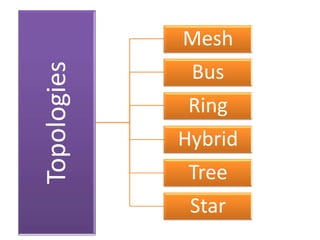
Topologies

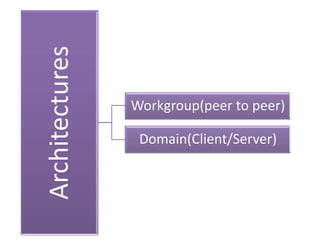
Architectures
Geographical

LAN(Local)
WAN(Wide)
MAN(Metro)
CAN(Campus)
TAN(Tiny)
HAN(Home)
PAN(Personal)
SAN(Storage)
Topologies

Mesh
Bus
Ring

Hybrid
Tree
Star
Architectures

Workgroup(peer to peer)
Domain(Client/Server)
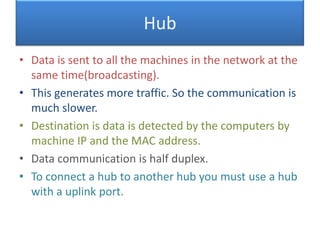
Hub
• Data is sent to all the machines in the network at the
same time(broadcasting).
• This generates more traffic. So the communication is
much slower.
• Destination is data is detected by the computers by
machine IP and the MAC address.
• Data communication is half duplex.
• To connect a hub to another hub you must use a hub
with a uplink port.
Switch
• Data is sent only to the requested destinations
(forwarding).
• This reduces traffic so communication is much
faster.
• Data communication is full duplex(can receive
and send at the same time).
• Destination of data is decided by the switch itself
by keeping all MAC addresses in its temporary
memory.
• Can connect any numbers of switches without
using a special port or device.
• No server to control the network.
• Less security, restrictions and control.
• No centralized user management or
administrator.
• Administrator must visit each to perform any
configurations or management tasks.
• The domain controller control the network.
• More security, restrictions and control.
• A centralized user management and
administrator.
• The administrator performs all the tasks
through the domain control.
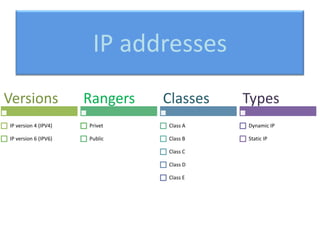
IP addresses
Versions

Rangers

Classes

Types

IP version 4 (IPV4)

Privet

Class A

Dynamic IP

IP version 6 (IPV6)

Public

Class B

Static IP

Class C
Class D
Class E
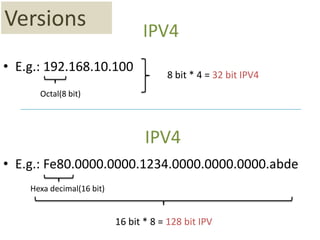
Versions

IPV4

• E.g.: 192.168.10.100

8 bit * 4 = 32 bit IPV4

Octal(8 bit)

IPV4
• E.g.: Fe80.0000.0000.1234.0000.0000.0000.abde
Hexa decimal(16 bit)

16 bit * 8 = 128 bit IPV
Classes
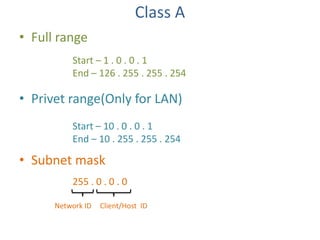
Class A
• Full range
Start – 1 . 0 . 0 . 1
End – 126 . 255 . 255 . 254

• Privet range(Only for LAN)
Start – 10 . 0 . 0 . 1
End – 10 . 255 . 255 . 254

• Subnet mask
255 . 0 . 0 . 0
Network ID

Client/Host ID
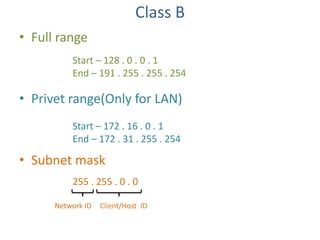
Class B
• Full range
Start – 128 . 0 . 0 . 1
End – 191 . 255 . 255 . 254

• Privet range(Only for LAN)
Start – 172 . 16 . 0 . 1
End – 172 . 31 . 255 . 254

• Subnet mask
255 . 255 . 0 . 0
Network ID

Client/Host ID
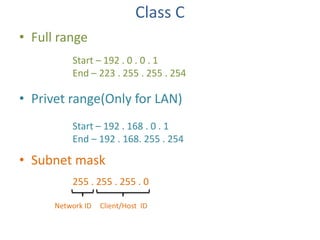
Class C
• Full range
Start – 192 . 0 . 0 . 1
End – 223 . 255 . 255 . 254

• Privet range(Only for LAN)
Start – 192 . 168 . 0 . 1
End – 192 . 168. 255 . 254

• Subnet mask
255 . 255 . 255 . 0
Network ID

Client/Host ID
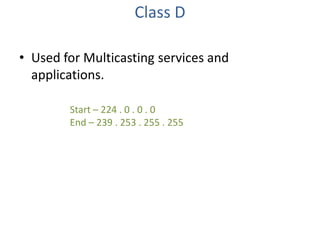
Class D
• Used for Multicasting services and
applications.
Start – 224 . 0 . 0 . 0
End – 239 . 253 . 255 . 255
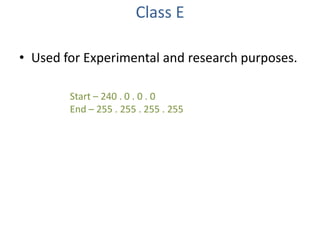
Class E
• Used for Experimental and research purposes.
Start – 240 . 0 . 0 . 0
End – 255 . 255 . 255 . 255
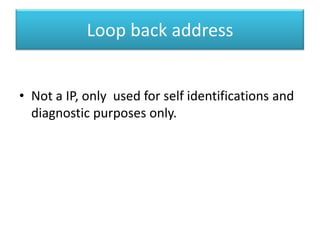
Loop back address
• Not a IP, only used for self identifications and
diagnostic purposes only.
IP Rangers
Privet

Public

• Addresses which are
reserved for local area
networks/ Intranets.
• These addresses freely
assigned for our privet
networks.

• Addresses which are
reserved for Wide area
networks/ Internet. You
must buy this addresses
from Internet Service
Providers(ISP) or from any
internet authority.
IP Types
Dynamic IPs
• Addresses which are
automatically assign by a
Dynamic Host Configuration
Protocol (DHCP) service.
These addresses are
randomly assigned and they
changed frequently.

Static IPs
• Addresses which are
manually assigned in the
properties of TCP/IP
protocol by the
administrator. These
addresses will not changed
unless we changed them.
• DHCP allows to automatically assign IP addresses,
subnet masks and other configuration information to
client computers on the local network.
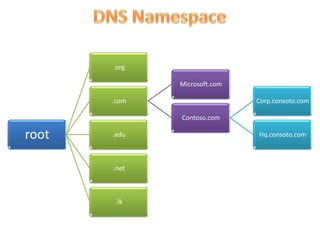
Domain Name System ( DNS )
• DNS is a system for naming computers and network
services that maps those names to network
addresses and organizes them into a hierarchy of
domains.
.org
Microsoft.com
.com

Corp.consoto.com
Contoso.com

root

.edu

.net

.lk

Hq.consoto.com
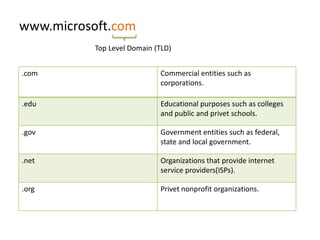
www.microsoft.com
Top Level Domain (TLD)
.com

Commercial entities such as
corporations.

.edu

Educational purposes such as colleges
and public and privet schools.

.gov

Government entities such as federal,
state and local government.

.net

Organizations that provide internet
service providers(ISPs).

.org

Privet nonprofit organizations.
Microsoft Management Console ( MMC )
• MMC is a platform used for running
administrative tools in a windows OS.

• Start

Run

MMC
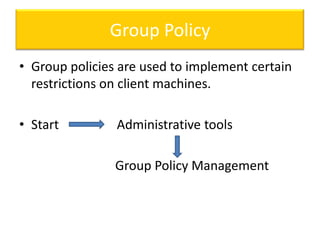
Group Policy
• Group policies are used to implement certain
restrictions on client machines.
• Start

Administrative tools
Group Policy Management
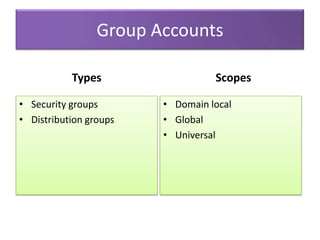
Group Accounts
Types
• Security groups
• Distribution groups

Scopes
• Domain local
• Global
• Universal
Internet Information Service ( IIS )

• IIS is the Microsoft web server use for hosting
web sites, virtual directories and FTP sites.
Windows Deployment Service (WDS)

• WDS is a service use for installing the
operation system through the network to
many computers at the same time.
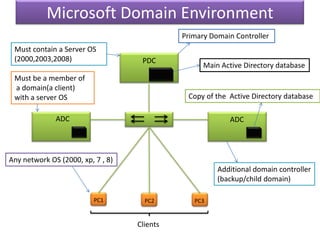
Microsoft Domain Environment
Primary Domain Controller
Must contain a Server OS
(2000,2003,2008)

PDC

Must be a member of
a domain(a client)
with a server OS

Main Active Directory database

Copy of the Active Directory database

ADC

ADC

Any network OS (2000, xp, 7 , 8)
Additional domain controller
(backup/child domain)
PC1

PC2

Clients

PC3
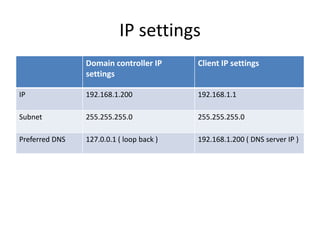
IP settings
Domain controller IP
settings

Client IP settings

IP

192.168.1.200

192.168.1.1

Subnet

255.255.255.0

255.255.255.0

Preferred DNS

127.0.0.1 ( loop back )

192.168.1.200 ( DNS server IP )

Windows network administration Basic theories

  • 2.
    Cables Coaxial cables Twisted paircables Cable OHMS meters Mbps Thin 50 185 10 Thick 100 500 10 • Unshielded Twisted Pair(UTP) • Shielded Twisted Pair (STP)
  • 3.
  • 4.
  • 5.
  • 6.
  • 7.
    Hub • Data issent to all the machines in the network at the same time(broadcasting). • This generates more traffic. So the communication is much slower. • Destination is data is detected by the computers by machine IP and the MAC address. • Data communication is half duplex. • To connect a hub to another hub you must use a hub with a uplink port.
  • 8.
    Switch • Data issent only to the requested destinations (forwarding). • This reduces traffic so communication is much faster. • Data communication is full duplex(can receive and send at the same time). • Destination of data is decided by the switch itself by keeping all MAC addresses in its temporary memory. • Can connect any numbers of switches without using a special port or device.
  • 9.
    • No serverto control the network. • Less security, restrictions and control. • No centralized user management or administrator. • Administrator must visit each to perform any configurations or management tasks.
  • 10.
    • The domaincontroller control the network. • More security, restrictions and control. • A centralized user management and administrator. • The administrator performs all the tasks through the domain control.
  • 11.
    IP addresses Versions Rangers Classes Types IP version4 (IPV4) Privet Class A Dynamic IP IP version 6 (IPV6) Public Class B Static IP Class C Class D Class E
  • 12.
    Versions IPV4 • E.g.: 192.168.10.100 8bit * 4 = 32 bit IPV4 Octal(8 bit) IPV4 • E.g.: Fe80.0000.0000.1234.0000.0000.0000.abde Hexa decimal(16 bit) 16 bit * 8 = 128 bit IPV
  • 13.
  • 14.
    Class A • Fullrange Start – 1 . 0 . 0 . 1 End – 126 . 255 . 255 . 254 • Privet range(Only for LAN) Start – 10 . 0 . 0 . 1 End – 10 . 255 . 255 . 254 • Subnet mask 255 . 0 . 0 . 0 Network ID Client/Host ID
  • 15.
    Class B • Fullrange Start – 128 . 0 . 0 . 1 End – 191 . 255 . 255 . 254 • Privet range(Only for LAN) Start – 172 . 16 . 0 . 1 End – 172 . 31 . 255 . 254 • Subnet mask 255 . 255 . 0 . 0 Network ID Client/Host ID
  • 16.
    Class C • Fullrange Start – 192 . 0 . 0 . 1 End – 223 . 255 . 255 . 254 • Privet range(Only for LAN) Start – 192 . 168 . 0 . 1 End – 192 . 168. 255 . 254 • Subnet mask 255 . 255 . 255 . 0 Network ID Client/Host ID
  • 17.
    Class D • Usedfor Multicasting services and applications. Start – 224 . 0 . 0 . 0 End – 239 . 253 . 255 . 255
  • 18.
    Class E • Usedfor Experimental and research purposes. Start – 240 . 0 . 0 . 0 End – 255 . 255 . 255 . 255
  • 19.
    Loop back address •Not a IP, only used for self identifications and diagnostic purposes only.
  • 20.
    IP Rangers Privet Public • Addresseswhich are reserved for local area networks/ Intranets. • These addresses freely assigned for our privet networks. • Addresses which are reserved for Wide area networks/ Internet. You must buy this addresses from Internet Service Providers(ISP) or from any internet authority.
  • 21.
    IP Types Dynamic IPs •Addresses which are automatically assign by a Dynamic Host Configuration Protocol (DHCP) service. These addresses are randomly assigned and they changed frequently. Static IPs • Addresses which are manually assigned in the properties of TCP/IP protocol by the administrator. These addresses will not changed unless we changed them.
  • 22.
    • DHCP allowsto automatically assign IP addresses, subnet masks and other configuration information to client computers on the local network.
  • 23.
    Domain Name System( DNS ) • DNS is a system for naming computers and network services that maps those names to network addresses and organizes them into a hierarchy of domains.
  • 24.
  • 25.
    www.microsoft.com Top Level Domain(TLD) .com Commercial entities such as corporations. .edu Educational purposes such as colleges and public and privet schools. .gov Government entities such as federal, state and local government. .net Organizations that provide internet service providers(ISPs). .org Privet nonprofit organizations.
  • 26.
    Microsoft Management Console( MMC ) • MMC is a platform used for running administrative tools in a windows OS. • Start Run MMC
  • 27.
    Group Policy • Grouppolicies are used to implement certain restrictions on client machines. • Start Administrative tools Group Policy Management
  • 28.
    Group Accounts Types • Securitygroups • Distribution groups Scopes • Domain local • Global • Universal
  • 29.
    Internet Information Service( IIS ) • IIS is the Microsoft web server use for hosting web sites, virtual directories and FTP sites.
  • 30.
    Windows Deployment Service(WDS) • WDS is a service use for installing the operation system through the network to many computers at the same time.
  • 31.
    Microsoft Domain Environment PrimaryDomain Controller Must contain a Server OS (2000,2003,2008) PDC Must be a member of a domain(a client) with a server OS Main Active Directory database Copy of the Active Directory database ADC ADC Any network OS (2000, xp, 7 , 8) Additional domain controller (backup/child domain) PC1 PC2 Clients PC3
  • 32.
    IP settings Domain controllerIP settings Client IP settings IP 192.168.1.200 192.168.1.1 Subnet 255.255.255.0 255.255.255.0 Preferred DNS 127.0.0.1 ( loop back ) 192.168.1.200 ( DNS server IP )