Network+ Guide to Networks
5th Edition
Chapter 1
An Introduction to Networking
Goals of This Chapter
• List the advantages of networked computing relative
to standalone computing
• Distinguish between client/server and peer-to-peer
networks
• List elements common to all client/server networks
• Describe several specific uses for a network
• Identify some of the certifications available to
networking professionals
• Identify the kinds of skills and specializations that
will help you excel as a networking professional
Why Use Networks?
• Network
– Group of computers and devices
• Connected by transmission media
• Stand-alone computer
– Not connected to other computers
– Uses local software and data
• Advantages of networks over standalone computers
– Device sharing by multiple users
• Saves money and time
– Central network management
Types of Networks
• Models vary according to:
– Computer positioning
– Control levels over shared resources
– Communication and resource sharing schemes
• Network models
– Peer-to-Peer
– Client/server
Peer-to-Peer Network
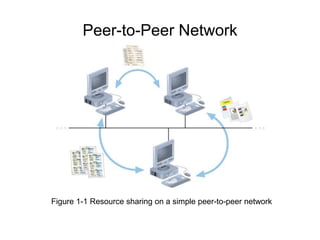
Figure 1-1 Resource sharing on a simple peer-to-peer network
Peer-to-Peer Networks
• Typical in a home with several computers
• Direct computer communication
– Equal authority
• Individual resource sharing
– May share resources
– May prevent access to resources
• Each computer can send data to every other
computer on the network
Peer-to-Peer Networks
• Advantages
– Simple configuration
– Inexpensive to set up
• Disadvantages
– Not flexible
– Not necessarily secure
– Not practical for large installations
Peer-to-Peer Networks
• Resource sharing method
– Modify file sharing controls
• A user responsibility
– Not centrally controlled
• Potential variations and security issues
• Environments
– Small home or office
– Large networks using the Internet
• Gnutella, Freenet, original Napster
• BitTorrent software
Client/Server Networks
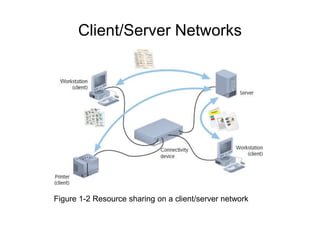
Figure 1-2 Resource sharing on a client/server network
Client/Server Networks
• Central computer (server)
– Facilitates communication and resource sharing
• Clients (other computers)
– Personal computers
• Known as workstations
• Central resource sharing controlled by server
– Data sharing, data storage space, devices
– No direct sharing of client resources
Client/Server Networks
• Computer roles
– Server
– Clients
• Run local applications
• Store data locally
• Use server shared applications, data, devices
• Use server as intermediary
• Communication
– Switches or routers
Client/Server Networks
• Server requirement
– Network operating system
• Manages client data, resources
• Ensures authorized user access
• Controls user file access
• Restricts user network access
• Dictates computer communication rules
• Supplies application to clients
• Server examples
– UNIX, Linux, Microsoft Server 2003 and 2008, MAC
OS X Server
Client/Server Networks
• Server features relative to clients
– More memory, processing, storage capacity
– Equipped with special hardware
• Provides network management functions
• Disadvantages relative to peer-to-peer networks
– Complex in design and maintenance
Client/Server Networks
• Advantages relative to peer-to-peer networks
– User credential assigned from one place
– Multiple shared resource access centrally controlled
– Central problem monitoring, diagnostics, correction
capabilities
– User response time optimization capabilities
– Efficient processing on large networks
– Scalability
• Popular in medium- and large-scale organizations
LANs, MANs, and WANs
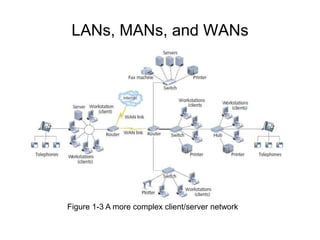
Figure 1-3 A more complex client/server network
LANs, MANs, and WANs
• LAN (local area network)
– Network confined to a relatively small space
– 1980s
• LANs became popular as peer-to-peer based
– Today
• Larger and more complex client/server network
• MAN (metropolitan area network)
– Network extends beyond building boundaries
– Larger than LAN
– Connects clients and servers from multiple buildings
LANs, MANs, and WANs
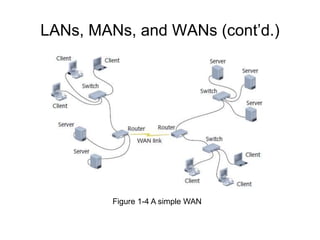
• WAN (wide area network)
– Connects two or more geographically distinct LANs or
MANs
– Comparison to LANs
• Use slightly different transmission methods and media
• Use greater variety of technologies
– Network connection
• Separate offices in same organization
• Separate offices in different organizations
LANs, MANs, and WANs (cont’d.)
Figure 1-4 A simple WAN
Elements Common to
Client/Server Networks
• Client
– Network computer requesting resources or services
from another network computer
– Client workstation human user
– Client software installed on workstation
• Server
– Network computer managing shared resources
– Runs network operating system
• Workstation
– Personal computer
• May or may not be connected to network
Elements Common to
Client/Server Networks
• NIC (network interface card)
– Device inside computer
• Connects computer to network media
• Allows communication with other computers
• NOS (network operating system)
– Server software
– Enables server to manage data, users, groups,
security, applications, and other networking functions
Elements Common to
Client/Server Networks
• Host
– A computer that enables other computers to share
resources
• Node
– Client, server, or other device
• Communicates over a network
• Identified by unique number (network address)
• Connectivity device
– Allows multiple networks or multiple parts of one
network to connect and exchange data
– Such as a switch or router
Elements Common to
Client/Server Networks
• Segment
– Group of nodes
• Use same communications channel for traffic
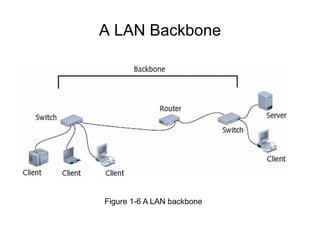
• Backbone
– Connects segments and significant shared devices
– “A network of networks”
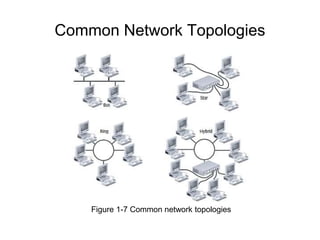
• Topology
– Computer network physical layout
– Ring, bus, star or hybrid formation
A LAN Backbone
Figure 1-6 A LAN backbone
Common Network Topologies
Figure 1-7 Common network topologies
Elements Common to
Client/Server Networks
• Protocol
– Standard method or format for communication
between networked devices
• Data packets
– Distinct data units exchanged between nodes
• Addressing
– Scheme for assigning unique identifying number to
every node
• Transmission media
– Means through which data is transmitted and
received
How Networks Are Used
• Network services
– Functions provided by a network
– Most visible
• E-mail
– Other vital services
• Printer sharing, file sharing, Internet access and Web
site delivery, remote access capabilities, the provision
of voice (telephone) and video services, network
management
File and Print Services
• File services
– Capability of server to share data files, applications
and disk storage space
• File server
– Provides file services
• File services provide foundation of networking
• Print services
– Share printers across network
– Saves time and money
Access Services
• Allow remote user network connection
• Allow network users to connect to machines outside
the network
• Remote user
– Computer user on different network or in different
geographical location from LAN’s server
• Network operating systems include built-in access
services
Access Services
• Provide LAN connectivity when WAN connection is
not cost-effective
– External staff used to diagnose problems
• Allow external users to use network resources and
devices
– Same as if logged on to office workstation
Communications Services
• Convergence
– Multiple types of communications services on the
same network
• Phone calls, fax, text messages, video…
• Unified communications
– Centralized management of network-based
communications
• E-mail
– Oldest and most frequently used
• Mail server
– Computer responsible for mail services
• Coordinates storage and transfer of e-mail
Communications Services
• Additional tasks of mail servers
– Intercept spam
– Handle objectionable content
– Route messages according to rules
– Provide Web-based client
– Notify administrators or users if certain events occur
– Schedule e-mail transmission, retrieval, storage,
maintenance functions
– Communicate with mail servers on other networks
• Mail server runs specialized mail server software
Internet Services
• Supplying Web pages
– Servers work together to bring Web pages to user’s
desktop
– Web server
• Computer installed with appropriate software to supply
Web pages to many different clients upon demand
• Other Internet services
– File transfer capabilities, Internet addressing
schemes, security filters, means for directly logging
on to other Internet computers
Management Services
• Small network management
– Single network administrator
– Network operating system’s internal functions
• Today’s larger network management
– Centrally administered network management tasks
Developing Your “Soft Skills”
• Soft skills
– Not easily measurable
– Important to networking projects
• Customer relations
• Oral and written communications
• Dependability
• Teamwork
• Leadership abilities
Pursuing Certification
• Certification process
– Master material
• Pertaining to particular hardware system, operating
system, programming language, software application
– Proving mastery
• Pass exams
• Professional organizations
– CompTIA
• Vendors
– Microsoft , Cisco
Pursuing Certification
• Benefits
– Better salary
– Greater opportunities
– Professional respect
– Access to better support
• Drawback
– Number of people obtaining and pursuing them
– Cheating and fraud (strangely not mentioned in the
book)
Finding a Job in Networking
• Job research methods
– Search the Web
– Read the newspaper
– Visit a career center
– Network
– Attend career fairs
– Enlist a recruiter
Joining Professional Associations
• Provide varying benefits
– Connect with people having similar interests
– New learning opportunities
– Specialized information access
– Tangible assets (free goods)
– Publications
– Technical workshops and conferences
– Free software, prerelease software
– Expensive hardware lab access
Joining Professional Associations
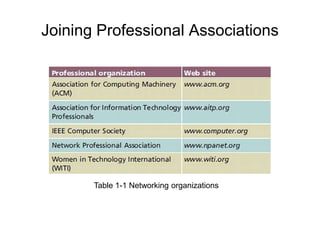
Table 1-1 Networking organizations

ch01.ppt

  • 1.
    Network+ Guide toNetworks 5th Edition Chapter 1 An Introduction to Networking
  • 2.
    Goals of ThisChapter • List the advantages of networked computing relative to standalone computing • Distinguish between client/server and peer-to-peer networks • List elements common to all client/server networks • Describe several specific uses for a network • Identify some of the certifications available to networking professionals • Identify the kinds of skills and specializations that will help you excel as a networking professional
  • 3.
    Why Use Networks? •Network – Group of computers and devices • Connected by transmission media • Stand-alone computer – Not connected to other computers – Uses local software and data • Advantages of networks over standalone computers – Device sharing by multiple users • Saves money and time – Central network management
  • 4.
    Types of Networks •Models vary according to: – Computer positioning – Control levels over shared resources – Communication and resource sharing schemes • Network models – Peer-to-Peer – Client/server
  • 5.
    Peer-to-Peer Network Figure 1-1Resource sharing on a simple peer-to-peer network
  • 6.
    Peer-to-Peer Networks • Typicalin a home with several computers • Direct computer communication – Equal authority • Individual resource sharing – May share resources – May prevent access to resources • Each computer can send data to every other computer on the network
  • 7.
    Peer-to-Peer Networks • Advantages –Simple configuration – Inexpensive to set up • Disadvantages – Not flexible – Not necessarily secure – Not practical for large installations
  • 8.
    Peer-to-Peer Networks • Resourcesharing method – Modify file sharing controls • A user responsibility – Not centrally controlled • Potential variations and security issues • Environments – Small home or office – Large networks using the Internet • Gnutella, Freenet, original Napster • BitTorrent software
  • 9.
    Client/Server Networks Figure 1-2Resource sharing on a client/server network
  • 10.
    Client/Server Networks • Centralcomputer (server) – Facilitates communication and resource sharing • Clients (other computers) – Personal computers • Known as workstations • Central resource sharing controlled by server – Data sharing, data storage space, devices – No direct sharing of client resources
  • 11.
    Client/Server Networks • Computerroles – Server – Clients • Run local applications • Store data locally • Use server shared applications, data, devices • Use server as intermediary • Communication – Switches or routers
  • 12.
    Client/Server Networks • Serverrequirement – Network operating system • Manages client data, resources • Ensures authorized user access • Controls user file access • Restricts user network access • Dictates computer communication rules • Supplies application to clients • Server examples – UNIX, Linux, Microsoft Server 2003 and 2008, MAC OS X Server
  • 13.
    Client/Server Networks • Serverfeatures relative to clients – More memory, processing, storage capacity – Equipped with special hardware • Provides network management functions • Disadvantages relative to peer-to-peer networks – Complex in design and maintenance
  • 14.
    Client/Server Networks • Advantagesrelative to peer-to-peer networks – User credential assigned from one place – Multiple shared resource access centrally controlled – Central problem monitoring, diagnostics, correction capabilities – User response time optimization capabilities – Efficient processing on large networks – Scalability • Popular in medium- and large-scale organizations
  • 15.
    LANs, MANs, andWANs Figure 1-3 A more complex client/server network
  • 16.
    LANs, MANs, andWANs • LAN (local area network) – Network confined to a relatively small space – 1980s • LANs became popular as peer-to-peer based – Today • Larger and more complex client/server network • MAN (metropolitan area network) – Network extends beyond building boundaries – Larger than LAN – Connects clients and servers from multiple buildings
  • 17.
    LANs, MANs, andWANs • WAN (wide area network) – Connects two or more geographically distinct LANs or MANs – Comparison to LANs • Use slightly different transmission methods and media • Use greater variety of technologies – Network connection • Separate offices in same organization • Separate offices in different organizations
  • 18.
    LANs, MANs, andWANs (cont’d.) Figure 1-4 A simple WAN
  • 19.
    Elements Common to Client/ServerNetworks • Client – Network computer requesting resources or services from another network computer – Client workstation human user – Client software installed on workstation • Server – Network computer managing shared resources – Runs network operating system • Workstation – Personal computer • May or may not be connected to network
  • 20.
    Elements Common to Client/ServerNetworks • NIC (network interface card) – Device inside computer • Connects computer to network media • Allows communication with other computers • NOS (network operating system) – Server software – Enables server to manage data, users, groups, security, applications, and other networking functions
  • 21.
    Elements Common to Client/ServerNetworks • Host – A computer that enables other computers to share resources • Node – Client, server, or other device • Communicates over a network • Identified by unique number (network address) • Connectivity device – Allows multiple networks or multiple parts of one network to connect and exchange data – Such as a switch or router
  • 22.
    Elements Common to Client/ServerNetworks • Segment – Group of nodes • Use same communications channel for traffic • Backbone – Connects segments and significant shared devices – “A network of networks” • Topology – Computer network physical layout – Ring, bus, star or hybrid formation
  • 23.
    A LAN Backbone Figure1-6 A LAN backbone
  • 24.
    Common Network Topologies Figure1-7 Common network topologies
  • 25.
    Elements Common to Client/ServerNetworks • Protocol – Standard method or format for communication between networked devices • Data packets – Distinct data units exchanged between nodes • Addressing – Scheme for assigning unique identifying number to every node • Transmission media – Means through which data is transmitted and received
  • 26.
    How Networks AreUsed • Network services – Functions provided by a network – Most visible • E-mail – Other vital services • Printer sharing, file sharing, Internet access and Web site delivery, remote access capabilities, the provision of voice (telephone) and video services, network management
  • 27.
    File and PrintServices • File services – Capability of server to share data files, applications and disk storage space • File server – Provides file services • File services provide foundation of networking • Print services – Share printers across network – Saves time and money
  • 28.
    Access Services • Allowremote user network connection • Allow network users to connect to machines outside the network • Remote user – Computer user on different network or in different geographical location from LAN’s server • Network operating systems include built-in access services
  • 29.
    Access Services • ProvideLAN connectivity when WAN connection is not cost-effective – External staff used to diagnose problems • Allow external users to use network resources and devices – Same as if logged on to office workstation
  • 30.
    Communications Services • Convergence –Multiple types of communications services on the same network • Phone calls, fax, text messages, video… • Unified communications – Centralized management of network-based communications • E-mail – Oldest and most frequently used • Mail server – Computer responsible for mail services • Coordinates storage and transfer of e-mail
  • 31.
    Communications Services • Additionaltasks of mail servers – Intercept spam – Handle objectionable content – Route messages according to rules – Provide Web-based client – Notify administrators or users if certain events occur – Schedule e-mail transmission, retrieval, storage, maintenance functions – Communicate with mail servers on other networks • Mail server runs specialized mail server software
  • 32.
    Internet Services • SupplyingWeb pages – Servers work together to bring Web pages to user’s desktop – Web server • Computer installed with appropriate software to supply Web pages to many different clients upon demand • Other Internet services – File transfer capabilities, Internet addressing schemes, security filters, means for directly logging on to other Internet computers
  • 33.
    Management Services • Smallnetwork management – Single network administrator – Network operating system’s internal functions • Today’s larger network management – Centrally administered network management tasks
  • 34.
    Developing Your “SoftSkills” • Soft skills – Not easily measurable – Important to networking projects • Customer relations • Oral and written communications • Dependability • Teamwork • Leadership abilities
  • 35.
    Pursuing Certification • Certificationprocess – Master material • Pertaining to particular hardware system, operating system, programming language, software application – Proving mastery • Pass exams • Professional organizations – CompTIA • Vendors – Microsoft , Cisco
  • 36.
    Pursuing Certification • Benefits –Better salary – Greater opportunities – Professional respect – Access to better support • Drawback – Number of people obtaining and pursuing them – Cheating and fraud (strangely not mentioned in the book)
  • 37.
    Finding a Jobin Networking • Job research methods – Search the Web – Read the newspaper – Visit a career center – Network – Attend career fairs – Enlist a recruiter
  • 38.
    Joining Professional Associations •Provide varying benefits – Connect with people having similar interests – New learning opportunities – Specialized information access – Tangible assets (free goods) – Publications – Technical workshops and conferences – Free software, prerelease software – Expensive hardware lab access
  • 39.
    Joining Professional Associations Table1-1 Networking organizations