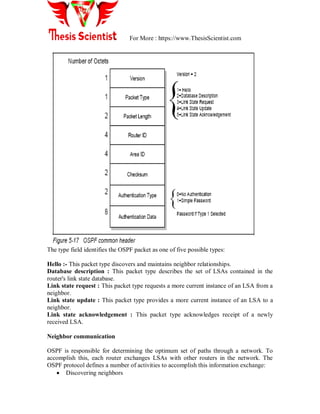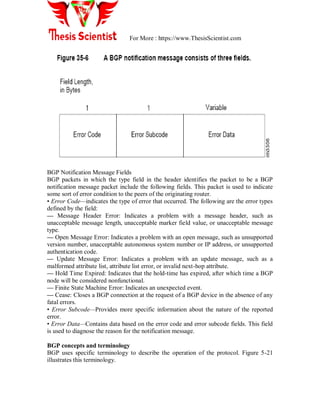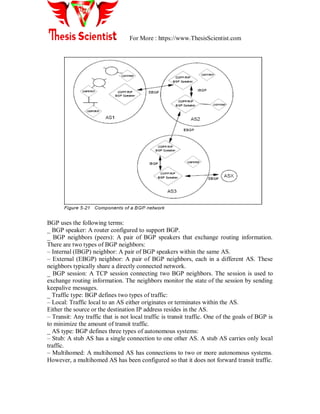
For More : https://www.ThesisScientist.com
UNIT 2
NETWORK ADMINISTATION
Network administration means the management of network infrastructure devices
(routers and switches). Network administration is the management of PCs in a network.
Goal of network administration:-
 The goal of network administration is to ensures that the users of networks
receive the information and technically serves with quality of services they
except.
 Network administration means the management of network infrastructures
devices (such as router and switches)
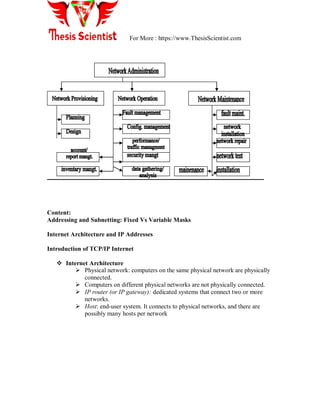
 Network administration compromises of 3 majors groups:
1. Network provisioning
2. Network operations
3. Network maintenance
Network provisioning: - is the primary responsibility of engineering groups and its
consists of planning and design of network which is done by engineer.
Network operations: - it consists of fault, configurations, traffic, all type of
management and it is done by plant facilities group. Its is nerve center of network
management operations.
Network maintenance:- its consists of all type of installations and maintenance
work.
For More : https://www.ThesisScientist.com
Content:
Addressing and Subnetting: Fixed Vs Variable Masks
Internet Architecture and IP Addresses
Introduction of TCP/IP Internet
 Internet Architecture
 Physical network: computers on the same physical network are physically
connected.
 Computers on different physical networks are not physically connected.
 IP router (or IP gateway): dedicated systems that connect two or more
networks.
 Host: end-user system. It connects to physical networks, and there are
possibly many hosts per network
For More : https://www.ThesisScientist.com
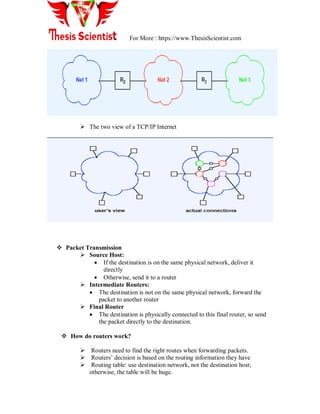
 The two view of a TCP/IP Internet
 Packet Transmission
 Source Host:
 If the destination is on the same physical network, deliver it
directly
 Otherwise, send it to a router
 Intermediate Routers:
 The destination is not on the same physical network, forward the
packet to another router
 Final Router
 The destination is physically connected to this final router, so send
the packet directly to the destination.
 How do routers work?
 Routers need to find the right routes when forwarding packets.
 Routers‘ decision is based on the routing information they have
 Routing table: use destination network, not the destination host;
otherwise, the table will be huge.
For More : https://www.ThesisScientist.com
IP Address
 Overview
 It is basically an identifier used in the network layer of the internet model to
identify each device is connected to internet or not.
 32 bit binary value
 Unique value assigned to each host
 Values chosen to make routing efficient
 Dotted Decimal Notation:
 Binary: 10000000 11100110 00000001 00001100
 Dotted decimal notation: 128.230.1.12
The IP address consists of a pair of numbers:
IP address = <network number><host number>
The network number portion of the IP address is administered by one of three
Regional Internet Registries (RIR):
 American Registry for Internet Numbers (ARIN): This registry is responsible for
the administration and registration of Internet Protocol (IP) numbers for North
America, South America, the Caribbean, and sub-Saharan Africa.
 Reseaux IP Europeans (RIPE): This registry is responsible for the administration
and registration of Internet Protocol (IP) numbers for Europe, Middle East, and
parts of Africa.
 Asia Pacific Network Information Centre (APNIC): This registry is responsible
for the administration and registration of Internet Protocol (IP) numbers within
the Asia Pacific region.
The division of an IP address into two parts also separates the responsibility for selecting
the complete IP address. The network number portion of the address is assigned by the
RIRs. The host number portion is assigned by the authority controlling the network. As
shown in the next section, the host number can be further subdivided: This division is
controlled by the authority that manages the network. It is not controlled by the RIRs.
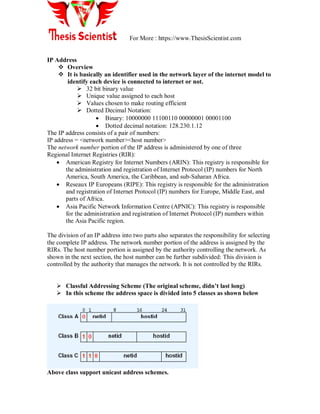
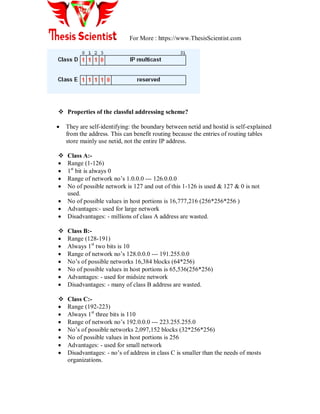
 Classful Addressing Scheme (The original scheme, didn’t last long)
 In this scheme the address space is divided into 5 classes as shown below
Above class support unicast address schemes.
For More : https://www.ThesisScientist.com
 Properties of the classful addressing scheme?
 They are self-identifying: the boundary between netid and hostid is self-explained
from the address. This can benefit routing because the entries of routing tables
store mainly use netid, not the entire IP address.
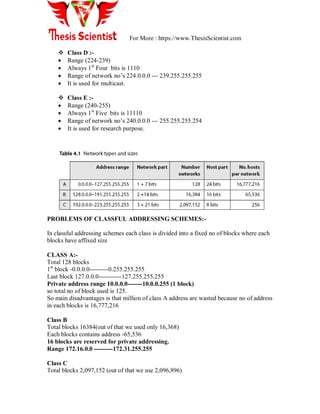
 Class A:-
 Range (1-126)
 1st
bit is always 0
 Range of network no‘s 1.0.0.0 --- 126.0.0.0
 No of possible network is 127 and out of this 1-126 is used & 127 & 0 is not
used.
 No of possible values in host portions is 16,777,216 (256*256*256 )
 Advantages:- used for large network
 Disadvantages: - millions of class A address are wasted.
 Class B:-
 Range (128-191)
 Always 1st
two bits is 10
 Range of network no‘s 128.0.0.0 --- 191.255.0.0
 No‘s of possible networks 16,384 blocks (64*256)
 No of possible values in host portions is 65,536(256*256)
 Advantages: - used for midsize network
 Disadvantages: - many of class B address are wasted.
 Class C:-
 Range (192-223)
 Always 1st
three bits is 110
 Range of network no‘s 192.0.0.0 --- 223.255.255.0
 No‘s of possible networks 2,097,152 blocks (32*256*256)
 No of possible values in host portions is 256
 Advantages: - used for small network
 Disadvantages: - no‘s of address in class C is smaller than the needs of mosts
organizations.
For More : https://www.ThesisScientist.com
 Class D :-
 Range (224-239)
 Always 1st
Four bits is 1110
 Range of network no‘s 224.0.0.0 --- 239.255.255.255
 It is used for multicast.
 Class E :-
 Range (240-255)
 Always 1st
Five bits is 11110
 Range of network no‘s 240.0.0.0 --- 255.255.255.254
 It is used for research purpose.
PROBLEMS OF CLASSFUL ADDRESSING SCHEMES:-
In classful addressing schemes each class is divided into a fixed no of blocks where each
blocks have affixed size
CLASS A:-
Total 128 blocks
1st
block -0.0.0.0---------0.255.255.255
Last block 127.0.0.0-----------127.255.255.255
Private address range 10.0.0.0-------10.0.0.255 (1 block)
so total no of block used is 125.
So main disadvantages is that million of class A address are wasted because no of address
in each blocks is 16,777,216
Class B
Total blocks 16384(out of that we used only 16,368)
Each blocks contains address -65,536
16 blocks are reserved for private addressing.
Range 172.16.0.0 ---------172.31.255.255
Class C
Total blocks 2,097,152 (out of that we use 2,096,896)
For More : https://www.ThesisScientist.com
256 blocks are used for private addressing.
Private address range 192.168.0.0 ---------192.168.255.256
Each block contains 256 addresses.
Class D
It contain 1 block
Used for multicasting
Class E
Its contain 1 block
Used for reserved address.
Reserved address prefixes
a) 10/8 10.0.0.0 - 10.255.255.255
b) 172.16/12 172.16.0.0 - 172.31.255.255
c) 192.168/16 192.168.0.0 - 192.168.255.255
d) 169.254/16 169.254.0.0 - 169.254.255.255
 Special Addresses
 255.255.255.255: Limited broadcast (local net)
 0.0.0.0: this host. Can only be used as source address. It is used during
bootstrap before a computer knows its IP address. “0” means THIS.
 net + all 1s: directed broadcast for net
 127. Anything (often 1): loop back.
Reserved IP addresses
A component of an IP address with a value all bits 0 or all bits 1 has a special
meaning:
 All bits 0: An address with all bits zero in the host number portion is interpreted
as this host (IP address with <host address>=0). All bits zero in the network
number portion is this network (IP address with <network address>=0). When a
host wants to communicate over a network, but does not yet know the network IP
address, it can send packets with <network address>=0. Other hosts in the
network interpret the address as meaning this network. Their replies contain the
fully qualified network address, which the sender records for future use.
 All bits 1: An address with all bits one is interpreted as all networks or all hosts.
For example, the following means all hosts on network 128.2 (Class B address):
128.2.255.255 This is called a directed broadcast address because it contains
128.2.255.256 both a valid
<network address> and a broadcast <host address>.
For More : https://www.ThesisScientist.com
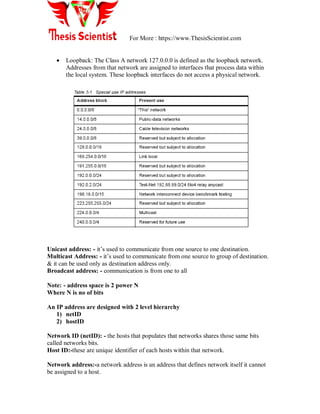
 Loopback: The Class A network 127.0.0.0 is defined as the loopback network.
Addresses from that network are assigned to interfaces that process data within
the local system. These loopback interfaces do not access a physical network.
Unicast address: - it‘s used to communicate from one source to one destination.
Multicast Address: - it‘s used to communicate from one source to group of destination.
& it can be used only as destination address only.
Broadcast address: - communication is from one to all
Note: - address space is 2 power N
Where N is no of bits
An IP address are designed with 2 level hierarchy
1) netID
2) hostID
Network ID (netID): - the hosts that populates that networks shares those same bits
called networks bits.
Host ID:-these are unique identifier of each hosts within that network.
Network address:-a network address is an address that defines network itself it cannot
be assigned to a host.
For More : https://www.ThesisScientist.com
Property of network address:-
1) all hosts ID bytes are 0‘s
2) The network address defines the networks to the rest of the internet.
3) Network address is the 1st
address in the blocks.
4) If given an network address we can define class of address
NOTE: - A network address is different from netID. A network address has both netID&
hostID with 0‘s for hostID.
Eg. Given the address 23.56.7.91. Find the network address?
Sol: - the class is A because first byte define netID. So we can find network address by
replacing hostID bytes by 0‘s so network address is 23.0.0.0
SUBNETTING
If you wanted to take one network address and create six networks from it? You would
have to perform what is called subnetting, which allows you to take one larger network
and break it into many smaller networks.
There are many reasons to perform subnetting. Some of the benefits of subnetting
include the following:
Reduced network traffic We all appreciate less traffic of any kind. Networks are no
different. Without trusty routers, packet traffic could grind the entire network down to a
near standstill. With routers, most traffic will stay on the local network; only packets
destined for other networks will pass through the router. Routers create broadcast
domains. The smaller broadcast domains you create the less network traffic on that
network segment.
Optimized network performance This is a result of reduced network traffic.
Simplified management It‘s easier to identify and isolate network problems in a group
of smaller connected networks than within one gigantic network.
Facilitated spanning of large geographical distances Because WAN links are
considerably slower and more expensive than LAN links, a single large network that
spans long distances can create problems in every arena listed above. Connecting
multiple smaller networks makes the system more efficient.
Subnet Masks
For the subnet address scheme to work, every machine on the network must know which
part of the host address will be used as the subnet address. This is accomplished by
assigning a subnet mask to each machine. This is a 32-bit value that allows the recipient
of IP packets to distinguish the network ID portion of the IP address from the host ID
portion of the IP address.
When router receives packet with destination IP address it needs to route a packets & the
routing is based on the network address & subnetwork address so the router outside the
For More : https://www.ThesisScientist.com
organization routes the packets based on network address & router inside the organization
route the packets based on subnetwork address.
ROUTER OUTSIDE = USES DEFAULT MASK
ROUTER INSIDE = USES SUBNET MASK
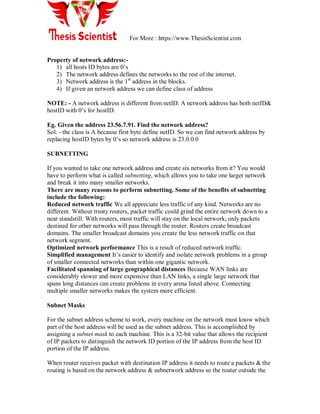
The network administrator creates a 32-bit subnet mask composed of 1s and 0s. The 1s in
the subnet mask represent the positions that refer to the network or subnet addresses.
DEFAULT MASK
It‘s a 32 bit binary no‘s that gives 1s t address
in the block (network address)
When ANDed with address in the block.
Rules of masking:-
1) If mask byte is255 retain corresponding byte.
2) if mask byte is255 set corresponding byte to 0
Eg. Given following address and use default mask to find network address.
1) 23.56.7.91
2) 132.16.17.85
3) 201.180.56.5
Sol 1) 23.56.7.91----- class A
255.0.0.0 --------default mask of class A
23.0.0.0 ---------- network address by using masking rule
For More : https://www.ThesisScientist.com
2) 132.16.17.85----- class B
255.255.0.0 --------default mask of class B
132.16.0.0 ---------- network address by using masking rule
3) 201.180.56.5----- class C
255.255.255.0 --------default mask of class C
201.180.56.0 ---------- network address by using masking rule
Contiguous subnetmask
Are those 11110000 (no‘s of 1 followed by 0‘s)
Non Contiguous subnetmask
Strings with mixture of 0 & 1‘s.
Notes: adding subnetting to ip address will create 3 level of hierarchy
a) site
b) subnetID
c) hosted
 Classless Addressing Scheme (Devised in 1990s)
 Allow the division between prefix and suffix to occur at an arbitrary point.
 Allow more complete utilization of the address space.
(2) CIDR: Classless Inter-Domain Routing
a) Internet Part + Local Part
b) Internet Part + Physical Network + Host
i) Example: IP:128.230.211.195. Netmask FFFFF800
ii) 128 = 1000 0000, 230 = 1110 0110, 211 = 11010011
iii) What is the CIDR representation? What are the lowest IP and highest IP addresses?
iv) Is Apollo (128.230.208.46) on the same subnet? 208 = 1101 0000
2.2 VLAN
What are VLAN’s?
For More : https://www.ThesisScientist.com
In a traditional LAN, workstations are connected to each other by means of a hub or a
repeater. These devices propagate any incoming data throughout the network. However,
if two people attempt to send information at the same time, a collision will occur and all
the transmitted data will be lost. Once the collision has occurred, it will continue to be
propagated throughout the network by hubs and repeaters. The original information will
therefore need to be resent after waiting for the collision to be resolved, thereby incurring
a significant wastage of time and resources.
To prevent collisions from traveling through all the workstations in the network, a bridge
or a switch can be used. These devices will not forward collisions, but will allow
broadcasts (to every user in the network) and multicasts (to a pre-specified group of
users) to pass through.
A router may be used to prevent broadcasts and multicasts from traveling through the
network.
The workstations, hubs, and repeaters together form a LAN segment. A LAN segment is
also known as a collision domain since collisions remain within the segment.
The area within which broadcasts and multicasts are confined is called a broadcast
domain or LAN.
Thus a LAN can consist of one or more LAN segments. Defining broadcast and collision
domains in a LAN depends on how the workstations, hubs, switches, and routers are
physically connected together. This means that everyone on a LAN must be located in the
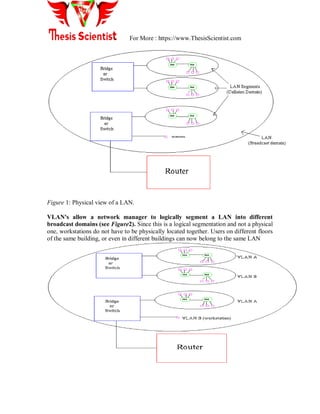
same area (see Figure1).
For More : https://www.ThesisScientist.com
Figure 1: Physical view of a LAN.
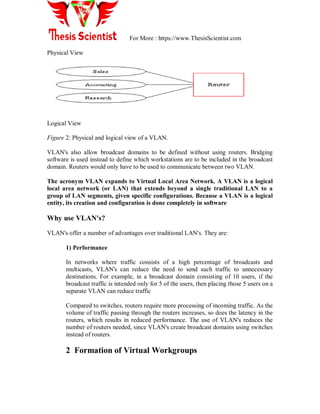
VLAN's allow a network manager to logically segment a LAN into different
broadcast domains (see Figure2). Since this is a logical segmentation and not a physical
one, workstations do not have to be physically located together. Users on different floors
of the same building, or even in different buildings can now belong to the same LAN
For More : https://www.ThesisScientist.com
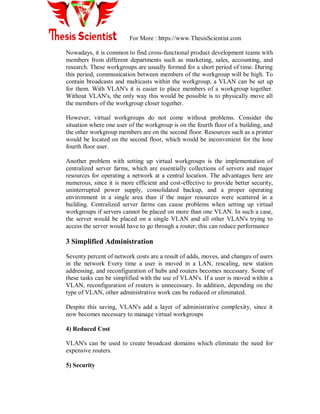
Physical View
Logical View
Figure 2: Physical and logical view of a VLAN.
VLAN's also allow broadcast domains to be defined without using routers. Bridging
software is used instead to define which workstations are to be included in the broadcast
domain. Routers would only have to be used to communicate between two VLAN.
The acronym VLAN expands to Virtual Local Area Network. A VLAN is a logical
local area network (or LAN) that extends beyond a single traditional LAN to a
group of LAN segments, given specific configurations. Because a VLAN is a logical
entity, its creation and configuration is done completely in software
Why use VLAN's?
VLAN's offer a number of advantages over traditional LAN's. They are:
1) Performance
In networks where traffic consists of a high percentage of broadcasts and
multicasts, VLAN's can reduce the need to send such traffic to unnecessary
destinations. For example, in a broadcast domain consisting of 10 users, if the
broadcast traffic is intended only for 5 of the users, then placing those 5 users on a
separate VLAN can reduce traffic
Compared to switches, routers require more processing of incoming traffic. As the
volume of traffic passing through the routers increases, so does the latency in the
routers, which results in reduced performance. The use of VLAN's reduces the
number of routers needed, since VLAN's create broadcast domains using switches
instead of routers.
2 Formation of Virtual Workgroups
For More : https://www.ThesisScientist.com
Nowadays, it is common to find cross-functional product development teams with
members from different departments such as marketing, sales, accounting, and
research. These workgroups are usually formed for a short period of time. During
this period, communication between members of the workgroup will be high. To
contain broadcasts and multicasts within the workgroup, a VLAN can be set up
for them. With VLAN's it is easier to place members of a workgroup together.
Without VLAN's, the only way this would be possible is to physically move all
the members of the workgroup closer together.
However, virtual workgroups do not come without problems. Consider the
situation where one user of the workgroup is on the fourth floor of a building, and
the other workgroup members are on the second floor. Resources such as a printer
would be located on the second floor, which would be inconvenient for the lone
fourth floor user.
Another problem with setting up virtual workgroups is the implementation of
centralized server farms, which are essentially collections of servers and major
resources for operating a network at a central location. The advantages here are
numerous, since it is more efficient and cost-effective to provide better security,
uninterrupted power supply, consolidated backup, and a proper operating
environment in a single area than if the major resources were scattered in a
building. Centralized server farms can cause problems when setting up virtual
workgroups if servers cannot be placed on more than one VLAN. In such a case,
the server would be placed on a single VLAN and all other VLAN's trying to
access the server would have to go through a router; this can reduce performance
3 Simplified Administration
Seventy percent of network costs are a result of adds, moves, and changes of users
in the network Every time a user is moved in a LAN, rescaling, new station
addressing, and reconfiguration of hubs and routers becomes necessary. Some of
these tasks can be simplified with the use of VLAN's. If a user is moved within a
VLAN, reconfiguration of routers is unnecessary. In addition, depending on the
type of VLAN, other administrative work can be reduced or eliminated.
Despite this saving, VLAN's add a layer of administrative complexity, since it
now becomes necessary to manage virtual workgroups
4) Reduced Cost
VLAN's can be used to create broadcast domains which eliminate the need for
expensive routers.
5) Security
For More : https://www.ThesisScientist.com
Periodically, sensitive data may be broadcast on a network. In such cases, placing
only those users who can have access to that data on a VLAN can reduce the
chances of an outsider gaining access to the data. VLAN's can also be used to
control broadcast domains, set up firewalls, restrict access, and inform the
network manager of an intrusion.
How VLAN's work
When a LAN bridge receives data from a workstation, it tags the data with a VLAN
identifier indicating the VLAN from which the data came. This is called explicit tagging.
It is also possible to determine to which VLAN the data received belongs using implicit
tagging. In implicit tagging the data is not tagged, but the VLAN from which the data
came is determined based on other information like the port on which the data arrived.
Tagging can be based on the port from which it came, the source Media Access Control
(MAC) field, the source network address, or some other field or combination of fields.
VLAN's are classified based on the method used. To be able to do the tagging of data
using any of the methods, the bridge would have to keep an updated database containing
a mapping between VLAN's and whichever field is used for tagging. For example, if
tagging is by port, the database should indicate which ports belong to which VLAN. This
database is called a filtering database. Bridges would have to be able to maintain this
database and also to make sure that all the bridges on the LAN have the same information
in each of their databases. The bridge determines where the data is to go next based on
normal LAN operations. Once the bridge determines where the data is to go, it now needs
to determine whether the VLAN identifier should be added to the data and sent. If the
data is to go to a device that knows about VLAN implementation (VLAN-aware), the
VLAN identifier is added to the data. If it is to go to a device that has no knowledge of
VLAN implementation (VLAN-unaware), the bridge sends the data without the VLAN
identifier.
In order to understand how VLAN's work, we need to look at the types of VLAN's, the
types of connections between devices on VLAN's, the filtering database which is used to
send traffic to the correct VLAN, and tagging, a process used to identify the VLAN
originating the data.
VLAN Standard: IEEE 802.1Q Draft Standard
There has been a recent move towards building a set of standards for VLAN products.
The Institute of Electrical and Electronic Engineers (IEEE) is currently working on a
draft standard 802.1Q for VLAN's. Up to this point, products have been proprietary,
implying that anyone wanting to install VLAN's would have to purchase all products
For More : https://www.ThesisScientist.com
from the same vendor. Once the standards have been written and vendors create products
based on these standards, users will no longer be confined to purchasing products from a
single vendor.
Types of VLAN's
VLAN membership can be classified by port, MAC address, and protocol type.
1) Layer 1 VLAN: Membership by Port
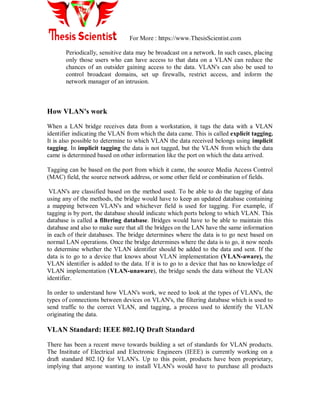
Membership in a VLAN can be defined based on the ports that belong to the VLAN. For
example, in a bridge with four ports, ports 1, 2, and 4 belong to VLAN 1 and port 3
belongs to VLAN 2 (see Figure3).
Port VLAN
1 1
2 1
3 2
4 1
Figure3: Assignment of ports to different VLAN's.
The main disadvantage of this method is that it does not allow for user mobility. If a user
moves to a different location away from the assigned bridge, the network manager must
reconfigure the VLAN.
2) Layer 2 VLAN: Membership by MAC Address
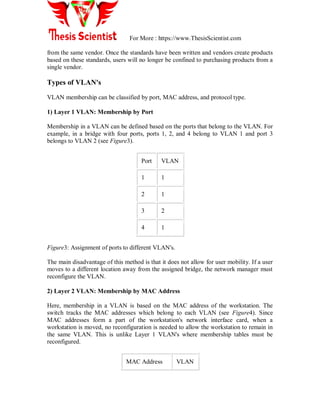
Here, membership in a VLAN is based on the MAC address of the workstation. The
switch tracks the MAC addresses which belong to each VLAN (see Figure4). Since
MAC addresses form a part of the workstation's network interface card, when a
workstation is moved, no reconfiguration is needed to allow the workstation to remain in
the same VLAN. This is unlike Layer 1 VLAN's where membership tables must be
reconfigured.
MAC Address VLAN
For More : https://www.ThesisScientist.com
1212354145121 1
2389234873743 2
3045834758445 2
5483573475843 1
Figure4: Assignment of MAC addresses to different VLAN's.
The main problem with this method is that VLAN membership must be assigned initially.
In networks with thousands of users, this is no easy task. Also, in environments where
notebook PC's are used, the MAC address is associated with the docking station and not
with the notebook PC. Consequently, when a notebook PC is moved to a different
docking station, its VLAN membership must be reconfigured.
3) Layer 2 VLAN: Membership by Protocol Type
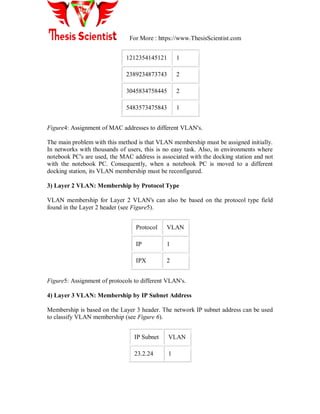
VLAN membership for Layer 2 VLAN's can also be based on the protocol type field
found in the Layer 2 header (see Figure5).
Protocol VLAN
IP 1
IPX 2
Figure5: Assignment of protocols to different VLAN's.
4) Layer 3 VLAN: Membership by IP Subnet Address
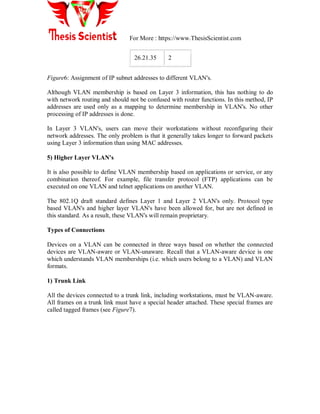
Membership is based on the Layer 3 header. The network IP subnet address can be used
to classify VLAN membership (see Figure 6).
IP Subnet VLAN
23.2.24 1
For More : https://www.ThesisScientist.com
26.21.35 2
Figure6: Assignment of IP subnet addresses to different VLAN's.
Although VLAN membership is based on Layer 3 information, this has nothing to do
with network routing and should not be confused with router functions. In this method, IP
addresses are used only as a mapping to determine membership in VLAN's. No other
processing of IP addresses is done.
In Layer 3 VLAN's, users can move their workstations without reconfiguring their
network addresses. The only problem is that it generally takes longer to forward packets
using Layer 3 information than using MAC addresses.
5) Higher Layer VLAN's
It is also possible to define VLAN membership based on applications or service, or any
combination thereof. For example, file transfer protocol (FTP) applications can be
executed on one VLAN and telnet applications on another VLAN.
The 802.1Q draft standard defines Layer 1 and Layer 2 VLAN's only. Protocol type
based VLAN's and higher layer VLAN's have been allowed for, but are not defined in
this standard. As a result, these VLAN's will remain proprietary.
Types of Connections
Devices on a VLAN can be connected in three ways based on whether the connected
devices are VLAN-aware or VLAN-unaware. Recall that a VLAN-aware device is one
which understands VLAN memberships (i.e. which users belong to a VLAN) and VLAN
formats.
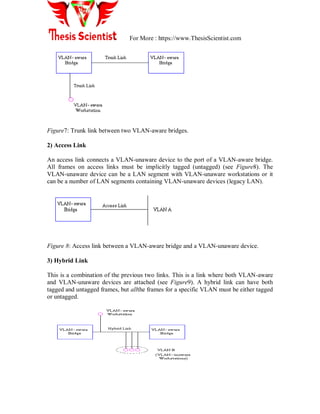
1) Trunk Link
All the devices connected to a trunk link, including workstations, must be VLAN-aware.
All frames on a trunk link must have a special header attached. These special frames are
called tagged frames (see Figure7).
For More : https://www.ThesisScientist.com
Figure7: Trunk link between two VLAN-aware bridges.
2) Access Link
An access link connects a VLAN-unaware device to the port of a VLAN-aware bridge.
All frames on access links must be implicitly tagged (untagged) (see Figure8). The
VLAN-unaware device can be a LAN segment with VLAN-unaware workstations or it
can be a number of LAN segments containing VLAN-unaware devices (legacy LAN).
Figure 8: Access link between a VLAN-aware bridge and a VLAN-unaware device.
3) Hybrid Link
This is a combination of the previous two links. This is a link where both VLAN-aware
and VLAN-unaware devices are attached (see Figure9). A hybrid link can have both
tagged and untagged frames, but allthe frames for a specific VLAN must be either tagged
or untagged.
For More : https://www.ThesisScientist.com
Figure9: Hybrid link containing both VLAN-aware and VLAN-unaware devices.
It must also be noted that the network can have a combination of all three types of links.
Frame Processing
A bridge on receiving data determines to which VLAN the data belongs either by implicit
or explicit tagging. In explicit tagging a tag header is added to the data. The bridge also
keeps track of VLAN members in a filtering database which it uses to determine where
the data is to be sent. Following is an explanation of the contents of the filtering database
and the format and purpose of the tag header [802.1Q].
1) Filtering Database
Membership information for a VLAN is stored in a filtering database. The filtering
database consists of the following types of entries:
i) Static Entries
Static information is added, modified, and deleted by management only. Entries are not
automatically removed after some time (ageing), but must be explicitly removed by
management. There are two types of static entries:
a) Static Filtering Entries: which specify for every port whether frames to be sent to a
specific MAC address or group address and on a specific VLAN should be forwarded or
discarded, or should follow the dynamic entry, and
b) Static Registration Entries: which specify whether frames to be sent to a specific
VLAN are to be tagged or untagged and which ports are registered for that VLAN.
ii) Dynamic Entries
Dynamic entries are learned by the bridge and cannot be created or updated by
management. The learning process observes the port from which a frame, with a given
source address and VLAN ID (VID), is received, and updates the filtering database. The
entry is updated only if all the following three conditions are satisfied:
a) this port allows learning,
b) the source address is a workstation address and not a group address, and
c) there is space available in the database.
Entries are removed from the database by the ageing out process where, after a certain
amount of time specified by management (10 sec --- 1000000 sec), entries allow
For More : https://www.ThesisScientist.com
automatic reconfiguration of the filtering database if the topology of the network
changes. There are three types of dynamic entries:
a) Dynamic Filtering Entries: which specify whether frames to be sent to a specific MAC
address and on a certain VLAN should be forwarded or discarded.
b) Group Registration Entries: which indicate for each port whether frames to be sent to a
group MAC address and on a certain VLAN should be filtered or discarded. These entries
are added and deleted using Group Multicast Registration Protocol (GMRP). This allows
multicasts to be sent on a single VLAN without affecting other VLAN's.
c) Dynamic Registration Entries: which specify which ports are registered for a specific
VLAN. Entries are added and deleted using GARP VLAN Registration Protocol
(GVRP), where GARP is the Generic Attribute Registration Protocol.
GVRP is used not only to update dynamic registration entries, but also to communicate
the information to other VLAN-aware bridges.
In order for VLAN's to forward information to the correct destination, all the bridges in
the VLAN should contain the same information in their respective filtering databases.
GVRP allows both VLAN-aware workstations and bridges to issue and revoke VLAN
memberships. VLAN-aware bridges register and propagate VLAN membership to all
ports that are a part of the active topology of the VLAN. The active topology of a
network is determined when the bridges are turned on or when a change in the state of the
current topology is perceived.
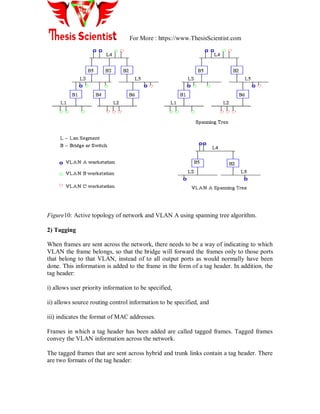
The active topology is determined using a spanning tree algorithm which prevents the
formation of loops in the network by disabling ports. Once an active topology for the
network (which may contain several VLAN's) is obtained, the bridges determine an
active topology for each VLAN. This may result in a different topology for each VLAN
or a common one for several VLAN's. In either case, the VLAN topology will be a subset
of the active topology of the network (see Figure 10).
For More : https://www.ThesisScientist.com
Figure10: Active topology of network and VLAN A using spanning tree algorithm.
2) Tagging
When frames are sent across the network, there needs to be a way of indicating to which
VLAN the frame belongs, so that the bridge will forward the frames only to those ports
that belong to that VLAN, instead of to all output ports as would normally have been
done. This information is added to the frame in the form of a tag header. In addition, the
tag header:
i) allows user priority information to be specified,
ii) allows source routing control information to be specified, and
iii) indicates the format of MAC addresses.
Frames in which a tag header has been added are called tagged frames. Tagged frames
convey the VLAN information across the network.
The tagged frames that are sent across hybrid and trunk links contain a tag header. There
are two formats of the tag header:
For More : https://www.ThesisScientist.com
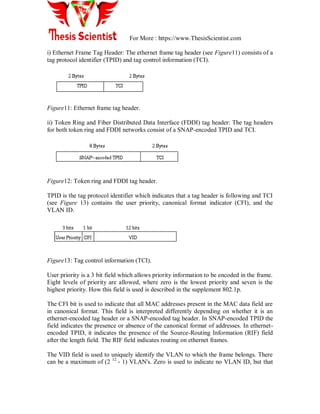
i) Ethernet Frame Tag Header: The ethernet frame tag header (see Figure11) consists of a
tag protocol identifier (TPID) and tag control information (TCI).
Figure11: Ethernet frame tag header.
ii) Token Ring and Fiber Distributed Data Interface (FDDI) tag header: The tag headers
for both token ring and FDDI networks consist of a SNAP-encoded TPID and TCI.
Figure12: Token ring and FDDI tag header.
TPID is the tag protocol identifier which indicates that a tag header is following and TCI
(see Figure 13) contains the user priority, canonical format indicator (CFI), and the
VLAN ID.
Figure13: Tag control information (TCI).
User priority is a 3 bit field which allows priority information to be encoded in the frame.
Eight levels of priority are allowed, where zero is the lowest priority and seven is the
highest priority. How this field is used is described in the supplement 802.1p.
The CFI bit is used to indicate that all MAC addresses present in the MAC data field are
in canonical format. This field is interpreted differently depending on whether it is an
ethernet-encoded tag header or a SNAP-encoded tag header. In SNAP-encoded TPID the
field indicates the presence or absence of the canonical format of addresses. In ethernet-
encoded TPID, it indicates the presence of the Source-Routing Information (RIF) field
after the length field. The RIF field indicates routing on ethernet frames.
The VID field is used to uniquely identify the VLAN to which the frame belongs. There
can be a maximum of (2 12
- 1) VLAN's. Zero is used to indicate no VLAN ID, but that
For More : https://www.ThesisScientist.com
user priority information is present. This allows priority to be encoded in non-priority
LAN's.
VLAN modes
There are three different modes in which a VLAN can be configured. These modes are
covered below:
 VLAN Switching Mode - The VLAN forms a switching bridge in which frames
are forwarded unmodified.
 VLAN Translation Mode - VLAN translation mode is used when the frame
tagging method is changed in the network path, or if the frame traverses from a
VLAN group to a legacy or native interface which is not configured in a VLAN.
When the packet is to pass into a native interface, the VLAN tag is removed so
that the packet can properly enter the native interface.
 VLAN Routing Mode - When a packet is routed from one VLAN to a different
VLAN, you use VLAN routing mode. The packet is modified, usually by a router,
which places its own MAC address as the source, and then changes the VLAN ID
of the packet.
VLAN configurations
 VLAN ID - The VLAN ID is a unique value you assign to each VLAN on a
single device. With a Cisco routing or switching device running IOS, your range
is from 1-4096. When you define a VLAN you usually use the syntax "vlan x"
where x is the number you would like to assign to the VLAN ID. VLAN 1 is
reserved as an administrative VLAN. If VLAN technologies are enabled, all ports
are a member of VLAN 1 by default.
 VLAN Name - The VLAN name is an text based name you use to identify your
VLAN, perhaps to help technical staff in understanding its function. The string
you use can be between 1 and 32 characters in length.
 Private VLAN - You also define if the VLAN is to be a private vlan in the VLAN
definition, and what other VLAN might be associated with it in the definition
section. When you configure a Cisco VLAN as a private-vlan, this means that
ports that are members of the VLAN cannot communicate directly with each other
by default. Normally all ports which are members of a VLAN can communicate
directly with each other just as they would be able to would they have been a
member of a standard network segment. Private vlans are created to enhance the
security on a network where hosts coexisting on the network cannot or should not
trust each other. This is a common practice to use on web farms or in other high
risk environments where communication between hosts on the same subnet are
For More : https://www.ThesisScientist.com
not necessary. Check your Cisco documentation if you have questions about how
to configure and deploy private VLANs.
 VLAN modes - in Cisco IOS, there are only two modes an interface can operate
in, "mode access" and "mode trunk". Access mode is for end devices or devices
that will not require multiple VLANs. Trunk mode is used for passing multiple
VLANs to other network devices, or for end devices that need to have
membership to multiple VLANs at once. If you are wondering what mode to use,
the mode is probably "mode access".
VLAN Definition
To define a VLAN on a cisco device, you need a VLAN ID, a VLAN name, ports you
would like to participate in the VLAN, and the type of membership the port will have
with the VLAN.
Step 1 configure terminal
Step 2 vlan vlan-id
Step 3 name vlan-name
Step 4- If you want your new VLAN to be a private-vlan, you now enter "private-vlan
primary" and "private-vlan association Y" where Y is the secondary VLAN you want
to associate with the primary vlan. If you would like the private VLAN to be community
based, you enter "private-vlan community" instead.
Step 5 end
Step 6 show vlan {name vlan-name | id vlan-id}
You have now created a vlan by assigning it an ID, and giving it a name. At this point,
the VLAN has no special configuration to handle IP traffic, nor are there any ports that
are members of the VLAN. The next section describes how you complete your vlan
configuration.
VLAN Configuration
 Step 1 - Enter "Interface VlanX" where X is the VLAN ID you used in the VLAN
definition above.
 Step 2 - This step is optional. Enter "description " where VLAN description
details what the VLAN is going to be used for. You can just simply re-use the
VLAN name you used above if you like.
 Step 3 - Enter "ip address <address> <netmask>" where <address> is the address
you want to assign this device in the VLAN, and <netmask> is the network mask
for the subnet you have assigned the VLAN.
 Step 4 - The step is optional. Create and apply an access list to the VLAN for
inbound and outbound access controls. For a standard access list enter "access-
group XXX in" and "access-group YYY out" where XXX and YYY corresponds
to access-lists you have previously configured. Remember that the terms are taken
For More : https://www.ThesisScientist.com
in respect to the specific subnet or interface, so "in" means from the VLAN INTO
the router, and "out" means from the router OUT to the VLAN.
 Step 5 - This step is optional. Enter the private VLAN mapping you would like to
use if the port is part of a private VLAN. This should be the same secondary
VLAN you associated with the primary VLAN in VLAN definition above. Enter
"private-vlan mapping XX" where XX is the VLAN ID of the secondary VLAN
you would like to associate with this VLAN.
 Step 6 - This step is optional. Configure HSRP and any other basic interface
configurations you would normally use for your Cisco device.
 Step 7 - Exit configuration mode by entering "end".
 Step 8 - Save your configuration to memory by entering "wr mem" and to the
network if you have need using "wr net". You may have to supply additional
information to write configurations to the network depending on your device
configuration.
Now you have your vlan defined and configured, but no physical ports are a member of
the VLAN, so the VLAN still isn't of much use. Next port membership in the VLAN is
described. IOS devices describe interfaces based on a technology and a port number, as
with "FastEthernet3/1" or "GigabitEthernet8/16". Once you have determined which
physical ports you want to be members of the VLAN you can use the following steps to
configure it. NOTE: These steps have already assumed that you have logged into the
router, gotten into enable mode, and entered configuration mode.
For access ports
 Step 1 - Enter "Interface <interface name>" where <interface name> is the name
Cisco has assigned the interface you would like to associate with the VLAN.
 Step 2 - This step is optional. Enter "description <interface description>" where
<interface description> is text describing the system connected to the interface in
question. It is usually helpful to provide DNS hostname, IP Address, which port
on the remote system is connected, and its function.
 Step 3 - This step depends on your equipment and IOS version, and requirements.
Enter "switchport" if you need the interface to act as a switch port. Some
hardware does not support switchport mode, and can only be used as a router port.
Check your documentation if you don't know the difference between a router port
and a switch port.
 Step 4 - Only use this step if you used step 3 above. Enter "switchport access vlan
X" where X is the VLAN ID of the VLAN you want the port to be a member of.
 Step 5 - Only use this step if you used step 3 above. Enter "switchport mode
access" to tell the port that you want it to be used as an access port.
 Step 6 - Exit configuration mode by entering "end".
 Step 7 - Save your configuration to memory by entering "wr mem" and to the
network if you have need using "wr net". You may have to supply additional
information to write configurations to the network depending on your device
configuration.
For More : https://www.ThesisScientist.com
For trunk ports
 Step 1 - Enter "Interface <interface name>" where <interface name> is the name
Cisco has assigned the interface you would like to associate with the VLAN.
 Step 2 - This step is optional. Enter "description <interface description>" where
<interface description> is text describing the system connected to the interface in
question. It is usually helpful to provide DNS hostname, IP Address, which port
on the remote system is connected, and its function.
 Step 3 - This step depends on your equipment and IOS version, and requirements.
Enter "switchport" if you need the interface to act as a switch port. Some
hardware does not support switchport mode, and can only be used as a router port.
Check your documentation if you don't know the difference between a router port
and a switch port.
 Step 4 - Only use this step if you used step 3 above. Enter "switchport trunk
encapsulation dot1q". This tells the VLAN to use dot1q encapsulation for the
VLAN, which is the industry standard encapsulation for trunking. There are other
encapsulation options, but your equipment may not operate with non Cisco
equipment if you use them.
 Step 5 - Only use this step if you used step 3 above. Enter "switchport trunk
allowed vlan XX, YY, ZZ" where XX, YY, and ZZ are VLANs you want the
trunk to include. You can define one or more VLANs to be allowed in the trunk.
 Step 6 - Only use this step if you used step 3 above. Enter "switchport mode
trunk" to tell the port to operate as a VLAN trunk, and not as an access port.
 Step 7 - Exit configuration mode by entering "end".
 Step 8 - Save your configuration to memory by entering "wr mem" and to the
network if you have need using "wr net". You may have to supply additional
information to write configurations to the network depending on your device
configuration.
For private VLAN ports
 Step 1 - Enter "Interface <interface name>" where <interface name> is the name
Cisco has assigned the interface you would like to associate with the VLAN.
 Step 2 - This step is optional. Enter "description <interface description>" where
<interface description> is text describing the system connected to the interface in
question. It is usually helpful to provide DNS hostname, IP Address, which port
on the remote system is connected, and its function.
 Step 3 - This step depends on your equipment and IOS version, and requirements.
Enter "switchport" if you need the interface to act as a switch port. Some
hardware does not support switchport mode, and can only be used as a router port.
Check your documentation if you don't know the difference between a router port
and a switch port.
 Step 4 - Enter "switchport private-vlan host association XX YY" where XX is the
primary VLAN you want to assign, YY is the secondary VLAN you want to
associate with it.
For More : https://www.ThesisScientist.com
 Step 5 - Enter "switchport mode private-vlan host" to force the port to operate as a
private-vlan in host mode.
 Step 6 - Exit configuration mode by entering "end".
 Step 7 - Save your configuration to memory by entering "wr mem" and to the
network if you have need using "wr net". You may have to supply additional
information to write configurations to the network depending on your device
configuration.
You should now have your VLAN properly implemented on a Cisco IOS device
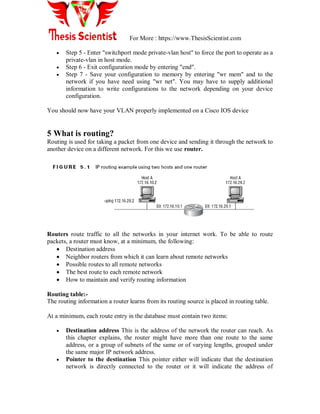
5 What is routing?
Routing is used for taking a packet from one device and sending it through the network to
another device on a different network. For this we use router.
Routers route traffic to all the networks in your internet work. To be able to route
packets, a router must know, at a minimum, the following:
 Destination address
 Neighbor routers from which it can learn about remote networks
 Possible routes to all remote networks
 The best route to each remote network
 How to maintain and verify routing information
Routing table:-
The routing information a router learns from its routing source is placed in routing table.
At a minimum, each route entry in the database must contain two items:
 Destination address This is the address of the network the router can reach. As
this chapter explains, the router might have more than one route to the same
address, or a group of subnets of the same or of varying lengths, grouped under
the same major IP network address.
 Pointer to the destination This pointer either will indicate that the destination
network is directly connected to the router or it will indicate the address of
For More : https://www.ThesisScientist.com
another router on a directly connected link or the local interface to that link. That
router, which will be one router hop closer to the destination, is a next-hop router.
The router will match the most specific address. The address may be one of the
following:
 Host address (a host route)
 Subnet
 Group of subnets (a summary route)
 Major network number
 Group of major network numbers (a supernet)
 Default address
Routing technique:-
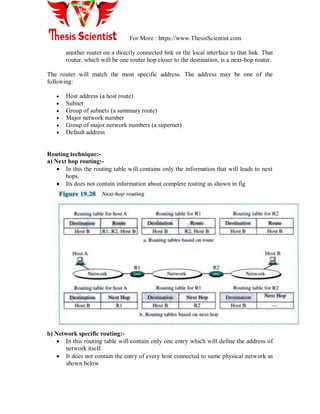
a) Next hop routing:-
 In this the routing table will contains only the information that will leads to next
hops.
 Its does not contain information about complete routing as shown in fig
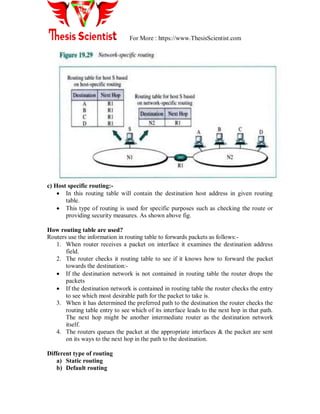
b) Network specific routing:-
 In this routing table will contain only one entry which will define the address of
network itself.
 It does not contain the entry of every host connected to same physical network as
shown below
For More : https://www.ThesisScientist.com
c) Host specific routing:-
 In this routing table will contain the destination host address in given routing
table.
 This type of routing is used for specific purposes such as checking the route or
providing security measures. As shown above fig.
How routing table are used?
Routers use the information in routing table to forwards packets as follows:-
1. When router receives a packet on interface it examines the destination address
field.
2. The router checks it routing table to see if it knows how to forward the packet
towards the destination:-
 If the destination network is not contained in routing table the router drops the
packets
 If the destination network is contained in routing table the router checks the entry
to see which most desirable path for the packet to take is.
3. When it has determined the preferred path to the destination the router checks the
routing table entry to see which of its interface leads to the next hop in that path.
The next hop might be another intermediate router as the destination network
itself.
4. The routers queues the packet at the appropriate interfaces & the packet are sent
on its ways to the next hop in the path to the destination.
Different type of routing
a) Static routing
b) Default routing
For More : https://www.ThesisScientist.com
c) Dynamic routing
Static routing:-
Static routing is the process of an administrator manually adding routes in each router‘s
routing table. In static routing algorithms, routes change very slowly over time, often as a
result of human intervention (e.g., a human manually editing a router's forwarding table).
Static routing has the following benefits:
 No overhead on the router CPU
 No bandwidth usage between routers
 Security (because the administrator only allows routing to certain networks)
Static routing has the following disadvantages:
 The administrator must really understand the internet work and how each router is
connected to configure the routes correctly.
 If one network is added to the internet work, the administrator must add a route to
it on all routers.
 It‘s not feasible in large networks because it would be a full-time job.
The command used to add a static route to a routing table is
ip route [destination_network] [mask] [next_hop_address or exit interface]
[administrative_distance][permanent]
The following list describes each command in the string:
a) Ip route The command used to create the static route.
b) Destination network The network you are placing in the routing table.
c) Mask Indicates the subnet mask being used on the network.
d) Next hop address The address of the next hop router that will receive the
packet and forward it to the remote network. This is a router interface that is
on a directly connected network. You must be able to ping the router interface
before you add the route.
e) Exit interface Used in place of the next hop address if desired. Must be on a
point-to-point link, such as a WAN. This command does not work on a LAN;
for example, Ethernet.
f) Administrative distance By default, static routes have an administrative
distance of 1. You can change the default value by adding an administrative
weight at the end of the command.
g) Permanent If the interface is shut down or the router cannot communicate to
the next hop router, the route is automatically discarded from the routing
table. Choosing the permanent option keeps the entry in the routing table no
matter what happens.
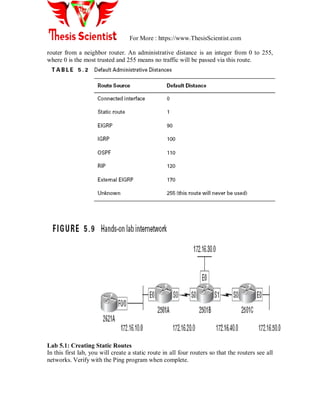
Administrative Distances
When configuring routing protocols, you need to be aware of administrative distances
(ADs). These are used to rate the trustworthiness of routing information received on a
For More : https://www.ThesisScientist.com
router from a neighbor router. An administrative distance is an integer from 0 to 255,
where 0 is the most trusted and 255 means no traffic will be passed via this route.
Lab 5.1: Creating Static Routes
In this first lab, you will create a static route in all four routers so that the routers see all
networks. Verify with the Ping program when complete.
For More : https://www.ThesisScientist.com
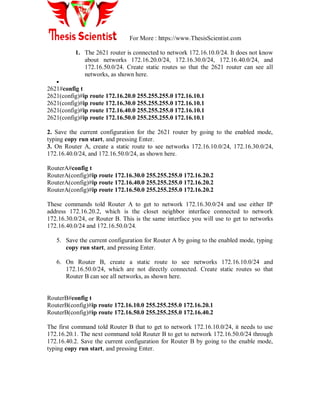
1. The 2621 router is connected to network 172.16.10.0/24. It does not know
about networks 172.16.20.0/24, 172.16.30.0/24, 172.16.40.0/24, and
172.16.50.0/24. Create static routes so that the 2621 router can see all
networks, as shown here.

2621#config t
2621(config)#ip route 172.16.20.0 255.255.255.0 172.16.10.1
2621(config)#ip route 172.16.30.0 255.255.255.0 172.16.10.1
2621(config)#ip route 172.16.40.0 255.255.255.0 172.16.10.1
2621(config)#ip route 172.16.50.0 255.255.255.0 172.16.10.1
2. Save the current configuration for the 2621 router by going to the enabled mode,
typing copy run start, and pressing Enter.
3. On Router A, create a static route to see networks 172.16.10.0/24, 172.16.30.0/24,
172.16.40.0/24, and 172.16.50.0/24, as shown here.
RouterA#config t
RouterA(config)#ip route 172.16.30.0 255.255.255.0 172.16.20.2
RouterA(config)#ip route 172.16.40.0 255.255.255.0 172.16.20.2
RouterA(config)#ip route 172.16.50.0 255.255.255.0 172.16.20.2
These commands told Router A to get to network 172.16.30.0/24 and use either IP
address 172.16.20.2, which is the closet neighbor interface connected to network
172.16.30.0/24, or Router B. This is the same interface you will use to get to networks
172.16.40.0/24 and 172.16.50.0/24.
5. Save the current configuration for Router A by going to the enabled mode, typing
copy run start, and pressing Enter.
6. On Router B, create a static route to see networks 172.16.10.0/24 and
172.16.50.0/24, which are not directly connected. Create static routes so that
Router B can see all networks, as shown here.
RouterB#config t
RouterB(config)#ip route 172.16.10.0 255.255.255.0 172.16.20.1
RouterB(config)#ip route 172.16.50.0 255.255.255.0 172.16.40.2
The first command told Router B that to get to network 172.16.10.0/24, it needs to use
172.16.20.1. The next command told Router B to get to network 172.16.50.0/24 through
172.16.40.2. Save the current configuration for Router B by going to the enable mode,
typing copy run start, and pressing Enter.
For More : https://www.ThesisScientist.com
6. Router C is connected to networks 172.16.50.0/24 and 172.16.40.0/ 24. It does not
know about networks 172.16.30.0/24, 172.16.20.0/ 24, and 172.16.10.0/24. Create static
routes so that Router C can see all networks, as shown here.
RouterC#config t
RouterC(config)#ip route 172.16.30.0 255.255.255.0 172.16.40.1
RouterC(config)#ip route 172.16.20.0 255.255.255.0 172.16.40.1
RouterC(config)#ip route 172.16.10.0 255.255.255.0 172.16.40.1
Save the current configuration for Router C by going to the enable mode, typing copy
run start, and pressing Enter. Now ping from each router to your hosts and from each
router to each router. If it is set up correctly, it will work.
Default Routing
Default routing is used to send packets with a remote destination network not in the
routing table to the next hop router. You can only use default routing on stub networks,
which means that they have only one exit port out of the network.
To configure a default route, you use wildcards in the network address and mask
locations of a static route.
Dynamic Routing
Dynamic routing is the process of using protocols to find and update routing tables on
routers. Dynamic routing algorithms change the routing paths as the network traffic loads
(and the resulting delays experienced by traffic) or topology change.
A dynamic algorithm can be run either periodically or in direct response to topology or
link cost changes. While dynamic algorithms are more responsive to network changes,
they are also more susceptible to problems such as routing loops and oscillation in routes,
issues.
Advantage:-
This is easier than static or default routing
Disadvantage:-
Expense of router CPU processes
Bandwidth on the network links.
What is difference between?
a) centralized vs. distributed routing
b) interdomain vs. intradomain routing
c) host based vs. router based routing
d) unicast vs. multicast routing
a) Centralized vs. distributed routing
For More : https://www.ThesisScientist.com
Centralized:-
In a centralized routing environment a single router collects & distributes topology
information for all part of internet work.
Advantage:
 Its relieves other routers in the inter network of responsibility of route collection.

Disadvantage:-
 Network links from the central router to other router carry a disproportionate
amount of traffic.
 If central routers fails other routers do not receives routing updates so to remove
this problem we use backup central routers.

Distributed routing:-
In a distributed routing environment all routers in the internet work share the
responsibility for collecting, distributing & using internet work topology information.
Advantage:
 Self sufficiency of individual router makes the routing environment more tolerant
of routing failures.
 Also traffic is evenly distributed among networks links.

Disadvantage:-
 It is that there are significantly more relationships established between routers &
all routers are burdened with route calculation & other processing tasks.
b) Interdomain vs. Intradomain routing
Interdomain: - (it’s also called exterior routing)
This type of routing occurs between multiple autonomous systems. E.g. BGP
Intradomain routing: - (it is also called interior routing)
In this routing occurs only within autonomous system e.g. IGRP
Autonomous system:-
It is a group of networks & routers under the authority of a single administration is called
autonomous system.
b) Host based vs. router based routing
Router based routing:-
 Routers are responsible for determining the route to a destination through the
network
For More : https://www.ThesisScientist.com
 Routers make routing decisions based on their own calculations
 The router will consider the entire best path based on various measures.
 Path selected is not optimal
 No discovery traffic is generated
 Decision making process is very rapid
Host based routing: - (same as host specific routing)
 Source end is responsible for determining the route to a destination through
internet network.
 Here router acts as store & forward devices simply sending packets to next
devices in the path.
 The source end node discovers all possible route to a destination before the packet
is sent into the internet work
 It then choice best optimal path
 It often require substantial discovery traffic
 It takes significant amount of time.

c) Unicast vs. multicast routing

Unicast routing:-
 In unicast routing there is one source and one destination.
 The address for both source & destination is unicast address assign to host.
 In Uincast routing when a router receives a packet it forward the packet through
only one of its ports
Multicast routing:-
In multicast routing there is one source & group of destination.
Source address is unicast address & destination address is group of address (class D)
Group of address: - its define the members of group
UNICAST ROUTING PROTOCOL
INTERIOR ROUTING EXTERIOR ROUTING
IGRP RIP OSPF
BGP
For More : https://www.ThesisScientist.com
DVMRP- DISTANCE VECTOR MULTICAST ROUTING PROTOCOL
MOSPF- MULTICAST OPEN SHORTEST PATH FIRST PROTOCOL
PIM – PROTOCOL INDEPENDENT MULTICAST
PIM-DM- PROTOCOL INDEPENDENT MULTICAST DENSE MODE
PIM-SM- PROTOCOL INDEPENDENT MULTICAST SPARSE MODE
CBT- CORE BASED TREE
Routing Protocols: RIP, OSPF, and BGP
RIP
RIP is a distance vector protocol using hop count as a routing metric to measure the
distance between the source and a destination network. Each link is assigned a hop-count
value (which is 1 typically).
RIP routers maintain only the best route (the route with the lowest hop count value) to a
destination in their routing tables. Each RIP router sends routing-update messages at
regular intervals and when the network topology changes. When a router receives a
routing update message that indicates a route change, it updates its routing table and
immediately sends routing-update messages to inform its neighbors about the change.
RIP uses a number of timers in routing,
1. The route-update timer. Clocks the interval between periodic routing updates, and is
generally set to 30 seconds plus a small, randomly generated number of seconds to avoid
collisions.
2. The route-invalid timer. A route becomes invalid when it is not updated over a period
defined by this timer. The route is marked as inaccessible and advertised as unreachable
.However, the router still forwards packets to this route until the flush interval (see
below) expires. The default value is 180 seconds.
MULTICAST ROUTING PROTOCOL
SOURCE BASED TREE GROUP SHARED TREE
DVMRP MOSPF
PIM
P
PIM-
DM
PIM-
SM
CBT
For More : https://www.ThesisScientist.com
3. The route-hold-down timer. The interval during which routing information regarding
better paths is suppressed. The interval should be at least three times the value of the
update timer. A route enters into a hold down state when an update packet is received
indicating the route is unreachable. The default value is 180 seconds.
4. The route-flush timer. Amount of time that must pass before the route is removed
from the routing table. The interval should be longer than the larger of the invalid and
hold-down values. The default value is 240 seconds.
RIP packet types
The RIP protocol specifies two packet types. These packets can be sent by any device
running the RIP protocol:
Request packets: A request packet queries neighboring RIP devices to obtain their
distance vector table. The request indicates if the neighbor should return either a specific
subset or the entire contents of the table.
Response packets: A response packet is sent by a device to advertise the information
maintained in its local distance vector table. The table is sent during the following
situations:
 The table is automatically sent every 30 seconds.
 The table is sent as a response to a request packet generated by another RIP node.
 If triggered updates are supported, the table is sent when there is a change to the
local distance vector table.
 When a response packet is received by a device, the information contained in the
update is compared against the local distance vector table. If the update contains a
lower cost route to a destination, the table is updated to reflect the new path.
RIP modes of operation
RIP hosts have two modes of operation:
 Active mode: Devices operating in active mode advertise their distance vector
table and also receive routing updates from neighboring RIP hosts. Routing
devices are typically configured to operate in active mode.
 Passive (or silent) mode: Devices operating in this mode simply receive routing
updates from neighboring RIP devices. They do not advertise their distance vector
table. End stations are typically configured to operate in passive mode.
RIP messages format
RIP messages are encapsulated in UDP datagrams, using the well-known port number
520. Figure 4.4 shows the format of a RIP message, and Fig. 4.5 shows the format of a
RIP-2 message.
The fields of a RIP message are listed here.
 Command: Indicates whether the packet is a request (1) or a response (2).
 Version Number: Specifies the RIP version used (1 or 2).
 Address-Family Identifier: Specifies the address family used. RIP can be used
to carry routing information for several different protocol families. For IP, this
field is 2.
For More : https://www.ThesisScientist.com
 Address: Specifies the IP address for the entry.
 Metric: Indicates how many hops have been traversed from the source to the
destination.
The RIP-2 message takes advantage of the unused fields in RIP, and provides additional
information such as subnet support and a simple authentication scheme. These fields are
listed here.
 Routing Domain: The identifier of the routing daemon that sends this message
(e.g., the process ID of the routing daemon).
 Route Tag: Used to support EGPs, carrying the AS number.
 Subnet Mask: The subnet mask associated with the IP address advertised.
 Next-hop IP Address: Where IP datagrams to the advertised IP address should
be forwarded to.
RIP is widely used because of its simplicity and low routing overhead. However, it has
the Count-to-Infinity problem which causes routing loops. To solve this problem, RIP
uses a hop-count limit of 15.
For More : https://www.ThesisScientist.com
NOTE: - RIP version 1 uses only classful routing, which means that all devices in the
network must use the same subnet mask. This is because RIP version 1 does not send
updates with subnet mask information in tow. RIP version 2 provides what is called
prefix routing and does send subnet mask information with the route updates. This is
called classless routing.
Configuring RIP
To configure RIP routing, just turn on the protocol with the router rip command and
tell the RIP routing protocol which networks to advertise.
For More : https://www.ThesisScientist.com
Lab 5.2: Dynamic Routing with RIP
In this lab, we will use the dynamic routing protocol RIP instead of static and default
routing.
1. Remove any static routes or default routes configured on your routers by using the no
ip route command. For example:
RouterA#config t
RouterA(config)#no ip route 172.16.10.0 255.255.255.0 172.16.11.2
RouterA(config)#no ip route 172.16.30.0 255.255.255.0 172.16.20.2
RouterA(config)#no ip route 172.16.40.0 255.255.255.0 172.16.20.2
RouterA(config)#no ip route 172.16.50.0 255.255.255.0 172.16.20.2
RouterA(config)#no ip route 172.16.55.0 255.255.255.0 172.16.20.2
Do the same thing for Routers B and C and the 2621 router. Type sh run and press Enter
on each router to verify that all static and default routes are cleared.
2. After your static and default routers are clear, go into configuration mode on Router A
by typing
config t.
3. Tell your router to use RIP routing by typing router rip and pressing
Enter, as shown here:
config t
router rip
4. Add the network number you want to advertise by typing network 172.16.0.0 and
pressing Enter.
5. Press Ctrl+Z to get out of configuration mode.
6. Go to Routers B and C and the 2621 router and type the same commands, as shown
here:
Config t
Router rip
Network 172.16.0.0
7. Verify that RIP is running at each router by typing the following commands at each
router:
show ip protocol
show ip route
show running-config or show run
8. Save your configurations by typing copy run start or copy runningconfig startup-
config and pressing Enter at each router.
For More : https://www.ThesisScientist.com
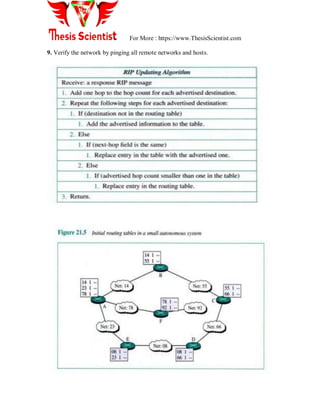
9. Verify the network by pinging all remote networks and hosts.
For More : https://www.ThesisScientist.com
OSPF
The Open Shortest Path First (OSPF) protocol is another example of an interior gateway
protocol. It was developed as a non-proprietary routing alternative to address the
limitations of RIP.
The following features contribute to the continued acceptance of the OSPF standard:
 Equal cost load balancing: The simultaneous use of multiple paths can provide
more efficient utilization of network resources.
 Logical partitioning of the network: This reduces the propagation of outage
information during adverse conditions. It also provides the ability to aggregate
routing announcements that limit the advertisement of unnecessary subnet
information.
 Support for authentication: OSPF supports the authentication of any node
transmitting route advertisements. This prevents fraudulent sources from
corrupting the routing tables.
 Faster convergence time: OSPF provides instantaneous propagation of routing
changes. This expedites the convergence time required to update network
topologies.
 Support for CIDR and VLSM: This allows the network administrator to
efficiently allocate IP address resources.
For More : https://www.ThesisScientist.com
OSPF is a link state protocol. As with other link state protocols, each OSPF router
executes the SPF algorithm to process the information stored in the link state database.
The algorithm produces a shortest-path tree detailing the preferred routes to each
destination network.
OSPF terminology
OSPF uses specific terminology to describe the operation of the protocol.
OSPF areas
OSPF networks are divided into a collection of areas. An area consists of a logical
grouping of networks and routers. The area can coincide with geographic or
administrative boundaries. Each area is assigned a 32-bit area ID.
Subdividing the network provides the following benefits:
 Within an area, every router maintains an identical topology database describing
the routing devices and links within the area. These routers have no knowledge of
topologies outside the area. They are only aware of routes to these external
destinations. This reduces the size of the topology database maintained by each
router.
 Areas limit the potentially explosive growth in the number of link state updates.
Most LSAs are distributed only within an area.
 Areas reduce the CPU processing required to maintain the topology database. The
SPF algorithm is limited to managing changes within the area.
Backbone area and area 0
All OSPF networks contain at least one area. This area is known as area 0 or the
backbone area
In networks containing multiple areas, the backbone physically connects to all other
areas. OSPF expects all areas to announce routing information directly into the backbone.
The backbone then announces this information into other areas.
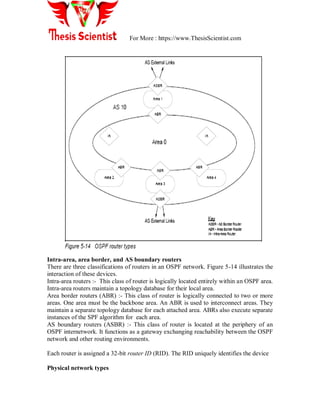
Figure 5-14 depicts a network with a backbone area and four additional areas
For More : https://www.ThesisScientist.com
Intra-area, area border, and AS boundary routers
There are three classifications of routers in an OSPF network. Figure 5-14 illustrates the
interaction of these devices.
Intra-area routers :- This class of router is logically located entirely within an OSPF area.
Intra-area routers maintain a topology database for their local area.
Area border routers (ABR) :- This class of router is logically connected to two or more
areas. One area must be the backbone area. An ABR is used to interconnect areas. They
maintain a separate topology database for each attached area. ABRs also execute separate
instances of the SPF algorithm for each area.
AS boundary routers (ASBR) :- This class of router is located at the periphery of an
OSPF internetwork. It functions as a gateway exchanging reachability between the OSPF
network and other routing environments.
Each router is assigned a 32-bit router ID (RID). The RID uniquely identifies the device
Physical network types
For More : https://www.ThesisScientist.com
OSPF categorizes network segments into three types. The frequency and types of
communication occurring between OSPF devices connected to these networks is
impacted by the network type:
1. Point-to-point: Point-to-point networks directly link two routers.
2. Multi-access: Multi-access networks support the attachment of more than two
routers.
They are further subdivided into two types:
 Broadcast networks have the capability of simultaneously directing a
packet to all attached routers. This capability uses an address that is
recognized by all devices. Ethernet and token-ring LANs are examples of
OSPF broadcast multi-access networks.
 Non-broadcast networks do not have broadcasting capabilities. Each
packet must be specifically addressed to every router in the network. X.25
and frame relay networks are examples of OSPF non-broadcast multi-
access networks.
3. Point-to-multipoint: Point-to-multipoint networks are a special case of multi-
access, non-broadcast networks. In a point-to-multipoint network, a device is not
required to have a direct connection to every other device. This is known as a
partially meshed environment.
Neighbor routers and adjacencies
Routers that share a common network segment establish a neighbor relationship on the
segment. Routers must agree on the following information to become neighbors:
 Area ID: The routers must belong to the same OSPF area.
 Authentication: If authentication is defined, the routers must specify the same
password.
 Hello and dead intervals: The routers must specify the same timer intervals used
in the Hello protocol.
 Stub area flag: The routers must agree that the area is configured as a stub area.
After two routers have become neighbors, an adjacency relationship can be formed
between the devices. Neighboring routers are considered adjacent when they have
synchronized their topology databases. This occurs through the exchange of link state
information.
Designated and backup designated router
The exchange of link state information between neighbors can create significant
quantities of network traffic. To reduce the total bandwidth required to synchronize
databases and advertise link state information, a router does not necessarily develop
adjacencies with every neighboring device:
For More : https://www.ThesisScientist.com
 Multi-access networks: Adjacencies are formed between an individual router and
the (backup) designated router.
 Point-to-point networks: An adjacency is formed between both devices.
Each multi-access network elects a designated router (DR) and backup designated router
(BDR). The DR performs two key functions on the network segment:
 It forms adjacencies with all routers on the multi-access network. This causes the
DR to become the focal point for forwarding LSAs.
 It generates network link advertisements listing each router connected to the
multi-access network
The BDR forms the same adjacencies as the designated router. It assumes DR
functionality when the DR fails.
Each router is assigned an 8-bit priority, indicating its ability to be selected as the DR or
BDR. A router priority of zero indicates that the router is not eligible to be selected. The
priority is configured on each interface in the router.
Figure 5-15 illustrates the relationship between neighbors. No adjacencies are formed
between routers that are not selected to be the DR or BDR.
Link state database
The link state database is also called the topology database. It contains the set of link
state advertisements describing the OSPF network and any external connections. Each
router within the area maintains an identical copy of the link state database.
For More : https://www.ThesisScientist.com
Link state advertisements and flooding
The contents of an LSA describe an individual network component (that is, router,
segment, or external destination). LSAs are exchanged between adjacent OSPF routers.
This is done to synchronize the link state database on each device.
When a router generates or modifies an LSA, it must communicate this change
throughout the network. The router starts this process by forwarding the LSA to each
adjacent device. Upon receipt of the LSA, these neighbors store the information in their
link state database and communicate the LSA to their neighbors. This store and forward
activity continues until all devices receive the update. This process is called reliable
flooding. Two steps are taken to ensure that this flooding effectively transmits changes
without overloading the network with excessive quantities of LSA traffic:
 Each router stores the LSA for a period of time before propagating the
information to its neighbors. If, during that time, a new copy of the LSA arrives,
the router replaces the stored version. However, if the new copy is outdated, it is
discarded.
 To ensure reliability, each link state advertisement must be acknowledged.
Multiple acknowledgements can be grouped together into a single
acknowledgement packet. If an acknowledgement is not received, the original link
state update packet is retransmitted.
Link state advertisements contain five types of information. Together these
advertisements provide the necessary information needed to describe the entire OSPF
network and any external environments:
Router LSAs: This type of advertisement describes the state of the router's interfaces
(links) within the area. They are generated by every OSPF router. The advertisements are
flooded throughout the area.
Network LSAs: This type of advertisement lists the routers connected to a multi-access
network. They are generated by the DR on a multi-access segment. The advertisements
are flooded throughout the area.
Summary LSAs (Type-3 and Type-4): This type of advertisement is generated by an
ABR. There are two types of summary link advertisements:
Type-3 summary LSAs describe routes to destinations in other areas within the OSPF
network (inter-area destinations).
Type-4 summary LSAs describe routes to ASBRs. Summary LSAs are used to exchange
reachability information between areas. Normally, information is announced into the
backbone area. The backbone then injects this information into other areas.
AS external LSAs: This type of advertisement describes routes to destinations external to
the OSPF network. They are generated by an ASBR. The advertisements are flooded
throughout all areas in the OSPF network.
For More : https://www.ThesisScientist.com
OSPF packet types
OSPF packets are transmitted in IP datagrams. They are not encapsulated within TCP or
UDP packets. The IP header uses protocol identifier 89. OSPF packets are sent with an IP
ToS of 0 and an IP precedence of internetwork control. This is used to obtain preferential
processing for the packets. Wherever possible, OSPF uses multicast facilities to
communicate with neighboring devices. In broadcast and point-to-point environments,
packets are sent to the reserved multicast address 224.0.0.5.
In non-broadcast environments, packets are addressed to the neighbor‘s specific IP
address.
All OSPF packets share the common header shown in Figure 5-17. The header provides
general information including area identifier, RID, checksum, and authentication
information.
For More : https://www.ThesisScientist.com
The type field identifies the OSPF packet as one of five possible types:
Hello :- This packet type discovers and maintains neighbor relationships.
Database description : This packet type describes the set of LSAs contained in the
router's link state database.
Link state request : This packet type requests a more current instance of an LSA from a
neighbor.
Link state update : This packet type provides a more current instance of an LSA to a
neighbor.
Link state acknowledgement : This packet type acknowledges receipt of a newly
received LSA.
Neighbor communication
OSPF is responsible for determining the optimum set of paths through a network. To
accomplish this, each router exchanges LSAs with other routers in the network. The
OSPF protocol defines a number of activities to accomplish this information exchange:
 Discovering neighbors
For More : https://www.ThesisScientist.com
 Electing a designated router
 Establishing adjacencies and synchronizing databases
The five OSPF packet types are used to support these information exchanges.
Discovering neighbors: The OSPF Hello protocol
The Hello protocol discovers and maintains relationships with neighboring routers. Hello
packets are periodically sent out to each router interface. The packet contains the RID of
other routers whose hello packets have already been received over the interface.
When a device sees its own RID in the hello packet generated by another router, these
devices establish a neighbor relationship.
The hello packet also contains the router priority, DR identifier, and BDR identifier.
These parameters are used to elect the DR on multi-access networks.
Electing a designated router
All multi-access networks must have a DR. A BDR can also be selected. The backup
ensures there is no extended loss of routing capability if the DR fails.
The DR and BDR are selected using information contained in hello packets. The device
with the highest OSPF router priority on a segment becomes the DR for that segment.
The same process is repeated to select the BDR. In case of a tie, the router with the
highest RID is selected. A router declared the DR is ineligible to become the BDR.
After elected, the DR and BDR proceed to establish adjacencies with all routers on the
multi-access segment.
Establishing adjacencies and synchronizing databases
Neighboring routers are considered adjacent when they have synchronized their link state
databases. A router does not develop an adjacency with every neighboring device. On
multi-access networks, adjacencies are formed only with the DR and BDR. This is a two
step process.
Step 1: Database exchange process
The first phase of database synchronization is the database exchange process. This occurs
immediately after two neighbors attempt to establish an adjacency. The process consists
of an exchange of database description packets. The packets contain a list of the LSAs
stored in the local database.
During the database exchange process, the routers form a master/subordinate relationship.
The master is the first to transmit. Each packet is identified by a sequence number. Using
this sequence number, the subordinate acknowledges each database description packet
from the master. The subordinate also includes its own set of link state headers in the
acknowledgements.
Step 2: Database loading
During the database exchange process, each router notes the link state headers for which
the neighbor has a more current instance (all advertisements are time stamped). After the
process is complete, each router requests the more current information from the neighbor.
This request is made with a link state request packet.
When a router receives a link state request, it must reply with a set of link state update
packets providing the requested LSA. Each transmitted LSA is acknowledged by the
For More : https://www.ThesisScientist.com
receiver. This process is similar to the reliable flooding procedure used to transmit
topology changes throughout the network.
Every LSA contains an age field indicating the time in seconds since the origin of the
advertisement. The age continues to increase after the LSA is installed in the topology
database. It also increases during each hop of the flooding process.
When the maximum age is reached, the LSA is no longer used to determining routing
information and is discarded from the link state database. This age is also used to
distinguish between two otherwise identical copies of an advertisement.
OSPF neighbor state machine
The OSPF specification defines a set of neighbor states and the events that can cause a
neighbor to transition from one state to another. A state machine is used to describe these
transitions:
 Down: This is the initial state. It indicates that no recent information has been
received from any device on the segment.
 Attempt: This state is used on non-broadcast networks. It indicates that a neighbor
appears to be inactive. Attempts continue to reestablish contact.
 Init: Communication with the neighbor has started, but bidirectional
communication has not been established. Specifically, a hello packet was received
from the neighbor, but the local router was not listed in the neighbor's hello
packet.
 2-way: Bidirectional communication between the two routers has been
established. Adjacencies can be formed. Neighbors are eligible to be elected as
designated routers.
 ExStart: The neighbors are starting to form an adjacency.
 Exchange: The two neighbors are exchanging their topology databases.
 Loading: The two neighbors are synchronizing their topology databases.
 Full: The two neighbors are fully adjacent and their databases are synchronized.
OSPF virtual links and transit areas
Virtual links are used when a network does not support the standard OSPF network
topology. This topology defines a backbone area that directly connects to each additional
OSPF area. The virtual link addresses two conditions:
 It can logically connect the backbone area when it is not contiguous.
 It can connect an area to the backbone when a direct connection does not exist.
A virtual link is established between two ABRs sharing a common non-backbone area.
The link is treated as a point-to-point link. The common area is known as a transit area.
Figure 5-18 illustrates the interaction between virtual links and transit areas when used to
connect an area to the backbone.
For More : https://www.ThesisScientist.com
This diagram shows that area 1 does not have a direct connection to the backbone. Area 2
can be used as a transit area to provide this connection. A virtual link is established
between the two ABRs located in area 2. Establishing this virtual link logically extends
the backbone area to connect to area 1.
A virtual link is used only to transmit routing information. It does not carry regular traffic
between the remote area and the backbone. This traffic, in addition to the virtual link
traffic, is routed using the standard intra-area routing within the transit area.
OSPF route redistribution
Route redistribution is the process of introducing external routes into an OSPF network.
These routes can be either static routes or routes learned through another routing
protocol. They are advertised into the OSPF network by an ASBR. These routes become
OSPF external routes. The ASBR advertises these routes by flooding OSPF AS external
LSAs throughout the entire OSPF network.
The routes describe an end-to-end path consisting of two portions:
 External portion: This is the portion of the path external to the OSPF network.
When these routes are distributed into OSPF, the ASBR assigns an initial cost.
This cost represents the external cost associated with traversing the external
portion of the path.
 Internal portion: This is the portion of the path internal to the OSPF network.
Costs for this portion of the network are calculated using standard OSPF
algorithms.
For More : https://www.ThesisScientist.com
OSPF differentiates between two types of external routes. They differ in the way the cost
of the route is calculated. The ASBR is configured to redistribute the route as:
 External type 1: The total cost of the route is the sum of the external cost and any
internal OSPF costs.
 External type 2: The total cost of the route is always the external cost. This
ignores any internal OSPF costs required to reach the ASBR.
Figure 5-19 illustrates an example of the types of OSPF external routes.
In this example, the ASBR is redistributing the 10.99.5.0/24 route into the OSPF
network. This subnet is located within the RIP network. The route is announced into
OSPF with an external cost of 50. This represents the cost for the portion of the path
traversing the RIP network:
 If the ASBR redistributed the route as an E1 route, R1 will contain an external
route to this subnet with a cost of 60 (50 + 10). R2 will have an external route
with a cost of 65 (50 + 15).
 If the ASBR redistributed the route as an E2 route, both R1 and R2 will contain
an external route to this subnet with a cost of 50. Any costs associated with
For More : https://www.ThesisScientist.com
traversing segments within the OSPF network are not included in the total cost to
reach the destination.
OSPF stub areas
OSPF allows certain areas to be defined as a stub area. A stub area is created when the
ABR connecting to a stub area excludes AS external LSAs from being flooded into the
area. This is done to reduce the size of the link state database maintained within the stub
area routers. Because there are no specific routes to external networks, routing to these
destinations is based on a default route generated by the ABR. The link state databases
maintained within the stub area contain only the default route and the routes from within
the OSPF environment (for example, intra-area and inter-area routes).
Because a stub area does not allow external LSAs, a stub area cannot contain an ASBR.
No external routes can be generated from within the stub area.
Stub areas can be deployed when there is a single exit point connecting the area to the
backbone. An area with multiple exit points can also be a stub area. However, there is no
guarantee that packets exiting the area will follow an optimal path. This is due to the fact
that each ABR generates a default route. There is no ability to associate traffic with a
specific default routes.
All routers within the area must be configured as stub routers. This configuration is
verified through the exchange of hello packets.
Not-so-stubby areas
An extension to the stub area concept is the not-so-stubby area (NSSA). An NSSA is
similar to a stub area in that the ABR servicing the NSSA does not flood any external
routes into the NSSA.
The only routes flooded into the NSSA are the default route and any other routes from
within the OSPF environment (for example, intra-area and inter-area).
However, unlike a stub area, an ASBR can be located within an NSSA. This ASBR can
generate external routes. Therefore, the link state databases maintained within the NSSA
contain the default route, routes from within the OSPF environment (for example, intra-
area and inter-area routes), and the external routes generated by the ASBR within the
area.
The ABR servicing the NSSA floods the external routes from within the NSSA
throughout the rest of the OSPF network.
OSPF route summarization
Route summarization is the process of consolidating multiple contiguous routing entries
into a single advertisement. This reduces the size of the link state database and the IP
routing table. In an OSPF network, summarization is performed at a border router. There
are two types of summarization:
 Inter-area route summarization: Inter-area summarization is performed by the
ABR for an area. It is used to summarize route advertisements originating within
For More : https://www.ThesisScientist.com
the area. The summarized route is announcement into the backbone. The
backbone receives the aggregated route and announces the summary into other
areas.
 External route summarization: This type of summarization applies specifically to
external routes injected into OSPF. This is performed by the ASBR distributing
the routes into the OSPF network.
Figure 5-20 illustrates an example of OSPF route summarization.
In this figure, the ASBR is advertising a single summary route for the 64 subnetworks
located in the RIP environment. This single summary route is flooded throughout the
entire OSPF network. In addition, the ABR is generating a single summary route for the
64 subnetworks located in area 1. This summary route is flooded through area 0 and area
2. Depending of the configuration of the ASBR, the inter-area summary route can also be
redistributed into the RIP network.
A Basic OSPF Configuration
The three steps necessary to begin a basic OSPF process are
1. Determine the area to which each router interface will be attached.
2. Enable OSPF with the command router ospf process-id.
For More : https://www.ThesisScientist.com
3. Specify the interfaces on which to run OSPF, and their areas, with the network
area command.
Example 8-19. Rubens's OSPF network area configuration.
router ospf 10
network 0.0.0.0 255.255.255.255 area 1
Example 8-20. Chardin's OSPF network area configuration.
router ospf 20
network 192.168.30.0 0.0.0.255 area 1
network 192.168.20.0 0.0.0.255 area 0
Example 8-21. Goya's OSPF network area configuration.
router ospf 30
network 192.168.20.0 0.0.0.3 area 0.0.0.0
network 192.168.10.0 0.0.0.31 area 192.168.10.0
Example 8-22. Matisse's OSPF network area configuration.
For More : https://www.ThesisScientist.com
router ospf 40
network 192.168.10.2 0.0.0.0 area 192.168.10.0
network 192.168.10.33 0.0.0.0 area 192.168.10.0
Short note Operation of OSPF
At a very high level, the operation of OSPF is easily explained:
1. OSPF-speaking routers send Hello packets out all OSPF-enabled interfaces. If
two routers sharing a common data link agree on certain parameters specified in
their respective Hello packets, they will become neighbors.
2. Adjacencies, which can be thought of as virtual point-to-point links, are formed
between some neighbors. OSPF defines several network types and several router
types. The establishment of an adjacency is determined by the types of routers
exchanging Hellos and the type of network over which the Hellos are exchanged.
3. Each router sends link-state advertisements (LSAs) over all adjacencies. The
LSAs describe all of the router's links, or interfaces, the router's neighbors, and
the state of the links. These links might be to stub networks (networks with no
other router attached), to other OSPF routers, to networks in other areas, or to
external networks (networks learned from another routing process). Because of
the varying types of link-state information, OSPF defines multiple LSA types.
4. Each router receiving an LSA from a neighbor records the LSA in its link-state
database and sends a copy of the LSA to all of its other neighbors.
5. By flooding LSAs throughout an area, all routers will build identical link-state
databases.
6. When the databases are complete, each router uses the SPF algorithm to calculate
a loop-free graph describing the shortest (lowest cost) path to every known
destination, with itself as the root. This graph is the SPF tree.
7. Each router builds its route table from its SPF tree
For More : https://www.ThesisScientist.com
BGP:-
BGP performs interdomain routing in Transmission-Control Protocol/Internet Protocol
(TCP/IP) networks. BGP is an exterior gateway protocol (EGP), which means that it
performs routing between multiple autonomous systems or domains and exchanges
routing and reachability information with other BGP systems.
BGP was developed to replace its predecessor, the now obsolete Exterior Gateway
Protocol (EGP), as the standard exterior gateway-routing protocol used in the global
Internet. BGP solves serious problems with EGP and scales to Internet growth more
efficiently.
Figure 35-1 illustrates core routers using BGP to route traffic between autonomous
systems.
BGP Operation
BGP performs three types of routing: interautonomous system routing, intra-autonomous
system routing, and pass-through autonomous system routing
Interautonomous system routing occurs between two or more BGP routers in different
autonomous systems. Peer routers in these systems use BGP to maintain a consistent
view of the internetwork topology. BGP neighbors communicating between autonomous
systems must reside on the same physical network. The Internet serves as an example of
an entity that uses this type of routing because it is comprised of autonomous systems or
administrative domains. Many of these domains represent the various institutions,
corporations, and entities that make up the Internet. BGP is frequently used to provide
path determination to provide optimal routing within the Internet.
Intra-autonomous system routing occurs between two or more BGP routers located
within the same autonomous system. Peer routers within the same autonomous system
For More : https://www.ThesisScientist.com
use BGP to maintain a consistent view of the system topology. BGP also is used to
determine which router will serve as the connection point for specific external
autonomous systems. Once again, the Internet provides an example of interautonomous
system routing. An organization, such as a university, could make use of BGP to provide
optimal routing within its own administrative domain or autonomous system. The BGP
protocol can provide both inter- and intra-autonomous system routing services.
Pass-through autonomous system routing occurs between two or more BGP peer routers
that exchange traffic across an autonomous system that does not run BGP. In a pass-
through autonomous system environment, the BGP traffic did not originate within the
autonomous system in question and is not destined for a node in the autonomous system.
BGP must interact with whatever intra-autonomous system routing protocol is being used
to successfully transport BGP traffic through that autonomous system. Figure 35-2
illustrates a pass-through autonomous system environment:
BGP Routing
For More : https://www.ThesisScientist.com
As with any routing protocol, BGP maintains routing tables, transmits routing updates,
and bases routing decisions on routing metrics. The primary function of a BGP system is
to exchange network-reachability information, including information about the list of
autonomous system paths, with other BGP systems. This information can be used to
construct a graph of autonomous system connectivity from which routing loops can be
pruned and with which autonomous system-level policy decisions can be enforced.
Each BGP router maintains a routing table that lists all feasible paths to a particular
network. The router does not refresh the routing table, however. Instead, routing
information received from peer routers is retained until an incremental update is received.
BGP devices exchange routing information upon initial data exchange and after
incremental updates. When a router first connects to the network, BGP routers exchange
their entire BGP routing tables. Similarly, when the routing table changes, routers send
the portion of their routing table that has changed. BGP routers do not send regularly
scheduled routing updates, and BGP routing updates advertise only the optimal path to a
network.
BGP uses a single routing metric to determine the best path to a given network. This
metric consists of an arbitrary unit number that specifies the degree of preference of a
particular link. The BGP metric typically is assigned to each link by the network
administrator. The value assigned to a link can be based on any number of criteria,
including the number of autonomous systems through which the path passes, stability,
speed, delay, or cost.
BGP Message Types
The open message opens a BGP communications session between peers and is the first
message sent by each side after a transport-protocol connection is established. Open
messages are confirmed using a keep-alive message sent by the peer device and must be
confirmed before updates, notifications, and keep-alives can be exchanged.
An update message is used to provide routing updates to other BGP systems, allowing
routers to construct a consistent view of the network topology. Updates are sent using the
Transmission-Control Protocol (TCP) to ensure reliable delivery. Update messages can
withdraw one or more unfeasible routes from the routing table and simultaneously can
advertise a route while withdrawing others.
The notification message is sent when an error condition is detected. Notifications are
used to close an active session and to inform any connected routers of why the session is
being closed.
The keep-alive message notifies BGP peers that a device is active. Keep-alives are sent
often enough to keep the sessions from expiring.
BGP Packet Formats
Header Format
For More : https://www.ThesisScientist.com
All BGP message types use the basic packet header. Open, update, and notification
messages have additional fields, but keep-alive messages use only the basic packet
header. Figure 35-3 illustrates the fields used in the BGP header. The section that follows
summarizes the function of each field.
BGP Packet-Header Fields
Each BGP packet contains a header whose primary purpose is to identify the function of
the packet in question. The following descriptions summarize the function of each field in
the BGP header illustrated in Figure 35-3.
• Marker— Contains an authentication value that the message receiver can predict.
• Length— Indicates the total length of the message in bytes.
• Type—Type — Specifies the message type as one of the following:
— Open
— Update
— Notification
— Keep-alive
• Data—Contains upper-layer information in this optional field.
Open Message Format
BGP open messages are comprised of a BGP header and additional fields. Figure 35-4
illustrates the additional fields used in BGP open messages.
For More : https://www.ThesisScientist.com
BGP Open Message Fields
BGP packets in which the type field in the header identifies the packet to be a BGP open
message packet include the following fields. These fields provide the exchange criteria
for two BGP routers to establish a peer relationship.
• Version—Provides the BGP version number so that the recipient can determine whether
it is running the same version as the sender.
• Autonomous System—Provides the autonomous system number of the sender.
• Hold-Time—Indicates the maximum number of seconds that can elapse without receipt
of a message before the transmitter is assumed to be nonfunctional.
• BGP Identifier—Provides the BGP identifier of the sender (an IP address), which is
determined at startup and is identical for all local interfaces and all BGP peers.
• Optional Parameters Length—Indicates the length of the optional parameters field (if
present).
• Optional Parameters—Contains a list of optional parameters (if any). Only one optional
parameter type is currently defined: authentication information. Authentication
information consists of the following two fields:
— Authentication code: Indicates the type of authentication being used.
— Authentication data: Contains data used by the authentication mechanism (if used).
Update Message Format
BGP update messages are comprised of a BGP header and additional fields. Figure 35-5
illustrates the additional fields used in BGP update messages.
For More : https://www.ThesisScientist.com
BGP Update Message Fields
BGP packets in which the type field in the header identifies the packet to be a BGP
update message packet include the following fields. Upon receiving an update message
packet, routers will be able to add or delete specific entries from their routing tables to
ensure accuracy. Update messages consist of the following packets:
• Unfeasible Routes Length—Indicates the total length of the withdrawn routes field or
that the field is not present.
• Withdrawn Routes—Contains a list of IP address prefixes for routes being withdrawn
from service.
• Total Path Attribute Length—Indicates the total length of the path attributes field or that
the field is not present.
• Path Attributes—Describes the characteristics of the advertised path. The following are
possible attributes for a path:
— Origin: Mandatory attribute that defines the origin of the path information
— AS Path: Mandatory attribute composed of a sequence of autonomous system path
segments
— Next Hop: Mandatory attribute that defines the IP address of the border router that
should be used as the next hop to destinations listed in the network layer reachability
information field
— Mult Exit Disc: Optional attribute used to discriminate between multiple exit points to
a neighboring autonomous system
— Local Pref: Discretionary attribute used to specify the degree of preference for an
advertised route
— Atomic Aggregate: Discretionary attribute used to disclose information about route
selections
— Aggregator: Optional attribute that contains information about aggregate routes
• Network Layer Reachability Information—Contains a list of IP address prefixes for the
advertised routes
Notification Message Format
Figure 35-6 illustrates the additional fields used in BGP notification messages.
For More : https://www.ThesisScientist.com
BGP Notification Message Fields
BGP packets in which the type field in the header identifies the packet to be a BGP
notification message packet include the following fields. This packet is used to indicate
some sort of error condition to the peers of the originating router.
• Error Code—indicates the type of error that occurred. The following are the error types
defined by the field:
— Message Header Error: Indicates a problem with a message header, such as
unacceptable message length, unacceptable marker field value, or unacceptable message
type.
— Open Message Error: Indicates a problem with an open message, such as unsupported
version number, unacceptable autonomous system number or IP address, or unsupported
authentication code.
— Update Message Error: Indicates a problem with an update message, such as a
malformed attribute list, attribute list error, or invalid next-hop attribute.
— Hold Time Expired: Indicates that the hold-time has expired, after which time a BGP
node will be considered nonfunctional.
— Finite State Machine Error: Indicates an unexpected event.
— Cease: Closes a BGP connection at the request of a BGP device in the absence of any
fatal errors.
• Error Subcode—Provides more specific information about the nature of the reported
error.
• Error Data—Contains data based on the error code and error subcode fields. This field
is used to diagnose the reason for the notification message.
BGP concepts and terminology
BGP uses specific terminology to describe the operation of the protocol. Figure 5-21
illustrates this terminology.
For More : https://www.ThesisScientist.com
BGP uses the following terms:
_ BGP speaker: A router configured to support BGP.
_ BGP neighbors (peers): A pair of BGP speakers that exchange routing information.
There are two types of BGP neighbors:
– Internal (IBGP) neighbor: A pair of BGP speakers within the same AS.
– External (EBGP) neighbor: A pair of BGP neighbors, each in a different AS. These
neighbors typically share a directly connected network.
_ BGP session: A TCP session connecting two BGP neighbors. The session is used to
exchange routing information. The neighbors monitor the state of the session by sending
keepalive messages.
_ Traffic type: BGP defines two types of traffic:
– Local: Traffic local to an AS either originates or terminates within the AS.
Either the source or the destination IP address resides in the AS.
– Transit: Any traffic that is not local traffic is transit traffic. One of the goals of BGP is
to minimize the amount of transit traffic.
_ AS type: BGP defines three types of autonomous systems:
– Stub: A stub AS has a single connection to one other AS. A stub AS carries only local
traffic.
– Multihomed: A multihomed AS has connections to two or more autonomous systems.
However, a multihomed AS has been configured so that it does not forward transit traffic.
For More : https://www.ThesisScientist.com
– Transit: A transit AS has connections to two or more autonomous systems and carries
both local and transit traffic. The AS can impose policy restrictions on the types of transit
traffic that will be forwarded
Depending on the configuration of the BGP devices within AS 2 in Figure 5-, this
autonomous system can be either a multihomed AS or a transit AS.
_ AS number: A 16-bit number uniquely identifying an AS.
_ AS path: A list of AS numbers describing a route through the network. A BGP
neighbor communicates paths to its peers.
_ Routing policy: A set of rules constraining the flow of data packets through the
network. Routing policies are not defined in the BGP protocol. Rather, they are used to
configure a BGP device. For example, a BGP device can be configured so that:
– A multihomed AS can refuse to act as a transit AS. This is accomplished by advertising
only those networks contained within the AS.
– A multihomed AS can perform transit AS routing for a restricted set of adjacent
autonomous systems. It does this by tailoring the routing advertisements sent to EBGP
peers.
– An AS can optimize traffic to use a specific AS path for certain categories of traffic.
_ Network layer reachability information (NLRI): NLRI is used by BGP to advertise
routes. It consists of a set of networks represented by the tuple <length,prefix>. For
example, the tuple <14,220.24.106.0> represents the CIDR route 220.24.106.0/14.
_ Routes and paths: A route associates a destination with a collection of attributes
describing the path to the destination. The destination is specified in NRLI format. The
path is reported as a collection of path attributes. This information is advertised in
UPDATE messages
How BGP Selects Paths
A router running Cisco IOS Release 12.0 or later does not select or use an iBGP route
unless both of the following are true:
• The router has a route available to the next-hop.
• If synchronization is enabled, the router has received synchronized routes from an
IGP.
BGP bases it's decision first on whether a path is loop free, then on the policies indicated
by the path attributes along with the policies configured on the router. The following
summarized how BGP chooses the best path to a given destination.
1 If the next hop is not reachable through an IGP route installed in the routing table, do
not consider this prefix for installation in the routing table.
If the only route you have to the next hop indicated in the NEXT_HOP attribute of a
prefix is learned through iBGP, the route will oscillate in the routing table. It will be
For More : https://www.ThesisScientist.com
installed by BGP, then removed about 60 seconds later, only to be reinstalled
momentarily after it is deleted.
2 If the path is internal, synchronization is enabled, and the route is not in the IGP, do
not consider the route.
3 Prefer the path with the largest weight (weight is a Cisco proprietary parameter). The
weight is generally used to prefer routes which are originated by this router over routes
originated by other routers.
4 If the routes have the same weight, prefer the route with the largest local preference.
For example, a route might be originated by the local router using the network (BGP) or
aggregate-address command, or through redistribution from an IGP. BGP prefers local
routes originated by network (BGP) and redistribute commands over local aggregates
originated by the aggregate-address command.
5 If the local preference is the same, or if no route was originated by the local router,
prefer the route with the shortest autonomous system path. Also note the following:
• BGP skips this step if the bgp bestpath as-path ignore command is configured.
• No matter how many autonomous systems are in a set, an autonomous system set
counts as one.
• The autonomous system confederation sequence is not included in the autonomous
system path length.
6 If the autonomous system path length is the same, prefer the route with the lowest
origin code (IGP < EGP < INCOMPLETE).
7 If the origin codes are the same, prefer the route with the lowest Multi Exit
Discriminator (MED) metric attribute.
A comparison is only done if the neighboring autonomous system is the same for all
routes considered. Also note the following:
• If the bgp always-compare-med command is enabled, BGP compares the MED for
routes from neighbors in different autonomous systems. Also, if this command is
enabled, it must be enabled throughout the autonomous system; otherwise, routing loops
can occur.
• If the bgp bestpath med-confed command is enabled, the MED is compared for all
routes that are originated within a local confederation.
For More : https://www.ThesisScientist.com
• BGP will change the MED of a route received from a neighbor with a value of
infinity to a value of one less than infinity before the route is inserted into the BGP table.
• The most recent IETF decision regarding BGP MED assigns a value of infinity to a
missing MED, making the route lacking the MED variable the least preferred. The
default behavior of BGP routers running Cisco IOS software is to treat routes without the
MED attribute as having a MED of 0, making the route lacking the MED variable the
most preferred. To configure the router to conform to the IETF standard, use the bgp
bestpath missing-as-worst command.
• If the bgp deterministic med command is enabled, BGP compares the MED variable
when choosing among routes advertised by the same sub-autonomous system within a
confederation. It the bgp deterministic med command is disabled, the order in which
routes are received may affect MED-based best path decisions.
8 Prefer the external (EBGP) route over the internal (IBGP) route.
All confederation routes are considered internal routes.
9 Prefer the route that can be reached through the closest IGP neighbor (the lowest IGP
metric).
This means the router will prefer the shortest internal path within the autonomous system
to reach the destination (the shortest path to the BGP next-hop).
10 If the following conditions are all true, insert the route for this path into the IP
routing table:
• Both the best route and this route are external.
• Both the best route and this route are from the same neighboring autonomous system.
• The maximum-paths command is enabled.
11 If multipath is enabled, prefer the route that was received first (the oldest route).
This step minimizes route flap in that a newer route will not displace an older route even
if the newer route is the preferred route based on the additional criteria discussed below.
If any of the following additional criteria are met, this step is skipped:
• The bgp bestpath compare-routerid command is enabled. If this command is
enabled, BGP compares similar routes received from external BGP peers and selects the
route with the lowest router ID.
For More : https://www.ThesisScientist.com
• The router ID is the same for multiple routes, for example, the routes were received
from the same router.
• No current best path exists, for example, a neighbor advertising the current best path
has gone down.
12 If multipath is not enabled, prefer the route with the lowest IP address value for the
BGP router ID.
The router ID is usually the highest IP address on the router or the loopback (virtual)
address, but might be implementation-specific. You can configure a fixed router ID by
using the bgp router-id command.
If a route contains route reflector attributes, the originator ID is substituted for the router
ID in the route selection process.
13 If multipath is enabled and the originator or router ID is the same for multiple paths,
prefer the path with the minimum cluster ID length.
The minimum cluster ID length attribute applies to BGP route reflector environments
only.
14 Prefer the route coming from the lowest neighbor address.
The BGP neighbor configuration uses this IP address. The IP address corresponds to the
remote peer used in the TCP connection with the local router.
Network Diagram
This document uses this network setup:
For More : https://www.ThesisScientist.com
In that network diagram, 1.0.0.0/8 and 2.0.0.0/8 are advertised by AS 300 to the outside.
Configuration to Receive Full Internet Routing Table
The following configuration allows Router A to peer with BGP speakers in other
autonomous systems. The route-map local only allows only the locally generated routes
to be advertised to both of the service providers. In other words, they filter the Internet
routes from one service provider that go back to the other service provider. This prevents
the risk that your autonomous system will become a transit AS for Internet traffic.
Router A
For More : https://www.ThesisScientist.com
Current configuration:
router bgp 300
network 1.0.0.0
network 2.0.0.0
neighbor 10.10.10.10 remote-as 100
neighbor 10.10.10.10 route-map localonly out
!--- Outgoing policy route-map that filters routes to service provider A (SP-A).
neighbor 20.20.20.20 remote-as 200
neighbor 20.20.20.20 route-map localonly out
!--- Outgoing policy route-map that filters routes to service provider B (SP-B).
end
This AS-Path access list only permits locally originated BGP routes:
ip as-path access-list 10 permit ^$
This is an example of a route map that uses that AS-Path access list to filter the routes
advertised to the external neighbors in the service provider networks:
route-map localonly permit 10
match as-path 10
Configuration to Receive Directly-Connected Routes
Router A
Current configuration:
router bgp 300
network 1.0.0.0
network 2.0.0.0
neighbor 10.10.10.10 remote-as 100
neighbor 10.10.10.10 route-map localonly out
!--- Outgoing policy route-map that filters routes to SP-A.
For More : https://www.ThesisScientist.com
neighbor 10.10.10.10 route-map as100only in
!--- Incoming policy route-map that filters routes from SP-A.
neighbor 20.20.20.20 remote-as 200
neighbor 20.20.20.20 route-map localonly out
!--- Outgoing policy route-map that filters routes to SP-B.
neighbor 20.20.20.20 route-map as200only in
!--- Incoming policy route-map that filters routes from SP-B.
end
Because you only want to accept routes that are directly connected to the service
providers, you must filter the routes that they send to you, as well as the routes that you
advertise. This access list and route map permit only locally originated routes; use it to
filter outbound routing updates:
ip as-path access-list 10 permit ^$
route-map localonly permit 10
match as-path 10
This access list and route map filter out anything that is not sourced within the first
service provider network; use it to filter the routes that are learned from service provider
A (SP-A).
ip as-path access-list 20 permit ^100$
route-map as100only permit 10
match as-path 20
This access list and route map filter out anything that is not sourced within the second
service provider network; use it to filter the routes that are learned from service provider
B (SP-B).
ip as-path access-list 30 permit ^200$
route-map as200only permit 10
match as-path 30
You also need two default routes that are distributed back into the rest of your network,
one pointed to each of the service provider entry points:
For More : https://www.ThesisScientist.com
ip route 0.0.0.0 0.0.0.0 10.10.10.10
ip route 0.0.0.0 0.0.0.0 20.20.20.20
Configuration to Receive Default Routes Only
Router A
Current configuration:
router bgp 300
network 1.0.0.0
network 2.0.0.0
neighbor 10.10.10.10 remote-as 100
neighbor 10.10.10.10 route-map localonly out
!--- Outgoing policy route-map that filters routes to SP-A.
neighbor 10.10.10.10 prefix-list ABC in
neighbor 20.20.20.20 remote-as 200
neighbor 20.20.20.20 route-map localonly out
!--- Outgoing policy route-map that filters routes to SP-B.
neighbor 20.20.20.20 prefix-list ABC in
ip prefix-list ABC seq 5 permit 0.0.0.0/0
!--- Prefix list to allow only default route updates.
end
Because you want Router A to receive only default routes and no other networks from
SP-A and SP-B, you must permit only the default route and deny all other BGP updates.
Use this prefix list to allow only the default route update 0.0.0.0/0 and to deny all other
BGP updates on Router A:
ip prefix-list ABC seq 5 permit 0.0.0.0/0
Apply that prefix list on the inbound updates on individual BGP neighbors in this way:
neighbor 10.10.10.10 prefix-list ABC in
neighbor 20.20.20.20 prefix-list ABC in
For More : https://www.ThesisScientist.com
 NAT Configuration
NAT
Need of NAT
With the popularity of internet there is main problem of depletion of IP Address because
firstly IP addresses are only 32 bits so as result exhaustion of the address space so to
remove this we use Classless addressing scheme which helped make better use of the
address space, and IPv6 was created to ensure that we will never run out of addresses
again. However, classless addressing has only slowed the consumption of the IPv4
address space, and IPv6 has taken years to develop and will require years more to deploy
o Increasing Cost of IP Addresses: As any resource grows scarce, it becomes
more expensive. Even when IP addresses were available, it cost more to get a
larger number from a service provider than a smaller number. It was desirable to
conserve them not only for the sake of the Internet as a whole, but to save money.
o Growing Concerns over Security: As Internet use increased in the 1990s, more
―bad guys‖ started using the network also. The more machines a company had
directly connected to the Internet, the greater their potential exposure to security
risks.
So The IP Network Address Translator (NAT) is designed to conserve IP addresses.
IP NAT Address Terminology
As its name clearly indicates, IP Network Address Translation is all about the
translation of IP addresses. When datagrams pass between the private network of an
organization and the public Internet, one or more of the addresses in these datagrams
are changed by the NAT router. This translation means that every transaction in a NAT
environment involves not just a source address and a destination address, but potentially
multiple addresses for each of the source and destination.
NAT Address Terms Based on Device Location (Inside/Outside)
For More : https://www.ThesisScientist.com
o Inside Address: Any device on the organization's private network that is using
NAT is said to be on the inside network. Thus, any address that refers to a device
on the local network in any form is called an inside address.
o Outside Address: The public internet—that is, everything outside the local
network—is considered the outside network. Any address that refers to a public
Internet device is an outside address.
Key Concept: In NAT, the terms inside and outside are used to identify the location of
devices. Inside addresses refer to devices on the organization‘s private network; outside
addresses refer to devices on the public Internet.
NAT Address Terms Based on Datagram Location (Local/Global)
An inside device always has an inside address; an outside device always has an outside
address. However, there are two different ways of addressing either an inside or an
outside device, depending on in which part of the network the address appears in a
datagram:
o Local Address: This term describes an address that appears in a datagram on the
inside network, whether it refers to an inside or outside address.
o Global Address: This term describes an address that appears in a datagram on the
outside network, again whether it refers to an inside or outside address.
Key Concept: In NAT, the terms local and global are used to indicate in what network a
particular address appears. Local addresses are used on the organization‘s private
network (whether to refer to an inside device or an outside device); global addresses are
used on the public Internet (again, whether referring to an inside or outside device).
IP NAT Static and Dynamic Address Mappings
NAT Working:-
NAT allows us to connect a private (inside) network to a public (outside) network such as
the Internet, by using an address translation algorithm implemented in a router that
connects the two. Each time a NAT router encounters an IP datagram that crosses the
boundary between the two networks it must translate addresses as appropriate. But how
does it know what to translate, and what to use for the translated address?
The NAT software in the router must maintain a translation table to tell it how to
operate. The translation table contains information that maps the inside local addresses of
internal devices (their regular addresses) to inside global address representations (the
special public addresses used for external communication). It may also contain mappings
For More : https://www.ThesisScientist.com
between outside global addresses and outside local addresses for inbound transactions, if
appropriate.
There are two basic ways that entries can be added to the NAT translation table.
Static Mappings
When static mappings are used, a permanent, fixed relationship is defined between a
global and a local representation of the address of either an inside or an outside device.
For example, we can use a static translation if we want the internal device with an inside
local address of 10.0.0.207 to always use the inside global address of 194.54.21.10.
Whenever 10.0.0.027 initiates a transaction with the Internet, the NAT router will replace
that address with 194.54.21.10.
Dynamic Mappings
With dynamic mappings, global and local address representations are generated
automatically by the NAT router, used as needed, and then discarded. The most common
way that this is employed is in allowing a pool of inside global addresses to be shared by
a large number of inside devices.
For example, say we were using dynamic mapping with a pool of inside global addresses
available from 194.54.21.1 through 194.54.21.20. When 10.0.0.207 sent a request to the
Internet it would not automatically have its source address replaced by 194.54.21.10. One
of the 20 addresses in the pool would be chosen by the NAT router. The router would
then watch for replies back using that address and translate them back to 10.0.0.207.
When the session was completed, it would discard the entry to return the inside global
address to the pool
IP NAT Unidirectional (Traditional/Outbound) Operation
Table 74: Operation Of Unidirectional (Traditional/Outbound) NAT
Step
#
Description
Datagram
Type
Datagram
Source
Address
Datagram
Destination
Address
1
Inside Client Generates Request
And Sends To NAT Router:
Device 10.0.0.207 generates an
HTTP request that is eventually
passed down to IP and
encapsulated in an IP datagram.
The source address is itself,
Request
(from inside
client to
outside
server)
10.0.0.207
(Inside Local)
204.51.16.12
(Outside
Local)
For More : https://www.ThesisScientist.com
10.0.0.207, and the destination is
204.51.16.12. The datagram is sent
to the NAT-capable router that
connects the organization's internal
network to the Internet.
2
NAT Router Translates Source
Address and Sends To Outside
Server: The NAT router realizes
that 10.0.0.207 is an inside local
address and knows it must
substitute an inside global address
in order to let the public Internet
destination respond. It consults its
pool of addresses and sees the next
available one is 194.54.21.11. It
changes the source address in the
datagram from 10.0.0.207 to
194.54.21.11. The destination
address is not translated in
traditional NAT. In other words,
the outside local address and
outside global address are the
same.
The NAT router puts the mapping
from 10.0.0.207 to 194.54.21.11
into its translation table. It sends
out the modified datagram, which
is eventually routed to the server at
204.51.16.12.
194.54.21.11
(Inside
Global)
204.51.16.12
(Outside
Global)
3
Outside Server Generates
Response And Sends Back To
NAT Router: The server at
204.51.16.12 generates an HTTP
response. It of course has no idea
that NAT was involved; it sees
194.54.21.11 in the request sent to
it, so that's where it sends back the
response. It is then routed back to
the original client's NAT router.
Response
(from
outside
server to
inside client)
204.51.16.12
(Outside
Global)
194.54.21.11
(Inside
Global)
For More : https://www.ThesisScientist.com
4
NAT Router Translates
Destination Address And
Delivers Datagram To Inside
Client: The NAT router sees
194.54.21.11 in the response that
arrived from the Internet. It
consults its translation table and
knows this datagram is intended
for 10.0.0.207. This time the
destination address is changed but
not the source. It then delivers the
datagram back to the originating
client.
204.51.16.12
(Outside
Local)
10.0.0.207
(Inside Local)
For More : https://www.ThesisScientist.com
IP NAT Bidirectional (Two-Way/Inbound) Operation
Traditional NAT is designed to handle only outbound transactions; clients on the local
network initiate requests and devices on the Internet send back responses. However, in
some circumstances, we may want to go in the opposite direction. That is, we may want
to have a device on the outside network initiate a transaction with one on the inside. To
permit this, we need a more capable type of NAT than the traditional version. This
enhancement goes by various names, most commonly Bidirectional NAT, Two-Way NAT
and Inbound NAT. All of these convey the concept that this kind of NAT allows both the
type of transaction we saw in the previous topic and also transactions initiated from the
outside network.
The Problem with Inbound NAT: Hidden Addresses
Table 75: Operation Of Bidirectional (Two-Way/Inbound) NAT
Step
#
Description
Datagram
Type
Datagram
Source
Address
Datagram
Destination
Address
1
Outside Client Generates
Request And Sends To NAT
Router: Device 204.51.16.12
generates a request to the inside
server. It uses the inside global
address 194.54.21.6 as the
destination. The datagram will be
routed to the local router for that
address, which is the NAT router
that services the inside network
where the server is located. Request
(from
outside
client to
inside
server)
204.51.16.12
(Outside
Global)
194.54.21.6
(Inside
Global)
2
NAT Router Translates
Destination Address and Sends
To Inside Server: The NAT
router already has a mapping from
the inside global address to the
inside local address of the server.
It replaces the 194.54.21.6
destination address with
10.0.0.207, and performs
checksum recalculations and other
work as necessary. The source
address is not translated. The
router then delivers the modified
datagram to the inside server at
204.51.16.12
(Outside
Local)
10.0.0.207
(Inside
Local)
For More : https://www.ThesisScientist.com
10.0.0.207.
3
Inside Server Generates
Response And Sends Back To
NAT Router: The server at
10.0.0.207 generates a response,
which it addresses to 204.51.16.12
since that was the source of the
request to it. This is then routed to
the server's NAT router.
Response
(from inside
server to
outside
client)
10.0.0.207
(Inside Local)
204.51.16.12
(Outside
Local)
4
NAT Router Translates Source
Address And Routes Datagram
To Outside Client: The NAT
router sees the private address
10.0.0.207 in the response and
replaces it with 194.54.21.6. It
then routes this back to the original
client on the outside network.
194.54.21.6
(Inside
Global)
204.51.16.12
(Outside
Global)
IP NAT Port-Based ("Overloaded") Operation: Network Address Port Translation
(NAPT)/PAT
Now, let's come back to NAT. We are already translating IP addresses as we send
datagrams between the public and private portions of the internetwork. What if we could
also translate port numbers? Well, we can! The combination of an address and port
For More : https://www.ThesisScientist.com
uniquely identifies a connection. As a datagram passes from the private network to the
public one, we can change not just the IP address but also the port number in the TCP or
UDP header. The datagram will be sent out with a different source address and port. The
response will come back to this same address and port combination (called a socket) and
can be translated back again.
Port-based NAT of course requires a router that is programmed to make the appropriate
address and port mappings for datagrams as it transfers them between networks. The
disadvantages of the method include this greater complexity, and also more potential
compatibility issues (such as with applications like FTP) since we must now watch for
port numbers at higher layers and not just IP addresses.
Port-based or “overloaded” NAT is an enhancement of regular NAT that allows a large
number of devices on a private network to simultaneously ―share‖ a single inside global
address by changing the port numbers used in TCP and UDP messages
Table 76: Operation Of Port-Based (“Overloaded”) NAT
Step
#
Description
Datagram
Type
Datagram
Source
Address:Port
Datagram
Destination
Address:Port
1
Inside Client Generates
Request And Sends To
NAT Router: Device
10.0.0.207 generates an
HTTP request to the server
at 204.51.16.12. The
standard server port for
WWW is 80, so the
destination port of the
request is 80; let's say the
source port on the client is
7000. The datagram is sent
to the NAT-capable router
that connects the
organization's internal
network to the Internet.
Request
(from inside
client to
outside
server)
10.0.0.207:7000
(Inside Local)
204.51.16.12:80
(Outside Local)
2
NAT Router Translates
Source Address And Port
And Sends To Outside
Server: The NAT router
realizes that 10.0.0.207 is
an inside local address and
194.54.21.7:7224
(Inside Global)
204.51.16.12
(Outside Global)
For More : https://www.ThesisScientist.com
knows it must substitute an
inside global address. Here
though, there are multiple
hosts sharing the single
inside global address
194.54.21.7. Lets say that
port 7000 is already in use
for that address by another
private host connection.
The router substitutes the
inside global address and
also chooses a new source
port number, say 7224, for
this request. The
destination address and port
are not changed.
The NAT router puts the
address and port mapping
into its translation table. It
sends the modified
datagram out, which arrives
at the server at
204.51.16.12.
3
Outside Server Generates
Response And Sends
Back To NAT Router:
The server at 204.51.16.12
generates an HTTP
response. It of course has
no idea that NAT was
involved; it sees an address
of 194.54.21.7 and port of
7224 in the request sent to
it, so it sends back to that
address and port.
Response
(from
outside
server to
inside
client)
204.51.16.12:80
(Outside Global)
194.54.21.7:7224
(Inside Global)
4
NAT Router Translates
Destination Address And
Port And Delivers
204.51.16.12:80
(Outside Local)
10.0.0.207:7000
(Inside Local)
For More : https://www.ThesisScientist.com
Datagram To Inside
Client: The NAT router
sees the address 94.54.21.7
and port 7224 in the
response that arrived from
the Internet. It consults its
translation table and knows
this datagram is intended
for 10.0.0.207, port 7000.
This time the destination
address and port are
changed but not the source.
The router then delivers the
datagram back to the
originating client.
IP NAT "Overlapping" / "Twice NAT" Operation
All three of the versions of NAT discussed so far—traditional, bidirectional and port-
based—are normally used to connect a network using private, non-routable addresses to
the public Internet, which uses unique, registered, routable addresses. With these kinds of
NAT, there will normally be no overlap between the address spaces of the inside and
outside network, since the former are private and the latter public. This enables the NAT
router to be able to immediately distinguish inside addresses from outside addresses just
by looking at them.
For More : https://www.ThesisScientist.com
Cases With Overlapping Private and Public Address Blocks
There are circumstances however where there may indeed be an overlap between the
addresses used for the inside network, and the addresses used for part of the outside
network. Consider the following cases:
o Private Network To Private Network Connections: Our example network
using 10.0.0.0 block addresses might want to connect to another network using
the same method. This situation might occur if two corporations merge and
happened to be using the same addressing scheme (and there aren't that many
private IP blocks, so this isn't that uncommon).
o Invalid Assignment of Public Address Space To Private Network: Some
networks might have been set up not using a designated private address block but
rather a block containing valid Internet addresses. For example, suppose an
administrator decided that the network he was setting up ―would never be
connected to the Internet‖ (ha!) and numbered the whole thing using 18.0.0.0
addresses, which belong to the Massachusetts Institute of Technology (MIT).
Then later, this administrator's shortsightedness would backfire when the network
did indeed need to be connected to the 'net.
o “Stale” Public Address Assignment: Company A might have been using a
particular address block for years that was reassigned or reallocated for whatever
reason to company B. Company A might not want to go through the hassle of
renumbering their network, and would then keep their addresses even while
Company B started using them on the Internet.
Table 77: Operation Of “Overlapping” NAT / “Twice NAT”
Step
#
Description
Datagram
Type
Datagram
Source
Address
Datagram
Destination
Address
1
Inside Client Generates Request
And Sends To NAT Router:
Device 18.0.0.18 generates a request
using the destination 172.16.44.55
that it got from the (NAT-
intercepted) DNS query for
―www.twicenat.mit.edu. The
datagram is sent to the NAT router
for the local network.
Request
(from
inside client
to outside
server)
18.0.0.18
(Inside
Local)
172.16.44.55
(Outside
Local)
2
NAT Router Translates Source
Address And Destination Address
194.54.21.12
(Inside
18.1.2.3
(Outside
For More : https://www.ThesisScientist.com
and Sends To Outside Server: The
NAT router makes two translations.
First, it substitutes the 18.0.0.18
address with a publicly registered
address, which is 194.54.21.12 for
this example. It then translates the
bogus 172.16.44.55 back to the real
MIT address for
―www.twicenat.mit.edu‖. It routes
the datagram to the outside server.
Global) Global)
3
Outside Server Generates
Response And Sends Back To
NAT Router: The MIT server at
18.1.2.3 generates a response and
sends it back to 194.54.21.12, which
causes it to arrive back at the NAT
router. Response
(from
outside
server to
inside
client)
18.1.2.3
(Outside
Global)
194.54.21.12
(Inside
Global)
4
NAT Router Translates Source
Address And Destination Address
And Delivers Datagram To Inside
Client: The NAT router translates
back the destination address to the
actual address being used for our
inside client, as in regular NAT. It
also substitutes back in the
172.16.44.55 value it is using as a
substitute for the real address of
―www.twicenat.mit.edu‖.
172.16.44.55
(Outside
Local)
18.0.0.18
(Inside
Local)
For More : https://www.ThesisScientist.com
Configuring an NAT router
To configure an NAT router, do the following.
1. To specify the public IP address pool ranging from first IP to last IP, use the following
Global Configuration command:
ip nat pool name of pool first IP last IP netmask mask
2. To define an access list controlling which internal hosts can use the IP addresses in the
pool, use the following Global Configuration command:
access-list access-list number deny host denied host IP
access-list access-list number permit network address bit mask
The access-list number parameter in the above commands represents an IP standard
access-list, with valid values ranging from 0 to 99. The bit mask parameter specifies
which bits in the network address should be ignored. A ―1‖ (―0‖) in the bit mask means
the corresponding network address bit should be ignored (compared).
3. Associate the access-list with the public IP address pool:
ip nat inside source list access-list number pool name of pool.
For More : https://www.ThesisScientist.com
4. To specify a router interface which has a public IP address and connects to the Internet,
use the following Interface Configuration commands:
interface name of interface
ip address public IP address netmask
ip nat outside
5. To specify a router interface which has a private IP address and connects to the private
network, use the following Interface Configuration commands:
interface name of interface
ip address private IP address netmask
ip nat inside
6. To define a static translation, use:
ip nat inside source static private IP address public IP address Note that if a static
translation is defined, the internal host with the private IP address should be denied from
using the shared public address pool.
7. To configure PAT, use:
ip nat inside source list list number interface  router interface
overload
Then all the internal hosts use the same public IP address, i.e., the IP address of the
outside router interface, using port translations.
Configuring Linux box as router
Prerequisite:
1. It needs atleast 2 Network cards
2. enable IP_Farwarding
3. Define required gateways
enable IP_Farwarding
IP_Forwarding can be activated by two ways.
For More : https://www.ThesisScientist.com
1. Include following line in /etc/sysconfig/network file
IP_FARWARD= YES
Or
2. By appending following line in /etc/rc.local file
echo "1" > /proc/sys/net/ipv4/ip_forward
Define required gateways:
Required gateway can be define in /etc/rc.local file. To define a specific gateway append
following line in /etc/rc.local file:
/sbin/route add -net 172.27.0.0 netmask 255.255.240.0 gw 172.27.31.254
Above line need three parameters, network address, subnet mask and gateway address of
other network.
To define a specific gateway append following line in /etc/rc.local file:
/sbin/route add -net default gw 172.31.127.254
Sample File:/ete/rc.local
#!/bin/sh
#
# This script will be executed *after* all the other init scripts.
# You can put your own initialization stuff in here if you don't
# want to do the full Sys V style init stuff.
# to enable IPv4 forwarding
#/sbin/route add -net 202.141.40.0 netmask 255.255.255.0 gw 172.31.44.1
#/sbin/route add -net 172.27.16.0 netmask 255.255.240.0 gw 172.31.127.252
echo "1" > /proc/sys/net/ipv4/ip_forward
# default route for outside world
/sbin/route add -net default gw 172.31.127.254
# route for the security network
/sbin/route add -net 172.27.0.0 netmask 255.255.240.0 gw 172.27.31.254
# route for the home pcs (22 Aug 2003) (Not Required)
#/sbin/route add -net 172.30.0.0 netmask 255.255.0.0 gw 172.31.11.104
#echo "1" > /proc/sys/net/ipv4/conf/eth1/proxy_arp
# Solution for ―Network Table Overflow‖ error
# increase ARP cache sizes
# default kernel values are 1024, 512, 128
echo 8192 > /proc/sys/net/ipv4/neigh/default/gc_thresh3
echo 4096 > /proc/sys/net/ipv4/neigh/default/gc_thresh2
echo 1024 > /proc/sys/net/ipv4/neigh/default/gc_thresh1
Troubleshooting:
If you get ―Network Table Overflow‖ error, it means default arp table cache size (1024)
is not sufficient for your router. At any point of time, more than 1024 machines are trying
to use the router. So increase arp table threshold values by adding following lines in
/etc/rc.local file. Here in the following example about 5000 systems are on the network,
so we chose an upper threshold value as 8192.
echo 8192 > /proc/sys/net/ipv4/neigh/default/gc_thresh3
For More : https://www.ThesisScientist.com
echo 4096 > /proc/sys/net/ipv4/neigh/default/gc_thresh2
echo 1024 > /proc/sys/net/ipv4/neigh/default/gc_thresh1
Configuring windows box as router
1) get your access provider to route a block of addresses to you
2) configure your RAS connection
3) configure TCP/IP settings for your network card. Leave the default gateway blank
By default, Windows can't forward incoming IP address, as a result it can't route IP
address between networks.
But we could make Windows as a PC router by adding little modification on the registry.
4) edit registry settings on your router machine to add values as follows:
HKEY_LOCAL_MACHINE
SystemCurrentControlSetServicesRasArpParametersDisableOtherSrcPackets
Data type REG_DWORD, value = 0
HKEY_LOCAL_MACHINE
SystemCurrentControlSetServicesTcpipParametersIPEnableRouter
Data type REG_DWORD, value = 1
5) On other machines on your LAN, set gateway to the IP of the machine used as the
router.
6) NOTE: if you have a recent NT Service Pack installed, you must have the IP addresses
of your LAN on a different subnet than your incoming RAS connection. For instance,
let's say your service provider routes packets to address xxx.xxx.xxx.1 (your incoming
RAS connection on the router PC). Configure the Ethernet card on that PC to be
xxx.xxx.xxx.129 and use a Subnet Mask of 255.255.255.128. Give the other PCs on your
LAN IP addresses above 129 and the same subnet mask.
7. Restart windows
You are all set. When the router machine is online, dialed into your access provider, it
will route IP packets to and from any other machine on your network
Note:
On Windows 2000/NT we don't need to modify the registry because there is an option to
make windows as PC router
Enter control panel> network > TCP/IP Properties > router > IP Forwarding
For More : https://www.ThesisScientist.com
Dialup configuration and Authentication: PPP
Point-to-Point Protocol
The Point-to-Point Protocol (PPP) originally emerged as an encapsulation protocol for
transporting IP traffic over point-to-point links. PPP also established a standard for the
assignment and management of
IP addresses, asynchronous (start/stop) and bit-oriented synchronous encapsulation,
network protocol multiplexing, link configuration, link quality testing, error detection,
and option negotiation for such capabilities as network layer address negotiation and
data-compression negotiation. PPP supports these functions by providing an extensible
Link Control Protocol (LCP) and a family of Network Control Protocols (NCPs) to
negotiate optional configuration parameters and facilities.
PPP Components
PPP provides a method for transmitting datagrams over serial point-to-point links. PPP
contains three main components:
• A method for encapsulating datagrams over serial links. PPP uses the High-Level Data
Link Control
(HDLC) protocol as a basis for encapsulating datagrams over point-to-point links.
• An extensible LCP to establish, configure, and test the data link connection.
• A family of NCPs for establishing and configuring different network layer protocols.
PPP is designed to allow the simultaneous use of multiple network layer protocols.
General Operation
To establish communications over a point-to-point link, the originating PPP first sends
LCP frames to configure and (optionally) test the data link. After the link has been
established and optional facilities have been negotiated as needed by the LCP, the
originating PPP sends NCP frames to choose and configure one or more network layer
protocols. When each of the chosen network layer protocols has been configured, packets
from each network layer protocol can be sent over the link. The link will remain
For More : https://www.ThesisScientist.com
configured for communications until explicit LCP or NCP frames close the link, or until
some external event occurs .
PPP Link Layer
PPP uses the principles, terminology, and frame structure of the International
Organization for
Standardization (ISO) HDLC procedures (ISO 3309-1979), as modified by ISO
3309:1984/PDAD1
―Addendum 1: Start/Stop Transmission.‖ ISO 3309-1979 specifies the HDLC frame
structure for use in synchronous environments. ISO 3309:1984/PDAD1 specifies
proposed modifications to ISO 3309-1979 to allow its use in asynchronous environments.
The PPP control procedures use the definitions and control field encodings standardized
in ISO 4335-1979 and ISO 4335-1979/Addendum 1-1979. The PPP frame format appears
in Figure 13-1.
The following descriptions summarize the PPP frame fields illustrated in Figure 13-1:
• Flag—A single byte that indicates the beginning or end of a frame. The flag field
consists of the binary sequence 01111110.
• Address—A single byte that contains the binary sequence 11111111, the standard
broadcast address. PPP does not assign individual station addresses.
Control—A single byte that contains the binary sequence 00000011, which
calls for transmission of user data in an unsequenced frame. A connectionless link
service similar to that of Logical Link Control (LLC) Type 1 is provided.
• Protocol—Two bytes that identify the protocol encapsulated in the information field of
the frame.
The most up-to-date values of the protocol field are specified in the most recent Assigned
Numbers Request For Comments (RFC).
• Data—Zero or more bytes that contain the datagram for the protocol specified in the
protocol field.
The end of the information field is found by locating the closing flag sequence and
allowing 2 bytes for the FCS field. The default maximum length of the information field
is 1,500 bytes. By prior agreement, consenting PPP implementations can use other values
for the maximum information field length.
For More : https://www.ThesisScientist.com
• Frame check sequence (FCS)—normally 16 bits (2 bytes). By prior agreement,
consenting PPP implementations can use a 32-bit (4-byte) FCS for improved error
detection.
The LCP can negotiate modifications to the standard PPP frame structure. Modified
frames, however, always will be clearly distinguishable from standard frames.
PPP Link-Control Protocol
The PPP LCP provides a method of establishing, configuring, maintaining, and
terminating the point-to-point connection. LCP goes through four distinct phases. First,
link establishment and configuration negotiation occur. Before any network layer
datagrams (for example, IP) can be exchanged, LCP first must open the connection and
negotiate configuration parameters. This phase is complete when a configuration-
acknowledgment frame has been both sent and received.
This is followed by link quality determination. LCP allows an optional link quality
determination phase following the link-establishment and configuration-negotiation
phase. In this phase, the link is tested to determine whether the link quality is sufficient to
bring up network layer protocols. This phase is optional. LCP can delay transmission of
network layer protocol information until this phase is complete.
At this point, network layer protocol configuration negotiation occurs. After LCP has
finished the link quality determination phase, network layer protocols can be configured
separately by the appropriate
NCP and can be brought up and taken down at any time. If LCP closes the link, it informs
the network layer protocols so that they can take appropriate action.
Finally, link termination occurs. LCP can terminate the link at any time. This usually is
done at the request of a user but can happen because of a physical event, such as the loss
of carrier or the expiration of an idle-period timer.
Three classes of LCP frames exist. Link-establishment frames are used to establish and
configure a link.
Link-termination frames are used to terminate a link, and link-maintenance frames are
used to manage and debug a link.
These frames are used to accomplish the work of each of the LCP phases.
PPP Configuration setup for serial TCP/IP phone or wireless connections between a
local and remote Linux Box.
A. Phone connection
Setup procedure for PPP server (dial-in):
Step 1:
File: /etc/inittab
Line to add: d1:2345:respawn:/sbin/mgetty –D /dev/ttyS#
For More : https://www.ThesisScientist.com
Where # is the number of the port which will be monitored by the mgetty process. This
port should be dedicated to incoming calls and not be used to interface with any other
devices (such as a UPS serial connection).
Note that the –D option is important as it forces mgetty to treat the modem as a DATA
modem. No fax initialization is attempted.
Re-boot the machine and the mgetty process will be started automatically by the inittab
master process.
Step 2:
Using the user configuration panel, create a new user ppp. Set the password, user
information, and create the /home/ppp directory. Do not make any changes to the
default shell at this time. Close the configuration panel and activate the changes.
Edit the /etc/passwd file and replace the default shell with /usr/sbin/pppd. This is not a
recognized shell by the user configuration control panel and this is why the /etc/passwd
file has to be edited separately. After the ppp login authentication process has completed,
the remote server will start the pppd process automatically instead of the normal shell.
Note: Do not edit the /etc/passwd file to create the ppp account. Edit the file only to
modify the shell, after the account has been created through the control panel.
Step 3:
Create the file .ppprc in /home/ppp and add the following lines
-detach
modem
lock
crtscts
proxyarp
localhostIP:remotehostIP
Note: If the PPP server is networked, then it should already have an IP address, and you
must replace the string localhostIP with it. If it is going to be used as a stand-alone
machine, then make up a dummy IP address. Replace the string remotehostIP with the IP
address of the PPP client. If the PPP client calling the server already has a static IP
address on some remote network, make sure the dummy IP address assigned to the server
will not conflict with another valid IP on the PPP client‘s network. The server may allow
clients with different IP addresses to dial in by adding more lines of the form
localhostIP:remotehostIP to the .ppprc file.
If you wish to enable any client to establish a PPP connection with the server, do not
include the address of the PPP client in line 6 of the .ppprc file. Only use the string
localhostIP:
For More : https://www.ThesisScientist.com
Step 4:
File: /etc/rc.d/rc.local
Line 1 to add: chmod u+s /usr/sbin/pppd
Line 2 to add: chmod a+rw /dev/ttyS*
This gives system permission to any logged user to run the pppd daemon and ensures
that the device are accessible by everyone.
Step 5:
If your PPP server is a Linux box on the local Ethernet, and you want your standalone
PPP client to be able to see machines behind the server (i.e. you can ping any valid IP
address), you must enable IP forwarding by the server. Edit the file
/etc/sysconfig/network and change the line that says FORWARD_IPV4=no, to
FORWARD_IPV4=yes. This is absolutely essential for a seamless connection to the
internet. The other parameter of importance is the proxyarp option above (which sets up a
proxy ARP entry in the server‘s ARP table which says ‗send all packets destined to the
PPP client to me‘. This is the easiest way to set up routing to a single PPP client.
Setup procedure for PPP client (dial-out):
Step 1:
Copy the chat scripts from /usr/docs/ppp.SOMEVERSION/scripts to the user directory.
You may create a separate ppp directory for the scripts.
The only scripts that are needed for a standard ppp connection are ppp-on, ppp-on-dialer,
and ppp-off. Make sure that all three files are executable by issuing the command chmod
a+x <file> for each file.
Edit the file ppp-on and make the required changes to the lines shown below:
TELEPHONE=telephone number of PPP server
ACCOUNT=ppp
PASSWORD=ppp12345
LOCAL_IP=xxx.xxx.xxx.xxx
REMOTE_IP=xxx.xxx.xxx.xxx
NETMASK=255.255.255.0
DIALER_SCRIPT=/ppp_scripts_directory/ppp-on-dialer
exec /usr/sbin/pppd debug lock modem crtcts /dev/ttyS# 19200 
$LOCAL_IP:$REMOTE_IP 
netmask $NETMASK defaultroute connect $DIALER_SCRIPT
Notes:
For More : https://www.ThesisScientist.com
The shell variable REMOTE_IP is the IP address of the dial-in PPP server. If the server
was set up to allow any dial-in connections, then leave the IP address blank (i.e.
REMOTE_IP= ) in the connection setup parameters, and leave out the $REMOTE_IP
variable from the command exec (i.e. $LOCAL_IP: ).
The defaultroute parameter adds a default route to the client‘s routing system. If the PPP
client is establishing a connection to a networked PPP server, and you want to be able to
see machines beyond the server, the IP address assigned to the client should belong to the
same subnet as that of the server (since we are using a netmask of 255.255.255.0).
Choose a number between 1 and 255 that is not already assigned to a machine on the
server‘s subnet.
Step2:
Issue the command chmod u+s /usr/sbin/pppd
This gives system permission to any logged user to run the pppd daemon.
Step3:
Modify the ppp-on-dialer file to conform with the ―chat‖ strings exchanged by the local
modem – remote modem and computer. Each line of the dialer script consists of an
―expect string‖ ―send string‖ pair.
Note: The script below (default template) will work without modification for a U.S.
Robotics Courier V. Everything modem connecting to a PPP server running RedHat
Linux 5.2. Note that the ―expect string‖ consists of the standard ―login‖ string prompt
sent by the remote computer. Keep in mind that if the client connects to a server such as
an Internet Service provider, the ―expect string‖ may be different. The remote server may
be sending a ―username‖ string instead of the ―login‖ string‖. Other ―expect strings‖ sent
by the remote server may have to be inserted in the ppp-on-dialer script as well. The
easiest way to determine which strings are sent by your provider is to use the Linux
communication program cu to call the provider directly, and record the strings echoed to
the screen by the remote computer, as well as the ones you have to type in, all the way to
the password prompt.
Initiating the connection:
From the PPP client, issue the command ./ppp-on to invoke the script
The connection process can be monitored on the PPP client by opening another xterm
and typing
tail –f /var/log/messages to see all the diagnostic messages sent by the client‘s PPP
daemon.
For More : https://www.ThesisScientist.com
On the server side, the same command can be used to capture the messages sent by its
own daemon once it gets started. Additionally, tail –f /var/log/mgetty.log/ttySx can be
invoked to check on the status of the serial connection itself.
To confirm that a valid PPP connection exists, type ifconfig on the client to see the ppp0
network interface and relation information in addition to the lo (local host) network
interface. Pinging the remote server shall instill further confidence that the connection
has been made successfully.
B. Wireless connection
Note: It is a good idea to set up a basic connection and check the serial link with the
mgetty program running on the server. Follow steps in HOWTO.2 for the wireless
connection and make sure the remote computer is sending a clean login prompt to your
screen.
Setup procedure for PPP server :
Once you have tested connectivity with the server running the mgetty daemon on the
serial port, you can replace the mgetty program with the pppd daemon in the /etc/inittab
file
File: /etc/inittab
Line to add: d1:2345:respawn:/sbin/pppd –detach lock crtscts /dev/ttyS#
<LOCAL_IP>:<REMOTE_IP> <speed>
where
<LOCAL_IP> is the IP address of the server.
<REMOTE_IP> is the IP address of the PPP client. If you wish to enable any client to
establish a PPP connection with the server, leave this field blank.
<speed> is the connect speed desired.
Re-boot the machine and the pppd process will be started automatically by the inittab
master process.
The defaultroute parameter adds a default route to the client‘s routing system. If the PPP
client is establishing a connection to a networked PPP server, and you want to be able to
see machines beyond the server, the IP address assigned to the client should belong to the
same subnet as that of the server (since we are using a netmask of 255.255.255.0).
Choose a number between 1 and 255 that is not already assigned to a machine on the
server‘s subnet.
For More : https://www.ThesisScientist.com
Where # is the number of the port which will be monitored by the mgetty process. This
port should be dedicated to incoming calls and not be used to interface with any other
devices (such as dial-out modem, or UPS serial connections).
Setup procedure for PPP client:
When you are ready to establish a PPP connection with the server (you can automate this
with a cron job), issue the command
Once you have tested connectivity with the server running the mgetty daemon on the
serial port, you can replace the mgetty program with the pppd daemon in the /etc/inittab
file
/sbin/pppd –detach crtscts lock /dev/ttyS# <LOCAL_IP>:<REMOTE_IP> <speed> &
This command should be run in the background and your connect speed should match the
setting on the PPP server. You do not need to validate the connection using
username/password pairs as for a dialup connection since you have physical control of
both machines.
Initiating the connection:
As outlined above, as soon as pppd is initiated on the client, it will bring up the link and
you have access to the standard TCP/IP application programs.
The connection process can be monitored on the PPP client by opening another xterm
and typing
tail –f /var/log/messages to see all the diagnostic messages sent by the client‘s PPP
daemon.
On the server side, the same command can be used to capture the messages sent by its
own daemon once the connection is established.
To confirm that a valid PPP connection exists, type ifconfig on the client to see the ppp0
network interface and relation information in addition to the lo (local host) network
interface. Pinging the remote server shall instill further confidence that the connection
has been made successfully.
Note:
The pppd command with the above options will bring up the link between two non-
networked computers. No routing as been specified yet. If the PPP server is connected to
a local network, you should add the command-line option proxyarp to pppd started by
the inittab process. This option sets up a proxy ARP entry in the server‘s ARP table
which says ‗send all packets destined to the PPP client to me‘. This is the easiest way to
set up routing to a single PPP client. Furthermore, if you want your standalone PPP
client to be able to see machines behind the server (i.e. you can ping any valid IP
address), you must enable IP forwarding by the server. Edit the file
For More : https://www.ThesisScientist.com
/etc/sysconfig/network and change the line that says FORWARD_IPV4=no, to
FORWARD_IPV4=yes. This is absolutely essential for a seamless connection to the
internet.
On the client side, you must add the option defaultroute to the pppd command. The
defaultroute parameter adds a default route to the client‘s routing system. Also, if the
PPP client is establishing a connection to a networked PPP server, and you want to be
able to see machines beyond the server, the IP address assigned to the client should
belong to the same subnet as that of the server (since we are using a netmask of
255.255.255.0). Choose a number between 1 and 255 that is not already assigned to a
machine on the server‘s subnet.
If the PPP client calling the server already has a static IP address on some remote
network, make sure the dummy IP address assigned to the server will not conflict with
another valid IP on the PPP client‘s network.
RADIUS Overview
RADIUS is a distributed client/server system that secures networks against unauthorized
access. In the Cisco implementation, RADIUS clients run on Cisco routers and send
authentication requests to a central RADIUS server that contains all user authentication
and network service access information. RADIUS is a fully open protocol, distributed in
source code format that can be modified to work with any security system currently
available on the market. Cisco supports RADIUS under its AAA security paradigm.
RADIUS can be used with other AAA security protocols, such as TACACS+, Kerberos,
or local username lookup. RADIUS is supported on all Cisco platforms.
RADIUS has been implemented in a variety of network environments that require high
levels of security while maintaining network access for remote users.
Use RADIUS in the following network environments that require access security:
• Networks with multiple-vendor access servers, each supporting RADIUS. For
example, access servers from several vendors use a single RADIUS server-based security
database. In an IP-based network with multiple vendors' access servers, dial-in users are
authenticated through a RADIUS server that has been customized to work with the
Kerberos security system.
• Turnkey network security environments in which applications support the RADIUS
protocol, such as in an access environment that uses a "smart card" access control system.
In one case, RADIUS has been used with Enigma's security cards to validate users and
grant access to network resources.
For More : https://www.ThesisScientist.com
• Networks already using RADIUS. You can add a Cisco router with RADIUS to the
network. This might be the first step when you make a transition to a Terminal Access
Controller Access Control System (TACACS+) server.
• Networks in which a user must only access a single service. Using RADIUS, you can
control user access to a single host, to a single utility such as Telnet, or to a single
protocol such as Point-to-Point Protocol (PPP). For example, when a user logs in,
RADIUS identifies this user as having authorization to run PPP using IP address 10.2.3.4
and the defined access list is started.
• Networks that require resource accounting. You can use RADIUS accounting
independent of RADIUS authentication or authorization. The RADIUS accounting
functions allow data to be sent at the start and end of services, indicating the amount of
resources (such as time, packets, bytes, and so on) used during the session. An Internet
service provider (ISP) might use a freeware-based version of RADIUS access control and
accounting software to meet special security and billing needs.
RADIUS is not suitable in the following network security situations:
• Multiprotocol access environments. RADIUS does not support the following
protocols:
• AppleTalk Remote Access (ARA) Protocol
• NetBIOS Frame Control Protocol (NBFCP)
• Router-to-router situations. RADIUS does not provide two-way authentication.
RADIUS can be used to authenticate from one router to a non-Cisco router if the non-
Cisco router requires RADIUS authentication.
• Networks using a variety of services. RADIUS generally binds a user to one service
model.
RADIUS Operation
When a user attempts to log in and authenticate to an access server using RADIUS, the
following steps occur:
1 The user is prompted for and enters a username and password.
2 The username and encrypted password are sent over the network to the RADIUS
server.
3 The user receives one of the following responses from the RADIUS server:
For More : https://www.ThesisScientist.com
(a) ACCEPT—The user is authenticated.
(b) REJECT—The user is not authenticated and is prompted to reenter the username
and password, or access is denied.
(c) CHALLENGE—A challenge is issued by the RADIUS server. The challenge
collects additional data from the user.
(d) CHANGE PASSWORD—A request is issued by the RADIUS server, asking the
user to select a new password.
The ACCEPT or REJECT response is bundled with additional data that is used for
EXEC or network authorization. You must first complete RADIUS authentication before
using RADIUS authorization. The additional data included with the ACCEPT or
REJECT packets consists of the following:
• Services that the user can access, including Telnet, rlogin, or local-area transport
(LAT) connections, and PPP, Serial Line Internet Protocol (SLIP), or EXEC services.
• Connection parameters, including the host or client IP address, access list, and user
timeouts.
RADIUS Configuration Task List
To configure RADIUS on your Cisco router or access server, you must perform the
following tasks:
• Use the aaa new-model global configuration command to enable AAA. AAA must be
configured if you plan to use RADIUS. For more information about using the aaa new-
model command, refer to the "AAA Overview" chapter.
• Use the aaa authentication global configuration command to define method lists for
RADIUS authentication. For more information about using the aaa authentication
command, refer to the "Configuring Authentication" chapter.
• Use line and interface commands to enable the defined method lists to be used. For
more information, refer to the "Configuring Authentication" chapter.
The following configuration tasks are optional:
• If needed, use the aaa authorization global command to authorize specific user
functions. For more information about using the aaa authorization command, refer to the
"Configuring Authorization" chapter.
For More : https://www.ThesisScientist.com
• If needed, use the aaa accounting command to enable accounting for RADIUS
connections. For more information about using the aaa accounting command, refer to the
"Configuring Accounting" chapter.
Configure Router to RADIUS Server Communication
The RADIUS host is normally a multiuser system running RADIUS server software from
Livingston, Merit, Microsoft, or another software provider. A RADIUS server and a
Cisco router use a shared secret text string to encrypt passwords and exchange responses.
To configure RADIUS to use the AAA security commands, you must specify the host
running the RADIUS server daemon and a secret text string that it shares with the router.
Use the radius-server commands to specify the RADIUS server host and a secret text
string.
To specify a RADIUS server host and shared secret text string, use the following
commands in global configuration mode:
Step Command Purpose
1 radius-server host
{hostname | ip-address}
[auth-port port-number]
[acct-port port-number]
Specify the IP address or host name
of the remote RADIUS server host
and assigns authentication and
accounting destination port numbers.
2 radius-server key string Specify the shared secret text string
used between the router and the
RADIUS server.
To customize communication between the router and the RADIUS server, use the
following optional radius-server global configuration commands:
Step Command Purpose
1 radius-server
retransmit
retries
Specify the number of times the router transmits
each RADIUS request to the server before
giving up (default is three).
2 radius-server
timeout
seconds
Specify the number of seconds a router waits for
a reply to a RADIUS request before
retransmitting the request.
For More : https://www.ThesisScientist.com
3 radius-server
deadtime
minutes
Specify the number of minutes a RADIUS
server, which is not responding to authentication
requests, is passed over by requests for RADIUS
authentication.
Configuring Send mail Server (Linux)
Step1# rpm –qa | grep ―sendmail‖
Step2# cd/etc/mail
Step3# ls
Step4# vi sendmail.mc
In this file we have to editing so we have to uncomment this lines
Dnl# DAEMON-OPTIONS(port = SMTP , addr = 127.0.0.1 , Name- MTA)
We have to insert Dnl# to make uncomment
/127 lines- this is line no in file we have to uncomment it
:wq
Step5# m4 sendmail.mc > sendmail.cf
This will divert the changes made in sendmail.mc to sendmail.cf by this command
Step6# service sendmail restsrt
Step7# ls
Step 8# vi/etc/mail/access
In this file we make changes when we are creating a new server & want to send & receive
mail from other network & give network ID of that particular network from which you
wish to send or receive mail.
Local host local domain Relay
Local host Relay
127.0.0.1 Relay
IP address ( 192.168.30.48) or Allow / Deny
192.168.30.0 /24
For More : https://www.ThesisScientist.com
:wq
Step9# vi virtuser table
Entry here
xyz@abc.com mail
xyz@rediffmail.com xy@gmail.com
step10# cd /
step 11# cd/etc/
step 12# ls
step 13# vi aliases
Make entry here LIKE
Root Ram, Sham
This mean that mail received by root are also received by all user shown above (Ram,
Sham)
Step14# newaliases
It will show that entry are made in vi aliases
Step15# service sendmail restart
Step16# telnet 192.168.30.26 25(port no)
Mail from : root@loacal host – sender OK
Rcpt to : ajay@local host- recipient OK
Data -------
Clt+d to quit
Step17# to check mail on recipient side
Login- xxxx
Password ( root & user)
Step 18# mail
Step 19# we have to enter mail no to see it details
Certificate assignment for POP3 & IMAP
POP3- post office protocol
IMAP- internet message access protocol
These are two protocols which are specially used in mail server & email retrieves it
For More : https://www.ThesisScientist.com
Step1# rpm –qa | grep ―dovecot‖
Step 2# vi/etc/dovecot.conf
Make entry here
Protocol – imap imaps pop3 pop3 s(add) & uncomment it
:wq
Step3# service dovecot restart
Step4# chkconfig dovecot on
Step5# nmap local host
This command is used to check the port for pop3 & pop3s are open or not
Step6# cd/usr/share/ssl
Step7# ls
Step8# cd certs
Step10# ls
Step11# rm –rf dovecat.pem
Delete this file
Step12# make dovecat.pem
Write entry
Country ---------org
State-------------org used
City-------------os
Company
Email
:wq
Step13# ls-l
Step14# cp dovecot.pem .. /private/
Overwrite private----y
Step15# service dovecat restart
Step16# mutt-f {root@www.server(hostname).com}
To retrive mail
Or
# mutt –f {192.168.30.26}
Yes checking mail
Step17# telnet 192.168.30.26
For More : https://www.ThesisScientist.com
Mail from:root@192.168.30.26
Recpt to: mail@192.168.30.26
Data
------
-----
Clt+d (quit)
Step18# to check mail on recipient side
Logon XXX
Password XXX (user /root)
# mail
Type no to check that mail.
Configuring a Web Server (Apache in Linux)
Step1# rpm –qa | grep ―httpd‖
Check apache packages such as apache –devel etc
Step2# cd/etc/httpd
Step3# cd conf
Step 4# vi httpd.conf
How to make html pages
Step5# cd /.
Step6# cd/var/www/html
Step 7# ls
Step 8 # ls – a
Step 9 # mkdir www.server
Step 10 # mv www.server server
Step 11 # ls
Step 12# cd server
Step 13 # cat > ser.html
This is a text page of server from lab administsrtor
Step 14 # pwd
Step 15 # mv ser.html index.html
Step 16# ls
Step 17 # repeat step 4
Vi httpd.conf
Make entry here
For More : https://www.ThesisScientist.com
Virtual host * 80 (port no) ip addres given here(host ip address)
Server administsrator –
Document root --/var/www/html/server
Server name – www.abc.com
Step 18# chkconfig httpd on
Step 19# service httpd restart
Step 20# hostname
Step 21# vi/etc/hosts
Make entry here
Ip system address –www.abc.com
127.0.0.1 –same line
Step 22# vi/etc/sysconfig /network
Make entry here
Host – www.abc.com
Step 23# sysctl – w kernel.hostname=‖www.abc.com
Step 24# service network restart
Step 25# cd/var/www/html/server
Step 26# vi index.html
Step 27# apachectl config_test
Step 28# service httpd restart
Step 29 # elinks http:// 192.168.30.26 ( it will view text page)
Step 30# elinks http:// www.abc.com ( it will view text page)
Permission to open webpage
Step1# cd/etc/httpd/conf
Step2# vi httpd.conf
Make entry here
<virtual hosts> copy here
Document root---
Server name--- www.abc.com
<directory /var/www/html/.server name
Allow override authconfig
Order allow,deny
Allow 192.168.30.96—IP is allowed for user
For More : https://www.ThesisScientist.com
Deny 192.168.30.86 – it will deny user to view text page>
Or
Allow /deny from <IP range>
</directory>
</virtual host>
Step3# service httpd restart
To create user
Step 4# cd/var/www/html
Step 5# mkdir Kamla
Step 6# cd Kamla
Step 7# ls
Step8# vi htaccess
Make entry here
AuthName ―linux site‖
AuthType basic
AuthUser file ―etc/htpass‖
Require valid –user
Step 9# ls –a
Step 10# htpasswd – mc /etc/htpass suu
Make entry
Password—TING
Step 11# htpasswd – m /etc/htpass suu
Make entry
Password--- TING2
Step 12# cd /etc/ vi htpass
It will show user password in encrypted form.
Step 13# elinks http:// www.Kamla.com
C.G.I Script
Step 1# cd/var/www/cgi-bin
Step2# ls
Step3# vi test.sh
For More : https://www.ThesisScientist.com
Entry here
#/bin/bash
Echo content-type:test/html
Echo
Echo ―<Pre>‖
Echo my username is
Who am i
Echo
Echo here is/etc/passwd
Cat/etc/passwd
Echo
Echo ―</Pre>‖
:wq
Step4# chmod 777 test.sh
Step5# service httpd restart
Step 6 # cd ..
Step 7# cd/etc/httpd/conf
Step8# vi httpd.conf
Make entry here
Virtual host –
Script alias /cgi-bin/ ―var/www/cgi-bin/‖
Copy above line and paste below the server name in the file
:wq
Step9# ls –a
Step10# ! ser
Step11# apachectl configtest
Step 12# elinks http:// www.Kamla.com /cgi-bin/test.sh
Configuring a Proxy Server (squid Proxy)
Step1# rpm – qa | grep ―squid‖
Step2# etc/squid/squid.conf
Make entry here
# NETWORK OPTIONS
#http_port 3128
http_port8080
Access control lists
Src-source client IP address
For More : https://www.ThesisScientist.com
Url_regex-URL regular expression
Urlpath_regex-Url PATH regular expression pattern matching
Maxconn-maximum numbers of connections limit from single client IP address
Time- Time of the day 7 day of week
# ACCESS CONTROLS
-acl clients src 192.168.0.0 /255.255.255.0
-http_access allow clients
-http_access deny all
Maintain blacklist sites
Acl blacklist url_regex-I “/etc/squid/blacklist.txt”
Blacklist will mean a group of all the url‘s contained in the text file named blacklist.txt
Acl blackpath urlpath_regex-I “/etc/squid/blackpath.txt”
Blackpath will mean a group of the url‘s in which the certain string of characters appear
as listed in the text file named blackpath.txt for example bad word,deny word etc
http_access deny blacklist
http_access deny blackpath
/etc/squid/blacklist.txt To block whole URL
http://denysite.com http://badsite.com/badcontents/
/etc/squid/blackpath.txt To block matching URL
-denyword
-badword
Restrict the access during particular duration only
Acl clients src 192.168.0.0/255.255.255.0
Acl regular_days time MTW 10:00-12:00
http_access allow clients regular_days
http_access deny clients
Restricting the internet usage to particular users through proxy server:-
For this purpose you have to first create users (called ncsa users whom you want to allow
access to internet) using following steps :-
Create an empty file with the name squid_pass in directory /etc/squid
Create ncsa users using command
# htpasswd/etc/squid/squid_pass username
This will asks the password for the user , give the same as asked,this creates ncsa users.
For More : https://www.ThesisScientist.com
After creating ncsa users edit the /etc/squid/squid.conf as follows
Locate the line :
# auth_program /usr/bin/ncsa_auth /etc/user/passwd
And change it as below
Auth_program /usr/lib/squid/ncsa_auth /etc/squid/squid_pass
And also insert following line under ACCESS CONTROLS of the file:
Acl ncsa_users proxy_auth REQUIRED
http_access allow ncsa_users
How to get squid started
# service squid start
# service squid stop or restart
Configuring web browsers to use your squid server
Internet explorer click on the ―tools‖ option on menu bar of browser
Click on internet options and clicks connections & click on LAN settings & configure
with the address and TCP port (3128 default) used by your squid server
For mozilla /Netscape
Click on edit item on menu bar of browser & click on preferences & click on advanced &
click on proxies & configure with IP address of your proxy server and TCP port (3128
default) used by your squid server under manual proxy configuration
Domain Name Server’s entry in /etc/squid/squid.conf file:
Locate the line dns_nameservers in squid.conf file
Remove the comment from above line and enter IP address of name servers in your
network in this line as below
Dns_nameservers 202.54.6.50 203.197.12.30
This will enable the proxy server to forward the name resolution queries to these name
servers for the sites indicated in the URL of browsers of clients.
With this entry there is no need to give entries of ip address of name servers in
/etc/resolv.conf files of client‘s machines using internet through proxy server.
For More : https://www.ThesisScientist.com
TCP/IP Troubleshooting: ping, traceroute, ifconfig,
netstat, ipconfig
1 PING
Verifies IP-level connectivity to another TCP/IP computer by sending Internet Control
Message Protocol (ICMP) Echo Request messages. The receipt of corresponding Echo
Reply messages are displayed, along with round-trip times. Ping is the primary TCP/IP
command used to troubleshoot connectivity, reachability, and name resolution. Used
without parameters, ping displays help. It‘s Stands for ―Packet Internet Groper‖
ping [-t] [-a] [-n Count] [-l Size] [-f] [-i TTL] [-v TOS] [-r Count] [-s Count] [{-
j HostList | -k HostList}] [-w Timeout] [TargetName]
C:>ping 192.168.1.110
Pinging 192.168.1.110 with 32 bytes of data:
Reply from 192.168.1.110: bytes=32 time<1ms TTL=128
Ping statistics for 192.168.1.110:
Packets: Sent = 4, Received = 4, Lost = 0 (0% loss),
Approximate round trip times in milli-seconds:
Minimum = 0ms, Maximum = 0ms, Average = 0ms
2. TRACERT
Determines the path taken to a destination by sending Internet Control Message Protocol
(ICMP) Echo Request messages to the destination with incrementally increasing Time to
Live (TTL) field values. The path displayed is the list of near-side router interfaces of the
routers in the path between a source host and a destination. The near-side interface is the
interface of the router that is closest to the sending host in the path. Used without
parameters, tracert displays help.
tracert [-d] [-h MaximumHops] [-j HostList] [-w Timeout] [TargetName]
For More : https://www.ThesisScientist.com
C:>tracert 192.168.1.110
Tracing route to 192.168.1.110 over a maximum of 30 hops
1 <1 ms <1 ms <1 ms 192.168.1.110
Trace complete.
3. IPCONFIG
Displays all current TCP/IP network configuration values and refreshes Dynamic Host
Configuration Protocol (DHCP) and Domain Name System (DNS) settings. Used without
parameters, ipconfig displays the IP address, subnet mask, and default gateway for all
adapters.
ipconfig [/all] [/renew [Adapter]] [/release [Adapter]] [/flushdns] [/displaydns]
[/registerdns] [/showclassid Adapter] [/setclassid Adapter [ClassID]]
C:>ipconfig
Windows IP Configuration
Ethernet adapter Local Area Connection:
Connection-specific DNS Suffix . :
IP Address. . . . . . . . . . . . : 192.168.1.113
Subnet Mask . . . . . . . . . . . : 255.255.255.0
Default Gateway . . . . . . . . . : 192.168.1.254
C:>ipconfig /all
Windows IP Configuration
Host Name . . . . . . . . . . . . : lab1com20
Primary Dns Suffix . . . . . . . :
Node Type . . . . . . . . . . . . : Unknown
IP Routing Enabled. . . . . . . . : No
WINS Proxy Enabled. . . . . . . . : No
Ethernet adapter Local Area Connection:
Connection-specific DNS Suffix . :
Description . . . . . . . . . . . : Realtek RTL8139 Family PCI
Fast Ethernet NIC
Physical Address. . . . . . . . . : 00-11-09-16-6B-73
Dhcp Enabled. . . . . . . . . . . : No
IP Address. . . . . . . . . . . . : 192.168.1.113
Subnet Mask . . . . . . . . . . . : 255.255.255.0
Default Gateway . . . . . . . . . : 192.168.1.254
DNS Servers . . . . . . . . . . . : 192.168.1.254
For More : https://www.ThesisScientist.com
IPCONFIG /RELEASE or /RENEW - Release or renew an IP Address from a DHCP
Server
4. PATHPING
Provides information about network latency and network loss at intermediate hops
between a source and destination. Pathping sends multiple Echo Request messages to
each router between a source and destination over a period of time and then computes
results based on the packets returned from each router. Because pathping displays the
degree of packet loss at any given router or link, you can determine which routers or
subnets might be having network problems. Pathping performs the equivalent of the
tracert command by identifying which routers are on the path. It then sends pings
periodically to all of the routers over a specified time period and computes statistics
based on the number returned from each. Used without parameters, pathping displays
help.
pathping [-n] [-h MaximumHops] [-g HostList] [-p Period] [-q NumQueries [-w
Timeout] [-T] [-R] [TargetName]
C:>pathping 192.168.1.110
Tracing route to 192.168.1.110 over a maximum of 30 hops
0 lab1com20 [192.168.1.113]
1 192.168.1.110
Computing statistics for 25 seconds...
Source to Here This Node/Link
Hop RTT Lost/Sent = Pct Lost/Sent = Pct Address
0 lab1com20 [192.168.1.113]
0/ 100 = 0% |
1 0ms 0/ 100 = 0% 0/ 100 = 0% 192.168.1.110
Trace complete.
5. NET
You can use the net user command to create and modify user accounts on computers.
When you use this command without command-line switches, the user accounts for the
computer are listed. The user account information is stored in the user accounts database.
This command works only on servers.
C:>NET HELP
For More : https://www.ThesisScientist.com
The syntax of this command is:
NET HELP
command
-or-
NET command /HELP
Commands available are:
NET ACCOUNTS NET HELP NET SHARE
NET COMPUTER NET HELPMSG NET START
NET CONFIG NET LOCALGROUP NET STATISTICS
NET CONFIG SERVER NET NAME NET STOP
NET CONFIG WORKSTATION NET PAUSE NET TIME
NET CONTINUE NET PRINT NET USE
NET FILE NET SEND NET USER
NET GROUP NET SESSION NET VIEW
NET HELP SERVICES lists some of the services you can start.
NET HELP SYNTAX explains how to read NET HELP syntax lines.
NET HELP command | MORE displays Help one screen at a time.
C:>NET SEND 192.168.1.104 hi!
The message was successfully sent to 192.168.1.104.
C:>NET ACCOUNTS
Force user logoff how long after time expires?: Never
Minimum password age (days): 0
Maximum password age (days): 42
Minimum password length: 0
Length of password history maintained: None
Lockout threshold: Never
Lockout duration (minutes): 30
Lockout observation window (minutes): 30
Computer role: WORKSTATION
The command completed successfully.
C:>NET CONFIG
The following running services can be controlled:
Server
Workstation
The command completed successfully.
C:>NET STATISTICS
Statistics are available for the following running services:
Server
Workstation
The command completed successfully.
For More : https://www.ThesisScientist.com
C:>NET USE
New connections will be remembered.
There are no entries in the list.
C:>NET USER
User accounts for LAB1COM20
---------------------------------------------------------------------------
Admin Administrator Guest
HelpAssistant Rajat SUPPORT_388945a0
user
The command completed successfully.
C:>NET VIEW
Server Name Remark
---------------------------------------------------------------------------
LAB1COM10
LAB1COM11
LAB1COM12
LAB1COM13
LAB1COM14
-------------
The command completed successfully.
6. NETSAT
Displays active TCP connections, ports on which the computer is listening, Ethernet
statistics, the IP routing table, IPv4 statistics (for the IP, ICMP, TCP, and UDP
protocols), and IPv6 statistics (for the IPv6, ICMPv6, TCP over IPv6, and UDP over IPv6
protocols). Used without parameters, netstat displays active TCP connections.
netstat [-a] [-e] [-n] [-o] [-p Protocol] [-r] [-s] [Interval]
C:>NETSTAT -a
Active Connections
Proto Local Address Foreign Address State
TCP lab1com20:epmap lab1com20:0 LISTENING
TCP lab1com20:microsoft-ds lab1com20:0 LISTENING
TCP lab1com20:1025 lab1com20:0 LISTENING
TCP lab1com20:5000 lab1com20:0 LISTENING
TCP lab1com20:netbios-ssn lab1com20:0 LISTENING
UDP lab1com20:epmap *:*
UDP lab1com20:microsoft-ds *:*
UDP lab1com20:isakmp *:*
For More : https://www.ThesisScientist.com
C:>NETSTAT -e
Interface Statistics
Received Sent
Bytes 1283397 315664
Unicast packets 2596 2617
Non-unicast packets 5408 136
Discards 0 0
Errors 0 0
Unknown protocols 36
C:>NETSTAT -RN
Route Table
===============================================================
============
Interface List
0x1 ........................... MS TCP Loopback interface
0x2 ...00 11 09 16 6b 73 ...... Realtek RTL8139 Family PCI Fast
Ethernet NIC - P
acket Scheduler Miniport
===============================================================
============
===============================================================
============
Active Routes:
Network Destination Netmask Gateway Interface Metric
0.0.0.0 0.0.0.0 192.168.1.254 192.168.1.113 20
127.0.0.0 255.0.0.0 127.0.0.1 127.0.0.1 1
192.168.1.0 255.255.255.0 192.168.1.113 192.168.1.113 20
192.168.1.113 255.255.255.255 127.0.0.1 127.0.0.1 20
192.168.1.255 255.255.255.255 192.168.1.113 192.168.1.113 20
224.0.0.0 240.0.0.0 192.168.1.113 192.168.1.113 20
255.255.255.255 255.255.255.255 192.168.1.113 192.168.1.113 1
Default Gateway: 192.168.1.254
===============================================================
============
Persistent Routes:
None
C:>NETSTAT -O
Active Connections
Proto Local Address Foreign Address State
For More : https://www.ThesisScientist.com
PID
C:>NETSTAT -N
Active Connections
Proto Local Address Foreign Address State
C:>NETSTAT -P TCP
Active Connections
Proto Local Address Foreign Address State
C:>NETSTAT -R
Route Table
===============================================================
============
Interface List
0x1 ........................... MS TCP Loopback interface
0x2 ...00 11 09 16 6b 73 ...... Realtek RTL8139 Family PCI Fast
Ethernet NIC - P
acket Scheduler Miniport
===============================================================
============
===============================================================
============
Active Routes:
Network Destination Netmask Gateway Interface
Metric
0.0.0.0 0.0.0.0 192.168.1.254 192.168.1.113
20
127.0.0.0 255.0.0.0 127.0.0.1 127.0.0.1
1
192.168.1.0 255.255.255.0 192.168.1.113 192.168.1.113
20
192.168.1.113 255.255.255.255 127.0.0.1 127.0.0.1
20
Default Gateway: 192.168.1.254
===============================================================
============
Persistent Routes:
None
C:>NETSTAT -S
IPv4 Statistics
Packets Received = 6912
Received Header Errors = 0
For More : https://www.ThesisScientist.com
Received Address Errors = 123
Datagrams Forwarded = 0
Unknown Protocols Received = 0
Received Packets Discarded = 0
Received Packets Delivered = 6873
Output Requests = 2727
7 IFCONFIG
ifconfig checks the network interface configuration. Use this command to verify
the user's configuration if the user's system has been recently configured or if the user's
system cannot reach the remote host while other systems on the same network can.
When ifconfig is entered with an interface name and no other arguments, it displays
the current values assigned to that interface. For example, checking interface dnet0 on a
Solaris 8 system gives this report:
% ifconfig dnet0
dnet0: flags=1000843<UP,BROADCAST,RUNNING,MULTICAST,IPv4> mtu 1500
index 2
inet 172.16.55.105 netmask ffffff00 broadcast 172.16.55.255
The ifconfig command displays two lines of output. The first line of the display
shows the interface's name and its characteristics. Check for these characteristics:
UP
The interface is enabled for use. If the interface is "down," have the system's
superuser bring the interface "up" with the ifconfig command (e.g.,
ifconfig dnet0 up). If the interface won't come up, replace the interface
cable and try again. If it still fails, have the interface hardware checked.
RUNNING
This interface is operational. If the interface is not "running," the driver for this
interface may not be properly installed. The system administrator should review
all of the steps necessary to install this interface, looking for errors or missed
steps.
For More : https://www.ThesisScientist.com
The second line of ifconfig output shows the IP address, the subnet mask (written in
hexadecimal), and the broadcast address. Check these three fields to make sure the
network interface is properly configured.
Two common interface configuration problems are misconfigured subnet masks and
incorrect IP addresses. A bad subnet mask is indicated when the host can reach other
hosts on its local subnet and remote hosts on distant networks, but it cannot reach hosts
on other local subnets. ifconfig quickly reveals if a bad subnet mask is set.
An incorrectly set IP address can be a subtle problem. If the network part of the address is
incorrect, every ping will fail with the "no answer" error. In this case, using ifconfig
will reveal the incorrect address. However, if the host part of the address is wrong, the
problem can be more difficult to detect. A small system, such as a PC that only connects
out to other systems and never accepts incoming connections, can run for a long time
with the wrong address without its user noticing the problem. Additionally, the system
that suffers the ill effects may not be the one that is misconfigured. It is possible for
someone to accidentally use your IP address on his system, and for his mistake to cause
your system intermittent communications problems. An example of this problem is
discussed later. This type of configuration error cannot be discovered by ifconfig
because the error is on a remote host. The arp command is used for this type of problem.
8 TRACEROUTE
If the local routing table is correct, the problem may be occurring some distance away
from the local host. Remote routing problems can cause the "no answer" error message,
as well as the "network unreachable" error message. But the "network unreachable"
message does not always signify a routing problem. It can mean that the remote network
cannot be reached because something is down between the local host and the remote
destination. traceroute is the program that can help you locate these problems.
Traceroute traces the route of UDP packets from the local host to a remote host. It
prints the name (if it can be determined) and IP address of each gateway along the route
to the remote host.
Traceroute uses two techniques, small TTL (time-to-live) values and an invalid port
number, to trace packets to their destination. traceroute sends out UDP packets with
small TTL values to detect the intermediate gateways. The TTL values start at 1 and
increase in increments of 1 for each group of three UDP packets sent. When a gateway
receives a packet, it decrements the TTL. If the TTL is then 0, the packet is not forwarded
and an ICMP "Time Exceeded" message is returned to the source of the packet.
traceroute displays one line of output for each gateway from which it receives a
"Time Exceeded" message. Figure 13-2 presents a sample of the single line of output that
is displayed for a gateway, and shows the meaning of each field in the line.
For More : https://www.ThesisScientist.com
When the destination host receives a packet from traceroute, it returns an ICMP
"Unreachable Port" message. This happens because traceroute intentionally uses an
invalid port number (33434) to force this error. When traceroute receives the
"Unreachable Port" message, it knows that it has reached the destination host, and it
terminates the trace. So, traceroute is able to develop a list of the gateways, starting
at one hop away and increasing one hop at a time until the remote host is reached. Figure
13-3 illustrates the flow of packets tracing to a host three hops away. The following
shows a traceroute to www.internic.net from a Solaris system hanging off the
Comcast network. traceroute sends out three packets at each TTL value. If no
response is received to a packet, traceroute prints an asterisk (*). If a response is
received, traceroute displays the name and address of the gateway that responded
and the packet's round trip time in milliseconds
For More : https://www.ThesisScientist.com
$ traceroute www.internic.net
traceroute to www.internic.net (207.151.159.3), 30 hops max, 40 byte packets
1 ani (192.168.0.1) 1.712 ms 1.40 ms 1.34 ms
2 10.81.130.1 (10.81.130.1) 52.01 ms 34.38 ms 118.97 ms
3 bb1-fe1-0.mtgmry1.md.home.net (24.11.248.1) 13.30 ms 100.92 ms 31.99 ms
4 c2-se9-0-10.washdc1.home.net (24.7.73.25) 118.63 ms 94.92 ms 121.10 ms
5 24.7.71.6 (24.7.71.6) 127.63 ms 26.29 ms 132.07 ms
6 p4-6-1-0.r00.plalca01.us.bb.verio.net (129.250.2.245) 186.02 ms 164.81 ms 156.44 ms
So on -------------------
 Configuring a Linux/Windows Box as a Router, Dialup
For More : https://www.ThesisScientist.com
 Configuration and Authentication: PPP
 Radius, RAS

SYSTEM NETWORK ADMINISTRATIONS GOALS and TIPS

  • 1.
    For More :https://www.ThesisScientist.com UNIT 2 NETWORK ADMINISTATION Network administration means the management of network infrastructure devices (routers and switches). Network administration is the management of PCs in a network. Goal of network administration:-  The goal of network administration is to ensures that the users of networks receive the information and technically serves with quality of services they except.  Network administration means the management of network infrastructures devices (such as router and switches)  Network administration compromises of 3 majors groups: 1. Network provisioning 2. Network operations 3. Network maintenance Network provisioning: - is the primary responsibility of engineering groups and its consists of planning and design of network which is done by engineer. Network operations: - it consists of fault, configurations, traffic, all type of management and it is done by plant facilities group. Its is nerve center of network management operations. Network maintenance:- its consists of all type of installations and maintenance work.
  • 2.
    For More :https://www.ThesisScientist.com Content: Addressing and Subnetting: Fixed Vs Variable Masks Internet Architecture and IP Addresses Introduction of TCP/IP Internet  Internet Architecture  Physical network: computers on the same physical network are physically connected.  Computers on different physical networks are not physically connected.  IP router (or IP gateway): dedicated systems that connect two or more networks.  Host: end-user system. It connects to physical networks, and there are possibly many hosts per network
  • 3.
    For More :https://www.ThesisScientist.com  The two view of a TCP/IP Internet  Packet Transmission  Source Host:  If the destination is on the same physical network, deliver it directly  Otherwise, send it to a router  Intermediate Routers:  The destination is not on the same physical network, forward the packet to another router  Final Router  The destination is physically connected to this final router, so send the packet directly to the destination.  How do routers work?  Routers need to find the right routes when forwarding packets.  Routers‘ decision is based on the routing information they have  Routing table: use destination network, not the destination host; otherwise, the table will be huge.
  • 4.
    For More :https://www.ThesisScientist.com IP Address  Overview  It is basically an identifier used in the network layer of the internet model to identify each device is connected to internet or not.  32 bit binary value  Unique value assigned to each host  Values chosen to make routing efficient  Dotted Decimal Notation:  Binary: 10000000 11100110 00000001 00001100  Dotted decimal notation: 128.230.1.12 The IP address consists of a pair of numbers: IP address = <network number><host number> The network number portion of the IP address is administered by one of three Regional Internet Registries (RIR):  American Registry for Internet Numbers (ARIN): This registry is responsible for the administration and registration of Internet Protocol (IP) numbers for North America, South America, the Caribbean, and sub-Saharan Africa.  Reseaux IP Europeans (RIPE): This registry is responsible for the administration and registration of Internet Protocol (IP) numbers for Europe, Middle East, and parts of Africa.  Asia Pacific Network Information Centre (APNIC): This registry is responsible for the administration and registration of Internet Protocol (IP) numbers within the Asia Pacific region. The division of an IP address into two parts also separates the responsibility for selecting the complete IP address. The network number portion of the address is assigned by the RIRs. The host number portion is assigned by the authority controlling the network. As shown in the next section, the host number can be further subdivided: This division is controlled by the authority that manages the network. It is not controlled by the RIRs.  Classful Addressing Scheme (The original scheme, didn’t last long)  In this scheme the address space is divided into 5 classes as shown below Above class support unicast address schemes.
  • 5.
    For More :https://www.ThesisScientist.com  Properties of the classful addressing scheme?  They are self-identifying: the boundary between netid and hostid is self-explained from the address. This can benefit routing because the entries of routing tables store mainly use netid, not the entire IP address.  Class A:-  Range (1-126)  1st bit is always 0  Range of network no‘s 1.0.0.0 --- 126.0.0.0  No of possible network is 127 and out of this 1-126 is used & 127 & 0 is not used.  No of possible values in host portions is 16,777,216 (256*256*256 )  Advantages:- used for large network  Disadvantages: - millions of class A address are wasted.  Class B:-  Range (128-191)  Always 1st two bits is 10  Range of network no‘s 128.0.0.0 --- 191.255.0.0  No‘s of possible networks 16,384 blocks (64*256)  No of possible values in host portions is 65,536(256*256)  Advantages: - used for midsize network  Disadvantages: - many of class B address are wasted.  Class C:-  Range (192-223)  Always 1st three bits is 110  Range of network no‘s 192.0.0.0 --- 223.255.255.0  No‘s of possible networks 2,097,152 blocks (32*256*256)  No of possible values in host portions is 256  Advantages: - used for small network  Disadvantages: - no‘s of address in class C is smaller than the needs of mosts organizations.
  • 6.
    For More :https://www.ThesisScientist.com  Class D :-  Range (224-239)  Always 1st Four bits is 1110  Range of network no‘s 224.0.0.0 --- 239.255.255.255  It is used for multicast.  Class E :-  Range (240-255)  Always 1st Five bits is 11110  Range of network no‘s 240.0.0.0 --- 255.255.255.254  It is used for research purpose. PROBLEMS OF CLASSFUL ADDRESSING SCHEMES:- In classful addressing schemes each class is divided into a fixed no of blocks where each blocks have affixed size CLASS A:- Total 128 blocks 1st block -0.0.0.0---------0.255.255.255 Last block 127.0.0.0-----------127.255.255.255 Private address range 10.0.0.0-------10.0.0.255 (1 block) so total no of block used is 125. So main disadvantages is that million of class A address are wasted because no of address in each blocks is 16,777,216 Class B Total blocks 16384(out of that we used only 16,368) Each blocks contains address -65,536 16 blocks are reserved for private addressing. Range 172.16.0.0 ---------172.31.255.255 Class C Total blocks 2,097,152 (out of that we use 2,096,896)
  • 7.
    For More :https://www.ThesisScientist.com 256 blocks are used for private addressing. Private address range 192.168.0.0 ---------192.168.255.256 Each block contains 256 addresses. Class D It contain 1 block Used for multicasting Class E Its contain 1 block Used for reserved address. Reserved address prefixes a) 10/8 10.0.0.0 - 10.255.255.255 b) 172.16/12 172.16.0.0 - 172.31.255.255 c) 192.168/16 192.168.0.0 - 192.168.255.255 d) 169.254/16 169.254.0.0 - 169.254.255.255  Special Addresses  255.255.255.255: Limited broadcast (local net)  0.0.0.0: this host. Can only be used as source address. It is used during bootstrap before a computer knows its IP address. “0” means THIS.  net + all 1s: directed broadcast for net  127. Anything (often 1): loop back. Reserved IP addresses A component of an IP address with a value all bits 0 or all bits 1 has a special meaning:  All bits 0: An address with all bits zero in the host number portion is interpreted as this host (IP address with <host address>=0). All bits zero in the network number portion is this network (IP address with <network address>=0). When a host wants to communicate over a network, but does not yet know the network IP address, it can send packets with <network address>=0. Other hosts in the network interpret the address as meaning this network. Their replies contain the fully qualified network address, which the sender records for future use.  All bits 1: An address with all bits one is interpreted as all networks or all hosts. For example, the following means all hosts on network 128.2 (Class B address): 128.2.255.255 This is called a directed broadcast address because it contains 128.2.255.256 both a valid <network address> and a broadcast <host address>.
  • 8.
    For More :https://www.ThesisScientist.com  Loopback: The Class A network 127.0.0.0 is defined as the loopback network. Addresses from that network are assigned to interfaces that process data within the local system. These loopback interfaces do not access a physical network. Unicast address: - it‘s used to communicate from one source to one destination. Multicast Address: - it‘s used to communicate from one source to group of destination. & it can be used only as destination address only. Broadcast address: - communication is from one to all Note: - address space is 2 power N Where N is no of bits An IP address are designed with 2 level hierarchy 1) netID 2) hostID Network ID (netID): - the hosts that populates that networks shares those same bits called networks bits. Host ID:-these are unique identifier of each hosts within that network. Network address:-a network address is an address that defines network itself it cannot be assigned to a host.
  • 9.
    For More :https://www.ThesisScientist.com Property of network address:- 1) all hosts ID bytes are 0‘s 2) The network address defines the networks to the rest of the internet. 3) Network address is the 1st address in the blocks. 4) If given an network address we can define class of address NOTE: - A network address is different from netID. A network address has both netID& hostID with 0‘s for hostID. Eg. Given the address 23.56.7.91. Find the network address? Sol: - the class is A because first byte define netID. So we can find network address by replacing hostID bytes by 0‘s so network address is 23.0.0.0 SUBNETTING If you wanted to take one network address and create six networks from it? You would have to perform what is called subnetting, which allows you to take one larger network and break it into many smaller networks. There are many reasons to perform subnetting. Some of the benefits of subnetting include the following: Reduced network traffic We all appreciate less traffic of any kind. Networks are no different. Without trusty routers, packet traffic could grind the entire network down to a near standstill. With routers, most traffic will stay on the local network; only packets destined for other networks will pass through the router. Routers create broadcast domains. The smaller broadcast domains you create the less network traffic on that network segment. Optimized network performance This is a result of reduced network traffic. Simplified management It‘s easier to identify and isolate network problems in a group of smaller connected networks than within one gigantic network. Facilitated spanning of large geographical distances Because WAN links are considerably slower and more expensive than LAN links, a single large network that spans long distances can create problems in every arena listed above. Connecting multiple smaller networks makes the system more efficient. Subnet Masks For the subnet address scheme to work, every machine on the network must know which part of the host address will be used as the subnet address. This is accomplished by assigning a subnet mask to each machine. This is a 32-bit value that allows the recipient of IP packets to distinguish the network ID portion of the IP address from the host ID portion of the IP address. When router receives packet with destination IP address it needs to route a packets & the routing is based on the network address & subnetwork address so the router outside the
  • 10.
    For More :https://www.ThesisScientist.com organization routes the packets based on network address & router inside the organization route the packets based on subnetwork address. ROUTER OUTSIDE = USES DEFAULT MASK ROUTER INSIDE = USES SUBNET MASK The network administrator creates a 32-bit subnet mask composed of 1s and 0s. The 1s in the subnet mask represent the positions that refer to the network or subnet addresses. DEFAULT MASK It‘s a 32 bit binary no‘s that gives 1s t address in the block (network address) When ANDed with address in the block. Rules of masking:- 1) If mask byte is255 retain corresponding byte. 2) if mask byte is255 set corresponding byte to 0 Eg. Given following address and use default mask to find network address. 1) 23.56.7.91 2) 132.16.17.85 3) 201.180.56.5 Sol 1) 23.56.7.91----- class A 255.0.0.0 --------default mask of class A 23.0.0.0 ---------- network address by using masking rule
  • 11.
    For More :https://www.ThesisScientist.com 2) 132.16.17.85----- class B 255.255.0.0 --------default mask of class B 132.16.0.0 ---------- network address by using masking rule 3) 201.180.56.5----- class C 255.255.255.0 --------default mask of class C 201.180.56.0 ---------- network address by using masking rule Contiguous subnetmask Are those 11110000 (no‘s of 1 followed by 0‘s) Non Contiguous subnetmask Strings with mixture of 0 & 1‘s. Notes: adding subnetting to ip address will create 3 level of hierarchy a) site b) subnetID c) hosted  Classless Addressing Scheme (Devised in 1990s)  Allow the division between prefix and suffix to occur at an arbitrary point.  Allow more complete utilization of the address space. (2) CIDR: Classless Inter-Domain Routing a) Internet Part + Local Part b) Internet Part + Physical Network + Host i) Example: IP:128.230.211.195. Netmask FFFFF800 ii) 128 = 1000 0000, 230 = 1110 0110, 211 = 11010011 iii) What is the CIDR representation? What are the lowest IP and highest IP addresses? iv) Is Apollo (128.230.208.46) on the same subnet? 208 = 1101 0000 2.2 VLAN What are VLAN’s?
  • 12.
    For More :https://www.ThesisScientist.com In a traditional LAN, workstations are connected to each other by means of a hub or a repeater. These devices propagate any incoming data throughout the network. However, if two people attempt to send information at the same time, a collision will occur and all the transmitted data will be lost. Once the collision has occurred, it will continue to be propagated throughout the network by hubs and repeaters. The original information will therefore need to be resent after waiting for the collision to be resolved, thereby incurring a significant wastage of time and resources. To prevent collisions from traveling through all the workstations in the network, a bridge or a switch can be used. These devices will not forward collisions, but will allow broadcasts (to every user in the network) and multicasts (to a pre-specified group of users) to pass through. A router may be used to prevent broadcasts and multicasts from traveling through the network. The workstations, hubs, and repeaters together form a LAN segment. A LAN segment is also known as a collision domain since collisions remain within the segment. The area within which broadcasts and multicasts are confined is called a broadcast domain or LAN. Thus a LAN can consist of one or more LAN segments. Defining broadcast and collision domains in a LAN depends on how the workstations, hubs, switches, and routers are physically connected together. This means that everyone on a LAN must be located in the same area (see Figure1).
  • 13.
    For More :https://www.ThesisScientist.com Figure 1: Physical view of a LAN. VLAN's allow a network manager to logically segment a LAN into different broadcast domains (see Figure2). Since this is a logical segmentation and not a physical one, workstations do not have to be physically located together. Users on different floors of the same building, or even in different buildings can now belong to the same LAN
  • 14.
    For More :https://www.ThesisScientist.com Physical View Logical View Figure 2: Physical and logical view of a VLAN. VLAN's also allow broadcast domains to be defined without using routers. Bridging software is used instead to define which workstations are to be included in the broadcast domain. Routers would only have to be used to communicate between two VLAN. The acronym VLAN expands to Virtual Local Area Network. A VLAN is a logical local area network (or LAN) that extends beyond a single traditional LAN to a group of LAN segments, given specific configurations. Because a VLAN is a logical entity, its creation and configuration is done completely in software Why use VLAN's? VLAN's offer a number of advantages over traditional LAN's. They are: 1) Performance In networks where traffic consists of a high percentage of broadcasts and multicasts, VLAN's can reduce the need to send such traffic to unnecessary destinations. For example, in a broadcast domain consisting of 10 users, if the broadcast traffic is intended only for 5 of the users, then placing those 5 users on a separate VLAN can reduce traffic Compared to switches, routers require more processing of incoming traffic. As the volume of traffic passing through the routers increases, so does the latency in the routers, which results in reduced performance. The use of VLAN's reduces the number of routers needed, since VLAN's create broadcast domains using switches instead of routers. 2 Formation of Virtual Workgroups
  • 15.
    For More :https://www.ThesisScientist.com Nowadays, it is common to find cross-functional product development teams with members from different departments such as marketing, sales, accounting, and research. These workgroups are usually formed for a short period of time. During this period, communication between members of the workgroup will be high. To contain broadcasts and multicasts within the workgroup, a VLAN can be set up for them. With VLAN's it is easier to place members of a workgroup together. Without VLAN's, the only way this would be possible is to physically move all the members of the workgroup closer together. However, virtual workgroups do not come without problems. Consider the situation where one user of the workgroup is on the fourth floor of a building, and the other workgroup members are on the second floor. Resources such as a printer would be located on the second floor, which would be inconvenient for the lone fourth floor user. Another problem with setting up virtual workgroups is the implementation of centralized server farms, which are essentially collections of servers and major resources for operating a network at a central location. The advantages here are numerous, since it is more efficient and cost-effective to provide better security, uninterrupted power supply, consolidated backup, and a proper operating environment in a single area than if the major resources were scattered in a building. Centralized server farms can cause problems when setting up virtual workgroups if servers cannot be placed on more than one VLAN. In such a case, the server would be placed on a single VLAN and all other VLAN's trying to access the server would have to go through a router; this can reduce performance 3 Simplified Administration Seventy percent of network costs are a result of adds, moves, and changes of users in the network Every time a user is moved in a LAN, rescaling, new station addressing, and reconfiguration of hubs and routers becomes necessary. Some of these tasks can be simplified with the use of VLAN's. If a user is moved within a VLAN, reconfiguration of routers is unnecessary. In addition, depending on the type of VLAN, other administrative work can be reduced or eliminated. Despite this saving, VLAN's add a layer of administrative complexity, since it now becomes necessary to manage virtual workgroups 4) Reduced Cost VLAN's can be used to create broadcast domains which eliminate the need for expensive routers. 5) Security
  • 16.
    For More :https://www.ThesisScientist.com Periodically, sensitive data may be broadcast on a network. In such cases, placing only those users who can have access to that data on a VLAN can reduce the chances of an outsider gaining access to the data. VLAN's can also be used to control broadcast domains, set up firewalls, restrict access, and inform the network manager of an intrusion. How VLAN's work When a LAN bridge receives data from a workstation, it tags the data with a VLAN identifier indicating the VLAN from which the data came. This is called explicit tagging. It is also possible to determine to which VLAN the data received belongs using implicit tagging. In implicit tagging the data is not tagged, but the VLAN from which the data came is determined based on other information like the port on which the data arrived. Tagging can be based on the port from which it came, the source Media Access Control (MAC) field, the source network address, or some other field or combination of fields. VLAN's are classified based on the method used. To be able to do the tagging of data using any of the methods, the bridge would have to keep an updated database containing a mapping between VLAN's and whichever field is used for tagging. For example, if tagging is by port, the database should indicate which ports belong to which VLAN. This database is called a filtering database. Bridges would have to be able to maintain this database and also to make sure that all the bridges on the LAN have the same information in each of their databases. The bridge determines where the data is to go next based on normal LAN operations. Once the bridge determines where the data is to go, it now needs to determine whether the VLAN identifier should be added to the data and sent. If the data is to go to a device that knows about VLAN implementation (VLAN-aware), the VLAN identifier is added to the data. If it is to go to a device that has no knowledge of VLAN implementation (VLAN-unaware), the bridge sends the data without the VLAN identifier. In order to understand how VLAN's work, we need to look at the types of VLAN's, the types of connections between devices on VLAN's, the filtering database which is used to send traffic to the correct VLAN, and tagging, a process used to identify the VLAN originating the data. VLAN Standard: IEEE 802.1Q Draft Standard There has been a recent move towards building a set of standards for VLAN products. The Institute of Electrical and Electronic Engineers (IEEE) is currently working on a draft standard 802.1Q for VLAN's. Up to this point, products have been proprietary, implying that anyone wanting to install VLAN's would have to purchase all products
  • 17.
    For More :https://www.ThesisScientist.com from the same vendor. Once the standards have been written and vendors create products based on these standards, users will no longer be confined to purchasing products from a single vendor. Types of VLAN's VLAN membership can be classified by port, MAC address, and protocol type. 1) Layer 1 VLAN: Membership by Port Membership in a VLAN can be defined based on the ports that belong to the VLAN. For example, in a bridge with four ports, ports 1, 2, and 4 belong to VLAN 1 and port 3 belongs to VLAN 2 (see Figure3). Port VLAN 1 1 2 1 3 2 4 1 Figure3: Assignment of ports to different VLAN's. The main disadvantage of this method is that it does not allow for user mobility. If a user moves to a different location away from the assigned bridge, the network manager must reconfigure the VLAN. 2) Layer 2 VLAN: Membership by MAC Address Here, membership in a VLAN is based on the MAC address of the workstation. The switch tracks the MAC addresses which belong to each VLAN (see Figure4). Since MAC addresses form a part of the workstation's network interface card, when a workstation is moved, no reconfiguration is needed to allow the workstation to remain in the same VLAN. This is unlike Layer 1 VLAN's where membership tables must be reconfigured. MAC Address VLAN
  • 18.
    For More :https://www.ThesisScientist.com 1212354145121 1 2389234873743 2 3045834758445 2 5483573475843 1 Figure4: Assignment of MAC addresses to different VLAN's. The main problem with this method is that VLAN membership must be assigned initially. In networks with thousands of users, this is no easy task. Also, in environments where notebook PC's are used, the MAC address is associated with the docking station and not with the notebook PC. Consequently, when a notebook PC is moved to a different docking station, its VLAN membership must be reconfigured. 3) Layer 2 VLAN: Membership by Protocol Type VLAN membership for Layer 2 VLAN's can also be based on the protocol type field found in the Layer 2 header (see Figure5). Protocol VLAN IP 1 IPX 2 Figure5: Assignment of protocols to different VLAN's. 4) Layer 3 VLAN: Membership by IP Subnet Address Membership is based on the Layer 3 header. The network IP subnet address can be used to classify VLAN membership (see Figure 6). IP Subnet VLAN 23.2.24 1
  • 19.
    For More :https://www.ThesisScientist.com 26.21.35 2 Figure6: Assignment of IP subnet addresses to different VLAN's. Although VLAN membership is based on Layer 3 information, this has nothing to do with network routing and should not be confused with router functions. In this method, IP addresses are used only as a mapping to determine membership in VLAN's. No other processing of IP addresses is done. In Layer 3 VLAN's, users can move their workstations without reconfiguring their network addresses. The only problem is that it generally takes longer to forward packets using Layer 3 information than using MAC addresses. 5) Higher Layer VLAN's It is also possible to define VLAN membership based on applications or service, or any combination thereof. For example, file transfer protocol (FTP) applications can be executed on one VLAN and telnet applications on another VLAN. The 802.1Q draft standard defines Layer 1 and Layer 2 VLAN's only. Protocol type based VLAN's and higher layer VLAN's have been allowed for, but are not defined in this standard. As a result, these VLAN's will remain proprietary. Types of Connections Devices on a VLAN can be connected in three ways based on whether the connected devices are VLAN-aware or VLAN-unaware. Recall that a VLAN-aware device is one which understands VLAN memberships (i.e. which users belong to a VLAN) and VLAN formats. 1) Trunk Link All the devices connected to a trunk link, including workstations, must be VLAN-aware. All frames on a trunk link must have a special header attached. These special frames are called tagged frames (see Figure7).
  • 20.
    For More :https://www.ThesisScientist.com Figure7: Trunk link between two VLAN-aware bridges. 2) Access Link An access link connects a VLAN-unaware device to the port of a VLAN-aware bridge. All frames on access links must be implicitly tagged (untagged) (see Figure8). The VLAN-unaware device can be a LAN segment with VLAN-unaware workstations or it can be a number of LAN segments containing VLAN-unaware devices (legacy LAN). Figure 8: Access link between a VLAN-aware bridge and a VLAN-unaware device. 3) Hybrid Link This is a combination of the previous two links. This is a link where both VLAN-aware and VLAN-unaware devices are attached (see Figure9). A hybrid link can have both tagged and untagged frames, but allthe frames for a specific VLAN must be either tagged or untagged.
  • 21.
    For More :https://www.ThesisScientist.com Figure9: Hybrid link containing both VLAN-aware and VLAN-unaware devices. It must also be noted that the network can have a combination of all three types of links. Frame Processing A bridge on receiving data determines to which VLAN the data belongs either by implicit or explicit tagging. In explicit tagging a tag header is added to the data. The bridge also keeps track of VLAN members in a filtering database which it uses to determine where the data is to be sent. Following is an explanation of the contents of the filtering database and the format and purpose of the tag header [802.1Q]. 1) Filtering Database Membership information for a VLAN is stored in a filtering database. The filtering database consists of the following types of entries: i) Static Entries Static information is added, modified, and deleted by management only. Entries are not automatically removed after some time (ageing), but must be explicitly removed by management. There are two types of static entries: a) Static Filtering Entries: which specify for every port whether frames to be sent to a specific MAC address or group address and on a specific VLAN should be forwarded or discarded, or should follow the dynamic entry, and b) Static Registration Entries: which specify whether frames to be sent to a specific VLAN are to be tagged or untagged and which ports are registered for that VLAN. ii) Dynamic Entries Dynamic entries are learned by the bridge and cannot be created or updated by management. The learning process observes the port from which a frame, with a given source address and VLAN ID (VID), is received, and updates the filtering database. The entry is updated only if all the following three conditions are satisfied: a) this port allows learning, b) the source address is a workstation address and not a group address, and c) there is space available in the database. Entries are removed from the database by the ageing out process where, after a certain amount of time specified by management (10 sec --- 1000000 sec), entries allow
  • 22.
    For More :https://www.ThesisScientist.com automatic reconfiguration of the filtering database if the topology of the network changes. There are three types of dynamic entries: a) Dynamic Filtering Entries: which specify whether frames to be sent to a specific MAC address and on a certain VLAN should be forwarded or discarded. b) Group Registration Entries: which indicate for each port whether frames to be sent to a group MAC address and on a certain VLAN should be filtered or discarded. These entries are added and deleted using Group Multicast Registration Protocol (GMRP). This allows multicasts to be sent on a single VLAN without affecting other VLAN's. c) Dynamic Registration Entries: which specify which ports are registered for a specific VLAN. Entries are added and deleted using GARP VLAN Registration Protocol (GVRP), where GARP is the Generic Attribute Registration Protocol. GVRP is used not only to update dynamic registration entries, but also to communicate the information to other VLAN-aware bridges. In order for VLAN's to forward information to the correct destination, all the bridges in the VLAN should contain the same information in their respective filtering databases. GVRP allows both VLAN-aware workstations and bridges to issue and revoke VLAN memberships. VLAN-aware bridges register and propagate VLAN membership to all ports that are a part of the active topology of the VLAN. The active topology of a network is determined when the bridges are turned on or when a change in the state of the current topology is perceived. The active topology is determined using a spanning tree algorithm which prevents the formation of loops in the network by disabling ports. Once an active topology for the network (which may contain several VLAN's) is obtained, the bridges determine an active topology for each VLAN. This may result in a different topology for each VLAN or a common one for several VLAN's. In either case, the VLAN topology will be a subset of the active topology of the network (see Figure 10).
  • 23.
    For More :https://www.ThesisScientist.com Figure10: Active topology of network and VLAN A using spanning tree algorithm. 2) Tagging When frames are sent across the network, there needs to be a way of indicating to which VLAN the frame belongs, so that the bridge will forward the frames only to those ports that belong to that VLAN, instead of to all output ports as would normally have been done. This information is added to the frame in the form of a tag header. In addition, the tag header: i) allows user priority information to be specified, ii) allows source routing control information to be specified, and iii) indicates the format of MAC addresses. Frames in which a tag header has been added are called tagged frames. Tagged frames convey the VLAN information across the network. The tagged frames that are sent across hybrid and trunk links contain a tag header. There are two formats of the tag header:
  • 24.
    For More :https://www.ThesisScientist.com i) Ethernet Frame Tag Header: The ethernet frame tag header (see Figure11) consists of a tag protocol identifier (TPID) and tag control information (TCI). Figure11: Ethernet frame tag header. ii) Token Ring and Fiber Distributed Data Interface (FDDI) tag header: The tag headers for both token ring and FDDI networks consist of a SNAP-encoded TPID and TCI. Figure12: Token ring and FDDI tag header. TPID is the tag protocol identifier which indicates that a tag header is following and TCI (see Figure 13) contains the user priority, canonical format indicator (CFI), and the VLAN ID. Figure13: Tag control information (TCI). User priority is a 3 bit field which allows priority information to be encoded in the frame. Eight levels of priority are allowed, where zero is the lowest priority and seven is the highest priority. How this field is used is described in the supplement 802.1p. The CFI bit is used to indicate that all MAC addresses present in the MAC data field are in canonical format. This field is interpreted differently depending on whether it is an ethernet-encoded tag header or a SNAP-encoded tag header. In SNAP-encoded TPID the field indicates the presence or absence of the canonical format of addresses. In ethernet- encoded TPID, it indicates the presence of the Source-Routing Information (RIF) field after the length field. The RIF field indicates routing on ethernet frames. The VID field is used to uniquely identify the VLAN to which the frame belongs. There can be a maximum of (2 12 - 1) VLAN's. Zero is used to indicate no VLAN ID, but that
  • 25.
    For More :https://www.ThesisScientist.com user priority information is present. This allows priority to be encoded in non-priority LAN's. VLAN modes There are three different modes in which a VLAN can be configured. These modes are covered below:  VLAN Switching Mode - The VLAN forms a switching bridge in which frames are forwarded unmodified.  VLAN Translation Mode - VLAN translation mode is used when the frame tagging method is changed in the network path, or if the frame traverses from a VLAN group to a legacy or native interface which is not configured in a VLAN. When the packet is to pass into a native interface, the VLAN tag is removed so that the packet can properly enter the native interface.  VLAN Routing Mode - When a packet is routed from one VLAN to a different VLAN, you use VLAN routing mode. The packet is modified, usually by a router, which places its own MAC address as the source, and then changes the VLAN ID of the packet. VLAN configurations  VLAN ID - The VLAN ID is a unique value you assign to each VLAN on a single device. With a Cisco routing or switching device running IOS, your range is from 1-4096. When you define a VLAN you usually use the syntax "vlan x" where x is the number you would like to assign to the VLAN ID. VLAN 1 is reserved as an administrative VLAN. If VLAN technologies are enabled, all ports are a member of VLAN 1 by default.  VLAN Name - The VLAN name is an text based name you use to identify your VLAN, perhaps to help technical staff in understanding its function. The string you use can be between 1 and 32 characters in length.  Private VLAN - You also define if the VLAN is to be a private vlan in the VLAN definition, and what other VLAN might be associated with it in the definition section. When you configure a Cisco VLAN as a private-vlan, this means that ports that are members of the VLAN cannot communicate directly with each other by default. Normally all ports which are members of a VLAN can communicate directly with each other just as they would be able to would they have been a member of a standard network segment. Private vlans are created to enhance the security on a network where hosts coexisting on the network cannot or should not trust each other. This is a common practice to use on web farms or in other high risk environments where communication between hosts on the same subnet are
  • 26.
    For More :https://www.ThesisScientist.com not necessary. Check your Cisco documentation if you have questions about how to configure and deploy private VLANs.  VLAN modes - in Cisco IOS, there are only two modes an interface can operate in, "mode access" and "mode trunk". Access mode is for end devices or devices that will not require multiple VLANs. Trunk mode is used for passing multiple VLANs to other network devices, or for end devices that need to have membership to multiple VLANs at once. If you are wondering what mode to use, the mode is probably "mode access". VLAN Definition To define a VLAN on a cisco device, you need a VLAN ID, a VLAN name, ports you would like to participate in the VLAN, and the type of membership the port will have with the VLAN. Step 1 configure terminal Step 2 vlan vlan-id Step 3 name vlan-name Step 4- If you want your new VLAN to be a private-vlan, you now enter "private-vlan primary" and "private-vlan association Y" where Y is the secondary VLAN you want to associate with the primary vlan. If you would like the private VLAN to be community based, you enter "private-vlan community" instead. Step 5 end Step 6 show vlan {name vlan-name | id vlan-id} You have now created a vlan by assigning it an ID, and giving it a name. At this point, the VLAN has no special configuration to handle IP traffic, nor are there any ports that are members of the VLAN. The next section describes how you complete your vlan configuration. VLAN Configuration  Step 1 - Enter "Interface VlanX" where X is the VLAN ID you used in the VLAN definition above.  Step 2 - This step is optional. Enter "description " where VLAN description details what the VLAN is going to be used for. You can just simply re-use the VLAN name you used above if you like.  Step 3 - Enter "ip address <address> <netmask>" where <address> is the address you want to assign this device in the VLAN, and <netmask> is the network mask for the subnet you have assigned the VLAN.  Step 4 - The step is optional. Create and apply an access list to the VLAN for inbound and outbound access controls. For a standard access list enter "access- group XXX in" and "access-group YYY out" where XXX and YYY corresponds to access-lists you have previously configured. Remember that the terms are taken
  • 27.
    For More :https://www.ThesisScientist.com in respect to the specific subnet or interface, so "in" means from the VLAN INTO the router, and "out" means from the router OUT to the VLAN.  Step 5 - This step is optional. Enter the private VLAN mapping you would like to use if the port is part of a private VLAN. This should be the same secondary VLAN you associated with the primary VLAN in VLAN definition above. Enter "private-vlan mapping XX" where XX is the VLAN ID of the secondary VLAN you would like to associate with this VLAN.  Step 6 - This step is optional. Configure HSRP and any other basic interface configurations you would normally use for your Cisco device.  Step 7 - Exit configuration mode by entering "end".  Step 8 - Save your configuration to memory by entering "wr mem" and to the network if you have need using "wr net". You may have to supply additional information to write configurations to the network depending on your device configuration. Now you have your vlan defined and configured, but no physical ports are a member of the VLAN, so the VLAN still isn't of much use. Next port membership in the VLAN is described. IOS devices describe interfaces based on a technology and a port number, as with "FastEthernet3/1" or "GigabitEthernet8/16". Once you have determined which physical ports you want to be members of the VLAN you can use the following steps to configure it. NOTE: These steps have already assumed that you have logged into the router, gotten into enable mode, and entered configuration mode. For access ports  Step 1 - Enter "Interface <interface name>" where <interface name> is the name Cisco has assigned the interface you would like to associate with the VLAN.  Step 2 - This step is optional. Enter "description <interface description>" where <interface description> is text describing the system connected to the interface in question. It is usually helpful to provide DNS hostname, IP Address, which port on the remote system is connected, and its function.  Step 3 - This step depends on your equipment and IOS version, and requirements. Enter "switchport" if you need the interface to act as a switch port. Some hardware does not support switchport mode, and can only be used as a router port. Check your documentation if you don't know the difference between a router port and a switch port.  Step 4 - Only use this step if you used step 3 above. Enter "switchport access vlan X" where X is the VLAN ID of the VLAN you want the port to be a member of.  Step 5 - Only use this step if you used step 3 above. Enter "switchport mode access" to tell the port that you want it to be used as an access port.  Step 6 - Exit configuration mode by entering "end".  Step 7 - Save your configuration to memory by entering "wr mem" and to the network if you have need using "wr net". You may have to supply additional information to write configurations to the network depending on your device configuration.
  • 28.
    For More :https://www.ThesisScientist.com For trunk ports  Step 1 - Enter "Interface <interface name>" where <interface name> is the name Cisco has assigned the interface you would like to associate with the VLAN.  Step 2 - This step is optional. Enter "description <interface description>" where <interface description> is text describing the system connected to the interface in question. It is usually helpful to provide DNS hostname, IP Address, which port on the remote system is connected, and its function.  Step 3 - This step depends on your equipment and IOS version, and requirements. Enter "switchport" if you need the interface to act as a switch port. Some hardware does not support switchport mode, and can only be used as a router port. Check your documentation if you don't know the difference between a router port and a switch port.  Step 4 - Only use this step if you used step 3 above. Enter "switchport trunk encapsulation dot1q". This tells the VLAN to use dot1q encapsulation for the VLAN, which is the industry standard encapsulation for trunking. There are other encapsulation options, but your equipment may not operate with non Cisco equipment if you use them.  Step 5 - Only use this step if you used step 3 above. Enter "switchport trunk allowed vlan XX, YY, ZZ" where XX, YY, and ZZ are VLANs you want the trunk to include. You can define one or more VLANs to be allowed in the trunk.  Step 6 - Only use this step if you used step 3 above. Enter "switchport mode trunk" to tell the port to operate as a VLAN trunk, and not as an access port.  Step 7 - Exit configuration mode by entering "end".  Step 8 - Save your configuration to memory by entering "wr mem" and to the network if you have need using "wr net". You may have to supply additional information to write configurations to the network depending on your device configuration. For private VLAN ports  Step 1 - Enter "Interface <interface name>" where <interface name> is the name Cisco has assigned the interface you would like to associate with the VLAN.  Step 2 - This step is optional. Enter "description <interface description>" where <interface description> is text describing the system connected to the interface in question. It is usually helpful to provide DNS hostname, IP Address, which port on the remote system is connected, and its function.  Step 3 - This step depends on your equipment and IOS version, and requirements. Enter "switchport" if you need the interface to act as a switch port. Some hardware does not support switchport mode, and can only be used as a router port. Check your documentation if you don't know the difference between a router port and a switch port.  Step 4 - Enter "switchport private-vlan host association XX YY" where XX is the primary VLAN you want to assign, YY is the secondary VLAN you want to associate with it.
  • 29.
    For More :https://www.ThesisScientist.com  Step 5 - Enter "switchport mode private-vlan host" to force the port to operate as a private-vlan in host mode.  Step 6 - Exit configuration mode by entering "end".  Step 7 - Save your configuration to memory by entering "wr mem" and to the network if you have need using "wr net". You may have to supply additional information to write configurations to the network depending on your device configuration. You should now have your VLAN properly implemented on a Cisco IOS device 5 What is routing? Routing is used for taking a packet from one device and sending it through the network to another device on a different network. For this we use router. Routers route traffic to all the networks in your internet work. To be able to route packets, a router must know, at a minimum, the following:  Destination address  Neighbor routers from which it can learn about remote networks  Possible routes to all remote networks  The best route to each remote network  How to maintain and verify routing information Routing table:- The routing information a router learns from its routing source is placed in routing table. At a minimum, each route entry in the database must contain two items:  Destination address This is the address of the network the router can reach. As this chapter explains, the router might have more than one route to the same address, or a group of subnets of the same or of varying lengths, grouped under the same major IP network address.  Pointer to the destination This pointer either will indicate that the destination network is directly connected to the router or it will indicate the address of
  • 30.
    For More :https://www.ThesisScientist.com another router on a directly connected link or the local interface to that link. That router, which will be one router hop closer to the destination, is a next-hop router. The router will match the most specific address. The address may be one of the following:  Host address (a host route)  Subnet  Group of subnets (a summary route)  Major network number  Group of major network numbers (a supernet)  Default address Routing technique:- a) Next hop routing:-  In this the routing table will contains only the information that will leads to next hops.  Its does not contain information about complete routing as shown in fig b) Network specific routing:-  In this routing table will contain only one entry which will define the address of network itself.  It does not contain the entry of every host connected to same physical network as shown below
  • 31.
    For More :https://www.ThesisScientist.com c) Host specific routing:-  In this routing table will contain the destination host address in given routing table.  This type of routing is used for specific purposes such as checking the route or providing security measures. As shown above fig. How routing table are used? Routers use the information in routing table to forwards packets as follows:- 1. When router receives a packet on interface it examines the destination address field. 2. The router checks it routing table to see if it knows how to forward the packet towards the destination:-  If the destination network is not contained in routing table the router drops the packets  If the destination network is contained in routing table the router checks the entry to see which most desirable path for the packet to take is. 3. When it has determined the preferred path to the destination the router checks the routing table entry to see which of its interface leads to the next hop in that path. The next hop might be another intermediate router as the destination network itself. 4. The routers queues the packet at the appropriate interfaces & the packet are sent on its ways to the next hop in the path to the destination. Different type of routing a) Static routing b) Default routing
  • 32.
    For More :https://www.ThesisScientist.com c) Dynamic routing Static routing:- Static routing is the process of an administrator manually adding routes in each router‘s routing table. In static routing algorithms, routes change very slowly over time, often as a result of human intervention (e.g., a human manually editing a router's forwarding table). Static routing has the following benefits:  No overhead on the router CPU  No bandwidth usage between routers  Security (because the administrator only allows routing to certain networks) Static routing has the following disadvantages:  The administrator must really understand the internet work and how each router is connected to configure the routes correctly.  If one network is added to the internet work, the administrator must add a route to it on all routers.  It‘s not feasible in large networks because it would be a full-time job. The command used to add a static route to a routing table is ip route [destination_network] [mask] [next_hop_address or exit interface] [administrative_distance][permanent] The following list describes each command in the string: a) Ip route The command used to create the static route. b) Destination network The network you are placing in the routing table. c) Mask Indicates the subnet mask being used on the network. d) Next hop address The address of the next hop router that will receive the packet and forward it to the remote network. This is a router interface that is on a directly connected network. You must be able to ping the router interface before you add the route. e) Exit interface Used in place of the next hop address if desired. Must be on a point-to-point link, such as a WAN. This command does not work on a LAN; for example, Ethernet. f) Administrative distance By default, static routes have an administrative distance of 1. You can change the default value by adding an administrative weight at the end of the command. g) Permanent If the interface is shut down or the router cannot communicate to the next hop router, the route is automatically discarded from the routing table. Choosing the permanent option keeps the entry in the routing table no matter what happens. Administrative Distances When configuring routing protocols, you need to be aware of administrative distances (ADs). These are used to rate the trustworthiness of routing information received on a
  • 33.
    For More :https://www.ThesisScientist.com router from a neighbor router. An administrative distance is an integer from 0 to 255, where 0 is the most trusted and 255 means no traffic will be passed via this route. Lab 5.1: Creating Static Routes In this first lab, you will create a static route in all four routers so that the routers see all networks. Verify with the Ping program when complete.
  • 34.
    For More :https://www.ThesisScientist.com 1. The 2621 router is connected to network 172.16.10.0/24. It does not know about networks 172.16.20.0/24, 172.16.30.0/24, 172.16.40.0/24, and 172.16.50.0/24. Create static routes so that the 2621 router can see all networks, as shown here.  2621#config t 2621(config)#ip route 172.16.20.0 255.255.255.0 172.16.10.1 2621(config)#ip route 172.16.30.0 255.255.255.0 172.16.10.1 2621(config)#ip route 172.16.40.0 255.255.255.0 172.16.10.1 2621(config)#ip route 172.16.50.0 255.255.255.0 172.16.10.1 2. Save the current configuration for the 2621 router by going to the enabled mode, typing copy run start, and pressing Enter. 3. On Router A, create a static route to see networks 172.16.10.0/24, 172.16.30.0/24, 172.16.40.0/24, and 172.16.50.0/24, as shown here. RouterA#config t RouterA(config)#ip route 172.16.30.0 255.255.255.0 172.16.20.2 RouterA(config)#ip route 172.16.40.0 255.255.255.0 172.16.20.2 RouterA(config)#ip route 172.16.50.0 255.255.255.0 172.16.20.2 These commands told Router A to get to network 172.16.30.0/24 and use either IP address 172.16.20.2, which is the closet neighbor interface connected to network 172.16.30.0/24, or Router B. This is the same interface you will use to get to networks 172.16.40.0/24 and 172.16.50.0/24. 5. Save the current configuration for Router A by going to the enabled mode, typing copy run start, and pressing Enter. 6. On Router B, create a static route to see networks 172.16.10.0/24 and 172.16.50.0/24, which are not directly connected. Create static routes so that Router B can see all networks, as shown here. RouterB#config t RouterB(config)#ip route 172.16.10.0 255.255.255.0 172.16.20.1 RouterB(config)#ip route 172.16.50.0 255.255.255.0 172.16.40.2 The first command told Router B that to get to network 172.16.10.0/24, it needs to use 172.16.20.1. The next command told Router B to get to network 172.16.50.0/24 through 172.16.40.2. Save the current configuration for Router B by going to the enable mode, typing copy run start, and pressing Enter.
  • 35.
    For More :https://www.ThesisScientist.com 6. Router C is connected to networks 172.16.50.0/24 and 172.16.40.0/ 24. It does not know about networks 172.16.30.0/24, 172.16.20.0/ 24, and 172.16.10.0/24. Create static routes so that Router C can see all networks, as shown here. RouterC#config t RouterC(config)#ip route 172.16.30.0 255.255.255.0 172.16.40.1 RouterC(config)#ip route 172.16.20.0 255.255.255.0 172.16.40.1 RouterC(config)#ip route 172.16.10.0 255.255.255.0 172.16.40.1 Save the current configuration for Router C by going to the enable mode, typing copy run start, and pressing Enter. Now ping from each router to your hosts and from each router to each router. If it is set up correctly, it will work. Default Routing Default routing is used to send packets with a remote destination network not in the routing table to the next hop router. You can only use default routing on stub networks, which means that they have only one exit port out of the network. To configure a default route, you use wildcards in the network address and mask locations of a static route. Dynamic Routing Dynamic routing is the process of using protocols to find and update routing tables on routers. Dynamic routing algorithms change the routing paths as the network traffic loads (and the resulting delays experienced by traffic) or topology change. A dynamic algorithm can be run either periodically or in direct response to topology or link cost changes. While dynamic algorithms are more responsive to network changes, they are also more susceptible to problems such as routing loops and oscillation in routes, issues. Advantage:- This is easier than static or default routing Disadvantage:- Expense of router CPU processes Bandwidth on the network links. What is difference between? a) centralized vs. distributed routing b) interdomain vs. intradomain routing c) host based vs. router based routing d) unicast vs. multicast routing a) Centralized vs. distributed routing
  • 36.
    For More :https://www.ThesisScientist.com Centralized:- In a centralized routing environment a single router collects & distributes topology information for all part of internet work. Advantage:  Its relieves other routers in the inter network of responsibility of route collection.  Disadvantage:-  Network links from the central router to other router carry a disproportionate amount of traffic.  If central routers fails other routers do not receives routing updates so to remove this problem we use backup central routers.  Distributed routing:- In a distributed routing environment all routers in the internet work share the responsibility for collecting, distributing & using internet work topology information. Advantage:  Self sufficiency of individual router makes the routing environment more tolerant of routing failures.  Also traffic is evenly distributed among networks links.  Disadvantage:-  It is that there are significantly more relationships established between routers & all routers are burdened with route calculation & other processing tasks. b) Interdomain vs. Intradomain routing Interdomain: - (it’s also called exterior routing) This type of routing occurs between multiple autonomous systems. E.g. BGP Intradomain routing: - (it is also called interior routing) In this routing occurs only within autonomous system e.g. IGRP Autonomous system:- It is a group of networks & routers under the authority of a single administration is called autonomous system. b) Host based vs. router based routing Router based routing:-  Routers are responsible for determining the route to a destination through the network
  • 37.
    For More :https://www.ThesisScientist.com  Routers make routing decisions based on their own calculations  The router will consider the entire best path based on various measures.  Path selected is not optimal  No discovery traffic is generated  Decision making process is very rapid Host based routing: - (same as host specific routing)  Source end is responsible for determining the route to a destination through internet network.  Here router acts as store & forward devices simply sending packets to next devices in the path.  The source end node discovers all possible route to a destination before the packet is sent into the internet work  It then choice best optimal path  It often require substantial discovery traffic  It takes significant amount of time.  c) Unicast vs. multicast routing  Unicast routing:-  In unicast routing there is one source and one destination.  The address for both source & destination is unicast address assign to host.  In Uincast routing when a router receives a packet it forward the packet through only one of its ports Multicast routing:- In multicast routing there is one source & group of destination. Source address is unicast address & destination address is group of address (class D) Group of address: - its define the members of group UNICAST ROUTING PROTOCOL INTERIOR ROUTING EXTERIOR ROUTING IGRP RIP OSPF BGP
  • 38.
    For More :https://www.ThesisScientist.com DVMRP- DISTANCE VECTOR MULTICAST ROUTING PROTOCOL MOSPF- MULTICAST OPEN SHORTEST PATH FIRST PROTOCOL PIM – PROTOCOL INDEPENDENT MULTICAST PIM-DM- PROTOCOL INDEPENDENT MULTICAST DENSE MODE PIM-SM- PROTOCOL INDEPENDENT MULTICAST SPARSE MODE CBT- CORE BASED TREE Routing Protocols: RIP, OSPF, and BGP RIP RIP is a distance vector protocol using hop count as a routing metric to measure the distance between the source and a destination network. Each link is assigned a hop-count value (which is 1 typically). RIP routers maintain only the best route (the route with the lowest hop count value) to a destination in their routing tables. Each RIP router sends routing-update messages at regular intervals and when the network topology changes. When a router receives a routing update message that indicates a route change, it updates its routing table and immediately sends routing-update messages to inform its neighbors about the change. RIP uses a number of timers in routing, 1. The route-update timer. Clocks the interval between periodic routing updates, and is generally set to 30 seconds plus a small, randomly generated number of seconds to avoid collisions. 2. The route-invalid timer. A route becomes invalid when it is not updated over a period defined by this timer. The route is marked as inaccessible and advertised as unreachable .However, the router still forwards packets to this route until the flush interval (see below) expires. The default value is 180 seconds. MULTICAST ROUTING PROTOCOL SOURCE BASED TREE GROUP SHARED TREE DVMRP MOSPF PIM P PIM- DM PIM- SM CBT
  • 39.
    For More :https://www.ThesisScientist.com 3. The route-hold-down timer. The interval during which routing information regarding better paths is suppressed. The interval should be at least three times the value of the update timer. A route enters into a hold down state when an update packet is received indicating the route is unreachable. The default value is 180 seconds. 4. The route-flush timer. Amount of time that must pass before the route is removed from the routing table. The interval should be longer than the larger of the invalid and hold-down values. The default value is 240 seconds. RIP packet types The RIP protocol specifies two packet types. These packets can be sent by any device running the RIP protocol: Request packets: A request packet queries neighboring RIP devices to obtain their distance vector table. The request indicates if the neighbor should return either a specific subset or the entire contents of the table. Response packets: A response packet is sent by a device to advertise the information maintained in its local distance vector table. The table is sent during the following situations:  The table is automatically sent every 30 seconds.  The table is sent as a response to a request packet generated by another RIP node.  If triggered updates are supported, the table is sent when there is a change to the local distance vector table.  When a response packet is received by a device, the information contained in the update is compared against the local distance vector table. If the update contains a lower cost route to a destination, the table is updated to reflect the new path. RIP modes of operation RIP hosts have two modes of operation:  Active mode: Devices operating in active mode advertise their distance vector table and also receive routing updates from neighboring RIP hosts. Routing devices are typically configured to operate in active mode.  Passive (or silent) mode: Devices operating in this mode simply receive routing updates from neighboring RIP devices. They do not advertise their distance vector table. End stations are typically configured to operate in passive mode. RIP messages format RIP messages are encapsulated in UDP datagrams, using the well-known port number 520. Figure 4.4 shows the format of a RIP message, and Fig. 4.5 shows the format of a RIP-2 message. The fields of a RIP message are listed here.  Command: Indicates whether the packet is a request (1) or a response (2).  Version Number: Specifies the RIP version used (1 or 2).  Address-Family Identifier: Specifies the address family used. RIP can be used to carry routing information for several different protocol families. For IP, this field is 2.
  • 40.
    For More :https://www.ThesisScientist.com  Address: Specifies the IP address for the entry.  Metric: Indicates how many hops have been traversed from the source to the destination. The RIP-2 message takes advantage of the unused fields in RIP, and provides additional information such as subnet support and a simple authentication scheme. These fields are listed here.  Routing Domain: The identifier of the routing daemon that sends this message (e.g., the process ID of the routing daemon).  Route Tag: Used to support EGPs, carrying the AS number.  Subnet Mask: The subnet mask associated with the IP address advertised.  Next-hop IP Address: Where IP datagrams to the advertised IP address should be forwarded to. RIP is widely used because of its simplicity and low routing overhead. However, it has the Count-to-Infinity problem which causes routing loops. To solve this problem, RIP uses a hop-count limit of 15.
  • 41.
    For More :https://www.ThesisScientist.com NOTE: - RIP version 1 uses only classful routing, which means that all devices in the network must use the same subnet mask. This is because RIP version 1 does not send updates with subnet mask information in tow. RIP version 2 provides what is called prefix routing and does send subnet mask information with the route updates. This is called classless routing. Configuring RIP To configure RIP routing, just turn on the protocol with the router rip command and tell the RIP routing protocol which networks to advertise.
  • 42.
    For More :https://www.ThesisScientist.com Lab 5.2: Dynamic Routing with RIP In this lab, we will use the dynamic routing protocol RIP instead of static and default routing. 1. Remove any static routes or default routes configured on your routers by using the no ip route command. For example: RouterA#config t RouterA(config)#no ip route 172.16.10.0 255.255.255.0 172.16.11.2 RouterA(config)#no ip route 172.16.30.0 255.255.255.0 172.16.20.2 RouterA(config)#no ip route 172.16.40.0 255.255.255.0 172.16.20.2 RouterA(config)#no ip route 172.16.50.0 255.255.255.0 172.16.20.2 RouterA(config)#no ip route 172.16.55.0 255.255.255.0 172.16.20.2 Do the same thing for Routers B and C and the 2621 router. Type sh run and press Enter on each router to verify that all static and default routes are cleared. 2. After your static and default routers are clear, go into configuration mode on Router A by typing config t. 3. Tell your router to use RIP routing by typing router rip and pressing Enter, as shown here: config t router rip 4. Add the network number you want to advertise by typing network 172.16.0.0 and pressing Enter. 5. Press Ctrl+Z to get out of configuration mode. 6. Go to Routers B and C and the 2621 router and type the same commands, as shown here: Config t Router rip Network 172.16.0.0 7. Verify that RIP is running at each router by typing the following commands at each router: show ip protocol show ip route show running-config or show run 8. Save your configurations by typing copy run start or copy runningconfig startup- config and pressing Enter at each router.
  • 43.
    For More :https://www.ThesisScientist.com 9. Verify the network by pinging all remote networks and hosts.
  • 44.
    For More :https://www.ThesisScientist.com OSPF The Open Shortest Path First (OSPF) protocol is another example of an interior gateway protocol. It was developed as a non-proprietary routing alternative to address the limitations of RIP. The following features contribute to the continued acceptance of the OSPF standard:  Equal cost load balancing: The simultaneous use of multiple paths can provide more efficient utilization of network resources.  Logical partitioning of the network: This reduces the propagation of outage information during adverse conditions. It also provides the ability to aggregate routing announcements that limit the advertisement of unnecessary subnet information.  Support for authentication: OSPF supports the authentication of any node transmitting route advertisements. This prevents fraudulent sources from corrupting the routing tables.  Faster convergence time: OSPF provides instantaneous propagation of routing changes. This expedites the convergence time required to update network topologies.  Support for CIDR and VLSM: This allows the network administrator to efficiently allocate IP address resources.
  • 45.
    For More :https://www.ThesisScientist.com OSPF is a link state protocol. As with other link state protocols, each OSPF router executes the SPF algorithm to process the information stored in the link state database. The algorithm produces a shortest-path tree detailing the preferred routes to each destination network. OSPF terminology OSPF uses specific terminology to describe the operation of the protocol. OSPF areas OSPF networks are divided into a collection of areas. An area consists of a logical grouping of networks and routers. The area can coincide with geographic or administrative boundaries. Each area is assigned a 32-bit area ID. Subdividing the network provides the following benefits:  Within an area, every router maintains an identical topology database describing the routing devices and links within the area. These routers have no knowledge of topologies outside the area. They are only aware of routes to these external destinations. This reduces the size of the topology database maintained by each router.  Areas limit the potentially explosive growth in the number of link state updates. Most LSAs are distributed only within an area.  Areas reduce the CPU processing required to maintain the topology database. The SPF algorithm is limited to managing changes within the area. Backbone area and area 0 All OSPF networks contain at least one area. This area is known as area 0 or the backbone area In networks containing multiple areas, the backbone physically connects to all other areas. OSPF expects all areas to announce routing information directly into the backbone. The backbone then announces this information into other areas. Figure 5-14 depicts a network with a backbone area and four additional areas
  • 46.
    For More :https://www.ThesisScientist.com Intra-area, area border, and AS boundary routers There are three classifications of routers in an OSPF network. Figure 5-14 illustrates the interaction of these devices. Intra-area routers :- This class of router is logically located entirely within an OSPF area. Intra-area routers maintain a topology database for their local area. Area border routers (ABR) :- This class of router is logically connected to two or more areas. One area must be the backbone area. An ABR is used to interconnect areas. They maintain a separate topology database for each attached area. ABRs also execute separate instances of the SPF algorithm for each area. AS boundary routers (ASBR) :- This class of router is located at the periphery of an OSPF internetwork. It functions as a gateway exchanging reachability between the OSPF network and other routing environments. Each router is assigned a 32-bit router ID (RID). The RID uniquely identifies the device Physical network types
  • 47.
    For More :https://www.ThesisScientist.com OSPF categorizes network segments into three types. The frequency and types of communication occurring between OSPF devices connected to these networks is impacted by the network type: 1. Point-to-point: Point-to-point networks directly link two routers. 2. Multi-access: Multi-access networks support the attachment of more than two routers. They are further subdivided into two types:  Broadcast networks have the capability of simultaneously directing a packet to all attached routers. This capability uses an address that is recognized by all devices. Ethernet and token-ring LANs are examples of OSPF broadcast multi-access networks.  Non-broadcast networks do not have broadcasting capabilities. Each packet must be specifically addressed to every router in the network. X.25 and frame relay networks are examples of OSPF non-broadcast multi- access networks. 3. Point-to-multipoint: Point-to-multipoint networks are a special case of multi- access, non-broadcast networks. In a point-to-multipoint network, a device is not required to have a direct connection to every other device. This is known as a partially meshed environment. Neighbor routers and adjacencies Routers that share a common network segment establish a neighbor relationship on the segment. Routers must agree on the following information to become neighbors:  Area ID: The routers must belong to the same OSPF area.  Authentication: If authentication is defined, the routers must specify the same password.  Hello and dead intervals: The routers must specify the same timer intervals used in the Hello protocol.  Stub area flag: The routers must agree that the area is configured as a stub area. After two routers have become neighbors, an adjacency relationship can be formed between the devices. Neighboring routers are considered adjacent when they have synchronized their topology databases. This occurs through the exchange of link state information. Designated and backup designated router The exchange of link state information between neighbors can create significant quantities of network traffic. To reduce the total bandwidth required to synchronize databases and advertise link state information, a router does not necessarily develop adjacencies with every neighboring device:
  • 48.
    For More :https://www.ThesisScientist.com  Multi-access networks: Adjacencies are formed between an individual router and the (backup) designated router.  Point-to-point networks: An adjacency is formed between both devices. Each multi-access network elects a designated router (DR) and backup designated router (BDR). The DR performs two key functions on the network segment:  It forms adjacencies with all routers on the multi-access network. This causes the DR to become the focal point for forwarding LSAs.  It generates network link advertisements listing each router connected to the multi-access network The BDR forms the same adjacencies as the designated router. It assumes DR functionality when the DR fails. Each router is assigned an 8-bit priority, indicating its ability to be selected as the DR or BDR. A router priority of zero indicates that the router is not eligible to be selected. The priority is configured on each interface in the router. Figure 5-15 illustrates the relationship between neighbors. No adjacencies are formed between routers that are not selected to be the DR or BDR. Link state database The link state database is also called the topology database. It contains the set of link state advertisements describing the OSPF network and any external connections. Each router within the area maintains an identical copy of the link state database.
  • 49.
    For More :https://www.ThesisScientist.com Link state advertisements and flooding The contents of an LSA describe an individual network component (that is, router, segment, or external destination). LSAs are exchanged between adjacent OSPF routers. This is done to synchronize the link state database on each device. When a router generates or modifies an LSA, it must communicate this change throughout the network. The router starts this process by forwarding the LSA to each adjacent device. Upon receipt of the LSA, these neighbors store the information in their link state database and communicate the LSA to their neighbors. This store and forward activity continues until all devices receive the update. This process is called reliable flooding. Two steps are taken to ensure that this flooding effectively transmits changes without overloading the network with excessive quantities of LSA traffic:  Each router stores the LSA for a period of time before propagating the information to its neighbors. If, during that time, a new copy of the LSA arrives, the router replaces the stored version. However, if the new copy is outdated, it is discarded.  To ensure reliability, each link state advertisement must be acknowledged. Multiple acknowledgements can be grouped together into a single acknowledgement packet. If an acknowledgement is not received, the original link state update packet is retransmitted. Link state advertisements contain five types of information. Together these advertisements provide the necessary information needed to describe the entire OSPF network and any external environments: Router LSAs: This type of advertisement describes the state of the router's interfaces (links) within the area. They are generated by every OSPF router. The advertisements are flooded throughout the area. Network LSAs: This type of advertisement lists the routers connected to a multi-access network. They are generated by the DR on a multi-access segment. The advertisements are flooded throughout the area. Summary LSAs (Type-3 and Type-4): This type of advertisement is generated by an ABR. There are two types of summary link advertisements: Type-3 summary LSAs describe routes to destinations in other areas within the OSPF network (inter-area destinations). Type-4 summary LSAs describe routes to ASBRs. Summary LSAs are used to exchange reachability information between areas. Normally, information is announced into the backbone area. The backbone then injects this information into other areas. AS external LSAs: This type of advertisement describes routes to destinations external to the OSPF network. They are generated by an ASBR. The advertisements are flooded throughout all areas in the OSPF network.
  • 50.
    For More :https://www.ThesisScientist.com OSPF packet types OSPF packets are transmitted in IP datagrams. They are not encapsulated within TCP or UDP packets. The IP header uses protocol identifier 89. OSPF packets are sent with an IP ToS of 0 and an IP precedence of internetwork control. This is used to obtain preferential processing for the packets. Wherever possible, OSPF uses multicast facilities to communicate with neighboring devices. In broadcast and point-to-point environments, packets are sent to the reserved multicast address 224.0.0.5. In non-broadcast environments, packets are addressed to the neighbor‘s specific IP address. All OSPF packets share the common header shown in Figure 5-17. The header provides general information including area identifier, RID, checksum, and authentication information.
  • 51.
    For More :https://www.ThesisScientist.com The type field identifies the OSPF packet as one of five possible types: Hello :- This packet type discovers and maintains neighbor relationships. Database description : This packet type describes the set of LSAs contained in the router's link state database. Link state request : This packet type requests a more current instance of an LSA from a neighbor. Link state update : This packet type provides a more current instance of an LSA to a neighbor. Link state acknowledgement : This packet type acknowledges receipt of a newly received LSA. Neighbor communication OSPF is responsible for determining the optimum set of paths through a network. To accomplish this, each router exchanges LSAs with other routers in the network. The OSPF protocol defines a number of activities to accomplish this information exchange:  Discovering neighbors
  • 52.
    For More :https://www.ThesisScientist.com  Electing a designated router  Establishing adjacencies and synchronizing databases The five OSPF packet types are used to support these information exchanges. Discovering neighbors: The OSPF Hello protocol The Hello protocol discovers and maintains relationships with neighboring routers. Hello packets are periodically sent out to each router interface. The packet contains the RID of other routers whose hello packets have already been received over the interface. When a device sees its own RID in the hello packet generated by another router, these devices establish a neighbor relationship. The hello packet also contains the router priority, DR identifier, and BDR identifier. These parameters are used to elect the DR on multi-access networks. Electing a designated router All multi-access networks must have a DR. A BDR can also be selected. The backup ensures there is no extended loss of routing capability if the DR fails. The DR and BDR are selected using information contained in hello packets. The device with the highest OSPF router priority on a segment becomes the DR for that segment. The same process is repeated to select the BDR. In case of a tie, the router with the highest RID is selected. A router declared the DR is ineligible to become the BDR. After elected, the DR and BDR proceed to establish adjacencies with all routers on the multi-access segment. Establishing adjacencies and synchronizing databases Neighboring routers are considered adjacent when they have synchronized their link state databases. A router does not develop an adjacency with every neighboring device. On multi-access networks, adjacencies are formed only with the DR and BDR. This is a two step process. Step 1: Database exchange process The first phase of database synchronization is the database exchange process. This occurs immediately after two neighbors attempt to establish an adjacency. The process consists of an exchange of database description packets. The packets contain a list of the LSAs stored in the local database. During the database exchange process, the routers form a master/subordinate relationship. The master is the first to transmit. Each packet is identified by a sequence number. Using this sequence number, the subordinate acknowledges each database description packet from the master. The subordinate also includes its own set of link state headers in the acknowledgements. Step 2: Database loading During the database exchange process, each router notes the link state headers for which the neighbor has a more current instance (all advertisements are time stamped). After the process is complete, each router requests the more current information from the neighbor. This request is made with a link state request packet. When a router receives a link state request, it must reply with a set of link state update packets providing the requested LSA. Each transmitted LSA is acknowledged by the
  • 53.
    For More :https://www.ThesisScientist.com receiver. This process is similar to the reliable flooding procedure used to transmit topology changes throughout the network. Every LSA contains an age field indicating the time in seconds since the origin of the advertisement. The age continues to increase after the LSA is installed in the topology database. It also increases during each hop of the flooding process. When the maximum age is reached, the LSA is no longer used to determining routing information and is discarded from the link state database. This age is also used to distinguish between two otherwise identical copies of an advertisement. OSPF neighbor state machine The OSPF specification defines a set of neighbor states and the events that can cause a neighbor to transition from one state to another. A state machine is used to describe these transitions:  Down: This is the initial state. It indicates that no recent information has been received from any device on the segment.  Attempt: This state is used on non-broadcast networks. It indicates that a neighbor appears to be inactive. Attempts continue to reestablish contact.  Init: Communication with the neighbor has started, but bidirectional communication has not been established. Specifically, a hello packet was received from the neighbor, but the local router was not listed in the neighbor's hello packet.  2-way: Bidirectional communication between the two routers has been established. Adjacencies can be formed. Neighbors are eligible to be elected as designated routers.  ExStart: The neighbors are starting to form an adjacency.  Exchange: The two neighbors are exchanging their topology databases.  Loading: The two neighbors are synchronizing their topology databases.  Full: The two neighbors are fully adjacent and their databases are synchronized. OSPF virtual links and transit areas Virtual links are used when a network does not support the standard OSPF network topology. This topology defines a backbone area that directly connects to each additional OSPF area. The virtual link addresses two conditions:  It can logically connect the backbone area when it is not contiguous.  It can connect an area to the backbone when a direct connection does not exist. A virtual link is established between two ABRs sharing a common non-backbone area. The link is treated as a point-to-point link. The common area is known as a transit area. Figure 5-18 illustrates the interaction between virtual links and transit areas when used to connect an area to the backbone.
  • 54.
    For More :https://www.ThesisScientist.com This diagram shows that area 1 does not have a direct connection to the backbone. Area 2 can be used as a transit area to provide this connection. A virtual link is established between the two ABRs located in area 2. Establishing this virtual link logically extends the backbone area to connect to area 1. A virtual link is used only to transmit routing information. It does not carry regular traffic between the remote area and the backbone. This traffic, in addition to the virtual link traffic, is routed using the standard intra-area routing within the transit area. OSPF route redistribution Route redistribution is the process of introducing external routes into an OSPF network. These routes can be either static routes or routes learned through another routing protocol. They are advertised into the OSPF network by an ASBR. These routes become OSPF external routes. The ASBR advertises these routes by flooding OSPF AS external LSAs throughout the entire OSPF network. The routes describe an end-to-end path consisting of two portions:  External portion: This is the portion of the path external to the OSPF network. When these routes are distributed into OSPF, the ASBR assigns an initial cost. This cost represents the external cost associated with traversing the external portion of the path.  Internal portion: This is the portion of the path internal to the OSPF network. Costs for this portion of the network are calculated using standard OSPF algorithms.
  • 55.
    For More :https://www.ThesisScientist.com OSPF differentiates between two types of external routes. They differ in the way the cost of the route is calculated. The ASBR is configured to redistribute the route as:  External type 1: The total cost of the route is the sum of the external cost and any internal OSPF costs.  External type 2: The total cost of the route is always the external cost. This ignores any internal OSPF costs required to reach the ASBR. Figure 5-19 illustrates an example of the types of OSPF external routes. In this example, the ASBR is redistributing the 10.99.5.0/24 route into the OSPF network. This subnet is located within the RIP network. The route is announced into OSPF with an external cost of 50. This represents the cost for the portion of the path traversing the RIP network:  If the ASBR redistributed the route as an E1 route, R1 will contain an external route to this subnet with a cost of 60 (50 + 10). R2 will have an external route with a cost of 65 (50 + 15).  If the ASBR redistributed the route as an E2 route, both R1 and R2 will contain an external route to this subnet with a cost of 50. Any costs associated with
  • 56.
    For More :https://www.ThesisScientist.com traversing segments within the OSPF network are not included in the total cost to reach the destination. OSPF stub areas OSPF allows certain areas to be defined as a stub area. A stub area is created when the ABR connecting to a stub area excludes AS external LSAs from being flooded into the area. This is done to reduce the size of the link state database maintained within the stub area routers. Because there are no specific routes to external networks, routing to these destinations is based on a default route generated by the ABR. The link state databases maintained within the stub area contain only the default route and the routes from within the OSPF environment (for example, intra-area and inter-area routes). Because a stub area does not allow external LSAs, a stub area cannot contain an ASBR. No external routes can be generated from within the stub area. Stub areas can be deployed when there is a single exit point connecting the area to the backbone. An area with multiple exit points can also be a stub area. However, there is no guarantee that packets exiting the area will follow an optimal path. This is due to the fact that each ABR generates a default route. There is no ability to associate traffic with a specific default routes. All routers within the area must be configured as stub routers. This configuration is verified through the exchange of hello packets. Not-so-stubby areas An extension to the stub area concept is the not-so-stubby area (NSSA). An NSSA is similar to a stub area in that the ABR servicing the NSSA does not flood any external routes into the NSSA. The only routes flooded into the NSSA are the default route and any other routes from within the OSPF environment (for example, intra-area and inter-area). However, unlike a stub area, an ASBR can be located within an NSSA. This ASBR can generate external routes. Therefore, the link state databases maintained within the NSSA contain the default route, routes from within the OSPF environment (for example, intra- area and inter-area routes), and the external routes generated by the ASBR within the area. The ABR servicing the NSSA floods the external routes from within the NSSA throughout the rest of the OSPF network. OSPF route summarization Route summarization is the process of consolidating multiple contiguous routing entries into a single advertisement. This reduces the size of the link state database and the IP routing table. In an OSPF network, summarization is performed at a border router. There are two types of summarization:  Inter-area route summarization: Inter-area summarization is performed by the ABR for an area. It is used to summarize route advertisements originating within
  • 57.
    For More :https://www.ThesisScientist.com the area. The summarized route is announcement into the backbone. The backbone receives the aggregated route and announces the summary into other areas.  External route summarization: This type of summarization applies specifically to external routes injected into OSPF. This is performed by the ASBR distributing the routes into the OSPF network. Figure 5-20 illustrates an example of OSPF route summarization. In this figure, the ASBR is advertising a single summary route for the 64 subnetworks located in the RIP environment. This single summary route is flooded throughout the entire OSPF network. In addition, the ABR is generating a single summary route for the 64 subnetworks located in area 1. This summary route is flooded through area 0 and area 2. Depending of the configuration of the ASBR, the inter-area summary route can also be redistributed into the RIP network. A Basic OSPF Configuration The three steps necessary to begin a basic OSPF process are 1. Determine the area to which each router interface will be attached. 2. Enable OSPF with the command router ospf process-id.
  • 58.
    For More :https://www.ThesisScientist.com 3. Specify the interfaces on which to run OSPF, and their areas, with the network area command. Example 8-19. Rubens's OSPF network area configuration. router ospf 10 network 0.0.0.0 255.255.255.255 area 1 Example 8-20. Chardin's OSPF network area configuration. router ospf 20 network 192.168.30.0 0.0.0.255 area 1 network 192.168.20.0 0.0.0.255 area 0 Example 8-21. Goya's OSPF network area configuration. router ospf 30 network 192.168.20.0 0.0.0.3 area 0.0.0.0 network 192.168.10.0 0.0.0.31 area 192.168.10.0 Example 8-22. Matisse's OSPF network area configuration.
  • 59.
    For More :https://www.ThesisScientist.com router ospf 40 network 192.168.10.2 0.0.0.0 area 192.168.10.0 network 192.168.10.33 0.0.0.0 area 192.168.10.0 Short note Operation of OSPF At a very high level, the operation of OSPF is easily explained: 1. OSPF-speaking routers send Hello packets out all OSPF-enabled interfaces. If two routers sharing a common data link agree on certain parameters specified in their respective Hello packets, they will become neighbors. 2. Adjacencies, which can be thought of as virtual point-to-point links, are formed between some neighbors. OSPF defines several network types and several router types. The establishment of an adjacency is determined by the types of routers exchanging Hellos and the type of network over which the Hellos are exchanged. 3. Each router sends link-state advertisements (LSAs) over all adjacencies. The LSAs describe all of the router's links, or interfaces, the router's neighbors, and the state of the links. These links might be to stub networks (networks with no other router attached), to other OSPF routers, to networks in other areas, or to external networks (networks learned from another routing process). Because of the varying types of link-state information, OSPF defines multiple LSA types. 4. Each router receiving an LSA from a neighbor records the LSA in its link-state database and sends a copy of the LSA to all of its other neighbors. 5. By flooding LSAs throughout an area, all routers will build identical link-state databases. 6. When the databases are complete, each router uses the SPF algorithm to calculate a loop-free graph describing the shortest (lowest cost) path to every known destination, with itself as the root. This graph is the SPF tree. 7. Each router builds its route table from its SPF tree
  • 60.
    For More :https://www.ThesisScientist.com
  • 61.
    For More :https://www.ThesisScientist.com
  • 62.
    For More :https://www.ThesisScientist.com BGP:- BGP performs interdomain routing in Transmission-Control Protocol/Internet Protocol (TCP/IP) networks. BGP is an exterior gateway protocol (EGP), which means that it performs routing between multiple autonomous systems or domains and exchanges routing and reachability information with other BGP systems. BGP was developed to replace its predecessor, the now obsolete Exterior Gateway Protocol (EGP), as the standard exterior gateway-routing protocol used in the global Internet. BGP solves serious problems with EGP and scales to Internet growth more efficiently. Figure 35-1 illustrates core routers using BGP to route traffic between autonomous systems. BGP Operation BGP performs three types of routing: interautonomous system routing, intra-autonomous system routing, and pass-through autonomous system routing Interautonomous system routing occurs between two or more BGP routers in different autonomous systems. Peer routers in these systems use BGP to maintain a consistent view of the internetwork topology. BGP neighbors communicating between autonomous systems must reside on the same physical network. The Internet serves as an example of an entity that uses this type of routing because it is comprised of autonomous systems or administrative domains. Many of these domains represent the various institutions, corporations, and entities that make up the Internet. BGP is frequently used to provide path determination to provide optimal routing within the Internet. Intra-autonomous system routing occurs between two or more BGP routers located within the same autonomous system. Peer routers within the same autonomous system
  • 63.
    For More :https://www.ThesisScientist.com use BGP to maintain a consistent view of the system topology. BGP also is used to determine which router will serve as the connection point for specific external autonomous systems. Once again, the Internet provides an example of interautonomous system routing. An organization, such as a university, could make use of BGP to provide optimal routing within its own administrative domain or autonomous system. The BGP protocol can provide both inter- and intra-autonomous system routing services. Pass-through autonomous system routing occurs between two or more BGP peer routers that exchange traffic across an autonomous system that does not run BGP. In a pass- through autonomous system environment, the BGP traffic did not originate within the autonomous system in question and is not destined for a node in the autonomous system. BGP must interact with whatever intra-autonomous system routing protocol is being used to successfully transport BGP traffic through that autonomous system. Figure 35-2 illustrates a pass-through autonomous system environment: BGP Routing
  • 64.
    For More :https://www.ThesisScientist.com As with any routing protocol, BGP maintains routing tables, transmits routing updates, and bases routing decisions on routing metrics. The primary function of a BGP system is to exchange network-reachability information, including information about the list of autonomous system paths, with other BGP systems. This information can be used to construct a graph of autonomous system connectivity from which routing loops can be pruned and with which autonomous system-level policy decisions can be enforced. Each BGP router maintains a routing table that lists all feasible paths to a particular network. The router does not refresh the routing table, however. Instead, routing information received from peer routers is retained until an incremental update is received. BGP devices exchange routing information upon initial data exchange and after incremental updates. When a router first connects to the network, BGP routers exchange their entire BGP routing tables. Similarly, when the routing table changes, routers send the portion of their routing table that has changed. BGP routers do not send regularly scheduled routing updates, and BGP routing updates advertise only the optimal path to a network. BGP uses a single routing metric to determine the best path to a given network. This metric consists of an arbitrary unit number that specifies the degree of preference of a particular link. The BGP metric typically is assigned to each link by the network administrator. The value assigned to a link can be based on any number of criteria, including the number of autonomous systems through which the path passes, stability, speed, delay, or cost. BGP Message Types The open message opens a BGP communications session between peers and is the first message sent by each side after a transport-protocol connection is established. Open messages are confirmed using a keep-alive message sent by the peer device and must be confirmed before updates, notifications, and keep-alives can be exchanged. An update message is used to provide routing updates to other BGP systems, allowing routers to construct a consistent view of the network topology. Updates are sent using the Transmission-Control Protocol (TCP) to ensure reliable delivery. Update messages can withdraw one or more unfeasible routes from the routing table and simultaneously can advertise a route while withdrawing others. The notification message is sent when an error condition is detected. Notifications are used to close an active session and to inform any connected routers of why the session is being closed. The keep-alive message notifies BGP peers that a device is active. Keep-alives are sent often enough to keep the sessions from expiring. BGP Packet Formats Header Format
  • 65.
    For More :https://www.ThesisScientist.com All BGP message types use the basic packet header. Open, update, and notification messages have additional fields, but keep-alive messages use only the basic packet header. Figure 35-3 illustrates the fields used in the BGP header. The section that follows summarizes the function of each field. BGP Packet-Header Fields Each BGP packet contains a header whose primary purpose is to identify the function of the packet in question. The following descriptions summarize the function of each field in the BGP header illustrated in Figure 35-3. • Marker— Contains an authentication value that the message receiver can predict. • Length— Indicates the total length of the message in bytes. • Type—Type — Specifies the message type as one of the following: — Open — Update — Notification — Keep-alive • Data—Contains upper-layer information in this optional field. Open Message Format BGP open messages are comprised of a BGP header and additional fields. Figure 35-4 illustrates the additional fields used in BGP open messages.
  • 66.
    For More :https://www.ThesisScientist.com BGP Open Message Fields BGP packets in which the type field in the header identifies the packet to be a BGP open message packet include the following fields. These fields provide the exchange criteria for two BGP routers to establish a peer relationship. • Version—Provides the BGP version number so that the recipient can determine whether it is running the same version as the sender. • Autonomous System—Provides the autonomous system number of the sender. • Hold-Time—Indicates the maximum number of seconds that can elapse without receipt of a message before the transmitter is assumed to be nonfunctional. • BGP Identifier—Provides the BGP identifier of the sender (an IP address), which is determined at startup and is identical for all local interfaces and all BGP peers. • Optional Parameters Length—Indicates the length of the optional parameters field (if present). • Optional Parameters—Contains a list of optional parameters (if any). Only one optional parameter type is currently defined: authentication information. Authentication information consists of the following two fields: — Authentication code: Indicates the type of authentication being used. — Authentication data: Contains data used by the authentication mechanism (if used). Update Message Format BGP update messages are comprised of a BGP header and additional fields. Figure 35-5 illustrates the additional fields used in BGP update messages.
  • 67.
    For More :https://www.ThesisScientist.com BGP Update Message Fields BGP packets in which the type field in the header identifies the packet to be a BGP update message packet include the following fields. Upon receiving an update message packet, routers will be able to add or delete specific entries from their routing tables to ensure accuracy. Update messages consist of the following packets: • Unfeasible Routes Length—Indicates the total length of the withdrawn routes field or that the field is not present. • Withdrawn Routes—Contains a list of IP address prefixes for routes being withdrawn from service. • Total Path Attribute Length—Indicates the total length of the path attributes field or that the field is not present. • Path Attributes—Describes the characteristics of the advertised path. The following are possible attributes for a path: — Origin: Mandatory attribute that defines the origin of the path information — AS Path: Mandatory attribute composed of a sequence of autonomous system path segments — Next Hop: Mandatory attribute that defines the IP address of the border router that should be used as the next hop to destinations listed in the network layer reachability information field — Mult Exit Disc: Optional attribute used to discriminate between multiple exit points to a neighboring autonomous system — Local Pref: Discretionary attribute used to specify the degree of preference for an advertised route — Atomic Aggregate: Discretionary attribute used to disclose information about route selections — Aggregator: Optional attribute that contains information about aggregate routes • Network Layer Reachability Information—Contains a list of IP address prefixes for the advertised routes Notification Message Format Figure 35-6 illustrates the additional fields used in BGP notification messages.
  • 68.
    For More :https://www.ThesisScientist.com BGP Notification Message Fields BGP packets in which the type field in the header identifies the packet to be a BGP notification message packet include the following fields. This packet is used to indicate some sort of error condition to the peers of the originating router. • Error Code—indicates the type of error that occurred. The following are the error types defined by the field: — Message Header Error: Indicates a problem with a message header, such as unacceptable message length, unacceptable marker field value, or unacceptable message type. — Open Message Error: Indicates a problem with an open message, such as unsupported version number, unacceptable autonomous system number or IP address, or unsupported authentication code. — Update Message Error: Indicates a problem with an update message, such as a malformed attribute list, attribute list error, or invalid next-hop attribute. — Hold Time Expired: Indicates that the hold-time has expired, after which time a BGP node will be considered nonfunctional. — Finite State Machine Error: Indicates an unexpected event. — Cease: Closes a BGP connection at the request of a BGP device in the absence of any fatal errors. • Error Subcode—Provides more specific information about the nature of the reported error. • Error Data—Contains data based on the error code and error subcode fields. This field is used to diagnose the reason for the notification message. BGP concepts and terminology BGP uses specific terminology to describe the operation of the protocol. Figure 5-21 illustrates this terminology.
  • 69.
    For More :https://www.ThesisScientist.com BGP uses the following terms: _ BGP speaker: A router configured to support BGP. _ BGP neighbors (peers): A pair of BGP speakers that exchange routing information. There are two types of BGP neighbors: – Internal (IBGP) neighbor: A pair of BGP speakers within the same AS. – External (EBGP) neighbor: A pair of BGP neighbors, each in a different AS. These neighbors typically share a directly connected network. _ BGP session: A TCP session connecting two BGP neighbors. The session is used to exchange routing information. The neighbors monitor the state of the session by sending keepalive messages. _ Traffic type: BGP defines two types of traffic: – Local: Traffic local to an AS either originates or terminates within the AS. Either the source or the destination IP address resides in the AS. – Transit: Any traffic that is not local traffic is transit traffic. One of the goals of BGP is to minimize the amount of transit traffic. _ AS type: BGP defines three types of autonomous systems: – Stub: A stub AS has a single connection to one other AS. A stub AS carries only local traffic. – Multihomed: A multihomed AS has connections to two or more autonomous systems. However, a multihomed AS has been configured so that it does not forward transit traffic.
  • 70.
    For More :https://www.ThesisScientist.com – Transit: A transit AS has connections to two or more autonomous systems and carries both local and transit traffic. The AS can impose policy restrictions on the types of transit traffic that will be forwarded Depending on the configuration of the BGP devices within AS 2 in Figure 5-, this autonomous system can be either a multihomed AS or a transit AS. _ AS number: A 16-bit number uniquely identifying an AS. _ AS path: A list of AS numbers describing a route through the network. A BGP neighbor communicates paths to its peers. _ Routing policy: A set of rules constraining the flow of data packets through the network. Routing policies are not defined in the BGP protocol. Rather, they are used to configure a BGP device. For example, a BGP device can be configured so that: – A multihomed AS can refuse to act as a transit AS. This is accomplished by advertising only those networks contained within the AS. – A multihomed AS can perform transit AS routing for a restricted set of adjacent autonomous systems. It does this by tailoring the routing advertisements sent to EBGP peers. – An AS can optimize traffic to use a specific AS path for certain categories of traffic. _ Network layer reachability information (NLRI): NLRI is used by BGP to advertise routes. It consists of a set of networks represented by the tuple <length,prefix>. For example, the tuple <14,220.24.106.0> represents the CIDR route 220.24.106.0/14. _ Routes and paths: A route associates a destination with a collection of attributes describing the path to the destination. The destination is specified in NRLI format. The path is reported as a collection of path attributes. This information is advertised in UPDATE messages How BGP Selects Paths A router running Cisco IOS Release 12.0 or later does not select or use an iBGP route unless both of the following are true: • The router has a route available to the next-hop. • If synchronization is enabled, the router has received synchronized routes from an IGP. BGP bases it's decision first on whether a path is loop free, then on the policies indicated by the path attributes along with the policies configured on the router. The following summarized how BGP chooses the best path to a given destination. 1 If the next hop is not reachable through an IGP route installed in the routing table, do not consider this prefix for installation in the routing table. If the only route you have to the next hop indicated in the NEXT_HOP attribute of a prefix is learned through iBGP, the route will oscillate in the routing table. It will be
  • 71.
    For More :https://www.ThesisScientist.com installed by BGP, then removed about 60 seconds later, only to be reinstalled momentarily after it is deleted. 2 If the path is internal, synchronization is enabled, and the route is not in the IGP, do not consider the route. 3 Prefer the path with the largest weight (weight is a Cisco proprietary parameter). The weight is generally used to prefer routes which are originated by this router over routes originated by other routers. 4 If the routes have the same weight, prefer the route with the largest local preference. For example, a route might be originated by the local router using the network (BGP) or aggregate-address command, or through redistribution from an IGP. BGP prefers local routes originated by network (BGP) and redistribute commands over local aggregates originated by the aggregate-address command. 5 If the local preference is the same, or if no route was originated by the local router, prefer the route with the shortest autonomous system path. Also note the following: • BGP skips this step if the bgp bestpath as-path ignore command is configured. • No matter how many autonomous systems are in a set, an autonomous system set counts as one. • The autonomous system confederation sequence is not included in the autonomous system path length. 6 If the autonomous system path length is the same, prefer the route with the lowest origin code (IGP < EGP < INCOMPLETE). 7 If the origin codes are the same, prefer the route with the lowest Multi Exit Discriminator (MED) metric attribute. A comparison is only done if the neighboring autonomous system is the same for all routes considered. Also note the following: • If the bgp always-compare-med command is enabled, BGP compares the MED for routes from neighbors in different autonomous systems. Also, if this command is enabled, it must be enabled throughout the autonomous system; otherwise, routing loops can occur. • If the bgp bestpath med-confed command is enabled, the MED is compared for all routes that are originated within a local confederation.
  • 72.
    For More :https://www.ThesisScientist.com • BGP will change the MED of a route received from a neighbor with a value of infinity to a value of one less than infinity before the route is inserted into the BGP table. • The most recent IETF decision regarding BGP MED assigns a value of infinity to a missing MED, making the route lacking the MED variable the least preferred. The default behavior of BGP routers running Cisco IOS software is to treat routes without the MED attribute as having a MED of 0, making the route lacking the MED variable the most preferred. To configure the router to conform to the IETF standard, use the bgp bestpath missing-as-worst command. • If the bgp deterministic med command is enabled, BGP compares the MED variable when choosing among routes advertised by the same sub-autonomous system within a confederation. It the bgp deterministic med command is disabled, the order in which routes are received may affect MED-based best path decisions. 8 Prefer the external (EBGP) route over the internal (IBGP) route. All confederation routes are considered internal routes. 9 Prefer the route that can be reached through the closest IGP neighbor (the lowest IGP metric). This means the router will prefer the shortest internal path within the autonomous system to reach the destination (the shortest path to the BGP next-hop). 10 If the following conditions are all true, insert the route for this path into the IP routing table: • Both the best route and this route are external. • Both the best route and this route are from the same neighboring autonomous system. • The maximum-paths command is enabled. 11 If multipath is enabled, prefer the route that was received first (the oldest route). This step minimizes route flap in that a newer route will not displace an older route even if the newer route is the preferred route based on the additional criteria discussed below. If any of the following additional criteria are met, this step is skipped: • The bgp bestpath compare-routerid command is enabled. If this command is enabled, BGP compares similar routes received from external BGP peers and selects the route with the lowest router ID.
  • 73.
    For More :https://www.ThesisScientist.com • The router ID is the same for multiple routes, for example, the routes were received from the same router. • No current best path exists, for example, a neighbor advertising the current best path has gone down. 12 If multipath is not enabled, prefer the route with the lowest IP address value for the BGP router ID. The router ID is usually the highest IP address on the router or the loopback (virtual) address, but might be implementation-specific. You can configure a fixed router ID by using the bgp router-id command. If a route contains route reflector attributes, the originator ID is substituted for the router ID in the route selection process. 13 If multipath is enabled and the originator or router ID is the same for multiple paths, prefer the path with the minimum cluster ID length. The minimum cluster ID length attribute applies to BGP route reflector environments only. 14 Prefer the route coming from the lowest neighbor address. The BGP neighbor configuration uses this IP address. The IP address corresponds to the remote peer used in the TCP connection with the local router. Network Diagram This document uses this network setup:
  • 74.
    For More :https://www.ThesisScientist.com In that network diagram, 1.0.0.0/8 and 2.0.0.0/8 are advertised by AS 300 to the outside. Configuration to Receive Full Internet Routing Table The following configuration allows Router A to peer with BGP speakers in other autonomous systems. The route-map local only allows only the locally generated routes to be advertised to both of the service providers. In other words, they filter the Internet routes from one service provider that go back to the other service provider. This prevents the risk that your autonomous system will become a transit AS for Internet traffic. Router A
  • 75.
    For More :https://www.ThesisScientist.com Current configuration: router bgp 300 network 1.0.0.0 network 2.0.0.0 neighbor 10.10.10.10 remote-as 100 neighbor 10.10.10.10 route-map localonly out !--- Outgoing policy route-map that filters routes to service provider A (SP-A). neighbor 20.20.20.20 remote-as 200 neighbor 20.20.20.20 route-map localonly out !--- Outgoing policy route-map that filters routes to service provider B (SP-B). end This AS-Path access list only permits locally originated BGP routes: ip as-path access-list 10 permit ^$ This is an example of a route map that uses that AS-Path access list to filter the routes advertised to the external neighbors in the service provider networks: route-map localonly permit 10 match as-path 10 Configuration to Receive Directly-Connected Routes Router A Current configuration: router bgp 300 network 1.0.0.0 network 2.0.0.0 neighbor 10.10.10.10 remote-as 100 neighbor 10.10.10.10 route-map localonly out !--- Outgoing policy route-map that filters routes to SP-A.
  • 76.
    For More :https://www.ThesisScientist.com neighbor 10.10.10.10 route-map as100only in !--- Incoming policy route-map that filters routes from SP-A. neighbor 20.20.20.20 remote-as 200 neighbor 20.20.20.20 route-map localonly out !--- Outgoing policy route-map that filters routes to SP-B. neighbor 20.20.20.20 route-map as200only in !--- Incoming policy route-map that filters routes from SP-B. end Because you only want to accept routes that are directly connected to the service providers, you must filter the routes that they send to you, as well as the routes that you advertise. This access list and route map permit only locally originated routes; use it to filter outbound routing updates: ip as-path access-list 10 permit ^$ route-map localonly permit 10 match as-path 10 This access list and route map filter out anything that is not sourced within the first service provider network; use it to filter the routes that are learned from service provider A (SP-A). ip as-path access-list 20 permit ^100$ route-map as100only permit 10 match as-path 20 This access list and route map filter out anything that is not sourced within the second service provider network; use it to filter the routes that are learned from service provider B (SP-B). ip as-path access-list 30 permit ^200$ route-map as200only permit 10 match as-path 30 You also need two default routes that are distributed back into the rest of your network, one pointed to each of the service provider entry points:
  • 77.
    For More :https://www.ThesisScientist.com ip route 0.0.0.0 0.0.0.0 10.10.10.10 ip route 0.0.0.0 0.0.0.0 20.20.20.20 Configuration to Receive Default Routes Only Router A Current configuration: router bgp 300 network 1.0.0.0 network 2.0.0.0 neighbor 10.10.10.10 remote-as 100 neighbor 10.10.10.10 route-map localonly out !--- Outgoing policy route-map that filters routes to SP-A. neighbor 10.10.10.10 prefix-list ABC in neighbor 20.20.20.20 remote-as 200 neighbor 20.20.20.20 route-map localonly out !--- Outgoing policy route-map that filters routes to SP-B. neighbor 20.20.20.20 prefix-list ABC in ip prefix-list ABC seq 5 permit 0.0.0.0/0 !--- Prefix list to allow only default route updates. end Because you want Router A to receive only default routes and no other networks from SP-A and SP-B, you must permit only the default route and deny all other BGP updates. Use this prefix list to allow only the default route update 0.0.0.0/0 and to deny all other BGP updates on Router A: ip prefix-list ABC seq 5 permit 0.0.0.0/0 Apply that prefix list on the inbound updates on individual BGP neighbors in this way: neighbor 10.10.10.10 prefix-list ABC in neighbor 20.20.20.20 prefix-list ABC in
  • 78.
    For More :https://www.ThesisScientist.com  NAT Configuration NAT Need of NAT With the popularity of internet there is main problem of depletion of IP Address because firstly IP addresses are only 32 bits so as result exhaustion of the address space so to remove this we use Classless addressing scheme which helped make better use of the address space, and IPv6 was created to ensure that we will never run out of addresses again. However, classless addressing has only slowed the consumption of the IPv4 address space, and IPv6 has taken years to develop and will require years more to deploy o Increasing Cost of IP Addresses: As any resource grows scarce, it becomes more expensive. Even when IP addresses were available, it cost more to get a larger number from a service provider than a smaller number. It was desirable to conserve them not only for the sake of the Internet as a whole, but to save money. o Growing Concerns over Security: As Internet use increased in the 1990s, more ―bad guys‖ started using the network also. The more machines a company had directly connected to the Internet, the greater their potential exposure to security risks. So The IP Network Address Translator (NAT) is designed to conserve IP addresses. IP NAT Address Terminology As its name clearly indicates, IP Network Address Translation is all about the translation of IP addresses. When datagrams pass between the private network of an organization and the public Internet, one or more of the addresses in these datagrams are changed by the NAT router. This translation means that every transaction in a NAT environment involves not just a source address and a destination address, but potentially multiple addresses for each of the source and destination. NAT Address Terms Based on Device Location (Inside/Outside)
  • 79.
    For More :https://www.ThesisScientist.com o Inside Address: Any device on the organization's private network that is using NAT is said to be on the inside network. Thus, any address that refers to a device on the local network in any form is called an inside address. o Outside Address: The public internet—that is, everything outside the local network—is considered the outside network. Any address that refers to a public Internet device is an outside address. Key Concept: In NAT, the terms inside and outside are used to identify the location of devices. Inside addresses refer to devices on the organization‘s private network; outside addresses refer to devices on the public Internet. NAT Address Terms Based on Datagram Location (Local/Global) An inside device always has an inside address; an outside device always has an outside address. However, there are two different ways of addressing either an inside or an outside device, depending on in which part of the network the address appears in a datagram: o Local Address: This term describes an address that appears in a datagram on the inside network, whether it refers to an inside or outside address. o Global Address: This term describes an address that appears in a datagram on the outside network, again whether it refers to an inside or outside address. Key Concept: In NAT, the terms local and global are used to indicate in what network a particular address appears. Local addresses are used on the organization‘s private network (whether to refer to an inside device or an outside device); global addresses are used on the public Internet (again, whether referring to an inside or outside device). IP NAT Static and Dynamic Address Mappings NAT Working:- NAT allows us to connect a private (inside) network to a public (outside) network such as the Internet, by using an address translation algorithm implemented in a router that connects the two. Each time a NAT router encounters an IP datagram that crosses the boundary between the two networks it must translate addresses as appropriate. But how does it know what to translate, and what to use for the translated address? The NAT software in the router must maintain a translation table to tell it how to operate. The translation table contains information that maps the inside local addresses of internal devices (their regular addresses) to inside global address representations (the special public addresses used for external communication). It may also contain mappings
  • 80.
    For More :https://www.ThesisScientist.com between outside global addresses and outside local addresses for inbound transactions, if appropriate. There are two basic ways that entries can be added to the NAT translation table. Static Mappings When static mappings are used, a permanent, fixed relationship is defined between a global and a local representation of the address of either an inside or an outside device. For example, we can use a static translation if we want the internal device with an inside local address of 10.0.0.207 to always use the inside global address of 194.54.21.10. Whenever 10.0.0.027 initiates a transaction with the Internet, the NAT router will replace that address with 194.54.21.10. Dynamic Mappings With dynamic mappings, global and local address representations are generated automatically by the NAT router, used as needed, and then discarded. The most common way that this is employed is in allowing a pool of inside global addresses to be shared by a large number of inside devices. For example, say we were using dynamic mapping with a pool of inside global addresses available from 194.54.21.1 through 194.54.21.20. When 10.0.0.207 sent a request to the Internet it would not automatically have its source address replaced by 194.54.21.10. One of the 20 addresses in the pool would be chosen by the NAT router. The router would then watch for replies back using that address and translate them back to 10.0.0.207. When the session was completed, it would discard the entry to return the inside global address to the pool IP NAT Unidirectional (Traditional/Outbound) Operation Table 74: Operation Of Unidirectional (Traditional/Outbound) NAT Step # Description Datagram Type Datagram Source Address Datagram Destination Address 1 Inside Client Generates Request And Sends To NAT Router: Device 10.0.0.207 generates an HTTP request that is eventually passed down to IP and encapsulated in an IP datagram. The source address is itself, Request (from inside client to outside server) 10.0.0.207 (Inside Local) 204.51.16.12 (Outside Local)
  • 81.
    For More :https://www.ThesisScientist.com 10.0.0.207, and the destination is 204.51.16.12. The datagram is sent to the NAT-capable router that connects the organization's internal network to the Internet. 2 NAT Router Translates Source Address and Sends To Outside Server: The NAT router realizes that 10.0.0.207 is an inside local address and knows it must substitute an inside global address in order to let the public Internet destination respond. It consults its pool of addresses and sees the next available one is 194.54.21.11. It changes the source address in the datagram from 10.0.0.207 to 194.54.21.11. The destination address is not translated in traditional NAT. In other words, the outside local address and outside global address are the same. The NAT router puts the mapping from 10.0.0.207 to 194.54.21.11 into its translation table. It sends out the modified datagram, which is eventually routed to the server at 204.51.16.12. 194.54.21.11 (Inside Global) 204.51.16.12 (Outside Global) 3 Outside Server Generates Response And Sends Back To NAT Router: The server at 204.51.16.12 generates an HTTP response. It of course has no idea that NAT was involved; it sees 194.54.21.11 in the request sent to it, so that's where it sends back the response. It is then routed back to the original client's NAT router. Response (from outside server to inside client) 204.51.16.12 (Outside Global) 194.54.21.11 (Inside Global)
  • 82.
    For More :https://www.ThesisScientist.com 4 NAT Router Translates Destination Address And Delivers Datagram To Inside Client: The NAT router sees 194.54.21.11 in the response that arrived from the Internet. It consults its translation table and knows this datagram is intended for 10.0.0.207. This time the destination address is changed but not the source. It then delivers the datagram back to the originating client. 204.51.16.12 (Outside Local) 10.0.0.207 (Inside Local)
  • 83.
    For More :https://www.ThesisScientist.com IP NAT Bidirectional (Two-Way/Inbound) Operation Traditional NAT is designed to handle only outbound transactions; clients on the local network initiate requests and devices on the Internet send back responses. However, in some circumstances, we may want to go in the opposite direction. That is, we may want to have a device on the outside network initiate a transaction with one on the inside. To permit this, we need a more capable type of NAT than the traditional version. This enhancement goes by various names, most commonly Bidirectional NAT, Two-Way NAT and Inbound NAT. All of these convey the concept that this kind of NAT allows both the type of transaction we saw in the previous topic and also transactions initiated from the outside network. The Problem with Inbound NAT: Hidden Addresses Table 75: Operation Of Bidirectional (Two-Way/Inbound) NAT Step # Description Datagram Type Datagram Source Address Datagram Destination Address 1 Outside Client Generates Request And Sends To NAT Router: Device 204.51.16.12 generates a request to the inside server. It uses the inside global address 194.54.21.6 as the destination. The datagram will be routed to the local router for that address, which is the NAT router that services the inside network where the server is located. Request (from outside client to inside server) 204.51.16.12 (Outside Global) 194.54.21.6 (Inside Global) 2 NAT Router Translates Destination Address and Sends To Inside Server: The NAT router already has a mapping from the inside global address to the inside local address of the server. It replaces the 194.54.21.6 destination address with 10.0.0.207, and performs checksum recalculations and other work as necessary. The source address is not translated. The router then delivers the modified datagram to the inside server at 204.51.16.12 (Outside Local) 10.0.0.207 (Inside Local)
  • 84.
    For More :https://www.ThesisScientist.com 10.0.0.207. 3 Inside Server Generates Response And Sends Back To NAT Router: The server at 10.0.0.207 generates a response, which it addresses to 204.51.16.12 since that was the source of the request to it. This is then routed to the server's NAT router. Response (from inside server to outside client) 10.0.0.207 (Inside Local) 204.51.16.12 (Outside Local) 4 NAT Router Translates Source Address And Routes Datagram To Outside Client: The NAT router sees the private address 10.0.0.207 in the response and replaces it with 194.54.21.6. It then routes this back to the original client on the outside network. 194.54.21.6 (Inside Global) 204.51.16.12 (Outside Global) IP NAT Port-Based ("Overloaded") Operation: Network Address Port Translation (NAPT)/PAT Now, let's come back to NAT. We are already translating IP addresses as we send datagrams between the public and private portions of the internetwork. What if we could also translate port numbers? Well, we can! The combination of an address and port
  • 85.
    For More :https://www.ThesisScientist.com uniquely identifies a connection. As a datagram passes from the private network to the public one, we can change not just the IP address but also the port number in the TCP or UDP header. The datagram will be sent out with a different source address and port. The response will come back to this same address and port combination (called a socket) and can be translated back again. Port-based NAT of course requires a router that is programmed to make the appropriate address and port mappings for datagrams as it transfers them between networks. The disadvantages of the method include this greater complexity, and also more potential compatibility issues (such as with applications like FTP) since we must now watch for port numbers at higher layers and not just IP addresses. Port-based or “overloaded” NAT is an enhancement of regular NAT that allows a large number of devices on a private network to simultaneously ―share‖ a single inside global address by changing the port numbers used in TCP and UDP messages Table 76: Operation Of Port-Based (“Overloaded”) NAT Step # Description Datagram Type Datagram Source Address:Port Datagram Destination Address:Port 1 Inside Client Generates Request And Sends To NAT Router: Device 10.0.0.207 generates an HTTP request to the server at 204.51.16.12. The standard server port for WWW is 80, so the destination port of the request is 80; let's say the source port on the client is 7000. The datagram is sent to the NAT-capable router that connects the organization's internal network to the Internet. Request (from inside client to outside server) 10.0.0.207:7000 (Inside Local) 204.51.16.12:80 (Outside Local) 2 NAT Router Translates Source Address And Port And Sends To Outside Server: The NAT router realizes that 10.0.0.207 is an inside local address and 194.54.21.7:7224 (Inside Global) 204.51.16.12 (Outside Global)
  • 86.
    For More :https://www.ThesisScientist.com knows it must substitute an inside global address. Here though, there are multiple hosts sharing the single inside global address 194.54.21.7. Lets say that port 7000 is already in use for that address by another private host connection. The router substitutes the inside global address and also chooses a new source port number, say 7224, for this request. The destination address and port are not changed. The NAT router puts the address and port mapping into its translation table. It sends the modified datagram out, which arrives at the server at 204.51.16.12. 3 Outside Server Generates Response And Sends Back To NAT Router: The server at 204.51.16.12 generates an HTTP response. It of course has no idea that NAT was involved; it sees an address of 194.54.21.7 and port of 7224 in the request sent to it, so it sends back to that address and port. Response (from outside server to inside client) 204.51.16.12:80 (Outside Global) 194.54.21.7:7224 (Inside Global) 4 NAT Router Translates Destination Address And Port And Delivers 204.51.16.12:80 (Outside Local) 10.0.0.207:7000 (Inside Local)
  • 87.
    For More :https://www.ThesisScientist.com Datagram To Inside Client: The NAT router sees the address 94.54.21.7 and port 7224 in the response that arrived from the Internet. It consults its translation table and knows this datagram is intended for 10.0.0.207, port 7000. This time the destination address and port are changed but not the source. The router then delivers the datagram back to the originating client. IP NAT "Overlapping" / "Twice NAT" Operation All three of the versions of NAT discussed so far—traditional, bidirectional and port- based—are normally used to connect a network using private, non-routable addresses to the public Internet, which uses unique, registered, routable addresses. With these kinds of NAT, there will normally be no overlap between the address spaces of the inside and outside network, since the former are private and the latter public. This enables the NAT router to be able to immediately distinguish inside addresses from outside addresses just by looking at them.
  • 88.
    For More :https://www.ThesisScientist.com Cases With Overlapping Private and Public Address Blocks There are circumstances however where there may indeed be an overlap between the addresses used for the inside network, and the addresses used for part of the outside network. Consider the following cases: o Private Network To Private Network Connections: Our example network using 10.0.0.0 block addresses might want to connect to another network using the same method. This situation might occur if two corporations merge and happened to be using the same addressing scheme (and there aren't that many private IP blocks, so this isn't that uncommon). o Invalid Assignment of Public Address Space To Private Network: Some networks might have been set up not using a designated private address block but rather a block containing valid Internet addresses. For example, suppose an administrator decided that the network he was setting up ―would never be connected to the Internet‖ (ha!) and numbered the whole thing using 18.0.0.0 addresses, which belong to the Massachusetts Institute of Technology (MIT). Then later, this administrator's shortsightedness would backfire when the network did indeed need to be connected to the 'net. o “Stale” Public Address Assignment: Company A might have been using a particular address block for years that was reassigned or reallocated for whatever reason to company B. Company A might not want to go through the hassle of renumbering their network, and would then keep their addresses even while Company B started using them on the Internet. Table 77: Operation Of “Overlapping” NAT / “Twice NAT” Step # Description Datagram Type Datagram Source Address Datagram Destination Address 1 Inside Client Generates Request And Sends To NAT Router: Device 18.0.0.18 generates a request using the destination 172.16.44.55 that it got from the (NAT- intercepted) DNS query for ―www.twicenat.mit.edu. The datagram is sent to the NAT router for the local network. Request (from inside client to outside server) 18.0.0.18 (Inside Local) 172.16.44.55 (Outside Local) 2 NAT Router Translates Source Address And Destination Address 194.54.21.12 (Inside 18.1.2.3 (Outside
  • 89.
    For More :https://www.ThesisScientist.com and Sends To Outside Server: The NAT router makes two translations. First, it substitutes the 18.0.0.18 address with a publicly registered address, which is 194.54.21.12 for this example. It then translates the bogus 172.16.44.55 back to the real MIT address for ―www.twicenat.mit.edu‖. It routes the datagram to the outside server. Global) Global) 3 Outside Server Generates Response And Sends Back To NAT Router: The MIT server at 18.1.2.3 generates a response and sends it back to 194.54.21.12, which causes it to arrive back at the NAT router. Response (from outside server to inside client) 18.1.2.3 (Outside Global) 194.54.21.12 (Inside Global) 4 NAT Router Translates Source Address And Destination Address And Delivers Datagram To Inside Client: The NAT router translates back the destination address to the actual address being used for our inside client, as in regular NAT. It also substitutes back in the 172.16.44.55 value it is using as a substitute for the real address of ―www.twicenat.mit.edu‖. 172.16.44.55 (Outside Local) 18.0.0.18 (Inside Local)
  • 90.
    For More :https://www.ThesisScientist.com Configuring an NAT router To configure an NAT router, do the following. 1. To specify the public IP address pool ranging from first IP to last IP, use the following Global Configuration command: ip nat pool name of pool first IP last IP netmask mask 2. To define an access list controlling which internal hosts can use the IP addresses in the pool, use the following Global Configuration command: access-list access-list number deny host denied host IP access-list access-list number permit network address bit mask The access-list number parameter in the above commands represents an IP standard access-list, with valid values ranging from 0 to 99. The bit mask parameter specifies which bits in the network address should be ignored. A ―1‖ (―0‖) in the bit mask means the corresponding network address bit should be ignored (compared). 3. Associate the access-list with the public IP address pool: ip nat inside source list access-list number pool name of pool.
  • 91.
    For More :https://www.ThesisScientist.com 4. To specify a router interface which has a public IP address and connects to the Internet, use the following Interface Configuration commands: interface name of interface ip address public IP address netmask ip nat outside 5. To specify a router interface which has a private IP address and connects to the private network, use the following Interface Configuration commands: interface name of interface ip address private IP address netmask ip nat inside 6. To define a static translation, use: ip nat inside source static private IP address public IP address Note that if a static translation is defined, the internal host with the private IP address should be denied from using the shared public address pool. 7. To configure PAT, use: ip nat inside source list list number interface router interface overload Then all the internal hosts use the same public IP address, i.e., the IP address of the outside router interface, using port translations. Configuring Linux box as router Prerequisite: 1. It needs atleast 2 Network cards 2. enable IP_Farwarding 3. Define required gateways enable IP_Farwarding IP_Forwarding can be activated by two ways.
  • 92.
    For More :https://www.ThesisScientist.com 1. Include following line in /etc/sysconfig/network file IP_FARWARD= YES Or 2. By appending following line in /etc/rc.local file echo "1" > /proc/sys/net/ipv4/ip_forward Define required gateways: Required gateway can be define in /etc/rc.local file. To define a specific gateway append following line in /etc/rc.local file: /sbin/route add -net 172.27.0.0 netmask 255.255.240.0 gw 172.27.31.254 Above line need three parameters, network address, subnet mask and gateway address of other network. To define a specific gateway append following line in /etc/rc.local file: /sbin/route add -net default gw 172.31.127.254 Sample File:/ete/rc.local #!/bin/sh # # This script will be executed *after* all the other init scripts. # You can put your own initialization stuff in here if you don't # want to do the full Sys V style init stuff. # to enable IPv4 forwarding #/sbin/route add -net 202.141.40.0 netmask 255.255.255.0 gw 172.31.44.1 #/sbin/route add -net 172.27.16.0 netmask 255.255.240.0 gw 172.31.127.252 echo "1" > /proc/sys/net/ipv4/ip_forward # default route for outside world /sbin/route add -net default gw 172.31.127.254 # route for the security network /sbin/route add -net 172.27.0.0 netmask 255.255.240.0 gw 172.27.31.254 # route for the home pcs (22 Aug 2003) (Not Required) #/sbin/route add -net 172.30.0.0 netmask 255.255.0.0 gw 172.31.11.104 #echo "1" > /proc/sys/net/ipv4/conf/eth1/proxy_arp # Solution for ―Network Table Overflow‖ error # increase ARP cache sizes # default kernel values are 1024, 512, 128 echo 8192 > /proc/sys/net/ipv4/neigh/default/gc_thresh3 echo 4096 > /proc/sys/net/ipv4/neigh/default/gc_thresh2 echo 1024 > /proc/sys/net/ipv4/neigh/default/gc_thresh1 Troubleshooting: If you get ―Network Table Overflow‖ error, it means default arp table cache size (1024) is not sufficient for your router. At any point of time, more than 1024 machines are trying to use the router. So increase arp table threshold values by adding following lines in /etc/rc.local file. Here in the following example about 5000 systems are on the network, so we chose an upper threshold value as 8192. echo 8192 > /proc/sys/net/ipv4/neigh/default/gc_thresh3
  • 93.
    For More :https://www.ThesisScientist.com echo 4096 > /proc/sys/net/ipv4/neigh/default/gc_thresh2 echo 1024 > /proc/sys/net/ipv4/neigh/default/gc_thresh1 Configuring windows box as router 1) get your access provider to route a block of addresses to you 2) configure your RAS connection 3) configure TCP/IP settings for your network card. Leave the default gateway blank By default, Windows can't forward incoming IP address, as a result it can't route IP address between networks. But we could make Windows as a PC router by adding little modification on the registry. 4) edit registry settings on your router machine to add values as follows: HKEY_LOCAL_MACHINE SystemCurrentControlSetServicesRasArpParametersDisableOtherSrcPackets Data type REG_DWORD, value = 0 HKEY_LOCAL_MACHINE SystemCurrentControlSetServicesTcpipParametersIPEnableRouter Data type REG_DWORD, value = 1 5) On other machines on your LAN, set gateway to the IP of the machine used as the router. 6) NOTE: if you have a recent NT Service Pack installed, you must have the IP addresses of your LAN on a different subnet than your incoming RAS connection. For instance, let's say your service provider routes packets to address xxx.xxx.xxx.1 (your incoming RAS connection on the router PC). Configure the Ethernet card on that PC to be xxx.xxx.xxx.129 and use a Subnet Mask of 255.255.255.128. Give the other PCs on your LAN IP addresses above 129 and the same subnet mask. 7. Restart windows You are all set. When the router machine is online, dialed into your access provider, it will route IP packets to and from any other machine on your network Note: On Windows 2000/NT we don't need to modify the registry because there is an option to make windows as PC router Enter control panel> network > TCP/IP Properties > router > IP Forwarding
  • 94.
    For More :https://www.ThesisScientist.com Dialup configuration and Authentication: PPP Point-to-Point Protocol The Point-to-Point Protocol (PPP) originally emerged as an encapsulation protocol for transporting IP traffic over point-to-point links. PPP also established a standard for the assignment and management of IP addresses, asynchronous (start/stop) and bit-oriented synchronous encapsulation, network protocol multiplexing, link configuration, link quality testing, error detection, and option negotiation for such capabilities as network layer address negotiation and data-compression negotiation. PPP supports these functions by providing an extensible Link Control Protocol (LCP) and a family of Network Control Protocols (NCPs) to negotiate optional configuration parameters and facilities. PPP Components PPP provides a method for transmitting datagrams over serial point-to-point links. PPP contains three main components: • A method for encapsulating datagrams over serial links. PPP uses the High-Level Data Link Control (HDLC) protocol as a basis for encapsulating datagrams over point-to-point links. • An extensible LCP to establish, configure, and test the data link connection. • A family of NCPs for establishing and configuring different network layer protocols. PPP is designed to allow the simultaneous use of multiple network layer protocols. General Operation To establish communications over a point-to-point link, the originating PPP first sends LCP frames to configure and (optionally) test the data link. After the link has been established and optional facilities have been negotiated as needed by the LCP, the originating PPP sends NCP frames to choose and configure one or more network layer protocols. When each of the chosen network layer protocols has been configured, packets from each network layer protocol can be sent over the link. The link will remain
  • 95.
    For More :https://www.ThesisScientist.com configured for communications until explicit LCP or NCP frames close the link, or until some external event occurs . PPP Link Layer PPP uses the principles, terminology, and frame structure of the International Organization for Standardization (ISO) HDLC procedures (ISO 3309-1979), as modified by ISO 3309:1984/PDAD1 ―Addendum 1: Start/Stop Transmission.‖ ISO 3309-1979 specifies the HDLC frame structure for use in synchronous environments. ISO 3309:1984/PDAD1 specifies proposed modifications to ISO 3309-1979 to allow its use in asynchronous environments. The PPP control procedures use the definitions and control field encodings standardized in ISO 4335-1979 and ISO 4335-1979/Addendum 1-1979. The PPP frame format appears in Figure 13-1. The following descriptions summarize the PPP frame fields illustrated in Figure 13-1: • Flag—A single byte that indicates the beginning or end of a frame. The flag field consists of the binary sequence 01111110. • Address—A single byte that contains the binary sequence 11111111, the standard broadcast address. PPP does not assign individual station addresses. Control—A single byte that contains the binary sequence 00000011, which calls for transmission of user data in an unsequenced frame. A connectionless link service similar to that of Logical Link Control (LLC) Type 1 is provided. • Protocol—Two bytes that identify the protocol encapsulated in the information field of the frame. The most up-to-date values of the protocol field are specified in the most recent Assigned Numbers Request For Comments (RFC). • Data—Zero or more bytes that contain the datagram for the protocol specified in the protocol field. The end of the information field is found by locating the closing flag sequence and allowing 2 bytes for the FCS field. The default maximum length of the information field is 1,500 bytes. By prior agreement, consenting PPP implementations can use other values for the maximum information field length.
  • 96.
    For More :https://www.ThesisScientist.com • Frame check sequence (FCS)—normally 16 bits (2 bytes). By prior agreement, consenting PPP implementations can use a 32-bit (4-byte) FCS for improved error detection. The LCP can negotiate modifications to the standard PPP frame structure. Modified frames, however, always will be clearly distinguishable from standard frames. PPP Link-Control Protocol The PPP LCP provides a method of establishing, configuring, maintaining, and terminating the point-to-point connection. LCP goes through four distinct phases. First, link establishment and configuration negotiation occur. Before any network layer datagrams (for example, IP) can be exchanged, LCP first must open the connection and negotiate configuration parameters. This phase is complete when a configuration- acknowledgment frame has been both sent and received. This is followed by link quality determination. LCP allows an optional link quality determination phase following the link-establishment and configuration-negotiation phase. In this phase, the link is tested to determine whether the link quality is sufficient to bring up network layer protocols. This phase is optional. LCP can delay transmission of network layer protocol information until this phase is complete. At this point, network layer protocol configuration negotiation occurs. After LCP has finished the link quality determination phase, network layer protocols can be configured separately by the appropriate NCP and can be brought up and taken down at any time. If LCP closes the link, it informs the network layer protocols so that they can take appropriate action. Finally, link termination occurs. LCP can terminate the link at any time. This usually is done at the request of a user but can happen because of a physical event, such as the loss of carrier or the expiration of an idle-period timer. Three classes of LCP frames exist. Link-establishment frames are used to establish and configure a link. Link-termination frames are used to terminate a link, and link-maintenance frames are used to manage and debug a link. These frames are used to accomplish the work of each of the LCP phases. PPP Configuration setup for serial TCP/IP phone or wireless connections between a local and remote Linux Box. A. Phone connection Setup procedure for PPP server (dial-in): Step 1: File: /etc/inittab Line to add: d1:2345:respawn:/sbin/mgetty –D /dev/ttyS#
  • 97.
    For More :https://www.ThesisScientist.com Where # is the number of the port which will be monitored by the mgetty process. This port should be dedicated to incoming calls and not be used to interface with any other devices (such as a UPS serial connection). Note that the –D option is important as it forces mgetty to treat the modem as a DATA modem. No fax initialization is attempted. Re-boot the machine and the mgetty process will be started automatically by the inittab master process. Step 2: Using the user configuration panel, create a new user ppp. Set the password, user information, and create the /home/ppp directory. Do not make any changes to the default shell at this time. Close the configuration panel and activate the changes. Edit the /etc/passwd file and replace the default shell with /usr/sbin/pppd. This is not a recognized shell by the user configuration control panel and this is why the /etc/passwd file has to be edited separately. After the ppp login authentication process has completed, the remote server will start the pppd process automatically instead of the normal shell. Note: Do not edit the /etc/passwd file to create the ppp account. Edit the file only to modify the shell, after the account has been created through the control panel. Step 3: Create the file .ppprc in /home/ppp and add the following lines -detach modem lock crtscts proxyarp localhostIP:remotehostIP Note: If the PPP server is networked, then it should already have an IP address, and you must replace the string localhostIP with it. If it is going to be used as a stand-alone machine, then make up a dummy IP address. Replace the string remotehostIP with the IP address of the PPP client. If the PPP client calling the server already has a static IP address on some remote network, make sure the dummy IP address assigned to the server will not conflict with another valid IP on the PPP client‘s network. The server may allow clients with different IP addresses to dial in by adding more lines of the form localhostIP:remotehostIP to the .ppprc file. If you wish to enable any client to establish a PPP connection with the server, do not include the address of the PPP client in line 6 of the .ppprc file. Only use the string localhostIP:
  • 98.
    For More :https://www.ThesisScientist.com Step 4: File: /etc/rc.d/rc.local Line 1 to add: chmod u+s /usr/sbin/pppd Line 2 to add: chmod a+rw /dev/ttyS* This gives system permission to any logged user to run the pppd daemon and ensures that the device are accessible by everyone. Step 5: If your PPP server is a Linux box on the local Ethernet, and you want your standalone PPP client to be able to see machines behind the server (i.e. you can ping any valid IP address), you must enable IP forwarding by the server. Edit the file /etc/sysconfig/network and change the line that says FORWARD_IPV4=no, to FORWARD_IPV4=yes. This is absolutely essential for a seamless connection to the internet. The other parameter of importance is the proxyarp option above (which sets up a proxy ARP entry in the server‘s ARP table which says ‗send all packets destined to the PPP client to me‘. This is the easiest way to set up routing to a single PPP client. Setup procedure for PPP client (dial-out): Step 1: Copy the chat scripts from /usr/docs/ppp.SOMEVERSION/scripts to the user directory. You may create a separate ppp directory for the scripts. The only scripts that are needed for a standard ppp connection are ppp-on, ppp-on-dialer, and ppp-off. Make sure that all three files are executable by issuing the command chmod a+x <file> for each file. Edit the file ppp-on and make the required changes to the lines shown below: TELEPHONE=telephone number of PPP server ACCOUNT=ppp PASSWORD=ppp12345 LOCAL_IP=xxx.xxx.xxx.xxx REMOTE_IP=xxx.xxx.xxx.xxx NETMASK=255.255.255.0 DIALER_SCRIPT=/ppp_scripts_directory/ppp-on-dialer exec /usr/sbin/pppd debug lock modem crtcts /dev/ttyS# 19200 $LOCAL_IP:$REMOTE_IP netmask $NETMASK defaultroute connect $DIALER_SCRIPT Notes:
  • 99.
    For More :https://www.ThesisScientist.com The shell variable REMOTE_IP is the IP address of the dial-in PPP server. If the server was set up to allow any dial-in connections, then leave the IP address blank (i.e. REMOTE_IP= ) in the connection setup parameters, and leave out the $REMOTE_IP variable from the command exec (i.e. $LOCAL_IP: ). The defaultroute parameter adds a default route to the client‘s routing system. If the PPP client is establishing a connection to a networked PPP server, and you want to be able to see machines beyond the server, the IP address assigned to the client should belong to the same subnet as that of the server (since we are using a netmask of 255.255.255.0). Choose a number between 1 and 255 that is not already assigned to a machine on the server‘s subnet. Step2: Issue the command chmod u+s /usr/sbin/pppd This gives system permission to any logged user to run the pppd daemon. Step3: Modify the ppp-on-dialer file to conform with the ―chat‖ strings exchanged by the local modem – remote modem and computer. Each line of the dialer script consists of an ―expect string‖ ―send string‖ pair. Note: The script below (default template) will work without modification for a U.S. Robotics Courier V. Everything modem connecting to a PPP server running RedHat Linux 5.2. Note that the ―expect string‖ consists of the standard ―login‖ string prompt sent by the remote computer. Keep in mind that if the client connects to a server such as an Internet Service provider, the ―expect string‖ may be different. The remote server may be sending a ―username‖ string instead of the ―login‖ string‖. Other ―expect strings‖ sent by the remote server may have to be inserted in the ppp-on-dialer script as well. The easiest way to determine which strings are sent by your provider is to use the Linux communication program cu to call the provider directly, and record the strings echoed to the screen by the remote computer, as well as the ones you have to type in, all the way to the password prompt. Initiating the connection: From the PPP client, issue the command ./ppp-on to invoke the script The connection process can be monitored on the PPP client by opening another xterm and typing tail –f /var/log/messages to see all the diagnostic messages sent by the client‘s PPP daemon.
  • 100.
    For More :https://www.ThesisScientist.com On the server side, the same command can be used to capture the messages sent by its own daemon once it gets started. Additionally, tail –f /var/log/mgetty.log/ttySx can be invoked to check on the status of the serial connection itself. To confirm that a valid PPP connection exists, type ifconfig on the client to see the ppp0 network interface and relation information in addition to the lo (local host) network interface. Pinging the remote server shall instill further confidence that the connection has been made successfully. B. Wireless connection Note: It is a good idea to set up a basic connection and check the serial link with the mgetty program running on the server. Follow steps in HOWTO.2 for the wireless connection and make sure the remote computer is sending a clean login prompt to your screen. Setup procedure for PPP server : Once you have tested connectivity with the server running the mgetty daemon on the serial port, you can replace the mgetty program with the pppd daemon in the /etc/inittab file File: /etc/inittab Line to add: d1:2345:respawn:/sbin/pppd –detach lock crtscts /dev/ttyS# <LOCAL_IP>:<REMOTE_IP> <speed> where <LOCAL_IP> is the IP address of the server. <REMOTE_IP> is the IP address of the PPP client. If you wish to enable any client to establish a PPP connection with the server, leave this field blank. <speed> is the connect speed desired. Re-boot the machine and the pppd process will be started automatically by the inittab master process. The defaultroute parameter adds a default route to the client‘s routing system. If the PPP client is establishing a connection to a networked PPP server, and you want to be able to see machines beyond the server, the IP address assigned to the client should belong to the same subnet as that of the server (since we are using a netmask of 255.255.255.0). Choose a number between 1 and 255 that is not already assigned to a machine on the server‘s subnet.
  • 101.
    For More :https://www.ThesisScientist.com Where # is the number of the port which will be monitored by the mgetty process. This port should be dedicated to incoming calls and not be used to interface with any other devices (such as dial-out modem, or UPS serial connections). Setup procedure for PPP client: When you are ready to establish a PPP connection with the server (you can automate this with a cron job), issue the command Once you have tested connectivity with the server running the mgetty daemon on the serial port, you can replace the mgetty program with the pppd daemon in the /etc/inittab file /sbin/pppd –detach crtscts lock /dev/ttyS# <LOCAL_IP>:<REMOTE_IP> <speed> & This command should be run in the background and your connect speed should match the setting on the PPP server. You do not need to validate the connection using username/password pairs as for a dialup connection since you have physical control of both machines. Initiating the connection: As outlined above, as soon as pppd is initiated on the client, it will bring up the link and you have access to the standard TCP/IP application programs. The connection process can be monitored on the PPP client by opening another xterm and typing tail –f /var/log/messages to see all the diagnostic messages sent by the client‘s PPP daemon. On the server side, the same command can be used to capture the messages sent by its own daemon once the connection is established. To confirm that a valid PPP connection exists, type ifconfig on the client to see the ppp0 network interface and relation information in addition to the lo (local host) network interface. Pinging the remote server shall instill further confidence that the connection has been made successfully. Note: The pppd command with the above options will bring up the link between two non- networked computers. No routing as been specified yet. If the PPP server is connected to a local network, you should add the command-line option proxyarp to pppd started by the inittab process. This option sets up a proxy ARP entry in the server‘s ARP table which says ‗send all packets destined to the PPP client to me‘. This is the easiest way to set up routing to a single PPP client. Furthermore, if you want your standalone PPP client to be able to see machines behind the server (i.e. you can ping any valid IP address), you must enable IP forwarding by the server. Edit the file
  • 102.
    For More :https://www.ThesisScientist.com /etc/sysconfig/network and change the line that says FORWARD_IPV4=no, to FORWARD_IPV4=yes. This is absolutely essential for a seamless connection to the internet. On the client side, you must add the option defaultroute to the pppd command. The defaultroute parameter adds a default route to the client‘s routing system. Also, if the PPP client is establishing a connection to a networked PPP server, and you want to be able to see machines beyond the server, the IP address assigned to the client should belong to the same subnet as that of the server (since we are using a netmask of 255.255.255.0). Choose a number between 1 and 255 that is not already assigned to a machine on the server‘s subnet. If the PPP client calling the server already has a static IP address on some remote network, make sure the dummy IP address assigned to the server will not conflict with another valid IP on the PPP client‘s network. RADIUS Overview RADIUS is a distributed client/server system that secures networks against unauthorized access. In the Cisco implementation, RADIUS clients run on Cisco routers and send authentication requests to a central RADIUS server that contains all user authentication and network service access information. RADIUS is a fully open protocol, distributed in source code format that can be modified to work with any security system currently available on the market. Cisco supports RADIUS under its AAA security paradigm. RADIUS can be used with other AAA security protocols, such as TACACS+, Kerberos, or local username lookup. RADIUS is supported on all Cisco platforms. RADIUS has been implemented in a variety of network environments that require high levels of security while maintaining network access for remote users. Use RADIUS in the following network environments that require access security: • Networks with multiple-vendor access servers, each supporting RADIUS. For example, access servers from several vendors use a single RADIUS server-based security database. In an IP-based network with multiple vendors' access servers, dial-in users are authenticated through a RADIUS server that has been customized to work with the Kerberos security system. • Turnkey network security environments in which applications support the RADIUS protocol, such as in an access environment that uses a "smart card" access control system. In one case, RADIUS has been used with Enigma's security cards to validate users and grant access to network resources.
  • 103.
    For More :https://www.ThesisScientist.com • Networks already using RADIUS. You can add a Cisco router with RADIUS to the network. This might be the first step when you make a transition to a Terminal Access Controller Access Control System (TACACS+) server. • Networks in which a user must only access a single service. Using RADIUS, you can control user access to a single host, to a single utility such as Telnet, or to a single protocol such as Point-to-Point Protocol (PPP). For example, when a user logs in, RADIUS identifies this user as having authorization to run PPP using IP address 10.2.3.4 and the defined access list is started. • Networks that require resource accounting. You can use RADIUS accounting independent of RADIUS authentication or authorization. The RADIUS accounting functions allow data to be sent at the start and end of services, indicating the amount of resources (such as time, packets, bytes, and so on) used during the session. An Internet service provider (ISP) might use a freeware-based version of RADIUS access control and accounting software to meet special security and billing needs. RADIUS is not suitable in the following network security situations: • Multiprotocol access environments. RADIUS does not support the following protocols: • AppleTalk Remote Access (ARA) Protocol • NetBIOS Frame Control Protocol (NBFCP) • Router-to-router situations. RADIUS does not provide two-way authentication. RADIUS can be used to authenticate from one router to a non-Cisco router if the non- Cisco router requires RADIUS authentication. • Networks using a variety of services. RADIUS generally binds a user to one service model. RADIUS Operation When a user attempts to log in and authenticate to an access server using RADIUS, the following steps occur: 1 The user is prompted for and enters a username and password. 2 The username and encrypted password are sent over the network to the RADIUS server. 3 The user receives one of the following responses from the RADIUS server:
  • 104.
    For More :https://www.ThesisScientist.com (a) ACCEPT—The user is authenticated. (b) REJECT—The user is not authenticated and is prompted to reenter the username and password, or access is denied. (c) CHALLENGE—A challenge is issued by the RADIUS server. The challenge collects additional data from the user. (d) CHANGE PASSWORD—A request is issued by the RADIUS server, asking the user to select a new password. The ACCEPT or REJECT response is bundled with additional data that is used for EXEC or network authorization. You must first complete RADIUS authentication before using RADIUS authorization. The additional data included with the ACCEPT or REJECT packets consists of the following: • Services that the user can access, including Telnet, rlogin, or local-area transport (LAT) connections, and PPP, Serial Line Internet Protocol (SLIP), or EXEC services. • Connection parameters, including the host or client IP address, access list, and user timeouts. RADIUS Configuration Task List To configure RADIUS on your Cisco router or access server, you must perform the following tasks: • Use the aaa new-model global configuration command to enable AAA. AAA must be configured if you plan to use RADIUS. For more information about using the aaa new- model command, refer to the "AAA Overview" chapter. • Use the aaa authentication global configuration command to define method lists for RADIUS authentication. For more information about using the aaa authentication command, refer to the "Configuring Authentication" chapter. • Use line and interface commands to enable the defined method lists to be used. For more information, refer to the "Configuring Authentication" chapter. The following configuration tasks are optional: • If needed, use the aaa authorization global command to authorize specific user functions. For more information about using the aaa authorization command, refer to the "Configuring Authorization" chapter.
  • 105.
    For More :https://www.ThesisScientist.com • If needed, use the aaa accounting command to enable accounting for RADIUS connections. For more information about using the aaa accounting command, refer to the "Configuring Accounting" chapter. Configure Router to RADIUS Server Communication The RADIUS host is normally a multiuser system running RADIUS server software from Livingston, Merit, Microsoft, or another software provider. A RADIUS server and a Cisco router use a shared secret text string to encrypt passwords and exchange responses. To configure RADIUS to use the AAA security commands, you must specify the host running the RADIUS server daemon and a secret text string that it shares with the router. Use the radius-server commands to specify the RADIUS server host and a secret text string. To specify a RADIUS server host and shared secret text string, use the following commands in global configuration mode: Step Command Purpose 1 radius-server host {hostname | ip-address} [auth-port port-number] [acct-port port-number] Specify the IP address or host name of the remote RADIUS server host and assigns authentication and accounting destination port numbers. 2 radius-server key string Specify the shared secret text string used between the router and the RADIUS server. To customize communication between the router and the RADIUS server, use the following optional radius-server global configuration commands: Step Command Purpose 1 radius-server retransmit retries Specify the number of times the router transmits each RADIUS request to the server before giving up (default is three). 2 radius-server timeout seconds Specify the number of seconds a router waits for a reply to a RADIUS request before retransmitting the request.
  • 106.
    For More :https://www.ThesisScientist.com 3 radius-server deadtime minutes Specify the number of minutes a RADIUS server, which is not responding to authentication requests, is passed over by requests for RADIUS authentication. Configuring Send mail Server (Linux) Step1# rpm –qa | grep ―sendmail‖ Step2# cd/etc/mail Step3# ls Step4# vi sendmail.mc In this file we have to editing so we have to uncomment this lines Dnl# DAEMON-OPTIONS(port = SMTP , addr = 127.0.0.1 , Name- MTA) We have to insert Dnl# to make uncomment /127 lines- this is line no in file we have to uncomment it :wq Step5# m4 sendmail.mc > sendmail.cf This will divert the changes made in sendmail.mc to sendmail.cf by this command Step6# service sendmail restsrt Step7# ls Step 8# vi/etc/mail/access In this file we make changes when we are creating a new server & want to send & receive mail from other network & give network ID of that particular network from which you wish to send or receive mail. Local host local domain Relay Local host Relay 127.0.0.1 Relay IP address ( 192.168.30.48) or Allow / Deny 192.168.30.0 /24
  • 107.
    For More :https://www.ThesisScientist.com :wq Step9# vi virtuser table Entry here xyz@abc.com mail xyz@rediffmail.com xy@gmail.com step10# cd / step 11# cd/etc/ step 12# ls step 13# vi aliases Make entry here LIKE Root Ram, Sham This mean that mail received by root are also received by all user shown above (Ram, Sham) Step14# newaliases It will show that entry are made in vi aliases Step15# service sendmail restart Step16# telnet 192.168.30.26 25(port no) Mail from : root@loacal host – sender OK Rcpt to : ajay@local host- recipient OK Data ------- Clt+d to quit Step17# to check mail on recipient side Login- xxxx Password ( root & user) Step 18# mail Step 19# we have to enter mail no to see it details Certificate assignment for POP3 & IMAP POP3- post office protocol IMAP- internet message access protocol These are two protocols which are specially used in mail server & email retrieves it
  • 108.
    For More :https://www.ThesisScientist.com Step1# rpm –qa | grep ―dovecot‖ Step 2# vi/etc/dovecot.conf Make entry here Protocol – imap imaps pop3 pop3 s(add) & uncomment it :wq Step3# service dovecot restart Step4# chkconfig dovecot on Step5# nmap local host This command is used to check the port for pop3 & pop3s are open or not Step6# cd/usr/share/ssl Step7# ls Step8# cd certs Step10# ls Step11# rm –rf dovecat.pem Delete this file Step12# make dovecat.pem Write entry Country ---------org State-------------org used City-------------os Company Email :wq Step13# ls-l Step14# cp dovecot.pem .. /private/ Overwrite private----y Step15# service dovecat restart Step16# mutt-f {root@www.server(hostname).com} To retrive mail Or # mutt –f {192.168.30.26} Yes checking mail Step17# telnet 192.168.30.26
  • 109.
    For More :https://www.ThesisScientist.com Mail from:root@192.168.30.26 Recpt to: mail@192.168.30.26 Data ------ ----- Clt+d (quit) Step18# to check mail on recipient side Logon XXX Password XXX (user /root) # mail Type no to check that mail. Configuring a Web Server (Apache in Linux) Step1# rpm –qa | grep ―httpd‖ Check apache packages such as apache –devel etc Step2# cd/etc/httpd Step3# cd conf Step 4# vi httpd.conf How to make html pages Step5# cd /. Step6# cd/var/www/html Step 7# ls Step 8 # ls – a Step 9 # mkdir www.server Step 10 # mv www.server server Step 11 # ls Step 12# cd server Step 13 # cat > ser.html This is a text page of server from lab administsrtor Step 14 # pwd Step 15 # mv ser.html index.html Step 16# ls Step 17 # repeat step 4 Vi httpd.conf Make entry here
  • 110.
    For More :https://www.ThesisScientist.com Virtual host * 80 (port no) ip addres given here(host ip address) Server administsrator – Document root --/var/www/html/server Server name – www.abc.com Step 18# chkconfig httpd on Step 19# service httpd restart Step 20# hostname Step 21# vi/etc/hosts Make entry here Ip system address –www.abc.com 127.0.0.1 –same line Step 22# vi/etc/sysconfig /network Make entry here Host – www.abc.com Step 23# sysctl – w kernel.hostname=‖www.abc.com Step 24# service network restart Step 25# cd/var/www/html/server Step 26# vi index.html Step 27# apachectl config_test Step 28# service httpd restart Step 29 # elinks http:// 192.168.30.26 ( it will view text page) Step 30# elinks http:// www.abc.com ( it will view text page) Permission to open webpage Step1# cd/etc/httpd/conf Step2# vi httpd.conf Make entry here <virtual hosts> copy here Document root--- Server name--- www.abc.com <directory /var/www/html/.server name Allow override authconfig Order allow,deny Allow 192.168.30.96—IP is allowed for user
  • 111.
    For More :https://www.ThesisScientist.com Deny 192.168.30.86 – it will deny user to view text page> Or Allow /deny from <IP range> </directory> </virtual host> Step3# service httpd restart To create user Step 4# cd/var/www/html Step 5# mkdir Kamla Step 6# cd Kamla Step 7# ls Step8# vi htaccess Make entry here AuthName ―linux site‖ AuthType basic AuthUser file ―etc/htpass‖ Require valid –user Step 9# ls –a Step 10# htpasswd – mc /etc/htpass suu Make entry Password—TING Step 11# htpasswd – m /etc/htpass suu Make entry Password--- TING2 Step 12# cd /etc/ vi htpass It will show user password in encrypted form. Step 13# elinks http:// www.Kamla.com C.G.I Script Step 1# cd/var/www/cgi-bin Step2# ls Step3# vi test.sh
  • 112.
    For More :https://www.ThesisScientist.com Entry here #/bin/bash Echo content-type:test/html Echo Echo ―<Pre>‖ Echo my username is Who am i Echo Echo here is/etc/passwd Cat/etc/passwd Echo Echo ―</Pre>‖ :wq Step4# chmod 777 test.sh Step5# service httpd restart Step 6 # cd .. Step 7# cd/etc/httpd/conf Step8# vi httpd.conf Make entry here Virtual host – Script alias /cgi-bin/ ―var/www/cgi-bin/‖ Copy above line and paste below the server name in the file :wq Step9# ls –a Step10# ! ser Step11# apachectl configtest Step 12# elinks http:// www.Kamla.com /cgi-bin/test.sh Configuring a Proxy Server (squid Proxy) Step1# rpm – qa | grep ―squid‖ Step2# etc/squid/squid.conf Make entry here # NETWORK OPTIONS #http_port 3128 http_port8080 Access control lists Src-source client IP address
  • 113.
    For More :https://www.ThesisScientist.com Url_regex-URL regular expression Urlpath_regex-Url PATH regular expression pattern matching Maxconn-maximum numbers of connections limit from single client IP address Time- Time of the day 7 day of week # ACCESS CONTROLS -acl clients src 192.168.0.0 /255.255.255.0 -http_access allow clients -http_access deny all Maintain blacklist sites Acl blacklist url_regex-I “/etc/squid/blacklist.txt” Blacklist will mean a group of all the url‘s contained in the text file named blacklist.txt Acl blackpath urlpath_regex-I “/etc/squid/blackpath.txt” Blackpath will mean a group of the url‘s in which the certain string of characters appear as listed in the text file named blackpath.txt for example bad word,deny word etc http_access deny blacklist http_access deny blackpath /etc/squid/blacklist.txt To block whole URL http://denysite.com http://badsite.com/badcontents/ /etc/squid/blackpath.txt To block matching URL -denyword -badword Restrict the access during particular duration only Acl clients src 192.168.0.0/255.255.255.0 Acl regular_days time MTW 10:00-12:00 http_access allow clients regular_days http_access deny clients Restricting the internet usage to particular users through proxy server:- For this purpose you have to first create users (called ncsa users whom you want to allow access to internet) using following steps :- Create an empty file with the name squid_pass in directory /etc/squid Create ncsa users using command # htpasswd/etc/squid/squid_pass username This will asks the password for the user , give the same as asked,this creates ncsa users.
  • 114.
    For More :https://www.ThesisScientist.com After creating ncsa users edit the /etc/squid/squid.conf as follows Locate the line : # auth_program /usr/bin/ncsa_auth /etc/user/passwd And change it as below Auth_program /usr/lib/squid/ncsa_auth /etc/squid/squid_pass And also insert following line under ACCESS CONTROLS of the file: Acl ncsa_users proxy_auth REQUIRED http_access allow ncsa_users How to get squid started # service squid start # service squid stop or restart Configuring web browsers to use your squid server Internet explorer click on the ―tools‖ option on menu bar of browser Click on internet options and clicks connections & click on LAN settings & configure with the address and TCP port (3128 default) used by your squid server For mozilla /Netscape Click on edit item on menu bar of browser & click on preferences & click on advanced & click on proxies & configure with IP address of your proxy server and TCP port (3128 default) used by your squid server under manual proxy configuration Domain Name Server’s entry in /etc/squid/squid.conf file: Locate the line dns_nameservers in squid.conf file Remove the comment from above line and enter IP address of name servers in your network in this line as below Dns_nameservers 202.54.6.50 203.197.12.30 This will enable the proxy server to forward the name resolution queries to these name servers for the sites indicated in the URL of browsers of clients. With this entry there is no need to give entries of ip address of name servers in /etc/resolv.conf files of client‘s machines using internet through proxy server.
  • 115.
    For More :https://www.ThesisScientist.com TCP/IP Troubleshooting: ping, traceroute, ifconfig, netstat, ipconfig 1 PING Verifies IP-level connectivity to another TCP/IP computer by sending Internet Control Message Protocol (ICMP) Echo Request messages. The receipt of corresponding Echo Reply messages are displayed, along with round-trip times. Ping is the primary TCP/IP command used to troubleshoot connectivity, reachability, and name resolution. Used without parameters, ping displays help. It‘s Stands for ―Packet Internet Groper‖ ping [-t] [-a] [-n Count] [-l Size] [-f] [-i TTL] [-v TOS] [-r Count] [-s Count] [{- j HostList | -k HostList}] [-w Timeout] [TargetName] C:>ping 192.168.1.110 Pinging 192.168.1.110 with 32 bytes of data: Reply from 192.168.1.110: bytes=32 time<1ms TTL=128 Reply from 192.168.1.110: bytes=32 time<1ms TTL=128 Reply from 192.168.1.110: bytes=32 time<1ms TTL=128 Reply from 192.168.1.110: bytes=32 time<1ms TTL=128 Ping statistics for 192.168.1.110: Packets: Sent = 4, Received = 4, Lost = 0 (0% loss), Approximate round trip times in milli-seconds: Minimum = 0ms, Maximum = 0ms, Average = 0ms 2. TRACERT Determines the path taken to a destination by sending Internet Control Message Protocol (ICMP) Echo Request messages to the destination with incrementally increasing Time to Live (TTL) field values. The path displayed is the list of near-side router interfaces of the routers in the path between a source host and a destination. The near-side interface is the interface of the router that is closest to the sending host in the path. Used without parameters, tracert displays help. tracert [-d] [-h MaximumHops] [-j HostList] [-w Timeout] [TargetName]
  • 116.
    For More :https://www.ThesisScientist.com C:>tracert 192.168.1.110 Tracing route to 192.168.1.110 over a maximum of 30 hops 1 <1 ms <1 ms <1 ms 192.168.1.110 Trace complete. 3. IPCONFIG Displays all current TCP/IP network configuration values and refreshes Dynamic Host Configuration Protocol (DHCP) and Domain Name System (DNS) settings. Used without parameters, ipconfig displays the IP address, subnet mask, and default gateway for all adapters. ipconfig [/all] [/renew [Adapter]] [/release [Adapter]] [/flushdns] [/displaydns] [/registerdns] [/showclassid Adapter] [/setclassid Adapter [ClassID]] C:>ipconfig Windows IP Configuration Ethernet adapter Local Area Connection: Connection-specific DNS Suffix . : IP Address. . . . . . . . . . . . : 192.168.1.113 Subnet Mask . . . . . . . . . . . : 255.255.255.0 Default Gateway . . . . . . . . . : 192.168.1.254 C:>ipconfig /all Windows IP Configuration Host Name . . . . . . . . . . . . : lab1com20 Primary Dns Suffix . . . . . . . : Node Type . . . . . . . . . . . . : Unknown IP Routing Enabled. . . . . . . . : No WINS Proxy Enabled. . . . . . . . : No Ethernet adapter Local Area Connection: Connection-specific DNS Suffix . : Description . . . . . . . . . . . : Realtek RTL8139 Family PCI Fast Ethernet NIC Physical Address. . . . . . . . . : 00-11-09-16-6B-73 Dhcp Enabled. . . . . . . . . . . : No IP Address. . . . . . . . . . . . : 192.168.1.113 Subnet Mask . . . . . . . . . . . : 255.255.255.0 Default Gateway . . . . . . . . . : 192.168.1.254 DNS Servers . . . . . . . . . . . : 192.168.1.254
  • 117.
    For More :https://www.ThesisScientist.com IPCONFIG /RELEASE or /RENEW - Release or renew an IP Address from a DHCP Server 4. PATHPING Provides information about network latency and network loss at intermediate hops between a source and destination. Pathping sends multiple Echo Request messages to each router between a source and destination over a period of time and then computes results based on the packets returned from each router. Because pathping displays the degree of packet loss at any given router or link, you can determine which routers or subnets might be having network problems. Pathping performs the equivalent of the tracert command by identifying which routers are on the path. It then sends pings periodically to all of the routers over a specified time period and computes statistics based on the number returned from each. Used without parameters, pathping displays help. pathping [-n] [-h MaximumHops] [-g HostList] [-p Period] [-q NumQueries [-w Timeout] [-T] [-R] [TargetName] C:>pathping 192.168.1.110 Tracing route to 192.168.1.110 over a maximum of 30 hops 0 lab1com20 [192.168.1.113] 1 192.168.1.110 Computing statistics for 25 seconds... Source to Here This Node/Link Hop RTT Lost/Sent = Pct Lost/Sent = Pct Address 0 lab1com20 [192.168.1.113] 0/ 100 = 0% | 1 0ms 0/ 100 = 0% 0/ 100 = 0% 192.168.1.110 Trace complete. 5. NET You can use the net user command to create and modify user accounts on computers. When you use this command without command-line switches, the user accounts for the computer are listed. The user account information is stored in the user accounts database. This command works only on servers. C:>NET HELP
  • 118.
    For More :https://www.ThesisScientist.com The syntax of this command is: NET HELP command -or- NET command /HELP Commands available are: NET ACCOUNTS NET HELP NET SHARE NET COMPUTER NET HELPMSG NET START NET CONFIG NET LOCALGROUP NET STATISTICS NET CONFIG SERVER NET NAME NET STOP NET CONFIG WORKSTATION NET PAUSE NET TIME NET CONTINUE NET PRINT NET USE NET FILE NET SEND NET USER NET GROUP NET SESSION NET VIEW NET HELP SERVICES lists some of the services you can start. NET HELP SYNTAX explains how to read NET HELP syntax lines. NET HELP command | MORE displays Help one screen at a time. C:>NET SEND 192.168.1.104 hi! The message was successfully sent to 192.168.1.104. C:>NET ACCOUNTS Force user logoff how long after time expires?: Never Minimum password age (days): 0 Maximum password age (days): 42 Minimum password length: 0 Length of password history maintained: None Lockout threshold: Never Lockout duration (minutes): 30 Lockout observation window (minutes): 30 Computer role: WORKSTATION The command completed successfully. C:>NET CONFIG The following running services can be controlled: Server Workstation The command completed successfully. C:>NET STATISTICS Statistics are available for the following running services: Server Workstation The command completed successfully.
  • 119.
    For More :https://www.ThesisScientist.com C:>NET USE New connections will be remembered. There are no entries in the list. C:>NET USER User accounts for LAB1COM20 --------------------------------------------------------------------------- Admin Administrator Guest HelpAssistant Rajat SUPPORT_388945a0 user The command completed successfully. C:>NET VIEW Server Name Remark --------------------------------------------------------------------------- LAB1COM10 LAB1COM11 LAB1COM12 LAB1COM13 LAB1COM14 ------------- The command completed successfully. 6. NETSAT Displays active TCP connections, ports on which the computer is listening, Ethernet statistics, the IP routing table, IPv4 statistics (for the IP, ICMP, TCP, and UDP protocols), and IPv6 statistics (for the IPv6, ICMPv6, TCP over IPv6, and UDP over IPv6 protocols). Used without parameters, netstat displays active TCP connections. netstat [-a] [-e] [-n] [-o] [-p Protocol] [-r] [-s] [Interval] C:>NETSTAT -a Active Connections Proto Local Address Foreign Address State TCP lab1com20:epmap lab1com20:0 LISTENING TCP lab1com20:microsoft-ds lab1com20:0 LISTENING TCP lab1com20:1025 lab1com20:0 LISTENING TCP lab1com20:5000 lab1com20:0 LISTENING TCP lab1com20:netbios-ssn lab1com20:0 LISTENING UDP lab1com20:epmap *:* UDP lab1com20:microsoft-ds *:* UDP lab1com20:isakmp *:*
  • 120.
    For More :https://www.ThesisScientist.com C:>NETSTAT -e Interface Statistics Received Sent Bytes 1283397 315664 Unicast packets 2596 2617 Non-unicast packets 5408 136 Discards 0 0 Errors 0 0 Unknown protocols 36 C:>NETSTAT -RN Route Table =============================================================== ============ Interface List 0x1 ........................... MS TCP Loopback interface 0x2 ...00 11 09 16 6b 73 ...... Realtek RTL8139 Family PCI Fast Ethernet NIC - P acket Scheduler Miniport =============================================================== ============ =============================================================== ============ Active Routes: Network Destination Netmask Gateway Interface Metric 0.0.0.0 0.0.0.0 192.168.1.254 192.168.1.113 20 127.0.0.0 255.0.0.0 127.0.0.1 127.0.0.1 1 192.168.1.0 255.255.255.0 192.168.1.113 192.168.1.113 20 192.168.1.113 255.255.255.255 127.0.0.1 127.0.0.1 20 192.168.1.255 255.255.255.255 192.168.1.113 192.168.1.113 20 224.0.0.0 240.0.0.0 192.168.1.113 192.168.1.113 20 255.255.255.255 255.255.255.255 192.168.1.113 192.168.1.113 1 Default Gateway: 192.168.1.254 =============================================================== ============ Persistent Routes: None C:>NETSTAT -O Active Connections Proto Local Address Foreign Address State
  • 121.
    For More :https://www.ThesisScientist.com PID C:>NETSTAT -N Active Connections Proto Local Address Foreign Address State C:>NETSTAT -P TCP Active Connections Proto Local Address Foreign Address State C:>NETSTAT -R Route Table =============================================================== ============ Interface List 0x1 ........................... MS TCP Loopback interface 0x2 ...00 11 09 16 6b 73 ...... Realtek RTL8139 Family PCI Fast Ethernet NIC - P acket Scheduler Miniport =============================================================== ============ =============================================================== ============ Active Routes: Network Destination Netmask Gateway Interface Metric 0.0.0.0 0.0.0.0 192.168.1.254 192.168.1.113 20 127.0.0.0 255.0.0.0 127.0.0.1 127.0.0.1 1 192.168.1.0 255.255.255.0 192.168.1.113 192.168.1.113 20 192.168.1.113 255.255.255.255 127.0.0.1 127.0.0.1 20 Default Gateway: 192.168.1.254 =============================================================== ============ Persistent Routes: None C:>NETSTAT -S IPv4 Statistics Packets Received = 6912 Received Header Errors = 0
  • 122.
    For More :https://www.ThesisScientist.com Received Address Errors = 123 Datagrams Forwarded = 0 Unknown Protocols Received = 0 Received Packets Discarded = 0 Received Packets Delivered = 6873 Output Requests = 2727 7 IFCONFIG ifconfig checks the network interface configuration. Use this command to verify the user's configuration if the user's system has been recently configured or if the user's system cannot reach the remote host while other systems on the same network can. When ifconfig is entered with an interface name and no other arguments, it displays the current values assigned to that interface. For example, checking interface dnet0 on a Solaris 8 system gives this report: % ifconfig dnet0 dnet0: flags=1000843<UP,BROADCAST,RUNNING,MULTICAST,IPv4> mtu 1500 index 2 inet 172.16.55.105 netmask ffffff00 broadcast 172.16.55.255 The ifconfig command displays two lines of output. The first line of the display shows the interface's name and its characteristics. Check for these characteristics: UP The interface is enabled for use. If the interface is "down," have the system's superuser bring the interface "up" with the ifconfig command (e.g., ifconfig dnet0 up). If the interface won't come up, replace the interface cable and try again. If it still fails, have the interface hardware checked. RUNNING This interface is operational. If the interface is not "running," the driver for this interface may not be properly installed. The system administrator should review all of the steps necessary to install this interface, looking for errors or missed steps.
  • 123.
    For More :https://www.ThesisScientist.com The second line of ifconfig output shows the IP address, the subnet mask (written in hexadecimal), and the broadcast address. Check these three fields to make sure the network interface is properly configured. Two common interface configuration problems are misconfigured subnet masks and incorrect IP addresses. A bad subnet mask is indicated when the host can reach other hosts on its local subnet and remote hosts on distant networks, but it cannot reach hosts on other local subnets. ifconfig quickly reveals if a bad subnet mask is set. An incorrectly set IP address can be a subtle problem. If the network part of the address is incorrect, every ping will fail with the "no answer" error. In this case, using ifconfig will reveal the incorrect address. However, if the host part of the address is wrong, the problem can be more difficult to detect. A small system, such as a PC that only connects out to other systems and never accepts incoming connections, can run for a long time with the wrong address without its user noticing the problem. Additionally, the system that suffers the ill effects may not be the one that is misconfigured. It is possible for someone to accidentally use your IP address on his system, and for his mistake to cause your system intermittent communications problems. An example of this problem is discussed later. This type of configuration error cannot be discovered by ifconfig because the error is on a remote host. The arp command is used for this type of problem. 8 TRACEROUTE If the local routing table is correct, the problem may be occurring some distance away from the local host. Remote routing problems can cause the "no answer" error message, as well as the "network unreachable" error message. But the "network unreachable" message does not always signify a routing problem. It can mean that the remote network cannot be reached because something is down between the local host and the remote destination. traceroute is the program that can help you locate these problems. Traceroute traces the route of UDP packets from the local host to a remote host. It prints the name (if it can be determined) and IP address of each gateway along the route to the remote host. Traceroute uses two techniques, small TTL (time-to-live) values and an invalid port number, to trace packets to their destination. traceroute sends out UDP packets with small TTL values to detect the intermediate gateways. The TTL values start at 1 and increase in increments of 1 for each group of three UDP packets sent. When a gateway receives a packet, it decrements the TTL. If the TTL is then 0, the packet is not forwarded and an ICMP "Time Exceeded" message is returned to the source of the packet. traceroute displays one line of output for each gateway from which it receives a "Time Exceeded" message. Figure 13-2 presents a sample of the single line of output that is displayed for a gateway, and shows the meaning of each field in the line.
  • 124.
    For More :https://www.ThesisScientist.com When the destination host receives a packet from traceroute, it returns an ICMP "Unreachable Port" message. This happens because traceroute intentionally uses an invalid port number (33434) to force this error. When traceroute receives the "Unreachable Port" message, it knows that it has reached the destination host, and it terminates the trace. So, traceroute is able to develop a list of the gateways, starting at one hop away and increasing one hop at a time until the remote host is reached. Figure 13-3 illustrates the flow of packets tracing to a host three hops away. The following shows a traceroute to www.internic.net from a Solaris system hanging off the Comcast network. traceroute sends out three packets at each TTL value. If no response is received to a packet, traceroute prints an asterisk (*). If a response is received, traceroute displays the name and address of the gateway that responded and the packet's round trip time in milliseconds
  • 125.
    For More :https://www.ThesisScientist.com $ traceroute www.internic.net traceroute to www.internic.net (207.151.159.3), 30 hops max, 40 byte packets 1 ani (192.168.0.1) 1.712 ms 1.40 ms 1.34 ms 2 10.81.130.1 (10.81.130.1) 52.01 ms 34.38 ms 118.97 ms 3 bb1-fe1-0.mtgmry1.md.home.net (24.11.248.1) 13.30 ms 100.92 ms 31.99 ms 4 c2-se9-0-10.washdc1.home.net (24.7.73.25) 118.63 ms 94.92 ms 121.10 ms 5 24.7.71.6 (24.7.71.6) 127.63 ms 26.29 ms 132.07 ms 6 p4-6-1-0.r00.plalca01.us.bb.verio.net (129.250.2.245) 186.02 ms 164.81 ms 156.44 ms So on -------------------  Configuring a Linux/Windows Box as a Router, Dialup
  • 126.
    For More :https://www.ThesisScientist.com  Configuration and Authentication: PPP  Radius, RAS