2nd
CLASS
Course Name : Data Communication
Course Code : CSE 313
Topics
Transmission Mode (Simplex, Half Duplex, Full Duplex), Switch, Hub, Router ,
Computer Network (LAN, MAN, WAN, PAN) , IP Address, Mac Address.
Rakibul Hasan Emon, ID : 1915002532, Department of CSE, City University
Transmission Mode :
Transmission mode refers to the mechanism of transferring of data between two
devices connected over a network. It is also called Communication Mode. These
modes direct the direction of flow of information. There are three types of
transmission modes. They are:
1. Simplex Mode
2. Half duplex Mode
3. Full duplex Mode
Simplex Mode:
In simplex transmission mode, the communication between sender and receiver
occurs in only one direction. The sender can only send the data, and the receiver
can only receive the data. The receiver cannot reply to the sender.
Examples : To take a keyboard / monitor relationship as an example, the
keyboard can only send the input to the monitor, and the monitor can only
receive the input and display it on the screen. The monitor cannot reply, or send
any feedback, to the keyboard. Television and Remote.
Half duplex Mode:
The communication between sender and receiver occurs in both directions in half
duplex transmission, but only one at a time. The sender and receiver can both
send and receive the information, but only one is allowed to send at any given
time.
Examples : In walkie-talkies, the speakers at both ends can speak, but they have
to speak one by one. They cannot speak simultaneously.
Full duplex Mode:
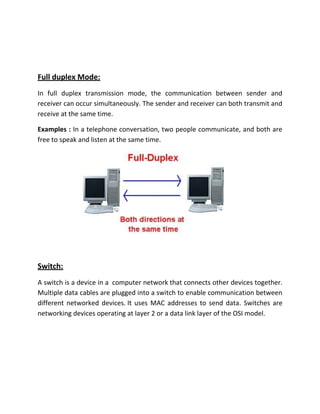
In full duplex transmission mode, the communication between sender and
receiver can occur simultaneously. The sender and receiver can both transmit and
receive at the same time.
Examples : In a telephone conversation, two people communicate, and both are
free to speak and listen at the same time.
Switch:
A switch is a device in a computer network that connects other devices together.
Multiple data cables are plugged into a switch to enable communication between
different networked devices. It uses MAC addresses to send data. Switches are
networking devices operating at layer 2 or a data link layer of the OSI model.
Hub :
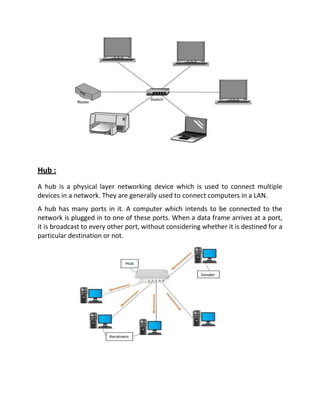
A hub is a physical layer networking device which is used to connect multiple
devices in a network. They are generally used to connect computers in a LAN.
A hub has many ports in it. A computer which intends to be connected to the
network is plugged in to one of these ports. When a data frame arrives at a port,
it is broadcast to every other port, without considering whether it is destined for a
particular destination or not.
Router :
A router is a networking device that send and receives data between computer
networks. A router is a layer 3 or network layer device. It used IP Address to send
data.
Computer Network :
A computer network is a group of computers linked to each other that enables
the computer to communicate with another computer and share their resources,
data, and applications. A computer network is mainly of four types:
o LAN (Local Area Network)
o PAN (Personal Area Network)
o MAN (Metropolitan Area Network)
o WAN (Wide Area Network)
LAN (Local Area Network) :
A LAN (Local Area Network)is a group of computer and peripheral devices which
are connected in a limited area such as school, laboratory, home, and office
building. It is a widely useful network for sharing resources like files, printers,
games, and other application. The simplest type of LAN network is to connect
computers and a printer in someone’s home or office. In general, LAN will be used
as one type of transmission medium. It is a network which consists of less than
5000 interconnected devices across several buildings.
MAN (Metropolitan Area Network) :
A MAN (Metropolitan Area Network) consists of a computer network across an
entire city, college campus or small region. A MAN is larger than a LAN, which is
typically limited to a single building or site. Depending on the configuration, this
type of network can cover an area from several miles to tens of miles. A MAN is
often used to connect several LANs together to form a bigger network. When this
type of network is specifically designed for a college campus, it is sometimes
referred to as a campus area network, or CAN.
WAN (Wide Area Network) :
A WAN (Wide Area Network) occupies a very large area, such as an entire country
or the entire world. A WAN can contain multiple smaller networks, such as LANs
or MANs. The Internet is the best-known example of a public WAN.
PAN (Personal Area Network) :
A PAN (Personal Area Network) is a computer network organized around an
individual person within a single building. This could be inside a small office or
residence. A typical PAN would include one or more computers, telephones,
peripheral devices, video game consoles and other personal entertainment
devices.
MAC Address :
MAC address is the physical address, which uniquely identifies each device on a
given network. It is assigned to the NIC (Network Interface card) of each device
that can be connected to the internet.
It is 12-digit, and 48 bits long, out of which the first 24 bits are use
for OUI(Organization Unique Identifier), and 24 bits are for VS(vendor-specific).
OUI(Organization Unique Identifier) --- IANA (Internet Assigned Number
Authority). We collect MAC Address from IANA.IANA is a Organization who
provide MAC Address and it’s unique.
MAC = OUI + VS
IP (Internet Protocol) Address :
An IP address is a unique address that identifies a device on the internet or a local
network. IP stands for "Internet Protocol," which is the set of rules governing the
format of data sent via the internet or local network.
IP Address divided into two part. They are :
1) IPV4 (IP version 4)
2) IPV6 (IP version 6
We use IPV4 and IPV6 are used in big organization like nasa.
IPV4 also divided into two part. They are :
1) Public IP
2) Private IP
DFGD
IP Address look like
101.200.65.2
8bit.8bit.8bit.8bit total 4*8bit = 32bit
IPV4 is 32 bit (Network ID 16 bit + Host ID 16 bit)
range 0 to 255
Highest —255.255.255.255 and took 1 to 3 digit only(1.22.201.25 like this )
IP = Network ID 16 bit + Host ID 16 bit
IP CLASSES Range
Class A 1-126
Class B 128-191
Class C 192-223
Class D 244-239
Class E 240-255
 127 Loopback Address / Police Address.
 Class D and E for big network.
Reference :
https://www.nielit.gov.in
https://www.google.com
https://www.tutorialspoint.com
https://en.wikipedia.org
https://www.javatpoint.com
https://www.guru99.com
https://study.com

2nd class

  • 1.
    2nd CLASS Course Name :Data Communication Course Code : CSE 313 Topics Transmission Mode (Simplex, Half Duplex, Full Duplex), Switch, Hub, Router , Computer Network (LAN, MAN, WAN, PAN) , IP Address, Mac Address. Rakibul Hasan Emon, ID : 1915002532, Department of CSE, City University Transmission Mode : Transmission mode refers to the mechanism of transferring of data between two devices connected over a network. It is also called Communication Mode. These modes direct the direction of flow of information. There are three types of transmission modes. They are: 1. Simplex Mode 2. Half duplex Mode 3. Full duplex Mode Simplex Mode: In simplex transmission mode, the communication between sender and receiver occurs in only one direction. The sender can only send the data, and the receiver can only receive the data. The receiver cannot reply to the sender. Examples : To take a keyboard / monitor relationship as an example, the keyboard can only send the input to the monitor, and the monitor can only receive the input and display it on the screen. The monitor cannot reply, or send any feedback, to the keyboard. Television and Remote.
  • 2.
    Half duplex Mode: Thecommunication between sender and receiver occurs in both directions in half duplex transmission, but only one at a time. The sender and receiver can both send and receive the information, but only one is allowed to send at any given time. Examples : In walkie-talkies, the speakers at both ends can speak, but they have to speak one by one. They cannot speak simultaneously.
  • 3.
    Full duplex Mode: Infull duplex transmission mode, the communication between sender and receiver can occur simultaneously. The sender and receiver can both transmit and receive at the same time. Examples : In a telephone conversation, two people communicate, and both are free to speak and listen at the same time. Switch: A switch is a device in a computer network that connects other devices together. Multiple data cables are plugged into a switch to enable communication between different networked devices. It uses MAC addresses to send data. Switches are networking devices operating at layer 2 or a data link layer of the OSI model.
  • 4.
    Hub : A hubis a physical layer networking device which is used to connect multiple devices in a network. They are generally used to connect computers in a LAN. A hub has many ports in it. A computer which intends to be connected to the network is plugged in to one of these ports. When a data frame arrives at a port, it is broadcast to every other port, without considering whether it is destined for a particular destination or not.
  • 5.
    Router : A routeris a networking device that send and receives data between computer networks. A router is a layer 3 or network layer device. It used IP Address to send data. Computer Network : A computer network is a group of computers linked to each other that enables the computer to communicate with another computer and share their resources, data, and applications. A computer network is mainly of four types: o LAN (Local Area Network) o PAN (Personal Area Network) o MAN (Metropolitan Area Network) o WAN (Wide Area Network)
  • 6.
    LAN (Local AreaNetwork) : A LAN (Local Area Network)is a group of computer and peripheral devices which are connected in a limited area such as school, laboratory, home, and office building. It is a widely useful network for sharing resources like files, printers, games, and other application. The simplest type of LAN network is to connect computers and a printer in someone’s home or office. In general, LAN will be used as one type of transmission medium. It is a network which consists of less than 5000 interconnected devices across several buildings. MAN (Metropolitan Area Network) : A MAN (Metropolitan Area Network) consists of a computer network across an entire city, college campus or small region. A MAN is larger than a LAN, which is typically limited to a single building or site. Depending on the configuration, this type of network can cover an area from several miles to tens of miles. A MAN is often used to connect several LANs together to form a bigger network. When this type of network is specifically designed for a college campus, it is sometimes referred to as a campus area network, or CAN.
  • 7.
    WAN (Wide AreaNetwork) : A WAN (Wide Area Network) occupies a very large area, such as an entire country or the entire world. A WAN can contain multiple smaller networks, such as LANs or MANs. The Internet is the best-known example of a public WAN.
  • 8.
    PAN (Personal AreaNetwork) : A PAN (Personal Area Network) is a computer network organized around an individual person within a single building. This could be inside a small office or residence. A typical PAN would include one or more computers, telephones, peripheral devices, video game consoles and other personal entertainment devices. MAC Address : MAC address is the physical address, which uniquely identifies each device on a given network. It is assigned to the NIC (Network Interface card) of each device that can be connected to the internet. It is 12-digit, and 48 bits long, out of which the first 24 bits are use for OUI(Organization Unique Identifier), and 24 bits are for VS(vendor-specific). OUI(Organization Unique Identifier) --- IANA (Internet Assigned Number Authority). We collect MAC Address from IANA.IANA is a Organization who provide MAC Address and it’s unique. MAC = OUI + VS
  • 9.
    IP (Internet Protocol)Address : An IP address is a unique address that identifies a device on the internet or a local network. IP stands for "Internet Protocol," which is the set of rules governing the format of data sent via the internet or local network. IP Address divided into two part. They are : 1) IPV4 (IP version 4) 2) IPV6 (IP version 6 We use IPV4 and IPV6 are used in big organization like nasa. IPV4 also divided into two part. They are : 1) Public IP 2) Private IP DFGD IP Address look like 101.200.65.2 8bit.8bit.8bit.8bit total 4*8bit = 32bit IPV4 is 32 bit (Network ID 16 bit + Host ID 16 bit) range 0 to 255 Highest —255.255.255.255 and took 1 to 3 digit only(1.22.201.25 like this ) IP = Network ID 16 bit + Host ID 16 bit
  • 10.
    IP CLASSES Range ClassA 1-126 Class B 128-191 Class C 192-223 Class D 244-239 Class E 240-255  127 Loopback Address / Police Address.  Class D and E for big network. Reference : https://www.nielit.gov.in https://www.google.com https://www.tutorialspoint.com https://en.wikipedia.org https://www.javatpoint.com https://www.guru99.com https://study.com