XML FOR DUMMIES

Book author: Lucinda Dykes and Ed Tittle
Part 1 : XML Basics
Lecture 1 : Getting to know XML
http://it-slideshares.blogspot.com
Contents

         1       Introducing XML


        2        Examining the many uses of XML


        3       Deciphering what is XML and what XML isn’t


        4        Building an XML document


http://it-slideshares.blogspot.com
1. Introducing XML
    XML   is markup language.
    XML isn’t limited to a particular set of markup.
    The flexibility of XML has led to its wide-spread use for
     exchanging data in a multitude of forms.
    With XML, you can send the same information to
     various locations.
    You can customize the informtion sent out so it’s
     displayed appropriately on the various devices.
    Getting started with XML isn’t difficult.


http://it-slideshares.blogspot.com
2.Examining the many uses of
    Mocking up your own markup :
                  XML.
     ● XML is derived from the “mother of all markup
      language”.
        ● XML has no predefined tags, you can create your
      own XML.
        ● You can design your own custom markup language
      but you must to keep rules about the syntax of an XML
      document.
        ●XHTML is yet another markup language: designed as
      a transition language between XML and HTML.


http://it-slideshares.blogspot.com
Examining the many uses of XML(cont..)
      Separating data and context :
         ●XML automatically separates data from context.
         ●XML document no instructions about how to display the
       content contained in the document. It only defines the structure of
       document. You can then add styles.
         ●The same style sheet is used with more than one document.
         ●XML can be combined with both two different types of
       stylesheets : CSS and XSLT for extra versatility.


http://it-slideshares.blogspot.com
   Making information portable :
Examining the many uses of ML(cont..)
           ● XML is all about managing your data.
               ○XML enables you to colect information once and
                     reuse it in a variety of ways.
               ○XML data is not limited to one application format.
               ○Making information portable does require
        planning             and design before the information is
        collected.


       XML mean business.
          ●XML provides an easy way for businesses to manage
        and share information.


 http://it-slideshares.blogspot.com
3. Deciphering what is XML and what XML isn’t.
        3.1 Figuring out what XML is good for
         Classifying information
               ●One of the most useful function of XML involves classifying
          information.
                ●Example: Book can be classified in many ways, but we kind of like
          the following classification sheme:
                    ◦ Tile
                    ◦ Author
                    ◦ Publisher
                    ◦ Price
                    ◦ Content Type(Fiction, Nonfiction)
                    ◦ Format(Paperback, hardback)
                    ◦ ISBN


    http://it-slideshares.blogspot.com
3.1 Figuring out what XML is good for
         Classifying information
             ●Using XML, you can create tags to classify this information. The following code
          shows a possible XML format for one book:


           <book>
                 <title>Night Fall</title>
                 <author>Demille, Nelson</author>
                 <publisher>Warner</publisher>
                 <price>$26.95</price>
                 <contentType>Fiction</contentType>
                 <format>Hardback</format>
                 <isbn>0446576638</isbn>
           </book>
             ●Giving your tags meaningful name that actually reflect the content makes it
          easier to work with the information.
             ●Classifying the information as shown here makes possible for you to search for
          and retrieve any item with ease.


   http://it-slideshares.blogspot.com
Figuring out what XML is good for(cont..)
         Enforcing rules on your data.
              ●XML excels at allowing you to create rules for the format of your          data.Using
          either Document Type Definitions(DTDs) or XML Scheme to             validate your data gives
          you two immediate advantages.
                     ◦ It help ensure accuracy of information you collect .
                     ◦ It helps ensure that the information gathered is in the most
          usable format for your business needs.

             ●Taking another look at the XML we came up with in the previous              section for
          your imaginary book business, you can see several items              for which you might
          want to include rules to govern how the data is          formatted, such as:
                      ◦ A currency format for the price
                       ◦ A number format for the ISBN
                       ◦ A restricted selection for content type (Fiction or Nonfiction)
                       ◦ A restricted selection for format (Paperback or Hardback)


   http://it-slideshares.blogspot.com
Figuring out what XML is good for(cont..)
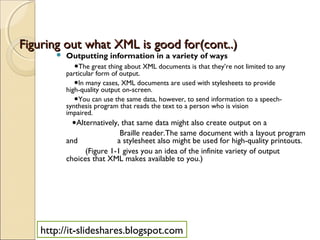
         Outputting information in a variety of ways
             ●The great thing about XML documents is that they’re not limited to any
          particular form of output.
             ●In many cases, XML documents are used with stylesheets to provide
          high-quality output on-screen.
             ●You can use the same data, however, to send information to a speech-
          synthesis program that reads the text to a person who is vision
          impaired.
            ●Alternatively, that same data might also create output on a
                           Braille reader.The same document with a layout program
          and             a stylesheet also might be used for high-quality printouts.
                (Figure 1-1 gives you an idea of the infinite variety of output
          choices that XML makes available to you.)


   http://it-slideshares.blogspot.com
● The beauty of this concept is that you never need to fuss and fidget
with the XML data to create output for different devices. You need only
use different pieces of software that can read XML and can provide the
output for a particular format or output device.

http://it-slideshares.blogspot.com
 Using the same data across platforms
       Figuring out what XML is good
         Figuring out what XML is good for(cont..)
        ● Suppose you want to exchange database information across the
      Web, use a Web browser to send information from a user
      questionnaire back to a Web server. To accomplish this task,     you need
      a document format that is:
          ♦ Extensible: An extensible format is one that can be tailored or
      customizeed for specific applications.
         ♦ Open: It’s well documented and widely available.
          ♦Nonproprietary: It’s expressed in an accepted or standard form of
      notation that isn’t the exclisive property of some individual,  company,
      or organnization.


http://it-slideshares.blogspot.com
3.2 Beyond the Hype: What XML anymore.
   It’s not just for Web pages Isn’t.
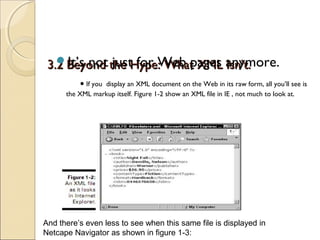
           ● If you display an XML document on the Web in its raw form, all you’ll see is
      the XML markup itself. Figure 1-2 show an XML file in IE , not much to look at.


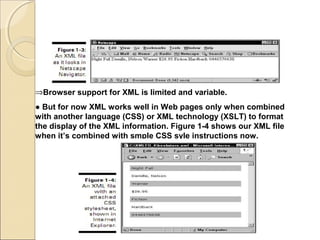
And there’s even less to see when this same file is displayed in
Netcape Navigator as shown in figure 1-3:
⇒Browser support for XML is limited and variable.
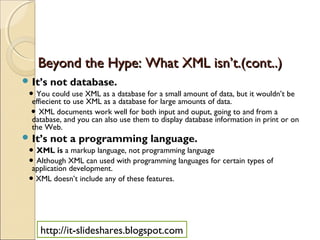
● But for now XML works well in Web pages only when combined
with another language (CSS) or XML technology (XSLT) to format
the display of the XML information. Figure 1-4 shows our XML file
when it’s combined with smple CSS syle instructions now.
Beyond the Hype: What XML isn’t.(cont..)
 It’s   not database.
 ● You could use XML as a database for a small amount of data, but it wouldn’t be
  effiecient to use XML as a database for large amounts of data.
 ● XML documents work well for both input and ouput, going to and from a
  database, and you can also use them to display database information in print or on
  the Web.
 It’s   not a programming language.
 ● XML is a markup language, not programming language
 ● Although XML can used with programming languages for certain types of
  application development.
 ● XML doesn’t include any of these features.


    http://it-slideshares.blogspot.com
4. Building XML documents.
    You can buiding XML document with notepad editor,but XML editors
     hava two distinct fearures that are essential for creating good XML
     documents:
      ♦ Ease if markup: XML editors, such as XMLSpy, Turbo XML, and XML
     Pro, can add markup to text as simply as you can turn text bold in today’s
     word processors. All XML editors provide the capability to select text
     with a cursor and choose which markup you want to apply from a menu
     of selections.
      ♦ Automatic enforcement of XML document rules: For many
     applications, XML editors can determine which element types can appear
     in certain contexts. In this way, the editor helps you avoid making syntax
     or structure mistakes.
    XML is a subset of SGML.


http://it-slideshares.blogspot.com
THANK YOU
THE END CHAPTER ONE
   http://it-slideshares.blogspot.com

Lecture 1 - Getting to know XML

  • 1.
    XML FOR DUMMIES Bookauthor: Lucinda Dykes and Ed Tittle Part 1 : XML Basics Lecture 1 : Getting to know XML http://it-slideshares.blogspot.com
  • 2.
    Contents 1 Introducing XML 2 Examining the many uses of XML 3 Deciphering what is XML and what XML isn’t 4 Building an XML document http://it-slideshares.blogspot.com
  • 3.
    1. Introducing XML  XML is markup language.  XML isn’t limited to a particular set of markup.  The flexibility of XML has led to its wide-spread use for exchanging data in a multitude of forms.  With XML, you can send the same information to various locations.  You can customize the informtion sent out so it’s displayed appropriately on the various devices.  Getting started with XML isn’t difficult. http://it-slideshares.blogspot.com
  • 4.
    2.Examining the manyuses of Mocking up your own markup : XML. ● XML is derived from the “mother of all markup language”. ● XML has no predefined tags, you can create your own XML. ● You can design your own custom markup language but you must to keep rules about the syntax of an XML document. ●XHTML is yet another markup language: designed as a transition language between XML and HTML. http://it-slideshares.blogspot.com
  • 5.
    Examining the manyuses of XML(cont..)  Separating data and context : ●XML automatically separates data from context. ●XML document no instructions about how to display the content contained in the document. It only defines the structure of document. You can then add styles. ●The same style sheet is used with more than one document. ●XML can be combined with both two different types of stylesheets : CSS and XSLT for extra versatility. http://it-slideshares.blogspot.com
  • 6.
    Making information portable : Examining the many uses of ML(cont..) ● XML is all about managing your data. ○XML enables you to colect information once and reuse it in a variety of ways. ○XML data is not limited to one application format. ○Making information portable does require planning and design before the information is collected.  XML mean business. ●XML provides an easy way for businesses to manage and share information. http://it-slideshares.blogspot.com
  • 7.
    3. Deciphering whatis XML and what XML isn’t. 3.1 Figuring out what XML is good for  Classifying information ●One of the most useful function of XML involves classifying information. ●Example: Book can be classified in many ways, but we kind of like the following classification sheme: ◦ Tile ◦ Author ◦ Publisher ◦ Price ◦ Content Type(Fiction, Nonfiction) ◦ Format(Paperback, hardback) ◦ ISBN http://it-slideshares.blogspot.com
  • 8.
    3.1 Figuring outwhat XML is good for  Classifying information ●Using XML, you can create tags to classify this information. The following code shows a possible XML format for one book: <book> <title>Night Fall</title> <author>Demille, Nelson</author> <publisher>Warner</publisher> <price>$26.95</price> <contentType>Fiction</contentType> <format>Hardback</format> <isbn>0446576638</isbn> </book> ●Giving your tags meaningful name that actually reflect the content makes it easier to work with the information. ●Classifying the information as shown here makes possible for you to search for and retrieve any item with ease. http://it-slideshares.blogspot.com
  • 9.
    Figuring out whatXML is good for(cont..)  Enforcing rules on your data. ●XML excels at allowing you to create rules for the format of your data.Using either Document Type Definitions(DTDs) or XML Scheme to validate your data gives you two immediate advantages. ◦ It help ensure accuracy of information you collect . ◦ It helps ensure that the information gathered is in the most usable format for your business needs. ●Taking another look at the XML we came up with in the previous section for your imaginary book business, you can see several items for which you might want to include rules to govern how the data is formatted, such as: ◦ A currency format for the price ◦ A number format for the ISBN ◦ A restricted selection for content type (Fiction or Nonfiction) ◦ A restricted selection for format (Paperback or Hardback) http://it-slideshares.blogspot.com
  • 10.
    Figuring out whatXML is good for(cont..)  Outputting information in a variety of ways ●The great thing about XML documents is that they’re not limited to any particular form of output. ●In many cases, XML documents are used with stylesheets to provide high-quality output on-screen. ●You can use the same data, however, to send information to a speech- synthesis program that reads the text to a person who is vision impaired. ●Alternatively, that same data might also create output on a Braille reader.The same document with a layout program and a stylesheet also might be used for high-quality printouts. (Figure 1-1 gives you an idea of the infinite variety of output choices that XML makes available to you.) http://it-slideshares.blogspot.com
  • 11.
    ● The beautyof this concept is that you never need to fuss and fidget with the XML data to create output for different devices. You need only use different pieces of software that can read XML and can provide the output for a particular format or output device. http://it-slideshares.blogspot.com
  • 12.
     Using thesame data across platforms Figuring out what XML is good Figuring out what XML is good for(cont..) ● Suppose you want to exchange database information across the Web, use a Web browser to send information from a user questionnaire back to a Web server. To accomplish this task, you need a document format that is: ♦ Extensible: An extensible format is one that can be tailored or customizeed for specific applications. ♦ Open: It’s well documented and widely available. ♦Nonproprietary: It’s expressed in an accepted or standard form of notation that isn’t the exclisive property of some individual, company, or organnization. http://it-slideshares.blogspot.com
  • 13.
    3.2 Beyond theHype: What XML anymore. It’s not just for Web pages Isn’t. ● If you display an XML document on the Web in its raw form, all you’ll see is the XML markup itself. Figure 1-2 show an XML file in IE , not much to look at. And there’s even less to see when this same file is displayed in Netcape Navigator as shown in figure 1-3:
  • 14.
    ⇒Browser support forXML is limited and variable. ● But for now XML works well in Web pages only when combined with another language (CSS) or XML technology (XSLT) to format the display of the XML information. Figure 1-4 shows our XML file when it’s combined with smple CSS syle instructions now.
  • 15.
    Beyond the Hype:What XML isn’t.(cont..)  It’s not database. ● You could use XML as a database for a small amount of data, but it wouldn’t be effiecient to use XML as a database for large amounts of data. ● XML documents work well for both input and ouput, going to and from a database, and you can also use them to display database information in print or on the Web.  It’s not a programming language. ● XML is a markup language, not programming language ● Although XML can used with programming languages for certain types of application development. ● XML doesn’t include any of these features. http://it-slideshares.blogspot.com
  • 16.
    4. Building XMLdocuments.  You can buiding XML document with notepad editor,but XML editors hava two distinct fearures that are essential for creating good XML documents: ♦ Ease if markup: XML editors, such as XMLSpy, Turbo XML, and XML Pro, can add markup to text as simply as you can turn text bold in today’s word processors. All XML editors provide the capability to select text with a cursor and choose which markup you want to apply from a menu of selections. ♦ Automatic enforcement of XML document rules: For many applications, XML editors can determine which element types can appear in certain contexts. In this way, the editor helps you avoid making syntax or structure mistakes.  XML is a subset of SGML. http://it-slideshares.blogspot.com
  • 17.
    THANK YOU THE ENDCHAPTER ONE http://it-slideshares.blogspot.com