Chapter 07: Running on a Cluster
Learning Spark
by Holden Karau et. al.
Overview: Running on a Cluster
 Introduction
 Spark Runtime Architecture
 The Driver
 Executors
 Cluster Manager
 Launching a Program
 Summary
 Deploying Applications with spark-submit
 Packaging Your Code and Dependencies
 Scheduling Within and Between Spark Applications
 Cluster Managers
 Standalone Cluster Manager
 Hadoop YARN
 Apache Mesos
 Amazon EC2
 Which Cluster Manager to Use?
 Conclusion
09/24/15
7.1 Introduction
This chapter explains the runtime architecture of a distributed
Spark application.
Discusses options for running Spark in distributed clusters.
 Hadoop YARN
 Apache Mesos
 Spark's own built-in Standalone cluster manager
Discuss the trade-offs and configurations required for running
in each case.
Cover the “nuts and bolts” of scheduling, deploying, and
configuring a Spark application.
09/24/15
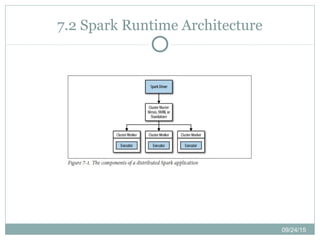
7.2 Spark Runtime Architecture
Edx and Coursera Courses
Introduction to Big Data with Apache Spark
Spark Fundamentals I
Functional Programming Principles in Scala
09/24/15
7.2.1 The Driver
The driver is the process where the main() method of your
program runs.
 It is the process running the user code that creates a SparkContext, creates
RDDs, and performs transformations and actions.
When the driver runs, it performs two duties:
 Converting a user program into tasks
 Scheduling tasks on executors
09/24/15
7.2.2 Executors
Spark executors are worker processes responsible for running
the individual tasks in a given Spark job.
Executors have two roles :
 Run the tasks that make up the application and return results to the driver.
 Provide in-memory storage for RDDs that are cached by user programs,
through a service called the Block Manager that lives within each executor.
09/24/15
7.2.3 Cluster Manager
Spark depends on a cluster manager to launch executors and,
in certain cases, to launch the driver.
The cluster manager is a pluggable component in Spark.
This allows Spark to run on top of different external
managers, such as YARN and Mesos, as well as its built-in
Standalone cluster manager.
09/24/15
7.2.4 Launching a Program
 No matter which cluster manager you use, Spark provides a single script
you can use to submit your program to it called spark-submit.
 Through various options, spark-submit can connect to different cluster
managers and control how many resources your application gets.
 Example( on a YARN worker node), while for others, it can run it only
 on your local machine
09/24/15
7.2.5 Summary
The exact steps that occur when you run a Spark application
on a cluster:
 The user submits an application using spark-submit.
 spark-submit launches the driver program and invokes the main() method
specified by the user.
 The driver program contacts the cluster manager to ask for resources to
launch executors.
 The cluster manager launches executors on behalf of the driver program.
 The driver process runs through the user application. Based on the RDD
actions and transformations in the program, the driver sends work to
executors in the form of tasks.
 Tasks are run on executor processes to compute and save results.
 If the driver’s main() method exits or it calls SparkContext.stop(), it will
terminate the executors and release resources from the cluster manager.
09/24/15
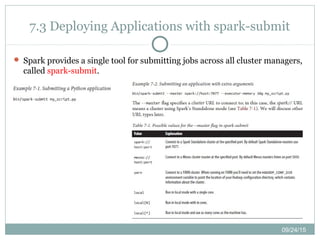
7.3 Deploying Applications with spark-submit
 Spark provides a single tool for submitting jobs across all cluster managers,
called spark-submit.
09/24/15
7.3 Deploying Applications with spark-submit (Con't)
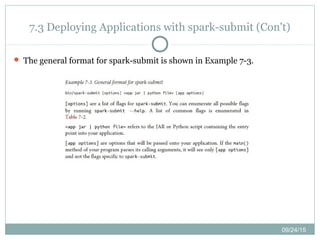
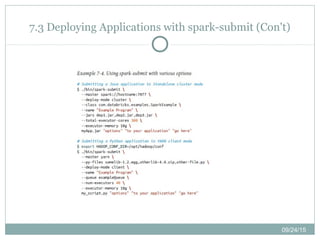
 The general format for spark-submit is shown in Example 7-3.
09/24/15
7.3 Deploying Applications with spark-submit (Con't)
09/24/15
Packaging Your Code and Dependencies
You need to ensure that all your dependencies are present at
the runtime of your Spark application.
For Python users :
 You can install dependency libraries directly on the cluster machines using
standard Python package managers
 Submit individual libraries using the --py-files argument to spark-submit
For Java and Scala users :
 Submit individual JAR files using the --jars flag to spark-submit.
 The most popular build tools for Java and Scala are Maven and sbt (Scala
build tool).
09/24/15
7.4 Scheduling Within and Between Spark Applications
Scheduling policies help ensure that resources are not
overwhelmed and allow for prioritization of workloads.
For scheduling in multitenant clusters, Spark primarily relies
on the cluster manager to share resources between Spark
applications.
09/24/15
7.5 Cluster Managers
Spark can run over a variety of cluster managers to access the
machines in a cluster.
 The built-in Standalone mode is the easiest way to deploy.
 Spark can also run over two popular cluster managers: Hadoop YARN and
Apache Mesos.
 Finally, for deploying on Amazon EC2, Spark comes with builtin scripts that
launch a Standalone cluster and various supporting services.
09/24/15
7.5.1 Standalone Cluster Manager
Spark’s Standalone manager offers a simple way to run
applications on a cluster.
 It consists of a master and multiple workers, each with a configured amount
of memory and CPU cores.
Submitting applications :
 spark-submit --master spark://masternode:7077 yourapp
 This cluster URL is also shown in the Standalone cluster manager’s web UI,
at http://masternode:8080.
You can also launch spark-shell or pyspark against the cluster
in the same way, by passing the --master parameter:
 spark-shell --master spark://masternode:7077
 pyspark --master spark://masternode:7077
09/24/15
7.5.1 Standalone Cluster Manager(con't)
Configuring resource usage
 In the Standalone cluster manager, resource allocation is controlled by two
settings:
 Executor memory : using the --executor-memory argument to
sparksubmit.
 The maximum number of total cores : the --total-executorcores
argument to spark-submit, or by configuring spark.cores.max in your Spark
configuration file
High availability
 The Standalone mode will gracefully support the failure of worker nodes.
 Spark supports using Apache ZooKeeper (a distributed coordination system)
to keep multiple standby masters and switch to a new one when any of them
fails.
09/24/15
7.5.2 Hadoop YARN
 YARN is a cluster manager introduced in Hadoop 2.0 that allows diverse
data processing frameworks to run on a shared resource pool, and is
typically installed on the same nodes as the Hadoop filesystem (HDFS).
 Running Spark on YARN in these environments is useful
 Spark access HDFS data quickly, on the same nodes where the data is stored.
 Spark’s interactive shell and pyspark both work on YARN as well; simply set
HADOOP_CONF_DIR and pass --master yarn to these applications. Note
export HADOOP_CONF_DIR="..."
spark-submit --master yarn yourapp
09/24/15
7.5.2 Hadoop YARN (Con't)
Configuring resource usage :
 When running on YARN, Spark applications use a fixed
number of executors, which you can set via the --num-
executors flag to spark-submit
 Set the memory used by each executor via --executor-memory
and the number of cores it claims from YARN via --executor-
cores.
09/24/15
7.5.3 Apache Mesos
 Apache Mesos is a general-purpose cluster manager that can run both
analytics workloads and long-running services (e.g., web applications or
key/value stores) on a cluster.
 spark-submit --master mesos://masternode:5050 yourapp
 Mesos scheduling modes :
 Client and cluster mode
 Configuring resource usage
 You can control resource usage on Mesos through two parameters to spark-submit:
--executor-memory, to set the memory for each executor, and --total-executorcores, to set
the maximum number of CPU cores for the application to claim (across all executors).
09/24/15
7.5.4 Amazon EC2
 Spark comes with a built-in script to launch clusters on Amazon EC2.
 Launching a cluster :
 Example : # Launch a cluster with 5 slaves of type m3.xlarge
 ./spark-ec2 -k mykeypair -i mykeypair.pem -s 5 -t m3.xlarge launch mycluster
 Logging in to a cluster :
 ./spark-ec2 -k mykeypair -i mykeypair.pem login mycluster
 Destroying a cluster :
 ./spark-ec2 destroy mycluster
 Pausing and restarting clusters :
 ./spark-ec2 stop mycluster
 ./spark-ec2 -k mykeypair -i mykeypair.pem start mycluster
 Storage on the cluster : Spark EC2 clusters come configured with two
installations of the Hadoop file systemthat you can use for scratch space.
 An “ephemeral” HDFS installation using the ephemeral drives on the nodes.
 A “persistent” HDFS installation on the root volumes of the nodes.
09/24/15
7.6 Which Cluster Manager to Use?
The cluster managers supported in Spark offer a
variety of options for deploying applications.
 Start with a Standalone cluster if this is a new deployment.
 If you would like to run Spark alongside other applications, or
to use richer resource scheduling capabilities (e.g., queues),
both YARN and Mesos provide these features.
 One advantage of Mesos over both YARN and Standalone
mode is its finegrained sharing option.
 In all cases, it is best to run Spark on the same nodes as HDFS
for fast access to storage.
Edx and Coursera Courses
Introduction to Big Data with Apache Spark
Spark Fundamentals I
Functional Programming Principles in Scala
09/24/15
7.7 Conclusion
This chapter described the runtime architecture of a Spark
application, composed of a driver process and a distributed set
of executor processes :
 We then covered how to build, package, and submit Spark applications.
 The common deployment environments for Spark, including its built-in
cluster manager
 Running Spark with YARN or Mesos
 Running Spark on Amazon’s EC2 cloud.

Learning spark ch07 - Running on a Cluster

  • 1.
    Chapter 07: Runningon a Cluster Learning Spark by Holden Karau et. al.
  • 2.
    Overview: Running ona Cluster  Introduction  Spark Runtime Architecture  The Driver  Executors  Cluster Manager  Launching a Program  Summary  Deploying Applications with spark-submit  Packaging Your Code and Dependencies  Scheduling Within and Between Spark Applications  Cluster Managers  Standalone Cluster Manager  Hadoop YARN  Apache Mesos  Amazon EC2  Which Cluster Manager to Use?  Conclusion
  • 3.
    09/24/15 7.1 Introduction This chapterexplains the runtime architecture of a distributed Spark application. Discusses options for running Spark in distributed clusters.  Hadoop YARN  Apache Mesos  Spark's own built-in Standalone cluster manager Discuss the trade-offs and configurations required for running in each case. Cover the “nuts and bolts” of scheduling, deploying, and configuring a Spark application.
  • 4.
  • 5.
    Edx and CourseraCourses Introduction to Big Data with Apache Spark Spark Fundamentals I Functional Programming Principles in Scala
  • 6.
    09/24/15 7.2.1 The Driver Thedriver is the process where the main() method of your program runs.  It is the process running the user code that creates a SparkContext, creates RDDs, and performs transformations and actions. When the driver runs, it performs two duties:  Converting a user program into tasks  Scheduling tasks on executors
  • 7.
    09/24/15 7.2.2 Executors Spark executorsare worker processes responsible for running the individual tasks in a given Spark job. Executors have two roles :  Run the tasks that make up the application and return results to the driver.  Provide in-memory storage for RDDs that are cached by user programs, through a service called the Block Manager that lives within each executor.
  • 8.
    09/24/15 7.2.3 Cluster Manager Sparkdepends on a cluster manager to launch executors and, in certain cases, to launch the driver. The cluster manager is a pluggable component in Spark. This allows Spark to run on top of different external managers, such as YARN and Mesos, as well as its built-in Standalone cluster manager.
  • 9.
    09/24/15 7.2.4 Launching aProgram  No matter which cluster manager you use, Spark provides a single script you can use to submit your program to it called spark-submit.  Through various options, spark-submit can connect to different cluster managers and control how many resources your application gets.  Example( on a YARN worker node), while for others, it can run it only  on your local machine
  • 10.
    09/24/15 7.2.5 Summary The exactsteps that occur when you run a Spark application on a cluster:  The user submits an application using spark-submit.  spark-submit launches the driver program and invokes the main() method specified by the user.  The driver program contacts the cluster manager to ask for resources to launch executors.  The cluster manager launches executors on behalf of the driver program.  The driver process runs through the user application. Based on the RDD actions and transformations in the program, the driver sends work to executors in the form of tasks.  Tasks are run on executor processes to compute and save results.  If the driver’s main() method exits or it calls SparkContext.stop(), it will terminate the executors and release resources from the cluster manager.
  • 11.
    09/24/15 7.3 Deploying Applicationswith spark-submit  Spark provides a single tool for submitting jobs across all cluster managers, called spark-submit.
  • 12.
    09/24/15 7.3 Deploying Applicationswith spark-submit (Con't)  The general format for spark-submit is shown in Example 7-3.
  • 13.
    09/24/15 7.3 Deploying Applicationswith spark-submit (Con't)
  • 14.
    09/24/15 Packaging Your Codeand Dependencies You need to ensure that all your dependencies are present at the runtime of your Spark application. For Python users :  You can install dependency libraries directly on the cluster machines using standard Python package managers  Submit individual libraries using the --py-files argument to spark-submit For Java and Scala users :  Submit individual JAR files using the --jars flag to spark-submit.  The most popular build tools for Java and Scala are Maven and sbt (Scala build tool).
  • 15.
    09/24/15 7.4 Scheduling Withinand Between Spark Applications Scheduling policies help ensure that resources are not overwhelmed and allow for prioritization of workloads. For scheduling in multitenant clusters, Spark primarily relies on the cluster manager to share resources between Spark applications.
  • 16.
    09/24/15 7.5 Cluster Managers Sparkcan run over a variety of cluster managers to access the machines in a cluster.  The built-in Standalone mode is the easiest way to deploy.  Spark can also run over two popular cluster managers: Hadoop YARN and Apache Mesos.  Finally, for deploying on Amazon EC2, Spark comes with builtin scripts that launch a Standalone cluster and various supporting services.
  • 17.
    09/24/15 7.5.1 Standalone ClusterManager Spark’s Standalone manager offers a simple way to run applications on a cluster.  It consists of a master and multiple workers, each with a configured amount of memory and CPU cores. Submitting applications :  spark-submit --master spark://masternode:7077 yourapp  This cluster URL is also shown in the Standalone cluster manager’s web UI, at http://masternode:8080. You can also launch spark-shell or pyspark against the cluster in the same way, by passing the --master parameter:  spark-shell --master spark://masternode:7077  pyspark --master spark://masternode:7077
  • 18.
    09/24/15 7.5.1 Standalone ClusterManager(con't) Configuring resource usage  In the Standalone cluster manager, resource allocation is controlled by two settings:  Executor memory : using the --executor-memory argument to sparksubmit.  The maximum number of total cores : the --total-executorcores argument to spark-submit, or by configuring spark.cores.max in your Spark configuration file High availability  The Standalone mode will gracefully support the failure of worker nodes.  Spark supports using Apache ZooKeeper (a distributed coordination system) to keep multiple standby masters and switch to a new one when any of them fails.
  • 19.
    09/24/15 7.5.2 Hadoop YARN YARN is a cluster manager introduced in Hadoop 2.0 that allows diverse data processing frameworks to run on a shared resource pool, and is typically installed on the same nodes as the Hadoop filesystem (HDFS).  Running Spark on YARN in these environments is useful  Spark access HDFS data quickly, on the same nodes where the data is stored.  Spark’s interactive shell and pyspark both work on YARN as well; simply set HADOOP_CONF_DIR and pass --master yarn to these applications. Note export HADOOP_CONF_DIR="..." spark-submit --master yarn yourapp
  • 20.
    09/24/15 7.5.2 Hadoop YARN(Con't) Configuring resource usage :  When running on YARN, Spark applications use a fixed number of executors, which you can set via the --num- executors flag to spark-submit  Set the memory used by each executor via --executor-memory and the number of cores it claims from YARN via --executor- cores.
  • 21.
    09/24/15 7.5.3 Apache Mesos Apache Mesos is a general-purpose cluster manager that can run both analytics workloads and long-running services (e.g., web applications or key/value stores) on a cluster.  spark-submit --master mesos://masternode:5050 yourapp  Mesos scheduling modes :  Client and cluster mode  Configuring resource usage  You can control resource usage on Mesos through two parameters to spark-submit: --executor-memory, to set the memory for each executor, and --total-executorcores, to set the maximum number of CPU cores for the application to claim (across all executors).
  • 22.
    09/24/15 7.5.4 Amazon EC2 Spark comes with a built-in script to launch clusters on Amazon EC2.  Launching a cluster :  Example : # Launch a cluster with 5 slaves of type m3.xlarge  ./spark-ec2 -k mykeypair -i mykeypair.pem -s 5 -t m3.xlarge launch mycluster  Logging in to a cluster :  ./spark-ec2 -k mykeypair -i mykeypair.pem login mycluster  Destroying a cluster :  ./spark-ec2 destroy mycluster  Pausing and restarting clusters :  ./spark-ec2 stop mycluster  ./spark-ec2 -k mykeypair -i mykeypair.pem start mycluster  Storage on the cluster : Spark EC2 clusters come configured with two installations of the Hadoop file systemthat you can use for scratch space.  An “ephemeral” HDFS installation using the ephemeral drives on the nodes.  A “persistent” HDFS installation on the root volumes of the nodes.
  • 23.
    09/24/15 7.6 Which ClusterManager to Use? The cluster managers supported in Spark offer a variety of options for deploying applications.  Start with a Standalone cluster if this is a new deployment.  If you would like to run Spark alongside other applications, or to use richer resource scheduling capabilities (e.g., queues), both YARN and Mesos provide these features.  One advantage of Mesos over both YARN and Standalone mode is its finegrained sharing option.  In all cases, it is best to run Spark on the same nodes as HDFS for fast access to storage.
  • 24.
    Edx and CourseraCourses Introduction to Big Data with Apache Spark Spark Fundamentals I Functional Programming Principles in Scala
  • 25.
    09/24/15 7.7 Conclusion This chapterdescribed the runtime architecture of a Spark application, composed of a driver process and a distributed set of executor processes :  We then covered how to build, package, and submit Spark applications.  The common deployment environments for Spark, including its built-in cluster manager  Running Spark with YARN or Mesos  Running Spark on Amazon’s EC2 cloud.

Editor's Notes

  • #5 In distributed mode, Spark uses a master/slave architecture with one central coordinator and many distributed workers. The central coordinator is called the driver. driver communicates with a potentially large number of distributed workers called executors. The driver runs in its own Java process and each executor is a separate Java process. A driver and its executors are together termed a Spark application. A Spark application is launched on a set of machines using an external service called a cluster manager. As noted, Spark is packaged with a built-in cluster manager called the Standalone cluster manager. Spark also works with Hadoop YARN and Apache Mesos, two popular open source cluster managers.
  • #20 The first step is to figure out your Hadoop configuration directory, and set it as the environment variable HADOOP_CONF_DIR. This is the directory that contains yarnsite. xml and other config files; typically, it is HADOOP_HOME/conf if you installed Hadoop in HADOOP_HOME, or a system path like /etc/hadoop/conf. Then, submit your application as follows:
  • #23 This script launches a set of nodes and then installs the Standalone cluster manager on them, so once the cluster is up, you can use it according to the Standalone mode instructions in the previous section. In addition, the EC2 script sets up supporting services such as HDFS, Tachyon, and Ganglia to monitor your cluster