Chapter 1
Describing Data: Graphical
Statistics for
Business and Economics
7th Edition
Copyright © 2010 Pearson Education, Inc. Publishing as Prentice Hall Ch. 1-1
After completing this chapter, you should be able to:
 Explain how decisions are often based on incomplete
information
 Explain key definitions:
 Population vs. Sample
 Parameter vs. Statistic
 Descriptive vs. Inferential Statistics
 Describe random sampling
 Explain the difference between Descriptive and Inferential
statistics
 Identify types of data and levels of measurement
Copyright © 2010 Pearson Education, Inc. Publishing as Prentice Hall Ch. 1-2
Chapter Goals
After completing this chapter, you should be able to:
 Create and interpret graphs to describe categorical
variables:
 frequency distribution, bar chart, pie chart, Pareto diagram
 Create a line chart to describe time-series data
 Create and interpret graphs to describe numerical
variables:
 frequency distribution, histogram, ogive, stem-and-leaf display
 Construct and interpret graphs to describe relationships
between variables:
 Scatter plot, cross table
 Describe appropriate and inappropriate ways to display
data graphically
Copyright © 2010 Pearson Education, Inc. Publishing as Prentice Hall Ch. 1-3
Chapter Goals
(continued)
Dealing with Uncertainty
Everyday decisions are based on incomplete
information
Consider:
 Will the job market be strong when I graduate?
 Will the price of Yahoo stock be higher in six months
than it is now?
 Will interest rates remain low for the rest of the year if
the federal budget deficit is as high as predicted?
Copyright © 2010 Pearson Education, Inc. Publishing as Prentice Hall Ch. 1-4
1.1
Dealing with Uncertainty
Numbers and data are used to assist decision
making
 Statistics is a tool to help process, summarize, analyze,
and interpret data
Copyright © 2010 Pearson Education, Inc. Publishing as Prentice Hall Ch. 1-5
(continued)
Key Definitions
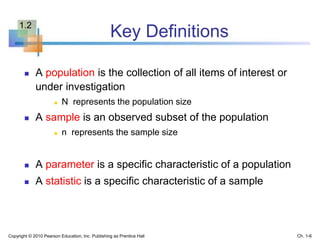
 A population is the collection of all items of interest or
under investigation
 N represents the population size
 A sample is an observed subset of the population
 n represents the sample size
 A parameter is a specific characteristic of a population
 A statistic is a specific characteristic of a sample
Copyright © 2010 Pearson Education, Inc. Publishing as Prentice Hall Ch. 1-6
1.2
Population vs. Sample
Copyright © 2010 Pearson Education, Inc. Publishing as Prentice Hall Ch. 1-7
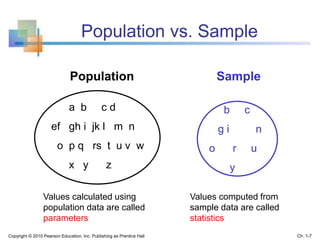
a b c d
ef gh i jk l m n
o p q rs t u v w
x y z
Population Sample
Values calculated using
population data are called
parameters
Values computed from
sample data are called
statistics
b c
g i n
o r u
y
Examples of Populations
 Names of all registered voters in the United
States
 Incomes of all families living in Daytona Beach
 Annual returns of all stocks traded on the New
York Stock Exchange
 Grade point averages of all the students in your
university
Copyright © 2010 Pearson Education, Inc. Publishing as Prentice Hall Ch. 1-8
Random Sampling
Simple random sampling is a procedure in which
 each member of the population is chosen strictly by
chance,
 each member of the population is equally likely to be
chosen,
 every possible sample of n objects is equally likely to
be chosen
The resulting sample is called a random sample
Copyright © 2010 Pearson Education, Inc. Publishing as Prentice Hall Ch. 1-9
Descriptive and Inferential Statistics
Two branches of statistics:
 Descriptive statistics
 Graphical and numerical procedures to summarize
and process data
 Inferential statistics
 Using data to make predictions, forecasts, and
estimates to assist decision making
Copyright © 2010 Pearson Education, Inc. Publishing as Prentice Hall Ch. 1-10
Descriptive Statistics
 Collect data
 e.g., Survey
 Present data
 e.g., Tables and graphs
 Summarize data
 e.g., Sample mean =
Copyright © 2010 Pearson Education, Inc. Publishing as Prentice Hall Ch. 1-11
iX
n

Inferential Statistics
Copyright © 2010 Pearson Education, Inc. Publishing as Prentice Hall Ch. 1-12
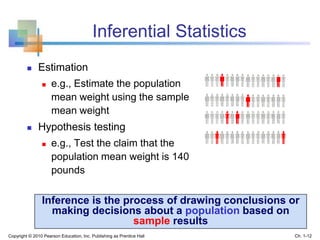
 Estimation
 e.g., Estimate the population
mean weight using the sample
mean weight
 Hypothesis testing
 e.g., Test the claim that the
population mean weight is 140
pounds
Inference is the process of drawing conclusions or
making decisions about a population based on
sample results
Types of Data
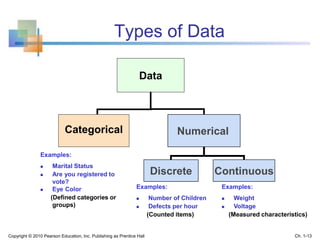
Data
Categorical Numerical
Discrete Continuous
Examples:
 Marital Status
 Are you registered to
vote?
 Eye Color
(Defined categories or
groups)
Examples:
 Number of Children
 Defects per hour
(Counted items)
Examples:
 Weight
 Voltage
(Measured characteristics)
Copyright © 2010 Pearson Education, Inc. Publishing as Prentice Hall Ch. 1-13
Measurement Levels
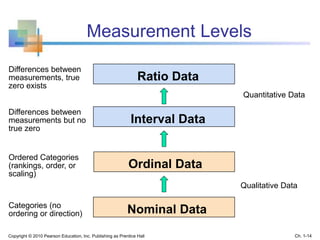
Interval Data
Ordinal Data
Nominal Data
Quantitative Data
Qualitative Data
Categories (no
ordering or direction)
Ordered Categories
(rankings, order, or
scaling)
Differences between
measurements but no
true zero
Ratio Data
Differences between
measurements, true
zero exists
Copyright © 2010 Pearson Education, Inc. Publishing as Prentice Hall Ch. 1-14
Graphical
Presentation of Data
 Data in raw form are usually not easy to use
for decision making
 Some type of organization is needed
 Table
 Graph
 The type of graph to use depends on the
variable being summarized
Copyright © 2010 Pearson Education, Inc. Publishing as Prentice Hall Ch. 1-15
1.3
Graphical
Presentation of Data
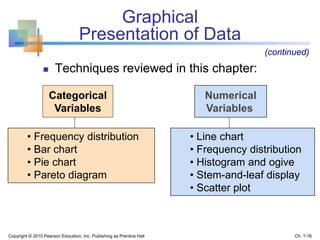
 Techniques reviewed in this chapter:
Categorical
Variables
Numerical
Variables
• Frequency distribution
• Bar chart
• Pie chart
• Pareto diagram
• Line chart
• Frequency distribution
• Histogram and ogive
• Stem-and-leaf display
• Scatter plot
(continued)
Copyright © 2010 Pearson Education, Inc. Publishing as Prentice Hall Ch. 1-16
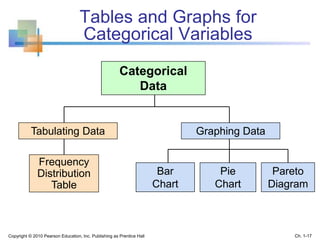
Tables and Graphs for
Categorical Variables
Categorical
Data
Graphing Data
Pie
Chart
Pareto
Diagram
Bar
Chart
Frequency
Distribution
Table
Tabulating Data
Copyright © 2010 Pearson Education, Inc. Publishing as Prentice Hall Ch. 1-17
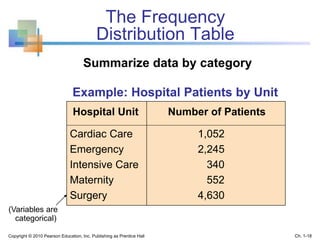
The Frequency
Distribution Table
Example: Hospital Patients by Unit
Hospital Unit Number of Patients
Cardiac Care 1,052
Emergency 2,245
Intensive Care 340
Maternity 552
Surgery 4,630
(Variables are
categorical)
Summarize data by category
Copyright © 2010 Pearson Education, Inc. Publishing as Prentice Hall Ch. 1-18
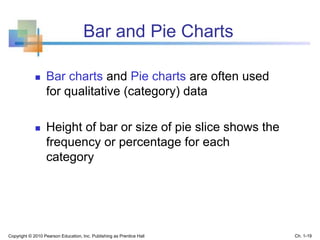
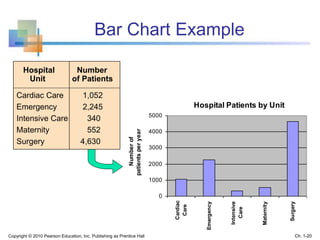
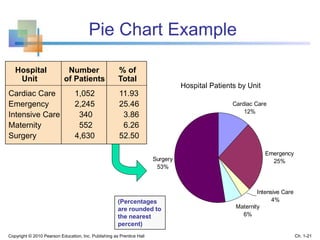
Bar and Pie Charts
 Bar charts and Pie charts are often used
for qualitative (category) data
 Height of bar or size of pie slice shows the
frequency or percentage for each
category
Copyright © 2010 Pearson Education, Inc. Publishing as Prentice Hall Ch. 1-19
Bar Chart Example
Hospital Patients by Unit
0
1000
2000
3000
4000
5000
Cardiac
Care
Emergency
Intensive
Care
Maternity
Surgery
Numberof
patientsperyear
Hospital Number
Unit of Patients
Cardiac Care 1,052
Emergency 2,245
Intensive Care 340
Maternity 552
Surgery 4,630
Copyright © 2010 Pearson Education, Inc. Publishing as Prentice Hall Ch. 1-20
Hospital Patients by Unit
Emergency
25%
Maternity
6%
Surgery
53%
Cardiac Care
12%
Intensive Care
4%
Pie Chart Example
(Percentages
are rounded to
the nearest
percent)
Hospital Number % of
Unit of Patients Total
Cardiac Care 1,052 11.93
Emergency 2,245 25.46
Intensive Care 340 3.86
Maternity 552 6.26
Surgery 4,630 52.50
Copyright © 2010 Pearson Education, Inc. Publishing as Prentice Hall Ch. 1-21
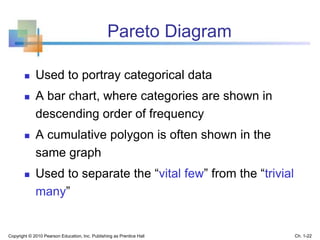
Pareto Diagram
 Used to portray categorical data
 A bar chart, where categories are shown in
descending order of frequency
 A cumulative polygon is often shown in the
same graph
 Used to separate the “vital few” from the “trivial
many”
Copyright © 2010 Pearson Education, Inc. Publishing as Prentice Hall Ch. 1-22
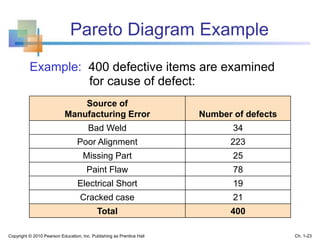
Pareto Diagram Example
Example: 400 defective items are examined
for cause of defect:
Source of
Manufacturing Error Number of defects
Bad Weld 34
Poor Alignment 223
Missing Part 25
Paint Flaw 78
Electrical Short 19
Cracked case 21
Total 400
Copyright © 2010 Pearson Education, Inc. Publishing as Prentice Hall Ch. 1-23
Pareto Diagram Example
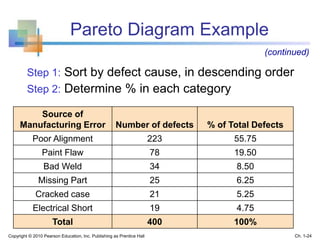
Step 1: Sort by defect cause, in descending order
Step 2: Determine % in each category
Source of
Manufacturing Error Number of defects % of Total Defects
Poor Alignment 223 55.75
Paint Flaw 78 19.50
Bad Weld 34 8.50
Missing Part 25 6.25
Cracked case 21 5.25
Electrical Short 19 4.75
Total 400 100%
(continued)
Copyright © 2010 Pearson Education, Inc. Publishing as Prentice Hall Ch. 1-24
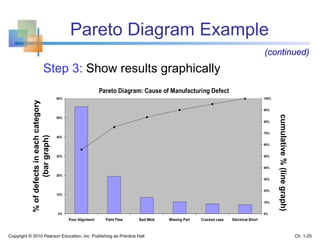
Pareto Diagram Example
cumulative%(linegraph)
%ofdefectsineachcategory
(bargraph)
Pareto Diagram: Cause of Manufacturing Defect
0%
10%
20%
30%
40%
50%
60%
Poor Alignment Paint Flaw Bad Weld Missing Part Cracked case Electrical Short
0%
10%
20%
30%
40%
50%
60%
70%
80%
90%
100%
Step 3: Show results graphically
(continued)
Copyright © 2010 Pearson Education, Inc. Publishing as Prentice Hall Ch. 1-25
Graphs for Time-Series Data
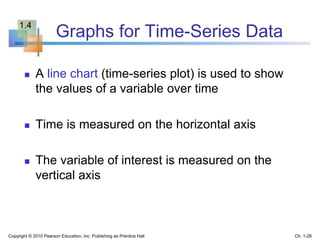
 A line chart (time-series plot) is used to show
the values of a variable over time
 Time is measured on the horizontal axis
 The variable of interest is measured on the
vertical axis
Copyright © 2010 Pearson Education, Inc. Publishing as Prentice Hall Ch. 1-26
1.4
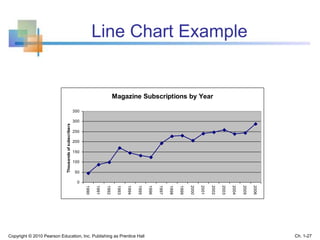
Line Chart Example
Magazine Subscriptions by Year
0
50
100
150
200
250
300
350
1990
1991
1992
1993
1994
1995
1996
1997
1998
1999
2000
2001
2002
2003
2004
2005
2006
Thousandsofsubscribers
Copyright © 2010 Pearson Education, Inc. Publishing as Prentice Hall Ch. 1-27
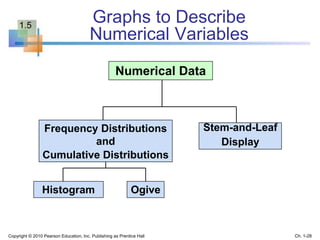
Numerical Data
Stem-and-Leaf
Display
Histogram Ogive
Frequency Distributions
and
Cumulative Distributions
Graphs to Describe
Numerical Variables
Copyright © 2010 Pearson Education, Inc. Publishing as Prentice Hall Ch. 1-28
1.5
Frequency Distributions
What is a Frequency Distribution?
 A frequency distribution is a list or a table …
 containing class groupings (categories or
ranges within which the data fall) ...
 and the corresponding frequencies with which
data fall within each class or category
Copyright © 2010 Pearson Education, Inc. Publishing as Prentice Hall Ch. 1-29
Why Use Frequency Distributions?
 A frequency distribution is a way to
summarize data
 The distribution condenses the raw data
into a more useful form...
 and allows for a quick visual interpretation
of the data
Copyright © 2010 Pearson Education, Inc. Publishing as Prentice Hall Ch. 1-30
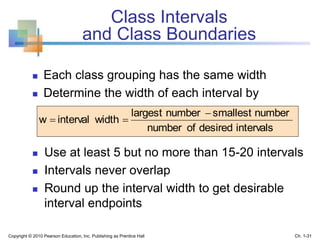
Class Intervals
and Class Boundaries
 Each class grouping has the same width
 Determine the width of each interval by
 Use at least 5 but no more than 15-20 intervals
 Intervals never overlap
 Round up the interval width to get desirable
interval endpoints
intervalsdesiredofnumber
numbersmallestnumberlargest
widthintervalw


Copyright © 2010 Pearson Education, Inc. Publishing as Prentice Hall Ch. 1-31
Frequency Distribution Example
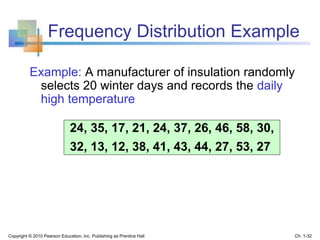
Example: A manufacturer of insulation randomly
selects 20 winter days and records the daily
high temperature
24, 35, 17, 21, 24, 37, 26, 46, 58, 30,
32, 13, 12, 38, 41, 43, 44, 27, 53, 27
Copyright © 2010 Pearson Education, Inc. Publishing as Prentice Hall Ch. 1-32
Frequency Distribution Example
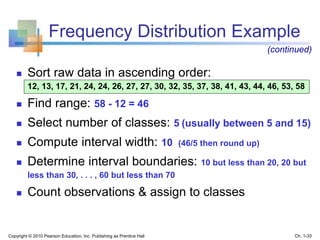
 Sort raw data in ascending order:
12, 13, 17, 21, 24, 24, 26, 27, 27, 30, 32, 35, 37, 38, 41, 43, 44, 46, 53, 58
 Find range: 58 - 12 = 46
 Select number of classes: 5 (usually between 5 and 15)
 Compute interval width: 10 (46/5 then round up)
 Determine interval boundaries: 10 but less than 20, 20 but
less than 30, . . . , 60 but less than 70
 Count observations & assign to classes
(continued)
Copyright © 2010 Pearson Education, Inc. Publishing as Prentice Hall Ch. 1-33
Frequency Distribution Example
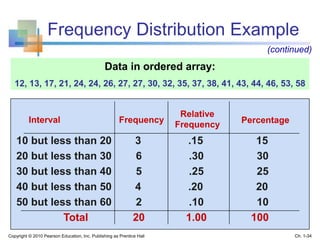
Interval Frequency
10 but less than 20 3 .15 15
20 but less than 30 6 .30 30
30 but less than 40 5 .25 25
40 but less than 50 4 .20 20
50 but less than 60 2 .10 10
Total 20 1.00 100
Relative
Frequency Percentage
Data in ordered array:
12, 13, 17, 21, 24, 24, 26, 27, 27, 30, 32, 35, 37, 38, 41, 43, 44, 46, 53, 58
(continued)
Copyright © 2010 Pearson Education, Inc. Publishing as Prentice Hall Ch. 1-34
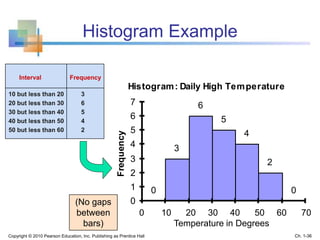
Histogram
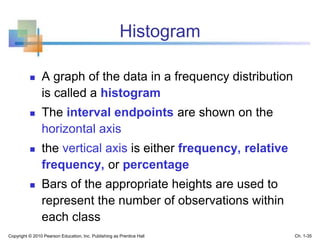
 A graph of the data in a frequency distribution
is called a histogram
 The interval endpoints are shown on the
horizontal axis
 the vertical axis is either frequency, relative
frequency, or percentage
 Bars of the appropriate heights are used to
represent the number of observations within
each class
Copyright © 2010 Pearson Education, Inc. Publishing as Prentice Hall Ch. 1-35
Histogram: Daily High Temperature
0
3
6
5
4
2
0
0
1
2
3
4
5
6
7
0 10 20 30 40 50 60
Frequency
Temperature in Degrees
Histogram Example
(No gaps
between
bars)
Interval
10 but less than 20 3
20 but less than 30 6
30 but less than 40 5
40 but less than 50 4
50 but less than 60 2
Frequency
0 10 20 30 40 50 60 70
Copyright © 2010 Pearson Education, Inc. Publishing as Prentice Hall Ch. 1-36
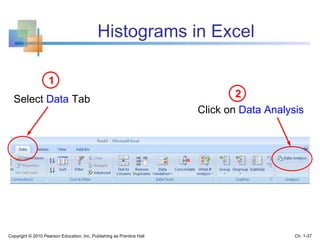
Histograms in Excel
Select Data Tab
1
Copyright © 2010 Pearson Education, Inc. Publishing as Prentice Hall Ch. 1-37
Click on Data Analysis
2
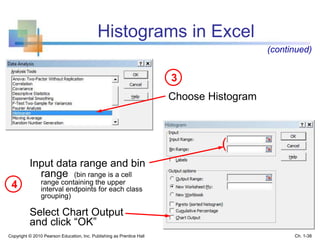
Choose Histogram
3
4
Input data range and bin
range (bin range is a cell
range containing the upper
interval endpoints for each class
grouping)
Select Chart Output
and click “OK”
Histograms in Excel
(continued)
(
Copyright © 2010 Pearson Education, Inc. Publishing as Prentice Hall Ch. 1-38
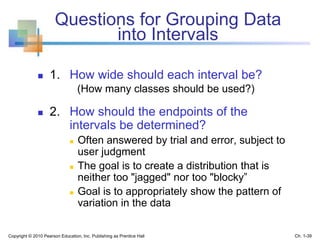
Questions for Grouping Data
into Intervals
 1. How wide should each interval be?
(How many classes should be used?)
 2. How should the endpoints of the
intervals be determined?
 Often answered by trial and error, subject to
user judgment
 The goal is to create a distribution that is
neither too "jagged" nor too "blocky”
 Goal is to appropriately show the pattern of
variation in the data
Copyright © 2010 Pearson Education, Inc. Publishing as Prentice Hall Ch. 1-39
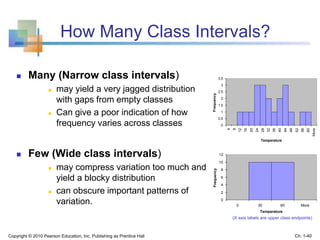
How Many Class Intervals?
 Many (Narrow class intervals)
 may yield a very jagged distribution
with gaps from empty classes
 Can give a poor indication of how
frequency varies across classes
 Few (Wide class intervals)
 may compress variation too much and
yield a blocky distribution
 can obscure important patterns of
variation. 0
2
4
6
8
10
12
0 30 60 More
Temperature
Frequency
0
0.5
1
1.5
2
2.5
3
3.5
4
8
12
16
20
24
28
32
36
40
44
48
52
56
60
More
Temperature
Frequency
(X axis labels are upper class endpoints)
Copyright © 2010 Pearson Education, Inc. Publishing as Prentice Hall Ch. 1-40
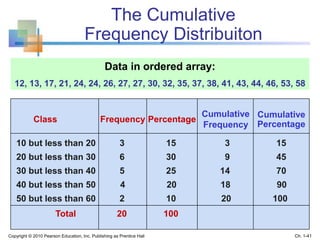
The Cumulative
Frequency Distribuiton
Class
10 but less than 20 3 15 3 15
20 but less than 30 6 30 9 45
30 but less than 40 5 25 14 70
40 but less than 50 4 20 18 90
50 but less than 60 2 10 20 100
Total 20 100
Percentage
Cumulative
Percentage
Data in ordered array:
12, 13, 17, 21, 24, 24, 26, 27, 27, 30, 32, 35, 37, 38, 41, 43, 44, 46, 53, 58
Frequency
Cumulative
Frequency
Copyright © 2010 Pearson Education, Inc. Publishing as Prentice Hall Ch. 1-41
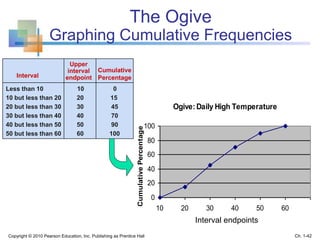
The Ogive
Graphing Cumulative Frequencies
Ogive: Daily High Temperature
0
20
40
60
80
100
10 20 30 40 50 60
CumulativePercentage
Interval endpoints
Interval
Less than 10 10 0
10 but less than 20 20 15
20 but less than 30 30 45
30 but less than 40 40 70
40 but less than 50 50 90
50 but less than 60 60 100
Cumulative
Percentage
Upper
interval
endpoint
Copyright © 2010 Pearson Education, Inc. Publishing as Prentice Hall Ch. 1-42
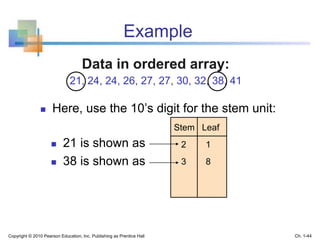
Stem-and-Leaf Diagram
 A simple way to see distribution details in a
data set
METHOD: Separate the sorted data series
into leading digits (the stem) and
the trailing digits (the leaves)
Copyright © 2010 Pearson Education, Inc. Publishing as Prentice Hall Ch. 1-43
Example
 Here, use the 10’s digit for the stem unit:
Data in ordered array:
21, 24, 24, 26, 27, 27, 30, 32, 38, 41
 21 is shown as
 38 is shown as
Stem Leaf
2 1
3 8
Copyright © 2010 Pearson Education, Inc. Publishing as Prentice Hall Ch. 1-44
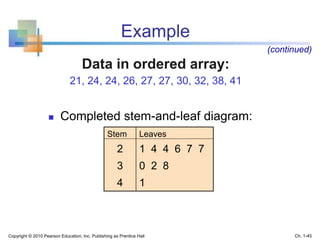
Example
 Completed stem-and-leaf diagram:
Stem Leaves
2 1 4 4 6 7 7
3 0 2 8
4 1
(continued)
Data in ordered array:
21, 24, 24, 26, 27, 27, 30, 32, 38, 41
Copyright © 2010 Pearson Education, Inc. Publishing as Prentice Hall Ch. 1-45
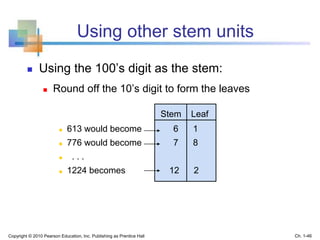
Using other stem units
 Using the 100’s digit as the stem:
 Round off the 10’s digit to form the leaves
 613 would become 6 1
 776 would become 7 8
 . . .
 1224 becomes 12 2
Stem Leaf
Copyright © 2010 Pearson Education, Inc. Publishing as Prentice Hall Ch. 1-46
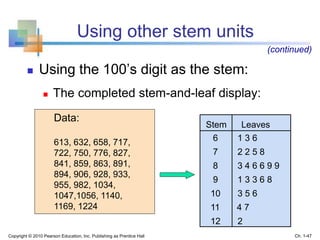
Using other stem units
 Using the 100’s digit as the stem:
 The completed stem-and-leaf display:
Stem Leaves
(continued)
6 1 3 6
7 2 2 5 8
8 3 4 6 6 9 9
9 1 3 3 6 8
10 3 5 6
11 4 7
12 2
Data:
613, 632, 658, 717,
722, 750, 776, 827,
841, 859, 863, 891,
894, 906, 928, 933,
955, 982, 1034,
1047,1056, 1140,
1169, 1224
Copyright © 2010 Pearson Education, Inc. Publishing as Prentice Hall Ch. 1-47
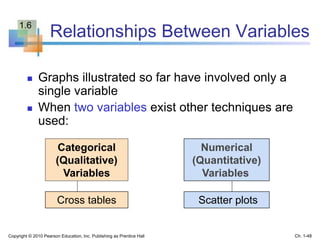
Relationships Between Variables
 Graphs illustrated so far have involved only a
single variable
 When two variables exist other techniques are
used:
Categorical
(Qualitative)
Variables
Numerical
(Quantitative)
Variables
Cross tables Scatter plots
Copyright © 2010 Pearson Education, Inc. Publishing as Prentice Hall Ch. 1-48
1.6
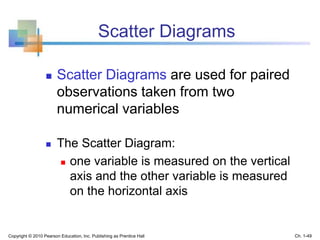
 Scatter Diagrams are used for paired
observations taken from two
numerical variables
 The Scatter Diagram:
 one variable is measured on the vertical
axis and the other variable is measured
on the horizontal axis
Scatter Diagrams
Copyright © 2010 Pearson Education, Inc. Publishing as Prentice Hall Ch. 1-49
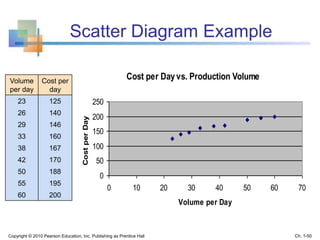
Scatter Diagram Example
Cost per Dayvs. Production Volume
0
50
100
150
200
250
0 10 20 30 40 50 60 70
Volume per Day
CostperDay
Volume
per day
Cost per
day
23 125
26 140
29 146
33 160
38 167
42 170
50 188
55 195
60 200
Copyright © 2010 Pearson Education, Inc. Publishing as Prentice Hall Ch. 1-50
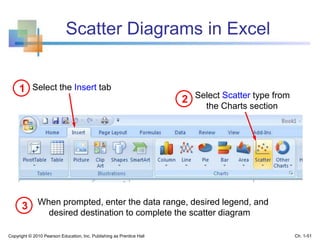
Scatter Diagrams in Excel
Select the Insert tab1
2 Select Scatter type from
the Charts section
When prompted, enter the data range, desired legend, and
desired destination to complete the scatter diagram
3
Copyright © 2010 Pearson Education, Inc. Publishing as Prentice Hall Ch. 1-51
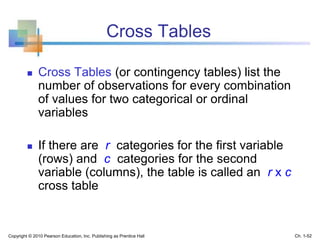
Cross Tables
 Cross Tables (or contingency tables) list the
number of observations for every combination
of values for two categorical or ordinal
variables
 If there are r categories for the first variable
(rows) and c categories for the second
variable (columns), the table is called an r x c
cross table
Copyright © 2010 Pearson Education, Inc. Publishing as Prentice Hall Ch. 1-52
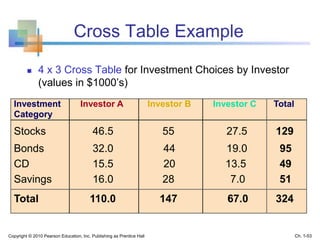
Cross Table Example
 4 x 3 Cross Table for Investment Choices by Investor
(values in $1000’s)
Investment Investor A Investor B Investor C Total
Category
Stocks 46.5 55 27.5 129
Bonds 32.0 44 19.0 95
CD 15.5 20 13.5 49
Savings 16.0 28 7.0 51
Total 110.0 147 67.0 324
Copyright © 2010 Pearson Education, Inc. Publishing as Prentice Hall Ch. 1-53
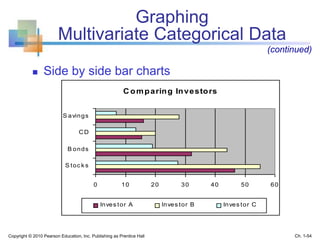
Graphing
Multivariate Categorical Data
 Side by side bar charts
(continued)
C omparing Investors
0 10 20 30 40 50 60
S toc k s
B onds
CD
S avings
Inves tor A Inves tor B Inves tor C
Copyright © 2010 Pearson Education, Inc. Publishing as Prentice Hall Ch. 1-54
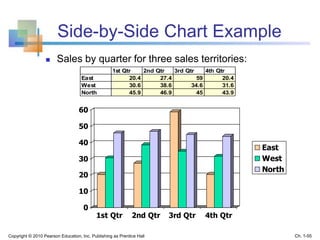
Side-by-Side Chart Example
 Sales by quarter for three sales territories:
0
10
20
30
40
50
60
1st Qtr 2nd Qtr 3rd Qtr 4th Qtr
East
West
North
1st Qtr 2nd Qtr 3rd Qtr 4th Qtr
East 20.4 27.4 59 20.4
West 30.6 38.6 34.6 31.6
North 45.9 46.9 45 43.9
Copyright © 2010 Pearson Education, Inc. Publishing as Prentice Hall Ch. 1-55
Data Presentation Errors
Goals for effective data presentation:
 Present data to display essential information
 Communicate complex ideas clearly and
accurately
 Avoid distortion that might convey the wrong
message
Copyright © 2010 Pearson Education, Inc. Publishing as Prentice Hall Ch. 1-56
1.7
Data Presentation Errors
 Unequal histogram interval widths
 Compressing or distorting the
vertical axis
 Providing no zero point on the
vertical axis
 Failing to provide a relative basis
in comparing data between
groups
(continued)
Copyright © 2010 Pearson Education, Inc. Publishing as Prentice Hall Ch. 1-57
Chapter Summary
 Reviewed incomplete information in decision
making
 Introduced key definitions:
 Population vs. Sample
 Parameter vs. Statistic
 Descriptive vs. Inferential statistics
 Described random sampling
 Examined the decision making process
Copyright © 2010 Pearson Education, Inc. Publishing as Prentice Hall Ch. 1-58
Chapter Summary
 Reviewed types of data and measurement levels
 Data in raw form are usually not easy to use for decision
making -- Some type of organization is needed:
 Table  Graph
 Techniques reviewed in this chapter:
 Frequency distribution
 Bar chart
 Pie chart
 Pareto diagram
 Line chart
 Frequency distribution
 Histogram and ogive
 Stem-and-leaf display
 Scatter plot
 Cross tables and
side-by-side bar charts
Copyright © 2010 Pearson Education, Inc. Publishing as Prentice Hall Ch. 1-59
(continued)

Chap01 describing data; graphical

  • 1.
    Chapter 1 Describing Data:Graphical Statistics for Business and Economics 7th Edition Copyright © 2010 Pearson Education, Inc. Publishing as Prentice Hall Ch. 1-1
  • 2.
    After completing thischapter, you should be able to:  Explain how decisions are often based on incomplete information  Explain key definitions:  Population vs. Sample  Parameter vs. Statistic  Descriptive vs. Inferential Statistics  Describe random sampling  Explain the difference between Descriptive and Inferential statistics  Identify types of data and levels of measurement Copyright © 2010 Pearson Education, Inc. Publishing as Prentice Hall Ch. 1-2 Chapter Goals
  • 3.
    After completing thischapter, you should be able to:  Create and interpret graphs to describe categorical variables:  frequency distribution, bar chart, pie chart, Pareto diagram  Create a line chart to describe time-series data  Create and interpret graphs to describe numerical variables:  frequency distribution, histogram, ogive, stem-and-leaf display  Construct and interpret graphs to describe relationships between variables:  Scatter plot, cross table  Describe appropriate and inappropriate ways to display data graphically Copyright © 2010 Pearson Education, Inc. Publishing as Prentice Hall Ch. 1-3 Chapter Goals (continued)
  • 4.
    Dealing with Uncertainty Everydaydecisions are based on incomplete information Consider:  Will the job market be strong when I graduate?  Will the price of Yahoo stock be higher in six months than it is now?  Will interest rates remain low for the rest of the year if the federal budget deficit is as high as predicted? Copyright © 2010 Pearson Education, Inc. Publishing as Prentice Hall Ch. 1-4 1.1
  • 5.
    Dealing with Uncertainty Numbersand data are used to assist decision making  Statistics is a tool to help process, summarize, analyze, and interpret data Copyright © 2010 Pearson Education, Inc. Publishing as Prentice Hall Ch. 1-5 (continued)
  • 6.
    Key Definitions  Apopulation is the collection of all items of interest or under investigation  N represents the population size  A sample is an observed subset of the population  n represents the sample size  A parameter is a specific characteristic of a population  A statistic is a specific characteristic of a sample Copyright © 2010 Pearson Education, Inc. Publishing as Prentice Hall Ch. 1-6 1.2
  • 7.
    Population vs. Sample Copyright© 2010 Pearson Education, Inc. Publishing as Prentice Hall Ch. 1-7 a b c d ef gh i jk l m n o p q rs t u v w x y z Population Sample Values calculated using population data are called parameters Values computed from sample data are called statistics b c g i n o r u y
  • 8.
    Examples of Populations Names of all registered voters in the United States  Incomes of all families living in Daytona Beach  Annual returns of all stocks traded on the New York Stock Exchange  Grade point averages of all the students in your university Copyright © 2010 Pearson Education, Inc. Publishing as Prentice Hall Ch. 1-8
  • 9.
    Random Sampling Simple randomsampling is a procedure in which  each member of the population is chosen strictly by chance,  each member of the population is equally likely to be chosen,  every possible sample of n objects is equally likely to be chosen The resulting sample is called a random sample Copyright © 2010 Pearson Education, Inc. Publishing as Prentice Hall Ch. 1-9
  • 10.
    Descriptive and InferentialStatistics Two branches of statistics:  Descriptive statistics  Graphical and numerical procedures to summarize and process data  Inferential statistics  Using data to make predictions, forecasts, and estimates to assist decision making Copyright © 2010 Pearson Education, Inc. Publishing as Prentice Hall Ch. 1-10
  • 11.
    Descriptive Statistics  Collectdata  e.g., Survey  Present data  e.g., Tables and graphs  Summarize data  e.g., Sample mean = Copyright © 2010 Pearson Education, Inc. Publishing as Prentice Hall Ch. 1-11 iX n 
  • 12.
    Inferential Statistics Copyright ©2010 Pearson Education, Inc. Publishing as Prentice Hall Ch. 1-12  Estimation  e.g., Estimate the population mean weight using the sample mean weight  Hypothesis testing  e.g., Test the claim that the population mean weight is 140 pounds Inference is the process of drawing conclusions or making decisions about a population based on sample results
  • 13.
    Types of Data Data CategoricalNumerical Discrete Continuous Examples:  Marital Status  Are you registered to vote?  Eye Color (Defined categories or groups) Examples:  Number of Children  Defects per hour (Counted items) Examples:  Weight  Voltage (Measured characteristics) Copyright © 2010 Pearson Education, Inc. Publishing as Prentice Hall Ch. 1-13
  • 14.
    Measurement Levels Interval Data OrdinalData Nominal Data Quantitative Data Qualitative Data Categories (no ordering or direction) Ordered Categories (rankings, order, or scaling) Differences between measurements but no true zero Ratio Data Differences between measurements, true zero exists Copyright © 2010 Pearson Education, Inc. Publishing as Prentice Hall Ch. 1-14
  • 15.
    Graphical Presentation of Data Data in raw form are usually not easy to use for decision making  Some type of organization is needed  Table  Graph  The type of graph to use depends on the variable being summarized Copyright © 2010 Pearson Education, Inc. Publishing as Prentice Hall Ch. 1-15 1.3
  • 16.
    Graphical Presentation of Data Techniques reviewed in this chapter: Categorical Variables Numerical Variables • Frequency distribution • Bar chart • Pie chart • Pareto diagram • Line chart • Frequency distribution • Histogram and ogive • Stem-and-leaf display • Scatter plot (continued) Copyright © 2010 Pearson Education, Inc. Publishing as Prentice Hall Ch. 1-16
  • 17.
    Tables and Graphsfor Categorical Variables Categorical Data Graphing Data Pie Chart Pareto Diagram Bar Chart Frequency Distribution Table Tabulating Data Copyright © 2010 Pearson Education, Inc. Publishing as Prentice Hall Ch. 1-17
  • 18.
    The Frequency Distribution Table Example:Hospital Patients by Unit Hospital Unit Number of Patients Cardiac Care 1,052 Emergency 2,245 Intensive Care 340 Maternity 552 Surgery 4,630 (Variables are categorical) Summarize data by category Copyright © 2010 Pearson Education, Inc. Publishing as Prentice Hall Ch. 1-18
  • 19.
    Bar and PieCharts  Bar charts and Pie charts are often used for qualitative (category) data  Height of bar or size of pie slice shows the frequency or percentage for each category Copyright © 2010 Pearson Education, Inc. Publishing as Prentice Hall Ch. 1-19
  • 20.
    Bar Chart Example HospitalPatients by Unit 0 1000 2000 3000 4000 5000 Cardiac Care Emergency Intensive Care Maternity Surgery Numberof patientsperyear Hospital Number Unit of Patients Cardiac Care 1,052 Emergency 2,245 Intensive Care 340 Maternity 552 Surgery 4,630 Copyright © 2010 Pearson Education, Inc. Publishing as Prentice Hall Ch. 1-20
  • 21.
    Hospital Patients byUnit Emergency 25% Maternity 6% Surgery 53% Cardiac Care 12% Intensive Care 4% Pie Chart Example (Percentages are rounded to the nearest percent) Hospital Number % of Unit of Patients Total Cardiac Care 1,052 11.93 Emergency 2,245 25.46 Intensive Care 340 3.86 Maternity 552 6.26 Surgery 4,630 52.50 Copyright © 2010 Pearson Education, Inc. Publishing as Prentice Hall Ch. 1-21
  • 22.
    Pareto Diagram  Usedto portray categorical data  A bar chart, where categories are shown in descending order of frequency  A cumulative polygon is often shown in the same graph  Used to separate the “vital few” from the “trivial many” Copyright © 2010 Pearson Education, Inc. Publishing as Prentice Hall Ch. 1-22
  • 23.
    Pareto Diagram Example Example:400 defective items are examined for cause of defect: Source of Manufacturing Error Number of defects Bad Weld 34 Poor Alignment 223 Missing Part 25 Paint Flaw 78 Electrical Short 19 Cracked case 21 Total 400 Copyright © 2010 Pearson Education, Inc. Publishing as Prentice Hall Ch. 1-23
  • 24.
    Pareto Diagram Example Step1: Sort by defect cause, in descending order Step 2: Determine % in each category Source of Manufacturing Error Number of defects % of Total Defects Poor Alignment 223 55.75 Paint Flaw 78 19.50 Bad Weld 34 8.50 Missing Part 25 6.25 Cracked case 21 5.25 Electrical Short 19 4.75 Total 400 100% (continued) Copyright © 2010 Pearson Education, Inc. Publishing as Prentice Hall Ch. 1-24
  • 25.
    Pareto Diagram Example cumulative%(linegraph) %ofdefectsineachcategory (bargraph) ParetoDiagram: Cause of Manufacturing Defect 0% 10% 20% 30% 40% 50% 60% Poor Alignment Paint Flaw Bad Weld Missing Part Cracked case Electrical Short 0% 10% 20% 30% 40% 50% 60% 70% 80% 90% 100% Step 3: Show results graphically (continued) Copyright © 2010 Pearson Education, Inc. Publishing as Prentice Hall Ch. 1-25
  • 26.
    Graphs for Time-SeriesData  A line chart (time-series plot) is used to show the values of a variable over time  Time is measured on the horizontal axis  The variable of interest is measured on the vertical axis Copyright © 2010 Pearson Education, Inc. Publishing as Prentice Hall Ch. 1-26 1.4
  • 27.
    Line Chart Example MagazineSubscriptions by Year 0 50 100 150 200 250 300 350 1990 1991 1992 1993 1994 1995 1996 1997 1998 1999 2000 2001 2002 2003 2004 2005 2006 Thousandsofsubscribers Copyright © 2010 Pearson Education, Inc. Publishing as Prentice Hall Ch. 1-27
  • 28.
    Numerical Data Stem-and-Leaf Display Histogram Ogive FrequencyDistributions and Cumulative Distributions Graphs to Describe Numerical Variables Copyright © 2010 Pearson Education, Inc. Publishing as Prentice Hall Ch. 1-28 1.5
  • 29.
    Frequency Distributions What isa Frequency Distribution?  A frequency distribution is a list or a table …  containing class groupings (categories or ranges within which the data fall) ...  and the corresponding frequencies with which data fall within each class or category Copyright © 2010 Pearson Education, Inc. Publishing as Prentice Hall Ch. 1-29
  • 30.
    Why Use FrequencyDistributions?  A frequency distribution is a way to summarize data  The distribution condenses the raw data into a more useful form...  and allows for a quick visual interpretation of the data Copyright © 2010 Pearson Education, Inc. Publishing as Prentice Hall Ch. 1-30
  • 31.
    Class Intervals and ClassBoundaries  Each class grouping has the same width  Determine the width of each interval by  Use at least 5 but no more than 15-20 intervals  Intervals never overlap  Round up the interval width to get desirable interval endpoints intervalsdesiredofnumber numbersmallestnumberlargest widthintervalw   Copyright © 2010 Pearson Education, Inc. Publishing as Prentice Hall Ch. 1-31
  • 32.
    Frequency Distribution Example Example:A manufacturer of insulation randomly selects 20 winter days and records the daily high temperature 24, 35, 17, 21, 24, 37, 26, 46, 58, 30, 32, 13, 12, 38, 41, 43, 44, 27, 53, 27 Copyright © 2010 Pearson Education, Inc. Publishing as Prentice Hall Ch. 1-32
  • 33.
    Frequency Distribution Example Sort raw data in ascending order: 12, 13, 17, 21, 24, 24, 26, 27, 27, 30, 32, 35, 37, 38, 41, 43, 44, 46, 53, 58  Find range: 58 - 12 = 46  Select number of classes: 5 (usually between 5 and 15)  Compute interval width: 10 (46/5 then round up)  Determine interval boundaries: 10 but less than 20, 20 but less than 30, . . . , 60 but less than 70  Count observations & assign to classes (continued) Copyright © 2010 Pearson Education, Inc. Publishing as Prentice Hall Ch. 1-33
  • 34.
    Frequency Distribution Example IntervalFrequency 10 but less than 20 3 .15 15 20 but less than 30 6 .30 30 30 but less than 40 5 .25 25 40 but less than 50 4 .20 20 50 but less than 60 2 .10 10 Total 20 1.00 100 Relative Frequency Percentage Data in ordered array: 12, 13, 17, 21, 24, 24, 26, 27, 27, 30, 32, 35, 37, 38, 41, 43, 44, 46, 53, 58 (continued) Copyright © 2010 Pearson Education, Inc. Publishing as Prentice Hall Ch. 1-34
  • 35.
    Histogram  A graphof the data in a frequency distribution is called a histogram  The interval endpoints are shown on the horizontal axis  the vertical axis is either frequency, relative frequency, or percentage  Bars of the appropriate heights are used to represent the number of observations within each class Copyright © 2010 Pearson Education, Inc. Publishing as Prentice Hall Ch. 1-35
  • 36.
    Histogram: Daily HighTemperature 0 3 6 5 4 2 0 0 1 2 3 4 5 6 7 0 10 20 30 40 50 60 Frequency Temperature in Degrees Histogram Example (No gaps between bars) Interval 10 but less than 20 3 20 but less than 30 6 30 but less than 40 5 40 but less than 50 4 50 but less than 60 2 Frequency 0 10 20 30 40 50 60 70 Copyright © 2010 Pearson Education, Inc. Publishing as Prentice Hall Ch. 1-36
  • 37.
    Histograms in Excel SelectData Tab 1 Copyright © 2010 Pearson Education, Inc. Publishing as Prentice Hall Ch. 1-37 Click on Data Analysis 2
  • 38.
    Choose Histogram 3 4 Input datarange and bin range (bin range is a cell range containing the upper interval endpoints for each class grouping) Select Chart Output and click “OK” Histograms in Excel (continued) ( Copyright © 2010 Pearson Education, Inc. Publishing as Prentice Hall Ch. 1-38
  • 39.
    Questions for GroupingData into Intervals  1. How wide should each interval be? (How many classes should be used?)  2. How should the endpoints of the intervals be determined?  Often answered by trial and error, subject to user judgment  The goal is to create a distribution that is neither too "jagged" nor too "blocky”  Goal is to appropriately show the pattern of variation in the data Copyright © 2010 Pearson Education, Inc. Publishing as Prentice Hall Ch. 1-39
  • 40.
    How Many ClassIntervals?  Many (Narrow class intervals)  may yield a very jagged distribution with gaps from empty classes  Can give a poor indication of how frequency varies across classes  Few (Wide class intervals)  may compress variation too much and yield a blocky distribution  can obscure important patterns of variation. 0 2 4 6 8 10 12 0 30 60 More Temperature Frequency 0 0.5 1 1.5 2 2.5 3 3.5 4 8 12 16 20 24 28 32 36 40 44 48 52 56 60 More Temperature Frequency (X axis labels are upper class endpoints) Copyright © 2010 Pearson Education, Inc. Publishing as Prentice Hall Ch. 1-40
  • 41.
    The Cumulative Frequency Distribuiton Class 10but less than 20 3 15 3 15 20 but less than 30 6 30 9 45 30 but less than 40 5 25 14 70 40 but less than 50 4 20 18 90 50 but less than 60 2 10 20 100 Total 20 100 Percentage Cumulative Percentage Data in ordered array: 12, 13, 17, 21, 24, 24, 26, 27, 27, 30, 32, 35, 37, 38, 41, 43, 44, 46, 53, 58 Frequency Cumulative Frequency Copyright © 2010 Pearson Education, Inc. Publishing as Prentice Hall Ch. 1-41
  • 42.
    The Ogive Graphing CumulativeFrequencies Ogive: Daily High Temperature 0 20 40 60 80 100 10 20 30 40 50 60 CumulativePercentage Interval endpoints Interval Less than 10 10 0 10 but less than 20 20 15 20 but less than 30 30 45 30 but less than 40 40 70 40 but less than 50 50 90 50 but less than 60 60 100 Cumulative Percentage Upper interval endpoint Copyright © 2010 Pearson Education, Inc. Publishing as Prentice Hall Ch. 1-42
  • 43.
    Stem-and-Leaf Diagram  Asimple way to see distribution details in a data set METHOD: Separate the sorted data series into leading digits (the stem) and the trailing digits (the leaves) Copyright © 2010 Pearson Education, Inc. Publishing as Prentice Hall Ch. 1-43
  • 44.
    Example  Here, usethe 10’s digit for the stem unit: Data in ordered array: 21, 24, 24, 26, 27, 27, 30, 32, 38, 41  21 is shown as  38 is shown as Stem Leaf 2 1 3 8 Copyright © 2010 Pearson Education, Inc. Publishing as Prentice Hall Ch. 1-44
  • 45.
    Example  Completed stem-and-leafdiagram: Stem Leaves 2 1 4 4 6 7 7 3 0 2 8 4 1 (continued) Data in ordered array: 21, 24, 24, 26, 27, 27, 30, 32, 38, 41 Copyright © 2010 Pearson Education, Inc. Publishing as Prentice Hall Ch. 1-45
  • 46.
    Using other stemunits  Using the 100’s digit as the stem:  Round off the 10’s digit to form the leaves  613 would become 6 1  776 would become 7 8  . . .  1224 becomes 12 2 Stem Leaf Copyright © 2010 Pearson Education, Inc. Publishing as Prentice Hall Ch. 1-46
  • 47.
    Using other stemunits  Using the 100’s digit as the stem:  The completed stem-and-leaf display: Stem Leaves (continued) 6 1 3 6 7 2 2 5 8 8 3 4 6 6 9 9 9 1 3 3 6 8 10 3 5 6 11 4 7 12 2 Data: 613, 632, 658, 717, 722, 750, 776, 827, 841, 859, 863, 891, 894, 906, 928, 933, 955, 982, 1034, 1047,1056, 1140, 1169, 1224 Copyright © 2010 Pearson Education, Inc. Publishing as Prentice Hall Ch. 1-47
  • 48.
    Relationships Between Variables Graphs illustrated so far have involved only a single variable  When two variables exist other techniques are used: Categorical (Qualitative) Variables Numerical (Quantitative) Variables Cross tables Scatter plots Copyright © 2010 Pearson Education, Inc. Publishing as Prentice Hall Ch. 1-48 1.6
  • 49.
     Scatter Diagramsare used for paired observations taken from two numerical variables  The Scatter Diagram:  one variable is measured on the vertical axis and the other variable is measured on the horizontal axis Scatter Diagrams Copyright © 2010 Pearson Education, Inc. Publishing as Prentice Hall Ch. 1-49
  • 50.
    Scatter Diagram Example Costper Dayvs. Production Volume 0 50 100 150 200 250 0 10 20 30 40 50 60 70 Volume per Day CostperDay Volume per day Cost per day 23 125 26 140 29 146 33 160 38 167 42 170 50 188 55 195 60 200 Copyright © 2010 Pearson Education, Inc. Publishing as Prentice Hall Ch. 1-50
  • 51.
    Scatter Diagrams inExcel Select the Insert tab1 2 Select Scatter type from the Charts section When prompted, enter the data range, desired legend, and desired destination to complete the scatter diagram 3 Copyright © 2010 Pearson Education, Inc. Publishing as Prentice Hall Ch. 1-51
  • 52.
    Cross Tables  CrossTables (or contingency tables) list the number of observations for every combination of values for two categorical or ordinal variables  If there are r categories for the first variable (rows) and c categories for the second variable (columns), the table is called an r x c cross table Copyright © 2010 Pearson Education, Inc. Publishing as Prentice Hall Ch. 1-52
  • 53.
    Cross Table Example 4 x 3 Cross Table for Investment Choices by Investor (values in $1000’s) Investment Investor A Investor B Investor C Total Category Stocks 46.5 55 27.5 129 Bonds 32.0 44 19.0 95 CD 15.5 20 13.5 49 Savings 16.0 28 7.0 51 Total 110.0 147 67.0 324 Copyright © 2010 Pearson Education, Inc. Publishing as Prentice Hall Ch. 1-53
  • 54.
    Graphing Multivariate Categorical Data Side by side bar charts (continued) C omparing Investors 0 10 20 30 40 50 60 S toc k s B onds CD S avings Inves tor A Inves tor B Inves tor C Copyright © 2010 Pearson Education, Inc. Publishing as Prentice Hall Ch. 1-54
  • 55.
    Side-by-Side Chart Example Sales by quarter for three sales territories: 0 10 20 30 40 50 60 1st Qtr 2nd Qtr 3rd Qtr 4th Qtr East West North 1st Qtr 2nd Qtr 3rd Qtr 4th Qtr East 20.4 27.4 59 20.4 West 30.6 38.6 34.6 31.6 North 45.9 46.9 45 43.9 Copyright © 2010 Pearson Education, Inc. Publishing as Prentice Hall Ch. 1-55
  • 56.
    Data Presentation Errors Goalsfor effective data presentation:  Present data to display essential information  Communicate complex ideas clearly and accurately  Avoid distortion that might convey the wrong message Copyright © 2010 Pearson Education, Inc. Publishing as Prentice Hall Ch. 1-56 1.7
  • 57.
    Data Presentation Errors Unequal histogram interval widths  Compressing or distorting the vertical axis  Providing no zero point on the vertical axis  Failing to provide a relative basis in comparing data between groups (continued) Copyright © 2010 Pearson Education, Inc. Publishing as Prentice Hall Ch. 1-57
  • 58.
    Chapter Summary  Reviewedincomplete information in decision making  Introduced key definitions:  Population vs. Sample  Parameter vs. Statistic  Descriptive vs. Inferential statistics  Described random sampling  Examined the decision making process Copyright © 2010 Pearson Education, Inc. Publishing as Prentice Hall Ch. 1-58
  • 59.
    Chapter Summary  Reviewedtypes of data and measurement levels  Data in raw form are usually not easy to use for decision making -- Some type of organization is needed:  Table  Graph  Techniques reviewed in this chapter:  Frequency distribution  Bar chart  Pie chart  Pareto diagram  Line chart  Frequency distribution  Histogram and ogive  Stem-and-leaf display  Scatter plot  Cross tables and side-by-side bar charts Copyright © 2010 Pearson Education, Inc. Publishing as Prentice Hall Ch. 1-59 (continued)