RECORDS MANAGEMENT
Judith Read and Mary Lea Ginn
Chapter 7
Storing, Retrieving, and
Transferring Files
Copyright 2011 South-Western, Cengage Learning
Records Storage
• Records retention program
• Documents to keep
• Location and environment for storing documents
• Length of time documents are to be kept
• Records retention schedule (RRS)
• A comprehensive list of records
• The length of time records are to be maintained
• When records are to be destroyed
2
Value of Records
• Nonessential
• Useful
• Important
• Vital
3
Records Inventory
• Records inventory contents
– Types, locations, dates, and volumes of records
– Equipment
– Classification systems
– Usage data for records
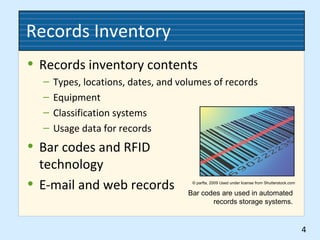
• Bar codes and RFID
technology
• E-mail and web records
4
© parfta, 2009 Used under license from Shutterstock.com
Bar codes are used in automated
records storage systems.
Records Retrieval
• Three types of records retrieval
– Manual retrieval
– Mechanical retrieval
– Electronic retrieval
• Effective records control
– What records are out of storage
– Who took the records and when
– How long the records will be out
– Where the records will be refiled
5
Requisition Procedures
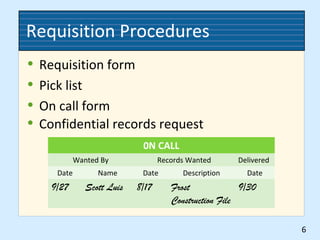
• Requisition form
• Pick list
• On call form
6
0N CALL
Wanted By Records Wanted Delivered
Date Name Date Description Date
9/27 Scott Luis 8/17 Frost
Construction File
9/30
• Confidential records request
Charge-Out Procedures
• Manual procedures
– OUT indicators
– OUT indicator disposal
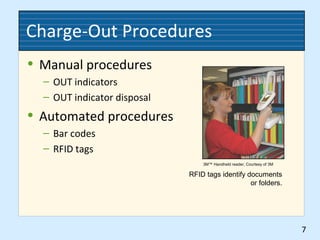
• Automated procedures
– Bar codes
– RFID tags
7
3M™ Handheld reader, Courtesy of 3M
RFID tags identify documents
or folders.
Follow-Up Procedures
• Factors affecting the time users may borrow
records
– Type of business
– Number of requests received for the records
– Use of a copying machine to make duplicate records
– Value of the records
• Procedures for confidential records
8
Charge-Out Log
• Shows information for records removed
from the files
– The record that was taken
– When the record was taken (date borrowed)
– Who took the record (name and extension number)
– Date due for returning the record
– Date returned
– Date overdue notice was sent
– Extended date due
9
Records Transfer
• Perpetual transfer method
– Records are continually transferred from active to
inactive storage whenever they are no longer needed
for reference
– This method should be used for e-mail and other
electronic records
• Periodic transfer method
– Records are transferred at the end of a stated period
– One-period transfer method
10
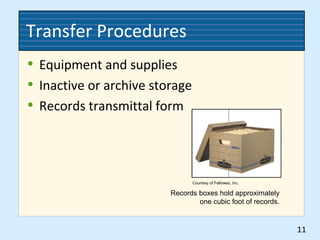
Transfer Procedures
• Equipment and supplies
• Inactive or archive storage
• Records transmittal form
11
Courtesy of Fellowes, Inc.
Records boxes hold approximately
one cubic foot of records.
Inactive Records Index
• Information for all records in the inactive
records storage center
– Dates the records were created
– Descriptions of the records series
– Departments that own the records
– Authorizations for transfer to inactive storage
– Locations in the records storage center
– Retention periods
– Disposition dates
12
Charge-Out and Follow-Up File
• Requisition form
• OUT indicator
• Tickler file to track dates
• Reminders of overdue files
• Electronic follow-up files
13
Destruction Date File
• Shows planned destruction dates for records
– A physical or electronic file
– Dates from the records retention schedule
• Destruction notice
• Destruction suspension
14
Destruction File
• Documents the destruction of records
• Records destruction methods
– Incinerating
– Macerating
– Pulping
– Shredding
15
Records Center Software
• Typical functions
– Box and/or records inventories
– Storage management
– Records and information searches
– Records retention schedule correlations
– Destruction methodology correlations
– Accounting
– User tracking
– Bar code and RFID tracking
16

Ch07 records management

  • 1.
    RECORDS MANAGEMENT Judith Readand Mary Lea Ginn Chapter 7 Storing, Retrieving, and Transferring Files Copyright 2011 South-Western, Cengage Learning
  • 2.
    Records Storage • Recordsretention program • Documents to keep • Location and environment for storing documents • Length of time documents are to be kept • Records retention schedule (RRS) • A comprehensive list of records • The length of time records are to be maintained • When records are to be destroyed 2
  • 3.
    Value of Records •Nonessential • Useful • Important • Vital 3
  • 4.
    Records Inventory • Recordsinventory contents – Types, locations, dates, and volumes of records – Equipment – Classification systems – Usage data for records • Bar codes and RFID technology • E-mail and web records 4 © parfta, 2009 Used under license from Shutterstock.com Bar codes are used in automated records storage systems.
  • 5.
    Records Retrieval • Threetypes of records retrieval – Manual retrieval – Mechanical retrieval – Electronic retrieval • Effective records control – What records are out of storage – Who took the records and when – How long the records will be out – Where the records will be refiled 5
  • 6.
    Requisition Procedures • Requisitionform • Pick list • On call form 6 0N CALL Wanted By Records Wanted Delivered Date Name Date Description Date 9/27 Scott Luis 8/17 Frost Construction File 9/30 • Confidential records request
  • 7.
    Charge-Out Procedures • Manualprocedures – OUT indicators – OUT indicator disposal • Automated procedures – Bar codes – RFID tags 7 3M™ Handheld reader, Courtesy of 3M RFID tags identify documents or folders.
  • 8.
    Follow-Up Procedures • Factorsaffecting the time users may borrow records – Type of business – Number of requests received for the records – Use of a copying machine to make duplicate records – Value of the records • Procedures for confidential records 8
  • 9.
    Charge-Out Log • Showsinformation for records removed from the files – The record that was taken – When the record was taken (date borrowed) – Who took the record (name and extension number) – Date due for returning the record – Date returned – Date overdue notice was sent – Extended date due 9
  • 10.
    Records Transfer • Perpetualtransfer method – Records are continually transferred from active to inactive storage whenever they are no longer needed for reference – This method should be used for e-mail and other electronic records • Periodic transfer method – Records are transferred at the end of a stated period – One-period transfer method 10
  • 11.
    Transfer Procedures • Equipmentand supplies • Inactive or archive storage • Records transmittal form 11 Courtesy of Fellowes, Inc. Records boxes hold approximately one cubic foot of records.
  • 12.
    Inactive Records Index •Information for all records in the inactive records storage center – Dates the records were created – Descriptions of the records series – Departments that own the records – Authorizations for transfer to inactive storage – Locations in the records storage center – Retention periods – Disposition dates 12
  • 13.
    Charge-Out and Follow-UpFile • Requisition form • OUT indicator • Tickler file to track dates • Reminders of overdue files • Electronic follow-up files 13
  • 14.
    Destruction Date File •Shows planned destruction dates for records – A physical or electronic file – Dates from the records retention schedule • Destruction notice • Destruction suspension 14
  • 15.
    Destruction File • Documentsthe destruction of records • Records destruction methods – Incinerating – Macerating – Pulping – Shredding 15
  • 16.
    Records Center Software •Typical functions – Box and/or records inventories – Storage management – Records and information searches – Records retention schedule correlations – Destruction methodology correlations – Accounting – User tracking – Bar code and RFID tracking 16