RECORDS MANAGEMENT
Judith Read and Mary Lea Ginn
Chapter 11
Electronic Records File Management
1
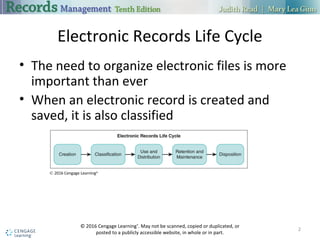
Electronic Records Life Cycle
 The need to organize electronic files is more important than ever
 When an electronic record is created and saved, it is also classified
2
© 2016 Cengage Learning®
Creation of Electronic Records
 Electronic files are created in specific software applications and file formats
 A compressed file format saves a file using less storage space
 Electronic files are stored on a computer’s hard drive, on shared drives, on
local area networks (LANs), or in the cloud
3
Folder Structure and File Names
 Dividing storage space into folders is an important part of managing
electronic information
 A folder can hold many files or subfolders
 Using meaningful filenames is important in managing electronic files
 When naming files, think about how the data might be requested
4
Classification of Electronic Records
 Classifying records provides the means to locate, group, retrieve, and
manage them
 Classification involves planning and making decisions
 Metadata is structured information related to a record
 Common metadata elements include the title, subject, author, keywords,
and comments
5
Taxonomies
 A taxonomy is a high-level, hierarchical classification system for records
 An enterprise-wide taxonomy usually has three levels
 Level 1 is a key business area
 Level 2 is a function within a business area
 Level 3 is a specialization or process within a function
6
File Plans
 A file plan is a classification scheme that defines and identifies all files
 It includes indexing and storage of the files and referencing the disposition
schedule
 Taxonomies and file plans work together to generate unique file plan
numbers
 File numbers or unique identifiers help with classification of records
7
Use and Distribution
 Use and distribution of records can be through several electronic channels
 E-mail
 Intranets
 Shared folders
 Programs that search for files on a computer drive, LAN drives, or intranet
are important tools for electronic records management
8
Retention and Maintenance
 A records retention schedule is used to specify how long to keep the
records
 Maintenance of electronic files follows scheduled times for disposing of files
 E-mail, text messages, and tweets may be obtained as evidence during e-
discovery procedures
 Established e-mail policies should be followed
9
Moving and Copying Files
 Files and folders can be moved or copied as part of managing electronic
records
 The copy may have a different name than the original file or folder
 Copying allows files to be available in two or more locations
 Data migration is used to copy electronic folders and files onto new media
10
Backing Up and Restoring Data
 A backup is a copy of electronic files and/or folders
 Backups are made as a precaution against the loss or damage of the original
data
 Users should follow a regular schedule to back up vital and important
electronic records
 If data is lost or damaged, it can be restored using backup copies
11
Inactive Records Storage and Archives
 Storage copies of electronic records may be recorded onto magnetic or
optical media
 Storage copies may be used only for making additional working copies
 The long-term quality of magnetic storage media has not been determined
 Microfilm remains a popular medium for long-term storage of vital records
12
Inactive Records Retention
 Managers need to develop total life cycle retention periods
 The records retention schedule reflects the length of time the data should
remain in computer-accessible form
 After that time has expired, all data should be purged from all storage
devices supporting the system
13
Disposition of Records
 The final step in a records life cycle is disposition
 An inactive record can either be destroyed or preserved indefinitely
 If a record is to be destroyed, it must be done correctly and completely
 To dispose of files on a magnetic disk, the files must be deleted, and the
space the files occupied must be overwritten
14
Electronic Databases
 An electronic database is a collection of related data stored on a computer
system
 The data can be used with various applications
 Databases are organized especially for rapid search and retrieval of specific
data
 A variety of database programs is available
15
Database Elements
 A database contains tables that hold the data in fields and records
 A field is a set of one or more characters, such as a name, treated as a unit
of information
 Fields related to one person or organization make up a record
 A query is used to instruct the program to find specific information
16
Using Databases in Records
Management and E-Commerce
 An electronic database allows rapid creation of documents such as mailing
labels
 In e-commerce, a database is used with web server application software to
provide data or complete transactions
 Push and pull technologies deliver data to a smartphone or other mobile
device
17
Resource
 Read, J., & Ginn, M. L. (2015). Electronic Records File Management. In Records
management (10th ed.). Boston, MA: Cengage Learning.
18

Chapter 11

  • 1.
    RECORDS MANAGEMENT Judith Readand Mary Lea Ginn Chapter 11 Electronic Records File Management 1
  • 2.
    Electronic Records LifeCycle  The need to organize electronic files is more important than ever  When an electronic record is created and saved, it is also classified 2 © 2016 Cengage Learning®
  • 3.
    Creation of ElectronicRecords  Electronic files are created in specific software applications and file formats  A compressed file format saves a file using less storage space  Electronic files are stored on a computer’s hard drive, on shared drives, on local area networks (LANs), or in the cloud 3
  • 4.
    Folder Structure andFile Names  Dividing storage space into folders is an important part of managing electronic information  A folder can hold many files or subfolders  Using meaningful filenames is important in managing electronic files  When naming files, think about how the data might be requested 4
  • 5.
    Classification of ElectronicRecords  Classifying records provides the means to locate, group, retrieve, and manage them  Classification involves planning and making decisions  Metadata is structured information related to a record  Common metadata elements include the title, subject, author, keywords, and comments 5
  • 6.
    Taxonomies  A taxonomyis a high-level, hierarchical classification system for records  An enterprise-wide taxonomy usually has three levels  Level 1 is a key business area  Level 2 is a function within a business area  Level 3 is a specialization or process within a function 6
  • 7.
    File Plans  Afile plan is a classification scheme that defines and identifies all files  It includes indexing and storage of the files and referencing the disposition schedule  Taxonomies and file plans work together to generate unique file plan numbers  File numbers or unique identifiers help with classification of records 7
  • 8.
    Use and Distribution Use and distribution of records can be through several electronic channels  E-mail  Intranets  Shared folders  Programs that search for files on a computer drive, LAN drives, or intranet are important tools for electronic records management 8
  • 9.
    Retention and Maintenance A records retention schedule is used to specify how long to keep the records  Maintenance of electronic files follows scheduled times for disposing of files  E-mail, text messages, and tweets may be obtained as evidence during e- discovery procedures  Established e-mail policies should be followed 9
  • 10.
    Moving and CopyingFiles  Files and folders can be moved or copied as part of managing electronic records  The copy may have a different name than the original file or folder  Copying allows files to be available in two or more locations  Data migration is used to copy electronic folders and files onto new media 10
  • 11.
    Backing Up andRestoring Data  A backup is a copy of electronic files and/or folders  Backups are made as a precaution against the loss or damage of the original data  Users should follow a regular schedule to back up vital and important electronic records  If data is lost or damaged, it can be restored using backup copies 11
  • 12.
    Inactive Records Storageand Archives  Storage copies of electronic records may be recorded onto magnetic or optical media  Storage copies may be used only for making additional working copies  The long-term quality of magnetic storage media has not been determined  Microfilm remains a popular medium for long-term storage of vital records 12
  • 13.
    Inactive Records Retention Managers need to develop total life cycle retention periods  The records retention schedule reflects the length of time the data should remain in computer-accessible form  After that time has expired, all data should be purged from all storage devices supporting the system 13
  • 14.
    Disposition of Records The final step in a records life cycle is disposition  An inactive record can either be destroyed or preserved indefinitely  If a record is to be destroyed, it must be done correctly and completely  To dispose of files on a magnetic disk, the files must be deleted, and the space the files occupied must be overwritten 14
  • 15.
    Electronic Databases  Anelectronic database is a collection of related data stored on a computer system  The data can be used with various applications  Databases are organized especially for rapid search and retrieval of specific data  A variety of database programs is available 15
  • 16.
    Database Elements  Adatabase contains tables that hold the data in fields and records  A field is a set of one or more characters, such as a name, treated as a unit of information  Fields related to one person or organization make up a record  A query is used to instruct the program to find specific information 16
  • 17.
    Using Databases inRecords Management and E-Commerce  An electronic database allows rapid creation of documents such as mailing labels  In e-commerce, a database is used with web server application software to provide data or complete transactions  Push and pull technologies deliver data to a smartphone or other mobile device 17
  • 18.
    Resource  Read, J.,& Ginn, M. L. (2015). Electronic Records File Management. In Records management (10th ed.). Boston, MA: Cengage Learning. 18