Records Retention Program Policies and procedures  What documents to keep Where and in what type of environment the documents are kept How long these documents are to be kept
Records Values Permanent storage Vital Records Long-term storage—seven to ten years Important Records Short-term storage—up to three years Useful Records Not worth keeping Nonessential Records
Records Inventory A detailed listing of an organization’s records that includes: Types Dates Equipment Usage Data Locations Volumes Classification systems
Radio Frequency Identification (RFID) A technology that uses electromagnetic or electrostatic radio frequency to identify an object, animal, or person  Used as an alternative to bar codes Does not require direct contact or line-of-sight scanning Can be used to conduct records inventories
Components of RFID System Antenna Transceiver/reader Transponder—the tag or chip
Records Inventory Names & dates of records series Records locations Storage equipment Number of storage containers Records reference rate Records media—paper, micrographic, electronic, or optical Continued on next slide
Records Inventory Records size—letter, legal, tab/checks, other Records housing Records value Retention requirements Continued from previous slide
 
Records Retention Schedule A comprehensive list of records, indicating the length of time records are to be maintained. Records series —a group of related records that normally are used and filed as a unit and can be evaluated as a unit to determine the records retention period. Retention period —the length of time that records must be kept according to operational, legal, regulatory, and fiscal requirements.
 
Records Retrieval Retrieval  is the process of locating and removing a record or file from storage.
Three Ways to Retrieve Records Manual retrieval —removing a record from a storage container by hand. Mechanical retrieval —using a mechanical means such as pushing a button to rotate movable shelves to the correct location for manual removal of the correct record. Electronic retrieval —using a computer to see an electronic record on a screen, in a database, or in an e-mail message.
Ten Steps for Retrieving a Record 1. Request stored record or records series 2. Check index for location of record(s) 3. Search for record or records series 4. Retrieve (locate) record or records series 5. Remove record(s) from storage Continued on next slide
Ten Steps for Retrieving a Record 6. Charge out records; insert OUT indicator; complete charge-out log 7. Send record(s) to requester 8. Follow up borrowed record(s) 9. Receive record(s) for re-storage 10. Store record(s) again; remove OUT indicator; update charge-out log Continued from previous slide
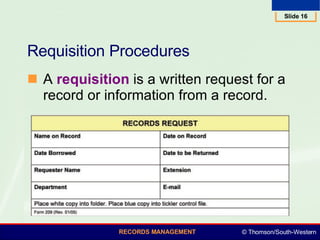
Requisition Procedures A  requisition  is a written request for a record or information from a record.
Charge-Out Procedures Charge-out  is a control procedure to establish the current location of a record when it is not in the records center or central file—may be manual or automated. Supplies needed: OUT indicators Carrier folders Charge-out log
Charge-Out Log
Records Transfer The act of changing the physical custody of records with or without change of legal title. Records are moved from one storage area to another. Records are transferred when they are no longer used frequently. Older records are less frequently accessed and become inactive. Continued on next slide
Records Transfer Dates on records are considered when deciding to transfer records. Active files contain the current year’s records plus those of the immediate past year. Records disposition  is the final destination of records at the end of their retention period in active and/or inactive storage. Records may be transferred to an archives for retention or destroyed. Continued from previous slide
Records Activity Active records —accessed three or more times a month; located near user Inactive records —accessed less than fifteen times a year; stored in less expensive area Archive records —kept for their continuing or historical value; stored in less expensive area, often off-site
Transfer Methods Perpetual —records are continually transferred from active to inactive storage areas Periodic —active records are transferred at the end of a stated period of time to inactive storage One-period —records are transferred at the end of one period of time (six months or a year)
Transfer Procedures Transferring department completes a multicopy transfer form. Transferring department keeps one copy Original and two copies go with box to inactive storage One copy is returned to transferring department with storage location
Records Center Control Procedures A records center is a low-cost centralized area for housing and servicing inactive records whose reference rate does not warrant their retention in a prime office area. Records center control files Inactive records index Charge-out and follow-up file Destruction date file Destruction file
Records Destruction The disposal of records of no further value by incinerating, macerating, pulping, or shredding. Destruction is the definitive obliteration of a record beyond any possible reconstruction.
Records Center Control Procedures Maintain records to document when and how records are destroyed. Destruction date file —a tickler file containing copies of transmittal forms completed when records are received in a records center. Destruction file —a file containing copies of transmittal forms removed from the destruction date file after records are destroyed. Forms are filed by department names and destruction dates.
Records Center Software Improves productivity Helps center employees provide faster service Improves records system integrity Eliminates manual tasks when combined with bar codes or RFID tags
Main Functions of  Records Center Software Box and/or records inventories Storage management Records and information searches Records retention schedules correlation Destruction methodology correlated with retention schedules Accounting User tracking
Functions of Records Center Software Combined with Bar Code and RFID Technology Locate a box on a shelf Check out/in a box or file Locate a folder in a box Identify a file or box for destruction Charge back costs to department that requested service

baim_ch07

  • 1.
  • 2.
    Records Retention ProgramPolicies and procedures What documents to keep Where and in what type of environment the documents are kept How long these documents are to be kept
  • 3.
    Records Values Permanentstorage Vital Records Long-term storage—seven to ten years Important Records Short-term storage—up to three years Useful Records Not worth keeping Nonessential Records
  • 4.
    Records Inventory Adetailed listing of an organization’s records that includes: Types Dates Equipment Usage Data Locations Volumes Classification systems
  • 5.
    Radio Frequency Identification(RFID) A technology that uses electromagnetic or electrostatic radio frequency to identify an object, animal, or person Used as an alternative to bar codes Does not require direct contact or line-of-sight scanning Can be used to conduct records inventories
  • 6.
    Components of RFIDSystem Antenna Transceiver/reader Transponder—the tag or chip
  • 7.
    Records Inventory Names& dates of records series Records locations Storage equipment Number of storage containers Records reference rate Records media—paper, micrographic, electronic, or optical Continued on next slide
  • 8.
    Records Inventory Recordssize—letter, legal, tab/checks, other Records housing Records value Retention requirements Continued from previous slide
  • 9.
  • 10.
    Records Retention ScheduleA comprehensive list of records, indicating the length of time records are to be maintained. Records series —a group of related records that normally are used and filed as a unit and can be evaluated as a unit to determine the records retention period. Retention period —the length of time that records must be kept according to operational, legal, regulatory, and fiscal requirements.
  • 11.
  • 12.
    Records Retrieval Retrieval is the process of locating and removing a record or file from storage.
  • 13.
    Three Ways toRetrieve Records Manual retrieval —removing a record from a storage container by hand. Mechanical retrieval —using a mechanical means such as pushing a button to rotate movable shelves to the correct location for manual removal of the correct record. Electronic retrieval —using a computer to see an electronic record on a screen, in a database, or in an e-mail message.
  • 14.
    Ten Steps forRetrieving a Record 1. Request stored record or records series 2. Check index for location of record(s) 3. Search for record or records series 4. Retrieve (locate) record or records series 5. Remove record(s) from storage Continued on next slide
  • 15.
    Ten Steps forRetrieving a Record 6. Charge out records; insert OUT indicator; complete charge-out log 7. Send record(s) to requester 8. Follow up borrowed record(s) 9. Receive record(s) for re-storage 10. Store record(s) again; remove OUT indicator; update charge-out log Continued from previous slide
  • 16.
    Requisition Procedures A requisition is a written request for a record or information from a record.
  • 17.
    Charge-Out Procedures Charge-out is a control procedure to establish the current location of a record when it is not in the records center or central file—may be manual or automated. Supplies needed: OUT indicators Carrier folders Charge-out log
  • 18.
  • 19.
    Records Transfer Theact of changing the physical custody of records with or without change of legal title. Records are moved from one storage area to another. Records are transferred when they are no longer used frequently. Older records are less frequently accessed and become inactive. Continued on next slide
  • 20.
    Records Transfer Dateson records are considered when deciding to transfer records. Active files contain the current year’s records plus those of the immediate past year. Records disposition is the final destination of records at the end of their retention period in active and/or inactive storage. Records may be transferred to an archives for retention or destroyed. Continued from previous slide
  • 21.
    Records Activity Activerecords —accessed three or more times a month; located near user Inactive records —accessed less than fifteen times a year; stored in less expensive area Archive records —kept for their continuing or historical value; stored in less expensive area, often off-site
  • 22.
    Transfer Methods Perpetual—records are continually transferred from active to inactive storage areas Periodic —active records are transferred at the end of a stated period of time to inactive storage One-period —records are transferred at the end of one period of time (six months or a year)
  • 23.
    Transfer Procedures Transferringdepartment completes a multicopy transfer form. Transferring department keeps one copy Original and two copies go with box to inactive storage One copy is returned to transferring department with storage location
  • 24.
    Records Center ControlProcedures A records center is a low-cost centralized area for housing and servicing inactive records whose reference rate does not warrant their retention in a prime office area. Records center control files Inactive records index Charge-out and follow-up file Destruction date file Destruction file
  • 25.
    Records Destruction Thedisposal of records of no further value by incinerating, macerating, pulping, or shredding. Destruction is the definitive obliteration of a record beyond any possible reconstruction.
  • 26.
    Records Center ControlProcedures Maintain records to document when and how records are destroyed. Destruction date file —a tickler file containing copies of transmittal forms completed when records are received in a records center. Destruction file —a file containing copies of transmittal forms removed from the destruction date file after records are destroyed. Forms are filed by department names and destruction dates.
  • 27.
    Records Center SoftwareImproves productivity Helps center employees provide faster service Improves records system integrity Eliminates manual tasks when combined with bar codes or RFID tags
  • 28.
    Main Functions of Records Center Software Box and/or records inventories Storage management Records and information searches Records retention schedules correlation Destruction methodology correlated with retention schedules Accounting User tracking
  • 29.
    Functions of RecordsCenter Software Combined with Bar Code and RFID Technology Locate a box on a shelf Check out/in a box or file Locate a folder in a box Identify a file or box for destruction Charge back costs to department that requested service