Camera Analysis
Unit 10 Digital Photography
Camera
• You can tell if a camera is automatic or manual by just looking at the picture. For example, in an
automatic camera, there is less lighting in the picture whereas in a manual camera, there is much
more lighting which makes the picture come out better.
The shooting mode dial is where the manual mode button
is located and it is labelled as ‘M’. Manual mode allows
you to control the speed of the photos being taken and
also the camera shutters. Also, manual mode allows you to
have more control over the camera. This means that you
will be more in charge of taking picture.
The shooting mode dial is where the automatic mode button in located and it is labelled
as ‘A’. Automatic mode allows the camera to be in charge of the speed of the photos being
taken and also the speed of the shutters. Also, automatic mode allows you to do less work
when taking photos because automatic mode will take it when you add a timer before the
image has been taken.
Cameras on a smartphone e.g. on a iPhone 6s, it has strong camera qualities for selfies
and just normal cameras. It has a front and back camera. This means that you will be able
to take pictures from the front and back of the smartphone. On a smartphone, it has an
manual and automatic mode. This is so that people can get the best quality photos from
their smartphones.
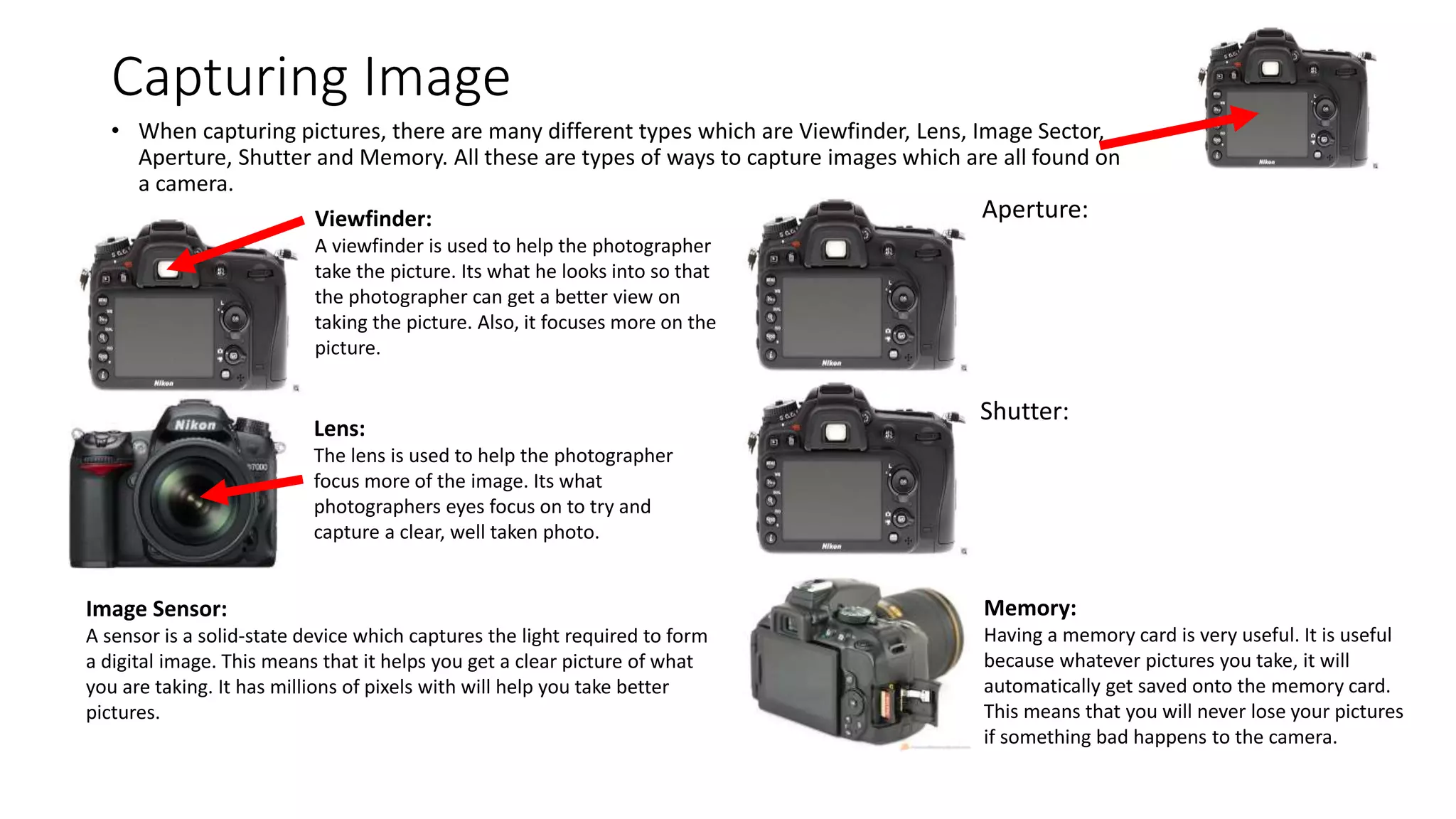
Capturing Image
• When capturing pictures, there are many different types which are Viewfinder, Lens, Image Sector,
Aperture, Shutter and Memory. All these are types of ways to capture images which are all found on
a camera.
Viewfinder:
A viewfinder is used to help the photographer
take the picture. Its what he looks into so that
the photographer can get a better view on
taking the picture. Also, it focuses more on the
picture.
Lens:
The lens is used to help the photographer
focus more of the image. Its what
photographers eyes focus on to try and
capture a clear, well taken photo.
Image Sensor:
A sensor is a solid-state device which captures the light required to form
a digital image. This means that it helps you get a clear picture of what
you are taking. It has millions of pixels with will help you take better
pictures.
Aperture:
Shutter:
Memory:
Having a memory card is very useful. It is useful
because whatever pictures you take, it will
automatically get saved onto the memory card.
This means that you will never lose your pictures
if something bad happens to the camera.

Camera analysis 2

  • 1.
    Camera Analysis Unit 10Digital Photography
  • 2.
    Camera • You cantell if a camera is automatic or manual by just looking at the picture. For example, in an automatic camera, there is less lighting in the picture whereas in a manual camera, there is much more lighting which makes the picture come out better. The shooting mode dial is where the manual mode button is located and it is labelled as ‘M’. Manual mode allows you to control the speed of the photos being taken and also the camera shutters. Also, manual mode allows you to have more control over the camera. This means that you will be more in charge of taking picture. The shooting mode dial is where the automatic mode button in located and it is labelled as ‘A’. Automatic mode allows the camera to be in charge of the speed of the photos being taken and also the speed of the shutters. Also, automatic mode allows you to do less work when taking photos because automatic mode will take it when you add a timer before the image has been taken. Cameras on a smartphone e.g. on a iPhone 6s, it has strong camera qualities for selfies and just normal cameras. It has a front and back camera. This means that you will be able to take pictures from the front and back of the smartphone. On a smartphone, it has an manual and automatic mode. This is so that people can get the best quality photos from their smartphones.
  • 3.
    Capturing Image • Whencapturing pictures, there are many different types which are Viewfinder, Lens, Image Sector, Aperture, Shutter and Memory. All these are types of ways to capture images which are all found on a camera. Viewfinder: A viewfinder is used to help the photographer take the picture. Its what he looks into so that the photographer can get a better view on taking the picture. Also, it focuses more on the picture. Lens: The lens is used to help the photographer focus more of the image. Its what photographers eyes focus on to try and capture a clear, well taken photo. Image Sensor: A sensor is a solid-state device which captures the light required to form a digital image. This means that it helps you get a clear picture of what you are taking. It has millions of pixels with will help you take better pictures. Aperture: Shutter: Memory: Having a memory card is very useful. It is useful because whatever pictures you take, it will automatically get saved onto the memory card. This means that you will never lose your pictures if something bad happens to the camera.