Task 1-
camera
functions
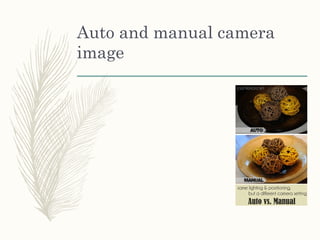
Auto and manual camera
image
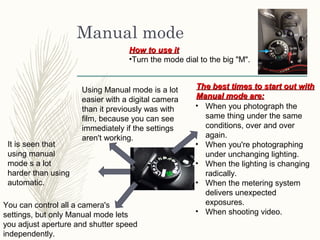
Manual mode
Using Manual mode is a lot
easier with a digital camera
than it previously was with
film, because you can see
immediately if the settings
aren't working.
You can control all a camera's
settings, but only Manual mode lets
you adjust aperture and shutter speed
independently.
• When you photograph the
same thing under the same
conditions, over and over
again.
• When you're photographing
under unchanging lighting.
• When the lighting is changing
radically.
• When the metering system
delivers unexpected
exposures.
• When shooting video.
The best times to start out withThe best times to start out with
Manual mode are:Manual mode are:
How to use itHow to use it
•Turn the mode dial to the big "M".
It is seen that
using manual
mode s a lot
harder than using
automatic.
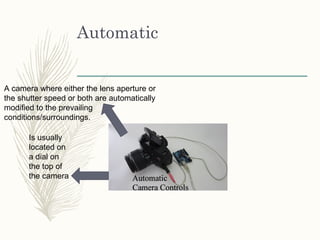
Automatic
A camera where either the lens aperture or
the shutter speed or both are automatically
modified to the prevailing
conditions/surroundings.
Is usually
located on
a dial on
the top of
the camera
Capturing camera
View finder (screen)
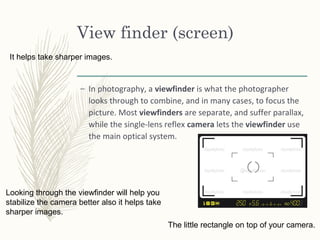
– In photography, a viewfinder is what the photographer
looks through to combine, and in many cases, to focus the
picture. Most viewfinders are separate, and suffer parallax,
while the single-lens reflex camera lets the viewfinder use
the main optical system.
The little rectangle on top of your camera.
It helps take sharper images.
Looking through the viewfinder will help you
stabilize the camera better also it helps take
sharper images.
Lens (function, types)
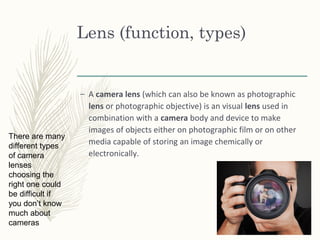
– A camera lens (which can also be known as photographic
lens or photographic objective) is an visual lens used in
combination with a camera body and device to make
images of objects either on photographic film or on other
media capable of storing an image chemically or
electronically.
There are many
different types
of camera
lenses
choosing the
right one could
be difficult if
you don’t know
much about
cameras
Image sensor
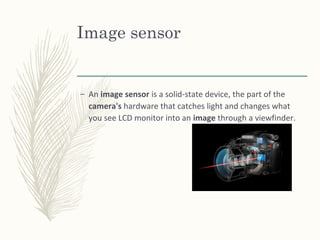
– An image sensor is a solid-state device, the part of the
camera's hardware that catches light and changes what
you see LCD monitor into an image through a viewfinder.
Aperture
– A large aperture lets in more light to the camera shutter
for an exposure, while small aperture has a smaller
opening in the lens diaphragm to let in a smaller amount of
light for a given exposure.
Large
(f/2.0, f/2.8 etc.)
Small
(f/11, f/16, f/22
etc.)
Memory (memory card,
internal storage)
File storage
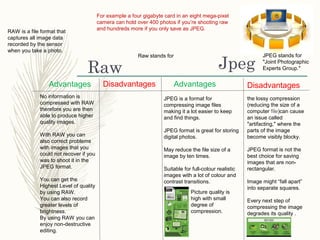
JpegRaw
For example a four gigabyte card in an eight mega-pixel
camera can hold over 400 photos if you’re shooting raw
and hundreds more if you only save as JPEG.
JPEG is a format for
compressing image files
making it a lot easier to keep
and find things.
JPEG format is great for storing
digital photos.
May reduce the file size of a
image by ten times.
Suitable for full-colour realistic
images with a lot of colour and
contrast transitions.
JPEG stands for
"Joint Photographic
Experts Group."
Advantages DisadvantagesDisadvantages Advantages
the lossy compression
(reducing the size of a
computer file)can cause
an issue called
"artifacting," where the
parts of the image
become visibly blocky.
JPEG format is not the
best choice for saving
images that are non-
rectangular.
Image might “fall apart”
into separate squares.
Every next step of
compressing the image
degrades its quality .
Picture quality is
high with small
degree of
compression.
Raw stands for
RAW is a file format that
captures all image data
recorded by the sensor
when you take a photo.
No information is
compressed with RAW
therefore you are then
able to produce higher
quality images.
With RAW you can
also correct problems
with images that you
could not recover if you
was to shoot it in the
JPEG format.
You can get the
Highest Level of quality
by using RAW.
You can also record
greater levels of
brightness.
By using RAW you can
enjoy non-destructive
editing.
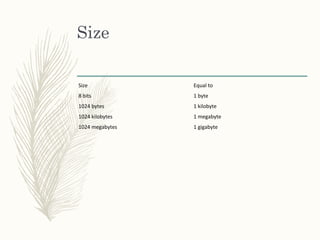
Size
Size Equal to
8 bits 1 byte
1024 bytes 1 kilobyte
1024 kilobytes 1 megabyte
1024 megabytes 1 gigabyte

camera functions

  • 1.
  • 2.
    Auto and manualcamera image
  • 3.
    Manual mode Using Manualmode is a lot easier with a digital camera than it previously was with film, because you can see immediately if the settings aren't working. You can control all a camera's settings, but only Manual mode lets you adjust aperture and shutter speed independently. • When you photograph the same thing under the same conditions, over and over again. • When you're photographing under unchanging lighting. • When the lighting is changing radically. • When the metering system delivers unexpected exposures. • When shooting video. The best times to start out withThe best times to start out with Manual mode are:Manual mode are: How to use itHow to use it •Turn the mode dial to the big "M". It is seen that using manual mode s a lot harder than using automatic.
  • 4.
    Automatic A camera whereeither the lens aperture or the shutter speed or both are automatically modified to the prevailing conditions/surroundings. Is usually located on a dial on the top of the camera
  • 5.
  • 6.
    View finder (screen) –In photography, a viewfinder is what the photographer looks through to combine, and in many cases, to focus the picture. Most viewfinders are separate, and suffer parallax, while the single-lens reflex camera lets the viewfinder use the main optical system. The little rectangle on top of your camera. It helps take sharper images. Looking through the viewfinder will help you stabilize the camera better also it helps take sharper images.
  • 7.
    Lens (function, types) –A camera lens (which can also be known as photographic lens or photographic objective) is an visual lens used in combination with a camera body and device to make images of objects either on photographic film or on other media capable of storing an image chemically or electronically. There are many different types of camera lenses choosing the right one could be difficult if you don’t know much about cameras
  • 8.
    Image sensor – Animage sensor is a solid-state device, the part of the camera's hardware that catches light and changes what you see LCD monitor into an image through a viewfinder.
  • 9.
    Aperture – A largeaperture lets in more light to the camera shutter for an exposure, while small aperture has a smaller opening in the lens diaphragm to let in a smaller amount of light for a given exposure. Large (f/2.0, f/2.8 etc.) Small (f/11, f/16, f/22 etc.)
  • 10.
  • 11.
  • 12.
    JpegRaw For example afour gigabyte card in an eight mega-pixel camera can hold over 400 photos if you’re shooting raw and hundreds more if you only save as JPEG. JPEG is a format for compressing image files making it a lot easier to keep and find things. JPEG format is great for storing digital photos. May reduce the file size of a image by ten times. Suitable for full-colour realistic images with a lot of colour and contrast transitions. JPEG stands for "Joint Photographic Experts Group." Advantages DisadvantagesDisadvantages Advantages the lossy compression (reducing the size of a computer file)can cause an issue called "artifacting," where the parts of the image become visibly blocky. JPEG format is not the best choice for saving images that are non- rectangular. Image might “fall apart” into separate squares. Every next step of compressing the image degrades its quality . Picture quality is high with small degree of compression. Raw stands for RAW is a file format that captures all image data recorded by the sensor when you take a photo. No information is compressed with RAW therefore you are then able to produce higher quality images. With RAW you can also correct problems with images that you could not recover if you was to shoot it in the JPEG format. You can get the Highest Level of quality by using RAW. You can also record greater levels of brightness. By using RAW you can enjoy non-destructive editing.
  • 13.
    Size Size Equal to 8bits 1 byte 1024 bytes 1 kilobyte 1024 kilobytes 1 megabyte 1024 megabytes 1 gigabyte