Cache Memory
Characteristics
• Location
• Capacity
• Unit of transfer
• Access method
• Performance
• Physical type
• Physical characteristics
• Organisation
Location
• CPU
• Internal
• External
Capacity
• Word size
—The natural unit of organisation
• Number of words
—or Bytes
Unit of Transfer
• Internal
—Usually governed by data bus width
• External
—Usually a block which is much larger than a word
• Addressable unit
—Smallest location which can be uniquely
addressed
—Word internally
—Cluster on M$ disks
Access Methods (1)
• Sequential
—Start at the beginning and read through in order
—Access time depends on location of data and previous
location
—e.g. tape
• Direct
—Individual blocks have unique address
—Access is by jumping to vicinity plus sequential search
—Access time depends on location and previous location
—e.g. disk
Access Methods (2)
• Random
—Individual addresses identify locations exactly
—Access time is independent of location or previous access
—e.g. RAM
• Associative
—Data is located by a comparison with contents of a portion
of the store
—Access time is independent of location or previous access
—e.g. cache
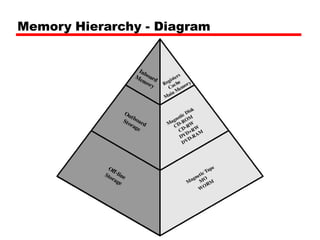
Memory Hierarchy
• Registers
—In CPU
• Internal or Main memory
—May include one or more levels of cache
—“RAM”
• External memory
—Backing store
Memory Hierarchy - Diagram
Performance
• Access time
—Time between presenting the address and getting
the valid data
• Memory Cycle time
—Time may be required for the memory to
“recover” before next access
—Cycle time is access + recovery
• Transfer Rate
—Rate at which data can be moved
Physical Types
• Semiconductor
—RAM
• Magnetic
—Disk & Tape
• Optical
—CD & DVD
• Others
—Bubble
—Hologram
Physical Characteristics
• Decay
• Volatility
• Erasable
• Power consumption
Organisation
• Physical arrangement of bits into words
• Not always obvious
• e.g. interleaved
The Bottom Line
• How much?
—Capacity
• How fast?
—Time is money
• How expensive?
Hierarchy List
• Registers
• L1 Cache
• L2 Cache
• Main memory
• Disk cache
• Disk
• Optical
• Tape
So you want fast?
• It is possible to build a computer which uses
only static RAM (see later)
• This would be very fast
• This would need no cache
—How can you cache cache?
• This would cost a very large amount
Locality of Reference
• During the course of the execution of a
program, memory references tend to cluster
• e.g. loops
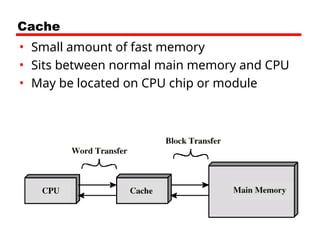
Cache
• Small amount of fast memory
• Sits between normal main memory and CPU
• May be located on CPU chip or module
Cache operation - overview
• CPU requests contents of memory location
• Check cache for this data
• If present, get from cache (fast)
• If not present, read required block from main
memory to cache
• Then deliver from cache to CPU
• Cache includes tags to identify which block of
main memory is in each cache slot
Cache Design
• Size
• Mapping Function
• Replacement Algorithm
• Write Policy
• Block Size
• Number of Caches
Size does matter
• Cost
—More cache is expensive
• Speed
—More cache is faster (up to a point)
—Checking cache for data takes time
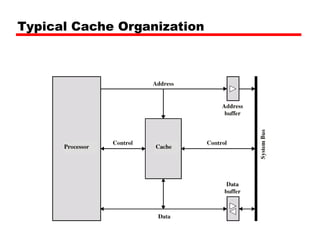
Typical Cache Organization
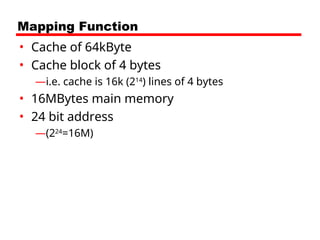
Mapping Function
• Cache of 64kByte
• Cache block of 4 bytes
—i.e. cache is 16k (214
) lines of 4 bytes
• 16MBytes main memory
• 24 bit address
—(224
=16M)
Direct Mapping
• Each block of main memory maps to only one
cache line
—i.e. if a block is in cache, it must be in one specific
place
• Address is in two parts
• Least Significant w bits identify unique word
• Most Significant s bits specify one memory
block
• The MSBs are split into a cache line field r and
a tag of s-r (most significant)
Direct Mapping
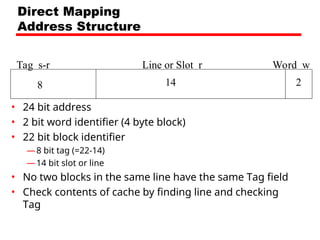
Address Structure
Tag s-r Line or Slot r Word w
8 14 2
• 24 bit address
• 2 bit word identifier (4 byte block)
• 22 bit block identifier
—8 bit tag (=22-14)
—14 bit slot or line
• No two blocks in the same line have the same Tag field
• Check contents of cache by finding line and checking
Tag
Direct Mapping
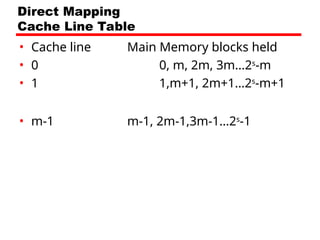
Cache Line Table
• Cache line Main Memory blocks held
• 0 0, m, 2m, 3m…2s
-m
• 1 1,m+1, 2m+1…2s
-m+1
• m-1 m-1, 2m-1,3m-1…2s
-1
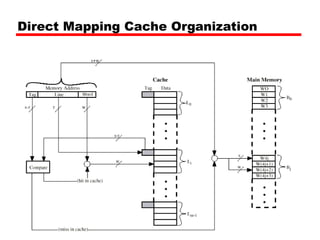
Direct Mapping Cache Organization
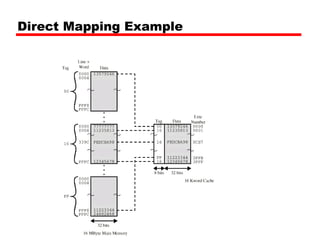
Direct Mapping Example
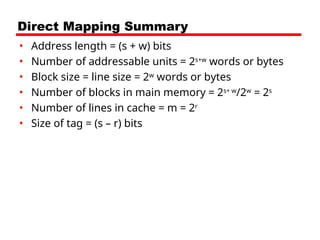
Direct Mapping Summary
• Address length = (s + w) bits
• Number of addressable units = 2s+w
words or bytes
• Block size = line size = 2w
words or bytes
• Number of blocks in main memory = 2s+ w
/2w
= 2s
• Number of lines in cache = m = 2r
• Size of tag = (s – r) bits
Direct Mapping pros & cons
• Simple
• Inexpensive
• Fixed location for given block
—If a program accesses 2 blocks that map to the
same line repeatedly, cache misses are very high
Associative Mapping
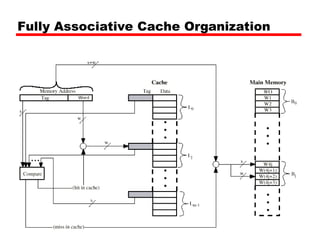
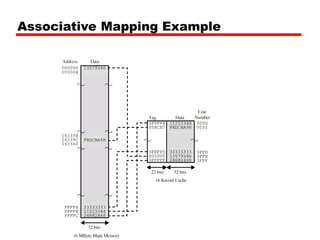
• A main memory block can load into any line
of cache
• Memory address is interpreted as tag and
word
• Tag uniquely identifies block of memory
• Every line’s tag is examined for a match
• Cache searching gets expensive
Fully Associative Cache Organization
Associative Mapping Example
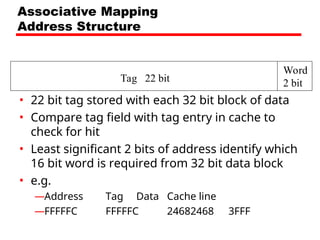
Tag 22 bit
Word
2 bit
Associative Mapping
Address Structure
• 22 bit tag stored with each 32 bit block of data
• Compare tag field with tag entry in cache to
check for hit
• Least significant 2 bits of address identify which
16 bit word is required from 32 bit data block
• e.g.
—Address Tag Data Cache line
—FFFFFC FFFFFC 24682468 3FFF
Associative Mapping Summary
• Address length = (s + w) bits
• Number of addressable units = 2s+w
words or bytes
• Block size = line size = 2w
words or bytes
• Number of blocks in main memory = 2s+ w
/2w
= 2s
• Number of lines in cache = undetermined
• Size of tag = s bits
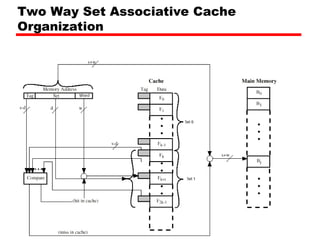
Set Associative Mapping
• Cache is divided into a number of sets
• Each set contains a number of lines
• A given block maps to any line in a given set
—e.g. Block B can be in any line of set i
• e.g. 2 lines per set
—2 way associative mapping
—A given block can be in one of 2 lines in only one
set
Set Associative Mapping
Example
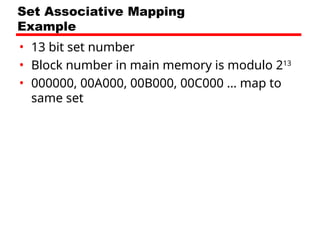
• 13 bit set number
• Block number in main memory is modulo 213
• 000000, 00A000, 00B000, 00C000 … map to
same set
Two Way Set Associative Cache
Organization
Set Associative Mapping
Address Structure
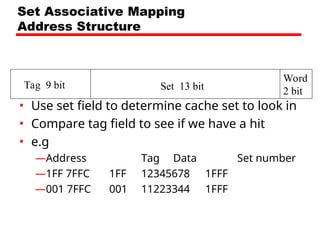
• Use set field to determine cache set to look in
• Compare tag field to see if we have a hit
• e.g
—Address Tag Data Set number
—1FF 7FFC 1FF 12345678 1FFF
—001 7FFC 001 11223344 1FFF
Tag 9 bit Set 13 bit
Word
2 bit
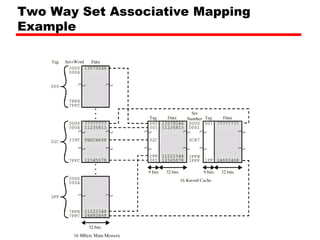
Two Way Set Associative Mapping
Example
Set Associative Mapping Summary
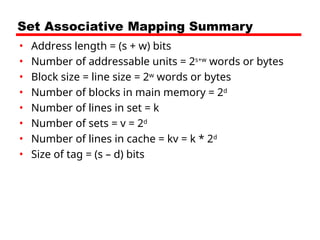
• Address length = (s + w) bits
• Number of addressable units = 2s+w
words or bytes
• Block size = line size = 2w
words or bytes
• Number of blocks in main memory = 2d
• Number of lines in set = k
• Number of sets = v = 2d
• Number of lines in cache = kv = k * 2d
• Size of tag = (s – d) bits
Replacement Algorithms (1)
Direct mapping
• No choice
• Each block only maps to one line
• Replace that line
Replacement Algorithms (2)
Associative & Set Associative
• Hardware implemented algorithm (speed)
• Least Recently used (LRU)
• e.g. in 2 way set associative
—Which of the 2 block is lru?
• First in first out (FIFO)
—replace block that has been in cache longest
• Least frequently used
—replace block which has had fewest hits
• Random
Write Policy
• Must not overwrite a cache block unless main
memory is up to date
• Multiple CPUs may have individual caches
• I/O may address main memory directly
Write through
• All writes go to main memory as well as cache
• Multiple CPUs can monitor main memory
traffic to keep local (to CPU) cache up to date
• Lots of traffic
• Slows down writes
• Remember bogus write through caches!
Write back
• Updates initially made in cache only
• Update bit for cache slot is set when update
occurs
• If block is to be replaced, write to main
memory only if update bit is set
• Other caches get out of sync
• I/O must access main memory through cache
• N.B. 15% of memory references are writes
Pentium 4 Cache
• 80386 – no on chip cache
• 80486 – 8k using 16 byte lines and four way set
associative organization
• Pentium (all versions) – two on chip L1 caches
—Data & instructions
• Pentium 4 – L1 caches
—8k bytes
—64 byte lines
—four way set associative
• L2 cache
—Feeding both L1 caches
—256k
—128 byte lines
—8 way set associative
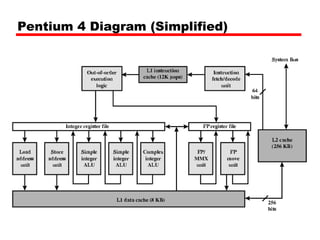
Pentium 4 Diagram (Simplified)
Pentium 4 Core Processor
• Fetch/Decode Unit
—Fetches instructions from L2 cache
—Decode into micro-ops
—Store micro-ops in L1 cache
• Out of order execution logic
—Schedules micro-ops
—Based on data dependence and resources
—May speculatively execute
• Execution units
—Execute micro-ops
—Data from L1 cache
—Results in registers
• Memory subsystem
—L2 cache and systems bus
Pentium 4 Design Reasoning
• Decodes instructions into RISC like micro-ops before
L1 cache
• Micro-ops fixed length
—Superscalar pipelining and scheduling
• Pentium instructions long & complex
• Performance improved by separating decoding from
scheduling & pipelining
—(More later – ch14)
• Data cache is write back
—Can be configured to write through
• L1 cache controlled by 2 bits in register
—CD = cache disable
—NW = not write through
—2 instructions to invalidate (flush) cache and write back then
invalidate
Power PC Cache Organization
• 601 – single 32kb 8 way set associative
• 603 – 16kb (2 x 8kb) two way set associative
• 604 – 32kb
• 610 – 64kb
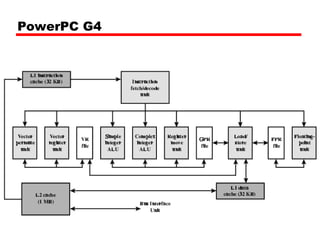
• G3 & G4
—64kb L1 cache
– 8 way set associative
—256k, 512k or 1M L2 cache
– two way set associative
PowerPC G4
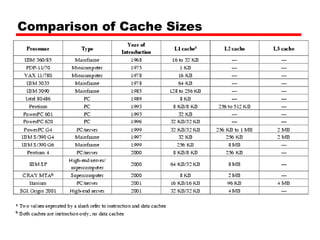
Comparison of Cache Sizes

Ch_4.pptInnovation technology pptInnovation technology ppt

  • 1.
  • 2.
    Characteristics • Location • Capacity •Unit of transfer • Access method • Performance • Physical type • Physical characteristics • Organisation
  • 3.
  • 4.
    Capacity • Word size —Thenatural unit of organisation • Number of words —or Bytes
  • 5.
    Unit of Transfer •Internal —Usually governed by data bus width • External —Usually a block which is much larger than a word • Addressable unit —Smallest location which can be uniquely addressed —Word internally —Cluster on M$ disks
  • 6.
    Access Methods (1) •Sequential —Start at the beginning and read through in order —Access time depends on location of data and previous location —e.g. tape • Direct —Individual blocks have unique address —Access is by jumping to vicinity plus sequential search —Access time depends on location and previous location —e.g. disk
  • 7.
    Access Methods (2) •Random —Individual addresses identify locations exactly —Access time is independent of location or previous access —e.g. RAM • Associative —Data is located by a comparison with contents of a portion of the store —Access time is independent of location or previous access —e.g. cache
  • 8.
    Memory Hierarchy • Registers —InCPU • Internal or Main memory —May include one or more levels of cache —“RAM” • External memory —Backing store
  • 9.
  • 10.
    Performance • Access time —Timebetween presenting the address and getting the valid data • Memory Cycle time —Time may be required for the memory to “recover” before next access —Cycle time is access + recovery • Transfer Rate —Rate at which data can be moved
  • 11.
    Physical Types • Semiconductor —RAM •Magnetic —Disk & Tape • Optical —CD & DVD • Others —Bubble —Hologram
  • 12.
    Physical Characteristics • Decay •Volatility • Erasable • Power consumption
  • 13.
    Organisation • Physical arrangementof bits into words • Not always obvious • e.g. interleaved
  • 14.
    The Bottom Line •How much? —Capacity • How fast? —Time is money • How expensive?
  • 15.
    Hierarchy List • Registers •L1 Cache • L2 Cache • Main memory • Disk cache • Disk • Optical • Tape
  • 16.
    So you wantfast? • It is possible to build a computer which uses only static RAM (see later) • This would be very fast • This would need no cache —How can you cache cache? • This would cost a very large amount
  • 17.
    Locality of Reference •During the course of the execution of a program, memory references tend to cluster • e.g. loops
  • 18.
    Cache • Small amountof fast memory • Sits between normal main memory and CPU • May be located on CPU chip or module
  • 19.
    Cache operation -overview • CPU requests contents of memory location • Check cache for this data • If present, get from cache (fast) • If not present, read required block from main memory to cache • Then deliver from cache to CPU • Cache includes tags to identify which block of main memory is in each cache slot
  • 20.
    Cache Design • Size •Mapping Function • Replacement Algorithm • Write Policy • Block Size • Number of Caches
  • 21.
    Size does matter •Cost —More cache is expensive • Speed —More cache is faster (up to a point) —Checking cache for data takes time
  • 22.
  • 23.
    Mapping Function • Cacheof 64kByte • Cache block of 4 bytes —i.e. cache is 16k (214 ) lines of 4 bytes • 16MBytes main memory • 24 bit address —(224 =16M)
  • 24.
    Direct Mapping • Eachblock of main memory maps to only one cache line —i.e. if a block is in cache, it must be in one specific place • Address is in two parts • Least Significant w bits identify unique word • Most Significant s bits specify one memory block • The MSBs are split into a cache line field r and a tag of s-r (most significant)
  • 25.
    Direct Mapping Address Structure Tags-r Line or Slot r Word w 8 14 2 • 24 bit address • 2 bit word identifier (4 byte block) • 22 bit block identifier —8 bit tag (=22-14) —14 bit slot or line • No two blocks in the same line have the same Tag field • Check contents of cache by finding line and checking Tag
  • 26.
    Direct Mapping Cache LineTable • Cache line Main Memory blocks held • 0 0, m, 2m, 3m…2s -m • 1 1,m+1, 2m+1…2s -m+1 • m-1 m-1, 2m-1,3m-1…2s -1
  • 27.
  • 28.
  • 29.
    Direct Mapping Summary •Address length = (s + w) bits • Number of addressable units = 2s+w words or bytes • Block size = line size = 2w words or bytes • Number of blocks in main memory = 2s+ w /2w = 2s • Number of lines in cache = m = 2r • Size of tag = (s – r) bits
  • 30.
    Direct Mapping pros& cons • Simple • Inexpensive • Fixed location for given block —If a program accesses 2 blocks that map to the same line repeatedly, cache misses are very high
  • 31.
    Associative Mapping • Amain memory block can load into any line of cache • Memory address is interpreted as tag and word • Tag uniquely identifies block of memory • Every line’s tag is examined for a match • Cache searching gets expensive
  • 32.
  • 33.
  • 34.
    Tag 22 bit Word 2bit Associative Mapping Address Structure • 22 bit tag stored with each 32 bit block of data • Compare tag field with tag entry in cache to check for hit • Least significant 2 bits of address identify which 16 bit word is required from 32 bit data block • e.g. —Address Tag Data Cache line —FFFFFC FFFFFC 24682468 3FFF
  • 35.
    Associative Mapping Summary •Address length = (s + w) bits • Number of addressable units = 2s+w words or bytes • Block size = line size = 2w words or bytes • Number of blocks in main memory = 2s+ w /2w = 2s • Number of lines in cache = undetermined • Size of tag = s bits
  • 36.
    Set Associative Mapping •Cache is divided into a number of sets • Each set contains a number of lines • A given block maps to any line in a given set —e.g. Block B can be in any line of set i • e.g. 2 lines per set —2 way associative mapping —A given block can be in one of 2 lines in only one set
  • 37.
    Set Associative Mapping Example •13 bit set number • Block number in main memory is modulo 213 • 000000, 00A000, 00B000, 00C000 … map to same set
  • 38.
    Two Way SetAssociative Cache Organization
  • 39.
    Set Associative Mapping AddressStructure • Use set field to determine cache set to look in • Compare tag field to see if we have a hit • e.g —Address Tag Data Set number —1FF 7FFC 1FF 12345678 1FFF —001 7FFC 001 11223344 1FFF Tag 9 bit Set 13 bit Word 2 bit
  • 40.
    Two Way SetAssociative Mapping Example
  • 41.
    Set Associative MappingSummary • Address length = (s + w) bits • Number of addressable units = 2s+w words or bytes • Block size = line size = 2w words or bytes • Number of blocks in main memory = 2d • Number of lines in set = k • Number of sets = v = 2d • Number of lines in cache = kv = k * 2d • Size of tag = (s – d) bits
  • 42.
    Replacement Algorithms (1) Directmapping • No choice • Each block only maps to one line • Replace that line
  • 43.
    Replacement Algorithms (2) Associative& Set Associative • Hardware implemented algorithm (speed) • Least Recently used (LRU) • e.g. in 2 way set associative —Which of the 2 block is lru? • First in first out (FIFO) —replace block that has been in cache longest • Least frequently used —replace block which has had fewest hits • Random
  • 44.
    Write Policy • Mustnot overwrite a cache block unless main memory is up to date • Multiple CPUs may have individual caches • I/O may address main memory directly
  • 45.
    Write through • Allwrites go to main memory as well as cache • Multiple CPUs can monitor main memory traffic to keep local (to CPU) cache up to date • Lots of traffic • Slows down writes • Remember bogus write through caches!
  • 46.
    Write back • Updatesinitially made in cache only • Update bit for cache slot is set when update occurs • If block is to be replaced, write to main memory only if update bit is set • Other caches get out of sync • I/O must access main memory through cache • N.B. 15% of memory references are writes
  • 47.
    Pentium 4 Cache •80386 – no on chip cache • 80486 – 8k using 16 byte lines and four way set associative organization • Pentium (all versions) – two on chip L1 caches —Data & instructions • Pentium 4 – L1 caches —8k bytes —64 byte lines —four way set associative • L2 cache —Feeding both L1 caches —256k —128 byte lines —8 way set associative
  • 48.
    Pentium 4 Diagram(Simplified)
  • 49.
    Pentium 4 CoreProcessor • Fetch/Decode Unit —Fetches instructions from L2 cache —Decode into micro-ops —Store micro-ops in L1 cache • Out of order execution logic —Schedules micro-ops —Based on data dependence and resources —May speculatively execute • Execution units —Execute micro-ops —Data from L1 cache —Results in registers • Memory subsystem —L2 cache and systems bus
  • 50.
    Pentium 4 DesignReasoning • Decodes instructions into RISC like micro-ops before L1 cache • Micro-ops fixed length —Superscalar pipelining and scheduling • Pentium instructions long & complex • Performance improved by separating decoding from scheduling & pipelining —(More later – ch14) • Data cache is write back —Can be configured to write through • L1 cache controlled by 2 bits in register —CD = cache disable —NW = not write through —2 instructions to invalidate (flush) cache and write back then invalidate
  • 51.
    Power PC CacheOrganization • 601 – single 32kb 8 way set associative • 603 – 16kb (2 x 8kb) two way set associative • 604 – 32kb • 610 – 64kb • G3 & G4 —64kb L1 cache – 8 way set associative —256k, 512k or 1M L2 cache – two way set associative
  • 52.
  • 53.