BLUETOOTH 
Wireless Personal Area Network 
Raju K 
C-DAC Hyderabad
Agenda 
● WPAN 
● BLUETOOTH 
○ GENERAL 
■ What use it? 
■ Discovering Bluetooth 
■ Specification 
■ Bluetooth Versions 
■ Power and Data Rates 
○ COMMUNICATION TOPOLOGY 
■ How about multiple connections? 
○ PROTOCOL STACK 
■ Controller Stack 
■ Host Stack 
○ PROFILE SPECIFICATION 
○ BLUETOOTH ON LINUX
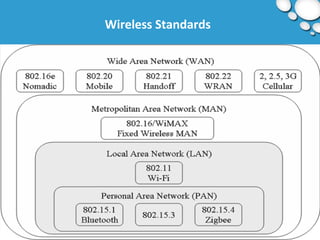
Wireless Standards
WPAN 
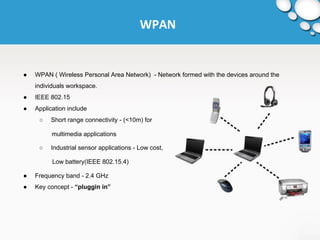
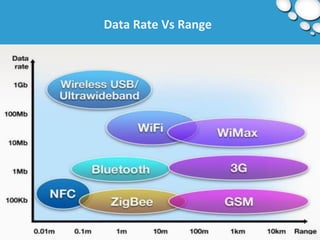
● WPAN ( Wireless Personal Area Network) - Network formed with the devices around the 
individuals workspace. 
● IEEE 802.15 
● Application include 
○ Short range connectivity - (<10m) for 
multimedia applications 
○ Industrial sensor applications - Low cost, 
Low battery(IEEE 802.15.4) 
● Frequency band - 2.4 GHz 
● Key concept - “pluggin in”
Data Rate Vs Range
BLUETOOTH 
● Bluetooth is a wireless technology standard for exchanging data over short distances (using 
short-wavelength UHF radio waves in the ISM band from 2.4 to 2.485 GHz ) from fixed and 
mobile devices, and building Personal Area Networks (PANs). 
● Bluetooth wireless technology is intended to replace the cables 
connecting portable and/or fixed devices while maintaining high 
levels of security.
Why use it ? 
● Eliminate Cables 
● Low Energy Consumption 
● Inexpensive 
● Automatic - Easy to setup and use 
● Device Compatibility - Standardized protocol = Interoperability 
● Readily available 
● Good Security
Discovering Bluetooth 
● Why does the Name ? 
○ It was taken from the tenth century Danish king Harald Blatand who unified Denmark and 
Norway. 
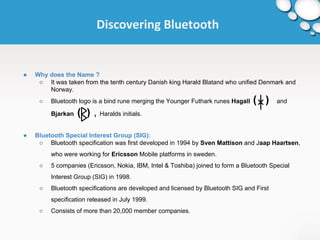
○ Bluetooth logo is a bind rune merging the Younger Futhark runes Hagall ( ) and 
Bjarkan ( ) , Haralds initials. 
● Bluetooth Special Interest Group (SIG): 
○ Bluetooth specification was first developed in 1994 by Sven Mattison and Jaap Haartsen, 
who were working for Ericsson Mobile platforms in sweden. 
○ 5 companies (Ericsson, Nokia, IBM, Intel & Toshiba) joined to form a Bluetooth Special 
Interest Group (SIG) in 1998. 
○ Bluetooth specifications are developed and licensed by Bluetooth SIG and First 
specification released in July 1999. 
○ Consists of more than 20,000 member companies.
Specifications 
● Bluetooth specification is based on FHSS(Frequency Hopping Spread Spectrum). 
● There are 79 channels in Bluetooth each of 1 MHz wide; after each transmit or receive, devices 
hop to a new channel. (f = 2402 + k MHz, k = 0, 1, 2 … 78 [f1= 2402, f79=2480]) 
● Channel Switching is as often as 1600 times per second. 
FHSS (Frequency Hopping Spread Spectrum): 
- is a method of transmitting radio signals by rapidly switching a carrier among many frequency 
channels, using a pseudorandom sequence known to both transmitter and receiver. 
- Hopping = No interface 
- Adaptive Frequency Hopping 
- version-3 supports 2.4GHz and 5GHz
Frequency Hopping Spread Spectrum 
Typically, the initiation of an FHSS communication is as follows: 
● The initiating party sends a request via a predefined frequency or control channel. 
● The receiving party sends a number, known as a seed. 
● The initiating party uses the number as a variable in a predefined algorithm, which calculates 
the sequence of frequencies that must be used. Most often the period of the frequency change 
is predefined, as to allow a single base station to serve multiple connections. 
● The initiating party sends a synchronization signal via the first frequency in the calculated 
sequence, thus acknowledging to the receiving party it has correctly calculated the sequence. 
● The communication begins, and both the receiving and the sending party change their 
frequencies along the calculated order, starting at the same point in time.
Genealogy of Bluetooth 
● Bluetooth v1.0 and v1.0B: 
○ Had many problems 
■ interoperability 
■ mandatory Bluetooth hardware device address (BD_ADDR) transmission in 
connection process (which made anonymity impossible). 
● Bluetooth v1.1: 
○ Ratified as IEEE 802.15.1 - 2002 
○ Errors found in 1.0B are fixed. 
○ Added possibility of non-encrypted channels 
○ RSSI (Received Signal Strength Indicator)
Genealogy of Bluetooth 
● Bluetooth v1.2: 
○ Made major enhancements 
■ Faster connection and Discovery 
■ Backward compatible with v1.1 
■ Adaptive Frequency Hopping Spread Spectrum (AFH) and Higher transmission 
speeds in practise, up to 721 kb/s than in v1.1 
■ Extended Synchronous Connections (eSCO), which improve voice quality 
■ Flow control and retransmission modes for L2CAP. 
● Bluetooth v2.0 + EDR: 
○ Released in 2004. Introduction of Enhanced Data Rate (EDR) for faster data transfers - 3 
Mb/s 
○ Lower power consumption through reduced duty cycle 
○ 100 meter range
Genealogy of Bluetooth 
● Bluetooth v2.1 + EDR: 
○ Headline feature is Secure Simple Pairing (SSP) 
■ improving pairing experience while increasing the use and strength of security 
○ Extended Inquiry Response (EIR) - provides more information during the inquiry procedure 
to allow better filtering of devices before connection. 
● Bluetooth v3.0 + HS: 
○ Theoretical data transfers of up to 24 Mb/s, though not over bluetooth link Main feature - 
AMP (Alternative MAC/PHY), the addition of 802.11 as a high speed transport. 
○ Alternate MAC/PHY Enables the use of alternative MAC and PHYs for transporting 
Bluetooth profile data. The Bluetooth radio is still used for device discovery, initial 
connection and profile configuration, however when large quantities of data need to be 
sent, the high speed alternate MAC PHY 802.11 will be used to transport the data.
Genealogy of Bluetooth 
● Bluetooth v4.0: 
○ Bluetooth Smart, includes 
■ Classic Bluetooth, Bluetooth High Speed and Bluetooth Low Energy protocols. 
○ General Improvements 
■ changes in BLE(Bluetooth Low Energy) modes 
■ Generic Attribute Profile(GATT) and 
■ Security Manager services with AES encryption. 
● Bluetooth v4.1: 
○ Announced on 4th Dec, 2013 
○ New features included 
■ Improved consumer usability with increased co-existence support for LTE 
■ Bulk data exchange rates 
■ Aid developer innovation by allowing devices to support multiple roles 
simultaneously.
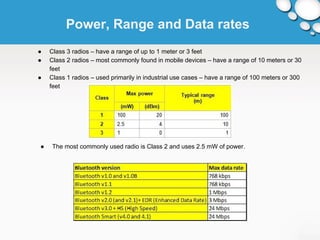
Power, Range and Data rates 
● Class 3 radios – have a range of up to 1 meter or 3 feet 
● Class 2 radios – most commonly found in mobile devices – have a range of 10 meters or 30 
feet 
● Class 1 radios – used primarily in industrial use cases – have a range of 100 meters or 300 
feet 
● The most commonly used radio is Class 2 and uses 2.5 mW of power.
Communication Topology 
How about multiple connections? (PICONET) 
● Bluetooth enabled devices to connect and communicate wirelessly through short-range, ad-hoc 
networks known as piconets 
● It allows one master device to interconnect with up to seven active slave devices. 
● Each device can also belong to several piconets simultaneously. 
● Piconets are established dynamically and automatically as Bluetooth enabled devices enter 
and leave radio proximity. 
● Master determines common hop sequence and phase (when to transmit). 
● Master transmits at even slot and receives at odd slot 
○ Clock tick = 312.5 μs 
○ Slot time = 2 * clock tick 
● Because the Bluetooth system hops over 79 channels, the probability of interfering with another 
Bluetooth system is less than 1.5%. This allows several Bluetooth Piconets to operate in the 
same area at the same time with minimal interference.
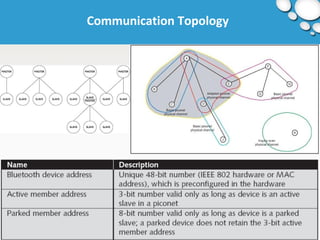
Communication Topology
Communication Topology 
● Each Bluetooth device is preconfigured with an address 
○ Needed when participating or not participating in the piconet 
● All devices in a piconet must change frequencies both at 
○ Same time 
○ Same sequence 
● Multiple piconets can cover the same area 
○ Each can contain up to seven slaves 
● Scatternets can be formed when a member of one piconet (either the master or one of the 
slaves) elects to participate as a slave in a second, separate piconet.
Operation Procedures and Modes 
● Inquiry (Discovering) Procedure 
● Extended Inquiry Response 
● Paging (Connecting) Procedure 
● Connected mode 
● Hold mode 
● Sniff mode 
● Parked state 
● Role switch procedure & Enhanced Data Rate 
● AMP Discovery Procedures
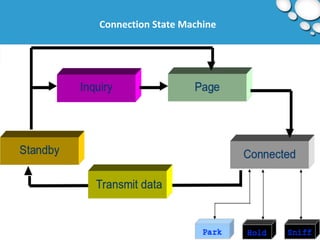
Connection State Machine
Connection State Machine 
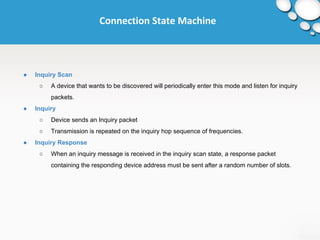
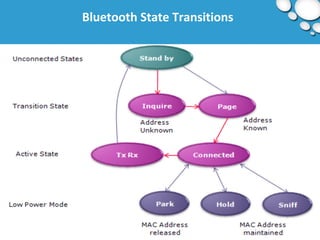
● Inquiry Scan 
○ A device that wants to be discovered will periodically enter this mode and listen for inquiry 
packets. 
● Inquiry 
○ Device sends an Inquiry packet 
○ Transmission is repeated on the inquiry hop sequence of frequencies. 
● Inquiry Response 
○ When an inquiry message is received in the inquiry scan state, a response packet 
containing the responding device address must be sent after a random number of slots.
Connection State Machine 
● Page 
○ The master uses the clock information about the slave to be paged, to determine where in 
the hop sequence, the slave might be listening in the page scan mode. 
○ The master sends a page message 
● Page Scan 
○ The page scan sub-state can be entered by the slave from the standby state or the 
connection state. It listens to packets addressed to it. 
● Page Response 
○ On receiving the page message, the slave enters the slave page response sub-state. It 
sends back a page response consisting of its ID packet, at the frequency for the next slot 
from the one in which page message was received.
Connection State Machine 
● Sniff Mode 
○ This is a low power mode in which the listening activity of the slave is reduced. 
○ In the sniff mode, the slave listens for transmissions only at fixed intervals Tsniff. These 
parameters are given by the LMP in the master when it issues the SNIFF command to the 
slave. 
● Hold Mode 
○ Slave temporarily does not support ACL packets on the channel (possible SCO links will 
still be supported). 
○ By this capacity can be made free to do other things like scanning, paging, inquiring, or 
attending another piconet. 
○ The slave unit keeps its active member address (AM_ADDR).
Connection State Machine 
● Park Mode 
○ This is a very low power mode with very little activity. 
○ The slave however, stays synchronized to the channel. 
○ The parked slaves regularly listen for beacon signals at intervals decided by the beacon 
structure communicated to the slave during the start of parking. 
○ The parked slave has to be informed about a transmission in a beacon channel which is 
supported by the master to keep parked slaves in synchronization and send them any 
other information. 
○ Any message to be sent to a parked member are sent over the broadcast channel. 
○ It also helps the master to have more than seven slaves.
Bluetooth State Transitions
Protocol Stack 
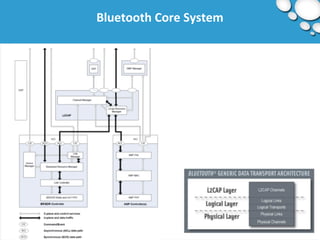
Bluetooth Core System 
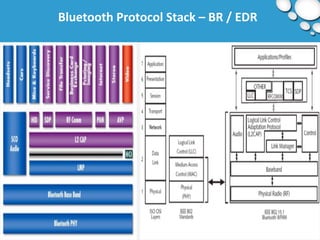
● Bluetooth Host and Controller Combinations: BR/EDR only, BR/EDR with one AMP, and 
BR/EDR with multiple AMPs 
● The Bluetooth protocol stack is split in two parts: 
○ "controller stack" containing the timing critical radio interface, and 
○ "host stack" dealing with high level data. 
● For integrated devices such as Bluetooth headsets, the host stack + controller stack can be run 
on the same microprocessor to reduce mass production costs; this is known as a hostless 
system.
Bluetooth Protocol Stack – BR / EDR
Bluetooth Core System
Controller Stack 
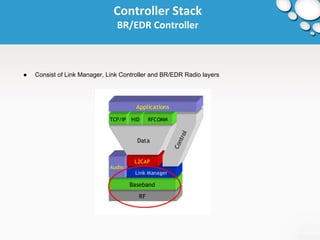
BR/EDR Controller 
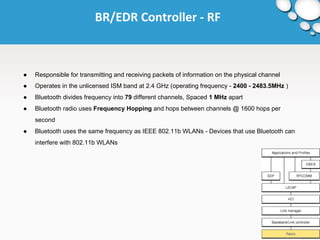
● Consist of Link Manager, Link Controller and BR/EDR Radio layers
BR/EDR Controller - RF 
● Responsible for transmitting and receiving packets of information on the physical channel 
● Operates in the unlicensed ISM band at 2.4 GHz (operating frequency - 2400 - 2483.5MHz ) 
● Bluetooth divides frequency into 79 different channels, Spaced 1 MHz apart 
● Bluetooth radio uses Frequency Hopping and hops between channels @ 1600 hops per 
second 
● Bluetooth uses the same frequency as IEEE 802.11b WLANs - Devices that use Bluetooth can 
interfere with 802.11b WLANs
BR/EDR Controller - RF 
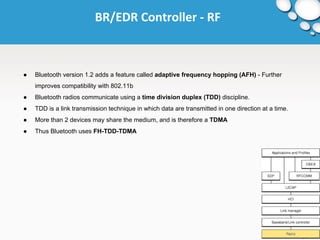
● Bluetooth version 1.2 adds a feature called adaptive frequency hopping (AFH) - Further 
improves compatibility with 802.11b 
● Bluetooth radios communicate using a time division duplex (TDD) discipline. 
● TDD is a link transmission technique in which data are transmitted in one direction at a time. 
● More than 2 devices may share the medium, and is therefore a TDMA 
● Thus Bluetooth uses FH-TDD-TDMA
BR/EDR Controller – Baseband 
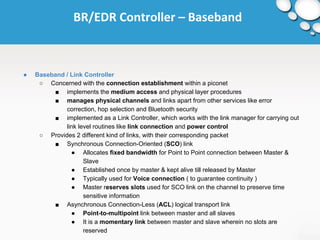
● Baseband / Link Controller 
○ Concerned with the connection establishment within a piconet 
■ implements the medium access and physical layer procedures 
■ manages physical channels and links apart from other services like error 
correction, hop selection and Bluetooth security 
■ implemented as a Link Controller, which works with the link manager for carrying out 
link level routines like link connection and power control 
○ Provides 2 different kind of links, with their corresponding packet 
■ Synchronous Connection-Oriented (SCO) link 
● Allocates fixed bandwidth for Point to Point connection between Master & 
Slave 
● Established once by master & kept alive till released by Master 
● Typically used for Voice connection ( to guarantee continuity ) 
● Master reserves slots used for SCO link on the channel to preserve time 
sensitive information 
■ Asynchronous Connection-Less (ACL) logical transport link 
● Point-to-multipoint link between master and all slaves 
● It is a momentary link between master and slave wherein no slots are 
reserved
BR/EDR Controller – Baseband 
● The Bluetooth device can support one asynchronous channel and up to three synchronous 
voice channels 
● For voice communications, 64 Kbps data rate is supported in both directions 
● For asynchronous links, two types of channels are possible 
○ In an asymmetric channel, the data rates are different in two directions – 723.2 Kbps and 
57.6 Kbps 
○ In a symmetric channel, 433.9Kbps data rate is supported in both directions 
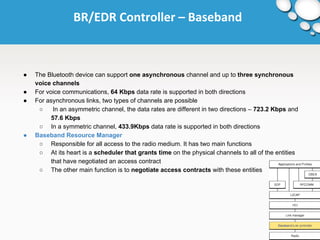
● Baseband Resource Manager 
○ Responsible for all access to the radio medium. It has two main functions 
○ At its heart is a scheduler that grants time on the physical channels to all of the entities 
that have negotiated an access contract 
○ The other main function is to negotiate access contracts with these entities
Bluetooth Packet Format 
● Parts 
○ Access code (72 bits) — it is used for timing synchronization, paging inquiry 
○ Header (54 bits) — Contains information for packet acknowledgment, packet numbering 
for out-of-order packet reordering, the slave address, the type of payload, and error 
checking 
○ Payload (0-2745 bits) — Can contain data, voice, or both
BR/EDR Controller – Link Manager 
● Link Manager 
○ Carries out link setup and is responsible for the creation, modification, configuration and 
release of links as well as the update of parameters related to links between devices. 
○ Uses the services of the underlying Link Controller (LC) 
○ It discovers other remote LM’s and communicates with them via the Link Manager Protocol 
(LMP) 
■ Responsible for link set-up between devices, including security functions: 
● Authentication 
● Encryption 
■ Controls and negotiates baseband packet size 
■ Controls power modes and connection states 
○ Essentially consists of a number of PDU (protocol Data Units), which are sent from one 
device to another, determined by the AM_ADDR in the packet header. LM PDUs are 
always sent as single-slot packets and the payload header is therefore one byte. 
● Device Manager 
○ Responsible for all operation of the Bluetooth system that is not directly related to data 
transport, such as inquiring for the presence of other nearby Bluetooth devices, 
connecting to other Bluetooth devices, or making the local Bluetooth device 
discoverable or connectable by other devices.
AMP Controller 
● Secondary controllers 
1. BR/EDR radio, the primary radio, is used to perform discovery, association, connection 
establishment, and connection maintenance 
2. Discover the AMPs that are available on the other device 
3. If AMP is common between the two devices, the Core system provides mechanisms for 
moving data traffic from BR/EDR Controller to an AMP Controller. 
● AMP Controller: An AMP PAL, AMP MAC, and AMP PHY 
○ AMP PHY: The AMP PHY is the AMP physical layer. 
○ AMP MAC: Provides services such as addressing and mechanisms to control and access 
channels 
○ AMP PAL 
■ AMP layer interfacing the AMP MAC with the Host (L2CAP and AMP Manager) 
■ Provides support for AMP channel management, data traffic according to specified 
flow specifications, and power efficiency
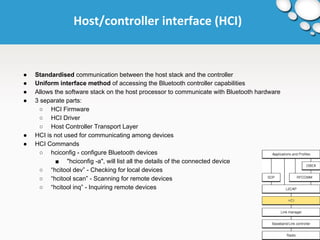
Host/controller interface (HCI) 
● Standardised communication between the host stack and the controller 
● Uniform interface method of accessing the Bluetooth controller capabilities 
● Allows the software stack on the host processor to communicate with Bluetooth hardware 
● 3 separate parts: 
○ HCI Firmware 
○ HCI Driver 
○ Host Controller Transport Layer 
● HCI is not used for communicating among devices 
● HCI Commands 
○ hciconfig - configure Bluetooth devices 
■ "hciconfig -a", will list all the details of the connected device 
○ “hcitool dev” - Checking for local devices 
○ “hcitool scan” - Scanning for remote devices 
○ “hcitool inq” - Inquiring remote devices
HOST STACK 
L2CAP 
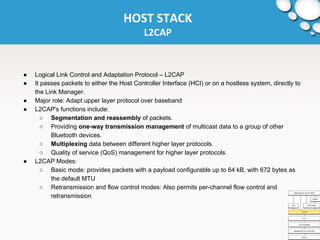
● Logical Link Control and Adaptation Protocol – L2CAP 
● It passes packets to either the Host Controller Interface (HCI) or on a hostless system, directly to 
the Link Manager. 
● Major role: Adapt upper layer protocol over baseband 
● L2CAP's functions include: 
○ Segmentation and reassembly of packets. 
○ Providing one-way transmission management of multicast data to a group of other 
Bluetooth devices. 
○ Multiplexing data between different higher layer protocols. 
○ Quality of service (QoS) management for higher layer protocols. 
● L2CAP Modes: 
○ Basic mode: provides packets with a payload configurable up to 64 kB, with 672 bytes as 
the default MTU 
○ Retransmission and flow control modes: Also permits per-channel flow control and 
retransmission
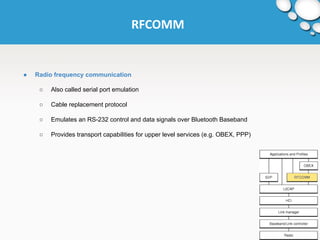
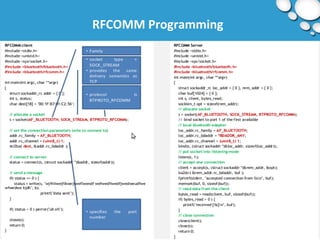
RFCOMM 
● Radio frequency communication 
○ Also called serial port emulation 
○ Cable replacement protocol 
○ Emulates an RS-232 control and data signals over Bluetooth Baseband 
○ Provides transport capabilities for upper level services (e.g. OBEX, PPP)
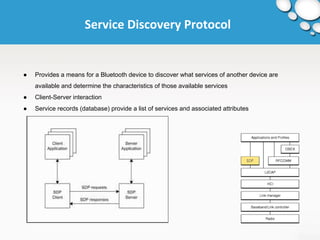
Service Discovery Protocol 
● Provides a means for a Bluetooth device to discover what services of another device are 
available and determine the characteristics of those available services 
● Client-Server interaction 
● Service records (database) provide a list of services and associated attributes
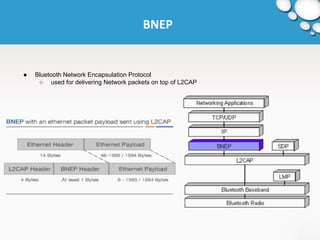
BNEP 
● Bluetooth Network Encapsulation Protocol 
○ used for delivering Network packets on top of L2CAP
Telephony control protocol (TCP) 
● TCS BIN is a bit oriented protocol that defines the call control signalling for the establishment of 
speech and data calls between Bluetooth devices. 
● It is used by the intercom (ICP) and cordless telephony (CTP) profiles.
Services Supported 
● Bluetooth supports both voice and data services 
● Since voice communication is done in circuit switching mode and data communication is done in 
packet switching mode, both types of connections are supported in Bluetooth 
● The link established for voice communication is a Synchronous Connection Oriented (SCO) link, 
and the link established for data communication is a Asynchronous Connection Less (ACL) link.
Data Rates 
● The Bluetooth device can support one asynchronous channel and up to three synchronous voice 
channels 
● For voice communications, 64 Kbps data rate is supported in both directions. 
● For asynchronous links, two types of channels are possible. 
○ In an asymmetric channel, the data rates are different in two directions – 723.2 Kbps and 
57.6 Kbps 
○ In a symmetric channel, 433.9Kbps data rate is supported in both directions
Core and Profile Specifications 
● The Core Specifications describe the details of the various layers of the Bluetooth protocol 
architecture, from the radio interface to the link control 
● The Core Specification discusses how the technology works 
● The Profile Specifications are concerned with the use of Bluetooth technology to support various 
applications. 
● Each profile discusses the use of technology defined in the core specifications to implement a 
particular usage model
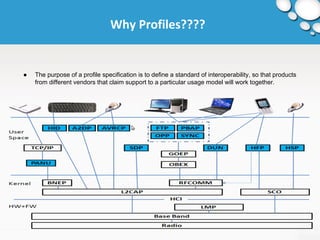
Why Profiles???? 
● The purpose of a profile specification is to define a standard of interoperability, so that products 
from different vendors that claim support to a particular usage model will work together.
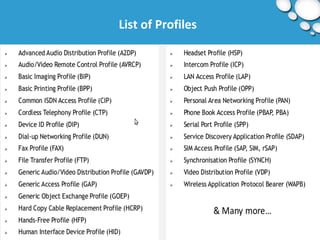
List of Profiles
Bluetooth in Linux 
● Many implementations 
○ Embedded and Non-free protocol stack 
○ Four major known Bluetooth stacks 
■ OpenBT, BlueDrekar, BlueZ and Affix 
● Official protocol stack in linux is Bluez 
○ Released May, 3rd 2001 
○ Integrated into Linux kernel 2.4.6 (June 2001) 
○ Enhanced many times
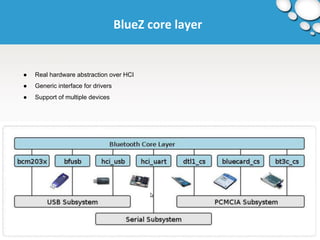
BlueZ core layer 
● Real hardware abstraction over HCI 
● Generic interface for drivers 
● Support of multiple devices
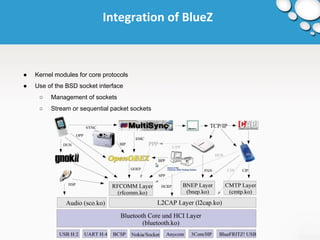
Integration of BlueZ 
● Kernel modules for core protocols 
● Use of the BSD socket interface 
○ Management of sockets 
○ Stream or sequential packet sockets
Bluez Summary 
● The source code is under GPL 
● Bluez is qualified by the Bluetooth SIG 
● Full access to all Bluetooth host layers 
● Native integration into many projects 
● Active development 
● Very good interoperability with Bluetooth versions
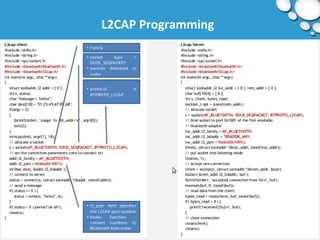
L2CAP Programming
RFCOMM Programming
Thank You !

Bluetooth

  • 1.
    BLUETOOTH Wireless PersonalArea Network Raju K C-DAC Hyderabad
  • 2.
    Agenda ● WPAN ● BLUETOOTH ○ GENERAL ■ What use it? ■ Discovering Bluetooth ■ Specification ■ Bluetooth Versions ■ Power and Data Rates ○ COMMUNICATION TOPOLOGY ■ How about multiple connections? ○ PROTOCOL STACK ■ Controller Stack ■ Host Stack ○ PROFILE SPECIFICATION ○ BLUETOOTH ON LINUX
  • 3.
  • 4.
    WPAN ● WPAN( Wireless Personal Area Network) - Network formed with the devices around the individuals workspace. ● IEEE 802.15 ● Application include ○ Short range connectivity - (<10m) for multimedia applications ○ Industrial sensor applications - Low cost, Low battery(IEEE 802.15.4) ● Frequency band - 2.4 GHz ● Key concept - “pluggin in”
  • 5.
  • 6.
    BLUETOOTH ● Bluetoothis a wireless technology standard for exchanging data over short distances (using short-wavelength UHF radio waves in the ISM band from 2.4 to 2.485 GHz ) from fixed and mobile devices, and building Personal Area Networks (PANs). ● Bluetooth wireless technology is intended to replace the cables connecting portable and/or fixed devices while maintaining high levels of security.
  • 7.
    Why use it? ● Eliminate Cables ● Low Energy Consumption ● Inexpensive ● Automatic - Easy to setup and use ● Device Compatibility - Standardized protocol = Interoperability ● Readily available ● Good Security
  • 8.
    Discovering Bluetooth ●Why does the Name ? ○ It was taken from the tenth century Danish king Harald Blatand who unified Denmark and Norway. ○ Bluetooth logo is a bind rune merging the Younger Futhark runes Hagall ( ) and Bjarkan ( ) , Haralds initials. ● Bluetooth Special Interest Group (SIG): ○ Bluetooth specification was first developed in 1994 by Sven Mattison and Jaap Haartsen, who were working for Ericsson Mobile platforms in sweden. ○ 5 companies (Ericsson, Nokia, IBM, Intel & Toshiba) joined to form a Bluetooth Special Interest Group (SIG) in 1998. ○ Bluetooth specifications are developed and licensed by Bluetooth SIG and First specification released in July 1999. ○ Consists of more than 20,000 member companies.
  • 9.
    Specifications ● Bluetoothspecification is based on FHSS(Frequency Hopping Spread Spectrum). ● There are 79 channels in Bluetooth each of 1 MHz wide; after each transmit or receive, devices hop to a new channel. (f = 2402 + k MHz, k = 0, 1, 2 … 78 [f1= 2402, f79=2480]) ● Channel Switching is as often as 1600 times per second. FHSS (Frequency Hopping Spread Spectrum): - is a method of transmitting radio signals by rapidly switching a carrier among many frequency channels, using a pseudorandom sequence known to both transmitter and receiver. - Hopping = No interface - Adaptive Frequency Hopping - version-3 supports 2.4GHz and 5GHz
  • 10.
    Frequency Hopping SpreadSpectrum Typically, the initiation of an FHSS communication is as follows: ● The initiating party sends a request via a predefined frequency or control channel. ● The receiving party sends a number, known as a seed. ● The initiating party uses the number as a variable in a predefined algorithm, which calculates the sequence of frequencies that must be used. Most often the period of the frequency change is predefined, as to allow a single base station to serve multiple connections. ● The initiating party sends a synchronization signal via the first frequency in the calculated sequence, thus acknowledging to the receiving party it has correctly calculated the sequence. ● The communication begins, and both the receiving and the sending party change their frequencies along the calculated order, starting at the same point in time.
  • 11.
    Genealogy of Bluetooth ● Bluetooth v1.0 and v1.0B: ○ Had many problems ■ interoperability ■ mandatory Bluetooth hardware device address (BD_ADDR) transmission in connection process (which made anonymity impossible). ● Bluetooth v1.1: ○ Ratified as IEEE 802.15.1 - 2002 ○ Errors found in 1.0B are fixed. ○ Added possibility of non-encrypted channels ○ RSSI (Received Signal Strength Indicator)
  • 12.
    Genealogy of Bluetooth ● Bluetooth v1.2: ○ Made major enhancements ■ Faster connection and Discovery ■ Backward compatible with v1.1 ■ Adaptive Frequency Hopping Spread Spectrum (AFH) and Higher transmission speeds in practise, up to 721 kb/s than in v1.1 ■ Extended Synchronous Connections (eSCO), which improve voice quality ■ Flow control and retransmission modes for L2CAP. ● Bluetooth v2.0 + EDR: ○ Released in 2004. Introduction of Enhanced Data Rate (EDR) for faster data transfers - 3 Mb/s ○ Lower power consumption through reduced duty cycle ○ 100 meter range
  • 13.
    Genealogy of Bluetooth ● Bluetooth v2.1 + EDR: ○ Headline feature is Secure Simple Pairing (SSP) ■ improving pairing experience while increasing the use and strength of security ○ Extended Inquiry Response (EIR) - provides more information during the inquiry procedure to allow better filtering of devices before connection. ● Bluetooth v3.0 + HS: ○ Theoretical data transfers of up to 24 Mb/s, though not over bluetooth link Main feature - AMP (Alternative MAC/PHY), the addition of 802.11 as a high speed transport. ○ Alternate MAC/PHY Enables the use of alternative MAC and PHYs for transporting Bluetooth profile data. The Bluetooth radio is still used for device discovery, initial connection and profile configuration, however when large quantities of data need to be sent, the high speed alternate MAC PHY 802.11 will be used to transport the data.
  • 14.
    Genealogy of Bluetooth ● Bluetooth v4.0: ○ Bluetooth Smart, includes ■ Classic Bluetooth, Bluetooth High Speed and Bluetooth Low Energy protocols. ○ General Improvements ■ changes in BLE(Bluetooth Low Energy) modes ■ Generic Attribute Profile(GATT) and ■ Security Manager services with AES encryption. ● Bluetooth v4.1: ○ Announced on 4th Dec, 2013 ○ New features included ■ Improved consumer usability with increased co-existence support for LTE ■ Bulk data exchange rates ■ Aid developer innovation by allowing devices to support multiple roles simultaneously.
  • 15.
    Power, Range andData rates ● Class 3 radios – have a range of up to 1 meter or 3 feet ● Class 2 radios – most commonly found in mobile devices – have a range of 10 meters or 30 feet ● Class 1 radios – used primarily in industrial use cases – have a range of 100 meters or 300 feet ● The most commonly used radio is Class 2 and uses 2.5 mW of power.
  • 16.
    Communication Topology Howabout multiple connections? (PICONET) ● Bluetooth enabled devices to connect and communicate wirelessly through short-range, ad-hoc networks known as piconets ● It allows one master device to interconnect with up to seven active slave devices. ● Each device can also belong to several piconets simultaneously. ● Piconets are established dynamically and automatically as Bluetooth enabled devices enter and leave radio proximity. ● Master determines common hop sequence and phase (when to transmit). ● Master transmits at even slot and receives at odd slot ○ Clock tick = 312.5 μs ○ Slot time = 2 * clock tick ● Because the Bluetooth system hops over 79 channels, the probability of interfering with another Bluetooth system is less than 1.5%. This allows several Bluetooth Piconets to operate in the same area at the same time with minimal interference.
  • 17.
  • 18.
    Communication Topology ●Each Bluetooth device is preconfigured with an address ○ Needed when participating or not participating in the piconet ● All devices in a piconet must change frequencies both at ○ Same time ○ Same sequence ● Multiple piconets can cover the same area ○ Each can contain up to seven slaves ● Scatternets can be formed when a member of one piconet (either the master or one of the slaves) elects to participate as a slave in a second, separate piconet.
  • 19.
    Operation Procedures andModes ● Inquiry (Discovering) Procedure ● Extended Inquiry Response ● Paging (Connecting) Procedure ● Connected mode ● Hold mode ● Sniff mode ● Parked state ● Role switch procedure & Enhanced Data Rate ● AMP Discovery Procedures
  • 20.
  • 21.
    Connection State Machine ● Inquiry Scan ○ A device that wants to be discovered will periodically enter this mode and listen for inquiry packets. ● Inquiry ○ Device sends an Inquiry packet ○ Transmission is repeated on the inquiry hop sequence of frequencies. ● Inquiry Response ○ When an inquiry message is received in the inquiry scan state, a response packet containing the responding device address must be sent after a random number of slots.
  • 22.
    Connection State Machine ● Page ○ The master uses the clock information about the slave to be paged, to determine where in the hop sequence, the slave might be listening in the page scan mode. ○ The master sends a page message ● Page Scan ○ The page scan sub-state can be entered by the slave from the standby state or the connection state. It listens to packets addressed to it. ● Page Response ○ On receiving the page message, the slave enters the slave page response sub-state. It sends back a page response consisting of its ID packet, at the frequency for the next slot from the one in which page message was received.
  • 23.
    Connection State Machine ● Sniff Mode ○ This is a low power mode in which the listening activity of the slave is reduced. ○ In the sniff mode, the slave listens for transmissions only at fixed intervals Tsniff. These parameters are given by the LMP in the master when it issues the SNIFF command to the slave. ● Hold Mode ○ Slave temporarily does not support ACL packets on the channel (possible SCO links will still be supported). ○ By this capacity can be made free to do other things like scanning, paging, inquiring, or attending another piconet. ○ The slave unit keeps its active member address (AM_ADDR).
  • 24.
    Connection State Machine ● Park Mode ○ This is a very low power mode with very little activity. ○ The slave however, stays synchronized to the channel. ○ The parked slaves regularly listen for beacon signals at intervals decided by the beacon structure communicated to the slave during the start of parking. ○ The parked slave has to be informed about a transmission in a beacon channel which is supported by the master to keep parked slaves in synchronization and send them any other information. ○ Any message to be sent to a parked member are sent over the broadcast channel. ○ It also helps the master to have more than seven slaves.
  • 25.
  • 26.
    Protocol Stack BluetoothCore System ● Bluetooth Host and Controller Combinations: BR/EDR only, BR/EDR with one AMP, and BR/EDR with multiple AMPs ● The Bluetooth protocol stack is split in two parts: ○ "controller stack" containing the timing critical radio interface, and ○ "host stack" dealing with high level data. ● For integrated devices such as Bluetooth headsets, the host stack + controller stack can be run on the same microprocessor to reduce mass production costs; this is known as a hostless system.
  • 27.
  • 28.
  • 29.
    Controller Stack BR/EDRController ● Consist of Link Manager, Link Controller and BR/EDR Radio layers
  • 30.
    BR/EDR Controller -RF ● Responsible for transmitting and receiving packets of information on the physical channel ● Operates in the unlicensed ISM band at 2.4 GHz (operating frequency - 2400 - 2483.5MHz ) ● Bluetooth divides frequency into 79 different channels, Spaced 1 MHz apart ● Bluetooth radio uses Frequency Hopping and hops between channels @ 1600 hops per second ● Bluetooth uses the same frequency as IEEE 802.11b WLANs - Devices that use Bluetooth can interfere with 802.11b WLANs
  • 31.
    BR/EDR Controller -RF ● Bluetooth version 1.2 adds a feature called adaptive frequency hopping (AFH) - Further improves compatibility with 802.11b ● Bluetooth radios communicate using a time division duplex (TDD) discipline. ● TDD is a link transmission technique in which data are transmitted in one direction at a time. ● More than 2 devices may share the medium, and is therefore a TDMA ● Thus Bluetooth uses FH-TDD-TDMA
  • 32.
    BR/EDR Controller –Baseband ● Baseband / Link Controller ○ Concerned with the connection establishment within a piconet ■ implements the medium access and physical layer procedures ■ manages physical channels and links apart from other services like error correction, hop selection and Bluetooth security ■ implemented as a Link Controller, which works with the link manager for carrying out link level routines like link connection and power control ○ Provides 2 different kind of links, with their corresponding packet ■ Synchronous Connection-Oriented (SCO) link ● Allocates fixed bandwidth for Point to Point connection between Master & Slave ● Established once by master & kept alive till released by Master ● Typically used for Voice connection ( to guarantee continuity ) ● Master reserves slots used for SCO link on the channel to preserve time sensitive information ■ Asynchronous Connection-Less (ACL) logical transport link ● Point-to-multipoint link between master and all slaves ● It is a momentary link between master and slave wherein no slots are reserved
  • 33.
    BR/EDR Controller –Baseband ● The Bluetooth device can support one asynchronous channel and up to three synchronous voice channels ● For voice communications, 64 Kbps data rate is supported in both directions ● For asynchronous links, two types of channels are possible ○ In an asymmetric channel, the data rates are different in two directions – 723.2 Kbps and 57.6 Kbps ○ In a symmetric channel, 433.9Kbps data rate is supported in both directions ● Baseband Resource Manager ○ Responsible for all access to the radio medium. It has two main functions ○ At its heart is a scheduler that grants time on the physical channels to all of the entities that have negotiated an access contract ○ The other main function is to negotiate access contracts with these entities
  • 34.
    Bluetooth Packet Format ● Parts ○ Access code (72 bits) — it is used for timing synchronization, paging inquiry ○ Header (54 bits) — Contains information for packet acknowledgment, packet numbering for out-of-order packet reordering, the slave address, the type of payload, and error checking ○ Payload (0-2745 bits) — Can contain data, voice, or both
  • 35.
    BR/EDR Controller –Link Manager ● Link Manager ○ Carries out link setup and is responsible for the creation, modification, configuration and release of links as well as the update of parameters related to links between devices. ○ Uses the services of the underlying Link Controller (LC) ○ It discovers other remote LM’s and communicates with them via the Link Manager Protocol (LMP) ■ Responsible for link set-up between devices, including security functions: ● Authentication ● Encryption ■ Controls and negotiates baseband packet size ■ Controls power modes and connection states ○ Essentially consists of a number of PDU (protocol Data Units), which are sent from one device to another, determined by the AM_ADDR in the packet header. LM PDUs are always sent as single-slot packets and the payload header is therefore one byte. ● Device Manager ○ Responsible for all operation of the Bluetooth system that is not directly related to data transport, such as inquiring for the presence of other nearby Bluetooth devices, connecting to other Bluetooth devices, or making the local Bluetooth device discoverable or connectable by other devices.
  • 36.
    AMP Controller ●Secondary controllers 1. BR/EDR radio, the primary radio, is used to perform discovery, association, connection establishment, and connection maintenance 2. Discover the AMPs that are available on the other device 3. If AMP is common between the two devices, the Core system provides mechanisms for moving data traffic from BR/EDR Controller to an AMP Controller. ● AMP Controller: An AMP PAL, AMP MAC, and AMP PHY ○ AMP PHY: The AMP PHY is the AMP physical layer. ○ AMP MAC: Provides services such as addressing and mechanisms to control and access channels ○ AMP PAL ■ AMP layer interfacing the AMP MAC with the Host (L2CAP and AMP Manager) ■ Provides support for AMP channel management, data traffic according to specified flow specifications, and power efficiency
  • 37.
    Host/controller interface (HCI) ● Standardised communication between the host stack and the controller ● Uniform interface method of accessing the Bluetooth controller capabilities ● Allows the software stack on the host processor to communicate with Bluetooth hardware ● 3 separate parts: ○ HCI Firmware ○ HCI Driver ○ Host Controller Transport Layer ● HCI is not used for communicating among devices ● HCI Commands ○ hciconfig - configure Bluetooth devices ■ "hciconfig -a", will list all the details of the connected device ○ “hcitool dev” - Checking for local devices ○ “hcitool scan” - Scanning for remote devices ○ “hcitool inq” - Inquiring remote devices
  • 38.
    HOST STACK L2CAP ● Logical Link Control and Adaptation Protocol – L2CAP ● It passes packets to either the Host Controller Interface (HCI) or on a hostless system, directly to the Link Manager. ● Major role: Adapt upper layer protocol over baseband ● L2CAP's functions include: ○ Segmentation and reassembly of packets. ○ Providing one-way transmission management of multicast data to a group of other Bluetooth devices. ○ Multiplexing data between different higher layer protocols. ○ Quality of service (QoS) management for higher layer protocols. ● L2CAP Modes: ○ Basic mode: provides packets with a payload configurable up to 64 kB, with 672 bytes as the default MTU ○ Retransmission and flow control modes: Also permits per-channel flow control and retransmission
  • 39.
    RFCOMM ● Radiofrequency communication ○ Also called serial port emulation ○ Cable replacement protocol ○ Emulates an RS-232 control and data signals over Bluetooth Baseband ○ Provides transport capabilities for upper level services (e.g. OBEX, PPP)
  • 40.
    Service Discovery Protocol ● Provides a means for a Bluetooth device to discover what services of another device are available and determine the characteristics of those available services ● Client-Server interaction ● Service records (database) provide a list of services and associated attributes
  • 41.
    BNEP ● BluetoothNetwork Encapsulation Protocol ○ used for delivering Network packets on top of L2CAP
  • 42.
    Telephony control protocol(TCP) ● TCS BIN is a bit oriented protocol that defines the call control signalling for the establishment of speech and data calls between Bluetooth devices. ● It is used by the intercom (ICP) and cordless telephony (CTP) profiles.
  • 43.
    Services Supported ●Bluetooth supports both voice and data services ● Since voice communication is done in circuit switching mode and data communication is done in packet switching mode, both types of connections are supported in Bluetooth ● The link established for voice communication is a Synchronous Connection Oriented (SCO) link, and the link established for data communication is a Asynchronous Connection Less (ACL) link.
  • 44.
    Data Rates ●The Bluetooth device can support one asynchronous channel and up to three synchronous voice channels ● For voice communications, 64 Kbps data rate is supported in both directions. ● For asynchronous links, two types of channels are possible. ○ In an asymmetric channel, the data rates are different in two directions – 723.2 Kbps and 57.6 Kbps ○ In a symmetric channel, 433.9Kbps data rate is supported in both directions
  • 45.
    Core and ProfileSpecifications ● The Core Specifications describe the details of the various layers of the Bluetooth protocol architecture, from the radio interface to the link control ● The Core Specification discusses how the technology works ● The Profile Specifications are concerned with the use of Bluetooth technology to support various applications. ● Each profile discusses the use of technology defined in the core specifications to implement a particular usage model
  • 46.
    Why Profiles???? ●The purpose of a profile specification is to define a standard of interoperability, so that products from different vendors that claim support to a particular usage model will work together.
  • 47.
  • 48.
    Bluetooth in Linux ● Many implementations ○ Embedded and Non-free protocol stack ○ Four major known Bluetooth stacks ■ OpenBT, BlueDrekar, BlueZ and Affix ● Official protocol stack in linux is Bluez ○ Released May, 3rd 2001 ○ Integrated into Linux kernel 2.4.6 (June 2001) ○ Enhanced many times
  • 49.
    BlueZ core layer ● Real hardware abstraction over HCI ● Generic interface for drivers ● Support of multiple devices
  • 50.
    Integration of BlueZ ● Kernel modules for core protocols ● Use of the BSD socket interface ○ Management of sockets ○ Stream or sequential packet sockets
  • 51.
    Bluez Summary ●The source code is under GPL ● Bluez is qualified by the Bluetooth SIG ● Full access to all Bluetooth host layers ● Native integration into many projects ● Active development ● Very good interoperability with Bluetooth versions
  • 52.
  • 53.
  • 54.