Bluetooth Technology
Prasan Kumar Sahoo
Outline of the talk
 Introduction
 Applications and Usages
 Bluetooth Network
 Technical Specifications
 Bluetooth Protocol Stack
 Research issues
 Our Routing Protocols
 Summary
Introduction to Bluetooth
Naming
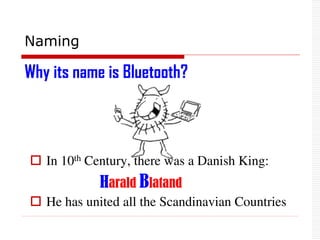
 In 10th Century, there was a Danish King:
Harald Blatand
 He has united all the Scandinavian Countries
Why its name is Bluetooth?
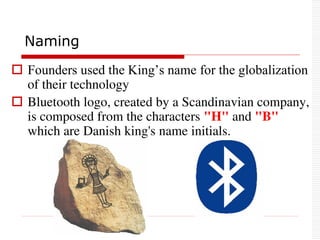
 Founders used the King’s name for the globalization
of their technology
 Bluetooth logo, created by a Scandinavian company,
is composed from the characters "H" and "B"
which are Danish king's name initials.
Naming
 1994: Ericsson started the idea
 1998: Special Interest Group (SIG) is formed with 5
companies
 Founder Group: Ericsson, Nokia, Intel, Toshiba,
IBM
 1999: Another 5 Major Companies joined.
 Promoter Group: Lucent, 3 Com, Motorola,
Microsoft
 2002: SIG became an Independent group with more
than 3000 companies. Office: Kansas, USA
History
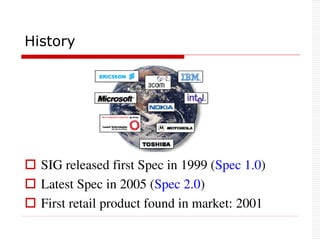
 SIG released first Spec in 1999 (Spec 1.0)
 Latest Spec in 2005 (Spec 2.0)
 First retail product found in market: 2001
History
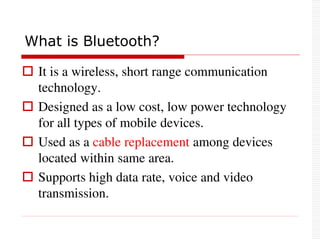
 It is a wireless, short range communication
technology.
 Designed as a low cost, low power technology
for all types of mobile devices.
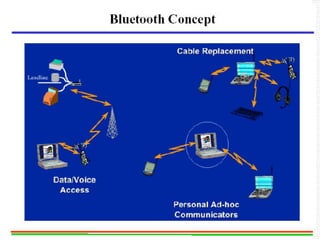
 Used as a cable replacement among devices
located within same area.
 Supports high data rate, voice and video
transmission.
What is Bluetooth?
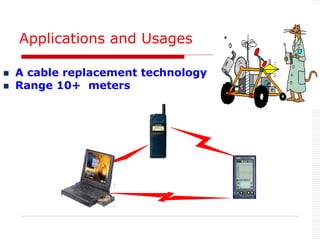
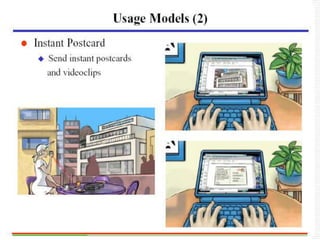
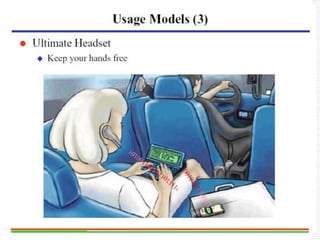
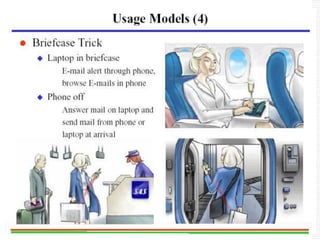
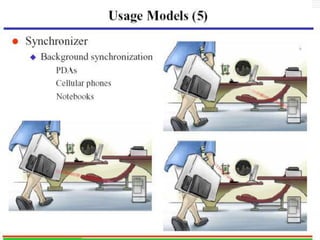
Applications and Usages
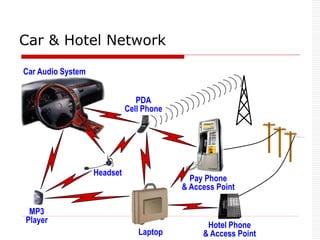
 A cable replacement technology
 Range 10+ meters
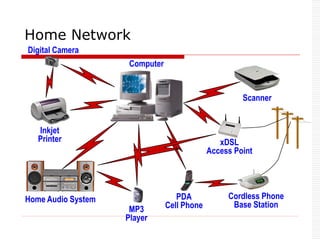
PDA
Cell Phone
Cordless Phone
Base Station
Inkjet
Printer
Scanner
Home Audio System
Computer
Digital Camera
MP3
Player
xDSL
Access Point
Home Network
Car Audio System
Pay Phone
& Access Point
Hotel Phone
& Access Point
Headset
MP3
Player
PDA
Cell Phone
Laptop
Car & Hotel Network
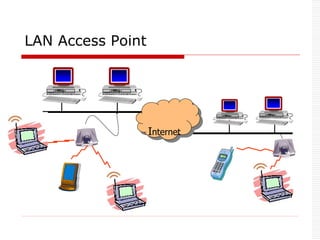
Internet
LAN Access Point
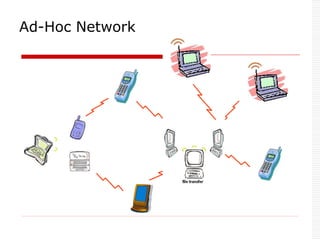
Ad-Hoc Network
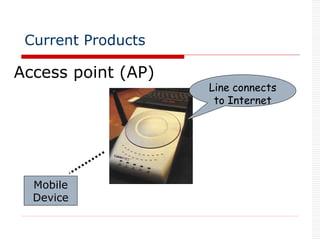
Bluetooth Products
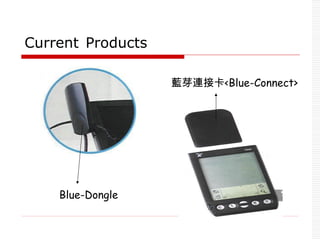
 Blue-Dongle
 Blue-Connect
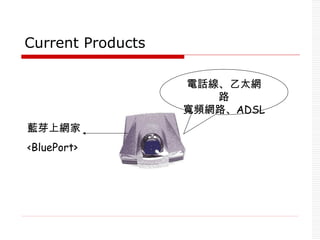
 BluePort
 Bluetooth printer
 Bluetooth Modem
Current Products
Access point (AP)
Line connects
to Internet
Mobile
Device
Current Products
Blue-Dongle
藍芽連接卡<Blue-Connect>
藍芽上網家
<BluePort>
電話線、乙太網
路
寬頻網路、ADSL
Current Products
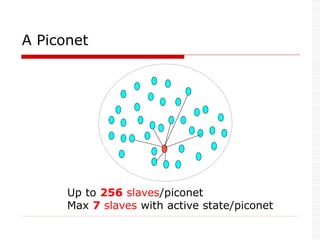
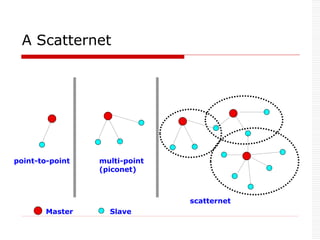
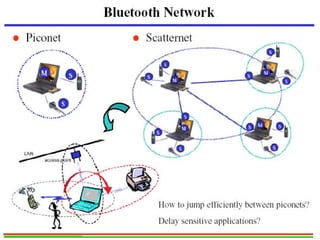
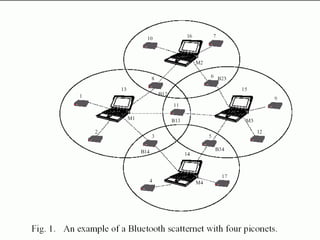
 Two parts: Piconet & Scatternet
 Piconet: 1 Master can connect to 7 active
slaves simultaneously.
 7 active slaves
 256 parked slaves [power saving mode].
 Master controls the slaves in the piconet.
Bluetooth Network
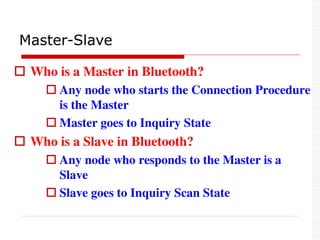
 Who is a Master in Bluetooth?
 Any node who starts the Connection Procedure
is the Master
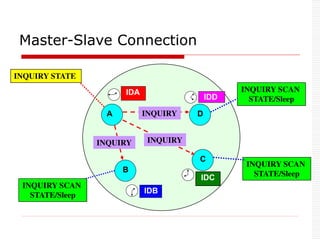
 Master goes to Inquiry State
 Who is a Slave in Bluetooth?
 Any node who responds to the Master is a
Slave
 Slave goes to Inquiry Scan State
Master-Slave
Up to 256 slaves/piconet
Max 7 slaves with active state/piconet
A Piconet
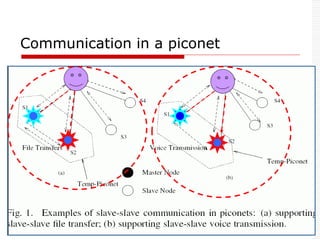
Communication in a piconet
A Scatternet
point-to-point multi-point
(piconet)
scatternet
Master Slave
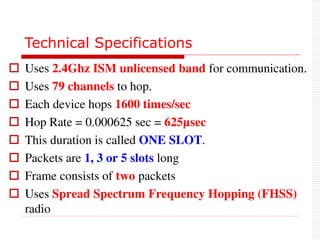
Technical Specifications
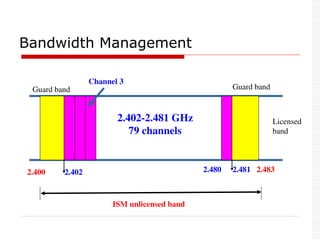
 Uses 2.4Ghz ISM unlicensed band for communication.
 Uses 79 channels to hop.
 Each device hops 1600 times/sec
 Hop Rate = 0.000625 sec = 625µsec
 This duration is called ONE SLOT.
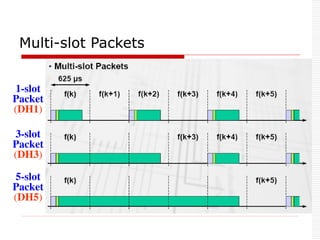
 Packets are 1, 3 or 5 slots long
 Frame consists of two packets
 Uses Spread Spectrum Frequency Hopping (FHSS)
radio
Technical Specifications
 Data rate: 1Mhz
 Symbol rate: 1M bps
 Data rate: 721Kbps excluding header [Data]
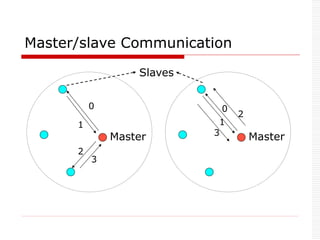
 Uses Time Division Duplex (TDD) technique.
 Time is divided into 625ms(1 time slot)
 Master sends packet to its slaves in the Even time
slot
 Slave sends packet to its Master in ODD time slot
 Uses 3 Power classes.
 Communication Range: 10 m, can be extended to 100 m.
Master
0
1
2
3
Master
0
1
2
3
Slaves
Master/slave Communication
2.400 2.402
Guard band Guard band
Channel 3
2.480 2.483
2.402-2.481 GHz
79 channels
ISM unlicensed band
Licensed
band
Bandwidth Management
2.481
Bandwidth Management
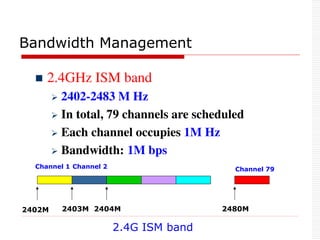
 2.4GHz ISM band
 2402-2483 M Hz
 In total, 79 channels are scheduled
 Each channel occupies 1M Hz
 Bandwidth: 1M bps
2402M 2403M 2404M 2480M
2.4G ISM band
Channel 1 Channel 2 Channel 79
Frequency hopping
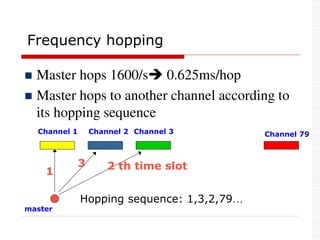
 Master hops 1600/s 0.625ms/hop
 Master hops to another channel according to
its hopping sequence
Channel 1 Channel 2 Channel 79
Channel 3
master
Hopping sequence: 1,3,2,79…
1 2 th time slot
3
Hopping Sequence Generation
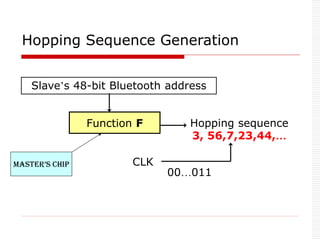
Slave’s 48-bit Bluetooth address
Function F Hopping sequence
3, 56,7,23,44,…
CLK
00…011
Master’s Chip
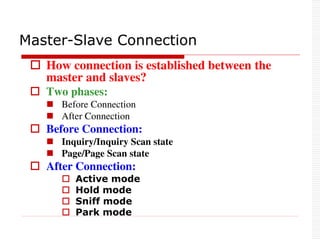
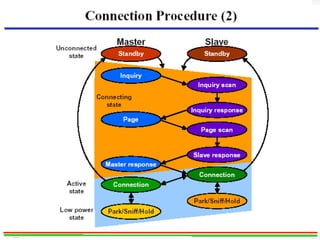
 How connection is established between the
master and slaves?
 Two phases:
 Before Connection
 After Connection
 Before Connection:
 Inquiry/Inquiry Scan state
 Page/Page Scan state
 After Connection:
 Active mode
 Hold mode
 Sniff mode
 Park mode
Master-Slave Connection
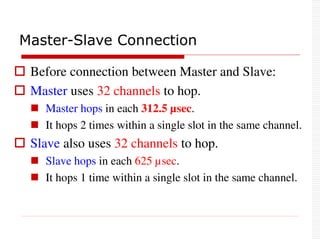
 Before connection between Master and Slave:
 Master uses 32 channels to hop.
 Master hops in each 312.5 µsec.
 It hops 2 times within a single slot in the same channel.
 Slave also uses 32 channels to hop.
 Slave hops in each 625 µsec.
 It hops 1 time within a single slot in the same channel.
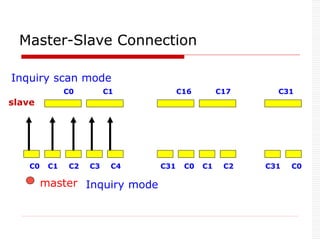
Master-Slave Connection
Inquiry mode
C0 C1 C16 C17 C31
C0 C1 C2 C3 C4 C31 C0 C1 C2 C31 C0
master
slave
Inquiry scan mode
Master-Slave Connection
IDB
IDA
A
IDD
IDC
B
C
D
INQUIRY INQUIRY
INQUIRY
INQUIRY STATE
INQUIRY SCAN
STATE/Sleep
INQUIRY SCAN
STATE/Sleep
INQUIRY SCAN
STATE/Sleep
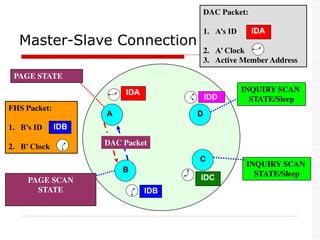
Master-Slave Connection
IDB
IDA
A
IDD
IDC
B
C
D
FHS Packet
INQUIRY STATE
INQUIRY SCAN
STATE
INQUIRY SCAN
STATE/Sleep
INQUIRY SCAN
STATE/Sleep
FHS Packet:
1. B’s ID
2. B’ Clock
IDB
PAGE SCAN
STATE
PAGE STATE
DAC Packet
DAC Packet:
1. A’s ID
2. A’ Clock
3. Active Member Address
IDA
Master-Slave Connection
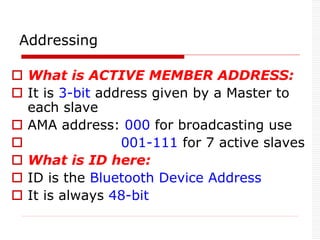
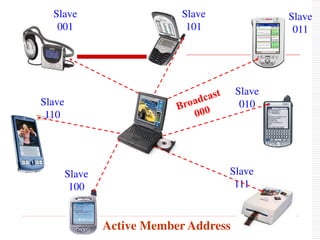
 What is ACTIVE MEMBER ADDRESS:
 It is 3-bit address given by a Master to
each slave
 AMA address: 000 for broadcasting use
 001-111 for 7 active slaves
 What is ID here:
 ID is the Bluetooth Device Address
 It is always 48-bit
Addressing
Slave
001
Slave
110
Slave
100
Slave
111
Slave
010
Slave
011
Slave
101
Active Member Address
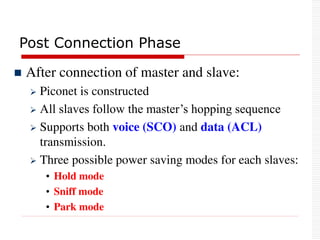
Post Connection Phase
 After connection of master and slave:
 Piconet is constructed
 All slaves follow the master’s hopping sequence
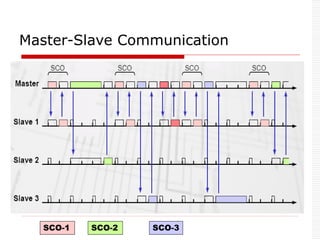
 Supports both voice (SCO) and data (ACL)
transmission.
 Three possible power saving modes for each slaves:
• Hold mode
• Sniff mode
• Park mode
1-slot
Packet
(DH1)
3-slot
Packet
(DH3)
5-slot
Packet
(DH5)
Multi-slot Packets
SCO-1 SCO-2
Master-Slave Communication
SCO-3
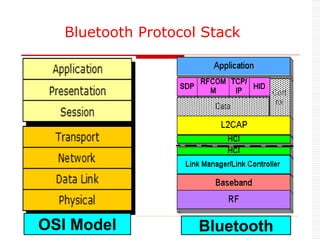
OSI Model Bluetooth
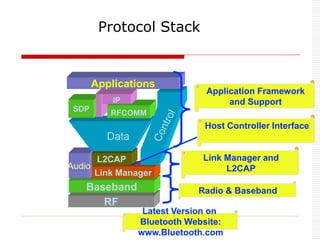
Bluetooth Protocol Stack
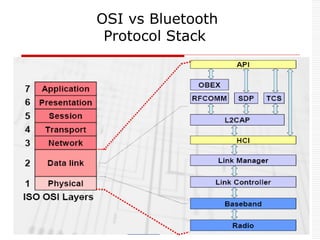
OSI vs Bluetooth
Protocol Stack
RF
Baseband
Audio
Link Manager
L2CAP
Data
SDP RFCOMM
IP
Applications
Protocol Stack
Radio & Baseband
Link Manager and
L2CAP
Host Controller Interface
Application Framework
and Support
Latest Version on
Bluetooth Website:
www.Bluetooth.com
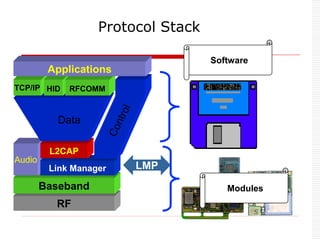
Modules
Software
RF
Baseband
Audio
Link Manager LMP
L2CAP
TCP/IP HID RFCOMM
Applications
Data
Protocol Stack
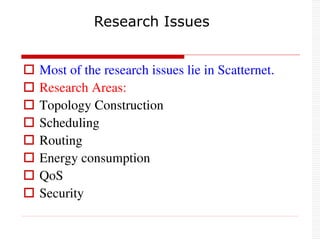
 Most of the research issues lie in Scatternet.
 Research Areas:
 Topology Construction
 Scheduling
 Routing
 Energy consumption
 QoS
 Security
Research Issues
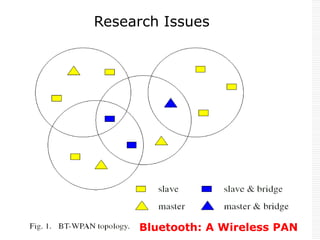
Bluetooth: A Wireless PAN
Research Issues
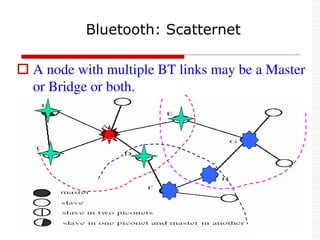
 A node with multiple BT links may be a Master
or Bridge or both.
Bluetooth: Scatternet
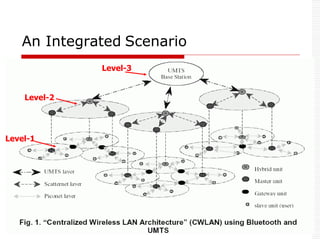
An Integrated Scenario
Level-1
Level-2
Level-3
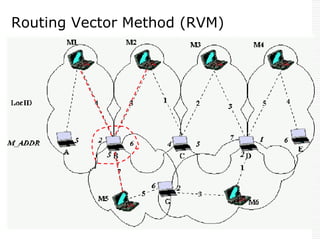
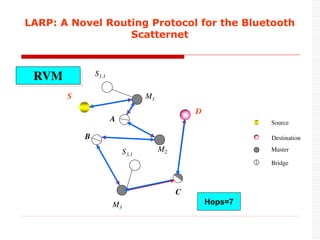
Routing Vector Method (RVM)
 Paper Title:
 LARP: A Novel Routing Protocol for the Bluetooth
Scatternet
 Published:
 In the Proc. of IEEE, WOCN, Dubai, March, 2005.
 Authors:
 Chih-Yung Chang, Prasan Kumar Sahoo, Shih-
Chieh Lee
Our Routing Protocol
LARP: A Novel Routing Protocol for the Bluetooth
Scatternet
RVM
M1
S1,1
S
A
M2
B
S3,1
M3
D
C
Destination
Source
Master
Bridge
Hops=7
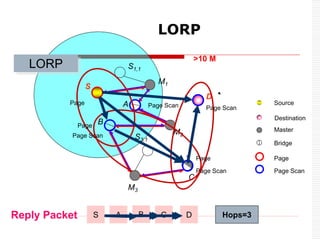
LORP
M1
S1,1
S
A
M2
B
S3,1
M3
C
D
Reply Packet C
B
A D
Page Scan
Page
>10 M
Destination
Source
Master
Bridge
Page Scan
Page Scan
Page Scan
Page Scan
Page
Hops=3
S
Page
LORP
Page
 Drawbacks of these work:
 Longer routing path length
 Long transmission delay time
 High bandwidth consumption
 High power consumption
Drawbacks
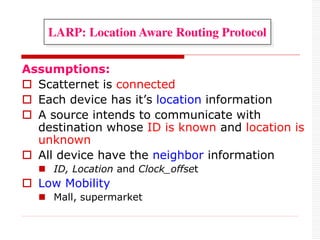
Assumptions:
 Scatternet is connected
 Each device has it’s location information
 A source intends to communicate with
destination whose ID is known and location is
unknown
 All device have the neighbor information
 ID, Location and Clock_offset
 Low Mobility
 Mall, supermarket
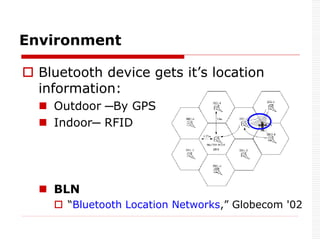
LARP: Location Aware Routing Protocol
 Bluetooth device gets it’s location
information:
 Outdoor ─By GPS
 Indoor─ RFID
 BLN
 “Bluetooth Location Networks,” Globecom '02
Environment
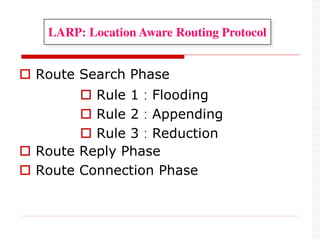
 Route Search Phase
 Route Reply Phase
 Route Connection Phase
 Rule 1:Flooding
 Rule 2:Appending
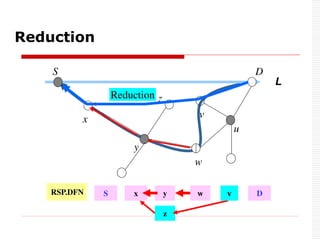
 Rule 3:Reduction
LARP: Location Aware Routing Protocol
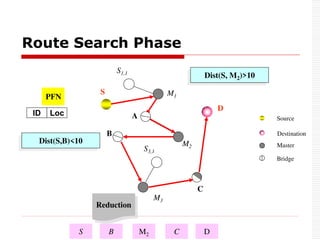
Route Search Phase
M1
S1,1
S
A
M2
B
S3,1
M3
C
D
Dist(S, M2)>10
Dist(S,B)<10
PFN
A
B M3 C
Appending
Reduction
S D
Destination
Source
Master
Bridge
ID Loc
M2
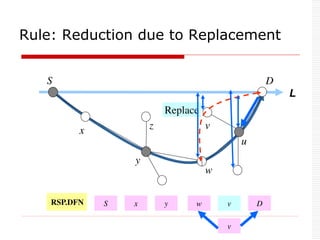
Rule: Reduction due to Replacement
S
x
y
w
u
D
z v
L
Replace
RSP.PFN x
S y w u D
RSP.DFN x
S y w u D
v
v
Reduction
w
Reduction
S
x
y
u
D
z
v
L
RSP.DFN x
S y w D
z
v
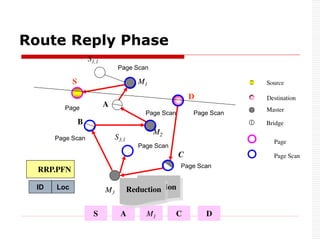
Route Reply Phase
M1
S1,1
S
A
M2
B
S3,1
M3
C
D
Page Scan
RRP.PFN
S B M3 D
C
M2
M1
Page
Replacing
Reduction
A
Destination
Source
Master
Bridge
Replacing
Reduction
Page Scan
Page Scan
Page Scan
Page Scan
Page Scan
Page Scan
Page
ID Loc
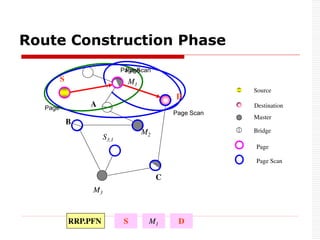
Route Construction Phase
M1
S
A
M2
B
S3,1
M3
C
D
RRP.PFN S D
M1
Page Scan
Page
Destination
Source
Master
Bridge
Page Scan
Page Scan
Page
Page
0
1
2
3
4
5
6
7
8
9
100 400 900 1600 2500
Scatternet Size (m2
)
Average
of
Routing
Length
RVM
LORP
LARP
ELARP(30%)
ELARP(70%)
0
0.2
0.4
0.6
0.8
1
1.2
100 400 900 1600 2500
ScatternetSize(m 2
)
Fr
act
i
on
of
B
andw
i
dt
h
C
onsum
pt
i
on
RVM
LORP
LARP
ELARP(30% )
ELARP(70% )
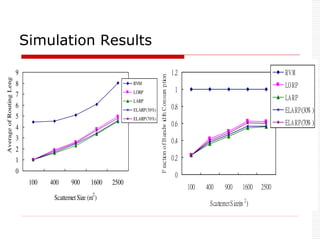
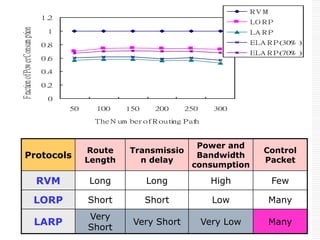
Simulation Results
0
0.
2
0.
4
0.
6
0.
8
1
1.
2
50 100 150 200 250 300
The N um berofR out
i
ng Pat
h
Fraction
of
Pow
er
Consum
ption
R V M
LO R P
LA R P
ELA R P(
30% )
ELA R P(
70% )
Protocols
Route
Length
Transmissio
n delay
Power and
Bandwidth
consumption
Control
Packet
RVM Long Long High Few
LORP Short Short Low Many
LARP
Very
Short
Very Short Very Low Many
Summary
 Bluetooth Technology is designed to replace wires.
 It is one up from IrDA and one down from Wi-Fi
WLAN.
 IrDa and Bluetooth can coexist.
 Bluetooth does not need the device to be in line of
sight.
 It's communications speed and distance are much
worse than available with Wi-Fi.
 It supports 'ad-hoc networking‘.
Thank Q
to
All !!!
Thank Q
to
All !!!

Bluetooth Technology-Introduction to Bluetooth, Technical Specifications, Bluetooth Protocol Stack