Mikrotik Firewall 
Securing Your Router With Port 
Knocking
Introduction 
 Name : Akbar 
 Mikrotik User Since : Mid 2005 
 IT Manager @ Agung Sedayu Group 
 Trainer For Ufoakses Mikrotik Training 
 www.forummikrotik.com 
 akbar@forummikrotik.com 
Forum Mikrotik Indonesia www.forummikrotik.com 2
What is Port Knocking ? 
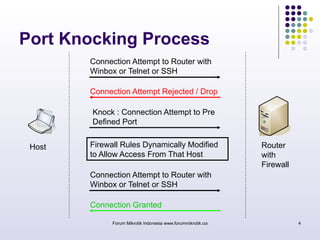
 Port Knocking is a method of externally 
opening ports on a firewall by generating a 
connection attempt on a set of prespecified 
closed ports 
 Once a correct sequence of connection 
attempts is received, the firewall rules are 
dynamically modified to allow the host which 
sent the connection attempts to connect over 
specific port(s) 
Forum Mikrotik Indonesia www.forummikrotik.com 3
Port Knocking Process 
Connection Attempt to Router with 
Winbox or Telnet or SSH 
Connection Attempt Rejected / Drop 
Knock : Connection Attempt to Pre 
Defined Port 
Firewall Rules Dynamically Modified 
to Allow Access From That Host 
Connection Attempt to Router with 
Winbox or Telnet or SSH 
Connection Granted 
Host Router 
with 
Firewall 
Forum Mikrotik Indonesia www.forummikrotik.com 4
Why Port Knocking ? 
 The primary purpose of port knocking is to 
prevent an attacker from scanning a system 
for potentially exploitable services by doing a 
port scan, because unless the attacker sends 
the correct knock sequence, the protected 
ports will appear closed. 
Forum Mikrotik Indonesia www.forummikrotik.com 5
When to Use Port Knocking ? 
 When you need to do remote configuration or 
monitoring from remote area 
 When you try to decrease brute force attack 
Forum Mikrotik Indonesia www.forummikrotik.com 6
How to Apply Port Knocking in 
Mikrotik ? 
Forum Mikrotik Indonesia www.forummikrotik.com 7 
 Using : 
 Firewall Filter 
 Address List 
 Knock Application 
Please download the application from : 
www.zeroflux.org
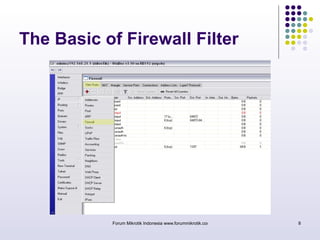
The Basic of Firewall Filter 
Forum Mikrotik Indonesia www.forummikrotik.com 8
The Basic of Firewall Filter 
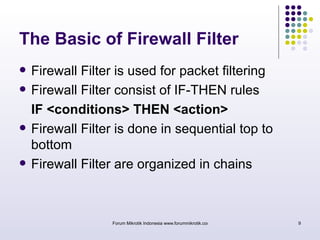
 Firewall Filter is used for packet filtering 
 Firewall Filter consist of IF-THEN rules 
IF <conditions> THEN <action> 
 Firewall Filter is done in sequential top to 
bottom 
 Firewall Filter are organized in chains 
Forum Mikrotik Indonesia www.forummikrotik.com 9
The Basic of Firewall Filter 
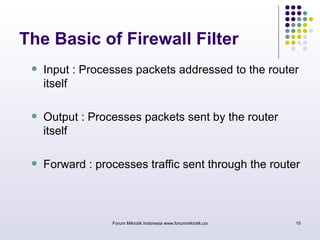
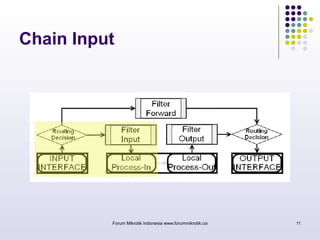
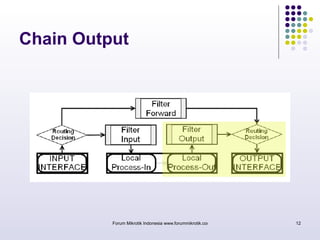
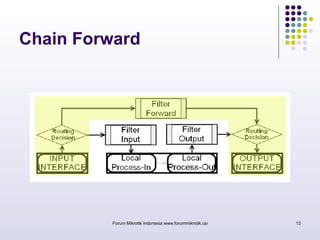
 Input : Processes packets addressed to the router 
itself 
 Output : Processes packets sent by the router 
itself 
 Forward : processes traffic sent through the router 
Forum Mikrotik Indonesia www.forummikrotik.com 10
Chain Input 
Forum Mikrotik Indonesia www.forummikrotik.com 11
Chain Output 
Forum Mikrotik Indonesia www.forummikrotik.com 12
Chain Forward 
Forum Mikrotik Indonesia www.forummikrotik.com 13
Firewall Filter Action 
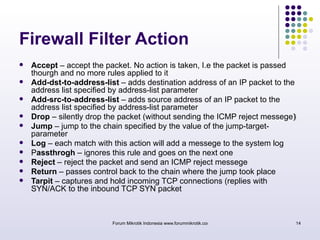
 Accept – accept the packet. No action is taken, I.e the packet is passed 
thourgh and no more rules applied to it 
 Add-dst-to-address-list – adds destination address of an IP packet to the 
address list specified by address-list parameter 
 Add-src-to-address-list – adds source address of an IP packet to the 
address list specified by address-list parameter 
 Drop – silently drop the packet (without sending the ICMP reject messege) 
 Jump – jump to the chain specified by the value of the jump-target-parameter 
 Log – each match with this action will add a messege to the system log 
 Passthrogh – ignores this rule and goes on the next one 
 Reject – reject the packet and send an ICMP reject messege 
 Return – passes control back to the chain where the jump took place 
 Tarpit – captures and hold incoming TCP connections (replies with 
SYN/ACK to the inbound TCP SYN packet 
Forum Mikrotik Indonesia www.forummikrotik.com 14
IP Address List 
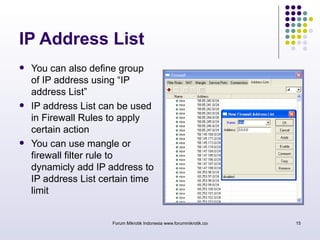
 You can also define group 
of IP address using “IP 
address List” 
 IP address List can be used 
in Firewall Rules to apply 
certain action 
 You can use mangle or 
firewall filter rule to 
dynamicly add IP address to 
IP address List certain time 
limit 
Forum Mikrotik Indonesia www.forummikrotik.com 15
Let’s Start Implementing 
Port Knocking in 
Mikrotik Router OS… 
Forum Mikrotik Indonesia www.forummikrotik.com 16
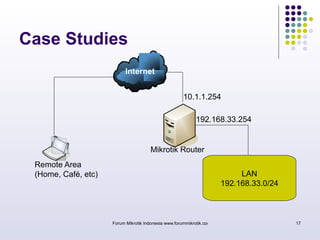
Case Studies 
192.168.33.254 
LAN 
10.1.1.254 
192.168.33.0/24 
Internet 
Mikrotik Router 
Forum Mikrotik Indonesia www.forummikrotik.com 17 
Remote Area 
(Home, Café, etc)
Case Studies 
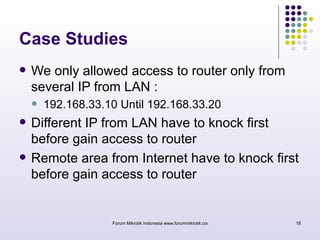
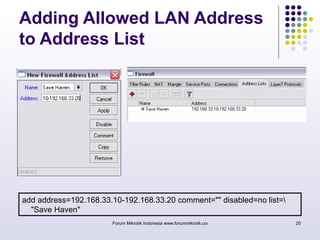
 We only allowed access to router only from 
several IP from LAN : 
 192.168.33.10 Until 192.168.33.20 
 Different IP from LAN have to knock first 
before gain access to router 
 Remote area from Internet have to knock first 
before gain access to router 
Forum Mikrotik Indonesia www.forummikrotik.com 18
Case Studies 
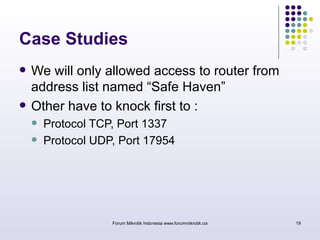
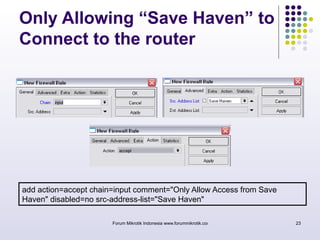
 We will only allowed access to router from 
address list named “Safe Haven” 
 Other have to knock first to : 
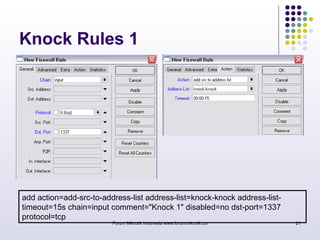
 Protocol TCP, Port 1337 
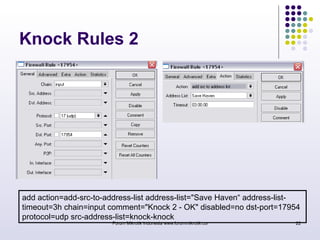
 Protocol UDP, Port 17954 
Forum Mikrotik Indonesia www.forummikrotik.com 19
Adding Allowed LAN Address 
to Address List 
add address=192.168.33.10-192.168.33.20 comment="" disabled=no list= 
"Save Haven" 
Forum Mikrotik Indonesia www.forummikrotik.com 20
Knock Rules 1 
add action=add-src-to-address-list address-list=knock-knock address-list-timeout= 
15s chain=input comment="Knock 1" disabled=no dst-port=1337 
Forum Mikrotik Indonesia www.forummikrotik.com 21 
protocol=tcp
Knock Rules 2 
add action=add-src-to-address-list address-list="Save Haven“ address-list-timeout= 
3h chain=input comment="Knock 2 - OK" disabled=no dst-port=17954 
protocol=udp src-address-list=knock-knock 
Forum Mikrotik Indonesia www.forummikrotik.com 22
Only Allowing “Save Haven” to 
Connect to the router 
add action=accept chain=input comment="Only Allow Access from Save 
Haven" disabled=no src-address-list="Save Haven" 
Forum Mikrotik Indonesia www.forummikrotik.com 23
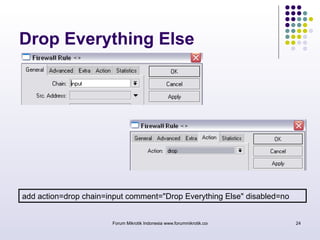
Drop Everything Else 
add action=drop chain=input comment="Drop Everything Else" disabled=no 
Forum Mikrotik Indonesia www.forummikrotik.com 24
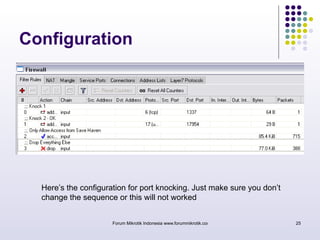
Configuration 
Here’s the configuration for port knocking. Just make sure you don’t 
change the sequence or this will not worked 
Forum Mikrotik Indonesia www.forummikrotik.com 25
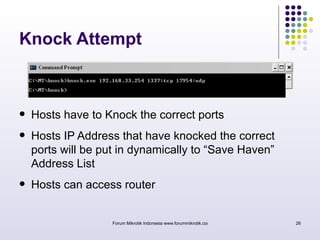
Knock Attempt 
 Hosts have to Knock the correct ports 
 Hosts IP Address that have knocked the correct 
ports will be put in dynamically to “Save Haven” 
Address List 
 Hosts can access router 
Forum Mikrotik Indonesia www.forummikrotik.com 26
Forum Mikrotik Indonesia www.forummikrotik.com 27 
Closing 
 Port Knocking is useful for securing the router 
 Port Knocking is also useful to decrease a brute 
force attack 
 Port Knocking has it’s weakness also: 
 It' s possible to spy out the knocking sequence by sniffing 
the network 
 It' s necessary to have a special knocking-client 
 Port Knocking is only one method to secure the 
router, best to combine this with other methods.
Thank You 
Your Question Will be Appreciated 
Forum Mikrotik Indonesia www.forummikrotik.com 28

MikroTik Firewall : Securing your Router with Port Knocking

  • 1.
    Mikrotik Firewall SecuringYour Router With Port Knocking
  • 2.
    Introduction  Name: Akbar  Mikrotik User Since : Mid 2005  IT Manager @ Agung Sedayu Group  Trainer For Ufoakses Mikrotik Training  www.forummikrotik.com  akbar@forummikrotik.com Forum Mikrotik Indonesia www.forummikrotik.com 2
  • 3.
    What is PortKnocking ?  Port Knocking is a method of externally opening ports on a firewall by generating a connection attempt on a set of prespecified closed ports  Once a correct sequence of connection attempts is received, the firewall rules are dynamically modified to allow the host which sent the connection attempts to connect over specific port(s) Forum Mikrotik Indonesia www.forummikrotik.com 3
  • 4.
    Port Knocking Process Connection Attempt to Router with Winbox or Telnet or SSH Connection Attempt Rejected / Drop Knock : Connection Attempt to Pre Defined Port Firewall Rules Dynamically Modified to Allow Access From That Host Connection Attempt to Router with Winbox or Telnet or SSH Connection Granted Host Router with Firewall Forum Mikrotik Indonesia www.forummikrotik.com 4
  • 5.
    Why Port Knocking?  The primary purpose of port knocking is to prevent an attacker from scanning a system for potentially exploitable services by doing a port scan, because unless the attacker sends the correct knock sequence, the protected ports will appear closed. Forum Mikrotik Indonesia www.forummikrotik.com 5
  • 6.
    When to UsePort Knocking ?  When you need to do remote configuration or monitoring from remote area  When you try to decrease brute force attack Forum Mikrotik Indonesia www.forummikrotik.com 6
  • 7.
    How to ApplyPort Knocking in Mikrotik ? Forum Mikrotik Indonesia www.forummikrotik.com 7  Using :  Firewall Filter  Address List  Knock Application Please download the application from : www.zeroflux.org
  • 8.
    The Basic ofFirewall Filter Forum Mikrotik Indonesia www.forummikrotik.com 8
  • 9.
    The Basic ofFirewall Filter  Firewall Filter is used for packet filtering  Firewall Filter consist of IF-THEN rules IF <conditions> THEN <action>  Firewall Filter is done in sequential top to bottom  Firewall Filter are organized in chains Forum Mikrotik Indonesia www.forummikrotik.com 9
  • 10.
    The Basic ofFirewall Filter  Input : Processes packets addressed to the router itself  Output : Processes packets sent by the router itself  Forward : processes traffic sent through the router Forum Mikrotik Indonesia www.forummikrotik.com 10
  • 11.
    Chain Input ForumMikrotik Indonesia www.forummikrotik.com 11
  • 12.
    Chain Output ForumMikrotik Indonesia www.forummikrotik.com 12
  • 13.
    Chain Forward ForumMikrotik Indonesia www.forummikrotik.com 13
  • 14.
    Firewall Filter Action  Accept – accept the packet. No action is taken, I.e the packet is passed thourgh and no more rules applied to it  Add-dst-to-address-list – adds destination address of an IP packet to the address list specified by address-list parameter  Add-src-to-address-list – adds source address of an IP packet to the address list specified by address-list parameter  Drop – silently drop the packet (without sending the ICMP reject messege)  Jump – jump to the chain specified by the value of the jump-target-parameter  Log – each match with this action will add a messege to the system log  Passthrogh – ignores this rule and goes on the next one  Reject – reject the packet and send an ICMP reject messege  Return – passes control back to the chain where the jump took place  Tarpit – captures and hold incoming TCP connections (replies with SYN/ACK to the inbound TCP SYN packet Forum Mikrotik Indonesia www.forummikrotik.com 14
  • 15.
    IP Address List  You can also define group of IP address using “IP address List”  IP address List can be used in Firewall Rules to apply certain action  You can use mangle or firewall filter rule to dynamicly add IP address to IP address List certain time limit Forum Mikrotik Indonesia www.forummikrotik.com 15
  • 16.
    Let’s Start Implementing Port Knocking in Mikrotik Router OS… Forum Mikrotik Indonesia www.forummikrotik.com 16
  • 17.
    Case Studies 192.168.33.254 LAN 10.1.1.254 192.168.33.0/24 Internet Mikrotik Router Forum Mikrotik Indonesia www.forummikrotik.com 17 Remote Area (Home, Café, etc)
  • 18.
    Case Studies We only allowed access to router only from several IP from LAN :  192.168.33.10 Until 192.168.33.20  Different IP from LAN have to knock first before gain access to router  Remote area from Internet have to knock first before gain access to router Forum Mikrotik Indonesia www.forummikrotik.com 18
  • 19.
    Case Studies We will only allowed access to router from address list named “Safe Haven”  Other have to knock first to :  Protocol TCP, Port 1337  Protocol UDP, Port 17954 Forum Mikrotik Indonesia www.forummikrotik.com 19
  • 20.
    Adding Allowed LANAddress to Address List add address=192.168.33.10-192.168.33.20 comment="" disabled=no list= "Save Haven" Forum Mikrotik Indonesia www.forummikrotik.com 20
  • 21.
    Knock Rules 1 add action=add-src-to-address-list address-list=knock-knock address-list-timeout= 15s chain=input comment="Knock 1" disabled=no dst-port=1337 Forum Mikrotik Indonesia www.forummikrotik.com 21 protocol=tcp
  • 22.
    Knock Rules 2 add action=add-src-to-address-list address-list="Save Haven“ address-list-timeout= 3h chain=input comment="Knock 2 - OK" disabled=no dst-port=17954 protocol=udp src-address-list=knock-knock Forum Mikrotik Indonesia www.forummikrotik.com 22
  • 23.
    Only Allowing “SaveHaven” to Connect to the router add action=accept chain=input comment="Only Allow Access from Save Haven" disabled=no src-address-list="Save Haven" Forum Mikrotik Indonesia www.forummikrotik.com 23
  • 24.
    Drop Everything Else add action=drop chain=input comment="Drop Everything Else" disabled=no Forum Mikrotik Indonesia www.forummikrotik.com 24
  • 25.
    Configuration Here’s theconfiguration for port knocking. Just make sure you don’t change the sequence or this will not worked Forum Mikrotik Indonesia www.forummikrotik.com 25
  • 26.
    Knock Attempt Hosts have to Knock the correct ports  Hosts IP Address that have knocked the correct ports will be put in dynamically to “Save Haven” Address List  Hosts can access router Forum Mikrotik Indonesia www.forummikrotik.com 26
  • 27.
    Forum Mikrotik Indonesiawww.forummikrotik.com 27 Closing  Port Knocking is useful for securing the router  Port Knocking is also useful to decrease a brute force attack  Port Knocking has it’s weakness also:  It' s possible to spy out the knocking sequence by sniffing the network  It' s necessary to have a special knocking-client  Port Knocking is only one method to secure the router, best to combine this with other methods.
  • 28.
    Thank You YourQuestion Will be Appreciated Forum Mikrotik Indonesia www.forummikrotik.com 28