MIKROTIK
NETWORK SIMULATOR
PRESENTED BY ROFIQ FAUZI

MUM Nov 2013 - Indonesia
2

ABOUT ROFIQ FAUZI
• Using MikroTik (v.2.97) since 2005, as Network Engineer at
WISP.
• 2007, Network & Wireless Engineer at INDOSAT Central Java
Area
• 2008, Network & Telco Procurement at INDOSAT Head Quarter
• 2012-Now,
MikroTik
Consultant
&
Certified
Trainer
(MTCNA, MTCRE, MTCTCE, MTCWE, MTCINE, Certified
Trainer) at ID-Networkers.
• 2013-Now, Network Manager at WISP Indomedianet, Indonesia
http://www.mikrotik.com/consultants/asia/indonesia

CONSULTANT
CERTIFIED TRAINER

http://www.mikrotik.com/training/partners/asia/indonesia

ID-NETWORKERS | www.training-mikrotik.com
ABOUT ID-NETWORKERS
EXPERT LEVEL TRAINERS & CONSULTANS
In the Most Prestigious Networking Certification

OVERVIEW
We are young entrepreneurs, we are only one
training partner & consultant who has expert
level trainers in the most prestigious
networking certification, CCIE Guru , JNCIE
Guru and MTCINE guru, which very limited
number in Indonesia even Asia. Proven that
hundred of our students pass the certification
exam every year. We are the biggest
certification factory in Indonesia.

WEBSITE
www.id-networkers.com
ID-NETWORKERS | www.training-mikrotik.com
4

TOPIC BACKGROUND
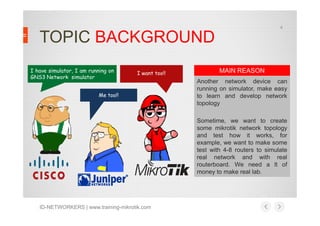
I have simulator, I am running on
GNS3 Network simulator

I want too!!

Me too!!

MAIN REASON
Another network device can
running on simulator, make easy
to learn and develop network
topology
Sometime, we want to create
some mikrotik network topology
and test how it works, for
example, we want to make some
test with 4-8 routers to simulate
real network and with real
routerboard. We need a lt of
money to make real lab.

ID-NETWORKERS | www.training-mikrotik.com
5

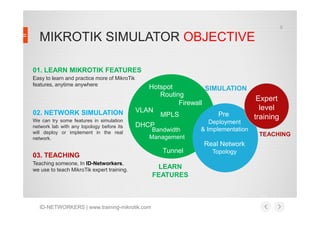
MIKROTIK SIMULATOR OBJECTIVE
01. LEARN MIKROTIK FEATURES
Easy to learn and practice more of MikroTik
features, anytime anywhere

02. NETWORK SIMULATION
We can try some features in simulation
network lab with any topology before its
will deploy or implement in the real
network.

Hotspot
SIMULATION
Routing
Firewall
VLAN
Pre
MPLS
Deployment
DHCP
Bandwidth
Management

& Implementation

Real Network
03. TEACHING
Teaching someone, In ID-Networkers,
we use to teach MikroTik expert training.

ID-NETWORKERS | www.training-mikrotik.com

Tunnel
LEARN
FEATURES

Topology

Expert
level
training
TEACHING
6

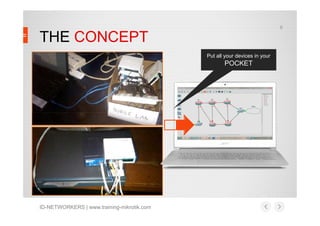
THE CONCEPT
Put all your devices in your

POCKET

ID-NETWORKERS | www.training-mikrotik.com
7

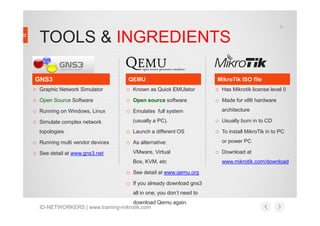
TOOLS & INGREDIENTS
GNS3
o Graphic Network Simulator

o Known as Quick EMUlator

o Has Mikrotik license level 0

o Open Source Software

o Open source software

o Made for x86 hardware

o Running on Windows, Linux

o Emulates full system

o Simulate complex network
topologies

o Running multi vendor devices
o See detail at www.gns3.net

QEMU

(usually a PC).

o Launch a different OS
o As alternative:
VMware, Virtual
Box, KVM, etc

o See detail at www.qemu.org
o If you already download gns3
all in one, you don’t need to
download Qemu again.
ID-NETWORKERS | www.training-mikrotik.com

MikroTik ISO file

architecture

o Usually burn in to CD
o To install MikroTik in to PC
or power PC

o Download at
www.mikrotik.com/download
8

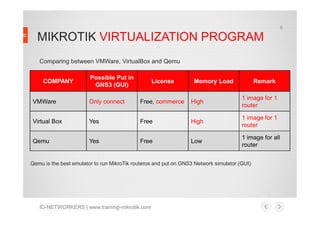
MIKROTIK VIRTUALIZATION PROGRAM
Comparing between VMWare, VirtualBox and Qemu
COMPANY

Possible Put in
GNS3 (GUI)

License

Memory Load

Remark

VMWare

Only connect

Free, commerce

High

1 image for 1
router

Virtual Box

Yes

Free

High

1 image for 1
router

Qemu

Yes

Free

Low

1 image for all
router

Qemu is the best emulator to run MikroTik routeros and put on GNS3 Network simulator (GUI)

ID-NETWORKERS | www.training-mikrotik.com
9

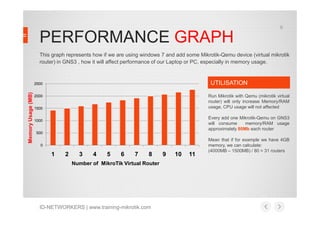
PERFORMANCE GRAPH
This graph represents how if we are using windows 7 and add some Mikrotik-Qemu device (virtual mikrotik
router) in GNS3 , how it will affect performance of our Laptop or PC, especially in memory usage.

UTILISATION

Memory Usage (MB)

2500

Run Mikrotik with Qemu (mikrotik virtual
router) will only increase Memory/RAM
usage, CPU usage will not affected

2000
1500

Every add one Mikrotik-Qemu on GNS3
will consume
memory/RAM usage
approximately 80Mb each router

1000
500
0

1

2

3

4

5

6

7

8

Number of MikroTik Virtual Router

ID-NETWORKERS | www.training-mikrotik.com

9

10

11

Mean that if for example we have 4GB
memory, we can calculate:
(4000MB – 1500MB) / 80 = 31 routers
10

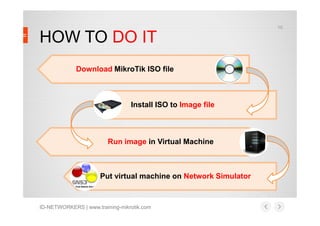
HOW TO DO IT
Download MikroTik ISO file

Install ISO to Image file

Run image in Virtual Machine

Put virtual machine on Network Simulator

ID-NETWORKERS | www.training-mikrotik.com
11

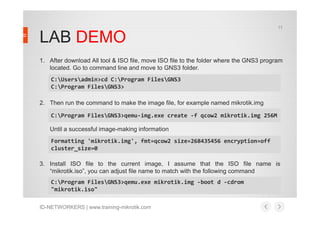
LAB DEMO
1. After download All tool & ISO file, move ISO file to the folder where the GNS3 program
located. Go to command line and move to GNS3 folder.
C:Usersadmin>cd C:Program FilesGNS3
C:Program FilesGNS3>
2. Then run the command to make the image file, for example named mikrotik.img
C:Program FilesGNS3>qemu-img.exe create -f qcow2 mikrotik.img 256M
Until a successful image-making information
Formatting 'mikrotik.img', fmt=qcow2 size=268435456 encryption=off
cluster_size=0
3. Install ISO file to the current image, I assume that the ISO file name is
“mikrotik.iso”, you can adjust file name to match with the following command
C:Program FilesGNS3>qemu.exe mikrotik.img -boot d -cdrom
"mikrotik.iso"
ID-NETWORKERS | www.training-mikrotik.com
12

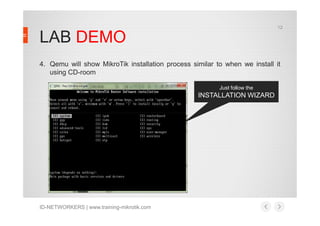
LAB DEMO
4. Qemu will show MikroTik installation process similar to when we install it
using CD-room
Just follow the

INSTALLATION WIZARD

ID-NETWORKERS | www.training-mikrotik.com
13

LAB DEMO
5. After the installation is complete (indicated by RouterOS reboot), close the
window and try boot from image

C:Program FilesGNS3>qemu.exe mikrotik.img -boot c
Qemu will boot and run routeros until see the login promt MiroTik routeros
Sometime file “mikrotik.img” that we already create not found in GNS3
folder, you need try to search it first in drive C, and copy it to GNS3 folder
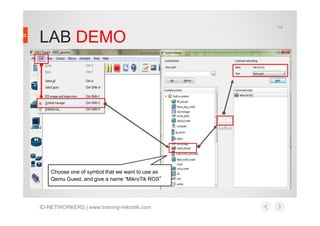
6. Put Mikrotik image to the Qemu Guest in GNS3
– Open GNS3 program
– Make a symbol for mikrotik device, click Edit > Symbol Manager

ID-NETWORKERS | www.training-mikrotik.com
14

LAB DEMO

Choose one of symbol that we want to use as
Qemu Guest, and give a name “MikroTik ROS”

ID-NETWORKERS | www.training-mikrotik.com
15

LAB DEMO
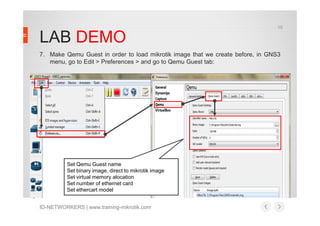
7. Make Qemu Guest in order to load mikrotik image that we create before, in GNS3
menu, go to Edit > Preferences > and go to Qemu Guest tab:

Set Qemu Guest name
Set binary image, direct to mikrotik image
Set virtual memory alocation
Set number of ethernet card
Set ethercart model
ID-NETWORKERS | www.training-mikrotik.com
16

LAB DEMO
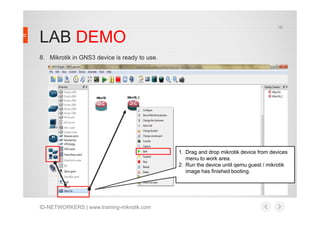
8. Mikrotik in GNS3 device is ready to use.

1. Drag and drop mikrotik device from devices
menu to work area.
2. Run the device until qemu guest / mikrotik
image has finished booting.

ID-NETWORKERS | www.training-mikrotik.com
17

BREAK, its time to QUIZ
Answer the question, and get free MikroTik RB951Ui-2HnD

Powered by
18

How to use winbox to remote our
virtual router?
19

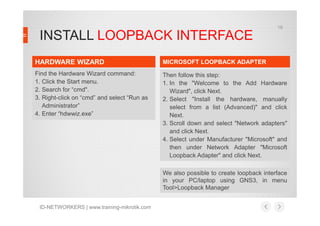
INSTALL LOOPBACK INTERFACE
HARDWARE WIZARD

MICROSOFT LOOPBACK ADAPTER

Find the Hardware Wizard command:
1. Click the Start menu.
2. Search for “cmd".
3. Right-click on “cmd” and select “Run as
Administrator”
4. Enter “hdwwiz.exe”

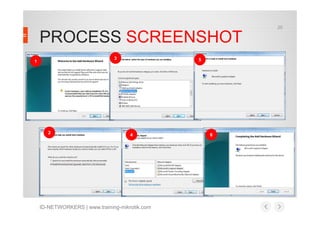
Then follow this step:
1. In the "Welcome to the Add Hardware
Wizard", click Next.
2. Select "Install the hardware, manually
select from a list (Advanced)" and click
Next.
3. Scroll down and select "Network adapters"
and click Next.
4. Select under Manufacturer "Microsoft" and
then under Network Adapter "Microsoft
Loopback Adapter" and click Next.
We also possible to create loopback interface
in your PC/laptop using GNS3, in menu
Tool>Loopback Manager

ID-NETWORKERS | www.training-mikrotik.com
20

PROCESS SCREENSHOT
3

1

2

5

4

ID-NETWORKERS | www.training-mikrotik.com

6
21

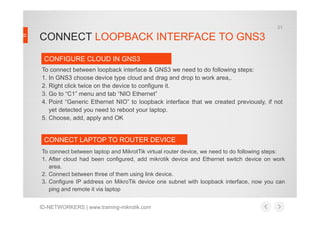
CONNECT LOOPBACK INTERFACE TO GNS3
CONFIGURE CLOUD IN GNS3
To connect between loopback interface & GNS3 we need to do following steps:
1. In GNS3 choose device type cloud and drag and drop to work area,.
2. Right click twice on the device to configure it.
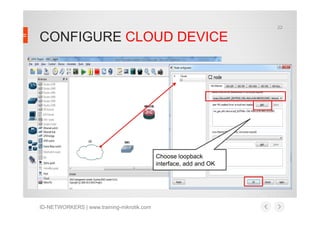
3. Go to “C1” menu and tab “NIO Ethernet”
4. Point “Generic Ethernet NIO” to loopback interface that we created previously, if not
yet detected you need to reboot your laptop.
5. Choose, add, apply and OK

CONNECT LAPTOP TO ROUTER DEVICE
To connect between laptop and MikrotTik virtual router device, we need to do following steps:
1. After cloud had been configured, add mikrotik device and Ethernet switch device on work
area.
2. Connect between three of them using link device.
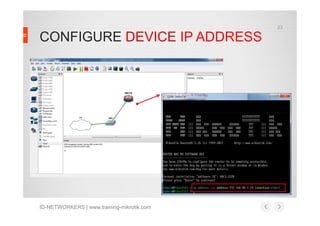
3. Configure IP address on MikroTik device one subnet with loopback interface, now you can
ping and remote it via laptop
ID-NETWORKERS | www.training-mikrotik.com
22

CONFIGURE CLOUD DEVICE

Choose loopback
interface, add and OK

ID-NETWORKERS | www.training-mikrotik.com
23

CONFIGURE DEVICE IP ADDRESS

ID-NETWORKERS | www.training-mikrotik.com
24

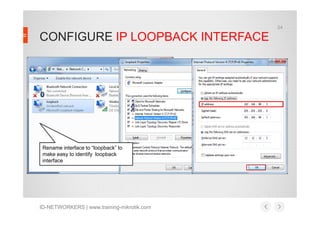
CONFIGURE IP LOOPBACK INTERFACE

Rename interface to “loopback” to
make easy to identify loopback
interface

ID-NETWORKERS | www.training-mikrotik.com
25

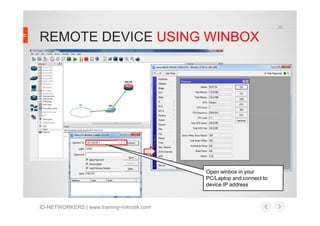
REMOTE DEVICE USING WINBOX

Open winbox in your
PC/Laptop and connect to
device IP address

ID-NETWORKERS | www.training-mikrotik.com
26

THANK YOU FOR YOUR TIME
And see u in the next MUM
This slide also can be found at www.training-mikrotik.com and www.freemikrotik.com.

“If you cannot survive in the tired of learning, then you will be suffering by the pain of stupidity” (Imam Syafi’i)

ID-NETWORKERS | www.training-mikrotik.com
27

MY CONTACT DETAILS
If you have any other questions or would like me to clarify anything else, please, let me know. I am
always glad to help in any way I can

ADDRESS: Jakarta & Semarang, Indonesia
WEBSITE: www.training-mikrotik.com
EMAIL: rofiq.fauzi@gmail.com
TELEPHONE: +62 8156583545

@mymikrotik
www.facebook.com/ropix
id.linkedin.com/in/ropix/
rofiq.fauzi

ID-NETWORKERS | www.training-mikrotik.com

Mikrotik Network Simulator (MUM Presentation Material 2013)

  • 1.
    MIKROTIK NETWORK SIMULATOR PRESENTED BYROFIQ FAUZI MUM Nov 2013 - Indonesia
  • 2.
    2 ABOUT ROFIQ FAUZI •Using MikroTik (v.2.97) since 2005, as Network Engineer at WISP. • 2007, Network & Wireless Engineer at INDOSAT Central Java Area • 2008, Network & Telco Procurement at INDOSAT Head Quarter • 2012-Now, MikroTik Consultant & Certified Trainer (MTCNA, MTCRE, MTCTCE, MTCWE, MTCINE, Certified Trainer) at ID-Networkers. • 2013-Now, Network Manager at WISP Indomedianet, Indonesia http://www.mikrotik.com/consultants/asia/indonesia CONSULTANT CERTIFIED TRAINER http://www.mikrotik.com/training/partners/asia/indonesia ID-NETWORKERS | www.training-mikrotik.com
  • 3.
    ABOUT ID-NETWORKERS EXPERT LEVELTRAINERS & CONSULTANS In the Most Prestigious Networking Certification OVERVIEW We are young entrepreneurs, we are only one training partner & consultant who has expert level trainers in the most prestigious networking certification, CCIE Guru , JNCIE Guru and MTCINE guru, which very limited number in Indonesia even Asia. Proven that hundred of our students pass the certification exam every year. We are the biggest certification factory in Indonesia. WEBSITE www.id-networkers.com ID-NETWORKERS | www.training-mikrotik.com
  • 4.
    4 TOPIC BACKGROUND I havesimulator, I am running on GNS3 Network simulator I want too!! Me too!! MAIN REASON Another network device can running on simulator, make easy to learn and develop network topology Sometime, we want to create some mikrotik network topology and test how it works, for example, we want to make some test with 4-8 routers to simulate real network and with real routerboard. We need a lt of money to make real lab. ID-NETWORKERS | www.training-mikrotik.com
  • 5.
    5 MIKROTIK SIMULATOR OBJECTIVE 01.LEARN MIKROTIK FEATURES Easy to learn and practice more of MikroTik features, anytime anywhere 02. NETWORK SIMULATION We can try some features in simulation network lab with any topology before its will deploy or implement in the real network. Hotspot SIMULATION Routing Firewall VLAN Pre MPLS Deployment DHCP Bandwidth Management & Implementation Real Network 03. TEACHING Teaching someone, In ID-Networkers, we use to teach MikroTik expert training. ID-NETWORKERS | www.training-mikrotik.com Tunnel LEARN FEATURES Topology Expert level training TEACHING
  • 6.
    6 THE CONCEPT Put allyour devices in your POCKET ID-NETWORKERS | www.training-mikrotik.com
  • 7.
    7 TOOLS & INGREDIENTS GNS3 oGraphic Network Simulator o Known as Quick EMUlator o Has Mikrotik license level 0 o Open Source Software o Open source software o Made for x86 hardware o Running on Windows, Linux o Emulates full system o Simulate complex network topologies o Running multi vendor devices o See detail at www.gns3.net QEMU (usually a PC). o Launch a different OS o As alternative: VMware, Virtual Box, KVM, etc o See detail at www.qemu.org o If you already download gns3 all in one, you don’t need to download Qemu again. ID-NETWORKERS | www.training-mikrotik.com MikroTik ISO file architecture o Usually burn in to CD o To install MikroTik in to PC or power PC o Download at www.mikrotik.com/download
  • 8.
    8 MIKROTIK VIRTUALIZATION PROGRAM Comparingbetween VMWare, VirtualBox and Qemu COMPANY Possible Put in GNS3 (GUI) License Memory Load Remark VMWare Only connect Free, commerce High 1 image for 1 router Virtual Box Yes Free High 1 image for 1 router Qemu Yes Free Low 1 image for all router Qemu is the best emulator to run MikroTik routeros and put on GNS3 Network simulator (GUI) ID-NETWORKERS | www.training-mikrotik.com
  • 9.
    9 PERFORMANCE GRAPH This graphrepresents how if we are using windows 7 and add some Mikrotik-Qemu device (virtual mikrotik router) in GNS3 , how it will affect performance of our Laptop or PC, especially in memory usage. UTILISATION Memory Usage (MB) 2500 Run Mikrotik with Qemu (mikrotik virtual router) will only increase Memory/RAM usage, CPU usage will not affected 2000 1500 Every add one Mikrotik-Qemu on GNS3 will consume memory/RAM usage approximately 80Mb each router 1000 500 0 1 2 3 4 5 6 7 8 Number of MikroTik Virtual Router ID-NETWORKERS | www.training-mikrotik.com 9 10 11 Mean that if for example we have 4GB memory, we can calculate: (4000MB – 1500MB) / 80 = 31 routers
  • 10.
    10 HOW TO DOIT Download MikroTik ISO file Install ISO to Image file Run image in Virtual Machine Put virtual machine on Network Simulator ID-NETWORKERS | www.training-mikrotik.com
  • 11.
    11 LAB DEMO 1. Afterdownload All tool & ISO file, move ISO file to the folder where the GNS3 program located. Go to command line and move to GNS3 folder. C:Usersadmin>cd C:Program FilesGNS3 C:Program FilesGNS3> 2. Then run the command to make the image file, for example named mikrotik.img C:Program FilesGNS3>qemu-img.exe create -f qcow2 mikrotik.img 256M Until a successful image-making information Formatting 'mikrotik.img', fmt=qcow2 size=268435456 encryption=off cluster_size=0 3. Install ISO file to the current image, I assume that the ISO file name is “mikrotik.iso”, you can adjust file name to match with the following command C:Program FilesGNS3>qemu.exe mikrotik.img -boot d -cdrom "mikrotik.iso" ID-NETWORKERS | www.training-mikrotik.com
  • 12.
    12 LAB DEMO 4. Qemuwill show MikroTik installation process similar to when we install it using CD-room Just follow the INSTALLATION WIZARD ID-NETWORKERS | www.training-mikrotik.com
  • 13.
    13 LAB DEMO 5. Afterthe installation is complete (indicated by RouterOS reboot), close the window and try boot from image C:Program FilesGNS3>qemu.exe mikrotik.img -boot c Qemu will boot and run routeros until see the login promt MiroTik routeros Sometime file “mikrotik.img” that we already create not found in GNS3 folder, you need try to search it first in drive C, and copy it to GNS3 folder 6. Put Mikrotik image to the Qemu Guest in GNS3 – Open GNS3 program – Make a symbol for mikrotik device, click Edit > Symbol Manager ID-NETWORKERS | www.training-mikrotik.com
  • 14.
    14 LAB DEMO Choose oneof symbol that we want to use as Qemu Guest, and give a name “MikroTik ROS” ID-NETWORKERS | www.training-mikrotik.com
  • 15.
    15 LAB DEMO 7. MakeQemu Guest in order to load mikrotik image that we create before, in GNS3 menu, go to Edit > Preferences > and go to Qemu Guest tab: Set Qemu Guest name Set binary image, direct to mikrotik image Set virtual memory alocation Set number of ethernet card Set ethercart model ID-NETWORKERS | www.training-mikrotik.com
  • 16.
    16 LAB DEMO 8. Mikrotikin GNS3 device is ready to use. 1. Drag and drop mikrotik device from devices menu to work area. 2. Run the device until qemu guest / mikrotik image has finished booting. ID-NETWORKERS | www.training-mikrotik.com
  • 17.
    17 BREAK, its timeto QUIZ Answer the question, and get free MikroTik RB951Ui-2HnD Powered by
  • 18.
    18 How to usewinbox to remote our virtual router?
  • 19.
    19 INSTALL LOOPBACK INTERFACE HARDWAREWIZARD MICROSOFT LOOPBACK ADAPTER Find the Hardware Wizard command: 1. Click the Start menu. 2. Search for “cmd". 3. Right-click on “cmd” and select “Run as Administrator” 4. Enter “hdwwiz.exe” Then follow this step: 1. In the "Welcome to the Add Hardware Wizard", click Next. 2. Select "Install the hardware, manually select from a list (Advanced)" and click Next. 3. Scroll down and select "Network adapters" and click Next. 4. Select under Manufacturer "Microsoft" and then under Network Adapter "Microsoft Loopback Adapter" and click Next. We also possible to create loopback interface in your PC/laptop using GNS3, in menu Tool>Loopback Manager ID-NETWORKERS | www.training-mikrotik.com
  • 20.
  • 21.
    21 CONNECT LOOPBACK INTERFACETO GNS3 CONFIGURE CLOUD IN GNS3 To connect between loopback interface & GNS3 we need to do following steps: 1. In GNS3 choose device type cloud and drag and drop to work area,. 2. Right click twice on the device to configure it. 3. Go to “C1” menu and tab “NIO Ethernet” 4. Point “Generic Ethernet NIO” to loopback interface that we created previously, if not yet detected you need to reboot your laptop. 5. Choose, add, apply and OK CONNECT LAPTOP TO ROUTER DEVICE To connect between laptop and MikrotTik virtual router device, we need to do following steps: 1. After cloud had been configured, add mikrotik device and Ethernet switch device on work area. 2. Connect between three of them using link device. 3. Configure IP address on MikroTik device one subnet with loopback interface, now you can ping and remote it via laptop ID-NETWORKERS | www.training-mikrotik.com
  • 22.
    22 CONFIGURE CLOUD DEVICE Chooseloopback interface, add and OK ID-NETWORKERS | www.training-mikrotik.com
  • 23.
    23 CONFIGURE DEVICE IPADDRESS ID-NETWORKERS | www.training-mikrotik.com
  • 24.
    24 CONFIGURE IP LOOPBACKINTERFACE Rename interface to “loopback” to make easy to identify loopback interface ID-NETWORKERS | www.training-mikrotik.com
  • 25.
    25 REMOTE DEVICE USINGWINBOX Open winbox in your PC/Laptop and connect to device IP address ID-NETWORKERS | www.training-mikrotik.com
  • 26.
    26 THANK YOU FORYOUR TIME And see u in the next MUM This slide also can be found at www.training-mikrotik.com and www.freemikrotik.com. “If you cannot survive in the tired of learning, then you will be suffering by the pain of stupidity” (Imam Syafi’i) ID-NETWORKERS | www.training-mikrotik.com
  • 27.
    27 MY CONTACT DETAILS Ifyou have any other questions or would like me to clarify anything else, please, let me know. I am always glad to help in any way I can ADDRESS: Jakarta & Semarang, Indonesia WEBSITE: www.training-mikrotik.com EMAIL: rofiq.fauzi@gmail.com TELEPHONE: +62 8156583545 @mymikrotik www.facebook.com/ropix id.linkedin.com/in/ropix/ rofiq.fauzi ID-NETWORKERS | www.training-mikrotik.com