
NETWORK ADMINISTRATION
OpenVPN Server on Linux
2013-2015
PASSERELLES NUMERIQEUS CAMBODIA
Street 371 Phum Tropeang Chhuk (Borey Sorla), Sangkat Tek Thia Khan Sek Sok P.O. Box 511 Phnom Penh,
Cambodia
PASSERELLESNUMERIQUES CAMBODIA NETWORK ADMINISTRATION
TOLA.LENG-PC 1
CONTENTS
LAB Instruction ..........................................................................................................................2
Windows......................................................................................Error! Bookmark not defined.
Install DHCP service..................................................................Error! Bookmark not defined.
Create DCHP Scope...................................................................Error! Bookmark not defined.
Exclude IP address amount 10 IP addresses .............................Error! Bookmark not defined.
Configure DHCP Option ............................................................Error! Bookmark not defined.
IP address Reservation..............................................................Error! Bookmark not defined.
Deny Client by filter Mac address .............................................Error! Bookmark not defined.
Create New scope for LAN-Client .............................................Error! Bookmark not defined.
Show DHCP audit log file ..........................................................Error! Bookmark not defined.
Suse Linux....................................................................................Error! Bookmark not defined.
Adding more NICs and Assign IP address...............Error! Bookmark not defined.
Install DHCP Relay Service ...........................................Error! Bookmark not defined.
Configure DHCP Relay Service.....................................Error! Bookmark not defined.
Let client request IP address........................................Error! Bookmark not defined.
Make sure between LAN client and Windows Server can:.. Error! Bookmark
not defined.
PASSERELLESNUMERIQUES CAMBODIA NETWORK ADMINISTRATION
TOLA.LENG-PC 2
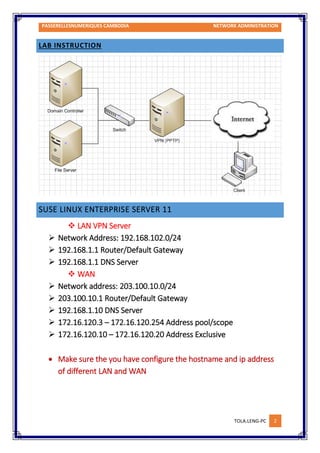
LAB INSTRUCTION
SUSE LINUX ENTERPRISE SERVER 11
 LAN VPN Server
 Network Address: 192.168.102.0/24
 192.168.1.1 Router/Default Gateway
 192.168.1.1 DNS Server
 WAN
 Network address: 203.100.10.0/24
 203.100.10.1 Router/Default Gateway
 192.168.1.10 DNS Server
 172.16.120.3 – 172.16.120.254 Address pool/scope
 172.16.120.10 – 172.16.120.20 Address Exclusive
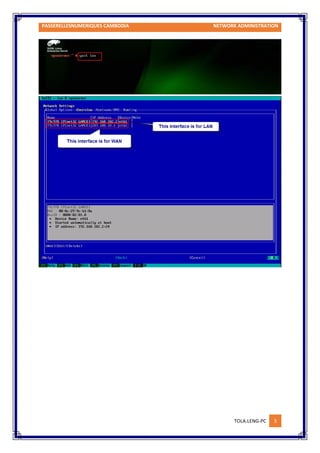
 Make sure the you have configure the hostname and ip address
of different LAN and WAN
PASSERELLESNUMERIQUES CAMBODIA NETWORK ADMINISTRATION
TOLA.LENG-PC 3
PASSERELLESNUMERIQUES CAMBODIA NETWORK ADMINISTRATION
TOLA.LENG-PC 4
1. Install Service OpenVPN
PASSERELLESNUMERIQUES CAMBODIA NETWORK ADMINISTRATION
TOLA.LENG-PC 5
2. Configure VPN Server
a. Copy “ëasy-rsa” from /usr/share/openvpn/easy-rsa to “/etc/openvpn”
b. Generate the server key by go to /etc/openvpn and generate
PASSERELLESNUMERIQUES CAMBODIA NETWORK ADMINISTRATION
TOLA.LENG-PC 6
c. Edit and change the certificate attribute by go to /etc/openvpn/easy-rsa/vars
PASSERELLESNUMERIQUES CAMBODIA NETWORK ADMINISTRATION
TOLA.LENG-PC 7
d. Define keys directory
PASSERELLESNUMERIQUES CAMBODIA NETWORK ADMINISTRATION
TOLA.LENG-PC 8
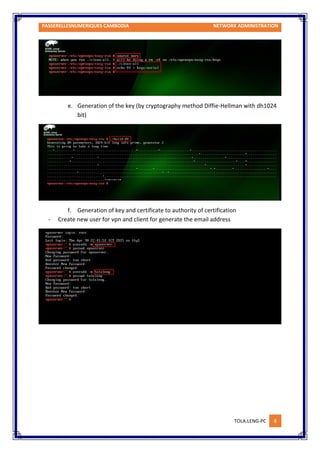
e. Generation of the key (by cryptography method Diffie-Hellman with dh1024
bit)
f. Generation of key and certificate to authority of certification
- Create new user for vpn and client for generate the email address
PASSERELLESNUMERIQUES CAMBODIA NETWORK ADMINISTRATION
TOLA.LENG-PC 9
g. Generation of key and certificate to the server //information mixed with key
to create certificate then store in Server
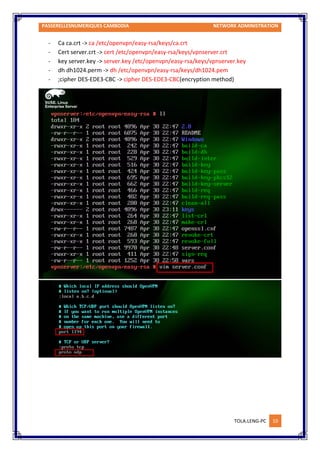
h. Edit /etc/openvpn/easy-rsa/server.conf by changing
PASSERELLESNUMERIQUES CAMBODIA NETWORK ADMINISTRATION
TOLA.LENG-PC 10
- Ca ca.crt -> ca /etc/openvpn/easy-rsa/keys/ca.crt
- Cert server.crt -> cert /etc/openvpn/easy-rsa/keys/vpnserver.crt
- key server.key -> server.key /etc/openvpn/easy-rsa/keys/vpnserver.key
- dh dh1024.perm -> dh /etc/openvpn/easy-rsa/keys/dh1024.pem
- ;cipher DES-EDE3-CBC -> cipher DES-EDE3-CBC(encryption method)
PASSERELLESNUMERIQUES CAMBODIA NETWORK ADMINISTRATION
TOLA.LENG-PC 11
PASSERELLESNUMERIQUES CAMBODIA NETWORK ADMINISTRATION
TOLA.LENG-PC 12
i. Generation of the keys and certificate to the client (for tola.leng user)
PASSERELLESNUMERIQUES CAMBODIA NETWORK ADMINISTRATION
TOLA.LENG-PC 13
PASSERELLESNUMERIQUES CAMBODIA NETWORK ADMINISTRATION
TOLA.LENG-PC 14
3. Install/Configure OpenVPN Client
PASSERELLESNUMERIQUES CAMBODIA NETWORK ADMINISTRATION
TOLA.LENG-PC 15
PASSERELLESNUMERIQUES CAMBODIA NETWORK ADMINISTRATION
TOLA.LENG-PC 16
-copy file ca.crt, tola.leng.crt, tola.leng.key to input into the configuration file and input the
certificate into C:Program FilesOpenVPNbin..........
-copy file client.ovpn to the folder config
-change configuration file client.ovpn
PASSERELLESNUMERIQUES CAMBODIA NETWORK ADMINISTRATION
TOLA.LENG-PC 17
PASSERELLESNUMERIQUES CAMBODIA NETWORK ADMINISTRATION
TOLA.LENG-PC 18
-Finally save the file after we edit the information there are:
remote 203.100.10.1 1194
;remote 203.100.10.1 1194
ca "C:Program FilesOpenVPNbinca.crt"
cert "C:Program FilesOpenVPNbintolaleng.crt"
key "C:Program FilesOpenVPNbintolaleng.key"
cipher DES-EDE3-CBC
PASSERELLESNUMERIQUES CAMBODIA NETWORK ADMINISTRATION
TOLA.LENG-PC 19
4. Testing OpenVPN remotes
5. Testing to access File Server
6. Set only one user can remote in the same time.
The End!

Open vpn server_linux

  • 1.
    NETWORK ADMINISTRATION OpenVPN Serveron Linux 2013-2015 PASSERELLES NUMERIQEUS CAMBODIA Street 371 Phum Tropeang Chhuk (Borey Sorla), Sangkat Tek Thia Khan Sek Sok P.O. Box 511 Phnom Penh, Cambodia
  • 2.
    PASSERELLESNUMERIQUES CAMBODIA NETWORKADMINISTRATION TOLA.LENG-PC 1 CONTENTS LAB Instruction ..........................................................................................................................2 Windows......................................................................................Error! Bookmark not defined. Install DHCP service..................................................................Error! Bookmark not defined. Create DCHP Scope...................................................................Error! Bookmark not defined. Exclude IP address amount 10 IP addresses .............................Error! Bookmark not defined. Configure DHCP Option ............................................................Error! Bookmark not defined. IP address Reservation..............................................................Error! Bookmark not defined. Deny Client by filter Mac address .............................................Error! Bookmark not defined. Create New scope for LAN-Client .............................................Error! Bookmark not defined. Show DHCP audit log file ..........................................................Error! Bookmark not defined. Suse Linux....................................................................................Error! Bookmark not defined. Adding more NICs and Assign IP address...............Error! Bookmark not defined. Install DHCP Relay Service ...........................................Error! Bookmark not defined. Configure DHCP Relay Service.....................................Error! Bookmark not defined. Let client request IP address........................................Error! Bookmark not defined. Make sure between LAN client and Windows Server can:.. Error! Bookmark not defined.
  • 3.
    PASSERELLESNUMERIQUES CAMBODIA NETWORKADMINISTRATION TOLA.LENG-PC 2 LAB INSTRUCTION SUSE LINUX ENTERPRISE SERVER 11  LAN VPN Server  Network Address: 192.168.102.0/24  192.168.1.1 Router/Default Gateway  192.168.1.1 DNS Server  WAN  Network address: 203.100.10.0/24  203.100.10.1 Router/Default Gateway  192.168.1.10 DNS Server  172.16.120.3 – 172.16.120.254 Address pool/scope  172.16.120.10 – 172.16.120.20 Address Exclusive  Make sure the you have configure the hostname and ip address of different LAN and WAN
  • 4.
    PASSERELLESNUMERIQUES CAMBODIA NETWORKADMINISTRATION TOLA.LENG-PC 3
  • 5.
    PASSERELLESNUMERIQUES CAMBODIA NETWORKADMINISTRATION TOLA.LENG-PC 4 1. Install Service OpenVPN
  • 6.
    PASSERELLESNUMERIQUES CAMBODIA NETWORKADMINISTRATION TOLA.LENG-PC 5 2. Configure VPN Server a. Copy “ëasy-rsa” from /usr/share/openvpn/easy-rsa to “/etc/openvpn” b. Generate the server key by go to /etc/openvpn and generate
  • 7.
    PASSERELLESNUMERIQUES CAMBODIA NETWORKADMINISTRATION TOLA.LENG-PC 6 c. Edit and change the certificate attribute by go to /etc/openvpn/easy-rsa/vars
  • 8.
    PASSERELLESNUMERIQUES CAMBODIA NETWORKADMINISTRATION TOLA.LENG-PC 7 d. Define keys directory
  • 9.
    PASSERELLESNUMERIQUES CAMBODIA NETWORKADMINISTRATION TOLA.LENG-PC 8 e. Generation of the key (by cryptography method Diffie-Hellman with dh1024 bit) f. Generation of key and certificate to authority of certification - Create new user for vpn and client for generate the email address
  • 10.
    PASSERELLESNUMERIQUES CAMBODIA NETWORKADMINISTRATION TOLA.LENG-PC 9 g. Generation of key and certificate to the server //information mixed with key to create certificate then store in Server h. Edit /etc/openvpn/easy-rsa/server.conf by changing
  • 11.
    PASSERELLESNUMERIQUES CAMBODIA NETWORKADMINISTRATION TOLA.LENG-PC 10 - Ca ca.crt -> ca /etc/openvpn/easy-rsa/keys/ca.crt - Cert server.crt -> cert /etc/openvpn/easy-rsa/keys/vpnserver.crt - key server.key -> server.key /etc/openvpn/easy-rsa/keys/vpnserver.key - dh dh1024.perm -> dh /etc/openvpn/easy-rsa/keys/dh1024.pem - ;cipher DES-EDE3-CBC -> cipher DES-EDE3-CBC(encryption method)
  • 12.
    PASSERELLESNUMERIQUES CAMBODIA NETWORKADMINISTRATION TOLA.LENG-PC 11
  • 13.
    PASSERELLESNUMERIQUES CAMBODIA NETWORKADMINISTRATION TOLA.LENG-PC 12 i. Generation of the keys and certificate to the client (for tola.leng user)
  • 14.
    PASSERELLESNUMERIQUES CAMBODIA NETWORKADMINISTRATION TOLA.LENG-PC 13
  • 15.
    PASSERELLESNUMERIQUES CAMBODIA NETWORKADMINISTRATION TOLA.LENG-PC 14 3. Install/Configure OpenVPN Client
  • 16.
    PASSERELLESNUMERIQUES CAMBODIA NETWORKADMINISTRATION TOLA.LENG-PC 15
  • 17.
    PASSERELLESNUMERIQUES CAMBODIA NETWORKADMINISTRATION TOLA.LENG-PC 16 -copy file ca.crt, tola.leng.crt, tola.leng.key to input into the configuration file and input the certificate into C:Program FilesOpenVPNbin.......... -copy file client.ovpn to the folder config -change configuration file client.ovpn
  • 18.
    PASSERELLESNUMERIQUES CAMBODIA NETWORKADMINISTRATION TOLA.LENG-PC 17
  • 19.
    PASSERELLESNUMERIQUES CAMBODIA NETWORKADMINISTRATION TOLA.LENG-PC 18 -Finally save the file after we edit the information there are: remote 203.100.10.1 1194 ;remote 203.100.10.1 1194 ca "C:Program FilesOpenVPNbinca.crt" cert "C:Program FilesOpenVPNbintolaleng.crt" key "C:Program FilesOpenVPNbintolaleng.key" cipher DES-EDE3-CBC
  • 20.
    PASSERELLESNUMERIQUES CAMBODIA NETWORKADMINISTRATION TOLA.LENG-PC 19 4. Testing OpenVPN remotes 5. Testing to access File Server 6. Set only one user can remote in the same time. The End!