


Prabhakar Thota
 Linux
 Factors of Linux Implementations
 What is Linux
 Where is Linux Used
 Why Use Linux
 Linux vsWindows
 Web Server Administration (DNS Server)
 UsefulTopics
 Why Hackers prefers Linux
 Speedup Internet with Google Public DNS
 Conclusion
 Why accept lower levels of security and reliability
when I can provide higher levels of service to my
customers?
 I don’t want to be locked into any single operating
system, platform, or solution technology. It’s
about choices.
 Why pay more when you can get the same or
better function for less with more flexible
licensing?
 Linux is a generic term referring to Unix-like
graphical user interface (GUI) based
computer operating systems.
 A famous open source project
 It is Multi-user, Multitasking, Multiprocessor
 Free to use, distribute, modify under a
compatible licence
 A combination of many projects
 People improve it, people adapt it, people fix
bugs. And this can happen at a speed that,
compared to conventional software
development.
Open source software
Continue..
 As there is a limited access of user to basic
files and folders, in Linux network it provide
security to user’s privacy.Without disclosing
the secured data Linux acts as a efficient
server.
Linux Provide Security
Continue..
 Linux is "virus-free", there are no viruses for
Linux in the world
Linux is aVirus Free
Continue..
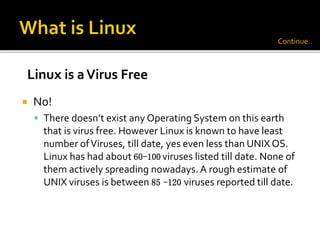
 No!
 There doesn’t exist any Operating System on this earth
that is virus free. However Linux is known to have least
number ofViruses, till date, yes even less than UNIX OS.
Linux has had about 60-100 viruses listed till date. None of
them actively spreading nowadays. A rough estimate of
UNIX viruses is between 85 -120 viruses reported till date.
Linux is aVirus Free
Continue..
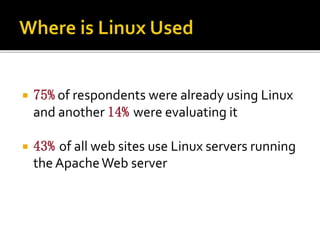
 75% of respondents were already using Linux
and another 14% were evaluating it
 43% of all web sites use Linux servers running
the ApacheWeb server
 Costs less
 Stable
 Reliable
 Extremely powerful
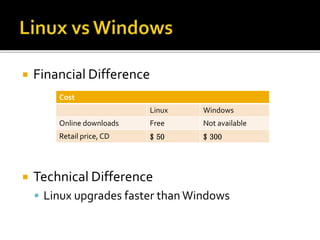
 Financial Difference
 Technical Difference
 Linux upgrades faster than Windows
Cost
Linux Windows
Online downloads Free Not available
Retail price, CD $ 50 $ 300
Web Server Administration
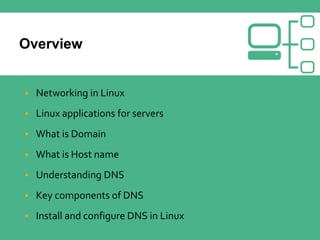
 Networking in Linux
 Linux applications for servers
 What is Domain
 What is Host name
 Understanding DNS
 Key components of DNS
 Install and configure DNS in Linux
 Linux is a powerful networking operating system
 Ability to work as a client, server, or network device
 Proxies, firewalls, routers, bridges, etc.
 As with most things, GUI tools available
 Similar toTCP/IP configuration in Windows
 Default firewall software is iptables or ipchains
 All common Internet services available
 Mail, Web, DNS, etc.
 Easy administration using web based interface
 No cost to setup a server.
 As easy as download a CD and install.
 Lower maintenance. Keeps running for years.
 Domain Names are the unique name that identifies
an entity.
 Domain Names always have 2 or more parts
separated by the dots.
 Types
 Top level domain
 New –Top level domain
 .edu, .gov, .com, .net, .org, …
 Countries each have a top level domain (2 letter
domain name).
 .biz - businesses
 .info - anyone can register
 .name - must register first and last name
 .pro - for professionals only
 must provide proof
 .aero, .museum, .coop are controlled by
organizations
 A hostname is any name placed to the left of
your domain name which resolves to an IP address.
www.myinnos.in
 The Domain name system is usually used to
translate a host name into an IP address.
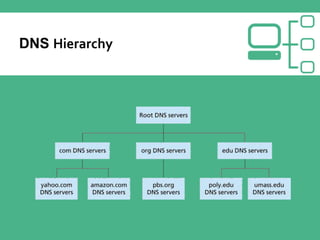
 Domain names comprise a hierarchy so that names
are unique, yet easy to remember.
 On your PC, theTCP/IP configuration contains the
address(es) of your DNS server(s)
 Whenever you use a URL, whether in a browser, or a
utility such as ping, DNS servers are used
 Domain Namespaces
 Zones
 Name server
 Name resolver
 The root level domain is "."
 Top-level domains include .com, .org etc.,
 Second-level domains are often owned by companies
and individuals
 myinnos.in
 A subdomain is a further division of a second-level
domain
 For pawanismmedia.in
 There is admin.myinnos.in
 A zone is a part of the domain namespace
 A domain myinnos.in, the domain name represents
a single zone
 For large organizations, subdomains can be divided
into separately maintained zones
 Each zone typically has a separate DNS
 Zones must be contiguous
 admin.myinnos.in can be combined with myinnos.in
 admin.myinnos.in cannot be combined with
user.myinnos.in
 There must be one primary DNS server in each zone
 Each zone can have multiple secondary DNS servers
Continue..
 Also called DNS server
 The program that stores information about domain
namespaces are called name server.
 Primary name server (Master)
 Secondary name server (Slave )
 Also called DNS client
 Resolvers are the clients that access the name
server
 Used by browsers, e-mail clients, and client utilities
such as ping
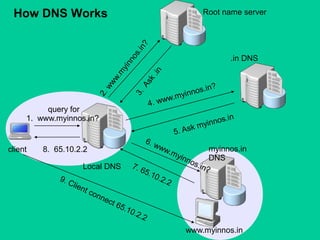
query for
1. www.myinnos.in?
client
www.myinnos.in
Root name server
Local DNS
.in DNS
myinnos.in
DNS
8. 65.10.2.2
How DNS Works
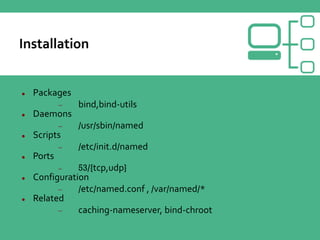
 Packages
 bind,bind-utils
 Daemons
 /usr/sbin/named
 Scripts
 /etc/init.d/named
 Ports
 53/{tcp,udp}
 Configuration
 /etc/named.conf , /var/named/*
 Related
 caching-nameserver, bind-chroot
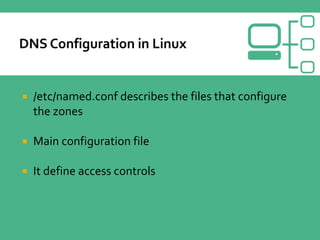
 /etc/named.conf describes the files that configure
the zones
 Main configuration file
 It define access controls
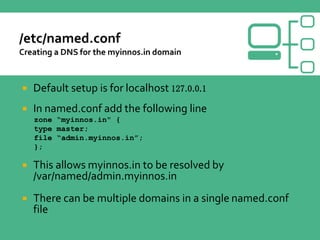
 Default setup is for localhost 127.0.0.1
 In named.conf add the following line
zone “myinnos.in" {
type master;
file “admin.myinnos.in”;
};
 This allows myinnos.in to be resolved by
/var/named/admin.myinnos.in
 There can be multiple domains in a single named.conf
file
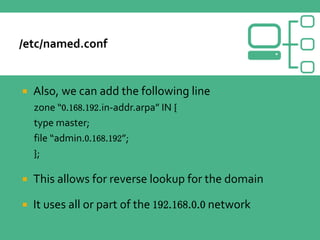
 Also, we can add the following line
zone “0.168.192.in-addr.arpa” IN {
type master;
file “admin.0.168.192”;
};
 This allows for reverse lookup for the domain
 It uses all or part of the 192.168.0.0 network
 To start DNS
 /etc/rc.d/init.d/named start
 To restart DNS
 /etc/rc.d/init.d/named restart
 To stop DNS
 /etc/rc.d/init.d/named stop
 Make DNS start when you boot Linux
 Add the command to start DNS to /etc/rc.d/rc.local
Hackers Loves Linux
 It's available to everyone at a great price .. Hackers never pay for
anything.
 It is already fully loaded with all the stuff needed, no need to download
additional applications for something as silly as netcat.
 Open source.. w00t!!! I have full f*#c@i&g control over my OS.
 Hackers hate windows compatibility issues/so many libararies.
 Hackers don’t want their system to crash or freeze when they’re about to
create history.
 90% servers run on Linux.. so why should we be behind??
 Linux is easy to customization, its customizable in every frigging way,
you can update/recompile the kernels too!!This is something we live for,
total control is the meaning of our lives.
Speedup internet with Google DNS
 Google Public DNS is a free, global DNS resolution
service, that you can use as an alternative to your
current DNS provider
 Configure your network settings to use the IP addresses
8.8.8.8 and 8.8.4.4 as your DNS servers
 Google DNS for
 Speed up your browsing experience.
 Improve your security.
 Get the results you expect with absolutely no redirection.
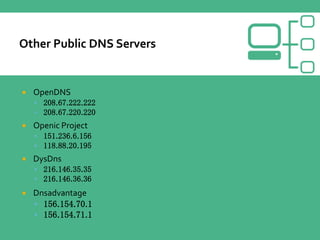
 OpenDNS
 208.67.222.222
 208.67.220.220
 Openic Project
 151.236.6.156
 118.88.20.195
 DysDns
 216.146.35.35
 216.146.36.36
 Dnsadvantage
 156.154.70.1
 156.154.71.1
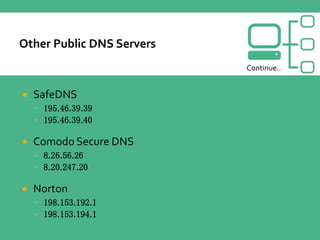
 SafeDNS
 195.46.39.39
 195.46.39.40
 Comodo Secure DNS
 8.26.56.26
 8.20.247.20
 Norton
 198.153.192.1
 198.153.194.1
Continue..
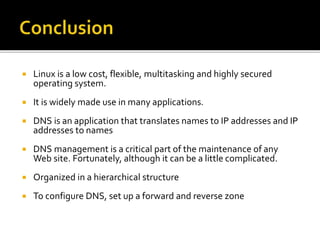
 Linux is a low cost, flexible, multitasking and highly secured
operating system.
 It is widely made use in many applications.
 DNS is an application that translates names to IP addresses and IP
addresses to names
 DNS management is a critical part of the maintenance of any
Web site. Fortunately, although it can be a little complicated.
 Organized in a hierarchical structure
 To configure DNS, set up a forward and reverse zone
Myinnos.in
Prabhakar Thota
MSc.,Computer Science
The Oxford College of Science

Linux and DNS Server

  • 1.
  • 2.
     Linux  Factorsof Linux Implementations  What is Linux  Where is Linux Used  Why Use Linux  Linux vsWindows  Web Server Administration (DNS Server)  UsefulTopics  Why Hackers prefers Linux  Speedup Internet with Google Public DNS  Conclusion
  • 3.
     Why acceptlower levels of security and reliability when I can provide higher levels of service to my customers?  I don’t want to be locked into any single operating system, platform, or solution technology. It’s about choices.  Why pay more when you can get the same or better function for less with more flexible licensing?
  • 4.
     Linux isa generic term referring to Unix-like graphical user interface (GUI) based computer operating systems.  A famous open source project  It is Multi-user, Multitasking, Multiprocessor  Free to use, distribute, modify under a compatible licence  A combination of many projects
  • 5.
     People improveit, people adapt it, people fix bugs. And this can happen at a speed that, compared to conventional software development. Open source software Continue..
  • 6.
     As thereis a limited access of user to basic files and folders, in Linux network it provide security to user’s privacy.Without disclosing the secured data Linux acts as a efficient server. Linux Provide Security Continue..
  • 7.
     Linux is"virus-free", there are no viruses for Linux in the world Linux is aVirus Free Continue..
  • 8.
     No!  Theredoesn’t exist any Operating System on this earth that is virus free. However Linux is known to have least number ofViruses, till date, yes even less than UNIX OS. Linux has had about 60-100 viruses listed till date. None of them actively spreading nowadays. A rough estimate of UNIX viruses is between 85 -120 viruses reported till date. Linux is aVirus Free Continue..
  • 9.
     75% ofrespondents were already using Linux and another 14% were evaluating it  43% of all web sites use Linux servers running the ApacheWeb server
  • 10.
     Costs less Stable  Reliable  Extremely powerful
  • 11.
     Financial Difference Technical Difference  Linux upgrades faster than Windows Cost Linux Windows Online downloads Free Not available Retail price, CD $ 50 $ 300
  • 12.
  • 13.
     Networking inLinux  Linux applications for servers  What is Domain  What is Host name  Understanding DNS  Key components of DNS  Install and configure DNS in Linux
  • 14.
     Linux isa powerful networking operating system  Ability to work as a client, server, or network device  Proxies, firewalls, routers, bridges, etc.  As with most things, GUI tools available  Similar toTCP/IP configuration in Windows  Default firewall software is iptables or ipchains
  • 15.
     All commonInternet services available  Mail, Web, DNS, etc.  Easy administration using web based interface  No cost to setup a server.  As easy as download a CD and install.  Lower maintenance. Keeps running for years.
  • 16.
     Domain Namesare the unique name that identifies an entity.  Domain Names always have 2 or more parts separated by the dots.  Types  Top level domain  New –Top level domain
  • 17.
     .edu, .gov,.com, .net, .org, …  Countries each have a top level domain (2 letter domain name).
  • 18.
     .biz -businesses  .info - anyone can register  .name - must register first and last name  .pro - for professionals only  must provide proof  .aero, .museum, .coop are controlled by organizations
  • 19.
     A hostnameis any name placed to the left of your domain name which resolves to an IP address. www.myinnos.in
  • 20.
     The Domainname system is usually used to translate a host name into an IP address.  Domain names comprise a hierarchy so that names are unique, yet easy to remember.
  • 22.
     On yourPC, theTCP/IP configuration contains the address(es) of your DNS server(s)  Whenever you use a URL, whether in a browser, or a utility such as ping, DNS servers are used
  • 23.
     Domain Namespaces Zones  Name server  Name resolver
  • 24.
     The rootlevel domain is "."  Top-level domains include .com, .org etc.,  Second-level domains are often owned by companies and individuals  myinnos.in  A subdomain is a further division of a second-level domain  For pawanismmedia.in  There is admin.myinnos.in
  • 25.
     A zoneis a part of the domain namespace  A domain myinnos.in, the domain name represents a single zone  For large organizations, subdomains can be divided into separately maintained zones  Each zone typically has a separate DNS
  • 26.
     Zones mustbe contiguous  admin.myinnos.in can be combined with myinnos.in  admin.myinnos.in cannot be combined with user.myinnos.in  There must be one primary DNS server in each zone  Each zone can have multiple secondary DNS servers Continue..
  • 27.
     Also calledDNS server  The program that stores information about domain namespaces are called name server.  Primary name server (Master)  Secondary name server (Slave )
  • 28.
     Also calledDNS client  Resolvers are the clients that access the name server  Used by browsers, e-mail clients, and client utilities such as ping
  • 29.
    query for 1. www.myinnos.in? client www.myinnos.in Rootname server Local DNS .in DNS myinnos.in DNS 8. 65.10.2.2 How DNS Works
  • 30.
     Packages  bind,bind-utils Daemons  /usr/sbin/named  Scripts  /etc/init.d/named  Ports  53/{tcp,udp}  Configuration  /etc/named.conf , /var/named/*  Related  caching-nameserver, bind-chroot
  • 31.
     /etc/named.conf describesthe files that configure the zones  Main configuration file  It define access controls
  • 32.
     Default setupis for localhost 127.0.0.1  In named.conf add the following line zone “myinnos.in" { type master; file “admin.myinnos.in”; };  This allows myinnos.in to be resolved by /var/named/admin.myinnos.in  There can be multiple domains in a single named.conf file
  • 33.
     Also, wecan add the following line zone “0.168.192.in-addr.arpa” IN { type master; file “admin.0.168.192”; };  This allows for reverse lookup for the domain  It uses all or part of the 192.168.0.0 network
  • 34.
     To startDNS  /etc/rc.d/init.d/named start  To restart DNS  /etc/rc.d/init.d/named restart  To stop DNS  /etc/rc.d/init.d/named stop  Make DNS start when you boot Linux  Add the command to start DNS to /etc/rc.d/rc.local
  • 35.
  • 36.
     It's availableto everyone at a great price .. Hackers never pay for anything.  It is already fully loaded with all the stuff needed, no need to download additional applications for something as silly as netcat.  Open source.. w00t!!! I have full f*#c@i&g control over my OS.  Hackers hate windows compatibility issues/so many libararies.  Hackers don’t want their system to crash or freeze when they’re about to create history.  90% servers run on Linux.. so why should we be behind??  Linux is easy to customization, its customizable in every frigging way, you can update/recompile the kernels too!!This is something we live for, total control is the meaning of our lives.
  • 37.
  • 38.
     Google PublicDNS is a free, global DNS resolution service, that you can use as an alternative to your current DNS provider  Configure your network settings to use the IP addresses 8.8.8.8 and 8.8.4.4 as your DNS servers  Google DNS for  Speed up your browsing experience.  Improve your security.  Get the results you expect with absolutely no redirection.
  • 39.
     OpenDNS  208.67.222.222 208.67.220.220  Openic Project  151.236.6.156  118.88.20.195  DysDns  216.146.35.35  216.146.36.36  Dnsadvantage  156.154.70.1  156.154.71.1
  • 40.
     SafeDNS  195.46.39.39 195.46.39.40  Comodo Secure DNS  8.26.56.26  8.20.247.20  Norton  198.153.192.1  198.153.194.1 Continue..
  • 41.
     Linux isa low cost, flexible, multitasking and highly secured operating system.  It is widely made use in many applications.  DNS is an application that translates names to IP addresses and IP addresses to names  DNS management is a critical part of the maintenance of any Web site. Fortunately, although it can be a little complicated.  Organized in a hierarchical structure  To configure DNS, set up a forward and reverse zone
  • 42.