Presentation on
BARCODE TECHNOLOGY
Presented by:
Abdullah-al-mamum
Sakil Ahamad
Yunus Miah
Maruf Alom
What is Barcode?

Barcodes are simply a set of symbols used to
represent alpha-numeric information instead of
seeing a number“1”, or letter “A”, you would see a
series of black and white bars in various
combinations and in different widths.

These are used to encode data. The data encoded in
such bars can be decoded again to represent it in
human readable form.
Brief History

As far back as the 1960s, barcodes were used in
industrial work environments. Some of the early
implementations of barcodes included the ability
identify rail road cars.

In the early 1970s, common barcodes started
appearing on grocery shelves. To automate the
process of identifying grocery items, UPC barcodes
were placed on products.

Today, barcodes are just about everywhere and are
used for identification in almost all types of
business.
Why use Barcodes?

When barcodes are used in the business process,
procedures are automated to increase productivity
and reduce human error.

Whenever there is a need to accurately identify or
track something, bar-coding should be used. For
example, in a data entry work environment, workers
may be required to enter an enormous amount of
data into a customer database system.

Instead of manually typing a customer identification
number into a database, if the information is
contained in a barcode, a data entry operator may
scan it in. This would increase automation and
Barcode types and use

The type of barcode to use for a particular situation
depends upon:
1) The use.
2) The data encoded in the barcode.
3) How the barcode will be printed.
There are two types of barcodes:

Linear barcodes

2D barcodes.
Applications of Barcode

RETAIL APPLICATIONS
− Super markets
− Counter-mounted Bar Code scanners
− Universal Product Code (UPC)
− Price and description information

WARE HOUSING

HEALTH CARE APPLICATIONS
− Drugs, devices, instruments
− Identification of expiry date
Evaluation of Barcode

One of the most common tools for reading barcodes
is the hand held barcode scanner. All of the barcode
scanners recommended and sold by ID Automation
have built-in decoders that can read several different
bar code types.

Most of the scanners sold by ID Automation receive
their power from the PC keyboard or USB port so
no external power supply is required. When a
barcode is scanned, the data is sent to the PC as if it
was typed using a keyboard.
1D Barcode

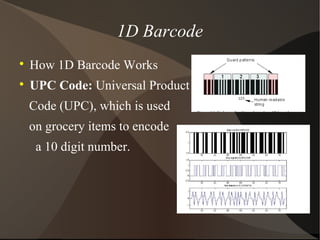
How 1D Barcode Works

UPC Code: Universal Product
Code (UPC), which is used
on grocery items to encode
a 10 digit number.
 What is 2D Barcode?
 Advantage of 2D barcodes
2D Barcode
 Laser scanner
 CCD Printer
 Camera based reader
Barcode Reader
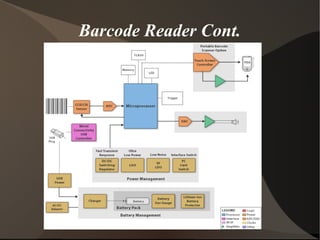
Barcode Reader Cont.
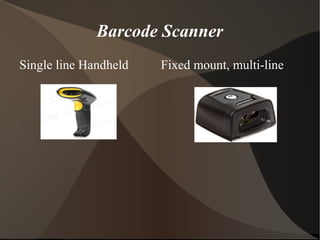
Barcode Scanner
Single line Handheld Fixed mount, multi-line
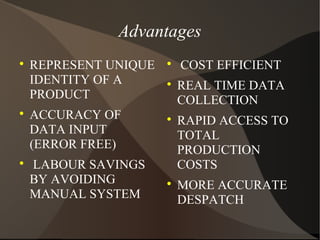
Advantages

REPRESENT UNIQUE
IDENTITY OF A
PRODUCT

ACCURACY OF
DATA INPUT
(ERROR FREE)

LABOUR SAVINGS
BY AVOIDING
MANUAL SYSTEM

COST EFFICIENT

REAL TIME DATA
COLLECTION

RAPID ACCESS TO
TOTAL
PRODUCTION
COSTS

MORE ACCURATE
DESPATCH
Disadvantages

System Failure may cost more delays

Scratched or crumpled barcodes may cause
problems

Data must be coded in the barcode

In laser scanning, durability and cost are the two
disadvantages
Future of Barcode Technology

Age verification

Opening customer accounts:

Business Tracking

Product Stock control

Coupons

Fraud detection
QR Code

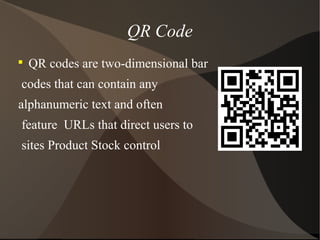
QR codes are two-dimensional bar
codes that can contain any
alphanumeric text and often
feature URLs that direct users to
sites Product Stock control
QR Code Cont.

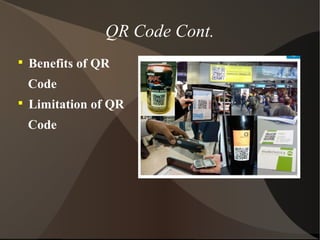
Benefits of QR
Code

Limitation of QR
Code
How QR code works
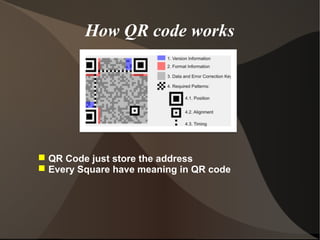
 QR Code just store the address
 Every Square have meaning in QR code
Conclusion
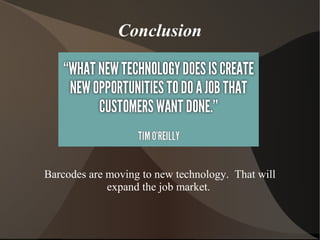
Barcodes are moving to new technology. That will
expand the job market.

Barcode history and Future

  • 1.
    Presentation on BARCODE TECHNOLOGY Presentedby: Abdullah-al-mamum Sakil Ahamad Yunus Miah Maruf Alom
  • 2.
    What is Barcode?  Barcodesare simply a set of symbols used to represent alpha-numeric information instead of seeing a number“1”, or letter “A”, you would see a series of black and white bars in various combinations and in different widths.  These are used to encode data. The data encoded in such bars can be decoded again to represent it in human readable form.
  • 3.
    Brief History  As farback as the 1960s, barcodes were used in industrial work environments. Some of the early implementations of barcodes included the ability identify rail road cars.  In the early 1970s, common barcodes started appearing on grocery shelves. To automate the process of identifying grocery items, UPC barcodes were placed on products.  Today, barcodes are just about everywhere and are used for identification in almost all types of business.
  • 4.
    Why use Barcodes?  Whenbarcodes are used in the business process, procedures are automated to increase productivity and reduce human error.  Whenever there is a need to accurately identify or track something, bar-coding should be used. For example, in a data entry work environment, workers may be required to enter an enormous amount of data into a customer database system.  Instead of manually typing a customer identification number into a database, if the information is contained in a barcode, a data entry operator may scan it in. This would increase automation and
  • 5.
    Barcode types anduse  The type of barcode to use for a particular situation depends upon: 1) The use. 2) The data encoded in the barcode. 3) How the barcode will be printed.
  • 6.
    There are twotypes of barcodes:  Linear barcodes  2D barcodes.
  • 7.
    Applications of Barcode  RETAILAPPLICATIONS − Super markets − Counter-mounted Bar Code scanners − Universal Product Code (UPC) − Price and description information  WARE HOUSING  HEALTH CARE APPLICATIONS − Drugs, devices, instruments − Identification of expiry date
  • 8.
    Evaluation of Barcode  Oneof the most common tools for reading barcodes is the hand held barcode scanner. All of the barcode scanners recommended and sold by ID Automation have built-in decoders that can read several different bar code types.  Most of the scanners sold by ID Automation receive their power from the PC keyboard or USB port so no external power supply is required. When a barcode is scanned, the data is sent to the PC as if it was typed using a keyboard.
  • 9.
    1D Barcode  How 1DBarcode Works  UPC Code: Universal Product Code (UPC), which is used on grocery items to encode a 10 digit number.
  • 10.
     What is2D Barcode?  Advantage of 2D barcodes 2D Barcode
  • 11.
     Laser scanner CCD Printer  Camera based reader Barcode Reader
  • 12.
  • 13.
    Barcode Scanner Single lineHandheld Fixed mount, multi-line
  • 14.
    Advantages  REPRESENT UNIQUE IDENTITY OFA PRODUCT  ACCURACY OF DATA INPUT (ERROR FREE)  LABOUR SAVINGS BY AVOIDING MANUAL SYSTEM  COST EFFICIENT  REAL TIME DATA COLLECTION  RAPID ACCESS TO TOTAL PRODUCTION COSTS  MORE ACCURATE DESPATCH
  • 15.
    Disadvantages  System Failure maycost more delays  Scratched or crumpled barcodes may cause problems  Data must be coded in the barcode  In laser scanning, durability and cost are the two disadvantages
  • 16.
    Future of BarcodeTechnology  Age verification  Opening customer accounts:  Business Tracking  Product Stock control  Coupons  Fraud detection
  • 17.
    QR Code  QR codesare two-dimensional bar codes that can contain any alphanumeric text and often feature URLs that direct users to sites Product Stock control
  • 18.
    QR Code Cont.  Benefitsof QR Code  Limitation of QR Code
  • 19.
    How QR codeworks  QR Code just store the address  Every Square have meaning in QR code
  • 20.
    Conclusion Barcodes are movingto new technology. That will expand the job market.