AUGMENTED REALITY TUTORIALS
MOBILE APPLICATION 2
[AR02] Vuforia + Unity

MODELOS 3D
ETSAB AR

ISIDRO NAVARRO
AR Architect
AUGMENTED REALITY TUTORIALS

MOBILE APPLICATION 2

By ISIDRO NAVARRO

INTRODUCTION

• Educational Application using Augmented
Reality ‘MODELOS 3D ETSAB AR’
– The case study is developed in the context of the
thesys about AR in Architecture Technical School
of Architecture of Barcelona (ETSAB-UPC)
– The application shows the geometry of 3D models
with the Augmented Reality using mobile devices.

VUFORIA + UNITY
2013

2
AUGMENTED REALITY TUTORIALS

MOBILE APPLICATION 2

By ISIDRO NAVARRO

RESOURCES
• Software
– Vuforia SDK 2.6 https://developer.vuforia.com/resources/sdk/unity
– Unity http://unity3d.com/unity/download/

VUFORIA + UNITY
2013

3
AUGMENTED REALITY TUTORIALS

MOBILE APPLICATION 2

By ISIDRO NAVARRO

• 3D models

DEVELOPMENT

– Creation of contents
• Models from AutoCAD are converted in 3DStudio MAX
file format .MAX

VUFORIA + UNITY
2013

4
AUGMENTED REALITY TUTORIALS

MOBILE APPLICATION 2

By ISIDRO NAVARRO

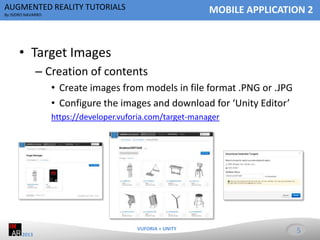
• Target Images
– Creation of contents
• Create images from models in file format .PNG or .JPG
• Configure the images and download for ‘Unity Editor’
https://developer.vuforia.com/target-manager

VUFORIA + UNITY
2013

5
AUGMENTED REALITY TUTORIALS

MOBILE APPLICATION 2

By ISIDRO NAVARRO

• Unity
– Creating the project
• Import the Vuforia assets and the previous Targets file

VUFORIA + UNITY
2013

6
AUGMENTED REALITY TUTORIALS

MOBILE APPLICATION 2

By ISIDRO NAVARRO

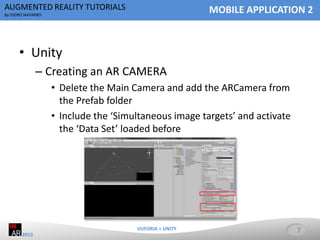
• Unity
– Creating an AR CAMERA
• Delete the Main Camera and add the ARCamera from
the Prefab folder
• Include the ‘Simultaneous image targets’ and activate
the ‘Data Set’ loaded before

VUFORIA + UNITY
2013

7
AUGMENTED REALITY TUTORIALS

MOBILE APPLICATION 2

By ISIDRO NAVARRO

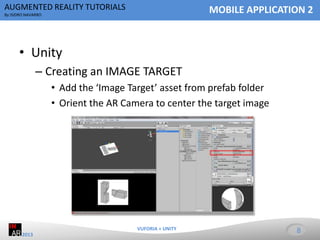
• Unity
– Creating an IMAGE TARGET
• Add the ‘Image Target’ asset from prefab folder
• Orient the AR Camera to center the target image

VUFORIA + UNITY
2013

8
AUGMENTED REALITY TUTORIALS

MOBILE APPLICATION 2

By ISIDRO NAVARRO

• Unity
– 3D Model
• Insert the 3D models into the assets folder of Unity
• Drag and Drop the file on the Image Target asset

VUFORIA + UNITY
2013

9
AUGMENTED REALITY TUTORIALS

MOBILE APPLICATION 2

By ISIDRO NAVARRO

• Unity

APPLICATION

– Creating the Application
• Configure the export settings and build the Application

VUFORIA + UNITY
2013

10
AUGMENTED REALITY TUTORIALS

MOBILE APPLICATION 2

By ISIDRO NAVARRO

DEMOSTRATION

• Mobile device Android

– Install the file .APK from Google Play
– Run the application and scan the images ‘targets’

> VIDEO
VUFORIA + UNITY
2013

11
AUGMENTED REALITY TUTORIALS

MOBILE APPLICATION 2

By ISIDRO NAVARRO

Isidro Navarro
LinkedIn
Youtube
Slideshare
Google+
Twitter
Facebook
Meetup

VUFORIA + UNITY
2013

12

Augmented Reality Application Tutorial for Education 2

  • 1.
    AUGMENTED REALITY TUTORIALS MOBILEAPPLICATION 2 [AR02] Vuforia + Unity MODELOS 3D ETSAB AR ISIDRO NAVARRO AR Architect
  • 2.
    AUGMENTED REALITY TUTORIALS MOBILEAPPLICATION 2 By ISIDRO NAVARRO INTRODUCTION • Educational Application using Augmented Reality ‘MODELOS 3D ETSAB AR’ – The case study is developed in the context of the thesys about AR in Architecture Technical School of Architecture of Barcelona (ETSAB-UPC) – The application shows the geometry of 3D models with the Augmented Reality using mobile devices. VUFORIA + UNITY 2013 2
  • 3.
    AUGMENTED REALITY TUTORIALS MOBILEAPPLICATION 2 By ISIDRO NAVARRO RESOURCES • Software – Vuforia SDK 2.6 https://developer.vuforia.com/resources/sdk/unity – Unity http://unity3d.com/unity/download/ VUFORIA + UNITY 2013 3
  • 4.
    AUGMENTED REALITY TUTORIALS MOBILEAPPLICATION 2 By ISIDRO NAVARRO • 3D models DEVELOPMENT – Creation of contents • Models from AutoCAD are converted in 3DStudio MAX file format .MAX VUFORIA + UNITY 2013 4
  • 5.
    AUGMENTED REALITY TUTORIALS MOBILEAPPLICATION 2 By ISIDRO NAVARRO • Target Images – Creation of contents • Create images from models in file format .PNG or .JPG • Configure the images and download for ‘Unity Editor’ https://developer.vuforia.com/target-manager VUFORIA + UNITY 2013 5
  • 6.
    AUGMENTED REALITY TUTORIALS MOBILEAPPLICATION 2 By ISIDRO NAVARRO • Unity – Creating the project • Import the Vuforia assets and the previous Targets file VUFORIA + UNITY 2013 6
  • 7.
    AUGMENTED REALITY TUTORIALS MOBILEAPPLICATION 2 By ISIDRO NAVARRO • Unity – Creating an AR CAMERA • Delete the Main Camera and add the ARCamera from the Prefab folder • Include the ‘Simultaneous image targets’ and activate the ‘Data Set’ loaded before VUFORIA + UNITY 2013 7
  • 8.
    AUGMENTED REALITY TUTORIALS MOBILEAPPLICATION 2 By ISIDRO NAVARRO • Unity – Creating an IMAGE TARGET • Add the ‘Image Target’ asset from prefab folder • Orient the AR Camera to center the target image VUFORIA + UNITY 2013 8
  • 9.
    AUGMENTED REALITY TUTORIALS MOBILEAPPLICATION 2 By ISIDRO NAVARRO • Unity – 3D Model • Insert the 3D models into the assets folder of Unity • Drag and Drop the file on the Image Target asset VUFORIA + UNITY 2013 9
  • 10.
    AUGMENTED REALITY TUTORIALS MOBILEAPPLICATION 2 By ISIDRO NAVARRO • Unity APPLICATION – Creating the Application • Configure the export settings and build the Application VUFORIA + UNITY 2013 10
  • 11.
    AUGMENTED REALITY TUTORIALS MOBILEAPPLICATION 2 By ISIDRO NAVARRO DEMOSTRATION • Mobile device Android – Install the file .APK from Google Play – Run the application and scan the images ‘targets’ > VIDEO VUFORIA + UNITY 2013 11
  • 12.
    AUGMENTED REALITY TUTORIALS MOBILEAPPLICATION 2 By ISIDRO NAVARRO Isidro Navarro LinkedIn Youtube Slideshare Google+ Twitter Facebook Meetup VUFORIA + UNITY 2013 12