Coding a VR
Application
in Android
A Practical Guide
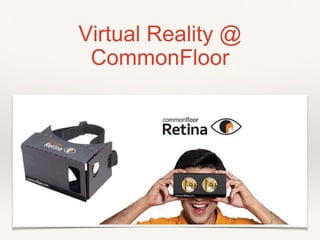
Virtual Reality @
CommonFloor
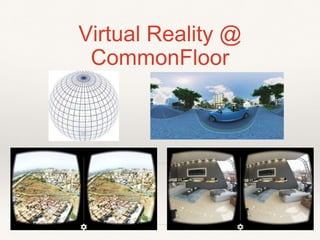
Virtual Reality @
CommonFloor
Contents
❖ Introduction to Google Cardboard SDK for Android
❖ Requirement of separate SDK for VR ?
❖ Getting Started with First Android Application for VR
❖ Setup of coding environment
❖ Overview of code
Intro to Google Cardboard
SDK
❖ Cardboard SDK for Android enables developers familiar with OpenGL to
quickly start creating VR applications.
❖ The toolkit simplifies many common VR development tasks, including:
❖ Lens distortion correction.
❖ Head tracking.
❖ 3D calibration.
❖ Side-by-side rendering.
❖ Stereo geometry configuration.
❖ User input event handling.
Setup of Coding Environment
❖ Building the demo app requires:
❖ Android Studio 1.0 or higher
❖ https://developer.android.com/sdk/index.html
❖ Version 19 of the Android SDK
❖ A physical Android device running Android 16 (Jelly
Bean) or higher
Lets start coding
❖ Main components of Android VR Application
❖ Manifest file
❖ Cardboard Activity
❖ Custom Renderer
❖ Content Model
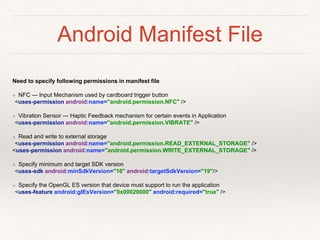
Android Manifest File
Need to specify following permissions in manifest file
❖ NFC — Input Mechanism used by cardboard trigger button
<uses-permission android:name="android.permission.NFC" />
❖ Vibration Sensor — Haptic Feedback mechanism for certain events in Application
<uses-permission android:name="android.permission.VIBRATE" />
❖ Read and write to external storage
<uses-permission android:name="android.permission.READ_EXTERNAL_STORAGE" />
<uses-permission android:name="android.permission.WRITE_EXTERNAL_STORAGE" />
❖ Specify minimum and target SDK version
<uses-sdk android:minSdkVersion="16" android:targetSdkVersion="19"/>
❖ Specify the OpenGL ES version that device must support to run the application
<uses-feature android:glEsVersion="0x00020000" android:required="true" />
Cardboard Activity
❖ Starting point for coding a cardboard app.
❖ Base activity that provides easy integration with
Cardboard devices.
❖ Exposes events to interact with Cardboards.
❖ Uses sticky immersive mode, in which the system UI is
hidden, and the content takes up the whole screen.
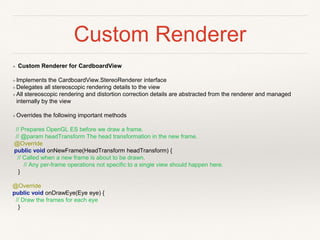
Custom Renderer
❖ Custom Renderer for CardboardView
❖ Implements the CardboardView.StereoRenderer interface
❖ Delegates all stereoscopic rendering details to the view
❖ All stereoscopic rendering and distortion correction details are abstracted from the renderer and managed
internally by the view
❖ Overrides the following important methods
// Prepares OpenGL ES before we draw a frame.
// @param headTransform The head transformation in the new frame.
@Override
public void onNewFrame(HeadTransform headTransform) {
// Called when a new frame is about to be drawn.
// Any per-frame operations not specific to a single view should happen here.
}
@Override
public void onDrawEye(Eye eye) {
// Draw the frames for each eye
}
Custom Renderer
OnDrawEye Function
// Draws a frame for an eye.
// @param eye The eye to render. Includes all required transformations.
@Override
public void onDrawEye(Eye eye) {
GLES20.glClear(GLES20.GL_COLOR_BUFFER_BIT | GLES20.GL_DEPTH_BUFFER_BIT);
. . .
// Apply the eye transformation to the camera.
Matrix.multiplyMM(mView, 0, eye.getEyeView(), 0, mCamera, 0);
// Set the position of the light
Matrix.multiplyMV(mLightPosInEyeSpace, 0, mView, 0, LIGHT_POS_IN_WORLD_SPACE, 0);
// Build the ModelView and ModelViewProjection matrices
// for calculating cube position and light.
float[] perspective = eye.getPerspective(Z_NEAR, Z_FAR);
Matrix.multiplyMM(mModelView, 0, mView, 0, mModelCube, 0);
Matrix.multiplyMM(mModelViewProjection, 0, perspective, 0, mModelView, 0);
drawCube();
// Draw rest of the scene.
. . .
}
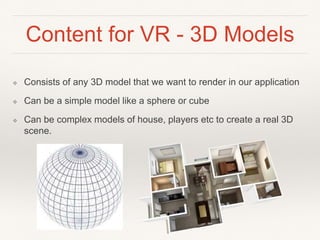
Content for VR - 3D Models
❖ Consists of any 3D model that we want to render in our application
❖ Can be a simple model like a sphere or cube
❖ Can be complex models of house, players etc to create a real 3D
scene.
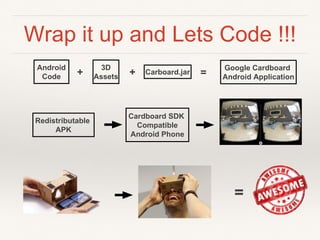
Wrap it up and Lets Code !!!
3D
Assets
Carboard.jar
Google Cardboard
Android Application
Redistributable
APK
Cardboard SDK
Compatible
Android Phone
+ =
=
Android
Code +

Developing Virtual Reality Application using Google Cardboard

  • 1.
    Coding a VR Application inAndroid A Practical Guide
  • 2.
  • 3.
  • 4.
    Contents ❖ Introduction toGoogle Cardboard SDK for Android ❖ Requirement of separate SDK for VR ? ❖ Getting Started with First Android Application for VR ❖ Setup of coding environment ❖ Overview of code
  • 5.
    Intro to GoogleCardboard SDK ❖ Cardboard SDK for Android enables developers familiar with OpenGL to quickly start creating VR applications. ❖ The toolkit simplifies many common VR development tasks, including: ❖ Lens distortion correction. ❖ Head tracking. ❖ 3D calibration. ❖ Side-by-side rendering. ❖ Stereo geometry configuration. ❖ User input event handling.
  • 6.
    Setup of CodingEnvironment ❖ Building the demo app requires: ❖ Android Studio 1.0 or higher ❖ https://developer.android.com/sdk/index.html ❖ Version 19 of the Android SDK ❖ A physical Android device running Android 16 (Jelly Bean) or higher
  • 7.
    Lets start coding ❖Main components of Android VR Application ❖ Manifest file ❖ Cardboard Activity ❖ Custom Renderer ❖ Content Model
  • 8.
    Android Manifest File Needto specify following permissions in manifest file ❖ NFC — Input Mechanism used by cardboard trigger button <uses-permission android:name="android.permission.NFC" /> ❖ Vibration Sensor — Haptic Feedback mechanism for certain events in Application <uses-permission android:name="android.permission.VIBRATE" /> ❖ Read and write to external storage <uses-permission android:name="android.permission.READ_EXTERNAL_STORAGE" /> <uses-permission android:name="android.permission.WRITE_EXTERNAL_STORAGE" /> ❖ Specify minimum and target SDK version <uses-sdk android:minSdkVersion="16" android:targetSdkVersion="19"/> ❖ Specify the OpenGL ES version that device must support to run the application <uses-feature android:glEsVersion="0x00020000" android:required="true" />
  • 9.
    Cardboard Activity ❖ Startingpoint for coding a cardboard app. ❖ Base activity that provides easy integration with Cardboard devices. ❖ Exposes events to interact with Cardboards. ❖ Uses sticky immersive mode, in which the system UI is hidden, and the content takes up the whole screen.
  • 10.
    Custom Renderer ❖ CustomRenderer for CardboardView ❖ Implements the CardboardView.StereoRenderer interface ❖ Delegates all stereoscopic rendering details to the view ❖ All stereoscopic rendering and distortion correction details are abstracted from the renderer and managed internally by the view ❖ Overrides the following important methods // Prepares OpenGL ES before we draw a frame. // @param headTransform The head transformation in the new frame. @Override public void onNewFrame(HeadTransform headTransform) { // Called when a new frame is about to be drawn. // Any per-frame operations not specific to a single view should happen here. } @Override public void onDrawEye(Eye eye) { // Draw the frames for each eye }
  • 11.
    Custom Renderer OnDrawEye Function //Draws a frame for an eye. // @param eye The eye to render. Includes all required transformations. @Override public void onDrawEye(Eye eye) { GLES20.glClear(GLES20.GL_COLOR_BUFFER_BIT | GLES20.GL_DEPTH_BUFFER_BIT); . . . // Apply the eye transformation to the camera. Matrix.multiplyMM(mView, 0, eye.getEyeView(), 0, mCamera, 0); // Set the position of the light Matrix.multiplyMV(mLightPosInEyeSpace, 0, mView, 0, LIGHT_POS_IN_WORLD_SPACE, 0); // Build the ModelView and ModelViewProjection matrices // for calculating cube position and light. float[] perspective = eye.getPerspective(Z_NEAR, Z_FAR); Matrix.multiplyMM(mModelView, 0, mView, 0, mModelCube, 0); Matrix.multiplyMM(mModelViewProjection, 0, perspective, 0, mModelView, 0); drawCube(); // Draw rest of the scene. . . . }
  • 12.
    Content for VR- 3D Models ❖ Consists of any 3D model that we want to render in our application ❖ Can be a simple model like a sphere or cube ❖ Can be complex models of house, players etc to create a real 3D scene.
  • 13.
    Wrap it upand Lets Code !!! 3D Assets Carboard.jar Google Cardboard Android Application Redistributable APK Cardboard SDK Compatible Android Phone + = = Android Code +