Adult literacy from creating joyful learning experience into active citizenship

Augmented Reality : How to find fun with
Renewable Energy Education
Welcome from Joanna Pinewood Education
Augmented Reality using Google Trimble SketchUp 8 and AR-Media to
encourage greater use and fun. Examples used are Voltaic panels and a new
biofuel replacement for petrol – DMF – Dimethyl Furan.
Adult literacy from creating joyful learning experience into active citizenship

Augmented Reality : How to find fun with
Renewable Energy Education
Contents
page 3 Downloading SketchUp
page 6 Augmented Reality Plug In
page 7 Downloading the AR-media page
page 13 Installing AR-media Plug in for SketchUp
page 18 Using the Trimble Library
page 19 Marker for using Augmented Reality
page 21 Augmented reality session
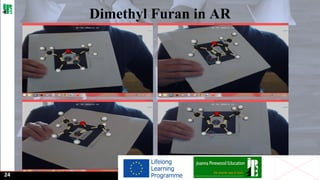
page 24 Dimethyl Furan in AR
page 25 Acknowledgements

03
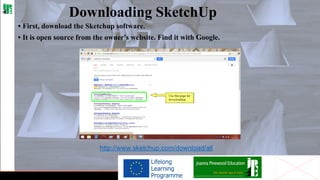
Downloading SketchUp
• First, download the Sketchup software.
• It is open source from the owner's website. Find it with Google.

http://www.sketchup.com/download/all
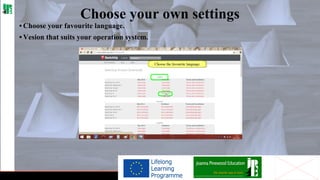
Choose your own settings
• Choose your favourite language.
• Vesion that suits your operation system.
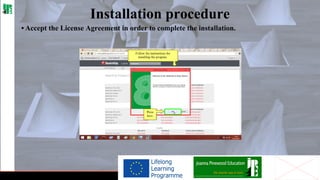
Installation procedure
• Accept the License Agreement in order to complete the installation.
Augmented Reality Plug In
• Now it's necessary to download the AR media plug-in for Sketchup.
• For a complete guide to all the functions of AR-MEDIA plugin, visit the page:
http://www.inglobetechnologies.
com/en/new_products/arplugin_su/download/_current_/QuickStartGuideWin.pdf
• Alternatively you can see the Video Tutorial of Joanna Pinewood Education about
SchetchUp and AR-Media Plugin and follow the simple instructions, step by step,
to install both software.

06
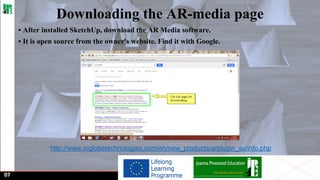
Downloading the AR-media page
• After installed SketchUp, download the AR Media software.
• It is open source from the owner's website. Find it with Google.

http://www.inglobetechnologies.com/en/new_products/arplugin_su/info.php

07
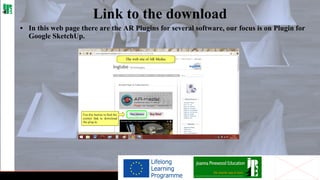
Link to the download
• In this web page there are the AR Plugins for several software, our focus is on Plugin for
Google SketchUp.
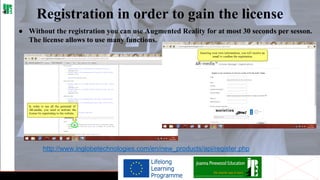
Registration in order to gain the license
● Without the registration you can use Augmented Reality for at most 30 seconds per sesson.
The license allows to use many functions.

http://www.inglobetechnologies.com/en/new_products/api/register.php
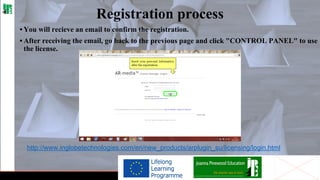
Registration process
• You will recieve an email to confirm the registration.
• After receiving the email, go back to the previous page and click "CONTROL PANEL" to use
the license.

http://www.inglobetechnologies.com/en/new_products/arplugin_su/licensing/login.html
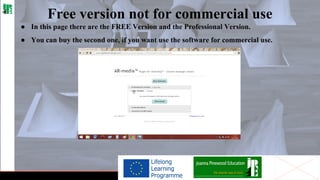
Free version not for commercial use
● In this page there are the FREE Version and the Professional Version.
● You can buy the second one, if you want use the software for commercial use.
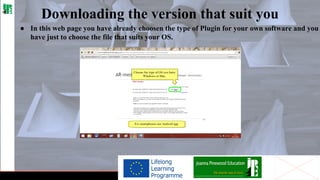
Downloading the version that suit you
● In this web page you have already choosen the type of Plugin for your own software and you
have just to choose the file that suits your OS.
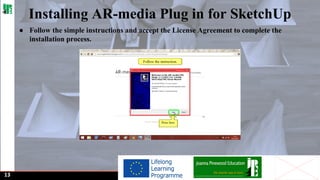
Installing AR-media Plug in for SketchUp
● Follow the simple instructions and accept the License Agreement to complete the
installation process.

13
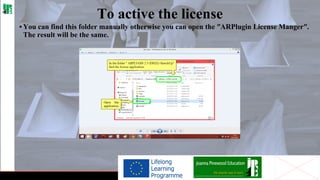
To active the license
• You can find this folder manually otherwise you can open the ʺARPlugin License Mangerʺ.
The result will be the same.
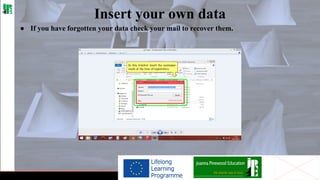
Insert your own data
● If you have forgotten your data check your mail to recover them.
AR Plugin for SketchUp
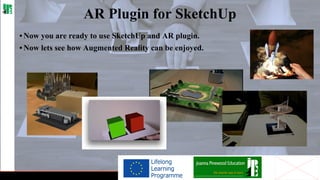
• Now you are ready to use SketchUp and AR plugin.
• Now lets see how Augmented Reality can be enjoyed.
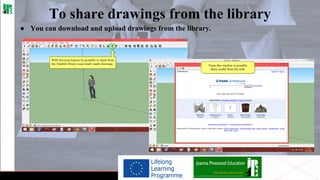
To share drawings from the library
● You can download and upload drawings from the library.
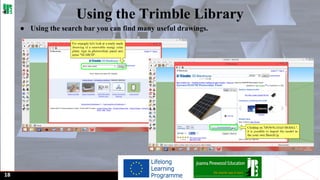
Using the Trimble Library
● Using the search bar you can find many useful drawings.

18
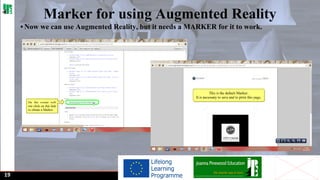
Marker for using Augmented Reality
• Now we can use Augmented Reality, but it needs a MARKER for it to work.

19
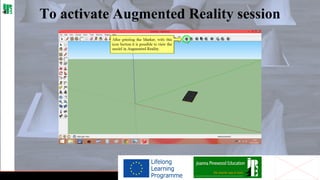
To activate Augmented Reality session
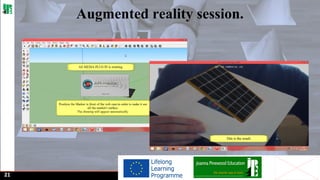
Augmented reality session.

21
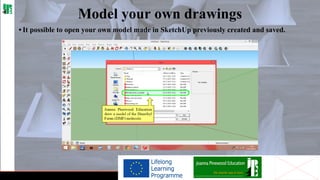
Model your own drawings
• It possible to open your own model made in SketchUp previously created and saved.
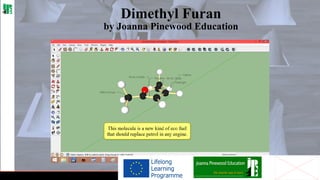
Dimethyl Furan
by Joanna Pinewood Education
Dimethyl Furan in AR

24
Editing: Vincenzo Caimano, Ariel Perea Diaz, Krzysztof Bahrynowski
Modelling: Vincenzo Caimano
Design & Layout: Ariel Perea Diaz
https://twitter.com/arielpereadiaz
Proof-Reading: Krzysztof Bahrynowski
https://twitter.com/KrzysJan

Joanna Pinewood Education Ltd Education Consultants
Phone 0044 (0)20 76400300 http://www.joannapinewoodeducation.com/ http://www.jpetutors.com/
www.facebook.com/joanapinewoodeducation https://www.facebook.com/groups/JoyAr/

• With the support of the Life Long Learning of the European Union.
• This project has been funded with support of the Life Long Learning from the European Commission of the European Union. This publication
reflects the views only of the author, and the Commission cannot be held responsible for any use which may be made of the information
contained therein.

25

Augmented Reality by Joanna Pinewood Education.

  • 1.
    Adult literacy fromcreating joyful learning experience into active citizenship Augmented Reality : How to find fun with Renewable Energy Education Welcome from Joanna Pinewood Education Augmented Reality using Google Trimble SketchUp 8 and AR-Media to encourage greater use and fun. Examples used are Voltaic panels and a new biofuel replacement for petrol – DMF – Dimethyl Furan.
  • 2.
    Adult literacy fromcreating joyful learning experience into active citizenship Augmented Reality : How to find fun with Renewable Energy Education Contents page 3 Downloading SketchUp page 6 Augmented Reality Plug In page 7 Downloading the AR-media page page 13 Installing AR-media Plug in for SketchUp page 18 Using the Trimble Library page 19 Marker for using Augmented Reality page 21 Augmented reality session page 24 Dimethyl Furan in AR page 25 Acknowledgements 03
  • 3.
    Downloading SketchUp • First,download the Sketchup software. • It is open source from the owner's website. Find it with Google. http://www.sketchup.com/download/all
  • 4.
    Choose your ownsettings • Choose your favourite language. • Vesion that suits your operation system.
  • 5.
    Installation procedure • Acceptthe License Agreement in order to complete the installation.
  • 6.
    Augmented Reality PlugIn • Now it's necessary to download the AR media plug-in for Sketchup. • For a complete guide to all the functions of AR-MEDIA plugin, visit the page: http://www.inglobetechnologies. com/en/new_products/arplugin_su/download/_current_/QuickStartGuideWin.pdf • Alternatively you can see the Video Tutorial of Joanna Pinewood Education about SchetchUp and AR-Media Plugin and follow the simple instructions, step by step, to install both software. 06
  • 7.
    Downloading the AR-mediapage • After installed SketchUp, download the AR Media software. • It is open source from the owner's website. Find it with Google. http://www.inglobetechnologies.com/en/new_products/arplugin_su/info.php 07
  • 8.
    Link to thedownload • In this web page there are the AR Plugins for several software, our focus is on Plugin for Google SketchUp.
  • 9.
    Registration in orderto gain the license ● Without the registration you can use Augmented Reality for at most 30 seconds per sesson. The license allows to use many functions. http://www.inglobetechnologies.com/en/new_products/api/register.php
  • 10.
    Registration process • Youwill recieve an email to confirm the registration. • After receiving the email, go back to the previous page and click "CONTROL PANEL" to use the license. http://www.inglobetechnologies.com/en/new_products/arplugin_su/licensing/login.html
  • 11.
    Free version notfor commercial use ● In this page there are the FREE Version and the Professional Version. ● You can buy the second one, if you want use the software for commercial use.
  • 12.
    Downloading the versionthat suit you ● In this web page you have already choosen the type of Plugin for your own software and you have just to choose the file that suits your OS.
  • 13.
    Installing AR-media Plugin for SketchUp ● Follow the simple instructions and accept the License Agreement to complete the installation process. 13
  • 14.
    To active thelicense • You can find this folder manually otherwise you can open the ʺARPlugin License Mangerʺ. The result will be the same.
  • 15.
    Insert your owndata ● If you have forgotten your data check your mail to recover them.
  • 16.
    AR Plugin forSketchUp • Now you are ready to use SketchUp and AR plugin. • Now lets see how Augmented Reality can be enjoyed.
  • 17.
    To share drawingsfrom the library ● You can download and upload drawings from the library.
  • 18.
    Using the TrimbleLibrary ● Using the search bar you can find many useful drawings. 18
  • 19.
    Marker for usingAugmented Reality • Now we can use Augmented Reality, but it needs a MARKER for it to work. 19
  • 20.
    To activate AugmentedReality session
  • 21.
  • 22.
    Model your owndrawings • It possible to open your own model made in SketchUp previously created and saved.
  • 23.
    Dimethyl Furan by JoannaPinewood Education
  • 24.
  • 25.
    Editing: Vincenzo Caimano,Ariel Perea Diaz, Krzysztof Bahrynowski Modelling: Vincenzo Caimano Design & Layout: Ariel Perea Diaz https://twitter.com/arielpereadiaz Proof-Reading: Krzysztof Bahrynowski https://twitter.com/KrzysJan Joanna Pinewood Education Ltd Education Consultants Phone 0044 (0)20 76400300 http://www.joannapinewoodeducation.com/ http://www.jpetutors.com/ www.facebook.com/joanapinewoodeducation https://www.facebook.com/groups/JoyAr/ • With the support of the Life Long Learning of the European Union. • This project has been funded with support of the Life Long Learning from the European Commission of the European Union. This publication reflects the views only of the author, and the Commission cannot be held responsible for any use which may be made of the information contained therein. 25