APPLICATION PACKAGES
CSC 2304
LECTURE 1
Department of Maths and Computer-
Science
Faculty of Natural and Applied Science
BY
UMAR DANJUMA MAIWADA
OBJECTIVES
 The concept of word processing
 How to start ms word
 Identify the various sections of ms word user interface
 Ways of creating document
 Adding text to the document
 Saving the document
 Exiting ms word
2
INTRODUCTION
 Word processing is the use of computer to
manipulate textual information.
 The software used to accomplish this task is
called word processor
 A word processor allows for the entry,
editing, manipulating, formatting and
printing of textual information. Example ms
word, word star, word perfect, lotus word
pro.
3
4
Advantages of word processing
1. Document can be edited without entirely retyping a new
document.
2. Ease of word, sentence or paragraph insertion
anywhere in the document.
3. Word processors make it easy to move sections of text
from one place to another within a document or between
documents
4. The spellchecker helps you automatically fix spelling
and grammatical errors.
5. Material created with word processor software look more
polished and professional than hand written or typed
materials do.
6. Allows for a final document to be sent to a printer to get
a hard copy.
FEATURES
 Insert
 Delete
 Copy and paste
 Cut and paste
 Page size and margins
 Font specifications
 Graphics
 Headers and footers
 Automatic page
numbering
 Table of contents
 Word wrap
MICROSOFT OFFICE SUIT
word
Excel
Access
Power point
Front page
Outlook
Binder
6
MICROSOFT WORD
 Known as ms word
 Microsoft Word is a word processor that is part of
the Microsoft Office Suite. It is a powerful tool used
in creating professional looking documents.
7
MS WORD EMPOWERS YOU TO
 Type edit insert format print
 Check and correct spelling of words
 Draw and format auto shapes
 Insert pictures
 Insert tables
 Divide your document
 Add header note
 Word art
8
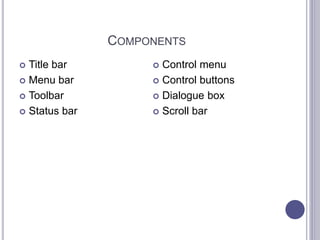
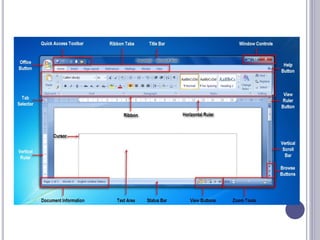
COMPONENTS
 Title bar
 Menu bar
 Toolbar
 Status bar
 Control menu
 Control buttons
 Dialogue box
 Scroll bar
STARTING MS WORD
 Click on start button
 Select all programs
 Select ms office program
 Click on ms word
10
WAYS OF CREATING DOCUMENT
 Blank document
 Template
 Wizard
11
CREATING A NEW DOCUMENT
 You can create documents using:
 Normal Template (default)
 Template wizard
 To create a new blank document simply:
 Click on icon on the toolbar, or
 Click on File, then click on New, then select Blank
document, or
 Press CTRL + N on the keyboard.
OPENING EXISTING DOCUMENTS
 Select File  Open (open dialog box displayed)
 then select file of document that is to be opened from
the drop-down list.
 If document is not on the list, you can navigate to the
document path to the desired folder or location;
 Double click on the document or click the Open button
to open the selected document.
 You can also open an existing document by
pressing CTRL + O
SAVING A DOCUMENT
 SAVE is the normal save feature which will ask you
the first time you save a file to assign a name to it.
 From that point on, choosing SAVE will simply
update the file to include the new information.
 On the other hand, SAVE AS saves an existing file
under a new name or as a different format to be
imported into another program.
SAVING A DOCUMENT
 Click on File on the menu bar, then click on Save. A
dialogue box will appear, give the document a
name, then click on save. (for Office 97 – 2003)
 Click on the SAVE icon (located on the tool bar)
 Press CTRL + S on the keyboard
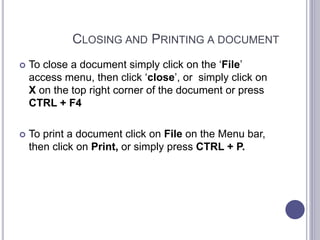
CLOSING AND PRINTING A DOCUMENT
 To close a document simply click on the ‘File’
access menu, then click ‘close’, or simply click on
X on the top right corner of the document or press
CTRL + F4
 To print a document click on File on the Menu bar,
then click on Print, or simply press CTRL + P.
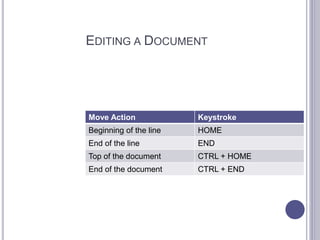
EDITING A DOCUMENT
Move Action Keystroke
Beginning of the line HOME
End of the line END
Top of the document CTRL + HOME
End of the document CTRL + END
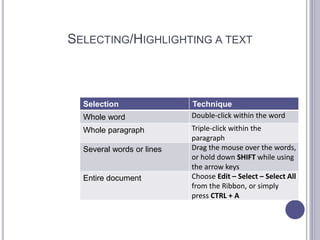
SELECTING/HIGHLIGHTING A TEXT
Selection Technique
Whole word Double-click within the word
Whole paragraph Triple-click within the
paragraph
Several words or lines Drag the mouse over the words,
or hold down SHIFT while using
the arrow keys
Entire document Choose Edit – Select – Select All
from the Ribbon, or simply
press CTRL + A
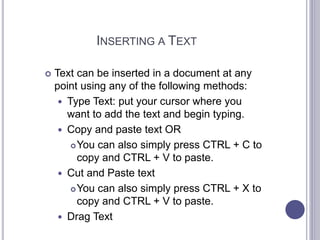
INSERTING A TEXT
 Text can be inserted in a document at any
point using any of the following methods:
 Type Text: put your cursor where you
want to add the text and begin typing.
 Copy and paste text OR
You can also simply press CTRL + C to
copy and CTRL + V to paste.
 Cut and Paste text
You can also simply press CTRL + X to
copy and CTRL + V to paste.
 Drag Text
DELETING TEXT
 Deleting blocks of text
 Use the BACKSPACE and DELETE keys
on the keyboard to delete text.
 BACKSPACE will erase the text to the left
of the cursor
 DELETE will erase text to the right of the
cursor.
 To delete a large selection of text, highlight
it using any of the highlight methods
outlined earlier and press the DELETE key.
SEARCH AND REPLACE
 To find a particular word or phrase in a document:
 Click on Edit on the menu bar, and then click on Find,
or simply press CTRL + F.
 To find and replace a word or phrase in a
document:
 click on Edit on the menu bar, and then click on
Replace, or simply press CTRL + H.
UNDO AND REDO CHANGES
 Undo Changes
 To undo changes, you should click Edit on the menu bar
then click on the Undo command, or you can simply
press CTRL + Z.
 Redo Action
 To redo changes, you should click Edit on the menu bar
then click on the Redo command, or you can simply
press CTRL + Y.
QUESTIONS???
THANK YOU FOR YOUR ATTENTION
24

Application Packages

  • 1.
    APPLICATION PACKAGES CSC 2304 LECTURE1 Department of Maths and Computer- Science Faculty of Natural and Applied Science BY UMAR DANJUMA MAIWADA
  • 2.
    OBJECTIVES  The conceptof word processing  How to start ms word  Identify the various sections of ms word user interface  Ways of creating document  Adding text to the document  Saving the document  Exiting ms word 2
  • 3.
    INTRODUCTION  Word processingis the use of computer to manipulate textual information.  The software used to accomplish this task is called word processor  A word processor allows for the entry, editing, manipulating, formatting and printing of textual information. Example ms word, word star, word perfect, lotus word pro. 3
  • 4.
    4 Advantages of wordprocessing 1. Document can be edited without entirely retyping a new document. 2. Ease of word, sentence or paragraph insertion anywhere in the document. 3. Word processors make it easy to move sections of text from one place to another within a document or between documents 4. The spellchecker helps you automatically fix spelling and grammatical errors. 5. Material created with word processor software look more polished and professional than hand written or typed materials do. 6. Allows for a final document to be sent to a printer to get a hard copy.
  • 5.
    FEATURES  Insert  Delete Copy and paste  Cut and paste  Page size and margins  Font specifications  Graphics  Headers and footers  Automatic page numbering  Table of contents  Word wrap
  • 6.
    MICROSOFT OFFICE SUIT word Excel Access Powerpoint Front page Outlook Binder 6
  • 7.
    MICROSOFT WORD  Knownas ms word  Microsoft Word is a word processor that is part of the Microsoft Office Suite. It is a powerful tool used in creating professional looking documents. 7
  • 8.
    MS WORD EMPOWERSYOU TO  Type edit insert format print  Check and correct spelling of words  Draw and format auto shapes  Insert pictures  Insert tables  Divide your document  Add header note  Word art 8
  • 9.
    COMPONENTS  Title bar Menu bar  Toolbar  Status bar  Control menu  Control buttons  Dialogue box  Scroll bar
  • 10.
    STARTING MS WORD Click on start button  Select all programs  Select ms office program  Click on ms word 10
  • 11.
    WAYS OF CREATINGDOCUMENT  Blank document  Template  Wizard 11
  • 13.
    CREATING A NEWDOCUMENT  You can create documents using:  Normal Template (default)  Template wizard  To create a new blank document simply:  Click on icon on the toolbar, or  Click on File, then click on New, then select Blank document, or  Press CTRL + N on the keyboard.
  • 14.
    OPENING EXISTING DOCUMENTS Select File  Open (open dialog box displayed)  then select file of document that is to be opened from the drop-down list.  If document is not on the list, you can navigate to the document path to the desired folder or location;  Double click on the document or click the Open button to open the selected document.  You can also open an existing document by pressing CTRL + O
  • 15.
    SAVING A DOCUMENT SAVE is the normal save feature which will ask you the first time you save a file to assign a name to it.  From that point on, choosing SAVE will simply update the file to include the new information.  On the other hand, SAVE AS saves an existing file under a new name or as a different format to be imported into another program.
  • 16.
    SAVING A DOCUMENT Click on File on the menu bar, then click on Save. A dialogue box will appear, give the document a name, then click on save. (for Office 97 – 2003)  Click on the SAVE icon (located on the tool bar)  Press CTRL + S on the keyboard
  • 17.
    CLOSING AND PRINTINGA DOCUMENT  To close a document simply click on the ‘File’ access menu, then click ‘close’, or simply click on X on the top right corner of the document or press CTRL + F4  To print a document click on File on the Menu bar, then click on Print, or simply press CTRL + P.
  • 18.
    EDITING A DOCUMENT MoveAction Keystroke Beginning of the line HOME End of the line END Top of the document CTRL + HOME End of the document CTRL + END
  • 19.
    SELECTING/HIGHLIGHTING A TEXT SelectionTechnique Whole word Double-click within the word Whole paragraph Triple-click within the paragraph Several words or lines Drag the mouse over the words, or hold down SHIFT while using the arrow keys Entire document Choose Edit – Select – Select All from the Ribbon, or simply press CTRL + A
  • 20.
    INSERTING A TEXT Text can be inserted in a document at any point using any of the following methods:  Type Text: put your cursor where you want to add the text and begin typing.  Copy and paste text OR You can also simply press CTRL + C to copy and CTRL + V to paste.  Cut and Paste text You can also simply press CTRL + X to copy and CTRL + V to paste.  Drag Text
  • 21.
    DELETING TEXT  Deletingblocks of text  Use the BACKSPACE and DELETE keys on the keyboard to delete text.  BACKSPACE will erase the text to the left of the cursor  DELETE will erase text to the right of the cursor.  To delete a large selection of text, highlight it using any of the highlight methods outlined earlier and press the DELETE key.
  • 22.
    SEARCH AND REPLACE To find a particular word or phrase in a document:  Click on Edit on the menu bar, and then click on Find, or simply press CTRL + F.  To find and replace a word or phrase in a document:  click on Edit on the menu bar, and then click on Replace, or simply press CTRL + H.
  • 23.
    UNDO AND REDOCHANGES  Undo Changes  To undo changes, you should click Edit on the menu bar then click on the Undo command, or you can simply press CTRL + Z.  Redo Action  To redo changes, you should click Edit on the menu bar then click on the Redo command, or you can simply press CTRL + Y.
  • 24.
    QUESTIONS??? THANK YOU FORYOUR ATTENTION 24

Editor's Notes

  • #6 Page margins are the blank space around the edges of the page. In general, you insert text and graphics in the printable area inside the margins. When you change a document's page margins, you change where text and graphics appear on each page.
  • #20 To change any attributes of text it must be highlighted first. Select the text by dragging the mouse over the desired text while keeping the left mouse button depressed, or hold down the SHIFT key on the keyboard while using the arrow buttons to highlight the highlight the text. The following table contains shortcuts for selecting a portion of the text