Command
Prompt
in Windows
 A command prompt is an entry point for
typing computer commands in the
Command Prompt window.
 By typing commands at the command
prompt, you can perform tasks on your
computer without using the Windows
graphical interface.
 The command line interpreter application
Command Prompt is officially called
Windows Command Processor but is also
sometimes called the command shell or by
its filename cmd.exe.
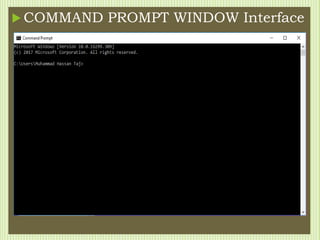
 COMMAND PROMPT WINDOW Interface
HOW TO LOCATE AND OPEN
COMMAND PROMPT
• Click on start icon
• Type “command prompt” or “cmd” without quotes
• Click on Command Prompt from the search result
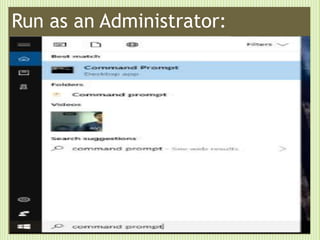
• To run Command Prompt as Administartor you
need to
• Right click on the application
• And click run as administrator,
Run as an Administrator:
Simple terms
”Arrow keys ” are used to get used command/previous on
current pointer
Put the ”Help” in any command front to show the help bar
about the command like “color help”
Put “Dir” to the command and get directory information of
current drive which you are using.
Hit “TAB” button to complete commands
Hit “F7” to open the command which we use during
working in current window
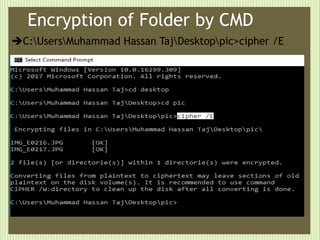
Encryption of Folder by CMD
C:UsersMuhammad Hassan TajDesktoppic>cipher /E
Open Command Prompt From
a Folder
All you have to do is hold shift while
right- clicking on a folder and the
option will appear in the context menu.
Simple Commands used in “CMD”
CD:
Change Directory - Select a Folder (and drive) Syntax
CD [/D] [drive:][path]
CD [..]
Key
/D : change the current DRIVE in addition to changing folder.
New folder in drive E through
Command Prompt
 Mkdir : This command is used to create a new
folder
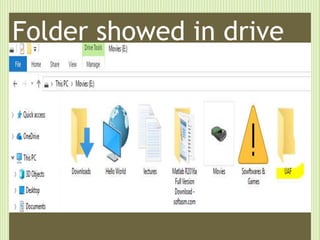
Folder showed in drive
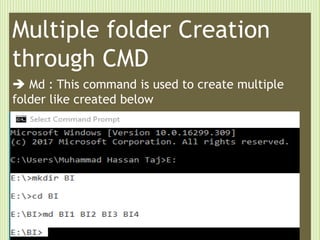
Multiple folder Creation
through CMD
 Md : This command is used to create multiple
folder like created below
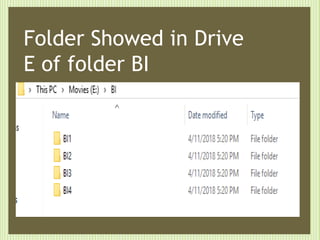
Folder Showed in Drive
E of folder BI
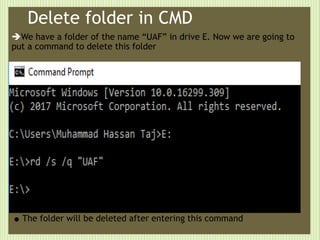
Delete folder in CMD
We have a folder of the name “UAF” in drive E. Now we are going to
put a command to delete this folder
.The folder will be deleted after entering this command
For checking folder deleted or not
.We put command to check the current drive directory information
.Check the directory , the folder UAF deleted successfully
Rename the Folder through CMD
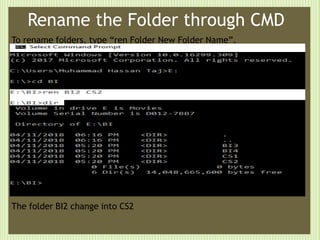
To rename folders, type “ren Folder New Folder Name”.
The folder BI2 change into CS2
Send a Command’s Output to
The Clipboard
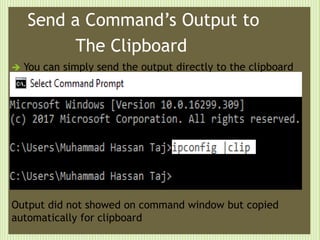
 You can simply send the output directly to the clipboard
Output did not showed on command window but copied
automatically for clipboard
Turn on Wireless Local Area
Network trough CMD
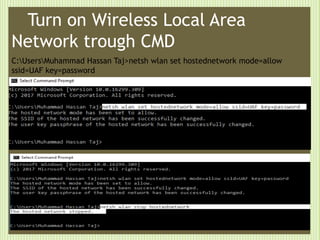
C:UsersMuhammad Hassan Taj>netsh wlan set hostednetwork mode=allow
ssid=UAF key=password
List Installed Programs on System
by CMD
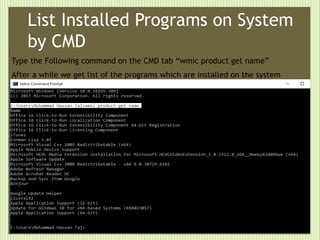
Type the Following command on the CMD tab “wmic product get name”
After a while we get list of the programs which are installed on the system
Uninstall the Program through CMD
Uninstallation of a program from the list will done by the command showed below
screenshot.
Let’s do
something
interesting
on CMD
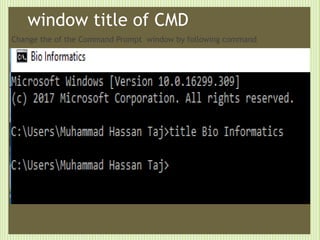
window title of CMD
Change the of the Command Prompt window by following command
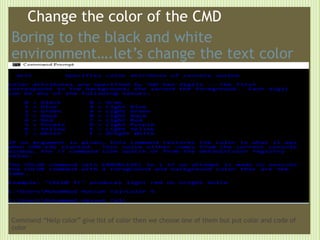
Change the color of the CMD
Boring to the black and white
environment….let’s change the text color
Command “Help color” give list of color then we choose one of them but put color and code of
color
ASCII Star Wars on Telnet in
Windows through CMD
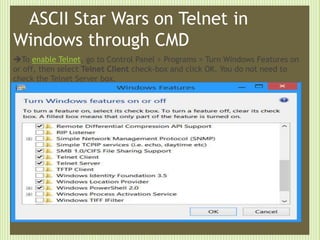
To enable Telnet, go to Control Panel > Programs > Turn Windows Features on
or off, then select Telnet Client check-box and click OK. You do not need to
check the Telnet Server box.
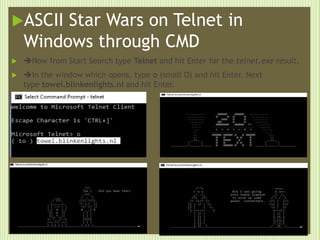
ASCII Star Wars on Telnet in
Windows through CMD
 Now from Start Search type Telnet and hit Enter for the telnet.exe result.
 In the window which opens, type o (small O) and hit Enter. Next
type towel.blinkenlights.nl and hit Enter.

s
Folders Hide completely By CMD
If we want to hide folder completely even “show folder ” by the window , then
we use CMD commands to hide or unhide.
Now use the command “DIR ” to check
The directory info of hide folder which
Showed in below screenshot.
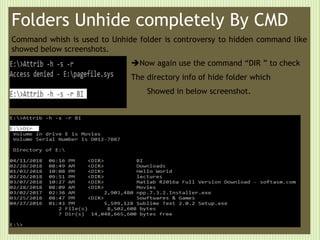
Folders Unhide completely By CMD
Command whish is used to Unhide folder is controversy to hidden command like
showed below screenshots.
Now again use the command “DIR ” to check
The directory info of hide folder which
Showed in below screenshot.
Command prompt presentation

Command prompt presentation

  • 1.
  • 2.
     A commandprompt is an entry point for typing computer commands in the Command Prompt window.  By typing commands at the command prompt, you can perform tasks on your computer without using the Windows graphical interface.  The command line interpreter application Command Prompt is officially called Windows Command Processor but is also sometimes called the command shell or by its filename cmd.exe.
  • 3.
     COMMAND PROMPTWINDOW Interface
  • 4.
    HOW TO LOCATEAND OPEN COMMAND PROMPT • Click on start icon • Type “command prompt” or “cmd” without quotes • Click on Command Prompt from the search result • To run Command Prompt as Administartor you need to • Right click on the application • And click run as administrator,
  • 5.
    Run as anAdministrator:
  • 6.
    Simple terms ”Arrow keys” are used to get used command/previous on current pointer Put the ”Help” in any command front to show the help bar about the command like “color help” Put “Dir” to the command and get directory information of current drive which you are using. Hit “TAB” button to complete commands Hit “F7” to open the command which we use during working in current window
  • 7.
    Encryption of Folderby CMD C:UsersMuhammad Hassan TajDesktoppic>cipher /E
  • 8.
    Open Command PromptFrom a Folder All you have to do is hold shift while right- clicking on a folder and the option will appear in the context menu.
  • 9.
    Simple Commands usedin “CMD” CD: Change Directory - Select a Folder (and drive) Syntax CD [/D] [drive:][path] CD [..] Key /D : change the current DRIVE in addition to changing folder.
  • 10.
    New folder indrive E through Command Prompt  Mkdir : This command is used to create a new folder
  • 11.
  • 12.
    Multiple folder Creation throughCMD  Md : This command is used to create multiple folder like created below
  • 13.
    Folder Showed inDrive E of folder BI
  • 14.
    Delete folder inCMD We have a folder of the name “UAF” in drive E. Now we are going to put a command to delete this folder .The folder will be deleted after entering this command
  • 15.
    For checking folderdeleted or not .We put command to check the current drive directory information .Check the directory , the folder UAF deleted successfully
  • 16.
    Rename the Folderthrough CMD To rename folders, type “ren Folder New Folder Name”. The folder BI2 change into CS2
  • 17.
    Send a Command’sOutput to The Clipboard  You can simply send the output directly to the clipboard Output did not showed on command window but copied automatically for clipboard
  • 18.
    Turn on WirelessLocal Area Network trough CMD C:UsersMuhammad Hassan Taj>netsh wlan set hostednetwork mode=allow ssid=UAF key=password
  • 19.
    List Installed Programson System by CMD Type the Following command on the CMD tab “wmic product get name” After a while we get list of the programs which are installed on the system
  • 20.
    Uninstall the Programthrough CMD Uninstallation of a program from the list will done by the command showed below screenshot.
  • 21.
  • 22.
    window title ofCMD Change the of the Command Prompt window by following command
  • 23.
    Change the colorof the CMD Boring to the black and white environment….let’s change the text color Command “Help color” give list of color then we choose one of them but put color and code of color
  • 24.
    ASCII Star Warson Telnet in Windows through CMD To enable Telnet, go to Control Panel > Programs > Turn Windows Features on or off, then select Telnet Client check-box and click OK. You do not need to check the Telnet Server box.
  • 25.
    ASCII Star Warson Telnet in Windows through CMD  Now from Start Search type Telnet and hit Enter for the telnet.exe result.  In the window which opens, type o (small O) and hit Enter. Next type towel.blinkenlights.nl and hit Enter.  s
  • 26.
    Folders Hide completelyBy CMD If we want to hide folder completely even “show folder ” by the window , then we use CMD commands to hide or unhide. Now use the command “DIR ” to check The directory info of hide folder which Showed in below screenshot.
  • 27.
    Folders Unhide completelyBy CMD Command whish is used to Unhide folder is controversy to hidden command like showed below screenshots. Now again use the command “DIR ” to check The directory info of hide folder which Showed in below screenshot.