TCP/IP Protocol Suite 1
Chapter 20Chapter 20
Upon completion you will be able to:
Electronic Mail:Electronic Mail:
SMTP, POP, and IMAPSMTP, POP, and IMAP
• Understand four configurations of email architecture
• Understand the functions and formats of a user agent
• Understand MIME and its capabilities and data types
• Understand the functions and commands of an MTA
• Understand the function of POP3 and IMAP4
Objectives
TCP/IP Protocol Suite 2
20.1 ARCHITECTURE
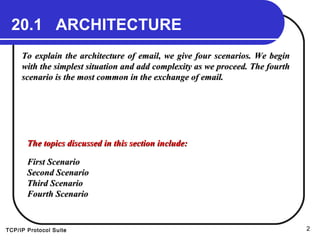
To explain the architecture of email, we give four scenarios. We beginTo explain the architecture of email, we give four scenarios. We begin
with the simplest situation and add complexity as we proceed. The fourthwith the simplest situation and add complexity as we proceed. The fourth
scenario is the most common in the exchange of email.scenario is the most common in the exchange of email.
The topics discussed in this section include:The topics discussed in this section include:
First ScenarioFirst Scenario
Second ScenarioSecond Scenario
Third ScenarioThird Scenario
Fourth ScenarioFourth Scenario
TCP/IP Protocol Suite 3
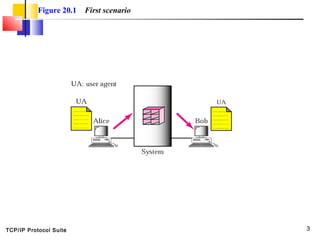
Figure 20.1 First scenario
TCP/IP Protocol Suite 4
When the sender and the receiver of
an email are on the same system, we
need only two user agents.
Note:Note:
TCP/IP Protocol Suite 5
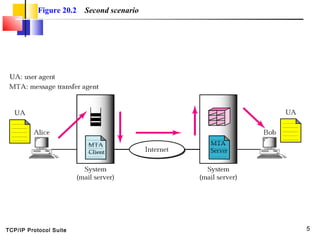
Figure 20.2 Second scenario
TCP/IP Protocol Suite 6
When the sender and the receiver of
an email are on different systems, we
need two UAs and a pair of MTAs
(client and server).
Note:Note:
TCP/IP Protocol Suite 7
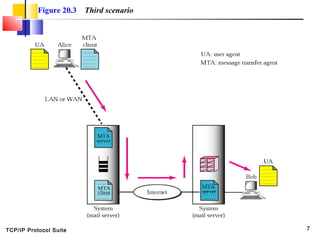
Figure 20.3 Third scenario
TCP/IP Protocol Suite 8
When the sender is connected to the
mail server via a LAN or a WAN, we
need two UAs and two pairs of MTAs
(client and server).
Note:Note:
TCP/IP Protocol Suite 9
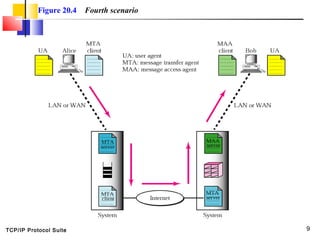
Figure 20.4 Fourth scenario
TCP/IP Protocol Suite 10
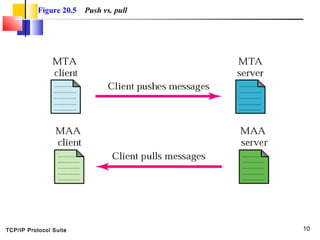
Figure 20.5 Push vs. pull
TCP/IP Protocol Suite 11
When both sender and receiver are
connected to the mail server via a LAN
or a WAN, we need two UAs, two pairs
of MTAs (client and server), and a
pair of MAAs (client and server). This
is the most common situation today.
Note:Note:
TCP/IP Protocol Suite 12
20.2 USER AGENT
The user agent (UA) provides service to the user to make the process ofThe user agent (UA) provides service to the user to make the process of
sending and receiving a message easier.sending and receiving a message easier.
The topics discussed in this section include:The topics discussed in this section include:
Services Provided by a User AgentServices Provided by a User Agent
User Agent TypesUser Agent Types
Sending MailSending Mail
Receiving MailReceiving Mail
AddressesAddresses
Mailing ListMailing List
MIMEMIME
TCP/IP Protocol Suite 13
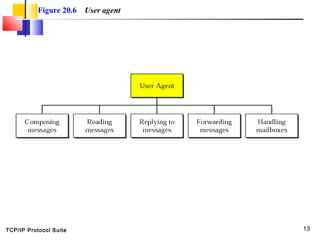
Figure 20.6 User agent
TCP/IP Protocol Suite 14
Some examples of GUI-based user
agents are Eudora, Outlook, and
Netscape.
Note:Note:
TCP/IP Protocol Suite 15
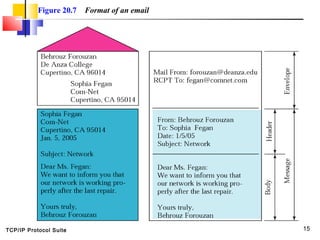
Figure 20.7 Format of an email
TCP/IP Protocol Suite 16
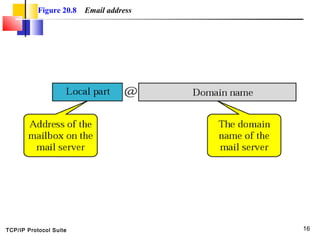
Figure 20.8 Email address
TCP/IP Protocol Suite 17
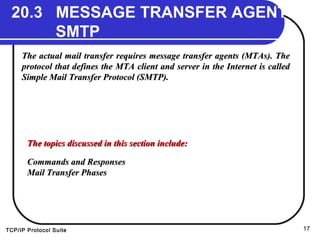
20.3 MESSAGE TRANSFER AGENT:
SMTP
The actual mail transfer requires message transfer agents (MTAs). TheThe actual mail transfer requires message transfer agents (MTAs). The
protocol that defines the MTA client and server in the Internet is calledprotocol that defines the MTA client and server in the Internet is called
Simple Mail Transfer Protocol (SMTP).Simple Mail Transfer Protocol (SMTP).
The topics discussed in this section include:The topics discussed in this section include:
Commands and ResponsesCommands and Responses
Mail Transfer PhasesMail Transfer Phases
TCP/IP Protocol Suite 18
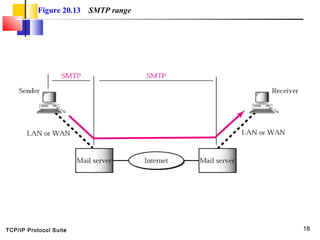
Figure 20.13 SMTP range
TCP/IP Protocol Suite 19
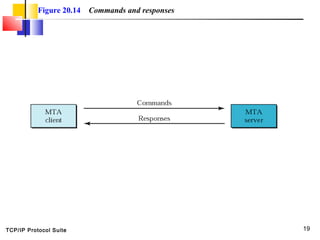
Figure 20.14 Commands and responses
TCP/IP Protocol Suite 20
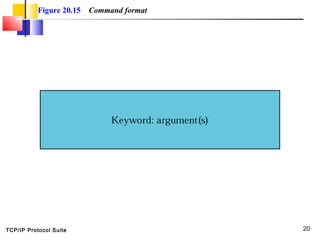
Figure 20.15 Command format
TCP/IP Protocol Suite 21
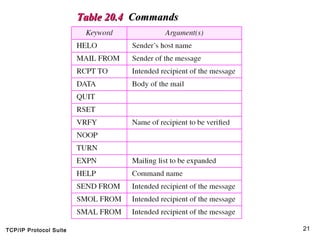
Table 20.4Table 20.4 CommandsCommands
TCP/IP Protocol Suite 22
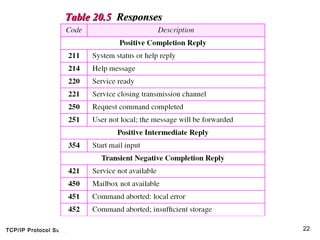
Table 20.5Table 20.5 ResponsesResponses
TCP/IP Protocol Suite 23
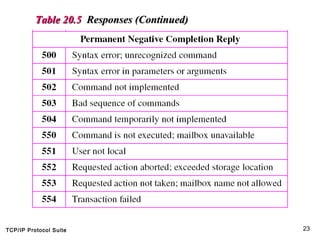
Table 20.5Table 20.5 Responses (Continued)Responses (Continued)
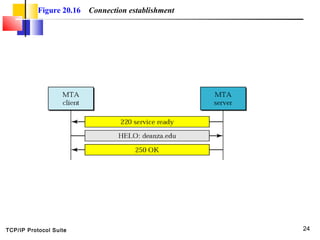
TCP/IP Protocol Suite 24
Figure 20.16 Connection establishment
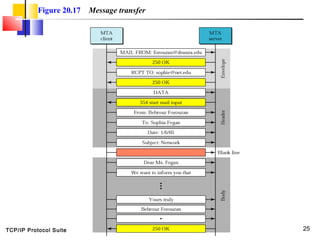
TCP/IP Protocol Suite 25
Figure 20.17 Message transfer
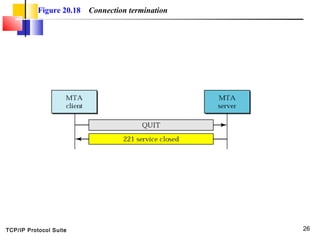
TCP/IP Protocol Suite 26
Figure 20.18 Connection termination
TCP/IP Protocol Suite 27
20.4 MESSAGE ACCESS AGENT:
POP AND IMAP
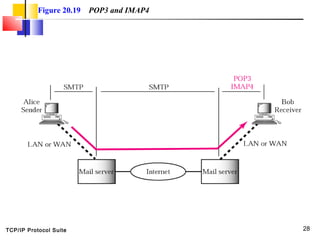
The third stage of mail delivery uses a message access agent; the clientThe third stage of mail delivery uses a message access agent; the client
must pull messages from the server. Currently two message accessmust pull messages from the server. Currently two message access
protocols are available: Post Office Protocol, version 3 (POP3) andprotocols are available: Post Office Protocol, version 3 (POP3) and
Internet Mail Access Protocol, version 4.Internet Mail Access Protocol, version 4.
The topics discussed in this section include:The topics discussed in this section include:
POP3POP3
IMAP4IMAP4
TCP/IP Protocol Suite 28
Figure 20.19 POP3 and IMAP4
TCP/IP Protocol Suite 29
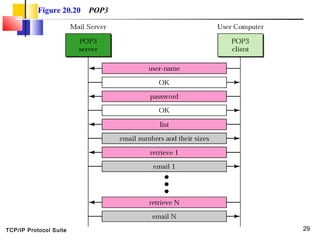
Figure 20.20 POP3
TCP/IP Protocol Suite 30
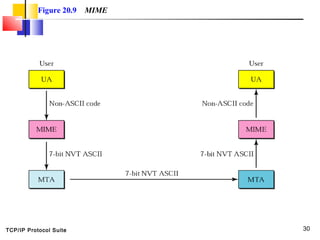
Figure 20.9 MIME
TCP/IP Protocol Suite 31
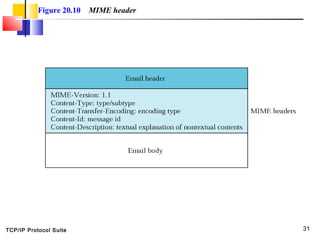
Figure 20.10 MIME header
TCP/IP Protocol Suite 32
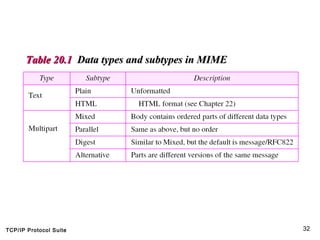
Table 20.1Table 20.1 Data types and subtypes in MIMEData types and subtypes in MIME
TCP/IP Protocol Suite 33
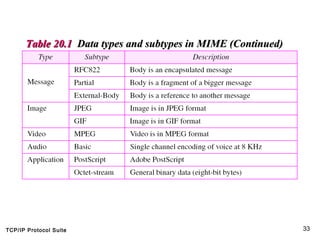
Table 20.1Table 20.1 Data types and subtypes in MIME (Continued)Data types and subtypes in MIME (Continued)
TCP/IP Protocol Suite 34
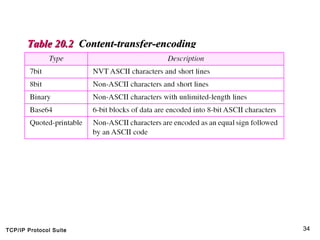
Table 20.2Table 20.2 Content-transfer-encodingContent-transfer-encoding
TCP/IP Protocol Suite 35
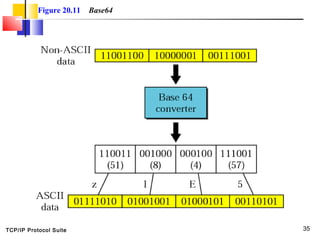
Figure 20.11 Base64
TCP/IP Protocol Suite 36
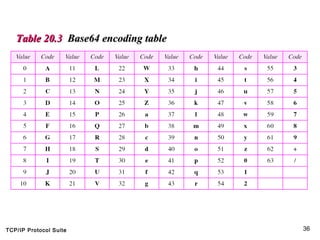
Table 20.3Table 20.3 Base64 encoding tableBase64 encoding table
TCP/IP Protocol Suite 37
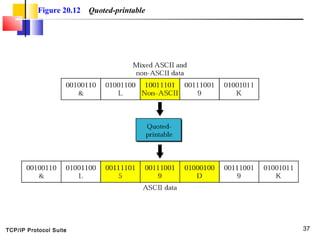
Figure 20.12 Quoted-printable
TCP/IP Protocol Suite 38
20.5 WEB-BASED MAIL
Some websites such as Hotmail and Yahoo provide email service toSome websites such as Hotmail and Yahoo provide email service to
anyone who accesses the site. Mail transfer and retrieval requires the useanyone who accesses the site. Mail transfer and retrieval requires the use
of HTTP.of HTTP.

Electronic mail chap-20

  • 1.
    TCP/IP Protocol Suite1 Chapter 20Chapter 20 Upon completion you will be able to: Electronic Mail:Electronic Mail: SMTP, POP, and IMAPSMTP, POP, and IMAP • Understand four configurations of email architecture • Understand the functions and formats of a user agent • Understand MIME and its capabilities and data types • Understand the functions and commands of an MTA • Understand the function of POP3 and IMAP4 Objectives
  • 2.
    TCP/IP Protocol Suite2 20.1 ARCHITECTURE To explain the architecture of email, we give four scenarios. We beginTo explain the architecture of email, we give four scenarios. We begin with the simplest situation and add complexity as we proceed. The fourthwith the simplest situation and add complexity as we proceed. The fourth scenario is the most common in the exchange of email.scenario is the most common in the exchange of email. The topics discussed in this section include:The topics discussed in this section include: First ScenarioFirst Scenario Second ScenarioSecond Scenario Third ScenarioThird Scenario Fourth ScenarioFourth Scenario
  • 3.
    TCP/IP Protocol Suite3 Figure 20.1 First scenario
  • 4.
    TCP/IP Protocol Suite4 When the sender and the receiver of an email are on the same system, we need only two user agents. Note:Note:
  • 5.
    TCP/IP Protocol Suite5 Figure 20.2 Second scenario
  • 6.
    TCP/IP Protocol Suite6 When the sender and the receiver of an email are on different systems, we need two UAs and a pair of MTAs (client and server). Note:Note:
  • 7.
    TCP/IP Protocol Suite7 Figure 20.3 Third scenario
  • 8.
    TCP/IP Protocol Suite8 When the sender is connected to the mail server via a LAN or a WAN, we need two UAs and two pairs of MTAs (client and server). Note:Note:
  • 9.
    TCP/IP Protocol Suite9 Figure 20.4 Fourth scenario
  • 10.
    TCP/IP Protocol Suite10 Figure 20.5 Push vs. pull
  • 11.
    TCP/IP Protocol Suite11 When both sender and receiver are connected to the mail server via a LAN or a WAN, we need two UAs, two pairs of MTAs (client and server), and a pair of MAAs (client and server). This is the most common situation today. Note:Note:
  • 12.
    TCP/IP Protocol Suite12 20.2 USER AGENT The user agent (UA) provides service to the user to make the process ofThe user agent (UA) provides service to the user to make the process of sending and receiving a message easier.sending and receiving a message easier. The topics discussed in this section include:The topics discussed in this section include: Services Provided by a User AgentServices Provided by a User Agent User Agent TypesUser Agent Types Sending MailSending Mail Receiving MailReceiving Mail AddressesAddresses Mailing ListMailing List MIMEMIME
  • 13.
    TCP/IP Protocol Suite13 Figure 20.6 User agent
  • 14.
    TCP/IP Protocol Suite14 Some examples of GUI-based user agents are Eudora, Outlook, and Netscape. Note:Note:
  • 15.
    TCP/IP Protocol Suite15 Figure 20.7 Format of an email
  • 16.
    TCP/IP Protocol Suite16 Figure 20.8 Email address
  • 17.
    TCP/IP Protocol Suite17 20.3 MESSAGE TRANSFER AGENT: SMTP The actual mail transfer requires message transfer agents (MTAs). TheThe actual mail transfer requires message transfer agents (MTAs). The protocol that defines the MTA client and server in the Internet is calledprotocol that defines the MTA client and server in the Internet is called Simple Mail Transfer Protocol (SMTP).Simple Mail Transfer Protocol (SMTP). The topics discussed in this section include:The topics discussed in this section include: Commands and ResponsesCommands and Responses Mail Transfer PhasesMail Transfer Phases
  • 18.
    TCP/IP Protocol Suite18 Figure 20.13 SMTP range
  • 19.
    TCP/IP Protocol Suite19 Figure 20.14 Commands and responses
  • 20.
    TCP/IP Protocol Suite20 Figure 20.15 Command format
  • 21.
    TCP/IP Protocol Suite21 Table 20.4Table 20.4 CommandsCommands
  • 22.
    TCP/IP Protocol Suite22 Table 20.5Table 20.5 ResponsesResponses
  • 23.
    TCP/IP Protocol Suite23 Table 20.5Table 20.5 Responses (Continued)Responses (Continued)
  • 24.
    TCP/IP Protocol Suite24 Figure 20.16 Connection establishment
  • 25.
    TCP/IP Protocol Suite25 Figure 20.17 Message transfer
  • 26.
    TCP/IP Protocol Suite26 Figure 20.18 Connection termination
  • 27.
    TCP/IP Protocol Suite27 20.4 MESSAGE ACCESS AGENT: POP AND IMAP The third stage of mail delivery uses a message access agent; the clientThe third stage of mail delivery uses a message access agent; the client must pull messages from the server. Currently two message accessmust pull messages from the server. Currently two message access protocols are available: Post Office Protocol, version 3 (POP3) andprotocols are available: Post Office Protocol, version 3 (POP3) and Internet Mail Access Protocol, version 4.Internet Mail Access Protocol, version 4. The topics discussed in this section include:The topics discussed in this section include: POP3POP3 IMAP4IMAP4
  • 28.
    TCP/IP Protocol Suite28 Figure 20.19 POP3 and IMAP4
  • 29.
    TCP/IP Protocol Suite29 Figure 20.20 POP3
  • 30.
    TCP/IP Protocol Suite30 Figure 20.9 MIME
  • 31.
    TCP/IP Protocol Suite31 Figure 20.10 MIME header
  • 32.
    TCP/IP Protocol Suite32 Table 20.1Table 20.1 Data types and subtypes in MIMEData types and subtypes in MIME
  • 33.
    TCP/IP Protocol Suite33 Table 20.1Table 20.1 Data types and subtypes in MIME (Continued)Data types and subtypes in MIME (Continued)
  • 34.
    TCP/IP Protocol Suite34 Table 20.2Table 20.2 Content-transfer-encodingContent-transfer-encoding
  • 35.
    TCP/IP Protocol Suite35 Figure 20.11 Base64
  • 36.
    TCP/IP Protocol Suite36 Table 20.3Table 20.3 Base64 encoding tableBase64 encoding table
  • 37.
    TCP/IP Protocol Suite37 Figure 20.12 Quoted-printable
  • 38.
    TCP/IP Protocol Suite38 20.5 WEB-BASED MAIL Some websites such as Hotmail and Yahoo provide email service toSome websites such as Hotmail and Yahoo provide email service to anyone who accesses the site. Mail transfer and retrieval requires the useanyone who accesses the site. Mail transfer and retrieval requires the use of HTTP.of HTTP.