Enterprise Search platform
Building solid scalable enterprise search REST services on top of Apache Lucene


                                 Tommaso Teofili
Agenda

• Apache Lucene overview


• Why do we need Apache Solr?


• Everyman tales from Solr


• Enterprise what?


• One step beyond...
Apache Lucene overview

• Information Retrieval library


• Inverted indexes are quick and efficient


• Vector space model


• Advanced search options (synonims, stopwords, similarity, nearness)


• Different language implementations (Java, .NET, C, Python)
The Lucene API

• Lucene indexes are built on a Directory


• Directory can be accessed by IndexReaders and IndexWriters


• IndexSearchers are built on top of Directories and IndexReaders


• IndexWriters can write Documents inside the index


• Documents are made of Fields


• Fields have value(s) and options


• Directory > IndexReader/Writer > Document > Field
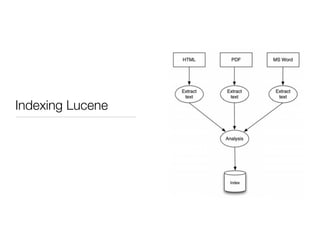
Indexing Lucene
Indexing Lucene

• A Lucene index has one or more segments and a generation


• Changes to the index must be committed (and optimized)


• No fixed schema


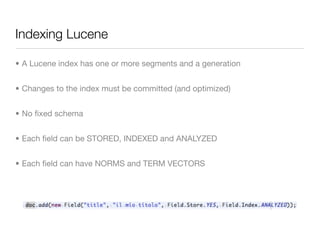
• Each field can be STORED, INDEXED and ANALYZED


• Each field can have NORMS and TERM VECTORS
Searching Lucene

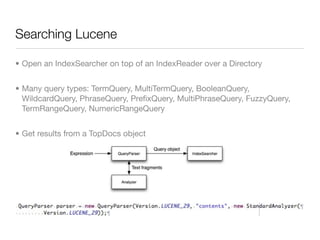
• Open an IndexSearcher on top of an IndexReader over a Directory


• Many query types: TermQuery, MultiTermQuery, BooleanQuery,
  WildcardQuery, PhraseQuery, PrefixQuery, MultiPhraseQuery, FuzzyQuery,
  TermRangeQuery, NumericRangeQuery


• Get results from a TopDocs object
Why do we need Apache Solr?

• Lucene is a library

• Lucene by itself can only be queried programmatically

• Often the search system has to be totally independent from other
  systems (i.e.: CMS)

• A ready to deploy search server is what you need

• Need to scale both vertically and horizontally
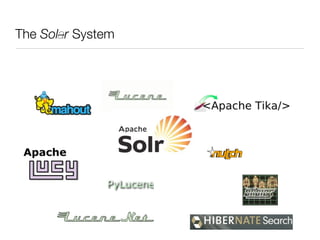
The Solar System
Everyman tales with Solr
Apache Solr - Overview

• Ready to use enterprise search server


• REST (and programmatic) API


• Results in XML, JSON, PHP, Ruby, etc...


• Exploit Lucene power


• Scaling capabilities (replication, distributed search)


• Easy administration interface


• Easy to extend and customize (plugin architecture)
Apache Solr - Project status

• Latest release 1.4.1 on June 2010


• Lots of new features on trunk


• Most of new features on branch 3.0


• A huge very active community


• Lucid Imagination powered project
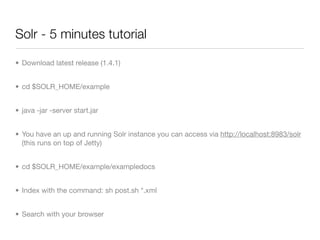
Solr - 5 minutes tutorial

• Download latest release (1.4.1)


• cd $SOLR_HOME/example


• java -jar -server start.jar


• You have an up and running Solr instance you can access via http://localhost:8983/solr
  (this runs on top of Jetty)


• cd $SOLR_HOME/example/exampledocs


• Index with the command: sh post.sh *.xml


• Search with your browser
Solr - Query syntax

• Default operator is OR (you can override adding &q.op=AND to the HTTP req)


• You can query fields with fieldname:value


• Common + - AND OR NOT modifiers


• Range queries on date or numeric fields timestamp:[* TO NOW]


• Boost terms, i.e.: roma^2 inter


• Fuzzy search roam~0.6


• ...
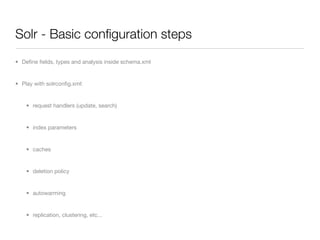
Solr - Basic configuration steps
• Define fields, types and analysis inside schema.xml


• Play with solrconfig.xml:


    • request handlers (update, search)


    • index parameters


    • caches


    • deletion policy


    • autowarming


    • replication, clustering, etc...
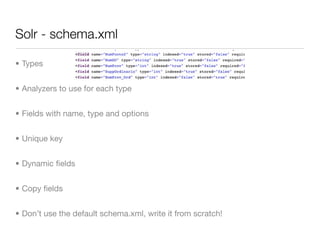
Solr - schema.xml

• Types


• Analyzers to use for each type


• Fields with name, type and options


• Unique key


• Dynamic fields


• Copy fields


• Don’t use the default schema.xml, write it from scratch!
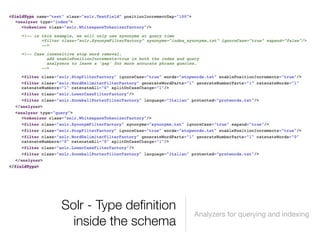
Solr - Type definition
                        Analyzers for querying and indexing
  inside the schema
Solr - solrconfig.xml

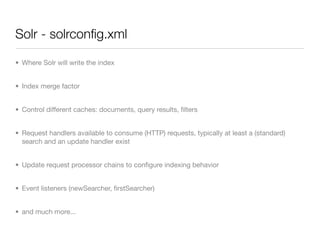
• Where Solr will write the index


• Index merge factor


• Control different caches: documents, query results, filters


• Request handlers available to consume (HTTP) requests, typically at least a (standard)
  search and an update handler exist


• Update request processor chains to configure indexing behavior


• Event listeners (newSearcher, firstSearcher)


• and much more...
Solr - Indexing

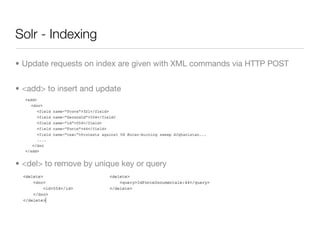
• Update requests on index are given with XML commands via HTTP POST


• <add> to insert and update


• <del> to remove by unique key or query
Solr - Searching

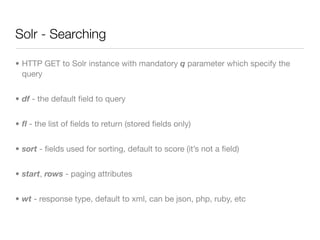
• HTTP GET to Solr instance with mandatory q parameter which specify the
  query


• df - the default field to query


• fl - the list of fields to return (stored fields only)


• sort - fields used for sorting, default to score (it’s not a field)


• start, rows - paging attributes


• wt - response type, default to xml, can be json, php, ruby, etc
Solr - Data import

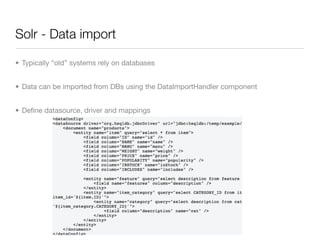
• Typically “old” systems rely on databases


• Data can be imported from DBs using the DataImportHandler component


• Define datasource, driver and mappings
Solr - Highlighting

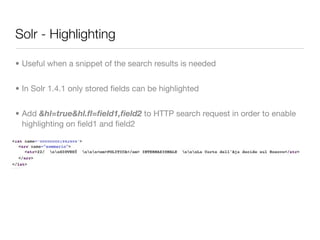
• Useful when a snippet of the search results is needed


• In Solr 1.4.1 only stored fields can be highlighted


• Add &hl=true&hl.fl=field1,field2 to HTTP search request in order to enable
  highlighting on field1 and field2
Solr - Faceting

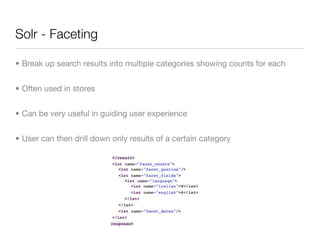
• Break up search results into multiple categories showing counts for each


• Often used in stores


• Can be very useful in guiding user experience


• User can then drill down only results of a certain category
Solr - Filter queries

• Queries used as filters against the actual query


• Define document superset without influencing score


• Useful for domain specific queries where you want the user to search only in
  certain “areas” of the index


• Add &fq=somefilterquery with the default Solr syntax
Solr - Enterprise
what?
Multicore
Replication
Distributed search
...
Solr - Multi core

• Define multiple Solr cores inside one only Solr instance


• Each cores maintain its own index


• Unified administration interface


• Runtime commands to create, swap, load, unload, delete cores
Solr - Replication

• It’s useful in case of high traffic to replicate a Solr instance and split (with
  eventually some load balancer in front) the queries


• Master has the original index


• Slave polls master asking the last version of index


• If slave has a lower version of the index asks the master for the difference
  (rsync like)


• In the meanwhile indexes remain available
Solr - Distributed search

• When an index is too large, in terms of space or memory required, it can be
  useful to define two or more shards


• A shard is a Solr instance and can be searched or indexed independently


• At the same time it’s possible to query all the shards having the result be
  merged from the sub-results of each shard


• http://localhost:8983/solr/select?shards=localhost:8983/solr,localhost:7574/
  solr&indent=true&q=category:information


• Note that the document distribution among indexes is up to the user (or who
  feeds the indexes)
One step beyond...

• Solr in the cloud


• Spatial search


• Solr & UIMA :-)
References

• http://lucene.apache.org/solr/


• http://lucene.apache.org/solr/tutorial.html


• http://wiki.apache.org/solr/FrontPage

Apache Solr - Enterprise search platform

  • 1.
    Enterprise Search platform Buildingsolid scalable enterprise search REST services on top of Apache Lucene Tommaso Teofili
  • 2.
    Agenda • Apache Luceneoverview • Why do we need Apache Solr? • Everyman tales from Solr • Enterprise what? • One step beyond...
  • 3.
    Apache Lucene overview •Information Retrieval library • Inverted indexes are quick and efficient • Vector space model • Advanced search options (synonims, stopwords, similarity, nearness) • Different language implementations (Java, .NET, C, Python)
  • 4.
    The Lucene API •Lucene indexes are built on a Directory • Directory can be accessed by IndexReaders and IndexWriters • IndexSearchers are built on top of Directories and IndexReaders • IndexWriters can write Documents inside the index • Documents are made of Fields • Fields have value(s) and options • Directory > IndexReader/Writer > Document > Field
  • 5.
  • 6.
    Indexing Lucene • ALucene index has one or more segments and a generation • Changes to the index must be committed (and optimized) • No fixed schema • Each field can be STORED, INDEXED and ANALYZED • Each field can have NORMS and TERM VECTORS
  • 7.
    Searching Lucene • Openan IndexSearcher on top of an IndexReader over a Directory • Many query types: TermQuery, MultiTermQuery, BooleanQuery, WildcardQuery, PhraseQuery, PrefixQuery, MultiPhraseQuery, FuzzyQuery, TermRangeQuery, NumericRangeQuery • Get results from a TopDocs object
  • 8.
    Why do weneed Apache Solr? • Lucene is a library • Lucene by itself can only be queried programmatically • Often the search system has to be totally independent from other systems (i.e.: CMS) • A ready to deploy search server is what you need • Need to scale both vertically and horizontally
  • 9.
  • 10.
  • 11.
    Apache Solr -Overview • Ready to use enterprise search server • REST (and programmatic) API • Results in XML, JSON, PHP, Ruby, etc... • Exploit Lucene power • Scaling capabilities (replication, distributed search) • Easy administration interface • Easy to extend and customize (plugin architecture)
  • 12.
    Apache Solr -Project status • Latest release 1.4.1 on June 2010 • Lots of new features on trunk • Most of new features on branch 3.0 • A huge very active community • Lucid Imagination powered project
  • 13.
    Solr - 5minutes tutorial • Download latest release (1.4.1) • cd $SOLR_HOME/example • java -jar -server start.jar • You have an up and running Solr instance you can access via http://localhost:8983/solr (this runs on top of Jetty) • cd $SOLR_HOME/example/exampledocs • Index with the command: sh post.sh *.xml • Search with your browser
  • 14.
    Solr - Querysyntax • Default operator is OR (you can override adding &q.op=AND to the HTTP req) • You can query fields with fieldname:value • Common + - AND OR NOT modifiers • Range queries on date or numeric fields timestamp:[* TO NOW] • Boost terms, i.e.: roma^2 inter • Fuzzy search roam~0.6 • ...
  • 15.
    Solr - Basicconfiguration steps • Define fields, types and analysis inside schema.xml • Play with solrconfig.xml: • request handlers (update, search) • index parameters • caches • deletion policy • autowarming • replication, clustering, etc...
  • 16.
    Solr - schema.xml •Types • Analyzers to use for each type • Fields with name, type and options • Unique key • Dynamic fields • Copy fields • Don’t use the default schema.xml, write it from scratch!
  • 17.
    Solr - Typedefinition Analyzers for querying and indexing inside the schema
  • 18.
    Solr - solrconfig.xml •Where Solr will write the index • Index merge factor • Control different caches: documents, query results, filters • Request handlers available to consume (HTTP) requests, typically at least a (standard) search and an update handler exist • Update request processor chains to configure indexing behavior • Event listeners (newSearcher, firstSearcher) • and much more...
  • 19.
    Solr - Indexing •Update requests on index are given with XML commands via HTTP POST • <add> to insert and update • <del> to remove by unique key or query
  • 20.
    Solr - Searching •HTTP GET to Solr instance with mandatory q parameter which specify the query • df - the default field to query • fl - the list of fields to return (stored fields only) • sort - fields used for sorting, default to score (it’s not a field) • start, rows - paging attributes • wt - response type, default to xml, can be json, php, ruby, etc
  • 21.
    Solr - Dataimport • Typically “old” systems rely on databases • Data can be imported from DBs using the DataImportHandler component • Define datasource, driver and mappings
  • 22.
    Solr - Highlighting •Useful when a snippet of the search results is needed • In Solr 1.4.1 only stored fields can be highlighted • Add &hl=true&hl.fl=field1,field2 to HTTP search request in order to enable highlighting on field1 and field2
  • 23.
    Solr - Faceting •Break up search results into multiple categories showing counts for each • Often used in stores • Can be very useful in guiding user experience • User can then drill down only results of a certain category
  • 24.
    Solr - Filterqueries • Queries used as filters against the actual query • Define document superset without influencing score • Useful for domain specific queries where you want the user to search only in certain “areas” of the index • Add &fq=somefilterquery with the default Solr syntax
  • 25.
  • 26.
    Solr - Multicore • Define multiple Solr cores inside one only Solr instance • Each cores maintain its own index • Unified administration interface • Runtime commands to create, swap, load, unload, delete cores
  • 27.
    Solr - Replication •It’s useful in case of high traffic to replicate a Solr instance and split (with eventually some load balancer in front) the queries • Master has the original index • Slave polls master asking the last version of index • If slave has a lower version of the index asks the master for the difference (rsync like) • In the meanwhile indexes remain available
  • 28.
    Solr - Distributedsearch • When an index is too large, in terms of space or memory required, it can be useful to define two or more shards • A shard is a Solr instance and can be searched or indexed independently • At the same time it’s possible to query all the shards having the result be merged from the sub-results of each shard • http://localhost:8983/solr/select?shards=localhost:8983/solr,localhost:7574/ solr&indent=true&q=category:information • Note that the document distribution among indexes is up to the user (or who feeds the indexes)
  • 29.
    One step beyond... •Solr in the cloud • Spatial search • Solr & UIMA :-)
  • 30.