Searching in the Cloud
Arkadiusz Masiakiewicz
Michał Warecki
About us
Arkadiusz Masiakiewicz
●
NoSQL Databases
●
Full-text search
engines
●
Neural networks
●
Scuba diving
Michał Warecki
●
GC
●
JiT Compilers
●
Concurrency
●
Non-blocking algorithms
●
Programming languages
runtime
●
Astronomy
Agenda
●
Introduction to Apache Solr
●
Data in PayU
●
About SolrCloud
●
Performance
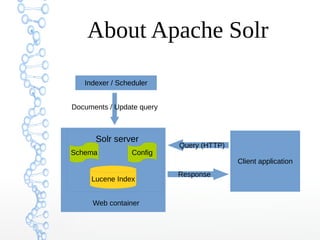
About Apache Solr
●
Full-text search server based on Apache
Lucene
●
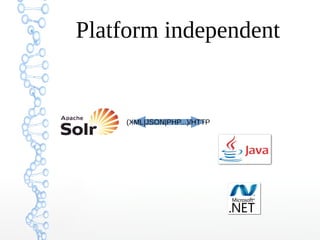
Platform independent
●
Buzzword compatible (sharding,
replication, clustering, cloud, scaling, big
data, ...)
Where to use Solr?
Who uses Solr?
About Apache Solr
Indexer / Scheduler
Lucene Index
Solr server
Schema Config
Documents / Update query
Client application
Query (HTTP)
Response
Web container
Platform independent
(XML|JSON|PHP...)/HTTP
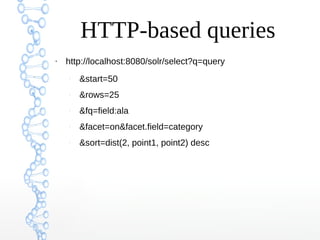
HTTP-based queries
●
http://localhost:8080/solr/select?q=query
–
&start=50
–
&rows=25
–
&fq=field:ala
–
&facet=on&facet.field=category
–
&sort=dist(2, point1, point2) desc
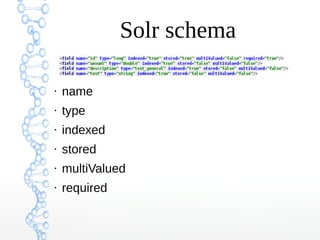
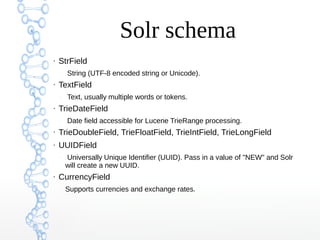
Solr schema
●
name
●
type
●
indexed
●
stored
●
multiValued
●
required
Solr schema
●
StrField
–
String (UTF-8 encoded string or Unicode).
●
TextField
–
Text, usually multiple words or tokens.
●
TrieDateField
–
Date field accessible for Lucene TrieRange processing.
●
TrieDoubleField, TrieFloatField, TrieIntField, TrieLongField
●
UUIDField
–
Universally Unique Identifier (UUID). Pass in a value of "NEW" and Solr
will create a new UUID.
●
CurrencyField
–
Supports currencies and exchange rates.
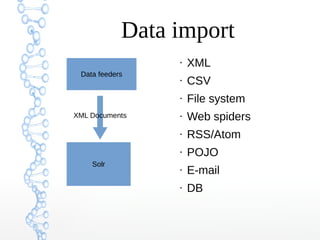
Data import
Solr
Data feeders
XML Documents
●
XML
●
CSV
●
File system
●
Web spiders
●
RSS/Atom
●
POJO
●
E-mail
●
DB
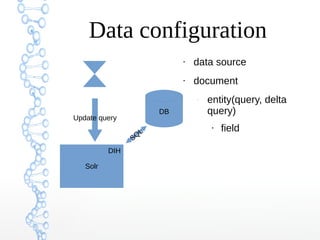
Data configuration
●
data source
●
document
–
entity(query, delta
query)
●
field
Solr
DB
Update query
SQ
L
DIH
Plugins
●
Search components
●
Request handlers
●
Process factory
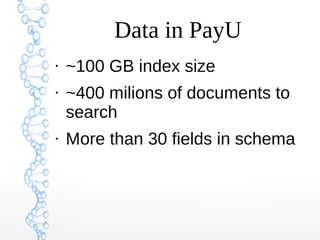
Data in PayU
●
~100 GB index size
●
~400 milions of documents to
search
●
More than 30 fields in schema
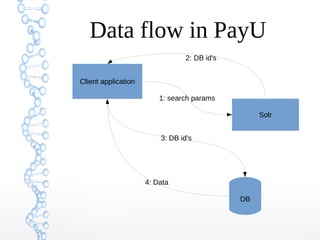
Data flow in PayU
Client application
Solr
DB
1: search params
3: DB id's
2: DB id's
4: Data
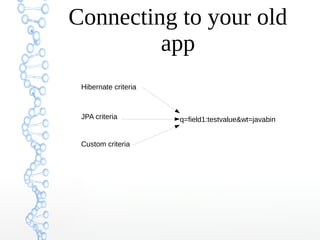
Connecting to your old
app
Hibernate criteria
JPA criteria
Custom criteria
q=field1:testvalue&wt=javabin
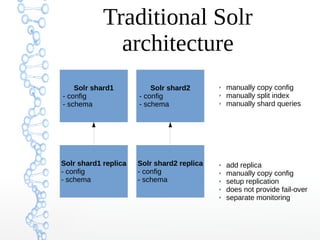
Traditional Solr
architecture
Solr shard1
- config
- schema
Solr shard1 replica
- config
- schema
Solr shard1
- config
- schema
Solr shard1
- config
- schema
Solr shard2 replica
- config
- schema
Solr shard2
- config
- schema
✗ manually copy config
✗ manually split index
✗ manually shard queries
✗ add replica
✗ manually copy config
✗ setup replication
✗ does not provide fail-over
✗ separate monitoring
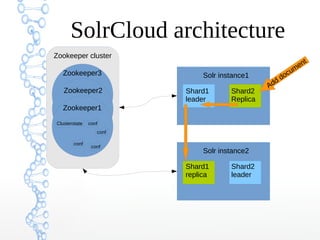
Zookeeper cluster
SolrCloud architecture
confClusterstate
conf
conf
conf
Zookeeper
Solr instance1
Shard1
leader
Shard2
Replica
Solr instance2
Shard1
replica
Shard2
leader
confClusterstate
conf
conf
conf
Zookeeper
confClusterstate
conf
conf
conf
Zookeeper2
Zookeeper1
Zookeeper3
Add document
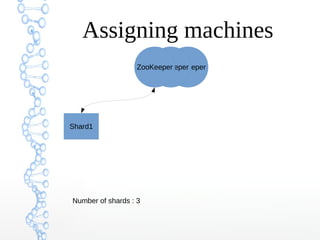
ZooKeeperZooKeeperZooKeeper
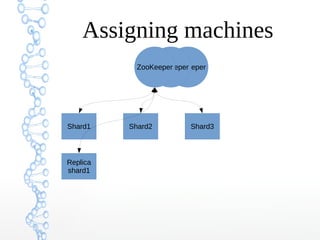
Assigning machines
Number of shards : 3
Shard1
ZooKeeperZooKeeperZooKeeper
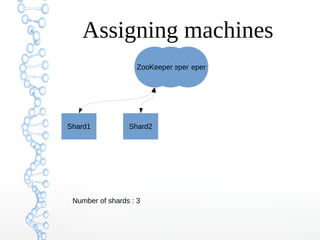
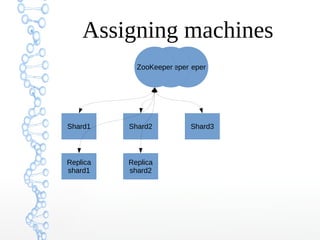
Assigning machines
Number of shards : 3
Shard1 Shard2
ZooKeeperZooKeeperZooKeeper
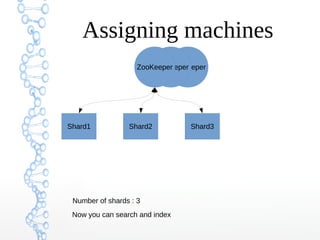
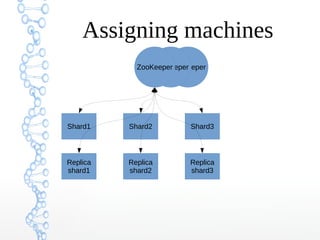
Assigning machines
Number of shards : 3
Shard1 Shard2 Shard3
Now you can search and index
ZooKeeperZooKeeperZooKeeper
Assigning machines
Shard1 Shard2 Shard3
Replica
shard1
ZooKeeperZooKeeperZooKeeper
Assigning machines
Shard1 Shard2 Shard3
Replica
shard1
Replica
shard2
ZooKeeperZooKeeperZooKeeper
Assigning machines
Shard1 Shard2 Shard3
Replica
shard1
Replica
shard2
Replica
shard3
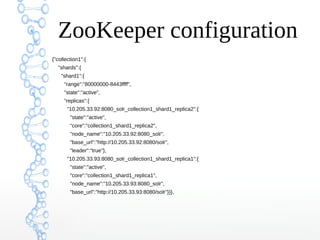
ZooKeeper configuration
{"collection1":{
"shards":{
"shard1":{
"range":"80000000-8443ffff",
"state":"active",
"replicas":{
"10.205.33.92:8080_solr_collection1_shard1_replica2":{
"state":"active",
"core":"collection1_shard1_replica2",
"node_name":"10.205.33.92:8080_solr",
"base_url":"http://10.205.33.92:8080/solr",
"leader":"true"},
"10.205.33.93:8080_solr_collection1_shard1_replica1":{
"state":"active",
"core":"collection1_shard1_replica1",
"node_name":"10.205.33.93:8080_solr",
"base_url":"http://10.205.33.93:8080/solr"}}},
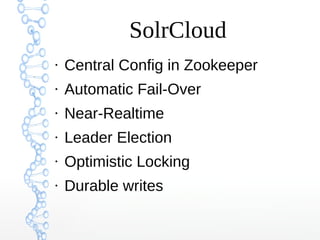
SolrCloud
●
Central Config in Zookeeper
●
Automatic Fail-Over
●
Near-Realtime
●
Leader Election
●
Optimistic Locking
●
Durable writes
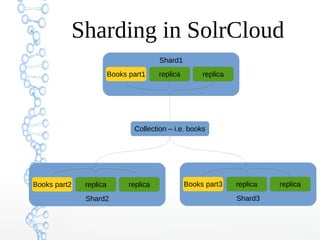
Sharding in SolrCloud
Collection – i.e. books
Shard1
Books part1 replica replica
Shard3
Books part3 replica replica
Shard2
Books part2 replica replica
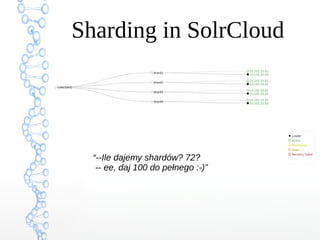
Sharding in SolrCloud
“--Ile dajemy shardów? 72?
-- ee, daj 100 do pełnego :-)”
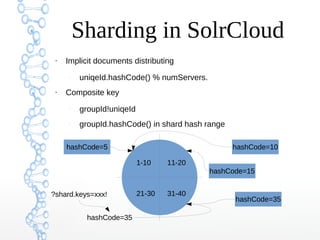
Sharding in SolrCloud
●
Implicit documents distributing
–
uniqeId.hashCode() % numServers.
●
Composite key
–
groupId!uniqeId
–
groupId.hashCode() in shard hash range
1-10 11-20
21-30 31-40
hashCode=5 hashCode=10
hashCode=35
hashCode=15
?shard.keys=xxx!
hashCode=35
SolrJ
●
HTTP Solr Server
●
Embedded Solr Server
–
Does not require HTTP
●
Cloud Solr Server
–
Pass ZooKeeper hosts
SolrJ POJO
public class Item {
@Field
String id;
@Field("cat")
String[] categories;
@Field
List<String> features;
}
//...
Item item = new Item();
item.id = "one";
item.categories = new String[] { "aaa", "bbb", "ccc" };
server.addBean(item);
Cache
●
Filter cache
●
Field value cache
●
Query result cache
●
Document cache
●
User/Generic Caches
Cache implementations
●
Least recent used (LRU)
●
Fast LRU
●
Least frequent used
Warming queries
<lst>
<str name="q">solr</str>
<str name="sort">testDate desc</str>
</lst>
FQ vs Q
●
Filter Query (FQ) doesn't
involve very complex
document scoring
q=description:Potter
fq=type:book
Questions?
Thank you!

Apache SolrCloud

Editor's Notes

  • #2 Przedstawić się, jesteśmy z PayU (Allegro group). Chcemy opowiedzieć o naszych krótkich doświadczeniach z Solr. Opowiemy o technicznych szczegółach tego fajnego serwera. Mieliśmy problem z czasami wyszukiwania, dlatego zainteresowaliśmy się tą technologią. Może być ciekawe bo zastosowaliśmy SolrCloud (stąd nazwa prezentacji). Pytania prosimy na końcu.
  • #6 Sklepy internetowe empik Wyszkiwarki Częściowe zastąpienie bazy danych wyszukiwanie plików po treści wyszukiwanie osób
  • #8 Omówić komponenty Solr Komunikacja
  • #11 Omówić atrybuty pól type i stored – wielkość indeksu Przykład z życia: setki milionów dokumentów I zwracamy tylko id, ktore pozniej wyciagamy po indeksie z bazy
  • #12 TextField – analizery (StandardTokenizer – whitespace, dots, itd.) i filtry (lowercasefilter) w czasie indeksowania i zapytania CurrencyField – zamiana wartości w trakcie zapytania
  • #13 Jak to się dzieję, że możemy odpytać solara o dokumenty? Dodatkowo można powiedzieć, że istnieje możliwość zaimplementowania własnego importu.
  • #14 Pełny import Import przyrostowy Dodatkowwo robimy full zamiast delta import, bo delta robi selecta per dokument
  • #15 Search component – może podkreślać wyszukiwane słowa kluczowe; zwracać dodatkowe informacje jak np. Ilość słów w polu Request handlers – podpinamy komponenty pod odpowiednią ścieżkę URL (endpoint) Process factory – przy indeksowaniu można za jego pomocą dodać nowe pola, zmieniać je itd.
  • #16 Dotyczy to tylko jednej tabeli bazodanowej Jest to stosunkowo duże wdrożenie.
  • #18 Można wówczas bardzo łatwo przełączać się pomiędzy bazą danych, a Solr
  • #20 Mogą być logiczne I fizyczne instancje
  • #29 Shardy są logicznym podziałem indeksu. W szczególności mogą być fizycznym podziałem.
  • #31 Jest jeszcze dostępny custom hashing
  • #34 Field value cache dla facetingu Query result cache trzyma posortowane id&apos;ki Document cache trzyma pelne dokumenty Lucene (enableLazyLoading – ref dla pol I potem dociaga – na podstawie fl)
  • #35 LRUCache - synchronized LinkedHashMap FastLRUCache - ConcurrentHashMap Omówić opcje cache&apos;a
  • #36 First searcher New searcher Kiedy jest otwierany nowy searcher