Information
Retrieval
JOSA Data Science Bootcamp
Kais Hassan
● Chief Data Officer @ Altibbi.
com
○ Data Science
○ BI
● Created several domain
specific search solutions
● Previously Assistant Professor
@ PSUT
● PhD in Computer Science
from England (Medical
Imaging)
Agenda
Introduction to IR and search
● Unstructured text, document-based storage
● Search Engines vs. Databases
● Inverted Index
Intro to Lucene/Solr
● Available open source search libraries and engines.
● Architectural diagram for Lucene and Solr
Solr basics
● Hands-on implementation the first Solr collection
● Indexing (example: XML files)
● Retrieving Information from Solr - Basic Queries and Parameters
Field Custom data types
● Copy fields
● Analysis Chain: Analyzers, Tokenizers and Character Filters
● Analyzers: Case Sensitivity, Lemmatization, Stemming, Synonyms, Shingles
Exercise
● Autocomplete using n-grams
Solr @ Altibbi
● Real life examples
• Information Retrieval (IR) is finding material (usually documents) of
an unstructured nature (usually text) that satisfies an information
need from within large collections (usually stored on computers).
– These days we frequently think first of web search, but there are
many other cases:
• Corporate knowledge bases
• Text classification
• Text clustering
Information Retrieval
Basic assumptions of Information Retrieval
• Document-based storage/Collection: A set of self-contained
documents, all of the data for the document is stored in the
document itself — not in a related table as it would be in a
relational database
• Goal: Retrieve documents with information that is relevant to
the user’s information need and helps the user complete a
task
How good are the retrieved docs?
▪ Precision : Fraction of retrieved docs that are
relevant to the user’s information need
▪ Recall : Fraction of relevant docs in collection
that are retrieved
IR vs. databases:
Structured vs unstructured data
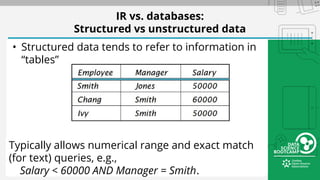
• Structured data tends to refer to information in
“tables”
Typically allows numerical range and exact match
(for text) queries, e.g.,
Salary < 60000 AND Manager = Smith.
Unstructured data
• Typically refers to free text
• Allows
– Keyword queries including operators
– More sophisticated “concept” queries e.g.,
• find all web pages dealing with drug abuse
• Classic model for searching text documents
• 85% of the World’s data Unstructured
8
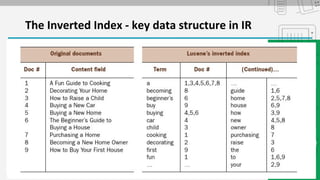
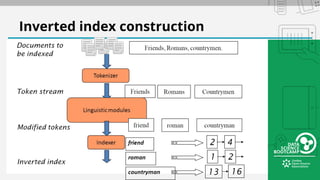
The Inverted Index - key data structure in IR
Stages of text processing
• Tokenization
– Cut character sequence into word tokens
• Normalization
– Map text and query term to same form
• You want U.S.A. and USA to match
• Stemming
– We may wish different forms of a root to match
• authorize, authorization
• Stop words
– We may omit very common words (or not)
• the, a, to, of
Inverted index construction
What is Lucene?
➔ High performance, scalable, full-text search library
➔ Focus: Indexing + Searching Documents
◆ “Document” is just a list of name+value pairs
➔ No crawlers or document parsing
➔ Flexible Text Analysis (tokenizers + token filters)
➔ 100% Java, no dependencies, no config files
Both Solr and ElasticSearch are based on it
What is Solr?
• A full text search server based on Lucene
• XML/HTTP, JSON Interfaces
• Faceted Search (category counting)
• Flexible data schema to define types and fields
• Hit Highlighting
• Configurable Advanced Caching
• Index Replication
• Written in Java
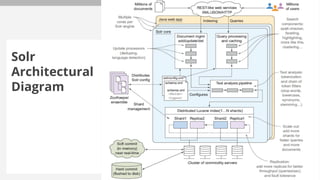
Solr
Architectural
Diagram
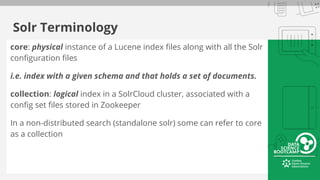
Solr Terminology
core: physical instance of a Lucene index files along with all the Solr
configuration files
i.e. index with a given schema and that holds a set of documents.
collection: logical index in a SolrCloud cluster, associated with a
config set files stored in Zookeeper
In a non-distributed search (standalone solr) some can refer to core
as a collection
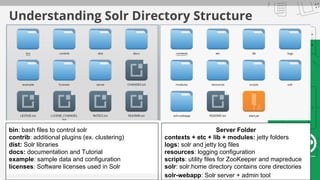
Understanding Solr Directory Structure
bin: bash files to control solr
contrib: additional plugins (ex. clustering)
dist: Solr libraries
docs: documentation and Tutorial
example: sample data and configuration
licenses: Software licenses used in Solr
Server Folder
contexts + etc + lib + modules: jetty folders
logs: solr and jetty log files
resources: logging configuration
scripts: utility files for ZooKeeper and mapreduce
solr: solr.home directory contains core directories
solr-webapp: Solr server + admin tool
Solr Important Environment Variables
solr.install.dir: The location where you extracted the Solr
installation.
solr.solr.home (SolrHome): contains core configuration and data,
also must contain solr.xml (configuration for solr).
By default it is located inside
solr.install.dir/server/solr
But can be changed to any location
Exercise 1: getting started with Solr
Prerequisites:
1. Java 7 or higher is installed and JAVA_HOME is set
2. You have downloaded Solr 5.4.1(tgz for Linux, zip for Windows)
3. Good text editor ( Anything but Notepad)
4. Downloaded bootcamp_config + nytimes_facebook_statuses.csv
Starting/Stopping Solr
1. cd to the extracted solr folder
2. To Start: bin/solr start (Linux) or binsolr.cmd start (Windows)
○ Solr will start and listen on port 8983
○ bin/solr start -help will show start options (useful for changing options)
3. To Stop: bin/solr stop
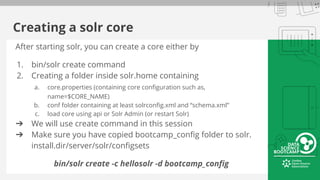
Creating a solr core
After starting solr, you can create a core either by
1. bin/solr create command
2. Creating a folder inside solr.home containing
a. core.properties (containing core configuration such as,
name=$CORE_NAME)
b. conf folder containing at least solrconfig.xml and “schema.xml”
c. load core using api or Solr Admin (or restart Solr)
➔ We will use create command in this session
➔ Make sure you have copied bootcamp_config folder to solr.
install.dir/server/solr/configsets
bin/solr create -c hellosolr -d bootcamp_config
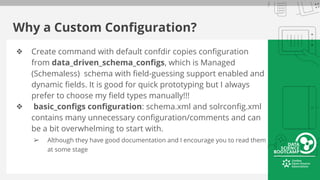
Why a Custom Configuration?
❖ Create command with default confdir copies configuration
from data_driven_schema_configs, which is Managed
(Schemaless) schema with field-guessing support enabled and
dynamic fields. It is good for quick prototyping but I always
prefer to choose my field types manually!!!
❖ basic_configs configuration: schema.xml and solrconfig.xml
contains many unnecessary configuration/comments and can
be a bit overwhelming to start with.
➢ Although they have good documentation and I encourage you to read them
at some stage
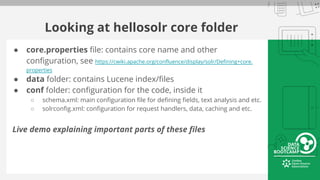
Looking at hellosolr core folder
● core.properties file: contains core name and other
configuration, see https://cwiki.apache.org/confluence/display/solr/Defining+core.
properties
● data folder: contains Lucene index/files
● conf folder: configuration for the code, inside it
○ schema.xml: main configuration file for defining fields, text analysis and etc.
○ solrconfig.xml: configuration for request handlers, data, caching and etc.
Live demo explaining important parts of these files
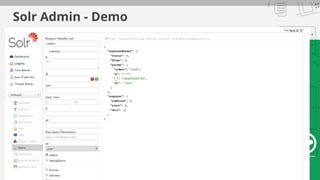
Solr Admin - Demo
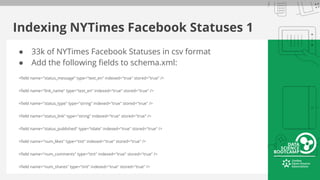
Indexing NYTimes Facebook Statuses 1
● 33k of NYTimes Facebook Statuses in csv format
● Add the following fields to schema.xml:
<field name="status_message" type="text_en" indexed="true" stored="true" />
<field name="link_name" type="text_en" indexed="true" stored="true" />
<field name="status_type" type="string" indexed="true" stored="true" />
<field name="status_link" type="string" indexed="true" stored="true" />
<field name="status_published" type="tdate" indexed="true" stored="true" />
<field name="num_likes" type="tint" indexed="true" stored="true" />
<field name="num_comments" type="tint" indexed="true" stored="true" />
<field name="num_shares" type="tint" indexed="true" stored="true" />
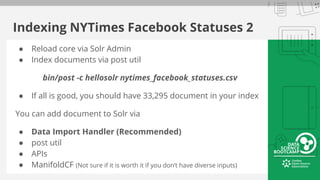
Indexing NYTimes Facebook Statuses 2
● Reload core via Solr Admin
● Index documents via post util
bin/post -c hellosolr nytimes_facebook_statuses.csv
● If all is good, you should have 33,295 document in your index
You can add document to Solr via
● Data Import Handler (Recommended)
● post util
● APIs
● ManifoldCF (Not sure if it is worth it if you don’t have diverse inputs)
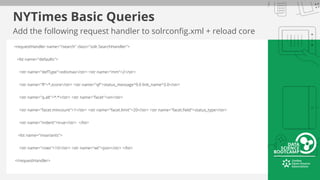
NYTimes Basic Queries
Add the following request handler to solrconfig.xml + reload core
<requestHandler name="/search" class="solr.SearchHandler">
<lst name="defaults">
<str name="defType">edismax</str> <str name="mm">2</str>
<str name="fl">*,score</str> <str name="qf">status_message^9.0 link_name^3.0</str>
<str name="q.alt">*:*</str> <str name="facet">on</str>
<str name="facet.mincount">1</str> <str name="facet.limit">20</str> <str name="facet.field">status_type</str>
<str name="indent">true</str> </lst>
<lst name="invariants">
<str name="rows">10</str> <str name="wt">json</str> </lst>
</requestHandler>
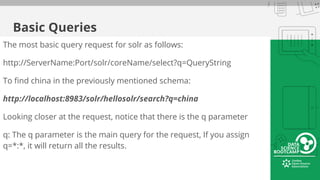
Basic Queries
The most basic query request for solr as follows:
http://ServerName:Port/solr/coreName/select?q=QueryString
To find china in the previously mentioned schema:
http://localhost:8983/solr/hellosolr/search?q=china
Looking closer at the request, notice that there is the q parameter
q: The q parameter is the main query for the request, If you assign
q=*:*, it will return all the results.
edismax Query Parser - 1
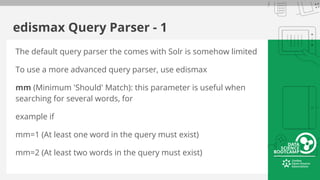
The default query parser the comes with Solr is somehow limited
To use a more advanced query parser, use edismax
mm (Minimum 'Should' Match): this parameter is useful when
searching for several words, for
example if
mm=1 (At least one word in the query must exist)
mm=2 (At least two words in the query must exist)
edismax Query Parser - 1
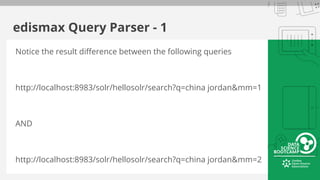
Notice the result difference between the following queries
http://localhost:8983/solr/hellosolr/search?q=china jordan&mm=1
AND
http://localhost:8983/solr/hellosolr/search?q=china jordan&mm=2
Field Definitions
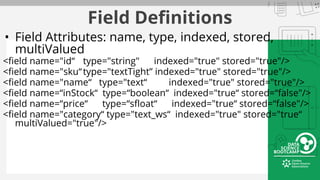
• Field Attributes: name, type, indexed, stored,
multiValued
<field name="id“ type="string" indexed="true" stored="true"/>
<field name="sku“type="textTight” indexed="true" stored="true"/>
<field name="name“ type="text“ indexed="true" stored="true"/>
<field name=“inStock“ type=“boolean“ indexed="true“ stored=“false"/>
<field name=“price“ type=“sfloat“ indexed="true“ stored=“false"/>
<field name="category“ type="text_ws“ indexed="true" stored="true“
multiValued="true"/>
Fields
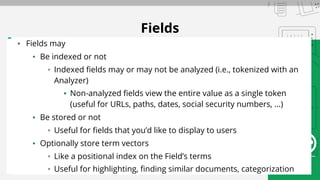
▪ Fields may
▪ Be indexed or not
▪ Indexed fields may or may not be analyzed (i.e., tokenized with an
Analyzer)
▪ Non-analyzed fields view the entire value as a single token
(useful for URLs, paths, dates, social security numbers, ...)
▪ Be stored or not
▪ Useful for fields that you’d like to display to users
▪ Optionally store term vectors
▪ Like a positional index on the Field’s terms
▪ Useful for highlighting, finding similar documents, categorization
copyField
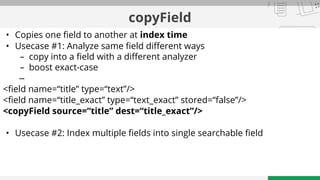
• Copies one field to another at index time
• Usecase #1: Analyze same field different ways
– copy into a field with a different analyzer
– boost exact-case
–
<field name=“title” type=“text”/>
<field name=“title_exact” type=“text_exact” stored=“false”/>
<copyField source=“title” dest=“title_exact”/>
• Usecase #2: Index multiple fields into single searchable field
Custom Field Types
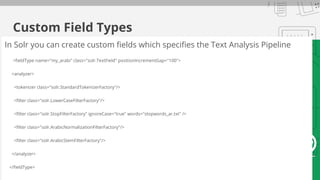
In Solr you can create custom fields which specifies the Text Analysis Pipeline
<fieldType name="my_arabi" class="solr.TextField" positionIncrementGap="100">
<analyzer>
<tokenizer class="solr.StandardTokenizerFactory"/>
<filter class="solr.LowerCaseFilterFactory"/>
<filter class="solr.StopFilterFactory" ignoreCase="true" words="stopwords_ar.txt" />
<filter class="solr.ArabicNormalizationFilterFactory"/>
<filter class="solr.ArabicStemFilterFactory"/>
</analyzer>
</fieldType>
Tokenizers And TokenFilters
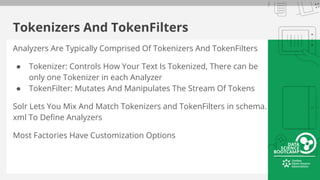
Analyzers Are Typically Comprised Of Tokenizers And TokenFilters
● Tokenizer: Controls How Your Text Is Tokenized, There can be
only one Tokenizer in each Analyzer
● TokenFilter: Mutates And Manipulates The Stream Of Tokens
Solr Lets You Mix And Match Tokenizers and TokenFilters in schema.
xml To Define Analyzers
Most Factories Have Customization Options
Notable Token(izers|Filters) - 1/2
WhitespaceTokenizer: Creates tokens of characters separated by splitting on whitespace
StandardTokenizerFactory: General purpose tokenizer that strips extraneous characters
LowerCaseFilterFactory: Lowercases the letters in each token
TrimFilterFactory: Trims whitespace at either end of a token.
● Example: " Kittens! ", "Duck" ==> "Kittens!", "Duck".
PatternReplaceFilterFactory: Applies a regex pattern
● Example: pattern="([^a-z])" replacement=""
Notable Token(izers|Filters) - 2/2
StopFilterFactory
SynonymFilterFactory
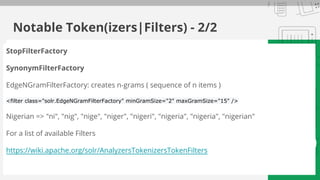
EdgeNGramFilterFactory: creates n-grams ( sequence of n items )
<filter class="solr.EdgeNGramFilterFactory" minGramSize="2" maxGramSize="15" />
Nigerian => "ni", "nig", "nige", "niger", "nigeri", "nigeria", "nigeria", "nigerian"
For a list of available Filters
https://wiki.apache.org/solr/AnalyzersTokenizersTokenFilters
Analysis Tool
Part of Solr Admin that allows you to enter text And See How It Would Be
Analyzed For A Given Field (Or Field Type)
Displays Step By Step Information For Analyzers Configured Using Solr
Factories...
Token Stream Produced By The Tokenizer
How The Token Stream Is Modified By Each TokenFilter
How The Tokens Produced When Indexing Compare With The Tokens
Produced When Querying
Helpful In Deciding Which Tokenizer/TokenFilters You Want To Use For Each
Field Based On Your Goals
Hands-on Tokenizers, and Filters
Live Demo
Exercise - Autocomplete using n-grams
Requirements:
1) Match from the edge of the field, e.g. if the document field is
"‫اﻟﺳﻛري‬ ‫"ﻣرض‬ and the query is "‫ال‬ ‫,"ﻣرض‬ it will match, but will not
match "‫"اﻟﺳﻛري‬
2) Matches any word in the input field, with implicit truncation.
This means that the field "‫اﻟﺳﻛري‬ ‫"ﻣرض‬ will be matched by query
"‫."اﻟﺳﻛري‬ We use this to get partial matches, but these should be
boosted lower
Tip: WordDelimiterFilterFactory + EdgeNGramFilterFactory
Solr @ Altibbi
Live Demo
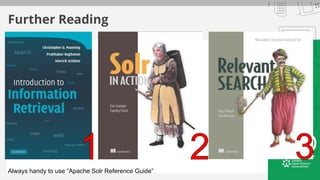
Further Reading
Always handy to use “Apache Solr Reference Guide”

Information Retrieval - Data Science Bootcamp

  • 1.
  • 2.
    Kais Hassan ● ChiefData Officer @ Altibbi. com ○ Data Science ○ BI ● Created several domain specific search solutions ● Previously Assistant Professor @ PSUT ● PhD in Computer Science from England (Medical Imaging)
  • 3.
    Agenda Introduction to IRand search ● Unstructured text, document-based storage ● Search Engines vs. Databases ● Inverted Index Intro to Lucene/Solr ● Available open source search libraries and engines. ● Architectural diagram for Lucene and Solr Solr basics ● Hands-on implementation the first Solr collection ● Indexing (example: XML files) ● Retrieving Information from Solr - Basic Queries and Parameters Field Custom data types ● Copy fields ● Analysis Chain: Analyzers, Tokenizers and Character Filters ● Analyzers: Case Sensitivity, Lemmatization, Stemming, Synonyms, Shingles Exercise ● Autocomplete using n-grams Solr @ Altibbi ● Real life examples
  • 4.
    • Information Retrieval(IR) is finding material (usually documents) of an unstructured nature (usually text) that satisfies an information need from within large collections (usually stored on computers). – These days we frequently think first of web search, but there are many other cases: • Corporate knowledge bases • Text classification • Text clustering Information Retrieval
  • 5.
    Basic assumptions ofInformation Retrieval • Document-based storage/Collection: A set of self-contained documents, all of the data for the document is stored in the document itself — not in a related table as it would be in a relational database • Goal: Retrieve documents with information that is relevant to the user’s information need and helps the user complete a task
  • 6.
    How good arethe retrieved docs? ▪ Precision : Fraction of retrieved docs that are relevant to the user’s information need ▪ Recall : Fraction of relevant docs in collection that are retrieved
  • 7.
    IR vs. databases: Structuredvs unstructured data • Structured data tends to refer to information in “tables” Typically allows numerical range and exact match (for text) queries, e.g., Salary < 60000 AND Manager = Smith.
  • 8.
    Unstructured data • Typicallyrefers to free text • Allows – Keyword queries including operators – More sophisticated “concept” queries e.g., • find all web pages dealing with drug abuse • Classic model for searching text documents • 85% of the World’s data Unstructured 8
  • 9.
    The Inverted Index- key data structure in IR
  • 10.
    Stages of textprocessing • Tokenization – Cut character sequence into word tokens • Normalization – Map text and query term to same form • You want U.S.A. and USA to match • Stemming – We may wish different forms of a root to match • authorize, authorization • Stop words – We may omit very common words (or not) • the, a, to, of
  • 11.
  • 12.
    What is Lucene? ➔High performance, scalable, full-text search library ➔ Focus: Indexing + Searching Documents ◆ “Document” is just a list of name+value pairs ➔ No crawlers or document parsing ➔ Flexible Text Analysis (tokenizers + token filters) ➔ 100% Java, no dependencies, no config files Both Solr and ElasticSearch are based on it
  • 13.
    What is Solr? •A full text search server based on Lucene • XML/HTTP, JSON Interfaces • Faceted Search (category counting) • Flexible data schema to define types and fields • Hit Highlighting • Configurable Advanced Caching • Index Replication • Written in Java
  • 14.
  • 15.
    Solr Terminology core: physicalinstance of a Lucene index files along with all the Solr configuration files i.e. index with a given schema and that holds a set of documents. collection: logical index in a SolrCloud cluster, associated with a config set files stored in Zookeeper In a non-distributed search (standalone solr) some can refer to core as a collection
  • 16.
    Understanding Solr DirectoryStructure bin: bash files to control solr contrib: additional plugins (ex. clustering) dist: Solr libraries docs: documentation and Tutorial example: sample data and configuration licenses: Software licenses used in Solr Server Folder contexts + etc + lib + modules: jetty folders logs: solr and jetty log files resources: logging configuration scripts: utility files for ZooKeeper and mapreduce solr: solr.home directory contains core directories solr-webapp: Solr server + admin tool
  • 17.
    Solr Important EnvironmentVariables solr.install.dir: The location where you extracted the Solr installation. solr.solr.home (SolrHome): contains core configuration and data, also must contain solr.xml (configuration for solr). By default it is located inside solr.install.dir/server/solr But can be changed to any location
  • 18.
    Exercise 1: gettingstarted with Solr Prerequisites: 1. Java 7 or higher is installed and JAVA_HOME is set 2. You have downloaded Solr 5.4.1(tgz for Linux, zip for Windows) 3. Good text editor ( Anything but Notepad) 4. Downloaded bootcamp_config + nytimes_facebook_statuses.csv Starting/Stopping Solr 1. cd to the extracted solr folder 2. To Start: bin/solr start (Linux) or binsolr.cmd start (Windows) ○ Solr will start and listen on port 8983 ○ bin/solr start -help will show start options (useful for changing options) 3. To Stop: bin/solr stop
  • 19.
    Creating a solrcore After starting solr, you can create a core either by 1. bin/solr create command 2. Creating a folder inside solr.home containing a. core.properties (containing core configuration such as, name=$CORE_NAME) b. conf folder containing at least solrconfig.xml and “schema.xml” c. load core using api or Solr Admin (or restart Solr) ➔ We will use create command in this session ➔ Make sure you have copied bootcamp_config folder to solr. install.dir/server/solr/configsets bin/solr create -c hellosolr -d bootcamp_config
  • 20.
    Why a CustomConfiguration? ❖ Create command with default confdir copies configuration from data_driven_schema_configs, which is Managed (Schemaless) schema with field-guessing support enabled and dynamic fields. It is good for quick prototyping but I always prefer to choose my field types manually!!! ❖ basic_configs configuration: schema.xml and solrconfig.xml contains many unnecessary configuration/comments and can be a bit overwhelming to start with. ➢ Although they have good documentation and I encourage you to read them at some stage
  • 21.
    Looking at hellosolrcore folder ● core.properties file: contains core name and other configuration, see https://cwiki.apache.org/confluence/display/solr/Defining+core. properties ● data folder: contains Lucene index/files ● conf folder: configuration for the code, inside it ○ schema.xml: main configuration file for defining fields, text analysis and etc. ○ solrconfig.xml: configuration for request handlers, data, caching and etc. Live demo explaining important parts of these files
  • 22.
  • 23.
    Indexing NYTimes FacebookStatuses 1 ● 33k of NYTimes Facebook Statuses in csv format ● Add the following fields to schema.xml: <field name="status_message" type="text_en" indexed="true" stored="true" /> <field name="link_name" type="text_en" indexed="true" stored="true" /> <field name="status_type" type="string" indexed="true" stored="true" /> <field name="status_link" type="string" indexed="true" stored="true" /> <field name="status_published" type="tdate" indexed="true" stored="true" /> <field name="num_likes" type="tint" indexed="true" stored="true" /> <field name="num_comments" type="tint" indexed="true" stored="true" /> <field name="num_shares" type="tint" indexed="true" stored="true" />
  • 24.
    Indexing NYTimes FacebookStatuses 2 ● Reload core via Solr Admin ● Index documents via post util bin/post -c hellosolr nytimes_facebook_statuses.csv ● If all is good, you should have 33,295 document in your index You can add document to Solr via ● Data Import Handler (Recommended) ● post util ● APIs ● ManifoldCF (Not sure if it is worth it if you don’t have diverse inputs)
  • 25.
    NYTimes Basic Queries Addthe following request handler to solrconfig.xml + reload core <requestHandler name="/search" class="solr.SearchHandler"> <lst name="defaults"> <str name="defType">edismax</str> <str name="mm">2</str> <str name="fl">*,score</str> <str name="qf">status_message^9.0 link_name^3.0</str> <str name="q.alt">*:*</str> <str name="facet">on</str> <str name="facet.mincount">1</str> <str name="facet.limit">20</str> <str name="facet.field">status_type</str> <str name="indent">true</str> </lst> <lst name="invariants"> <str name="rows">10</str> <str name="wt">json</str> </lst> </requestHandler>
  • 26.
    Basic Queries The mostbasic query request for solr as follows: http://ServerName:Port/solr/coreName/select?q=QueryString To find china in the previously mentioned schema: http://localhost:8983/solr/hellosolr/search?q=china Looking closer at the request, notice that there is the q parameter q: The q parameter is the main query for the request, If you assign q=*:*, it will return all the results.
  • 27.
    edismax Query Parser- 1 The default query parser the comes with Solr is somehow limited To use a more advanced query parser, use edismax mm (Minimum 'Should' Match): this parameter is useful when searching for several words, for example if mm=1 (At least one word in the query must exist) mm=2 (At least two words in the query must exist)
  • 28.
    edismax Query Parser- 1 Notice the result difference between the following queries http://localhost:8983/solr/hellosolr/search?q=china jordan&mm=1 AND http://localhost:8983/solr/hellosolr/search?q=china jordan&mm=2
  • 29.
    Field Definitions • FieldAttributes: name, type, indexed, stored, multiValued <field name="id“ type="string" indexed="true" stored="true"/> <field name="sku“type="textTight” indexed="true" stored="true"/> <field name="name“ type="text“ indexed="true" stored="true"/> <field name=“inStock“ type=“boolean“ indexed="true“ stored=“false"/> <field name=“price“ type=“sfloat“ indexed="true“ stored=“false"/> <field name="category“ type="text_ws“ indexed="true" stored="true“ multiValued="true"/>
  • 30.
    Fields ▪ Fields may ▪Be indexed or not ▪ Indexed fields may or may not be analyzed (i.e., tokenized with an Analyzer) ▪ Non-analyzed fields view the entire value as a single token (useful for URLs, paths, dates, social security numbers, ...) ▪ Be stored or not ▪ Useful for fields that you’d like to display to users ▪ Optionally store term vectors ▪ Like a positional index on the Field’s terms ▪ Useful for highlighting, finding similar documents, categorization
  • 31.
    copyField • Copies onefield to another at index time • Usecase #1: Analyze same field different ways – copy into a field with a different analyzer – boost exact-case – <field name=“title” type=“text”/> <field name=“title_exact” type=“text_exact” stored=“false”/> <copyField source=“title” dest=“title_exact”/> • Usecase #2: Index multiple fields into single searchable field
  • 32.
    Custom Field Types InSolr you can create custom fields which specifies the Text Analysis Pipeline <fieldType name="my_arabi" class="solr.TextField" positionIncrementGap="100"> <analyzer> <tokenizer class="solr.StandardTokenizerFactory"/> <filter class="solr.LowerCaseFilterFactory"/> <filter class="solr.StopFilterFactory" ignoreCase="true" words="stopwords_ar.txt" /> <filter class="solr.ArabicNormalizationFilterFactory"/> <filter class="solr.ArabicStemFilterFactory"/> </analyzer> </fieldType>
  • 33.
    Tokenizers And TokenFilters AnalyzersAre Typically Comprised Of Tokenizers And TokenFilters ● Tokenizer: Controls How Your Text Is Tokenized, There can be only one Tokenizer in each Analyzer ● TokenFilter: Mutates And Manipulates The Stream Of Tokens Solr Lets You Mix And Match Tokenizers and TokenFilters in schema. xml To Define Analyzers Most Factories Have Customization Options
  • 34.
    Notable Token(izers|Filters) -1/2 WhitespaceTokenizer: Creates tokens of characters separated by splitting on whitespace StandardTokenizerFactory: General purpose tokenizer that strips extraneous characters LowerCaseFilterFactory: Lowercases the letters in each token TrimFilterFactory: Trims whitespace at either end of a token. ● Example: " Kittens! ", "Duck" ==> "Kittens!", "Duck". PatternReplaceFilterFactory: Applies a regex pattern ● Example: pattern="([^a-z])" replacement=""
  • 35.
    Notable Token(izers|Filters) -2/2 StopFilterFactory SynonymFilterFactory EdgeNGramFilterFactory: creates n-grams ( sequence of n items ) <filter class="solr.EdgeNGramFilterFactory" minGramSize="2" maxGramSize="15" /> Nigerian => "ni", "nig", "nige", "niger", "nigeri", "nigeria", "nigeria", "nigerian" For a list of available Filters https://wiki.apache.org/solr/AnalyzersTokenizersTokenFilters
  • 36.
    Analysis Tool Part ofSolr Admin that allows you to enter text And See How It Would Be Analyzed For A Given Field (Or Field Type) Displays Step By Step Information For Analyzers Configured Using Solr Factories... Token Stream Produced By The Tokenizer How The Token Stream Is Modified By Each TokenFilter How The Tokens Produced When Indexing Compare With The Tokens Produced When Querying Helpful In Deciding Which Tokenizer/TokenFilters You Want To Use For Each Field Based On Your Goals
  • 37.
    Hands-on Tokenizers, andFilters Live Demo
  • 38.
    Exercise - Autocompleteusing n-grams Requirements: 1) Match from the edge of the field, e.g. if the document field is "‫اﻟﺳﻛري‬ ‫"ﻣرض‬ and the query is "‫ال‬ ‫,"ﻣرض‬ it will match, but will not match "‫"اﻟﺳﻛري‬ 2) Matches any word in the input field, with implicit truncation. This means that the field "‫اﻟﺳﻛري‬ ‫"ﻣرض‬ will be matched by query "‫."اﻟﺳﻛري‬ We use this to get partial matches, but these should be boosted lower Tip: WordDelimiterFilterFactory + EdgeNGramFilterFactory
  • 39.
  • 40.
    Further Reading Always handyto use “Apache Solr Reference Guide”