Hive - III
Table Partition, HQL
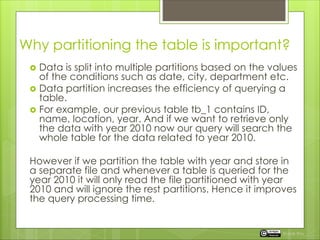
Why partitioning the table is important?
 Data is split into multiple partitions based on the values
of the conditions such as date, city, department etc.
 Data partition increases the efficiency of querying a
table.
 For example, our previous table tb_1 contains ID,
name, location, year. And if we want to retrieve only
the data with year 2010 now our query will search the
whole table for the data related to year 2010.
However if we partition the table with year and store in
a separate file and whenever a table is queried for the
year 2010 it will only read the file partitioned with year
2010 and will ignore the rest partitions. Hence it improves
the query processing time.
Rupak Roy
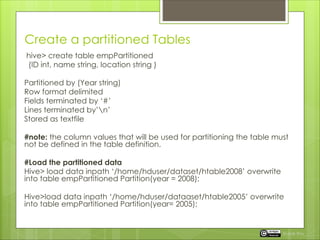
Create a partitioned Tables
hive> create table empPartitioned
(ID int, name string, location string )
Partitioned by (Year string)
Row format delimited
Fields terminated by ‘#’
Lines terminated by’n’
Stored as textfile
#note: the column values that will be used for partitioning the table must
not be defined in the table definition.
#Load the partitioned data
Hive> load data inpath ‘/home/hduser/dataset/htable2008’ overwrite
into table empPartitioned Partition(year = 2008);
Hive>load data inpath ‘/home/hduser/dataaset/htable2005’ overwrite
into table empPartitioned Partition(year= 2005);
Rupak Roy
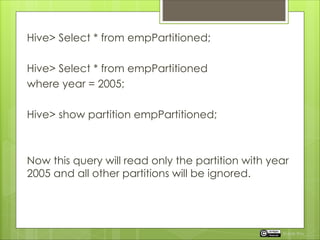
Hive> Select * from empPartitioned;
Hive> Select * from empPartitioned
where year = 2005;
Hive> show partition empPartitioned;
Now this query will read only the partition with year
2005 and all other partitions will be ignored.
Rupak Roy
Partitioned External Table
 We can also take the advantage of external
tables for Partitioned Tables and also we don’t
need to specify the ‘ Location ‘ as we did for
external tables.
hive> create external table empPartitioned
(ID int, name string, location string, year
string)
Partitioned by (year string)
Row format delimited
Lines terminated by’#’
Fields terminated by’n’
Stored as textfile;
Rupak Roy
Hive Query Language (HQL)
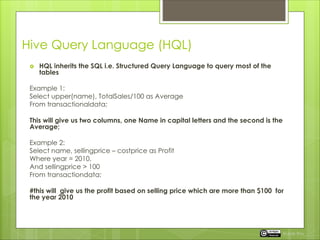
 HQL inherits the SQL i.e. Structured Query Language to query most of the
tables
Example 1:
Select upper(name), TotalSales/100 as Average
From transactionaldata;
This will give us two columns, one Name in capital letters and the second is the
Average;
Example 2:
Select name, sellingprice – costprice as Profit
Where year = 2010,
And sellingprice > 100
From transactiondata;
#this will give us the profit based on selling price which are more than $100 for
the year 2010
Rupak Roy
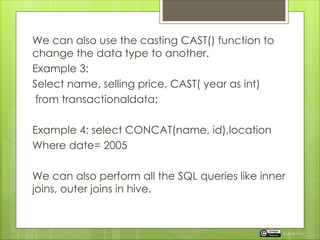
We can also use the casting CAST() function to
change the data type to another.
Example 3:
Select name, selling price, CAST( year as int)
from transactionaldata;
Example 4: select CONCAT(name, id),location
Where date= 2005
We can also perform all the SQL queries like inner
joins, outer joins in hive.
Rupak Roy
Hive in RC File
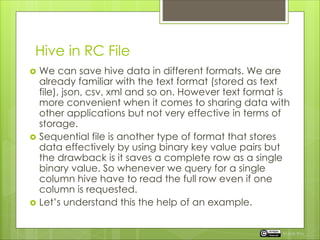
 We can save hive data in different formats. We are
already familiar with the text format (stored as text
file), json, csv, xml and so on. However text format is
more convenient when it comes to sharing data with
other applications but not very effective in terms of
storage.
 Sequential file is another type of format that stores
data effectively by using binary key value pairs but
the drawback is it saves a complete row as a single
binary value. So whenever we query for a single
column hive have to read the full row even if one
column is requested.
 Let’s understand this the help of an example.
Rupak Roy
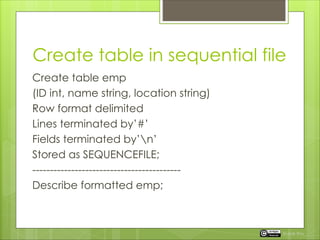
Create table in sequential file
Create table emp
(ID int, name string, location string)
Row format delimited
Lines terminated by’#’
Fields terminated by’n’
Stored as SEQUENCEFILE;
------------------------------------------
Describe formatted emp;
Rupak Roy
Row Vs Column Storage
 Row Oriented Storage:
Row oriented is efficient when retrieving for all the
columns data. For example from 50 columns & rows
and it realizes that it only has to scan 2 rows.
But when it comes to read only few columns it
needs to read all the rows. Best suits for row data.
ID Name Location Year
11 Bob IN 2005
22 Fara SG 2005
Rupak Roy
Row Vs Column Storage
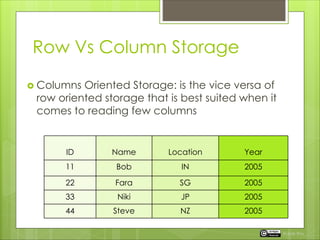
 Columns Oriented Storage: is the vice versa of
row oriented storage that is best suited when it
comes to reading few columns
ID Name Location Year
11 Bob IN 2005
22 Fara SG 2005
33 Niki JP 2005
44 Steve NZ 2005
Rupak Roy
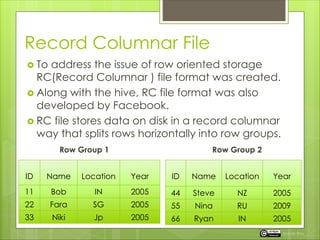
Record Columnar File
 To address the issue of row oriented storage
RC(Record Columnar ) file format was created.
 Along with the hive, RC file format was also
developed by Facebook.
 RC file stores data on disk in a record columnar
way that splits rows horizontally into row groups.
Row Group 1 Row Group 2
ID Name Location Year
11 Bob IN 2005
22 Fara SG 2005
33 Niki Jp 2005
ID Name Location Year
44 Steve NZ 2005
55 Nina RU 2009
66 Ryan IN 2005
Rupak Roy
Create table empRC
( ID int, name sring, location string)
Stored as RCFile;
----------------
Describe formatted empRC;
-----------------
Load data in hive
Insert overwrite table empRC select * from emp;
-------------------
Now query the table empRC and emp to observe
the difference in time taken to process the request.
Rupak Roy
Next
 Apache Hbase a column oriented non-
relational distributed database
management system.
Rupak Roy
 Stay Tuned.
Rupak Roy

Apache Hive Table Partition and HQL

  • 1.
    Hive - III TablePartition, HQL
  • 2.
    Why partitioning thetable is important?  Data is split into multiple partitions based on the values of the conditions such as date, city, department etc.  Data partition increases the efficiency of querying a table.  For example, our previous table tb_1 contains ID, name, location, year. And if we want to retrieve only the data with year 2010 now our query will search the whole table for the data related to year 2010. However if we partition the table with year and store in a separate file and whenever a table is queried for the year 2010 it will only read the file partitioned with year 2010 and will ignore the rest partitions. Hence it improves the query processing time. Rupak Roy
  • 3.
    Create a partitionedTables hive> create table empPartitioned (ID int, name string, location string ) Partitioned by (Year string) Row format delimited Fields terminated by ‘#’ Lines terminated by’n’ Stored as textfile #note: the column values that will be used for partitioning the table must not be defined in the table definition. #Load the partitioned data Hive> load data inpath ‘/home/hduser/dataset/htable2008’ overwrite into table empPartitioned Partition(year = 2008); Hive>load data inpath ‘/home/hduser/dataaset/htable2005’ overwrite into table empPartitioned Partition(year= 2005); Rupak Roy
  • 4.
    Hive> Select *from empPartitioned; Hive> Select * from empPartitioned where year = 2005; Hive> show partition empPartitioned; Now this query will read only the partition with year 2005 and all other partitions will be ignored. Rupak Roy
  • 5.
    Partitioned External Table We can also take the advantage of external tables for Partitioned Tables and also we don’t need to specify the ‘ Location ‘ as we did for external tables. hive> create external table empPartitioned (ID int, name string, location string, year string) Partitioned by (year string) Row format delimited Lines terminated by’#’ Fields terminated by’n’ Stored as textfile; Rupak Roy
  • 6.
    Hive Query Language(HQL)  HQL inherits the SQL i.e. Structured Query Language to query most of the tables Example 1: Select upper(name), TotalSales/100 as Average From transactionaldata; This will give us two columns, one Name in capital letters and the second is the Average; Example 2: Select name, sellingprice – costprice as Profit Where year = 2010, And sellingprice > 100 From transactiondata; #this will give us the profit based on selling price which are more than $100 for the year 2010 Rupak Roy
  • 7.
    We can alsouse the casting CAST() function to change the data type to another. Example 3: Select name, selling price, CAST( year as int) from transactionaldata; Example 4: select CONCAT(name, id),location Where date= 2005 We can also perform all the SQL queries like inner joins, outer joins in hive. Rupak Roy
  • 8.
    Hive in RCFile  We can save hive data in different formats. We are already familiar with the text format (stored as text file), json, csv, xml and so on. However text format is more convenient when it comes to sharing data with other applications but not very effective in terms of storage.  Sequential file is another type of format that stores data effectively by using binary key value pairs but the drawback is it saves a complete row as a single binary value. So whenever we query for a single column hive have to read the full row even if one column is requested.  Let’s understand this the help of an example. Rupak Roy
  • 9.
    Create table insequential file Create table emp (ID int, name string, location string) Row format delimited Lines terminated by’#’ Fields terminated by’n’ Stored as SEQUENCEFILE; ------------------------------------------ Describe formatted emp; Rupak Roy
  • 10.
    Row Vs ColumnStorage  Row Oriented Storage: Row oriented is efficient when retrieving for all the columns data. For example from 50 columns & rows and it realizes that it only has to scan 2 rows. But when it comes to read only few columns it needs to read all the rows. Best suits for row data. ID Name Location Year 11 Bob IN 2005 22 Fara SG 2005 Rupak Roy
  • 11.
    Row Vs ColumnStorage  Columns Oriented Storage: is the vice versa of row oriented storage that is best suited when it comes to reading few columns ID Name Location Year 11 Bob IN 2005 22 Fara SG 2005 33 Niki JP 2005 44 Steve NZ 2005 Rupak Roy
  • 12.
    Record Columnar File To address the issue of row oriented storage RC(Record Columnar ) file format was created.  Along with the hive, RC file format was also developed by Facebook.  RC file stores data on disk in a record columnar way that splits rows horizontally into row groups. Row Group 1 Row Group 2 ID Name Location Year 11 Bob IN 2005 22 Fara SG 2005 33 Niki Jp 2005 ID Name Location Year 44 Steve NZ 2005 55 Nina RU 2009 66 Ryan IN 2005 Rupak Roy
  • 13.
    Create table empRC (ID int, name sring, location string) Stored as RCFile; ---------------- Describe formatted empRC; ----------------- Load data in hive Insert overwrite table empRC select * from emp; ------------------- Now query the table empRC and emp to observe the difference in time taken to process the request. Rupak Roy
  • 14.
    Next  Apache Hbasea column oriented non- relational distributed database management system. Rupak Roy
  • 15.