© 2016 IBM Corporation
Big SQL and HBase:
A Technical Introduction
Created by C. M. Saracco
© 2016 IBM Corporation2
Executive summary
 Big SQL
 Industry-standard SQL interface for data managed by IBM’s Hadoop platform
 Table creators chose desired storage mechanism
 Big SQL queries require no special syntax due to underlying storage
 Why Big SQL and HBase?
 Easy on-ramp to Hadoop for SQL professionals
 Support familiar SQL tools / applications (via JDBC and ODBC drivers)
 HBase very popular in Hadoop – low latency for certain queries, good for sparse data . . .
 What operations are supported with HBase?
 Create tables / views. DDL extensions for exploiting HBase (e.g., column mappings,
FORCE UNIQUE KEY, ADD SALT, . . . )
 Load data into tables (from local files, remote files, RDBMSs)
 Query data (wide range of relational operators, including join, union, wide range of sub-
queries, wide range of built-in functions . . . . )
 Update and delete data
 Create secondary indexes
 Collect statistics and inspect data access plan
 . . . .
© 2016 IBM Corporation3
Agenda
 HBase overview
 Big SQL with HBase
 Creating tables and views
 Populating tables with data
 Querying data
 Design considerations
 Reducing storage and I/O
 Generating unique row keys
 Specifying dense / composite columns
 Encoding data
 Advanced topics
© 2016 IBM Corporation4
What is HBase?
 A columnar NoSQL data store for Hadoop
 Data stored as a sparse, distributed, persistent multidimensional sorted map
 An industry leading implementation of Google’s BigTable Design
 An open source Apache Top Level Project
 HBase powers some of the leading sites on the Web
© 2016 IBM Corporation5
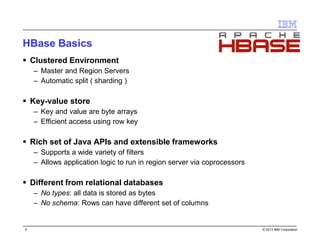
HBase basics
 Clustered Environment
 Master and Region Servers
 Automatic split ( sharding )
 Key-value store
 Key and value are byte arrays
 Efficient access using row key
 Rich set of Java APIs and extensible frameworks
 Supports a wide variety of filters
 Allows application logic to run in region server via coprocessors
 Different from relational databases
 No types: all data is stored as bytes
 No schema: Rows can have different set of columns
© 2016 IBM Corporation6
HBase data model: LOGICAL VIEW
 Table
 Contains column-families
 Column family
 Logical and physical grouping of
columns. Basic storage unit.
 Column
 Exists only when inserted
 Can have multiple versions
 Each row can have different set of
columns
 Each column identified by it’s key
 Row key
 Implicit primary key
 Used for storing ordered rows
 Efficient queries using row key
HBTABLE
Row key Value
11111 cf_data:
{‘cq_name’: ‘name1’,
‘cq_val’: 1111}
cf_info:
{‘cq_desc’: ‘desc11111’}
22222 cf_data:
{‘cq_name’: ‘name2’,
‘cq_val’: 2013 @ ts = 2013,
‘cq_val’: 2012 @ ts = 2012
}
HFileHFileHFile
11111 cf_data cq_name name1 @ ts1
11111 cf_data cq_val 1111 @ ts1
22222 cf_data cq_name name2 @ ts1
22222 cf_data cq_val 2013 @ ts1
22222 cf_data cq_val 2012 @ ts2
HFile
11111 cf_info cq_desc desc11111 @ ts1
© 2016 IBM Corporation7
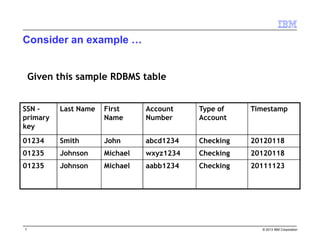
Consider an example …
Client ID Last Name First
Name
Account
Number
Type of
Account
Timestamp
01234 Smith John abcd1234 Checking 20120118
01235 Johnson Michael wxyz1234 Checking 20120118
01235 Johnson Michael aabb1234 Checking 20111123
Given this sample RDBMS table
© 2016 IBM Corporation8
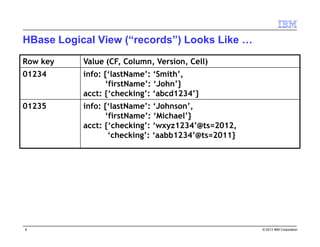
HBase logical view (“records”) looks like . . .
Row key Value (CF, Column, Version, Cell)
01234 info: {‘lastName’: ‘Smith’,
‘firstName’: ‘John’}
acct: {‘checking’: ‘abcd1234’}
01235 info: {‘lastName’: ‘Johnson’,
‘firstName’: ‘Michael’}
acct: {‘checking’: ‘wxyz1234’@ts=2012,
‘checking’: ‘aabb1234’@ts=2011}
© 2016 IBM Corporation9
While the physical view (“cell”) looks like . . .
Row Key Column Key Timestamp Cell Value
01234 info:fname 1330843130 John
01234 info:lname 1330843130 Smith
01235 info:fname 1330843345 Michael
01235 info:lname 1330843345 Johnson
info Column Family
acct Column Family
Row Key Column Key Timestamp Cell Value
01234 acct:checking 1330843130 abcd1234
01235 acct:checking 1330843345 wxyz1234
01235 acct:checking 1330843239 aabb1234
Key/Value Row Column Family Column Qualifier Timestamp Value
Key
© 2016 IBM Corporation10
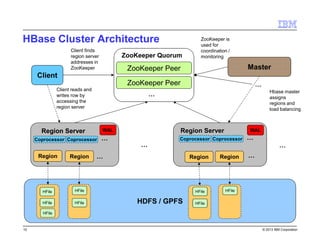
HBase cluster architecture
HDFS
Region Server
…
Master
…
Client
ZooKeeper Peer
ZooKeeper Quorum
ZooKeeper Peer
…
Hbase master
assigns
regions and
load balancing
Client finds
region server
addresses in
ZooKeeper
Client reads and
writes row by
accessing the
region server
ZooKeeper is
used for
coordination /
monitoring
Region
Region Server
Region … Region Region …
HFile
HFile
HFile
HFile
HFile
HFile HFile HFile
HFile HFile
Coprocessor Coprocessor …Coprocessor Coprocessor
Region Server
Coprocessor CoprocessorCoprocessor …CoprocessorCoprocessor …CoprocessorCoprocessor
… …
WAL WAL
© 2016 IBM Corporation11
How are tables stored in HBase?
Rows
Table–LogicalView
A
.
.
K
.
.
T
.
.
Z
Keys:[A-D]
Keys:[E-H]
Keys:[S-V]
Keys:[N-R]
Keys:[I-M]
Keys:[W-Z]
Region Server 1 Region Server 2 Region Server 3
Region
Region
Region
Region
Region
Region
Auto-Sharded Regions
The data is “sharded”
Each shard contains all the data in a key-range
© 2016 IBM Corporation12
Agenda
 HBase overview
 Big SQL with HBase
 Creating tables and views
 Populating tables with data
 Querying data
 Design considerations
 Reducing storage and I/O
 Generating unique row keys
 Specifying dense / composite columns
 Encoding data
 Advanced topics
© 2016 IBM Corporation13
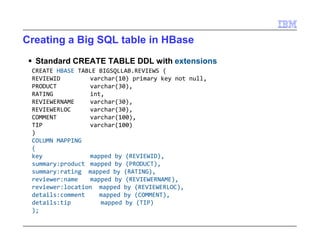
Creating a Big SQL table in HBase
 Standard CREATE TABLE DDL with extensions
CREATE HBASE TABLE BIGSQLLAB.REVIEWS (
REVIEWID varchar(10) primary key not null,
PRODUCT varchar(30),
RATING int,
REVIEWERNAME varchar(30),
REVIEWERLOC varchar(30),
COMMENT varchar(100),
TIP varchar(100)
)
COLUMN MAPPING
(
key mapped by (REVIEWID),
summary:product mapped by (PRODUCT),
summary:rating mapped by (RATING),
reviewer:name mapped by (REVIEWERNAME),
reviewer:location mapped by (REVIEWERLOC),
details:comment mapped by (COMMENT),
details:tip mapped by (TIP)
);
© 2016 IBM Corporation14
Results from previous CREATE TABLE . . .
 Data stored in subdirectory of HBase
 /hbase/data/default/table
 Additional subdirectories for meta data, column families
 Table’s data are files within column family subdirectories
 Views over Big SQL HBase tables supported – no special syntax
create view bigsqllab.testview as
select reviewid, product, reviewername, reviewerloc
from bigsqllab.reviews
where rating >= 3;
© 2016 IBM Corporation15
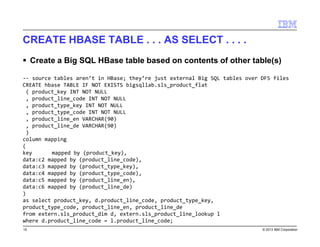
CREATE HBASE TABLE . . . AS SELECT . . . .
 Create a Big SQL HBase table based on contents of other table(s)
-- source tables aren’t in HBase; they’re just external Big SQL tables over DFS files
CREATE hbase TABLE IF NOT EXISTS bigsqllab.sls_product_flat
( product_key INT NOT NULL
, product_line_code INT NOT NULL
, product_type_key INT NOT NULL
, product_type_code INT NOT NULL
, product_line_en VARCHAR(90)
, product_line_de VARCHAR(90)
)
column mapping
(
key mapped by (product_key),
data:c2 mapped by (product_line_code),
data:c3 mapped by (product_type_key),
data:c4 mapped by (product_type_code),
data:c5 mapped by (product_line_en),
data:c6 mapped by (product_line_de)
)
as select product_key, d.product_line_code, product_type_key,
product_type_code, product_line_en, product_line_de
from extern.sls_product_dim d, extern.sls_product_line_lookup l
where d.product_line_code = l.product_line_code;
© 2016 IBM Corporation16
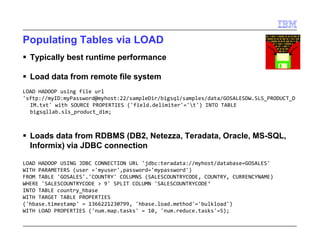
Populating tables via LOAD
 Typically best runtime performance
 Load data from remote file system
LOAD HADOOP using file url
'sftp://myID:myPassword@myhost:22/sampleDir/bigsql/samples/data/GOSALESDW.SLS_PRODUCT_
DIM.txt' with SOURCE PROPERTIES ('field.delimiter'='t') INTO TABLE
bigsqllab.sls_product_dim;
 Loads data from RDBMS (DB2, Netezza, Teradata, Oracle, MS-SQL,
Informix) via JDBC connection
LOAD HADOOP USING JDBC CONNECTION URL 'jdbc:teradata://myhost/database=GOSALES'
WITH PARAMETERS (user ='myuser',password='mypassword')
FROM TABLE 'GOSALES'.'COUNTRY' COLUMNS (SALESCOUNTRYCODE, COUNTRY, CURRENCYNAME)
WHERE 'SALESCOUNTRYCODE > 9' SPLIT COLUMN 'SALESCOUNTRYCODE‘
INTO TABLE country_hbase
WITH TARGET TABLE PROPERTIES
('hbase.timestamp' = 1366221230799, 'hbase.load.method'='bulkload')
WITH LOAD PROPERTIES ('num.map.tasks' = 10, 'num.reduce.tasks'=5);
© 2016 IBM Corporation17
SQL capability highlights
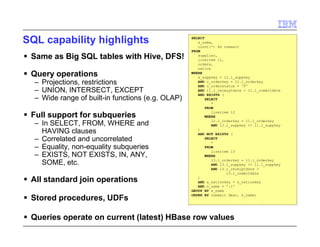
 Same SELECT support as Big SQL tables
with Hive, DFS!
 Query operations
 Projections, restrictions
 UNION, INTERSECT, EXCEPT
 Wide range of built-in functions (e.g. OLAP)
 Full support for subqueries
 In SELECT, FROM, WHERE and
HAVING clauses
 Correlated and uncorrelated
 Equality, non-equality subqueries
 EXISTS, NOT EXISTS, IN, ANY,
SOME, etc.
 All standard join operations
 UPDATE and DELETE operations
 Stored procedures, UDFs
 Queries operate on current (latest) HBase
row values
SELECT
s_name,
count(*) AS numwait
FROM
supplier,
lineitem l1,
orders,
nation
WHERE
s_suppkey = l1.l_suppkey
AND o_orderkey = l1.l_orderkey
AND o_orderstatus = 'F'
AND l1.l_receiptdate > l1.l_commitdate
AND EXISTS (
SELECT
*
FROM
lineitem l2
WHERE
l2.l_orderkey = l1.l_orderkey
AND l2.l_suppkey <> l1.l_suppkey
)
AND NOT EXISTS (
SELECT
*
FROM
lineitem l3
WHERE
l3.l_orderkey = l1.l_orderkey
AND l3.l_suppkey <> l1.l_suppkey
AND l3.l_receiptdate >
l3.l_commitdate
)
AND s_nationkey = n_nationkey
AND n_name = ':1'
GROUP BY s_name
ORDER BY numwait desc, s_name;
© 2016 IBM Corporation18
Agenda
 HBase overview
 Big SQL with HBase
 Creating tables and views
 Populating tables with data
 Querying data
 Design considerations
 Reducing storage and I/O
 Generating unique row keys
 Specifying dense / composite columns
 Encoding data
 Advanced topics
© 2016 IBM Corporation19
Storage and I/O considerations
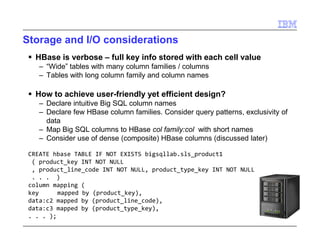
 HBase is verbose – full key info stored with each cell value
 “Wide” tables with many column families / columns
 Tables with long column family and column names
 How to achieve user-friendly yet efficient design?
 Declare intuitive Big SQL column names
 Declare few HBase column families. Consider query patterns, exclusivity of data
 Map Big SQL columns to HBase col family:col with short names
 Consider use of dense (composite) HBase columns (discussed later)
CREATE hbase TABLE IF NOT EXISTS bigsqllab.sls_product1
( product_key INT NOT NULL
, product_line_code INT NOT NULL, product_type_key INT NOT NULL
. . . )
column mapping (
key mapped by (product_key),
data:c2 mapped by (product_line_code),
data:c3 mapped by (product_type_key),
. . . );
© 2016 IBM Corporation20
Forcing unique row keys
 HBase requires unique row keys for each row
 PUT (insert) with duplicate row key value creates new version of data – no error
as with relational PK!
 Modeling challenge for some RDBMS designs
 Big SQL's FORCE KEY UNIQUE allows for duplicate row keys
 Big SQL transparently appends a "uniqifier" to the row key (36 bytes)
CREATE HBASE TABLE DUP_ROW
(
C1 INT NOT NULL,
C2 INT NOT NULL
)
COLUMN MAPPING
(
KEY MAPPED BY (C1) FORCE KEY UNIQUE
CF:C1 MAPPED BY (C2)
);
DUP_ROW
0x0000010AF-F2E4-A…
Key Value
C1 0x00000001
Row Key Col Fam: CF
1> INSERT INTO DUP_ROW VALUES (1, 1), (1, 2);
0x0000010DE-E134-0…
Key Value
C1 0x00000002
© 2016 IBM Corporation21
Specifying dense columns
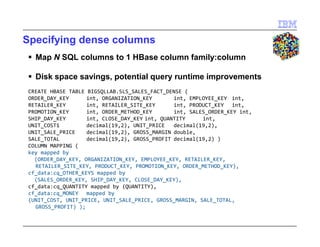
 Map N SQL columns to 1 HBase column family:column
 Disk space savings, potential query runtime improvements
CREATE HBASE TABLE BIGSQLLAB.SLS_SALES_FACT_DENSE (
ORDER_DAY_KEY int, ORGANIZATION_KEY int, EMPLOYEE_KEY int,
RETAILER_KEY int, RETAILER_SITE_KEY int, PRODUCT_KEY int,
PROMOTION_KEY int, ORDER_METHOD_KEY int, SALES_ORDER_KEY int,
SHIP_DAY_KEY int, CLOSE_DAY_KEY int, QUANTITY int,
UNIT_COST1 decimal(19,2), UNIT_PRICE decimal(19,2),
UNIT_SALE_PRICE decimal(19,2), GROSS_MARGIN double,
SALE_TOTAL decimal(19,2), GROSS_PROFIT decimal(19,2) )
COLUMN MAPPING (
key mapped by
(ORDER_DAY_KEY, ORGANIZATION_KEY, EMPLOYEE_KEY, RETAILER_KEY, RETAILER_SITE_KEY,
PRODUCT_KEY, PROMOTION_KEY, ORDER_METHOD_KEY),
cf_data:cq_OTHER_KEYS mapped by
(SALES_ORDER_KEY, SHIP_DAY_KEY, CLOSE_DAY_KEY),
cf_data:cq_QUANTITY mapped by (QUANTITY),
cf_data:cq_MONEY mapped by
(UNIT_COST, UNIT_PRICE, UNIT_SALE_PRICE, GROSS_MARGIN, SALE_TOTAL, GROSS_PROFIT) );
© 2016 IBM Corporation22
Encoding data
 3 options with Big SQL
 Binary: value stored in platform neutral binary encoding
 String: value converted to string and stored as UTF-8 bytes
 Custom: user provided Hive SerDe class to encode/decode column(s)
 Specified at table creation
 BINARY
 Based on Hive’s BinarySortable SerDe
 Default (and recommended) encoding
 STRING
 Format dictated by Java’s toString() functions
 Easy to read but expensive to convert
 Generally discouraged, particularly for numeric data
• Query predicates of numeric data encoded as Strings won’t be pushed down
© 2016 IBM Corporation23
Agenda
 HBase overview
 Big SQL with HBase
 Creating tables and views
 Populating tables with data
 Querying data
 Design considerations
 Reducing storage and I/O
 Generating unique row keys
 Specifying dense / composite columns
 Encoding data
 Advanced topics
© 2016 IBM Corporation24
Secondary indexes
create hbase table dt(id int,c1 string,c2 string,c3 string,c4 string,c5 string)
column mapping (key mapped by (id), f:a mapped by (c1,c2,c3), f:b mapped by (c4,c5));
create index ixc3 on dt (c3);
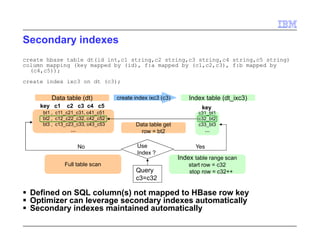
 Defined on SQL column(s) not mapped to HBase row key
 Optimizer can leverage secondary indexes automatically
 Secondary indexes maintained automatically
bt1 , c11_c21_c31, c41_c51
bt2 , c12_c22_c32, c42_c52
bt3 , c13_c23_c33, c43_c53
…
key c1 c2 c3 c4 c5
c31_bt1
c32_bt2
c33_bt3
…
key
Data table (dt) Index table (dt_ixc3)
Use
Index ?
Query
c3=c32
create index ixc3 (c3)
YesNo
Full table scan
Index table range scan
start row = c32
stop row = c32++
Data table get
row = bt2
© 2016 IBM Corporation25
Salting
 Adds prefix to row key
 Helps minimize hot spots in HBase regions
 Common occurrence with sequential row key values (writes often hit same
Region Server, inhibiting parallelism)
 Logical example (prefix routes salted rows to different regions):
 CREATE HBASE TABLE . . . ADD SALT
CREATE HBASE TABLE mysalt1 ( rowkey INT, c0 INT)
COLUMN MAPPING ( KEY MAPPED BY (rowkey), f:q MAPPED BY (c0) ) ADD SALT;
© 2016 IBM Corporation26
Get started with Big SQL: External resources
 Hadoop Dev: links to videos, white paper, lab, . . . .
https://developer.ibm.com/hadoop/

Big Data: Big SQL and HBase

  • 1.
    © 2016 IBMCorporation Big SQL and HBase: A Technical Introduction Created by C. M. Saracco
  • 2.
    © 2016 IBMCorporation2 Executive summary  Big SQL  Industry-standard SQL interface for data managed by IBM’s Hadoop platform  Table creators chose desired storage mechanism  Big SQL queries require no special syntax due to underlying storage  Why Big SQL and HBase?  Easy on-ramp to Hadoop for SQL professionals  Support familiar SQL tools / applications (via JDBC and ODBC drivers)  HBase very popular in Hadoop – low latency for certain queries, good for sparse data . . .  What operations are supported with HBase?  Create tables / views. DDL extensions for exploiting HBase (e.g., column mappings, FORCE UNIQUE KEY, ADD SALT, . . . )  Load data into tables (from local files, remote files, RDBMSs)  Query data (wide range of relational operators, including join, union, wide range of sub- queries, wide range of built-in functions . . . . )  Update and delete data  Create secondary indexes  Collect statistics and inspect data access plan  . . . .
  • 3.
    © 2016 IBMCorporation3 Agenda  HBase overview  Big SQL with HBase  Creating tables and views  Populating tables with data  Querying data  Design considerations  Reducing storage and I/O  Generating unique row keys  Specifying dense / composite columns  Encoding data  Advanced topics
  • 4.
    © 2016 IBMCorporation4 What is HBase?  A columnar NoSQL data store for Hadoop  Data stored as a sparse, distributed, persistent multidimensional sorted map  An industry leading implementation of Google’s BigTable Design  An open source Apache Top Level Project  HBase powers some of the leading sites on the Web
  • 5.
    © 2016 IBMCorporation5 HBase basics  Clustered Environment  Master and Region Servers  Automatic split ( sharding )  Key-value store  Key and value are byte arrays  Efficient access using row key  Rich set of Java APIs and extensible frameworks  Supports a wide variety of filters  Allows application logic to run in region server via coprocessors  Different from relational databases  No types: all data is stored as bytes  No schema: Rows can have different set of columns
  • 6.
    © 2016 IBMCorporation6 HBase data model: LOGICAL VIEW  Table  Contains column-families  Column family  Logical and physical grouping of columns. Basic storage unit.  Column  Exists only when inserted  Can have multiple versions  Each row can have different set of columns  Each column identified by it’s key  Row key  Implicit primary key  Used for storing ordered rows  Efficient queries using row key HBTABLE Row key Value 11111 cf_data: {‘cq_name’: ‘name1’, ‘cq_val’: 1111} cf_info: {‘cq_desc’: ‘desc11111’} 22222 cf_data: {‘cq_name’: ‘name2’, ‘cq_val’: 2013 @ ts = 2013, ‘cq_val’: 2012 @ ts = 2012 } HFileHFileHFile 11111 cf_data cq_name name1 @ ts1 11111 cf_data cq_val 1111 @ ts1 22222 cf_data cq_name name2 @ ts1 22222 cf_data cq_val 2013 @ ts1 22222 cf_data cq_val 2012 @ ts2 HFile 11111 cf_info cq_desc desc11111 @ ts1
  • 7.
    © 2016 IBMCorporation7 Consider an example … Client ID Last Name First Name Account Number Type of Account Timestamp 01234 Smith John abcd1234 Checking 20120118 01235 Johnson Michael wxyz1234 Checking 20120118 01235 Johnson Michael aabb1234 Checking 20111123 Given this sample RDBMS table
  • 8.
    © 2016 IBMCorporation8 HBase logical view (“records”) looks like . . . Row key Value (CF, Column, Version, Cell) 01234 info: {‘lastName’: ‘Smith’, ‘firstName’: ‘John’} acct: {‘checking’: ‘abcd1234’} 01235 info: {‘lastName’: ‘Johnson’, ‘firstName’: ‘Michael’} acct: {‘checking’: ‘wxyz1234’@ts=2012, ‘checking’: ‘aabb1234’@ts=2011}
  • 9.
    © 2016 IBMCorporation9 While the physical view (“cell”) looks like . . . Row Key Column Key Timestamp Cell Value 01234 info:fname 1330843130 John 01234 info:lname 1330843130 Smith 01235 info:fname 1330843345 Michael 01235 info:lname 1330843345 Johnson info Column Family acct Column Family Row Key Column Key Timestamp Cell Value 01234 acct:checking 1330843130 abcd1234 01235 acct:checking 1330843345 wxyz1234 01235 acct:checking 1330843239 aabb1234 Key/Value Row Column Family Column Qualifier Timestamp Value Key
  • 10.
    © 2016 IBMCorporation10 HBase cluster architecture HDFS Region Server … Master … Client ZooKeeper Peer ZooKeeper Quorum ZooKeeper Peer … Hbase master assigns regions and load balancing Client finds region server addresses in ZooKeeper Client reads and writes row by accessing the region server ZooKeeper is used for coordination / monitoring Region Region Server Region … Region Region … HFile HFile HFile HFile HFile HFile HFile HFile HFile HFile Coprocessor Coprocessor …Coprocessor Coprocessor Region Server Coprocessor CoprocessorCoprocessor …CoprocessorCoprocessor …CoprocessorCoprocessor … … WAL WAL
  • 11.
    © 2016 IBMCorporation11 How are tables stored in HBase? Rows Table–LogicalView A . . K . . T . . Z Keys:[A-D] Keys:[E-H] Keys:[S-V] Keys:[N-R] Keys:[I-M] Keys:[W-Z] Region Server 1 Region Server 2 Region Server 3 Region Region Region Region Region Region Auto-Sharded Regions The data is “sharded” Each shard contains all the data in a key-range
  • 12.
    © 2016 IBMCorporation12 Agenda  HBase overview  Big SQL with HBase  Creating tables and views  Populating tables with data  Querying data  Design considerations  Reducing storage and I/O  Generating unique row keys  Specifying dense / composite columns  Encoding data  Advanced topics
  • 13.
    © 2016 IBMCorporation13 Creating a Big SQL table in HBase  Standard CREATE TABLE DDL with extensions CREATE HBASE TABLE BIGSQLLAB.REVIEWS ( REVIEWID varchar(10) primary key not null, PRODUCT varchar(30), RATING int, REVIEWERNAME varchar(30), REVIEWERLOC varchar(30), COMMENT varchar(100), TIP varchar(100) ) COLUMN MAPPING ( key mapped by (REVIEWID), summary:product mapped by (PRODUCT), summary:rating mapped by (RATING), reviewer:name mapped by (REVIEWERNAME), reviewer:location mapped by (REVIEWERLOC), details:comment mapped by (COMMENT), details:tip mapped by (TIP) );
  • 14.
    © 2016 IBMCorporation14 Results from previous CREATE TABLE . . .  Data stored in subdirectory of HBase  /hbase/data/default/table  Additional subdirectories for meta data, column families  Table’s data are files within column family subdirectories  Views over Big SQL HBase tables supported – no special syntax create view bigsqllab.testview as select reviewid, product, reviewername, reviewerloc from bigsqllab.reviews where rating >= 3;
  • 15.
    © 2016 IBMCorporation15 CREATE HBASE TABLE . . . AS SELECT . . . .  Create a Big SQL HBase table based on contents of other table(s) -- source tables aren’t in HBase; they’re just external Big SQL tables over DFS files CREATE hbase TABLE IF NOT EXISTS bigsqllab.sls_product_flat ( product_key INT NOT NULL , product_line_code INT NOT NULL , product_type_key INT NOT NULL , product_type_code INT NOT NULL , product_line_en VARCHAR(90) , product_line_de VARCHAR(90) ) column mapping ( key mapped by (product_key), data:c2 mapped by (product_line_code), data:c3 mapped by (product_type_key), data:c4 mapped by (product_type_code), data:c5 mapped by (product_line_en), data:c6 mapped by (product_line_de) ) as select product_key, d.product_line_code, product_type_key, product_type_code, product_line_en, product_line_de from extern.sls_product_dim d, extern.sls_product_line_lookup l where d.product_line_code = l.product_line_code;
  • 16.
    © 2016 IBMCorporation16 Populating tables via LOAD  Typically best runtime performance  Load data from remote file system LOAD HADOOP using file url 'sftp://myID:myPassword@myhost:22/sampleDir/bigsql/samples/data/GOSALESDW.SLS_PRODUCT_ DIM.txt' with SOURCE PROPERTIES ('field.delimiter'='t') INTO TABLE bigsqllab.sls_product_dim;  Loads data from RDBMS (DB2, Netezza, Teradata, Oracle, MS-SQL, Informix) via JDBC connection LOAD HADOOP USING JDBC CONNECTION URL 'jdbc:teradata://myhost/database=GOSALES' WITH PARAMETERS (user ='myuser',password='mypassword') FROM TABLE 'GOSALES'.'COUNTRY' COLUMNS (SALESCOUNTRYCODE, COUNTRY, CURRENCYNAME) WHERE 'SALESCOUNTRYCODE > 9' SPLIT COLUMN 'SALESCOUNTRYCODE‘ INTO TABLE country_hbase WITH TARGET TABLE PROPERTIES ('hbase.timestamp' = 1366221230799, 'hbase.load.method'='bulkload') WITH LOAD PROPERTIES ('num.map.tasks' = 10, 'num.reduce.tasks'=5);
  • 17.
    © 2016 IBMCorporation17 SQL capability highlights  Same SELECT support as Big SQL tables with Hive, DFS!  Query operations  Projections, restrictions  UNION, INTERSECT, EXCEPT  Wide range of built-in functions (e.g. OLAP)  Full support for subqueries  In SELECT, FROM, WHERE and HAVING clauses  Correlated and uncorrelated  Equality, non-equality subqueries  EXISTS, NOT EXISTS, IN, ANY, SOME, etc.  All standard join operations  UPDATE and DELETE operations  Stored procedures, UDFs  Queries operate on current (latest) HBase row values SELECT s_name, count(*) AS numwait FROM supplier, lineitem l1, orders, nation WHERE s_suppkey = l1.l_suppkey AND o_orderkey = l1.l_orderkey AND o_orderstatus = 'F' AND l1.l_receiptdate > l1.l_commitdate AND EXISTS ( SELECT * FROM lineitem l2 WHERE l2.l_orderkey = l1.l_orderkey AND l2.l_suppkey <> l1.l_suppkey ) AND NOT EXISTS ( SELECT * FROM lineitem l3 WHERE l3.l_orderkey = l1.l_orderkey AND l3.l_suppkey <> l1.l_suppkey AND l3.l_receiptdate > l3.l_commitdate ) AND s_nationkey = n_nationkey AND n_name = ':1' GROUP BY s_name ORDER BY numwait desc, s_name;
  • 18.
    © 2016 IBMCorporation18 Agenda  HBase overview  Big SQL with HBase  Creating tables and views  Populating tables with data  Querying data  Design considerations  Reducing storage and I/O  Generating unique row keys  Specifying dense / composite columns  Encoding data  Advanced topics
  • 19.
    © 2016 IBMCorporation19 Storage and I/O considerations  HBase is verbose – full key info stored with each cell value  “Wide” tables with many column families / columns  Tables with long column family and column names  How to achieve user-friendly yet efficient design?  Declare intuitive Big SQL column names  Declare few HBase column families. Consider query patterns, exclusivity of data  Map Big SQL columns to HBase col family:col with short names  Consider use of dense (composite) HBase columns (discussed later) CREATE hbase TABLE IF NOT EXISTS bigsqllab.sls_product1 ( product_key INT NOT NULL , product_line_code INT NOT NULL, product_type_key INT NOT NULL . . . ) column mapping ( key mapped by (product_key), data:c2 mapped by (product_line_code), data:c3 mapped by (product_type_key), . . . );
  • 20.
    © 2016 IBMCorporation20 Forcing unique row keys  HBase requires unique row keys for each row  PUT (insert) with duplicate row key value creates new version of data – no error as with relational PK!  Modeling challenge for some RDBMS designs  Big SQL's FORCE KEY UNIQUE allows for duplicate row keys  Big SQL transparently appends a "uniqifier" to the row key (36 bytes) CREATE HBASE TABLE DUP_ROW ( C1 INT NOT NULL, C2 INT NOT NULL ) COLUMN MAPPING ( KEY MAPPED BY (C1) FORCE KEY UNIQUE CF:C1 MAPPED BY (C2) ); DUP_ROW 0x0000010AF-F2E4-A… Key Value C1 0x00000001 Row Key Col Fam: CF 1> INSERT INTO DUP_ROW VALUES (1, 1), (1, 2); 0x0000010DE-E134-0… Key Value C1 0x00000002
  • 21.
    © 2016 IBMCorporation21 Specifying dense columns  Map N SQL columns to 1 HBase column family:column  Disk space savings, potential query runtime improvements CREATE HBASE TABLE BIGSQLLAB.SLS_SALES_FACT_DENSE ( ORDER_DAY_KEY int, ORGANIZATION_KEY int, EMPLOYEE_KEY int, RETAILER_KEY int, RETAILER_SITE_KEY int, PRODUCT_KEY int, PROMOTION_KEY int, ORDER_METHOD_KEY int, SALES_ORDER_KEY int, SHIP_DAY_KEY int, CLOSE_DAY_KEY int, QUANTITY int, UNIT_COST1 decimal(19,2), UNIT_PRICE decimal(19,2), UNIT_SALE_PRICE decimal(19,2), GROSS_MARGIN double, SALE_TOTAL decimal(19,2), GROSS_PROFIT decimal(19,2) ) COLUMN MAPPING ( key mapped by (ORDER_DAY_KEY, ORGANIZATION_KEY, EMPLOYEE_KEY, RETAILER_KEY, RETAILER_SITE_KEY, PRODUCT_KEY, PROMOTION_KEY, ORDER_METHOD_KEY), cf_data:cq_OTHER_KEYS mapped by (SALES_ORDER_KEY, SHIP_DAY_KEY, CLOSE_DAY_KEY), cf_data:cq_QUANTITY mapped by (QUANTITY), cf_data:cq_MONEY mapped by (UNIT_COST, UNIT_PRICE, UNIT_SALE_PRICE, GROSS_MARGIN, SALE_TOTAL, GROSS_PROFIT) );
  • 22.
    © 2016 IBMCorporation22 Encoding data  3 options with Big SQL  Binary: value stored in platform neutral binary encoding  String: value converted to string and stored as UTF-8 bytes  Custom: user provided Hive SerDe class to encode/decode column(s)  Specified at table creation  BINARY  Based on Hive’s BinarySortable SerDe  Default (and recommended) encoding  STRING  Format dictated by Java’s toString() functions  Easy to read but expensive to convert  Generally discouraged, particularly for numeric data • Query predicates of numeric data encoded as Strings won’t be pushed down
  • 23.
    © 2016 IBMCorporation23 Agenda  HBase overview  Big SQL with HBase  Creating tables and views  Populating tables with data  Querying data  Design considerations  Reducing storage and I/O  Generating unique row keys  Specifying dense / composite columns  Encoding data  Advanced topics
  • 24.
    © 2016 IBMCorporation24 Secondary indexes create hbase table dt(id int,c1 string,c2 string,c3 string,c4 string,c5 string) column mapping (key mapped by (id), f:a mapped by (c1,c2,c3), f:b mapped by (c4,c5)); create index ixc3 on dt (c3);  Defined on SQL column(s) not mapped to HBase row key  Optimizer can leverage secondary indexes automatically  Secondary indexes maintained automatically bt1 , c11_c21_c31, c41_c51 bt2 , c12_c22_c32, c42_c52 bt3 , c13_c23_c33, c43_c53 … key c1 c2 c3 c4 c5 c31_bt1 c32_bt2 c33_bt3 … key Data table (dt) Index table (dt_ixc3) Use Index ? Query c3=c32 create index ixc3 (c3) YesNo Full table scan Index table range scan start row = c32 stop row = c32++ Data table get row = bt2
  • 25.
    © 2016 IBMCorporation25 Salting  Adds prefix to row key  Helps minimize hot spots in HBase regions  Common occurrence with sequential row key values (writes often hit same Region Server, inhibiting parallelism)  Logical example (prefix routes salted rows to different regions):  CREATE HBASE TABLE . . . ADD SALT CREATE HBASE TABLE mysalt1 ( rowkey INT, c0 INT) COLUMN MAPPING ( KEY MAPPED BY (rowkey), f:q MAPPED BY (c0) ) ADD SALT;
  • 26.
    © 2016 IBMCorporation26 Get started with Big SQL: External resources  Hadoop Dev: links to videos, white paper, lab, . . . . https://developer.ibm.com/hadoop/