Hive and HiveQL
What is Hive?
• Apache Hive is a data warehouse system for Hadoop.
• Hive is not a relational database, it only maintains metadata information about
your Big Data stored on HDFS.
• Hive allows to treat your Big Data as tables and perform SQL-like operations on
the data using a scripting language called HiveQL.
• Hive is not a database, but it uses a database (called the metastore) to store the
tables that you define. Hive uses Derby by default.
• A Hive table consists of a schema stored in the metastore and data stored on
HDFS.
• Hive converts HiveQL commands into MapReduce jobs.
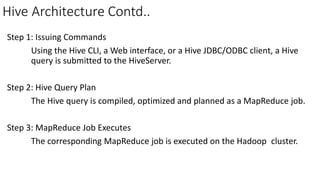
Hive Architecture Contd..
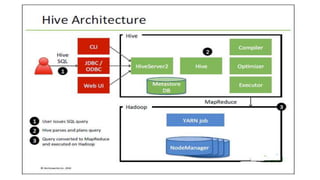
Step 1: Issuing Commands
Using the Hive CLI, a Web interface, or a Hive JDBC/ODBC client, a Hive
query is submitted to the HiveServer.
Step 2: Hive Query Plan
The Hive query is compiled, optimized and planned as a MapReduce job.
Step 3: MapReduce Job Executes
The corresponding MapReduce job is executed on the Hadoop cluster.
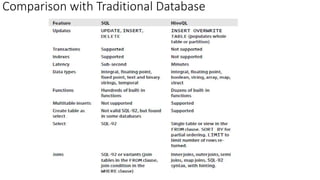
Comparison with Traditional Database
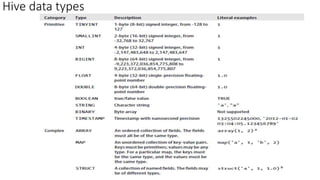
Hive data types
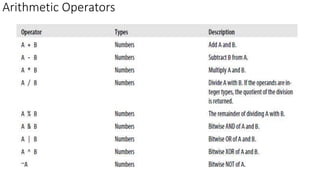
Arithmetic Operators
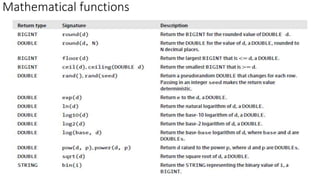
Mathematical functions
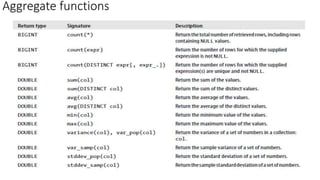
Aggregate functions
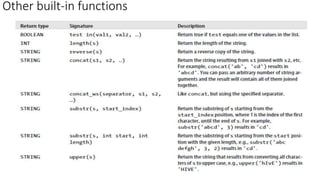
Other built-in functions
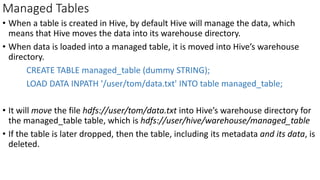
Managed Tables
• When a table is created in Hive, by default Hive will manage the data, which
means that Hive moves the data into its warehouse directory.
• When data is loaded into a managed table, it is moved into Hive’s warehouse
directory.
CREATE TABLE managed_table (dummy STRING);
LOAD DATA INPATH '/user/tom/data.txt' INTO table managed_table;
• It will move the file hdfs://user/tom/data.txt into Hive’s warehouse directory for
the managed_table table, which is hdfs://user/hive/warehouse/managed_table
• If the table is later dropped, then the table, including its metadata and its data, is
deleted.
External Tables
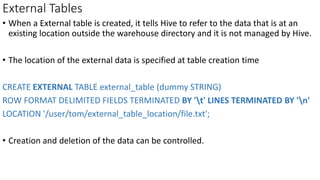
• When a External table is created, it tells Hive to refer to the data that is at an
existing location outside the warehouse directory and it is not managed by Hive.
• The location of the external data is specified at table creation time
CREATE EXTERNAL TABLE external_table (dummy STRING)
ROW FORMAT DELIMITED FIELDS TERMINATED BY 't' LINES TERMINATED BY 'n'
LOCATION '/user/tom/external_table_location/file.txt';
• Creation and deletion of the data can be controlled.
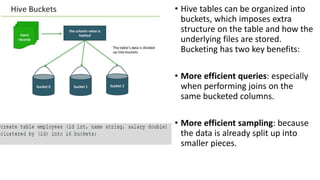
• Hive tables can be organized into
buckets, which imposes extra
structure on the table and how the
underlying files are stored.
Bucketing has two key benefits:
• More efficient queries: especially
when performing joins on the
same bucketed columns.
• More efficient sampling: because
the data is already split up into
smaller pieces.
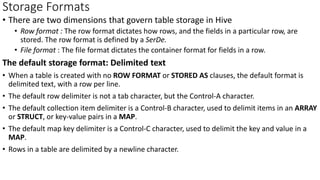
Storage Formats
• There are two dimensions that govern table storage in Hive
• Row format : The row format dictates how rows, and the fields in a particular row, are
stored. The row format is defined by a SerDe.
• File format : The file format dictates the container format for fields in a row.
The default storage format: Delimited text
• When a table is created with no ROW FORMAT or STORED AS clauses, the default format is
delimited text, with a row per line.
• The default row delimiter is not a tab character, but the Control-A character.
• The default collection item delimiter is a Control-B character, used to delimit items in an ARRAY
or STRUCT, or key-value pairs in a MAP.
• The default map key delimiter is a Control-C character, used to delimit the key and value in a
MAP.
• Rows in a table are delimited by a newline character.
Storage Formats Contd..
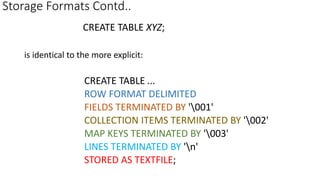
CREATE TABLE XYZ;
is identical to the more explicit:
CREATE TABLE ...
ROW FORMAT DELIMITED
FIELDS TERMINATED BY '001'
COLLECTION ITEMS TERMINATED BY '002'
MAP KEYS TERMINATED BY '003'
LINES TERMINATED BY 'n'
STORED AS TEXTFILE;
Importing Data
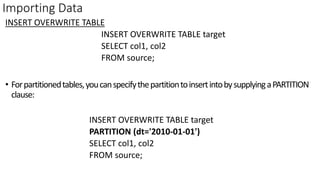
INSERT OVERWRITE TABLE
INSERT OVERWRITE TABLE target
SELECT col1, col2
FROM source;
• Forpartitionedtables,youcanspecifythepartitiontoinsertintobysupplyingaPARTITION
clause:
INSERT OVERWRITE TABLE target
PARTITION (dt='2010-01-01')
SELECT col1, col2
FROM source;
Importing Data Contd..
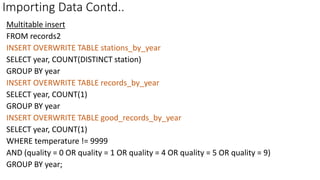
Multitable insert
FROM records2
INSERT OVERWRITE TABLE stations_by_year
SELECT year, COUNT(DISTINCT station)
GROUP BY year
INSERT OVERWRITE TABLE records_by_year
SELECT year, COUNT(1)
GROUP BY year
INSERT OVERWRITE TABLE good_records_by_year
SELECT year, COUNT(1)
WHERE temperature != 9999
AND (quality = 0 OR quality = 1 OR quality = 4 OR quality = 5 OR quality = 9)
GROUP BY year;
Importing Data Contd..
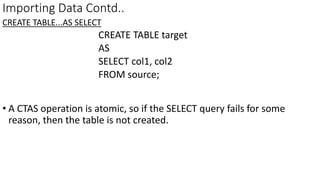
CREATE TABLE...AS SELECT
CREATE TABLE target
AS
SELECT col1, col2
FROM source;
• A CTAS operation is atomic, so if the SELECT query fails for some
reason, then the table is not created.
Altering Tables
• ALTER TABLE source RENAME TO target;
• ALTER TABLE target ADD COLUMNS (col3 STRING);
Dropping Tables
DROP TABLE table_name;
• The DROP TABLE statement deletes the data and metadata for a table. In the
case of external tables, only the metadata is deleted—the data is left
untouched.
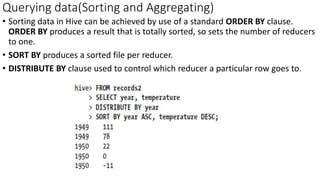
Querying data(Sorting and Aggregating)
• Sorting data in Hive can be achieved by use of a standard ORDER BY clause.
ORDER BY produces a result that is totally sorted, so sets the number of reducers
to one.
• SORT BY produces a sorted file per reducer.
• DISTRIBUTE BY clause used to control which reducer a particular row goes to.
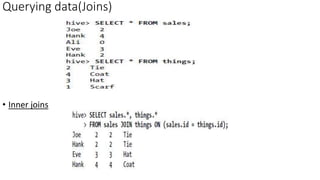
• Inner joins
Querying data(Joins)
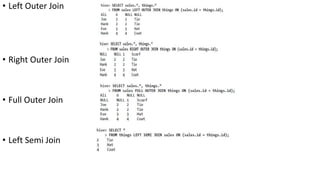
• Left Outer Join
• Right Outer Join
• Full Outer Join
• Left Semi Join
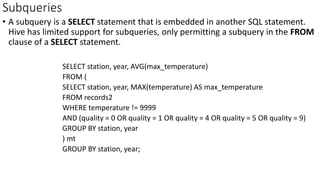
Subqueries
• A subquery is a SELECT statement that is embedded in another SQL statement.
Hive has limited support for subqueries, only permitting a subquery in the FROM
clause of a SELECT statement.
SELECT station, year, AVG(max_temperature)
FROM (
SELECT station, year, MAX(temperature) AS max_temperature
FROM records2
WHERE temperature != 9999
AND (quality = 0 OR quality = 1 OR quality = 4 OR quality = 5 OR quality = 9)
GROUP BY station, year
) mt
GROUP BY station, year;
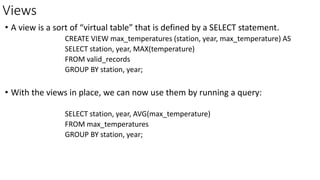
Views
• A view is a sort of “virtual table” that is defined by a SELECT statement.
CREATE VIEW max_temperatures (station, year, max_temperature) AS
SELECT station, year, MAX(temperature)
FROM valid_records
GROUP BY station, year;
• With the views in place, we can now use them by running a query:
SELECT station, year, AVG(max_temperature)
FROM max_temperatures
GROUP BY station, year;
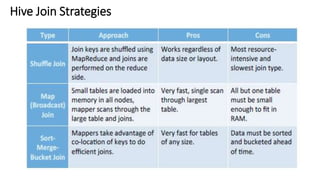
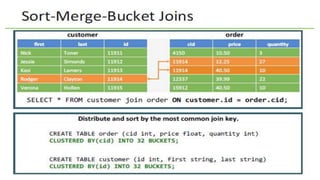
Hive Join Strategies
Hive and HiveQL - Module6

Hive and HiveQL - Module6

  • 1.
  • 2.
    What is Hive? •Apache Hive is a data warehouse system for Hadoop. • Hive is not a relational database, it only maintains metadata information about your Big Data stored on HDFS. • Hive allows to treat your Big Data as tables and perform SQL-like operations on the data using a scripting language called HiveQL. • Hive is not a database, but it uses a database (called the metastore) to store the tables that you define. Hive uses Derby by default. • A Hive table consists of a schema stored in the metastore and data stored on HDFS. • Hive converts HiveQL commands into MapReduce jobs.
  • 4.
    Hive Architecture Contd.. Step1: Issuing Commands Using the Hive CLI, a Web interface, or a Hive JDBC/ODBC client, a Hive query is submitted to the HiveServer. Step 2: Hive Query Plan The Hive query is compiled, optimized and planned as a MapReduce job. Step 3: MapReduce Job Executes The corresponding MapReduce job is executed on the Hadoop cluster.
  • 5.
  • 6.
  • 7.
  • 8.
  • 9.
  • 10.
  • 11.
    Managed Tables • Whena table is created in Hive, by default Hive will manage the data, which means that Hive moves the data into its warehouse directory. • When data is loaded into a managed table, it is moved into Hive’s warehouse directory. CREATE TABLE managed_table (dummy STRING); LOAD DATA INPATH '/user/tom/data.txt' INTO table managed_table; • It will move the file hdfs://user/tom/data.txt into Hive’s warehouse directory for the managed_table table, which is hdfs://user/hive/warehouse/managed_table • If the table is later dropped, then the table, including its metadata and its data, is deleted.
  • 12.
    External Tables • Whena External table is created, it tells Hive to refer to the data that is at an existing location outside the warehouse directory and it is not managed by Hive. • The location of the external data is specified at table creation time CREATE EXTERNAL TABLE external_table (dummy STRING) ROW FORMAT DELIMITED FIELDS TERMINATED BY 't' LINES TERMINATED BY 'n' LOCATION '/user/tom/external_table_location/file.txt'; • Creation and deletion of the data can be controlled.
  • 14.
    • Hive tablescan be organized into buckets, which imposes extra structure on the table and how the underlying files are stored. Bucketing has two key benefits: • More efficient queries: especially when performing joins on the same bucketed columns. • More efficient sampling: because the data is already split up into smaller pieces.
  • 15.
    Storage Formats • Thereare two dimensions that govern table storage in Hive • Row format : The row format dictates how rows, and the fields in a particular row, are stored. The row format is defined by a SerDe. • File format : The file format dictates the container format for fields in a row. The default storage format: Delimited text • When a table is created with no ROW FORMAT or STORED AS clauses, the default format is delimited text, with a row per line. • The default row delimiter is not a tab character, but the Control-A character. • The default collection item delimiter is a Control-B character, used to delimit items in an ARRAY or STRUCT, or key-value pairs in a MAP. • The default map key delimiter is a Control-C character, used to delimit the key and value in a MAP. • Rows in a table are delimited by a newline character.
  • 16.
    Storage Formats Contd.. CREATETABLE XYZ; is identical to the more explicit: CREATE TABLE ... ROW FORMAT DELIMITED FIELDS TERMINATED BY '001' COLLECTION ITEMS TERMINATED BY '002' MAP KEYS TERMINATED BY '003' LINES TERMINATED BY 'n' STORED AS TEXTFILE;
  • 17.
    Importing Data INSERT OVERWRITETABLE INSERT OVERWRITE TABLE target SELECT col1, col2 FROM source; • Forpartitionedtables,youcanspecifythepartitiontoinsertintobysupplyingaPARTITION clause: INSERT OVERWRITE TABLE target PARTITION (dt='2010-01-01') SELECT col1, col2 FROM source;
  • 18.
    Importing Data Contd.. Multitableinsert FROM records2 INSERT OVERWRITE TABLE stations_by_year SELECT year, COUNT(DISTINCT station) GROUP BY year INSERT OVERWRITE TABLE records_by_year SELECT year, COUNT(1) GROUP BY year INSERT OVERWRITE TABLE good_records_by_year SELECT year, COUNT(1) WHERE temperature != 9999 AND (quality = 0 OR quality = 1 OR quality = 4 OR quality = 5 OR quality = 9) GROUP BY year;
  • 19.
    Importing Data Contd.. CREATETABLE...AS SELECT CREATE TABLE target AS SELECT col1, col2 FROM source; • A CTAS operation is atomic, so if the SELECT query fails for some reason, then the table is not created.
  • 20.
    Altering Tables • ALTERTABLE source RENAME TO target; • ALTER TABLE target ADD COLUMNS (col3 STRING); Dropping Tables DROP TABLE table_name; • The DROP TABLE statement deletes the data and metadata for a table. In the case of external tables, only the metadata is deleted—the data is left untouched.
  • 21.
    Querying data(Sorting andAggregating) • Sorting data in Hive can be achieved by use of a standard ORDER BY clause. ORDER BY produces a result that is totally sorted, so sets the number of reducers to one. • SORT BY produces a sorted file per reducer. • DISTRIBUTE BY clause used to control which reducer a particular row goes to.
  • 22.
  • 23.
    • Left OuterJoin • Right Outer Join • Full Outer Join • Left Semi Join
  • 24.
    Subqueries • A subqueryis a SELECT statement that is embedded in another SQL statement. Hive has limited support for subqueries, only permitting a subquery in the FROM clause of a SELECT statement. SELECT station, year, AVG(max_temperature) FROM ( SELECT station, year, MAX(temperature) AS max_temperature FROM records2 WHERE temperature != 9999 AND (quality = 0 OR quality = 1 OR quality = 4 OR quality = 5 OR quality = 9) GROUP BY station, year ) mt GROUP BY station, year;
  • 25.
    Views • A viewis a sort of “virtual table” that is defined by a SELECT statement. CREATE VIEW max_temperatures (station, year, max_temperature) AS SELECT station, year, MAX(temperature) FROM valid_records GROUP BY station, year; • With the views in place, we can now use them by running a query: SELECT station, year, AVG(max_temperature) FROM max_temperatures GROUP BY station, year;
  • 26.