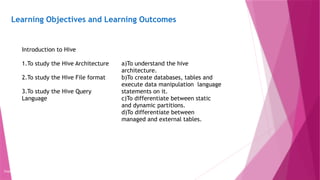
Learning Objectives andLearning Outcomes
Copyright 2015, WILEY INDIA PVT. LTD.
Learning Objectives Learning Outcomes
Introduction to Hive
1.To study the Hive Architecture
2.To study the Hive File format
3.To study the Hive Query
Language
a)To understand the hive
architecture.
b)To create databases, tables and
execute data manipulation language
statements on it.
c)To differentiate between static
and dynamic partitions.
d)To differentiate between
managed and external tables.
3.
Agenda
Copyright 2015, WILEYINDIA PVT. LTD.
What is Hive?
Hive Architecture
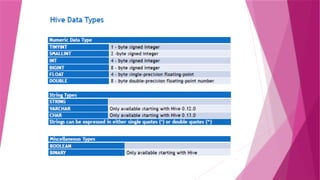
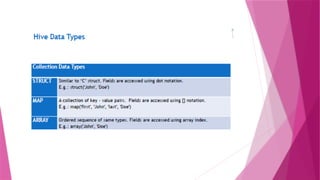
Hive Data Types
Primitive Data Types
Collection Data Types
Hive File Format
Text File
Sequential File
RCFile (Record Columnar File)
Hive Queries
4.
What is Hive?
Hiveis a Data Warehousing tool. Hive is used to query
structured data built on top of Hadoop. Facebook created
Hive component to manage their ever- growing volumes of
data. Hive makes use of the following:
1.HDFS for Storage
2.MapReduce for execution
3.Stores metadata in an RDBMS.
Hive is suitable for data warehousing applications,
processing batch jobs on huge data that is immutable.
Examples: Eg: Analysis of web logs, application logs.
5.
History of HIVE
2007: HIVE was born at Facebook to analyze their incoming log data
2008: HIVE became Apache Hadoop sub-project.
Hive provides HQL(Hive Query Language) which is similar to SQL.
Hive compiles SQL queries into Map Reduce jobs and then runs the job in
the Hadoop Cluster.
Hive provides extensive data type functions and formats for data
summarization and analysis.
6.
Features of Hive
1.It is similar to SQL.
2. HQL is easy to code.
3. Hive supports rich data types/collection data types such
as structs, lists, and maps.
4. Custom types , custom functions can be defined.
5. Hive supports SQL filters, group-by and order-by
clauses.
7.
Points to remember
HiveQuery Language is similar to SQL and gets
compiled into map reduce jobs and then runs the job in
the Hadoop cluster.
Hive's default database is derby.
8.
Hive integration andwork flow
Hourly log data can be stored directly into HDFS and then
data cleansing is performed on the log file. Finally, Hive tables
can be created to query the log file.
9.
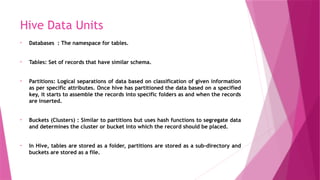
Hive Data Units
•Databases : The namespace for tables.
• Tables: Set of records that have similar schema.
• Partitions: Logical separations of data based on classification of given information
as per specific attributes. Once hive has partitioned the data based on a specified
key, it starts to assemble the records into specific folders as and when the records
are inserted.
• Buckets (Clusters) : Similar to partitions but uses hash functions to segregate data
and determines the cluster or bucket into which the record should be placed.
• In Hive, tables are stored as a folder, partitions are stored as a sub-directory and
buckets are stored as a file.
10.
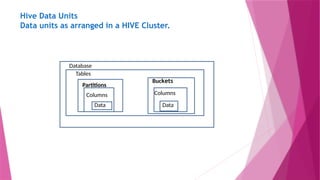
Hive Data Units
Dataunits as arranged in a HIVE Cluster.
Database
Tables
Partitions
Buckets
Data
Columns Columns
Data
12.
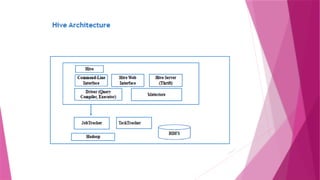
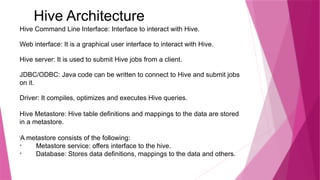
Hive Architecture
Hive CommandLine Interface: Interface to interact with Hive.
Web interface: It is a graphical user interface to interact with Hive.
Hive server: It is used to submit Hive jobs from a client.
JDBC/ODBC: Java code can be written to connect to Hive and submit jobs
on it.
Driver: It compiles, optimizes and executes Hive queries.
Hive Metastore: Hive table definitions and mappings to the data are stored
in a metastore.
l
A metastore consists of the following:
Metastore service: offers interface to the hive.
Database: Stores data definitions, mappings to the data and others.
13.
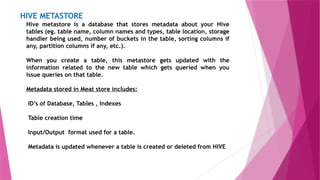
HIVE METASTORE
Hive metastoreis a database that stores metadata about your Hive
tables (eg. table name, column names and types, table location, storage
handler being used, number of buckets in the table, sorting columns if
any, partition columns if any, etc.).
When you create a table, this metastore gets updated with the
information related to the new table which gets queried when you
issue queries on that table.
Metadata stored in Meat store includes:
ID’s of Database, Tables , Indexes
Table creation time
Input/Output format used for a table.
Metadata is updated whenever a table is created or deleted from HIVE
14.
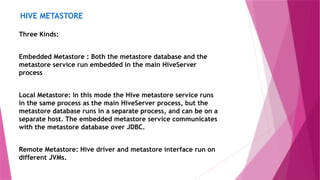
HIVE METASTORE
Three Kinds:
EmbeddedMetastore : Both the metastore database and the
metastore service run embedded in the main HiveServer
process
Local Metastore: In this mode the Hive metastore service runs
in the same process as the main HiveServer process, but the
metastore database runs in a separate process, and can be on a
separate host. The embedded metastore service communicates
with the metastore database over JDBC.
Remote Metastore: Hive driver and metastore interface run on
different JVMs.
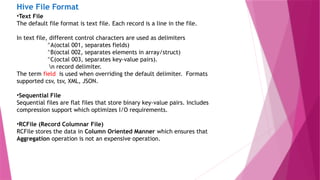
Hive File Format
•TextFile
The default file format is text file. Each record is a line in the file.
In text file, different control characters are used as delimiters
^A(octal 001, separates fields)
^B(octal 002, separates elements in array/struct)
^C(octal 003, separates key-value pairs).
n record delimiter.
The term field is used when overriding the default delimiter. Formats
supported csv, tsv, XML, JSON.
•Sequential File
Sequential files are flat files that store binary key-value pairs. Includes
compression support which optimizes I/O requirements.
•RCFile (Record Columnar File)
RCFile stores the data in Column Oriented Manner which ensures that
Aggregation operation is not an expensive operation.
19.
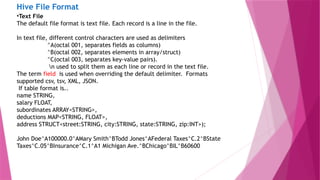
Hive File Format
•TextFile
The default file format is text file. Each record is a line in the file.
In text file, different control characters are used as delimiters
^A(octal 001, separates fields as columns)
^B(octal 002, separates elements in array/struct)
^C(octal 003, separates key-value pairs).
n used to split them as each line or record in the text file.
The term field is used when overriding the default delimiter. Formats
supported csv, tsv, XML, JSON.
If table format is..
name STRING,
salary FLOAT,
subordinates ARRAY<STRING>,
deductions MAP<STRING, FLOAT>,
address STRUCT<street:STRING, city:STRING, state:STRING, zip:INT>);
John Doe^A100000.0^AMary Smith^BTodd Jones^AFederal Taxes^C.2^BState
Taxes^C.05^BInsurance^C.1^A1 Michigan Ave.^BChicago^BIL^B60600
20.
The same samplerecord can be provided in form of JSON document (JavaScript
Object Notation).
{
“name”: “John Doe”,
“salary”: 100000.0,
“subordinates”: [“Mary Smith”, “Todd Jones”],
“deductions”: {
“Federal Taxes”: .2,
“State Taxes”:.05,
“Insurance”:.1
},
“address”: {
“street”: “1 Michigan Ave.”,
“city”:”Chicago”,
“state”: “IL”,
“zip”:60600
}
}
Now you able see how to represent the Complex data type like
ARRAY,MAP,STRUCT in JSON . Readable and easy to represent.
21.
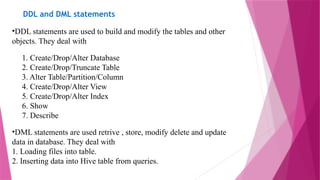
DDL and DMLstatements
•DDL statements are used to build and modify the tables and other
objects. They deal with
1. Create/Drop/Alter Database
2. Create/Drop/Truncate Table
3. Alter Table/Partition/Column
4. Create/Drop/Alter View
5. Create/Drop/Alter Index
6. Show
7. Describe
•DML statements are used retrive , store, modify delete and update
data in database. They deal with
1. Loading files into table.
2. Inserting data into Hive table from queries.
22.
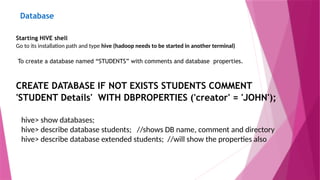
Database
Starting HIVE shell
Goto its installation path and type hive (hadoop needs to be started in another terminal)
To create a database named “STUDENTS” with comments and database properties.
CREATE DATABASE IF NOT EXISTS STUDENTS COMMENT
'STUDENT Details' WITH DBPROPERTIES ('creator' = 'JOHN');
hive> show databases;
hive> describe database students; //shows DB name, comment and directory
hive> describe database extended students; //will show the properties also
23.
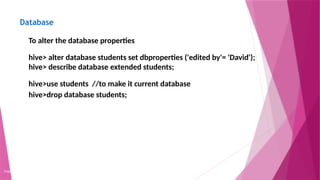
Database
Copyright 2015, WILEYINDIA PVT. LTD.
To alter the database properties
hive> alter database students set dbproperties ('edited by'= 'David');
hive> describe database extended students;
hive>use students //to make it current database
hive>drop database students;
24.
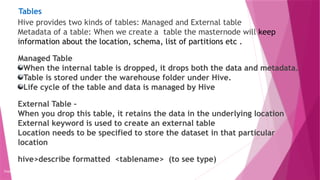
Tables
Copyright 2015, WILEYINDIA PVT. LTD.
Hive provides two kinds of tables: Managed and External table
Metadata of a table: When we create a table the masternode will keep
information about the location, schema, list of partitions etc .
Managed Table
When the internal table is dropped, it drops both the data and metadata.
Table is stored under the warehouse folder under Hive.
Life cycle of the table and data is managed by Hive
External Table –
When you drop this table, it retains the data in the underlying location
External keyword is used to create an external table
Location needs to be specified to store the dataset in that particular
location
hive>describe formatted <tablename> (to see type)
25.
Tables
Copyright 2015, WILEYINDIA PVT. LTD.
To create managed table named ‘STUDENT’.
Format
CREATE [temporary] [external] TABLE [ IF NOT EXISTS] STUDENT(rollno INT,name
STRING,gpa FLOAT) [COMMENT] ROW FORMAT DELIMITED FIELDS TERMINATED BY
't';
CREATE TABLE IF NOT EXISTS STUDENT(rollno INT,name STRING,gpa FLOAT) ROW
FORMAT DELIMITED FIELDS TERMINATED BY 't';
hive>describe STUDENT //will show the schema of the table
26.
Tables
Copyright 2015, WILEYINDIA PVT. LTD.
To create external table named ‘EXT_STUDENT’.
CREATE EXTERNAL TABLE IF NOT EXISTS EXT_STUDENT(rollno INT,name
STRING,gpa FLOAT) ROW FORMAT DELIMITED FIELDS TERMINATED BY 't'
LOCATION ‘/STUDENT_INFO';
ALTER TABLE name RENAME TO new_name
hive> ALTER TABLE employee RENAME TO emp;
DROP TABLE [IF EXISTS] table_name;
hive> DROP TABLE IF EXISTS employee;
27.
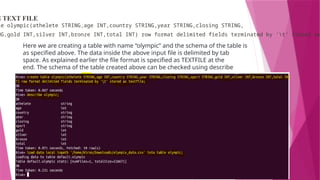
G TEXT FILE
leolympic(athelete STRING,age INT,country STRING,year STRING,closing STRING,
NG,gold INT,silver INT,bronze INT,total INT) row format delimited fields terminated by 't' stored as
Here we are creating a table with name “olympic” and the schema of the table is
as specified above. The data inside the above input file is delimited by tab
space. As explained earlier the file format is specified as TEXTFILE at the
end. The schema of the table created above can be checked using describe
olympic;
28.
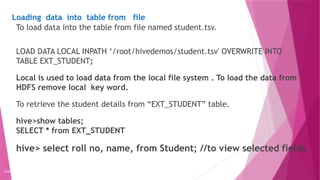
Loading data intotable from file
Copyright 2015, WILEY INDIA PVT. LTD.
To load data into the table from file named student.tsv.
LOAD DATA LOCAL INPATH ‘/root/hivedemos/student.tsv' OVERWRITE INTO
TABLE EXT_STUDENT;
Local is used to load data from the local file system . To load the data from
HDFS remove local key word.
To retrieve the student details from “EXT_STUDENT” table.
hive>show tables;
SELECT * from EXT_STUDENT
hive> select roll no, name, from Student; //to view selected fields
29.
Collection Data Types
Copyright2015, WILEY INDIA PVT. LTD.
ARRAY : Syntax ARRAY<data_type>,
MAP : MAP<primitive_type, data_type>
STRUCT : STRUCT<col_name:data_type>
hive> create table student_info(rollno INT, name STRING, sub ARRAY<STRING >, marks
MAP<STRING,INT>, addr struct<city:STRING, state:STRING, pin:BIGINT>)row format delimited
fields terminated by ',' collection items terminated by ':' map keys terminated by ‘!';
hive> load data local inpath '/home/hduser/hive/collection_demo.csv' into table student_info;
1001,John,[English:Hindi],{Mark1!45,Mark2!65},{delhi:delhi:897654}
1002,Jill,[Physics:Maths],{Mark1!43,Mark2!89},{bhopal:MP:432024}
30.
Collection Data Types-Array
Copyright2015, WILEY INDIA PVT. LTD.
hive> select *from student_info ;
1001 John [“English",“Hindi"] {"Mark1":45,"Mark2":65}
1002 Jill [“Physics",“Maths"] {"Mark1":43,"Mark2":89}
//Accessing complex data types
hive> select name, sub from student_info; //select whole array
John [“English",“Hindi"]
Jill [“Physics",“Maths"]
hive> select name, sub[1] from student_info where rollno=1001;
hive> select name, sub[0] from student_info; //array element
31.
Collection Data Types- Map
Copyright 2015, WILEY INDIA PVT. LTD.
hive> select name, marks from student_info; //display the whole map collection
John {"Mark1":45,"Mark2":65}
Jill {"Mark1":43,"Mark2":89}
hive >select name, marks[“mark1”], marks[“mark2”] from student_info;
John 45 65
Jill 43 89
hive>select name, addr.city from student_info;
John delhi
Jill bhopal
32.
Copyright 2015, WILEYINDIA PVT. LTD.
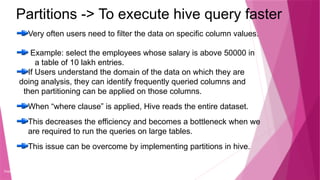
Partitions -> To execute hive query faster
Very often users need to filter the data on specific column values.
Example: select the employees whose salary is above 50000 in
a table of 10 lakh entries.
If Users understand the domain of the data on which they are
doing analysis, they can identify frequently queried columns and
then partitioning can be applied on those columns.
When “where clause” is applied, Hive reads the entire dataset.
This decreases the efficiency and becomes a bottleneck when we
are required to run the queries on large tables.
This issue can be overcome by implementing partitions in hive.
33.
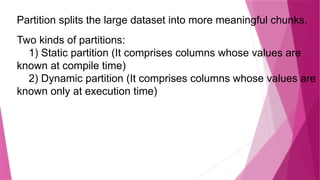
Partition splits thelarge dataset into more meaningful chunks.
Two kinds of partitions:
1) Static partition (It comprises columns whose values are
known at compile time)
2) Dynamic partition (It comprises columns whose values are
known only at execution time)
34.
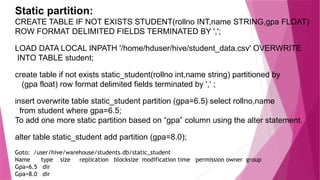
Static partition:
CREATE TABLEIF NOT EXISTS STUDENT(rollno INT,name STRING,gpa FLOAT)
ROW FORMAT DELIMITED FIELDS TERMINATED BY ',';
LOAD DATA LOCAL INPATH '/home/hduser/hive/student_data.csv' OVERWRITE
INTO TABLE student;
create table if not exists static_student(rollno int,name string) partitioned by
(gpa float) row format delimited fields terminated by ',‘ ;
insert overwrite table static_student partition (gpa=6.5) select rollno,name
from student where gpa=6.5;
To add one more static partition based on “gpa” column using the alter statement.
alter table static_student add partition (gpa=8.0);
Goto: /user/hive/warehouse/students.db/static_student
Name type size replication blocksize modification time permission owner group
Gpa=6.5 dir
Gpa=8.0 dir
35.
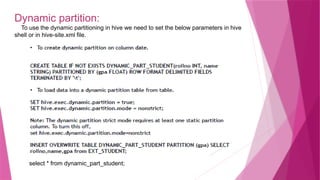
Dynamic partition:
To usethe dynamic partitioning in hive we need to set the below parameters in hive
shell or in hive-site.xml file.
select * from dynamic_part_student;
36.
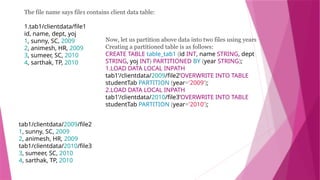
The file namesays file1 contains client data table:
1.tab1/clientdata/file1
id, name, dept, yoj
1, sunny, SC, 2009
2, animesh, HR, 2009
3, sumeer, SC, 2010
4, sarthak, TP, 2010
tab1/clientdata/2009/file2
1, sunny, SC, 2009
2, animesh, HR, 2009
tab1/clientdata/2010/file3
3, sumeer, SC, 2010
4, sarthak, TP, 2010
Now, let us partition above data into two files using years
Creating a partitioned table is as follows:
CREATE TABLE table_tab1 (id INT, name STRING, dept
STRING, yoj INT) PARTITIONED BY (year STRING);
1.LOAD DATA LOCAL INPATH
tab1’/clientdata/2009/file2’OVERWRITE INTO TABLE
studentTab PARTITION (year='2009');
2.LOAD DATA LOCAL INPATH
tab1’/clientdata/2010/file3’OVERWRITE INTO TABLE
studentTab PARTITION (year='2010');
37.
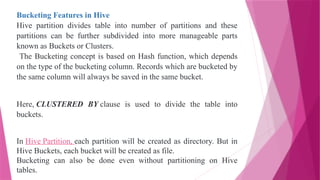
Bucketing Features inHive
Hive partition divides table into number of partitions and these
partitions can be further subdivided into more manageable parts
known as Buckets or Clusters.
The Bucketing concept is based on Hash function, which depends
on the type of the bucketing column. Records which are bucketed by
the same column will always be saved in the same bucket.
Here, CLUSTERED BY clause is used to divide the table into
buckets.
In Hive Partition, each partition will be created as directory. But in
Hive Buckets, each bucket will be created as file.
Bucketing can also be done even without partitioning on Hive
tables.
38.
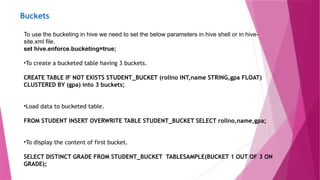
Buckets
To use thebucketing in hive we need to set the below parameters in hive shell or in hive-
site.xml file.
set hive.enforce.bucketing=true;
•To create a bucketed table having 3 buckets.
CREATE TABLE IF NOT EXISTS STUDENT_BUCKET (rollno INT,name STRING,gpa FLOAT)
CLUSTERED BY (gpa) into 3 buckets;
•Load data to bucketed table.
FROM STUDENT INSERT OVERWRITE TABLE STUDENT_BUCKET SELECT rollno,name,gpa;
•To display the content of first bucket.
SELECT DISTINCT GRADE FROM STUDENT_BUCKET TABLESAMPLE(BUCKET 1 OUT OF 3 ON
GRADE);
39.
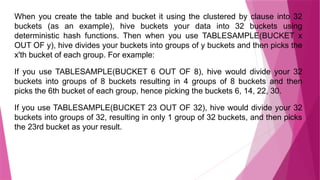
When you createthe table and bucket it using the clustered by clause into 32
buckets (as an example), hive buckets your data into 32 buckets using
deterministic hash functions. Then when you use TABLESAMPLE(BUCKET x
OUT OF y), hive divides your buckets into groups of y buckets and then picks the
x'th bucket of each group. For example:
If you use TABLESAMPLE(BUCKET 6 OUT OF 8), hive would divide your 32
buckets into groups of 8 buckets resulting in 4 groups of 8 buckets and then
picks the 6th bucket of each group, hence picking the buckets 6, 14, 22, 30.
If you use TABLESAMPLE(BUCKET 23 OUT OF 32), hive would divide your 32
buckets into groups of 32, resulting in only 1 group of 32 buckets, and then picks
the 23rd bucket as your result.
40.
Partitioning VS Bucketing
Basicallyboth Partitioning and Bucketing slice the data for executing the query much more efficiently
than on the non-sliced data.
The major difference is that the number of slices will keep on changing in the case of partitioning as
data is modified, but with bucketing the number of slices are fixed which are specified while creating
the table.
Bucketing happen by using a Hash algorithm and then a modulo on the number of buckets. So, a row
might get inserted into any of the bucket. Bucketing can be used for sampling of data, as well also for
joining two data sets much more effectively and much more.
when we do partitioning, we create a partition for each unique value of the column. But there may be
situation where we need to create lot of tiny partitions.
But if you use bucketing, you can limit it to a number which you choose and decompose your data
into those buckets. In hive a partition is a directory but a bucket is a file.
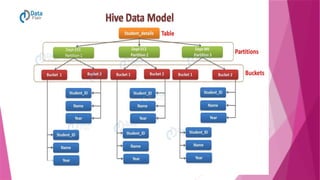
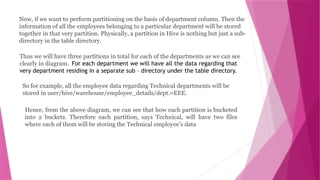
42.
Now, if wewant to perform partitioning on the basis of department column. Then the
information of all the employees belonging to a particular department will be stored
together in that very partition. Physically, a partition in Hive is nothing but just a sub-
directory in the table directory.
Thus we will have three partitions in total for each of the departments as we can see
clearly in diagram. For each department we will have all the data regarding that
very department residing in a separate sub – directory under the table directory.
So for example, all the employee data regarding Technical departments will be
stored in user/hive/warehouse/employee_details/dept.=EEE.
Hence, from the above diagram, we can see that how each partition is bucketed
into 2 buckets. Therefore each partition, says Technical, will have two files
where each of them will be storing the Technical employee’s data
43.
Aggregations
Copyright 2015, WILEYINDIA PVT. LTD.
Hive supports aggregation functions like avg, count, etc.
To write the average and count aggregation function.
SELECT AVG(gpa) FROM STUDENT;
SELECT count(*) FROM STUDENT;
44.
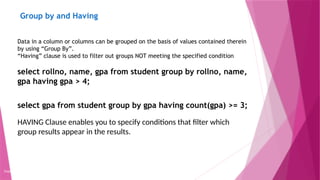
Group by andHaving
Copyright 2015, WILEY INDIA PVT. LTD.
Data in a column or columns can be grouped on the basis of values contained therein
by using “Group By”.
“Having” clause is used to filter out groups NOT meeting the specified condition
select rollno, name, gpa from student group by rollno, name,
gpa having gpa > 4;
select gpa from student group by gpa having count(gpa) >= 3;
HAVING Clause enables you to specify conditions that filter which
group results appear in the results.
45.
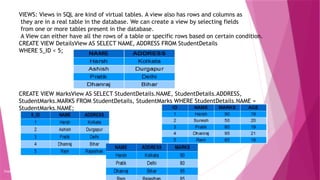
VIEWS: Views inSQL are kind of virtual tables. A view also has rows and columns as
they are in a real table in the database. We can create a view by selecting fields
from one or more tables present in the database.
A View can either have all the rows of a table or specific rows based on certain condition.
CREATE VIEW DetailsView AS SELECT NAME, ADDRESS FROM StudentDetails
WHERE S_ID < 5;
CREATE VIEW MarksView AS SELECT StudentDetails.NAME, StudentDetails.ADDRESS,
StudentMarks.MARKS FROM StudentDetails, StudentMarks WHERE StudentDetails.NAME =
StudentMarks.NAME;
Copyright 2015, WILEY INDIA PVT. LTD.
46.
Querying the View
Select * from marksview limit 4;
Drop the View
Drop View marksview;
47.
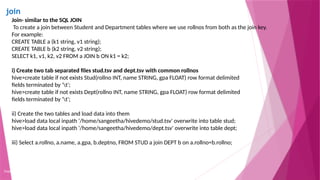
join
Copyright 2015, WILEYINDIA PVT. LTD.
Join- similar to the SQL JOIN
To create a join between Student and Department tables where we use rollnos from both as the join key.
For example:
CREATE TABLE a (k1 string, v1 string);
CREATE TABLE b (k2 string, v2 string);
SELECT k1, v1, k2, v2 FROM a JOIN b ON k1 = k2;
i) Create two tab separated files stud.tsv and dept.tsv with common rollnos
hive>create table if not exists Stud(rollno INT, name STRING, gpa FLOAT) row format delimited
fields terminated by 't';
hive>create table if not exists Dept(rollno INT, name STRING, gpa FLOAT) row format delimited
fields terminated by 't';
ii) Create the two tables and load data into them
hive>load data local inpath '/home/sangeetha/hivedemo/stud.tsv' overwrite into table stud;
hive>load data local inpath '/home/sangeetha/hivedemo/dept.tsv' overwrite into table dept;
iii) Select a.rollno, a.name, a.gpa, b.deptno, FROM STUD a join DEPT b on a.rollno=b.rollno;
48.
SerDer
Serializer converts javaobjects that hive has been working with and
translates it into something that Hive can write to HDFS.
Deserializer converts binary representation of records and converts it
into java objects.
Copyright 2015, WILEY INDIA PVT. LTD.
•SerDer stands for Serializer/Deserializer.
•Contains the logic to convert unstructured data into records.
•Implemented using Java.
•Serializers are used at the time of writing.
•Deserializers are used at query time (SELECT Statement).
49.
Sub Query
InHive sub queries are supported only in the FROM
Clause(Hive 0.12).
Need to specify name for sub query because every table
in a from clause has a name.
The columns in the sub query select list should have
unique names.
The columns in the sub query select list are available to
the outer query just like columns of a table.
In Hive(0.13),sub queries are supported in the where
clause as well.
50.
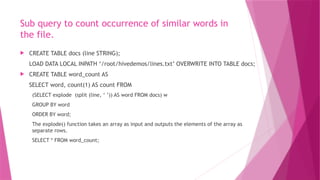
Sub query tocount occurrence of similar words in
the file.
CREATE TABLE docs (line STRING);
LOAD DATA LOCAL INPATH ‘/root/hivedemos/lines.txt’ OVERWRITE INTO TABLE docs;
CREATE TABLE word_count AS
SELECT word, count(1) AS count FROM
(SELECT explode (split (line, ‘ ’)) AS word FROM docs) w
GROUP BY word
ORDER BY word;
The explode() function takes an array as input and outputs the elements of the array as
separate rows.
SELECT * FROM word_count;
Editor's Notes
#4 When a structured data can be processedin QL OR RDBMS why do we need Hive. When the data in RDBMS becomes large we can store it in HDFS and then use Hive query to process the data.
Usual Data Warehouse :
Useful for data warehousing applications web logs application logs which are permutable.
A data warehouse is a :subject-oriented integrated timevarying non-volatile collection of data in support of the management's decision-making process.
A data warehouse is a centralized repository that stores data from multiple information sources – erp, crm, flat filesc and transforms them into a common, multidimensional data model for efficient querying and analysis.
Datawarehouding tool is one which can be used to query the data stored in a datawarehouse. Data in a warehouse ihas been stored after the ETL process on the raw data.
#6 It provides a query language similar to SQL. The hive querires are complied into MapReduce jobs and then these jobs run on the Hadoop cluster.
Since it is a query tool it also has several data summarization and analysis tools
How is HIVE useful in log analysis. Hourly log data can be directly stored in Hadoop. Data cleansing can then be performed on the log file. Finally HIVE tables can be created to query the log file.
#7 It provides a query language similar to SQL. The hive querires are complied into MapReduce jobs and then these jobs run on the Hadoop cluster.
Since it is a query tool it also has several data summarization and analysis tools
How is HIVE useful in log analysis. Hourly log data can be directly stored in Hadoop. Data cleansing can then be performed on the log file. Finally HIVE tables can be created to query the log file.
#18 A flat file is a file containing records that have no structured interrelationship. The term is frequently used to describe a text document from which all word processing or other structure characters or markup have been removed In any event, many users would call a Microsoft Word document that has been saved as "text only" a "flat file." The resulting file contains records (lines of text of a certain uniform length) but no information, for example, about what size to make a line that is a title or that a program could use to format thedocument with a table of contents.
Another form of flat file is one in which table data is gathered in lines of ASCII text with the value from each table cell separated by a comma and each row represented with a new line. This type of flat file is also known as acomma-separated values file (CSV) file
A CSV file is sometimes referred to as a flat file.
This was first published in July 2006
#19 A flat file is a file containing records that have no structured interrelationship. The term is frequently used to describe a text document from which all word processing or other structure characters or markup have been removed In any event, many users would call a Microsoft Word document that has been saved as "text only" a "flat file." The resulting file contains records (lines of text of a certain uniform length) but no information, for example, about what size to make a line that is a title or that a program could use to format thedocument with a table of contents.
Another form of flat file is one in which table data is gathered in lines of ASCII text with the value from each table cell separated by a comma and each row represented with a new line. This type of flat file is also known as acomma-separated values file (CSV) file
A CSV file is sometimes referred to as a flat file.
This was first published in July 2006
#27 A flat file is a file containing records that have no structured interrelationship. The term is frequently used to describe a text document from which all word processing or other structure characters or markup have been removed In any event, many users would call a Microsoft Word document that has been saved as "text only" a "flat file." The resulting file contains records (lines of text of a certain uniform length) but no information, for example, about what size to make a line that is a title or that a program could use to format thedocument with a table of contents.
Another form of flat file is one in which table data is gathered in lines of ASCII text with the value from each table cell separated by a comma and each row represented with a new line. This type of flat file is also known as acomma-separated values file (CSV) file
A CSV file is sometimes referred to as a flat file.
This was first published in July 2006
#29 Performs the following tascDDL: create table, create index, create views.
DML: Select, Where, group by, Join, Order By
Pluggable Functions:
UDF: User Defined Function
UDAF: User Defined Aggregate Function
UDTF: User Defined Table Function
s
#34 The following data is a Comment, Row formatted fields such as Field terminator, Lines terminator, and Stored File type.
#40 Hive organizes tables into partitions. It is a way of dividing a table into related parts based on the values of partitioned columns such as date, city, and department. Using partition, it is easy to query a portion of the data.
#51 Bucketing is another technique for decomposing data sets into more manageable parts. For example, suppose a table using the date as the top-level partition and the employee_id as the second-level partition leads to too many small partitions. Instead, if we bucket the employee table and use employee_id as the bucketing column, the value of this column will be hashed by a user-defined number into buckets. Records with the same employee_id will always be stored in the same bucket. Assuming the number of employee_id is much greater than the number of buckets, each bucket will have many employee_id. While creating table you can specify like CLUSTERED BY (employee_id) INTO XX BUCKETS ; where XX is the number of buckets . Bucketing has several advantages. The number of buckets is fixed so it does not fluctuate with data. If two tables are bucketed by employee_id, Hive can create a logically correct sampling. Bucketing also aids in doing efficient map-side joins etc.
Clustering aka bucketing on the other hand, will result with a fixed number of files, since you do specify the number of buckets. What hive will do is to take the field, calculate a hash and assign a record to that bucket.
In hive, bucketing does not work by default. You will have to set following variable to enable bucketing. set hive.enforce.bucketing=true;
#53 Partitioning helps in elimination of data, if used in WHERE clause, where as bucketing helps in organizing data in each partition into multiple files, so as same set of data is always written in same bucket.
Helps a lot in joining of columns.
Hive Buckets is nothing but another technique of decomposing data or decreasing the data into more manageable parts or equal parts.For example we have table with columns like date,employee_name,employee_id,salary,leaves etc . In this table just use date column as the top-level partition and the employee_id as the second-level partition leads to too many small partitions. We can use HASH value for bucketing or a range to bucket the data.
#57 The HAVING clause enables you to specify conditions that filter which group results appear in the final results.
The WHERE clause places conditions on the selected columns, whereas the HAVING clause places conditions on groups created by the GROUP BY clause.
The HAVING clause must follow the GROUP BY clause in a query and must also precede the ORDER BY clause if used. The following is the syntax of the SELECT statement, including the HAVING clause:
#58 How are views different from partitions: how are they different from select * field. They are purely logical objects
In SQL:200n, a view definition is supposed to be frozen at the time it is created, so that if the view is defined as select * from t, where t is a table with two columns a and b, then later requests to select * from the view should return just columns a and b, even if a new column c is later added to the table. This is implemented correctly by most DBMS products.
(Select * ) fetches the whole data from file as a FetchTask whereas (Select column) requires a map-reduce job since it needs to extract the 'column' from each row by parsing it. This means that the former is much faster than the latter
Because a view is purely a logical construct (an alias for a query) with no physical data behind it, ALTER VIEW only involves changes to metadata in the metastore database, not any data files in HDFS.


![The same sample record can be provided in form of JSON document (JavaScript
Object Notation).
{
“name”: “John Doe”,
“salary”: 100000.0,
“subordinates”: [“Mary Smith”, “Todd Jones”],
“deductions”: {
“Federal Taxes”: .2,
“State Taxes”:.05,
“Insurance”:.1
},
“address”: {
“street”: “1 Michigan Ave.”,
“city”:”Chicago”,
“state”: “IL”,
“zip”:60600
}
}
Now you able see how to represent the Complex data type like
ARRAY,MAP,STRUCT in JSON . Readable and easy to represent.](https://image.slidesharecdn.com/443988696-chapter-9-hive-pptx-250220001304-c7c14f87/85/443988696-Chapter-9-HIVEHIVEHIVE-pptx-pptx-20-320.jpg)
![Tables
Copyright 2015, WILEY INDIA PVT. LTD.
To create managed table named ‘STUDENT’.
Format
CREATE [temporary] [external] TABLE [ IF NOT EXISTS] STUDENT(rollno INT,name
STRING,gpa FLOAT) [COMMENT] ROW FORMAT DELIMITED FIELDS TERMINATED BY
't';
CREATE TABLE IF NOT EXISTS STUDENT(rollno INT,name STRING,gpa FLOAT) ROW
FORMAT DELIMITED FIELDS TERMINATED BY 't';
hive>describe STUDENT //will show the schema of the table](https://image.slidesharecdn.com/443988696-chapter-9-hive-pptx-250220001304-c7c14f87/85/443988696-Chapter-9-HIVEHIVEHIVE-pptx-pptx-25-320.jpg)
![Tables
Copyright 2015, WILEY INDIA PVT. LTD.
To create external table named ‘EXT_STUDENT’.
CREATE EXTERNAL TABLE IF NOT EXISTS EXT_STUDENT(rollno INT,name
STRING,gpa FLOAT) ROW FORMAT DELIMITED FIELDS TERMINATED BY 't'
LOCATION ‘/STUDENT_INFO';
ALTER TABLE name RENAME TO new_name
hive> ALTER TABLE employee RENAME TO emp;
DROP TABLE [IF EXISTS] table_name;
hive> DROP TABLE IF EXISTS employee;](https://image.slidesharecdn.com/443988696-chapter-9-hive-pptx-250220001304-c7c14f87/85/443988696-Chapter-9-HIVEHIVEHIVE-pptx-pptx-26-320.jpg)
![Collection Data Types
Copyright 2015, WILEY INDIA PVT. LTD.
ARRAY : Syntax ARRAY<data_type>,
MAP : MAP<primitive_type, data_type>
STRUCT : STRUCT<col_name:data_type>
hive> create table student_info(rollno INT, name STRING, sub ARRAY<STRING >, marks
MAP<STRING,INT>, addr struct<city:STRING, state:STRING, pin:BIGINT>)row format delimited
fields terminated by ',' collection items terminated by ':' map keys terminated by ‘!';
hive> load data local inpath '/home/hduser/hive/collection_demo.csv' into table student_info;
1001,John,[English:Hindi],{Mark1!45,Mark2!65},{delhi:delhi:897654}
1002,Jill,[Physics:Maths],{Mark1!43,Mark2!89},{bhopal:MP:432024}](https://image.slidesharecdn.com/443988696-chapter-9-hive-pptx-250220001304-c7c14f87/85/443988696-Chapter-9-HIVEHIVEHIVE-pptx-pptx-29-320.jpg)
![Collection Data Types-Array
Copyright 2015, WILEY INDIA PVT. LTD.
hive> select *from student_info ;
1001 John [“English",“Hindi"] {"Mark1":45,"Mark2":65}
1002 Jill [“Physics",“Maths"] {"Mark1":43,"Mark2":89}
//Accessing complex data types
hive> select name, sub from student_info; //select whole array
John [“English",“Hindi"]
Jill [“Physics",“Maths"]
hive> select name, sub[1] from student_info where rollno=1001;
hive> select name, sub[0] from student_info; //array element](https://image.slidesharecdn.com/443988696-chapter-9-hive-pptx-250220001304-c7c14f87/85/443988696-Chapter-9-HIVEHIVEHIVE-pptx-pptx-30-320.jpg)
![Collection Data Types - Map
Copyright 2015, WILEY INDIA PVT. LTD.
hive> select name, marks from student_info; //display the whole map collection
John {"Mark1":45,"Mark2":65}
Jill {"Mark1":43,"Mark2":89}
hive >select name, marks[“mark1”], marks[“mark2”] from student_info;
John 45 65
Jill 43 89
hive>select name, addr.city from student_info;
John delhi
Jill bhopal](https://image.slidesharecdn.com/443988696-chapter-9-hive-pptx-250220001304-c7c14f87/85/443988696-Chapter-9-HIVEHIVEHIVE-pptx-pptx-31-320.jpg)