Unit-4
Pig script
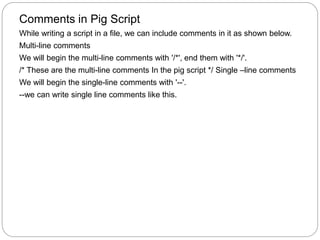
Comments in Pig Script
While writing a script in a file, we can include comments in it as shown below.
Multi-line comments
We will begin the multi-line comments with '/*', end them with '*/'.
/* These are the multi-line comments In the pig script */ Single –line comments
We will begin the single-line comments with '--'.
--we can write single line comments like this.
Executing Pig Script in Batch mode
Step 1
Write all the required Pig Latin statements in a single file. We can write all
the Pig Latin statements and commands in a single file and save it
as .pig file.
Step 2
Execute the Apache Pig script. You can execute the Pig script from the shell
(Linux) as shown below.
Local mode MapReduce mode
$ pig -x local Sample_script.pig $ pig -x
mapreduce Sample_script.pig
You can execute it from the Grunt shell as well using the exec command as shown
below.
grunt> exec /sample_script.pig
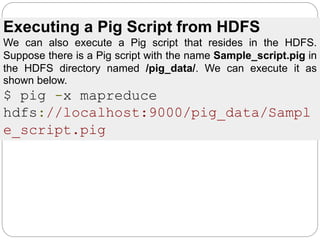
Executing a Pig Script from HDFS
We can also execute a Pig script that resides in the HDFS.
Suppose there is a Pig script with the name Sample_script.pig in
the HDFS directory named /pig_data/. We can execute it as
shown below.
$ pig -x mapreduce
hdfs://localhost:9000/pig_data/Sampl
e_script.pig
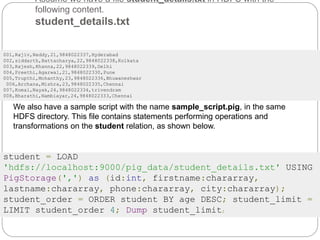
Assume we have a file student_details.txt in HDFS with the
following content.
student_details.txt
001,Rajiv,Reddy,21,9848022337,Hyderabad
002,siddarth,Battacharya,22,9848022338,Kolkata
003,Rajesh,Khanna,22,9848022339,Delhi
004,Preethi,Agarwal,21,9848022330,Pune
005,Trupthi,Mohanthy,23,9848022336,Bhuwaneshwar
006,Archana,Mishra,23,9848022335,Chennai
007,Komal,Nayak,24,9848022334,trivendram
008,Bharathi,Nambiayar,24,9848022333,Chennai
We also have a sample script with the name sample_script.pig, in the same
HDFS directory. This file contains statements performing operations and
transformations on the student relation, as shown below.
student = LOAD
'hdfs://localhost:9000/pig_data/student_details.txt' USING
PigStorage(',') as (id:int, firstname:chararray,
lastname:chararray, phone:chararray, city:chararray);
student_order = ORDER student BY age DESC; student_limit =
LIMIT student_order 4; Dump student_limit;
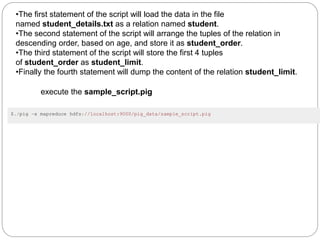
•The first statement of the script will load the data in the file
named student_details.txt as a relation named student.
•The second statement of the script will arrange the tuples of the relation in
descending order, based on age, and store it as student_order.
•The third statement of the script will store the first 4 tuples
of student_order as student_limit.
•Finally the fourth statement will dump the content of the relation student_limit.
execute the sample_script.pig
$./pig -x mapreduce hdfs://localhost:9000/pig_data/sample_script.pig
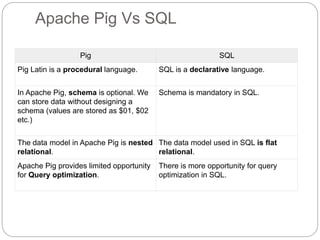
Apache Pig Vs SQL
Pig SQL
Pig Latin is a procedural language. SQL is a declarative language.
In Apache Pig, schema is optional. We
can store data without designing a
schema (values are stored as $01, $02
etc.)
Schema is mandatory in SQL.
The data model in Apache Pig is nested
relational.
The data model used in SQL is flat
relational.
Apache Pig provides limited opportunity
for Query optimization.
There is more opportunity for query
optimization in SQL.
Operator Description Example
() Tuple constructor
operator − This
operator is used to
construct a tuple.
(Raju, 30)
{} Bag constructor
operator − This
operator is used to
construct a bag.
{(Raju, 30),
(Mohammad, 45)}
[] Map constructor
operator − This
operator is used to
construct a tuple.
[name#Raja,
age#30]
Pig Latin – Type Construction Operators
The following table describes the Type construction operators of Pig Latin.
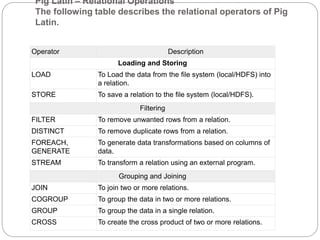
Pig Latin – Relational Operations
The following table describes the relational operators of Pig
Latin.
Operator Description
Loading and Storing
LOAD To Load the data from the file system (local/HDFS) into
a relation.
STORE To save a relation to the file system (local/HDFS).
Filtering
FILTER To remove unwanted rows from a relation.
DISTINCT To remove duplicate rows from a relation.
FOREACH,
GENERATE
To generate data transformations based on columns of
data.
STREAM To transform a relation using an external program.
Grouping and Joining
JOIN To join two or more relations.
COGROUP To group the data in two or more relations.
GROUP To group the data in a single relation.
CROSS To create the cross product of two or more relations.
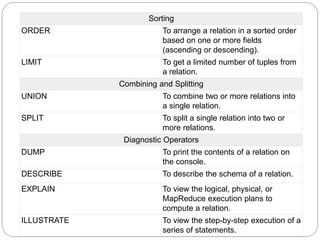
Sorting
ORDER To arrange a relation in a sorted order
based on one or more fields
(ascending or descending).
LIMIT To get a limited number of tuples from
a relation.
Combining and Splitting
UNION To combine two or more relations into
a single relation.
SPLIT To split a single relation into two or
more relations.
Diagnostic Operators
DUMP To print the contents of a relation on
the console.
DESCRIBE To describe the schema of a relation.
EXPLAIN To view the logical, physical, or
MapReduce execution plans to
compute a relation.
ILLUSTRATE To view the step-by-step execution of a
series of statements.

Unit 4 lecture-3

  • 1.
  • 2.
    Comments in PigScript While writing a script in a file, we can include comments in it as shown below. Multi-line comments We will begin the multi-line comments with '/*', end them with '*/'. /* These are the multi-line comments In the pig script */ Single –line comments We will begin the single-line comments with '--'. --we can write single line comments like this.
  • 3.
    Executing Pig Scriptin Batch mode Step 1 Write all the required Pig Latin statements in a single file. We can write all the Pig Latin statements and commands in a single file and save it as .pig file. Step 2 Execute the Apache Pig script. You can execute the Pig script from the shell (Linux) as shown below. Local mode MapReduce mode $ pig -x local Sample_script.pig $ pig -x mapreduce Sample_script.pig You can execute it from the Grunt shell as well using the exec command as shown below. grunt> exec /sample_script.pig
  • 4.
    Executing a PigScript from HDFS We can also execute a Pig script that resides in the HDFS. Suppose there is a Pig script with the name Sample_script.pig in the HDFS directory named /pig_data/. We can execute it as shown below. $ pig -x mapreduce hdfs://localhost:9000/pig_data/Sampl e_script.pig
  • 5.
    Assume we havea file student_details.txt in HDFS with the following content. student_details.txt 001,Rajiv,Reddy,21,9848022337,Hyderabad 002,siddarth,Battacharya,22,9848022338,Kolkata 003,Rajesh,Khanna,22,9848022339,Delhi 004,Preethi,Agarwal,21,9848022330,Pune 005,Trupthi,Mohanthy,23,9848022336,Bhuwaneshwar 006,Archana,Mishra,23,9848022335,Chennai 007,Komal,Nayak,24,9848022334,trivendram 008,Bharathi,Nambiayar,24,9848022333,Chennai We also have a sample script with the name sample_script.pig, in the same HDFS directory. This file contains statements performing operations and transformations on the student relation, as shown below. student = LOAD 'hdfs://localhost:9000/pig_data/student_details.txt' USING PigStorage(',') as (id:int, firstname:chararray, lastname:chararray, phone:chararray, city:chararray); student_order = ORDER student BY age DESC; student_limit = LIMIT student_order 4; Dump student_limit;
  • 6.
    •The first statementof the script will load the data in the file named student_details.txt as a relation named student. •The second statement of the script will arrange the tuples of the relation in descending order, based on age, and store it as student_order. •The third statement of the script will store the first 4 tuples of student_order as student_limit. •Finally the fourth statement will dump the content of the relation student_limit. execute the sample_script.pig $./pig -x mapreduce hdfs://localhost:9000/pig_data/sample_script.pig
  • 7.
    Apache Pig VsSQL Pig SQL Pig Latin is a procedural language. SQL is a declarative language. In Apache Pig, schema is optional. We can store data without designing a schema (values are stored as $01, $02 etc.) Schema is mandatory in SQL. The data model in Apache Pig is nested relational. The data model used in SQL is flat relational. Apache Pig provides limited opportunity for Query optimization. There is more opportunity for query optimization in SQL.
  • 8.
    Operator Description Example ()Tuple constructor operator − This operator is used to construct a tuple. (Raju, 30) {} Bag constructor operator − This operator is used to construct a bag. {(Raju, 30), (Mohammad, 45)} [] Map constructor operator − This operator is used to construct a tuple. [name#Raja, age#30] Pig Latin – Type Construction Operators The following table describes the Type construction operators of Pig Latin.
  • 9.
    Pig Latin –Relational Operations The following table describes the relational operators of Pig Latin. Operator Description Loading and Storing LOAD To Load the data from the file system (local/HDFS) into a relation. STORE To save a relation to the file system (local/HDFS). Filtering FILTER To remove unwanted rows from a relation. DISTINCT To remove duplicate rows from a relation. FOREACH, GENERATE To generate data transformations based on columns of data. STREAM To transform a relation using an external program. Grouping and Joining JOIN To join two or more relations. COGROUP To group the data in two or more relations. GROUP To group the data in a single relation. CROSS To create the cross product of two or more relations.
  • 10.
    Sorting ORDER To arrangea relation in a sorted order based on one or more fields (ascending or descending). LIMIT To get a limited number of tuples from a relation. Combining and Splitting UNION To combine two or more relations into a single relation. SPLIT To split a single relation into two or more relations. Diagnostic Operators DUMP To print the contents of a relation on the console. DESCRIBE To describe the schema of a relation. EXPLAIN To view the logical, physical, or MapReduce execution plans to compute a relation. ILLUSTRATE To view the step-by-step execution of a series of statements.