Pig Latin
Data Model with Load and
Store functions
There are two data types for the Pig Latin
Data Model
1. Single value or Atomic data types:
consists of single and atomic value, irrespective of
their data type. Atomic values can be integer,
float, long, chararray, bytearrary and a field is a
piece of single data value.
By default Pig takes any data value/type as
bytearray if it is not explicitly defined.
2. Complex data types or Non- Atomic data types:
consists of map, tuple, bag.
Rupak Roy
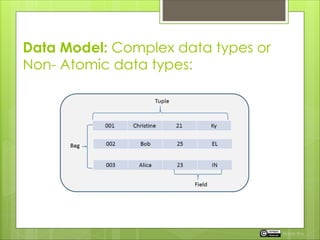
Data Model: Complex data types or
Non- Atomic data types:
Rupak Roy
Complex PIG data types in detail
1. Map contains Key-Value pairs
for example :
‘chararray-key1#Value1’,’ chararray-key2#Value2’
‘#’ is the separator of key and value
Key1 i.e. the key is chararray (character array)
Value1 i.e. the value and can be of any data type.
2. Tuple: is a collection of elements and each element can be of
any data type and because of collection of elements are
sequentially ordered it is possible to refer the field by position.
Example: (‘Ryan’, 22,’ St.JohnsSchool’, ’NewAvenue’)
We will perform this example in our next chapter.
Rupak Roy
Complex PIG data types in detail
3. Bag:
Is a collection of tuples in a non-sequentially manner or
we can say unordered manner.
A bag is represented by ‘ { } ’
Example:
{(‘Ryan’, 22,’ St.JohnsSchool’, ’NewAvenue’), (‘Bob’,
23,’ St.EdmundSchool’, ’Downtown’), (‘Alica’, 22, ’Don
bosco’, ’ParkAvenue’) }
Inner bag can also be a field in relation
Example – { Bob, 23 (9834514, bob@gmail.com}}
Rupak Roy
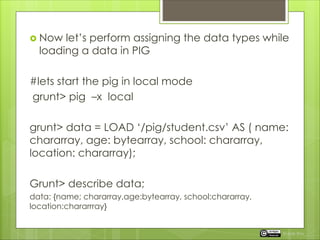
 Now let’s perform assigning the data types while
loading a data in PIG
#lets start the pig in local mode
grunt> pig –x local
grunt> data = LOAD ‘/pig/student.csv’ AS ( name:
chararray, age: bytearray, school: chararray,
location: chararray);
Grunt> describe data;
data: {name; chararray,age:bytearray, school:chararray,
location:chararrray}
Rupak Roy
Load and Store
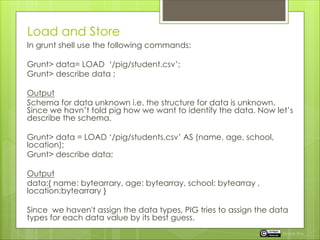
In grunt shell use the following commands:
Grunt> data= LOAD ‘/pig/student.csv’;
Grunt> describe data ;
Output
Schema for data unknown i.e. the structure for data is unknown.
Since we havn’t told pig how we want to identify the data. Now let’s
describe the schema.
Grunt> data = LOAD ‘/pig/students.csv’ AS (name, age, school,
location);
Grunt> describe data;
Output
data:{ name: bytearrary, age: bytearray, school: bytearray ,
location:bytearrary }
Since we haven't assign the data types, PIG tries to assign the data
types for each data value by its best guess.
Rupak Roy
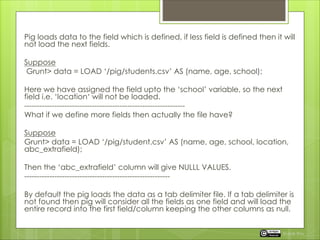
Pig loads data to the field which is defined, if less field is defined then it will
not load the next fields.
Suppose
Grunt> data = LOAD ‘/pig/students.csv’ AS (name, age, school);
Here we have assigned the field upto the ‘school’ variable, so the next
field i.e. ‘location‘ will not be loaded.
----------------------------------------------------------------
What if we define more fields then actually the file have?
Suppose
Grunt> data = LOAD ‘/pig/student.csv’ AS (name, age, school, location,
abc_extrafield);
Then the ‘abc_extrafield’ column will give NULLL VALUES.
----------------------------------------------------------
By default the pig loads the data as a tab delimiter file. If a tab delimiter is
not found then pig will consider all the fields as one field and will load the
entire record into the first field/column keeping the other columns as null.
Rupak Roy
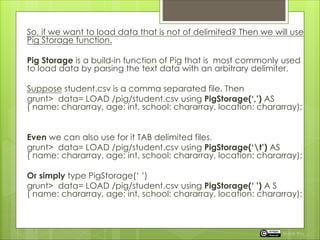
So, if we want to load data that is not of delimited? Then we will use
Pig Storage function.
Pig Storage is a build-in function of Pig that is most commonly used
to load data by parsing the text data with an arbitrary delimiter.
Suppose student.csv is a comma separated file. Then
grunt> data= LOAD /pig/student.csv using PigStorage(‘,’) AS
( name: chararray, age: int, school: chararray, location: chararray);
Even we can also use for it TAB delimited files.
grunt> data= LOAD /pig/student.csv using PigStorage(‘t’) AS
( name: chararray, age: int, school: chararray, location: chararray);
Or simply type PigStorage(‘ ’)
grunt> data= LOAD /pig/student.csv using PigStorage(‘ ’) A S
( name: chararray, age: int, school: chararray, location: chararray);
Rupak Roy
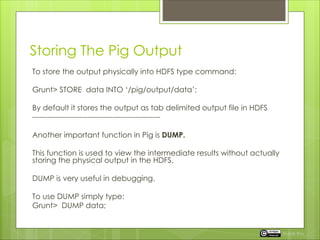
Storing The Pig Output
To store the output physically into HDFS type command:
Grunt> STORE data INTO ‘/pig/output/data’;
By default it stores the output as tab delimited output file in HDFS
---------------------------------------------------
Another important function in Pig is DUMP.
This function is used to view the intermediate results without actually
storing the physical output in the HDFS.
DUMP is very useful in debugging.
To use DUMP simply type:
Grunt> DUMP data;
Rupak Roy
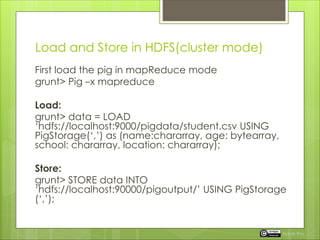
Load and Store in HDFS(cluster mode)
First load the pig in mapReduce mode
grunt> Pig –x mapreduce
Load:
grunt> data = LOAD
‘hdfs://localhost:9000/pigdata/student.csv USING
PigStorage(‘,’) as (name:chararray, age: bytearray,
school: chararray, location: chararray);
Store:
grunt> STORE data INTO
‘hdfs://localhost:90000/pigoutput/’ USING PigStorage
(‘,’);
Rupak Roy
Next
 We will learn PIG casting and reference
field by position.
Rupak Roy

Pig Latin, Data Model with Load and Store Functions

  • 1.
    Pig Latin Data Modelwith Load and Store functions
  • 2.
    There are twodata types for the Pig Latin Data Model 1. Single value or Atomic data types: consists of single and atomic value, irrespective of their data type. Atomic values can be integer, float, long, chararray, bytearrary and a field is a piece of single data value. By default Pig takes any data value/type as bytearray if it is not explicitly defined. 2. Complex data types or Non- Atomic data types: consists of map, tuple, bag. Rupak Roy
  • 3.
    Data Model: Complexdata types or Non- Atomic data types: Rupak Roy
  • 4.
    Complex PIG datatypes in detail 1. Map contains Key-Value pairs for example : ‘chararray-key1#Value1’,’ chararray-key2#Value2’ ‘#’ is the separator of key and value Key1 i.e. the key is chararray (character array) Value1 i.e. the value and can be of any data type. 2. Tuple: is a collection of elements and each element can be of any data type and because of collection of elements are sequentially ordered it is possible to refer the field by position. Example: (‘Ryan’, 22,’ St.JohnsSchool’, ’NewAvenue’) We will perform this example in our next chapter. Rupak Roy
  • 5.
    Complex PIG datatypes in detail 3. Bag: Is a collection of tuples in a non-sequentially manner or we can say unordered manner. A bag is represented by ‘ { } ’ Example: {(‘Ryan’, 22,’ St.JohnsSchool’, ’NewAvenue’), (‘Bob’, 23,’ St.EdmundSchool’, ’Downtown’), (‘Alica’, 22, ’Don bosco’, ’ParkAvenue’) } Inner bag can also be a field in relation Example – { Bob, 23 (9834514, bob@gmail.com}} Rupak Roy
  • 6.
     Now let’sperform assigning the data types while loading a data in PIG #lets start the pig in local mode grunt> pig –x local grunt> data = LOAD ‘/pig/student.csv’ AS ( name: chararray, age: bytearray, school: chararray, location: chararray); Grunt> describe data; data: {name; chararray,age:bytearray, school:chararray, location:chararrray} Rupak Roy
  • 7.
    Load and Store Ingrunt shell use the following commands: Grunt> data= LOAD ‘/pig/student.csv’; Grunt> describe data ; Output Schema for data unknown i.e. the structure for data is unknown. Since we havn’t told pig how we want to identify the data. Now let’s describe the schema. Grunt> data = LOAD ‘/pig/students.csv’ AS (name, age, school, location); Grunt> describe data; Output data:{ name: bytearrary, age: bytearray, school: bytearray , location:bytearrary } Since we haven't assign the data types, PIG tries to assign the data types for each data value by its best guess. Rupak Roy
  • 8.
    Pig loads datato the field which is defined, if less field is defined then it will not load the next fields. Suppose Grunt> data = LOAD ‘/pig/students.csv’ AS (name, age, school); Here we have assigned the field upto the ‘school’ variable, so the next field i.e. ‘location‘ will not be loaded. ---------------------------------------------------------------- What if we define more fields then actually the file have? Suppose Grunt> data = LOAD ‘/pig/student.csv’ AS (name, age, school, location, abc_extrafield); Then the ‘abc_extrafield’ column will give NULLL VALUES. ---------------------------------------------------------- By default the pig loads the data as a tab delimiter file. If a tab delimiter is not found then pig will consider all the fields as one field and will load the entire record into the first field/column keeping the other columns as null. Rupak Roy
  • 9.
    So, if wewant to load data that is not of delimited? Then we will use Pig Storage function. Pig Storage is a build-in function of Pig that is most commonly used to load data by parsing the text data with an arbitrary delimiter. Suppose student.csv is a comma separated file. Then grunt> data= LOAD /pig/student.csv using PigStorage(‘,’) AS ( name: chararray, age: int, school: chararray, location: chararray); Even we can also use for it TAB delimited files. grunt> data= LOAD /pig/student.csv using PigStorage(‘t’) AS ( name: chararray, age: int, school: chararray, location: chararray); Or simply type PigStorage(‘ ’) grunt> data= LOAD /pig/student.csv using PigStorage(‘ ’) A S ( name: chararray, age: int, school: chararray, location: chararray); Rupak Roy
  • 10.
    Storing The PigOutput To store the output physically into HDFS type command: Grunt> STORE data INTO ‘/pig/output/data’; By default it stores the output as tab delimited output file in HDFS --------------------------------------------------- Another important function in Pig is DUMP. This function is used to view the intermediate results without actually storing the physical output in the HDFS. DUMP is very useful in debugging. To use DUMP simply type: Grunt> DUMP data; Rupak Roy
  • 11.
    Load and Storein HDFS(cluster mode) First load the pig in mapReduce mode grunt> Pig –x mapreduce Load: grunt> data = LOAD ‘hdfs://localhost:9000/pigdata/student.csv USING PigStorage(‘,’) as (name:chararray, age: bytearray, school: chararray, location: chararray); Store: grunt> STORE data INTO ‘hdfs://localhost:90000/pigoutput/’ USING PigStorage (‘,’); Rupak Roy
  • 12.
    Next  We willlearn PIG casting and reference field by position. Rupak Roy