1
An Introduction to Kerberos
Shumon Huque
ISC Networking & Telecommunications
University of Pennsylvania
March 19th 2003
2
What this talk is about
!  A high-level view of how Kerberos works
!  How Kerberos differs from some other
authentication systems
  SSH password auth, SSH public key auth, SSL
!  Target audience:
  LSPs, computing staff, others?
3
What this talk is not about
!  Details of Penn’s Kerberos deployment plans
  How to get PennKeys, which Kerberos enabled
applications do I need to use
!  Writing Kerberized applications
!  In-depth protocol details and packet formats
!  Number Theory & Cryptography
4
What is Kerberos?
!  Developed at M.I.T.
!  A secret key based service for providing
authentication in open networks
!  Authentication mediated by a trusted 3rd
party on the network:
  Key Distribution Center (KDC)
5
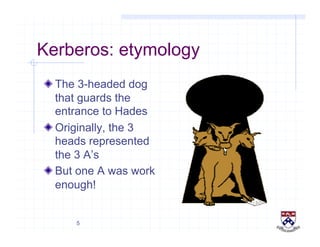
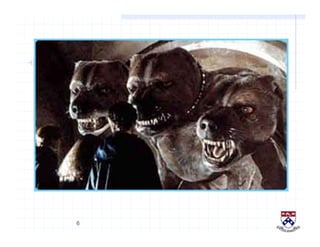
Kerberos: etymology
!  The 3-headed dog
that guards the
entrance to Hades
!  Originally, the 3
heads represented
the 3 A’s
!  But one A was work
enough!
6
7
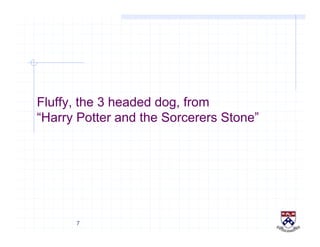
Fluffy, the 3 headed dog, from
“Harry Potter and the Sorcerers Stone”
8
Some Kerberos benefits
!   Standards based strong authentication system
!   Wide support in various operating systems
!   Make strong authentication readily available for use
with campus computer systems
!   Prevents transmission of passwords over the network
!   Provides “single-sign-on” capability
  Only 1 password to remember
  Only need to enter it once per day (typically)
9
So, what is Authentication?
!  The act of verifying someone’s identity
!  The process by which users prove their
identity to a service
!  Doesn’t specify what a user is allowed or not
allowed to do (Authorization)
10
Password based Authentication
!  Transmit password in clear over the network
to the server
!  Main Problem
  Eavesdropping/Interception
11
Cryptographic Authentication
!  No password or secret is transferred over the
network
!  Users prove their identity to a service by
performing a cryptographic operation,usually
on a quantity supplied by the server
!  Crypto operation based on user’s secret key
12
Encryption and Decryption
!  Encryption
  Process of scrambling data using a cipher and a
key in such a way, that it’s intelligible only to the
recipient
!  Decryption
  Process of unscambling encrypted data using a
cipher and key (possibly the same key used to
encrypt the data)
13
Symmetric Key Cryptography
!  Aka, Secret Key cryptography
!  The same key is used for both encryption and
decryption operations (symmetry)
!  Examples: DES, 3-DES, AES
14
Asymmetric Key Cryptography
!   Aka Public key cryptography
!   A pair of related keys are used:
  Public and Private keys
  Private key can’t be calculated from Public key
!   Data encrypted with one can only be decrypted with
the other
!   Usually, a user publishes his public key widely
  Others use it to encrypt data intended for the user
  User decrypts using the private key (known only to him)
!   Examples: RSA
15
Communicating Parties
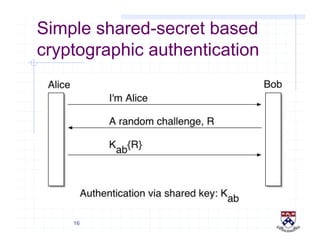
!  Alice and Bob
  Alice: initiator of the communication
  Think of her as the “client” or “user”
  Bob: correspondent or 2nd participant
  Think of him as the “server”
  “Alice” wants to access service “Bob”
!  Baddies:
  Eve, Trudy, Mallory
16
Simple shared-secret based
cryptographic authentication
17
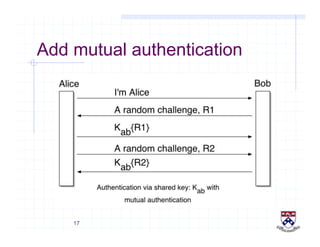
Add mutual authentication
18
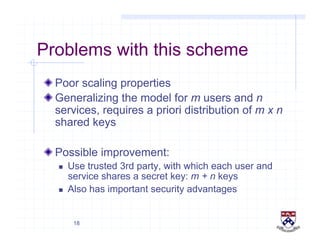
Problems with this scheme
!  Poor scaling properties
!  Generalizing the model for m users and n
services, requires a priori distribution of m x n
shared keys
!  Possible improvement:
  Use trusted 3rd party, with which each user and
service shares a secret key: m + n keys
  Also has important security advantages
19
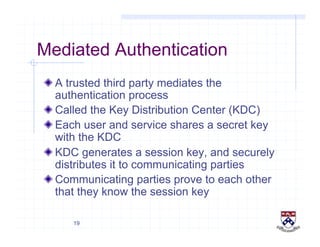
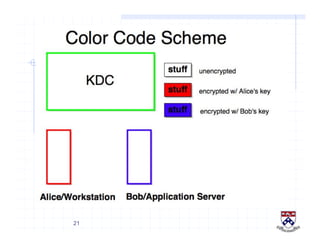
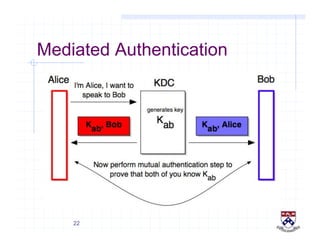
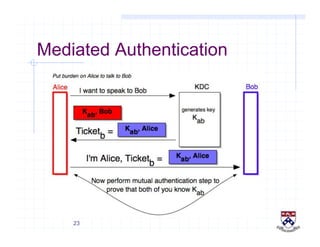
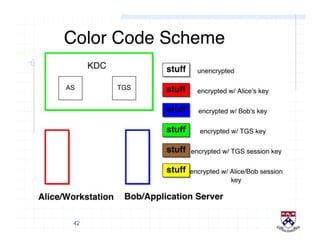
Mediated Authentication
!  A trusted third party mediates the
authentication process
!  Called the Key Distribution Center (KDC)
!  Each user and service shares a secret key
with the KDC
!  KDC generates a session key, and securely
distributes it to communicating parties
!  Communicating parties prove to each other
that they know the session key
20
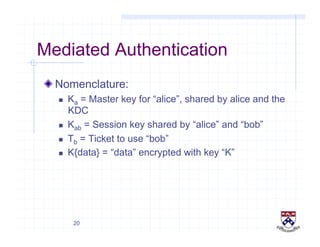
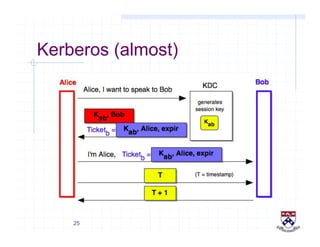
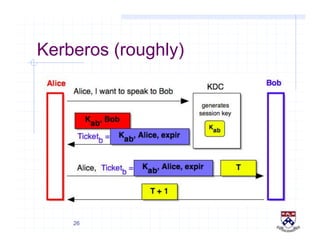
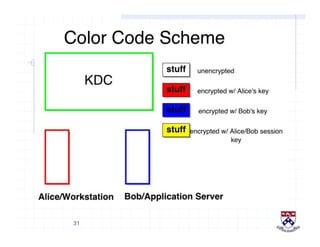
Mediated Authentication
!  Nomenclature:
  Ka = Master key for “alice”, shared by alice and the
KDC
  Kab = Session key shared by “alice” and “bob”
  Tb = Ticket to use “bob”
  K{data} = “data” encrypted with key “K”
21
22
Mediated Authentication
23
Mediated Authentication
24
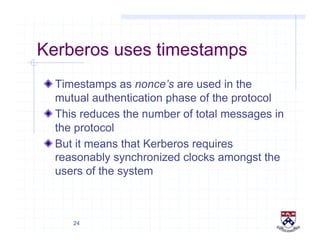
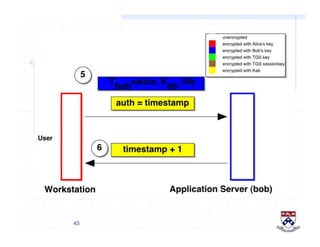
Kerberos uses timestamps
!  Timestamps as nonce’s are used in the
mutual authentication phase of the protocol
!  This reduces the number of total messages in
the protocol
!  But it means that Kerberos requires
reasonably synchronized clocks amongst the
users of the system
25
Kerberos (almost)
26
Kerberos (roughly)
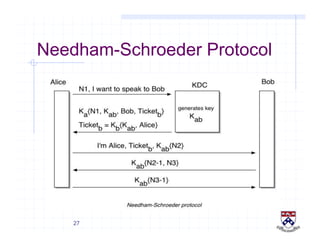
27
Needham-Schroeder Protocol
28
Kerberos (detailed)
!  Each user and service registers a secret key
with the KDC
!  Everyone trusts the KDC
  “Put all your eggs in one basket, and then watch
that basket very carefully” - Anonymous Mark
Twain
!  The user’s key is derived from a password, by
applying a hash function
!  The service key is a large random number,
and stored on the server
29
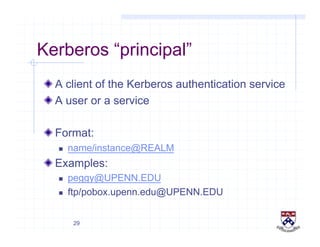
Kerberos “principal”
!  A client of the Kerberos authentication service
!  A user or a service
!  Format:
  name/instance@REALM
!  Examples:
  peggy@UPENN.EDU
  ftp/pobox.upenn.edu@UPENN.EDU
30
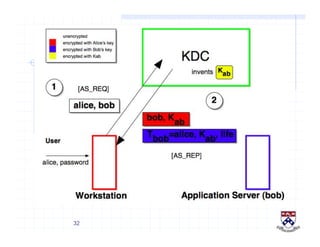
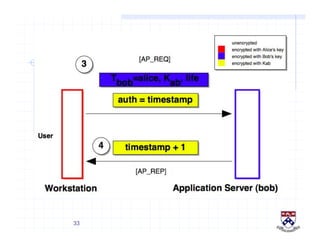
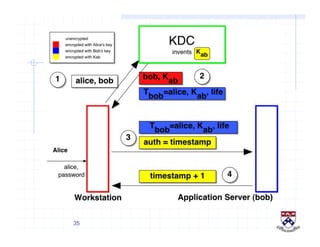
Kerberos without TGS
!  A simplified description of Kerberos without
the concept of a TGS (Ticket Granting
Service)
31
32
33
34
Combining 2 previous diags
!  …
35
36
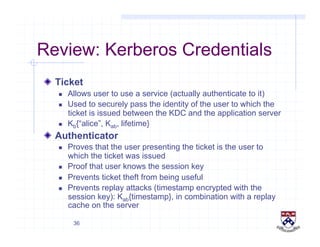
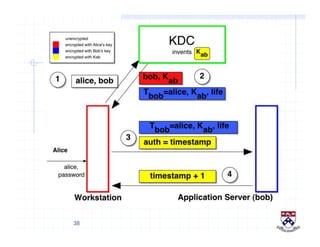
Review: Kerberos Credentials
!   Ticket
  Allows user to use a service (actually authenticate to it)
  Used to securely pass the identity of the user to which the
ticket is issued between the KDC and the application server
  Kb{“alice”, Kab, lifetime}
!   Authenticator
  Proves that the user presenting the ticket is the user to
which the ticket was issued
  Proof that user knows the session key
  Prevents ticket theft from being useful
  Prevents replay attacks (timestamp encrypted with the
session key): Kab{timestamp}, in combination with a replay
cache on the server
37
Ticket Granting Service (TGS)
!  Motivation
38
39
40
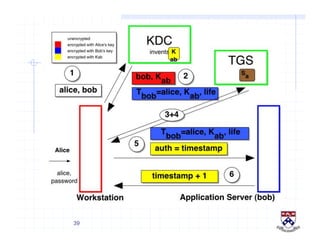
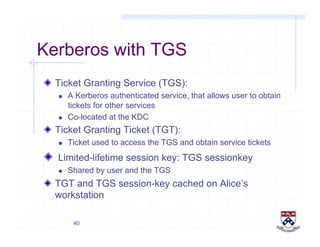
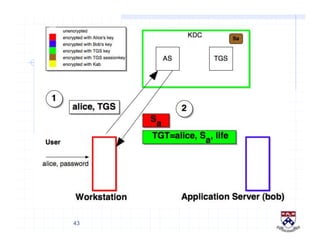
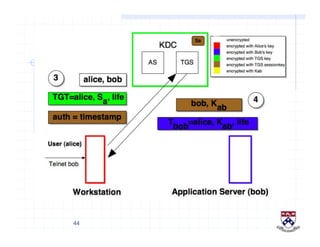
Kerberos with TGS
!   Ticket Granting Service (TGS):
  A Kerberos authenticated service, that allows user to obtain
tickets for other services
  Co-located at the KDC
!   Ticket Granting Ticket (TGT):
  Ticket used to access the TGS and obtain service tickets
!   Limited-lifetime session key: TGS sessionkey
  Shared by user and the TGS
!   TGT and TGS session-key cached on Alice’s
workstation
41
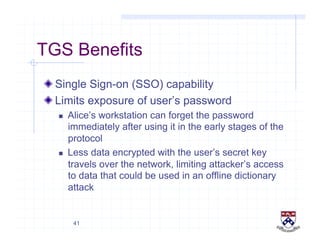
TGS Benefits
!  Single Sign-on (SSO) capability
!  Limits exposure of user’s password
  Alice’s workstation can forget the password
immediately after using it in the early stages of the
protocol
  Less data encrypted with the user’s secret key
travels over the network, limiting attacker’s access
to data that could be used in an offline dictionary
attack
42
43
44
45
46
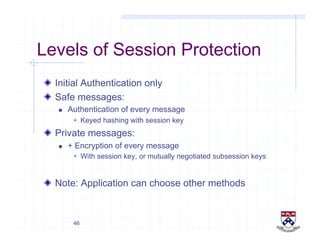
Levels of Session Protection
!   Initial Authentication only
!   Safe messages:
  Authentication of every message
  Keyed hashing with session key
!   Private messages:
  + Encryption of every message
  With session key, or mutually negotiated subsession keys
!   Note: Application can choose other methods
47
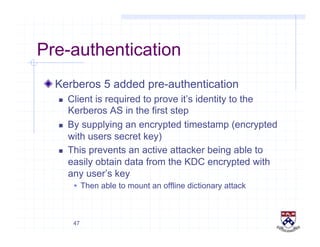
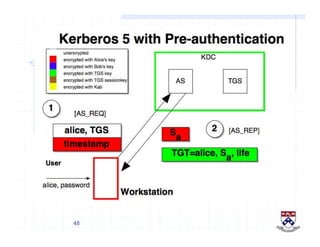
Pre-authentication
!  Kerberos 5 added pre-authentication
  Client is required to prove it’s identity to the
Kerberos AS in the first step
  By supplying an encrypted timestamp (encrypted
with users secret key)
  This prevents an active attacker being able to
easily obtain data from the KDC encrypted with
any user’s key
  Then able to mount an offline dictionary attack
48
49
Kerberos & Two-factor auth
!  In addition to a secret password, user is
required to present a physical item:
  A small electronic device: h/w authentication token
  Generates non-reusable numeric responses
!  Called 2-factor authentication, because it
requires 2 things:
  Something the user knows (password)
  Something the user has (hardware token)
50
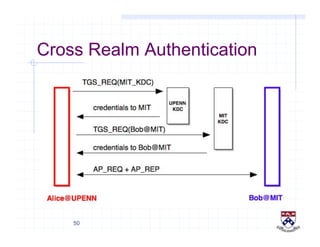
Cross Realm Authentication
51
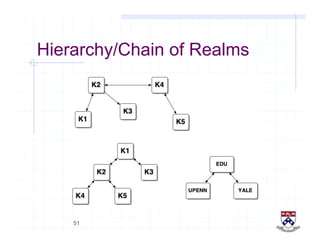
Hierarchy/Chain of Realms
52
Kerberos and PubKey Crypto
!  Proposed enhancements
  Public key crypto for Initial Authentication
 “PKINIT”
  Public key crypto for Cross-realm Authentication
 “PKCROSS”
53
Kerberos: summary
!  Authentication method:
  User’s enter password on local machine only
  Authenticated via central KDC once per day
  No passwords travel over the network
!  Single Sign-on (via TGS):
  KDC gives you a special “ticket”, the TGT, usually
good for rest of the day
  TGT can be used to get other service tickets
allowing user to access them (when presented
along with authenticators)
54
Advantages of Kerberos (1)
!   Passwords aren’t exposed to eavesdropping
!   Password is only typed to the local workstation
  It never travels over the network
  It is never transmitted to a remote server
!   Password guessing more difficult
!   Single Sign-on
  More convenient: only one password, entered once
  Users may be less likely to store passwords
!   Stolen tickets hard to reuse
  Need authenticator as well, which can’t be reused
!   Much easier to effectively secure a small set of
limited access machines (the KDC’s)
55
Advantages of Kerberos (2)
!   Easier to recover from host compromises
!   Centralized user account administration
56
Kerberos caveats
!   Kerberos server can impersonate anyone
!   KDC is a single point of failure
  Can have replicated KDC’s
!   KDC could be a performance bottleneck
  Everyone needs to communicate with it frequently
  Not a practical concern these days
  Having multiple KDC’s alleviates the problem
!   If local workstation is compromised, user’s password
could be stolen by a trojan horse
  Only use a desktop machine or laptop that you trust
  Use hardware token pre-authentication
57
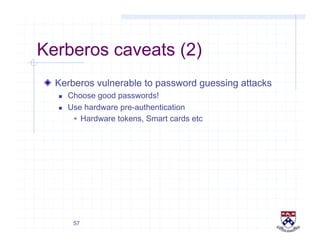
Kerberos caveats (2)
!   Kerberos vulnerable to password guessing attacks
  Choose good passwords!
  Use hardware pre-authentication
  Hardware tokens, Smart cards etc
58
References
!   Kerberos: An Authentication Service for Open Network
Systems
  Steiner, Neuman, Schiller, 1988, Winter USENIX
!   Kerberos: An Authentication Service for Computer
Networks
  Neuman and Ts’o, IEEE Communications, Sep 1994
!   A Moron’s guide to Kerberos - Brian Tung
  http://www.isi.edu/gost/brian/security/kerberos.html
!   Designing an Authentication System: A Dialogue in
Four Scenes
  Bill Bryant, 1988
  http://web.mit.edu/kerberos/www/dialogue.html
59
References (cont)
!   RFC 1510: The Kerberos Network Authentication
Service (v5)
  Kohl and Neuman, September 1993
!   draft-ietf-krb-wg-kerberos-clarifications-03.txt
  IETF Kerberos Working Group: rfc1510 revision
!   Using Encryption for Authentication in Large Networks
of Computers
  Roger Needham, Michael D. Schroeder
  CACM, Volume 21, December 1978, pp 993-999
60
Questions or comments?
!  Shumon Huque
!  E-mail: <shuque@isc.upenn.edu>

An Introduction to Kerberos

  • 1.
    1 An Introduction toKerberos Shumon Huque ISC Networking & Telecommunications University of Pennsylvania March 19th 2003
  • 2.
    2 What this talkis about !  A high-level view of how Kerberos works !  How Kerberos differs from some other authentication systems   SSH password auth, SSH public key auth, SSL !  Target audience:   LSPs, computing staff, others?
  • 3.
    3 What this talkis not about !  Details of Penn’s Kerberos deployment plans   How to get PennKeys, which Kerberos enabled applications do I need to use !  Writing Kerberized applications !  In-depth protocol details and packet formats !  Number Theory & Cryptography
  • 4.
    4 What is Kerberos? ! Developed at M.I.T. !  A secret key based service for providing authentication in open networks !  Authentication mediated by a trusted 3rd party on the network:   Key Distribution Center (KDC)
  • 5.
    5 Kerberos: etymology !  The3-headed dog that guards the entrance to Hades !  Originally, the 3 heads represented the 3 A’s !  But one A was work enough!
  • 6.
  • 7.
    7 Fluffy, the 3headed dog, from “Harry Potter and the Sorcerers Stone”
  • 8.
    8 Some Kerberos benefits !  Standards based strong authentication system !   Wide support in various operating systems !   Make strong authentication readily available for use with campus computer systems !   Prevents transmission of passwords over the network !   Provides “single-sign-on” capability   Only 1 password to remember   Only need to enter it once per day (typically)
  • 9.
    9 So, what isAuthentication? !  The act of verifying someone’s identity !  The process by which users prove their identity to a service !  Doesn’t specify what a user is allowed or not allowed to do (Authorization)
  • 10.
    10 Password based Authentication ! Transmit password in clear over the network to the server !  Main Problem   Eavesdropping/Interception
  • 11.
    11 Cryptographic Authentication !  Nopassword or secret is transferred over the network !  Users prove their identity to a service by performing a cryptographic operation,usually on a quantity supplied by the server !  Crypto operation based on user’s secret key
  • 12.
    12 Encryption and Decryption ! Encryption   Process of scrambling data using a cipher and a key in such a way, that it’s intelligible only to the recipient !  Decryption   Process of unscambling encrypted data using a cipher and key (possibly the same key used to encrypt the data)
  • 13.
    13 Symmetric Key Cryptography ! Aka, Secret Key cryptography !  The same key is used for both encryption and decryption operations (symmetry) !  Examples: DES, 3-DES, AES
  • 14.
    14 Asymmetric Key Cryptography !  Aka Public key cryptography !   A pair of related keys are used:   Public and Private keys   Private key can’t be calculated from Public key !   Data encrypted with one can only be decrypted with the other !   Usually, a user publishes his public key widely   Others use it to encrypt data intended for the user   User decrypts using the private key (known only to him) !   Examples: RSA
  • 15.
    15 Communicating Parties !  Aliceand Bob   Alice: initiator of the communication   Think of her as the “client” or “user”   Bob: correspondent or 2nd participant   Think of him as the “server”   “Alice” wants to access service “Bob” !  Baddies:   Eve, Trudy, Mallory
  • 16.
  • 17.
  • 18.
    18 Problems with thisscheme !  Poor scaling properties !  Generalizing the model for m users and n services, requires a priori distribution of m x n shared keys !  Possible improvement:   Use trusted 3rd party, with which each user and service shares a secret key: m + n keys   Also has important security advantages
  • 19.
    19 Mediated Authentication !  Atrusted third party mediates the authentication process !  Called the Key Distribution Center (KDC) !  Each user and service shares a secret key with the KDC !  KDC generates a session key, and securely distributes it to communicating parties !  Communicating parties prove to each other that they know the session key
  • 20.
    20 Mediated Authentication !  Nomenclature:  Ka = Master key for “alice”, shared by alice and the KDC   Kab = Session key shared by “alice” and “bob”   Tb = Ticket to use “bob”   K{data} = “data” encrypted with key “K”
  • 21.
  • 22.
  • 23.
  • 24.
    24 Kerberos uses timestamps ! Timestamps as nonce’s are used in the mutual authentication phase of the protocol !  This reduces the number of total messages in the protocol !  But it means that Kerberos requires reasonably synchronized clocks amongst the users of the system
  • 25.
  • 26.
  • 27.
  • 28.
    28 Kerberos (detailed) !  Eachuser and service registers a secret key with the KDC !  Everyone trusts the KDC   “Put all your eggs in one basket, and then watch that basket very carefully” - Anonymous Mark Twain !  The user’s key is derived from a password, by applying a hash function !  The service key is a large random number, and stored on the server
  • 29.
    29 Kerberos “principal” !  Aclient of the Kerberos authentication service !  A user or a service !  Format:   name/instance@REALM !  Examples:   peggy@UPENN.EDU   ftp/pobox.upenn.edu@UPENN.EDU
  • 30.
    30 Kerberos without TGS ! A simplified description of Kerberos without the concept of a TGS (Ticket Granting Service)
  • 31.
  • 32.
  • 33.
  • 34.
  • 35.
  • 36.
    36 Review: Kerberos Credentials !  Ticket   Allows user to use a service (actually authenticate to it)   Used to securely pass the identity of the user to which the ticket is issued between the KDC and the application server   Kb{“alice”, Kab, lifetime} !   Authenticator   Proves that the user presenting the ticket is the user to which the ticket was issued   Proof that user knows the session key   Prevents ticket theft from being useful   Prevents replay attacks (timestamp encrypted with the session key): Kab{timestamp}, in combination with a replay cache on the server
  • 37.
    37 Ticket Granting Service(TGS) !  Motivation
  • 38.
  • 39.
  • 40.
    40 Kerberos with TGS !  Ticket Granting Service (TGS):   A Kerberos authenticated service, that allows user to obtain tickets for other services   Co-located at the KDC !   Ticket Granting Ticket (TGT):   Ticket used to access the TGS and obtain service tickets !   Limited-lifetime session key: TGS sessionkey   Shared by user and the TGS !   TGT and TGS session-key cached on Alice’s workstation
  • 41.
    41 TGS Benefits !  SingleSign-on (SSO) capability !  Limits exposure of user’s password   Alice’s workstation can forget the password immediately after using it in the early stages of the protocol   Less data encrypted with the user’s secret key travels over the network, limiting attacker’s access to data that could be used in an offline dictionary attack
  • 42.
  • 43.
  • 44.
  • 45.
  • 46.
    46 Levels of SessionProtection !   Initial Authentication only !   Safe messages:   Authentication of every message   Keyed hashing with session key !   Private messages:   + Encryption of every message   With session key, or mutually negotiated subsession keys !   Note: Application can choose other methods
  • 47.
    47 Pre-authentication !  Kerberos 5added pre-authentication   Client is required to prove it’s identity to the Kerberos AS in the first step   By supplying an encrypted timestamp (encrypted with users secret key)   This prevents an active attacker being able to easily obtain data from the KDC encrypted with any user’s key   Then able to mount an offline dictionary attack
  • 48.
  • 49.
    49 Kerberos & Two-factorauth !  In addition to a secret password, user is required to present a physical item:   A small electronic device: h/w authentication token   Generates non-reusable numeric responses !  Called 2-factor authentication, because it requires 2 things:   Something the user knows (password)   Something the user has (hardware token)
  • 50.
  • 51.
  • 52.
    52 Kerberos and PubKeyCrypto !  Proposed enhancements   Public key crypto for Initial Authentication  “PKINIT”   Public key crypto for Cross-realm Authentication  “PKCROSS”
  • 53.
    53 Kerberos: summary !  Authenticationmethod:   User’s enter password on local machine only   Authenticated via central KDC once per day   No passwords travel over the network !  Single Sign-on (via TGS):   KDC gives you a special “ticket”, the TGT, usually good for rest of the day   TGT can be used to get other service tickets allowing user to access them (when presented along with authenticators)
  • 54.
    54 Advantages of Kerberos(1) !   Passwords aren’t exposed to eavesdropping !   Password is only typed to the local workstation   It never travels over the network   It is never transmitted to a remote server !   Password guessing more difficult !   Single Sign-on   More convenient: only one password, entered once   Users may be less likely to store passwords !   Stolen tickets hard to reuse   Need authenticator as well, which can’t be reused !   Much easier to effectively secure a small set of limited access machines (the KDC’s)
  • 55.
    55 Advantages of Kerberos(2) !   Easier to recover from host compromises !   Centralized user account administration
  • 56.
    56 Kerberos caveats !  Kerberos server can impersonate anyone !   KDC is a single point of failure   Can have replicated KDC’s !   KDC could be a performance bottleneck   Everyone needs to communicate with it frequently   Not a practical concern these days   Having multiple KDC’s alleviates the problem !   If local workstation is compromised, user’s password could be stolen by a trojan horse   Only use a desktop machine or laptop that you trust   Use hardware token pre-authentication
  • 57.
    57 Kerberos caveats (2) !  Kerberos vulnerable to password guessing attacks   Choose good passwords!   Use hardware pre-authentication   Hardware tokens, Smart cards etc
  • 58.
    58 References !   Kerberos:An Authentication Service for Open Network Systems   Steiner, Neuman, Schiller, 1988, Winter USENIX !   Kerberos: An Authentication Service for Computer Networks   Neuman and Ts’o, IEEE Communications, Sep 1994 !   A Moron’s guide to Kerberos - Brian Tung   http://www.isi.edu/gost/brian/security/kerberos.html !   Designing an Authentication System: A Dialogue in Four Scenes   Bill Bryant, 1988   http://web.mit.edu/kerberos/www/dialogue.html
  • 59.
    59 References (cont) !  RFC 1510: The Kerberos Network Authentication Service (v5)   Kohl and Neuman, September 1993 !   draft-ietf-krb-wg-kerberos-clarifications-03.txt   IETF Kerberos Working Group: rfc1510 revision !   Using Encryption for Authentication in Large Networks of Computers   Roger Needham, Michael D. Schroeder   CACM, Volume 21, December 1978, pp 993-999
  • 60.
    60 Questions or comments? ! Shumon Huque !  E-mail: <shuque@isc.upenn.edu>