Computer Arithmetic 
By 
Roll No. 2,Roll No.10 
Department of CS & IT 
University of Azad Jammu & Kashmir, MZD 
To 
Prof. Dr. Wajid Aziz Loun 
Chairman, DCS & IT/Prof. of Subject 
Advance Computer Architecture 
University of Azad Jammu & Kashmir, MZD
Presentation Topics 
Part I: Number Representation 
Part II: Addition / Subtraction 
Part III: Multiplication 
Part IV: Division
Arithmetic & Logic Unit 
• Does the calculations 
• Handles integers 
• May handle floating point (real) numbers
Integer Representation 
• In binary number system, an arbitrary number can be represented with 
– Zero and one 
– The minus sign 
– And period, or radix point 
– e.g. 
• For computer storage and processing 
– Only have 0 & 1 to represent everything 
– Positive numbers stored in binary. (For example 41=00101001) 
– No minus sign 
– No period 
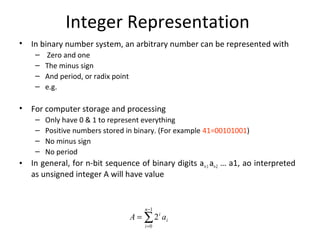
• In general, for n-bit sequence of binary digits an-1 an-2 … a1, ao interpreted 
as unsigned integer A will have value 
ĂĽ- 
= 
= 
1 
0 
2 
n 
i 
i 
A i a
What’s ALU? 
1. ALU stands for: Arithmetic Logic Unit 
2. ALU is a digital circuit that performs 
Arithmetic (Add, Sub, . . .) and Logical (AND, 
OR, NOT) operations. 
3. John Von Neumann proposed the ALU in 
1945 when he was working on EDVAC. 
Computer Arithmetic, Number 
Representation
Number Systems 
and Binary Arithmetic
Introduction to Numbering Systems 
• We are all familiar with the decimal number 
system (Base 10). Some other number 
systems that we will work with are: 
– Binary ® Base 2 
– Octal ® Base 8 
– Hexadecimal ® Base 16
Characteristics of Numbering Systems 
1) The digits are consecutive. 
2) The number of digits is equal to the size of the 
base. 
3) Zero is always the first digit. 
4) When 1 is added to the largest digit, a sum of zero 
and a carry of one results. 
5) Numeric values determined by the have implicit 
positional values of the digits.
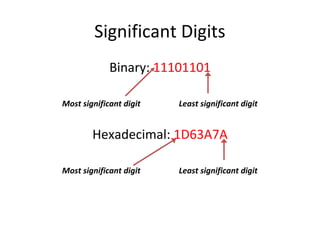
Significant Digits 
Binary: 11101101 
Most significant digit Least significant digit 
Hexadecimal: 1D63A7A 
Most significant digit Least significant digit
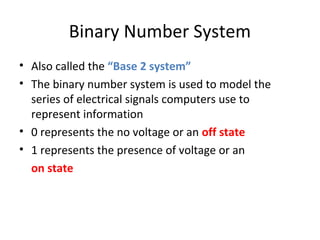
Binary Number System 
• Also called the “Base 2 system” 
• The binary number system is used to model the 
series of electrical signals computers use to 
represent information 
• 0 represents the no voltage or an off state 
• 1 represents the presence of voltage or an 
on state
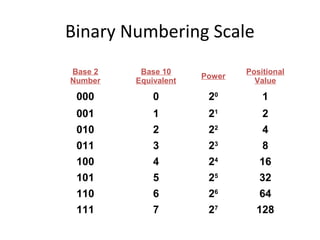
Binary Numbering Scale 
Base 2 
Number 
Base 10 
Equivalent Power Positional 
Value 
000 0 20 1 
001 1 21 2 
010 2 22 4 
011 3 23 8 
100 4 24 16 
101 5 25 32 
110 6 26 64 
111 7 27 128
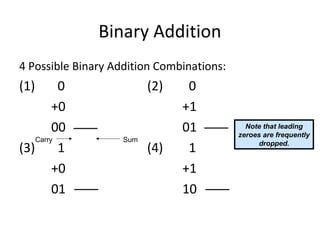
Binary Addition 
4 Possible Binary Addition Combinations: 
(1) 0 (2) 0 
+0 +1 
00 01 
Carry Sum 
(3) 1 (4) 1 
+0 +1 
01 10 
Note that leading 
zeroes are frequently 
dropped.
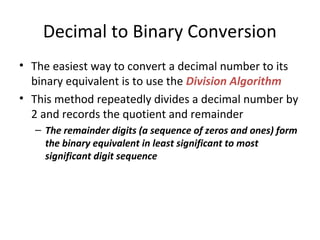
Decimal to Binary Conversion 
• The easiest way to convert a decimal number to its 
binary equivalent is to use the Division Algorithm 
• This method repeatedly divides a decimal number by 
2 and records the quotient and remainder 
– The remainder digits (a sequence of zeros and ones) form 
the binary equivalent in least significant to most 
significant digit sequence
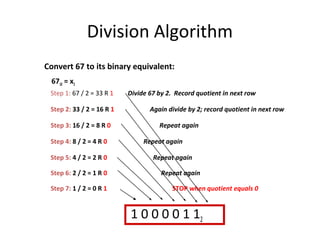
Division Algorithm 
Convert 67 to its binary equivalent: 
6710 = x2 
Step 1: 67 / 2 = 33 R 1 Divide 67 by 2. Record quotient in next row 
Step 2: 33 / 2 = 16 R 1 Again divide by 2; record quotient in next row 
Step 3: 16 / 2 = 8 R 0 Repeat again 
Step 4: 8 / 2 = 4 R 0 Repeat again 
Step 5: 4 / 2 = 2 R 0 Repeat again 
Step 6: 2 / 2 = 1 R 0 Repeat again 
Step 7: 1 / 2 = 0 R 1 STOP when quotient equals 0 
1 0 0 0 0 1 12
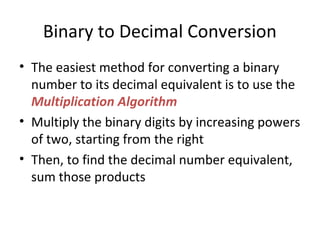
Binary to Decimal Conversion 
• The easiest method for converting a binary 
number to its decimal equivalent is to use the 
Multiplication Algorithm 
• Multiply the binary digits by increasing powers 
of two, starting from the right 
• Then, to find the decimal number equivalent, 
sum those products
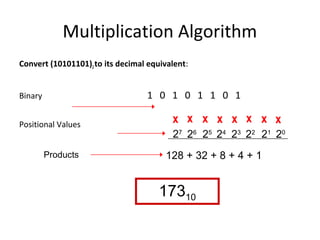
Multiplication Algorithm 
Convert (10101101)2 to its decimal equivalent: 
Binary 1 0 1 0 1 1 0 1 
Positional Values x x x x x x x x 
27 26 25 24 23 22 21 20 
Products 128 + 32 + 8 + 4 + 1 
17310
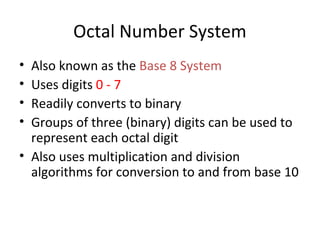
Octal Number System 
• Also known as the Base 8 System 
• Uses digits 0 - 7 
• Readily converts to binary 
• Groups of three (binary) digits can be used to 
represent each octal digit 
• Also uses multiplication and division 
algorithms for conversion to and from base 10
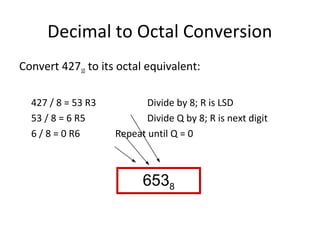
Decimal to Octal Conversion 
Convert 42710 to its octal equivalent: 
427 / 8 = 53 R3 Divide by 8; R is LSD 
53 / 8 = 6 R5 Divide Q by 8; R is next digit 
6 / 8 = 0 R6 Repeat until Q = 0 
6538
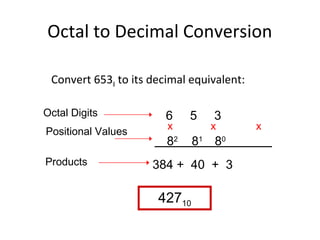
Octal to Decimal Conversion 
Convert 6538 to its decimal equivalent: 
6 5 3 
x x 2 81 80 
x8 
384 + 40 + 3 
42710 
Octal Digits 
Positional Values 
Products
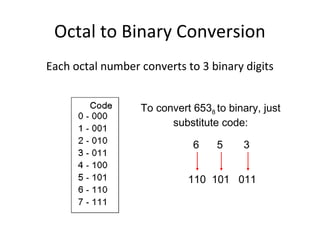
Octal to Binary Conversion 
Each octal number converts to 3 binary digits 
To convert 6538 to binary, just 
substitute code: 
6 5 3 
110 101 011
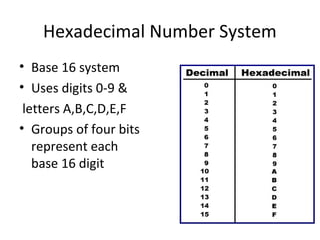
Hexadecimal Number System 
• Base 16 system 
• Uses digits 0-9 & 
letters A,B,C,D,E,F 
• Groups of four bits 
represent each 
base 16 digit
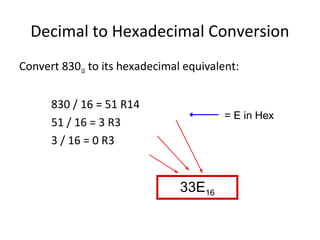
Decimal to Hexadecimal Conversion 
Convert 83010 to its hexadecimal equivalent: 
830 / 16 = 51 R14 
51 / 16 = 3 R3 
3 / 16 = 0 R3 
33E16 
= E in Hex
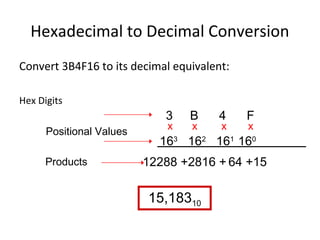
Hexadecimal to Decimal Conversion 
Convert 3B4F16 to its decimal equivalent: 
Hex Digits 
3 B 4 Fx 
x x 
163 162 161 160 
12288 +2816 + 64 +15 
15,18310 
Positional Values 
Products 
x
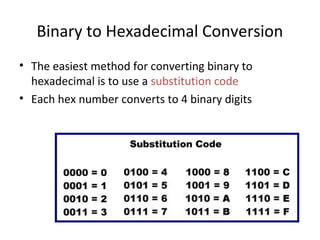
Binary to Hexadecimal Conversion 
• The easiest method for converting binary to 
hexadecimal is to use a substitution code 
• Each hex number converts to 4 binary digits
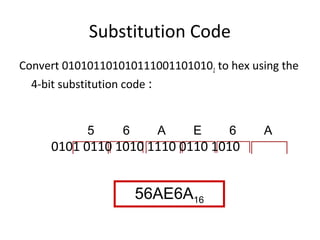
Substitution Code 
Convert 0101011010101110011010102 to hex using the 
4-bit substitution code : 
5 6 A E 6 A 
0101 0110 1010 1110 0110 1010 
56AE6A16
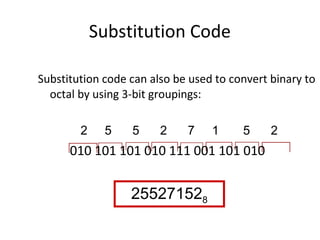
Substitution Code 
Substitution code can also be used to convert binary to 
octal by using 3-bit groupings: 
2 5 5 2 7 1 5 2 
010 101 101 010 111 001 101 010 
255271528
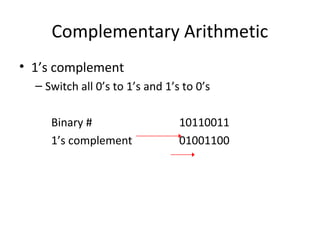
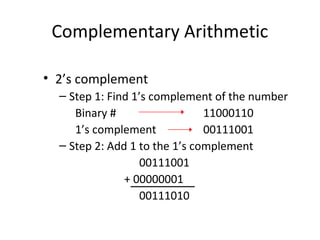
Complementary Arithmetic 
• 1’s complement 
– Switch all 0’s to 1’s and 1’s to 0’s 
Binary # 10110011 
1’s complement 01001100
Complementary Arithmetic 
• 2’s complement 
– Step 1: Find 1’s complement of the number 
Binary # 11000110 
1’s complement 00111001 
– Step 2: Add 1 to the 1’s complement 
00111001 
+ 00000001 
00111010
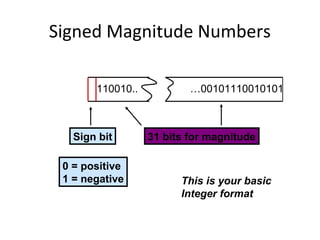
Signed Magnitude Numbers 
110010.. …00101110010101 
Sign bit 
0 = positive 
1 = negative 
31 bits for magnitude 
This is your basic 
Integer format
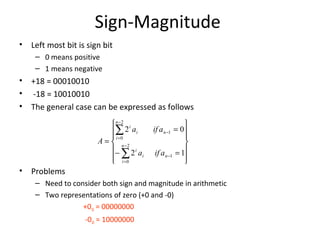
Sign-Magnitude 
• Left most bit is sign bit 
– 0 means positive 
– 1 means negative 
• +18 = 00010010 
• -18 = 10010010 
• The general case can be expressed as follows 
• Problems 
Ăź 
= 
ĂĽ 
a if a 
2 0 
- 
– Need to consider both sign and magnitude in arithmetic 
– Two representations of zero (+0 and -0) 
+010 = 00000000 
-010 = 10000000 
ĂŻ ĂŻĂž 
ĂŻ ĂŻĂ˝ 
ĂŻ ĂŻĂŽ 
ĂŻ ĂŻĂ­ ĂŹ 
- = 
= 
ĂĽ 
= 
- 
- 
= 
- 
2 
0 
1 
2 
0 
1 
2 1 
n 
i 
i n 
i 
n 
i 
i n 
i 
a if a 
A
Negation (Sign Magnitude Representation) 
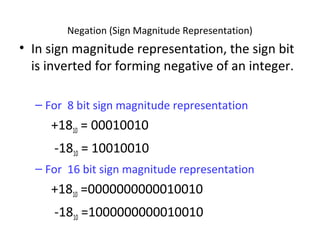
• In sign magnitude representation, the sign bit 
is inverted for forming negative of an integer. 
– For 8 bit sign magnitude representation 
+1810 = 00010010 
-1810 = 10010010 
– For 16 bit sign magnitude representation 
+1810 =0000000000010010 
-1810 =1000000000010010
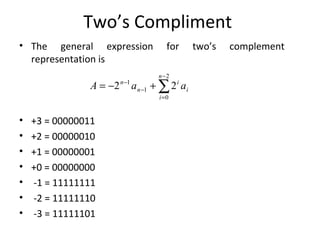
Two’s Compliment 
• The general expression for two’s complement 
representation is 
A n a a 
• +3 = 00000011 
• +2 = 00000010 
• +1 = 00000001 
• +0 = 00000000 
• -1 = 11111111 
• -2 = 11111110 
• -3 = 11111101 
ĂĽ- 
2 1 2 
= 
= - - + 
- 
2 
0 
1 
n 
i 
i 
i 
n
Negation (Twos Complement Representation) 
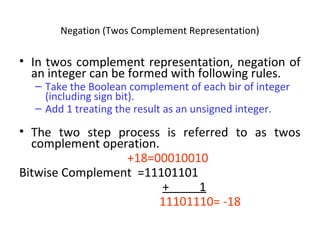
• In twos complement representation, negation of 
an integer can be formed with following rules. 
– Take the Boolean complement of each bir of integer 
(including sign bit). 
– Add 1 treating the result as an unsigned integer. 
• The two step process is referred to as twos 
complement operation. 
+18=00010010 
Bitwise Complement =11101101 
+ 1 
11101110= -18
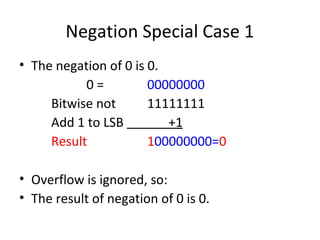
Negation Special Case 1 
• The negation of 0 is 0. 
0 = 00000000 
Bitwise not 11111111 
Add 1 to LSB +1 
Result 100000000=0 
• Overflow is ignored, so: 
• The result of negation of 0 is 0.
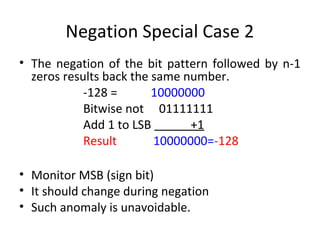
Negation Special Case 2 
• The negation of the bit pattern followed by n-1 
zeros results back the same number. 
-128 = 10000000 
Bitwise not 01111111 
Add 1 to LSB +1 
Result 10000000=-128 
• Monitor MSB (sign bit) 
• It should change during negation 
• Such anomaly is unavoidable.
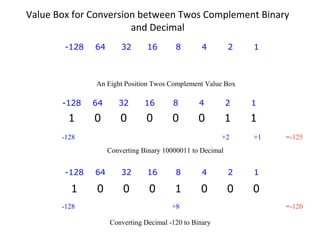
Value Box for Conversion between Twos Complement Binary 
and Decimal 
-128 64 32 16 8 4 2 1 
An Eight Position Twos Complement Value Box 
-128 64 32 16 8 4 2 1 
1 0 0 0 0 0 1 1 
-128 +2 +1 =-125 
Converting Binary 10000011 to Decimal 
-128 64 32 16 8 4 2 1 
1 0 0 0 1 0 0 0 
-128 +8 =-120 
Converting Decimal -120 to Binary
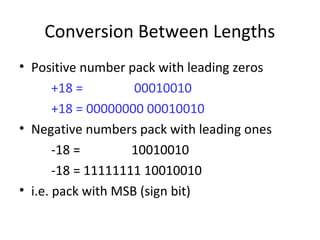
Conversion Between Lengths 
• Positive number pack with leading zeros 
+18 = 00010010 
+18 = 00000000 00010010 
• Negative numbers pack with leading ones 
-18 = 10010010 
-18 = 11111111 10010010 
• i.e. pack with MSB (sign bit)
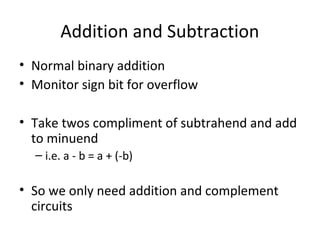
Addition and Subtraction 
• Normal binary addition 
• Monitor sign bit for overflow 
• Take twos compliment of subtrahend and add 
to minuend 
– i.e. a - b = a + (-b) 
• So we only need addition and complement 
circuits
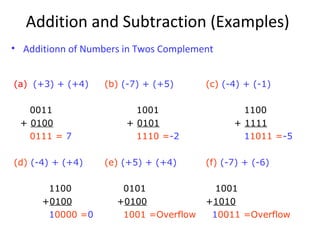
Addition and Subtraction (Examples) 
• Additionn of Numbers in Twos Complement 
(a) (+3) + (+4) 
0011 
+ 0100 
0111 = 7 
(b) (-7) + (+5) 
1001 
+ 0101 
1110 =-2 
(c) (-4) + (-1) 
1100 
+ 1111 
11011 =-5 
(d) (-4) + (+4) 
1100 
+0100 
10000 =0 
(e) (+5) + (+4) 
0101 
+0100 
1001 =Overflow 
(f) (-7) + (-6) 
1001 
+1010 
10011 =Overflow
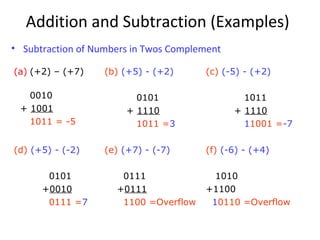
Addition and Subtraction (Examples) 
• Subtraction of Numbers in Twos Complement 
(a) (+2) – (+7) 
0010 
+ 1001 
1011 = -5 
(b) (+5) - (+2) 
0101 
+ 1110 
1011 =3 
(c) (-5) - (+2) 
1011 
+ 1110 
11001 =-7 
(d) (+5) - (-2) 
0101 
+0010 
0111 =7 
(e) (+7) - (-7) 
0111 
+0111 
1100 =Overflow 
(f) (-6) - (+4) 
1010 
+1100 
10110 =Overflow
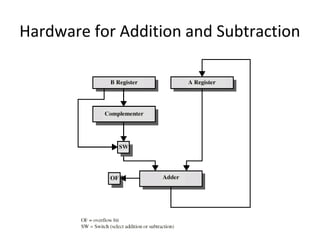
Hardware for Addition and Subtraction

Alu1

  • 1.
    Computer Arithmetic By Roll No. 2,Roll No.10 Department of CS & IT University of Azad Jammu & Kashmir, MZD To Prof. Dr. Wajid Aziz Loun Chairman, DCS & IT/Prof. of Subject Advance Computer Architecture University of Azad Jammu & Kashmir, MZD
  • 2.
    Presentation Topics PartI: Number Representation Part II: Addition / Subtraction Part III: Multiplication Part IV: Division
  • 3.
    Arithmetic & LogicUnit • Does the calculations • Handles integers • May handle floating point (real) numbers
  • 4.
    Integer Representation •In binary number system, an arbitrary number can be represented with – Zero and one – The minus sign – And period, or radix point – e.g. • For computer storage and processing – Only have 0 & 1 to represent everything – Positive numbers stored in binary. (For example 41=00101001) – No minus sign – No period • In general, for n-bit sequence of binary digits an-1 an-2 … a1, ao interpreted as unsigned integer A will have value å- = = 1 0 2 n i i A i a
  • 5.
    What’s ALU? 1.ALU stands for: Arithmetic Logic Unit 2. ALU is a digital circuit that performs Arithmetic (Add, Sub, . . .) and Logical (AND, OR, NOT) operations. 3. John Von Neumann proposed the ALU in 1945 when he was working on EDVAC. Computer Arithmetic, Number Representation
  • 6.
    Number Systems andBinary Arithmetic
  • 7.
    Introduction to NumberingSystems • We are all familiar with the decimal number system (Base 10). Some other number systems that we will work with are: – Binary ® Base 2 – Octal ® Base 8 – Hexadecimal ® Base 16
  • 8.
    Characteristics of NumberingSystems 1) The digits are consecutive. 2) The number of digits is equal to the size of the base. 3) Zero is always the first digit. 4) When 1 is added to the largest digit, a sum of zero and a carry of one results. 5) Numeric values determined by the have implicit positional values of the digits.
  • 9.
    Significant Digits Binary:11101101 Most significant digit Least significant digit Hexadecimal: 1D63A7A Most significant digit Least significant digit
  • 10.
    Binary Number System • Also called the “Base 2 system” • The binary number system is used to model the series of electrical signals computers use to represent information • 0 represents the no voltage or an off state • 1 represents the presence of voltage or an on state
  • 11.
    Binary Numbering Scale Base 2 Number Base 10 Equivalent Power Positional Value 000 0 20 1 001 1 21 2 010 2 22 4 011 3 23 8 100 4 24 16 101 5 25 32 110 6 26 64 111 7 27 128
  • 12.
    Binary Addition 4Possible Binary Addition Combinations: (1) 0 (2) 0 +0 +1 00 01 Carry Sum (3) 1 (4) 1 +0 +1 01 10 Note that leading zeroes are frequently dropped.
  • 13.
    Decimal to BinaryConversion • The easiest way to convert a decimal number to its binary equivalent is to use the Division Algorithm • This method repeatedly divides a decimal number by 2 and records the quotient and remainder – The remainder digits (a sequence of zeros and ones) form the binary equivalent in least significant to most significant digit sequence
  • 14.
    Division Algorithm Convert67 to its binary equivalent: 6710 = x2 Step 1: 67 / 2 = 33 R 1 Divide 67 by 2. Record quotient in next row Step 2: 33 / 2 = 16 R 1 Again divide by 2; record quotient in next row Step 3: 16 / 2 = 8 R 0 Repeat again Step 4: 8 / 2 = 4 R 0 Repeat again Step 5: 4 / 2 = 2 R 0 Repeat again Step 6: 2 / 2 = 1 R 0 Repeat again Step 7: 1 / 2 = 0 R 1 STOP when quotient equals 0 1 0 0 0 0 1 12
  • 15.
    Binary to DecimalConversion • The easiest method for converting a binary number to its decimal equivalent is to use the Multiplication Algorithm • Multiply the binary digits by increasing powers of two, starting from the right • Then, to find the decimal number equivalent, sum those products
  • 16.
    Multiplication Algorithm Convert(10101101)2 to its decimal equivalent: Binary 1 0 1 0 1 1 0 1 Positional Values x x x x x x x x 27 26 25 24 23 22 21 20 Products 128 + 32 + 8 + 4 + 1 17310
  • 17.
    Octal Number System • Also known as the Base 8 System • Uses digits 0 - 7 • Readily converts to binary • Groups of three (binary) digits can be used to represent each octal digit • Also uses multiplication and division algorithms for conversion to and from base 10
  • 18.
    Decimal to OctalConversion Convert 42710 to its octal equivalent: 427 / 8 = 53 R3 Divide by 8; R is LSD 53 / 8 = 6 R5 Divide Q by 8; R is next digit 6 / 8 = 0 R6 Repeat until Q = 0 6538
  • 19.
    Octal to DecimalConversion Convert 6538 to its decimal equivalent: 6 5 3 x x 2 81 80 x8 384 + 40 + 3 42710 Octal Digits Positional Values Products
  • 20.
    Octal to BinaryConversion Each octal number converts to 3 binary digits To convert 6538 to binary, just substitute code: 6 5 3 110 101 011
  • 21.
    Hexadecimal Number System • Base 16 system • Uses digits 0-9 & letters A,B,C,D,E,F • Groups of four bits represent each base 16 digit
  • 22.
    Decimal to HexadecimalConversion Convert 83010 to its hexadecimal equivalent: 830 / 16 = 51 R14 51 / 16 = 3 R3 3 / 16 = 0 R3 33E16 = E in Hex
  • 23.
    Hexadecimal to DecimalConversion Convert 3B4F16 to its decimal equivalent: Hex Digits 3 B 4 Fx x x 163 162 161 160 12288 +2816 + 64 +15 15,18310 Positional Values Products x
  • 24.
    Binary to HexadecimalConversion • The easiest method for converting binary to hexadecimal is to use a substitution code • Each hex number converts to 4 binary digits
  • 25.
    Substitution Code Convert0101011010101110011010102 to hex using the 4-bit substitution code : 5 6 A E 6 A 0101 0110 1010 1110 0110 1010 56AE6A16
  • 26.
    Substitution Code Substitutioncode can also be used to convert binary to octal by using 3-bit groupings: 2 5 5 2 7 1 5 2 010 101 101 010 111 001 101 010 255271528
  • 27.
    Complementary Arithmetic •1’s complement – Switch all 0’s to 1’s and 1’s to 0’s Binary # 10110011 1’s complement 01001100
  • 28.
    Complementary Arithmetic •2’s complement – Step 1: Find 1’s complement of the number Binary # 11000110 1’s complement 00111001 – Step 2: Add 1 to the 1’s complement 00111001 + 00000001 00111010
  • 29.
    Signed Magnitude Numbers 110010.. …00101110010101 Sign bit 0 = positive 1 = negative 31 bits for magnitude This is your basic Integer format
  • 30.
    Sign-Magnitude • Leftmost bit is sign bit – 0 means positive – 1 means negative • +18 = 00010010 • -18 = 10010010 • The general case can be expressed as follows • Problems ü = å a if a 2 0 - – Need to consider both sign and magnitude in arithmetic – Two representations of zero (+0 and -0) +010 = 00000000 -010 = 10000000 ï ïþ ï ïý ï ïî ï ïí ì - = = å = - - = - 2 0 1 2 0 1 2 1 n i i n i n i i n i a if a A
  • 31.
    Negation (Sign MagnitudeRepresentation) • In sign magnitude representation, the sign bit is inverted for forming negative of an integer. – For 8 bit sign magnitude representation +1810 = 00010010 -1810 = 10010010 – For 16 bit sign magnitude representation +1810 =0000000000010010 -1810 =1000000000010010
  • 32.
    Two’s Compliment •The general expression for two’s complement representation is A n a a • +3 = 00000011 • +2 = 00000010 • +1 = 00000001 • +0 = 00000000 • -1 = 11111111 • -2 = 11111110 • -3 = 11111101 å- 2 1 2 = = - - + - 2 0 1 n i i i n
  • 33.
    Negation (Twos ComplementRepresentation) • In twos complement representation, negation of an integer can be formed with following rules. – Take the Boolean complement of each bir of integer (including sign bit). – Add 1 treating the result as an unsigned integer. • The two step process is referred to as twos complement operation. +18=00010010 Bitwise Complement =11101101 + 1 11101110= -18
  • 34.
    Negation Special Case1 • The negation of 0 is 0. 0 = 00000000 Bitwise not 11111111 Add 1 to LSB +1 Result 100000000=0 • Overflow is ignored, so: • The result of negation of 0 is 0.
  • 35.
    Negation Special Case2 • The negation of the bit pattern followed by n-1 zeros results back the same number. -128 = 10000000 Bitwise not 01111111 Add 1 to LSB +1 Result 10000000=-128 • Monitor MSB (sign bit) • It should change during negation • Such anomaly is unavoidable.
  • 36.
    Value Box forConversion between Twos Complement Binary and Decimal -128 64 32 16 8 4 2 1 An Eight Position Twos Complement Value Box -128 64 32 16 8 4 2 1 1 0 0 0 0 0 1 1 -128 +2 +1 =-125 Converting Binary 10000011 to Decimal -128 64 32 16 8 4 2 1 1 0 0 0 1 0 0 0 -128 +8 =-120 Converting Decimal -120 to Binary
  • 37.
    Conversion Between Lengths • Positive number pack with leading zeros +18 = 00010010 +18 = 00000000 00010010 • Negative numbers pack with leading ones -18 = 10010010 -18 = 11111111 10010010 • i.e. pack with MSB (sign bit)
  • 38.
    Addition and Subtraction • Normal binary addition • Monitor sign bit for overflow • Take twos compliment of subtrahend and add to minuend – i.e. a - b = a + (-b) • So we only need addition and complement circuits
  • 39.
    Addition and Subtraction(Examples) • Additionn of Numbers in Twos Complement (a) (+3) + (+4) 0011 + 0100 0111 = 7 (b) (-7) + (+5) 1001 + 0101 1110 =-2 (c) (-4) + (-1) 1100 + 1111 11011 =-5 (d) (-4) + (+4) 1100 +0100 10000 =0 (e) (+5) + (+4) 0101 +0100 1001 =Overflow (f) (-7) + (-6) 1001 +1010 10011 =Overflow
  • 40.
    Addition and Subtraction(Examples) • Subtraction of Numbers in Twos Complement (a) (+2) – (+7) 0010 + 1001 1011 = -5 (b) (+5) - (+2) 0101 + 1110 1011 =3 (c) (-5) - (+2) 1011 + 1110 11001 =-7 (d) (+5) - (-2) 0101 +0010 0111 =7 (e) (+7) - (-7) 0111 +0111 1100 =Overflow (f) (-6) - (+4) 1010 +1100 10110 =Overflow
  • 41.
    Hardware for Additionand Subtraction