21EC201– Digital Principles and System Design
UNIT I - DIGITAL FUNDAMENTALS
Outline
 Number Systems – Decimal, Binary, Octal, 1’s and 2’s
complements,
 Codes-Binary, BCD, Excess 3,Gray, Alphanumeric codes,
Boolean theorems
 Logic gates,
 Universal gates,
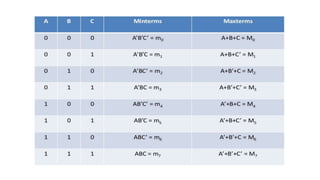
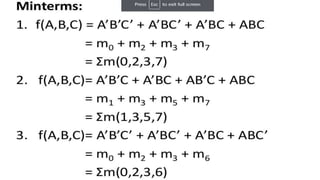
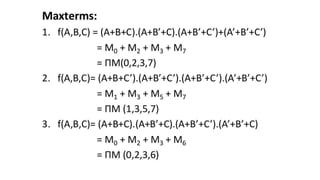
 Sum of products and product of sums, Minterms and
Maxterms,
 Karnaugh map minimization,
 NAND and NOR Implementations.
Number Systems
A set of values used to represent different quantities is known as
number system
Ex: Number of student in online classes
In general term computer represent information in different types
of data forms i.e. number , character ,picture ,audio , video etc
Number Systems
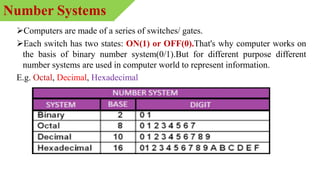
Computers are made of a series of switches/ gates.
Each switch has two states: ON(1) or OFF(0).That's why computer works on
the basis of binary number system(0/1).But for different purpose different
number systems are used in computer world to represent information.
E.g. Octal, Decimal, Hexadecimal
Number Systems
 This number systems is composed of 10 Symbols
(0,1,2,3,4,5,6,7,8,9)
 the decimal system has 10 numerical characters and so has a
base of 10
Decimal Number System
 Binary has only two values 0 and 1
 If larger values than 1 are needed, extra columns are added to
the left. Each column value is now twice the value of the
column to its right. For example the decimal value three is
written 11 in binary
Binary Number System
Octal
• Octal has eight values 0 to 7.
• If larger values than 7 are needed, extra columns are added to the
left. Each column value is now 8 times the value of the column to its
right. For example the decimal value twenty-seven is written 33 in
octal
Hexadecimal
• Hexadecimal number system uses base 16 from 0-9 and a,b,c,d,e,f as
16 symbols
Octal and HexaDecimal Number system
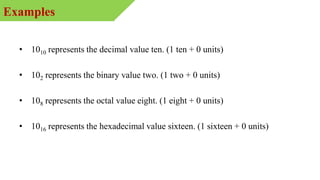
• 1010 represents the decimal value ten. (1 ten + 0 units)
• 102 represents the binary value two. (1 two + 0 units)
• 108 represents the octal value eight. (1 eight + 0 units)
• 1016 represents the hexadecimal value sixteen. (1 sixteen + 0 units)
Examples
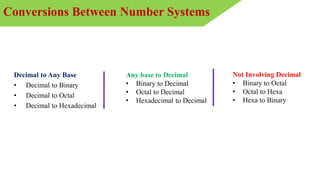
Decimal to Any Base
• Decimal to Binary
• Decimal to Octal
• Decimal to Hexadecimal
Any base to Decimal
• Binary to Decimal
• Octal to Decimal
• Hexadecimal to Decimal
Not Involving Decimal
• Binary to Octal
• Octal to Hexa
• Hexa to Binary
Conversions Between Number Systems
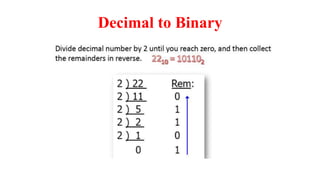
Decimal to Binary
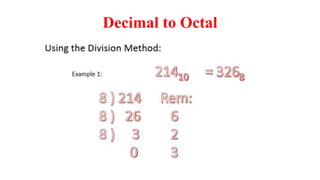
Decimal to Octal
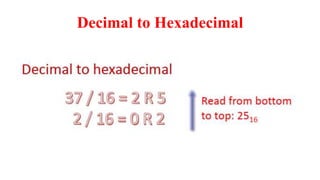
Decimal to Hexadecimal
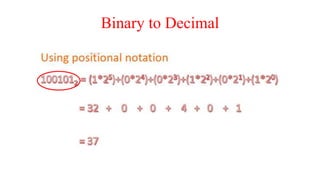
Binary to Decimal
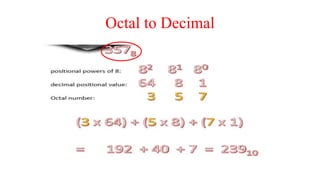
Octal to Decimal
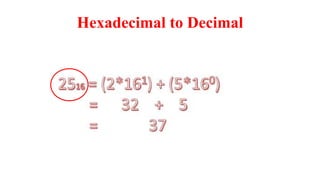
Hexadecimal to Decimal
Binary to Octal
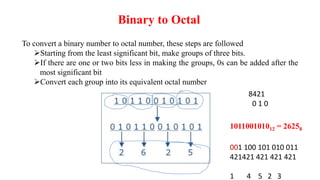
To convert a binary number to octal number, these steps are followed
Starting from the least significant bit, make groups of three bits.
If there are one or two bits less in making the groups, 0s can be added after the
most significant bit
Convert each group into its equivalent octal number
101100101012 = 26258
8421
0 1 0
001 100 101 010 011
421421 421 421 421
1 4 5 2 3
Binary to Hexadecimal
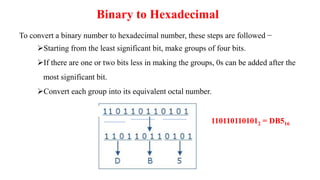
To convert a binary number to hexadecimal number, these steps are followed −
Starting from the least significant bit, make groups of four bits.
If there are one or two bits less in making the groups, 0s can be added after the
most significant bit.
Convert each group into its equivalent octal number.
1101101101012 = DB516
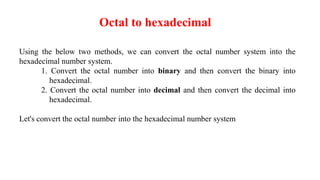
Octal to hexadecimal
Using the below two methods, we can convert the octal number system into the
hexadecimal number system.
1. Convert the octal number into binary and then convert the binary into
hexadecimal.
2. Convert the octal number into decimal and then convert the decimal into
hexadecimal.
Let's convert the octal number into the hexadecimal number system
Octal -> Binary -> Hexadecimal
Let's convert (56)8 into hexadecimal
Step 1 : Convert (56)8 into Binary
In order to convert the octal number into binary, we need to express every octal value using 3
binary bits.
Binary equivalent of 5 is (101)2.
Binary equivalent of 6 is (110)2.
= (56)8
= (101)(110)
= (101110)2
Step 2 : Convert (101110)2 into Hexadecimal
In order to convert the binary number into hexadecimal, we need to group every 4 binary bits
and calculate the value[From left to right].
(101110)2 in hexadecimal
= (101110)2
= (10)(1110)
= (2)(14) = = (2E)16
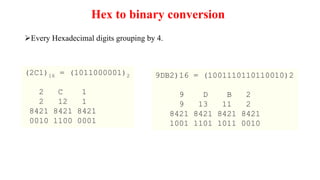
(2C1)16 = (1011000001)2
2 C 1
2 12 1
8421 8421 8421
0010 1100 0001
Hex to binary conversion
9DB2)16 = (1001110110110010)2
9 D B 2
9 13 11 2
8421 8421 8421 8421
1001 1101 1011 0010
Every Hexadecimal digits grouping by 4.
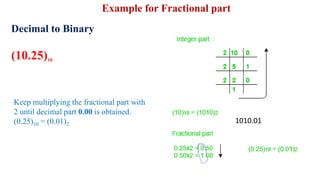
Decimal to Binary
(10.25)10
Keep multiplying the fractional part with
2 until decimal part 0.00 is obtained.
(0.25)10 = (0.01)2
Example for Fractional part
1010.01
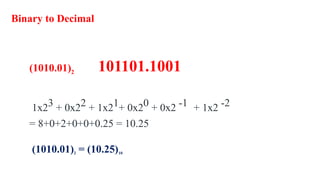
Binary to Decimal
(1010.01)2 101101.1001
1x23 + 0x22 + 1x21+ 0x20 + 0x2 -1 + 1x2 -2
= 8+0+2+0+0+0.25 = 10.25
(1010.01)2 = (10.25)10
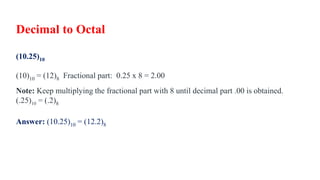
Decimal to Octal
(10.25)10
(10)10 = (12)8 Fractional part: 0.25 x 8 = 2.00
Note: Keep multiplying the fractional part with 8 until decimal part .00 is obtained.
(.25)10 = (.2)8
Answer: (10.25)10 = (12.2)8
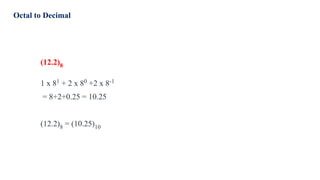
Octal to Decimal
(12.2)8
1 x 81 + 2 x 80 +2 x 8-1
= 8+2+0.25 = 10.25
(12.2)8 = (10.25)10
Arithmetic Operations
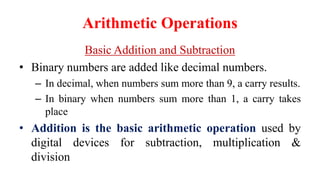
Basic Addition and Subtraction
• Binary numbers are added like decimal numbers.
– In decimal, when numbers sum more than 9, a carry results.
– In binary when numbers sum more than 1, a carry takes
place
• Addition is the basic arithmetic operation used by
digital devices for subtraction, multiplication &
division
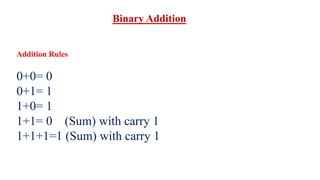
Binary Addition
Addition Rules
0+0= 0
0+1= 1
1+0= 1
1+1= 0 (Sum) with carry 1
1+1+1=1 (Sum) with carry 1
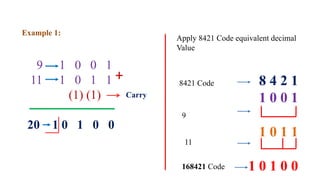
Example 1:
9 1 0 0 1
11 1 0 1 1
(1) (1)
20 1 0 1 0 0
Carry
Apply 8421 Code equivalent decimal
Value
8 4 2 1
1 0 0 1
1 0 1 1
1 0 1 0 0
8421 Code
9
11
168421 Code
+
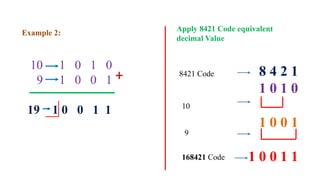
Example 2:
10 1 0 1 0
9 1 0 0 1
19 1 0 0 1 1
Apply 8421 Code equivalent
decimal Value
8 4 2 1
1 0 1 0
1 0 0 1
1 0 0 1 1
8421 Code
10
9
168421 Code
+
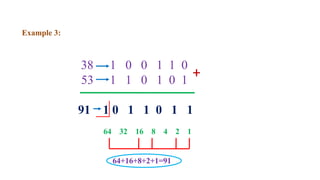
Example 3:
38 1 0 0 1 1 0
53 1 1 0 1 0 1
91 1 0 1 1 0 1 1
+
64 32 16 8 4 2 1
64+16+8+2+1=91
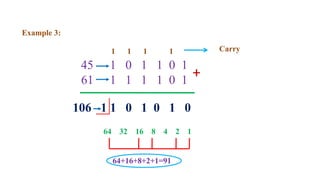
106 1 1 0 1 0 1 0
Example 3:
45 1 0 1 1 0 1
61 1 1 1 1 0 1
+
64 32 16 8 4 2 1
64+16+8+2+1=91
1 1 1 1 Carry
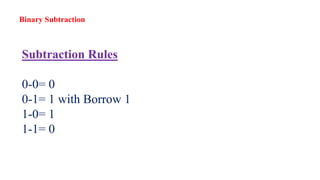
Subtraction Rules
0-0= 0
0-1= 1 with Borrow 1
1-0= 1
1-1= 0
Binary Subtraction
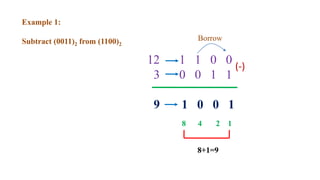
Example 1:
Subtract (0011)2 from (1100)2
12 1 1 0 0
3 0 0 1 1
9 1 0 0 1
(-)
Borrow
8 4 2 1
8+1=9
Example 2:
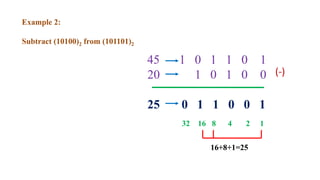
Subtract (10100)2 from (101101)2
45 1 0 1 1 0 1
20 1 0 1 0 0
25 0 1 1 0 0 1
(-)
32 16 8 4 2 1
16+8+1=25
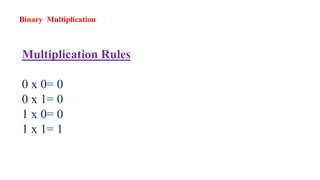
Multiplication Rules
0 x 0= 0
0 x 1= 0
1 x 0= 0
1 x 1= 1
Binary Multiplication
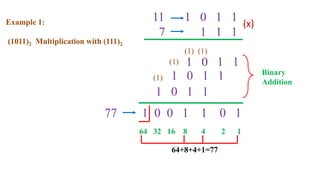
Example 1:
(1011)2 Multiplication with (111)2
11 1 0 1 1
7 1 1 1
(x)
64 32 16 8 4 2 1
64+8+4+1=77
1 0 1 1
1 0 1 1
1 0 1 1
Binary
Addition
1 0 0 1 1 0 1
(1)
(1)
(1)
(1)
77
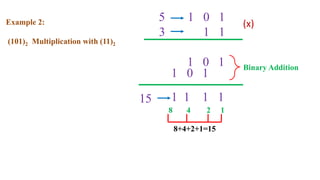
Example 2:
(101)2 Multiplication with (11)2
5 1 0 1
3 1 1
(x)
8 4 2 1
8+4+2+1=15
1 0 1 Binary Addition
1 1 1 1
1 0 1
15
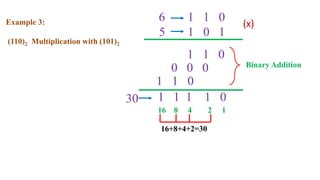
Example 3:
(110)2 Multiplication with (101)2
6 1 1 0
5 1 0 1
(x)
16 8 4 2 1
16+8+4+2=30
1 1 0
Binary Addition
1 1 1 1 0
0 0 0
30
1 1 0
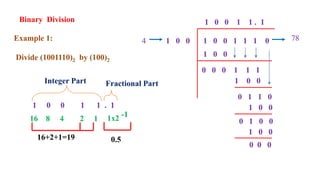
Binary Division
Example 1:
Divide (1001110)2 by (100)2
1 0 0 1 1 1 0
1 0 0
1 0 0
0 0 0 1 1 1
1 0 0
0 1 1 0
1 0 0
0 1 0 0
1 0 0
0 0 0
1 0 0 1 1 . 1
78
4
1 0 0 1 1 . 1
16 8 4 2 1
16+2+1=19
Integer Part Fractional Part
1x2 -1
0.5
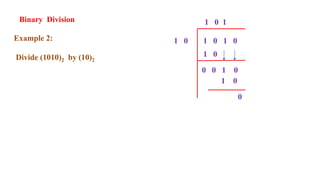
Binary Division
Example 2:
Divide (1010)2 by (10)2
1 0 1 0
1 0
1 0
0 0 1 0
1 0
0
1 0 1
Logic Gates
 Identify the basic gates and describe the behavior of
each
 Combine basic gates into circuits
 Describe the behavior of a gate or circuit using
Boolean expressions, truth tables, and logic diagrams
Outline
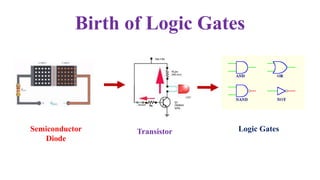
Birth of Logic Gates
Semiconductor
Diode
Transistor Logic Gates
Logic Gates
• A logic gate is a device that acts as a building block for digital circuits
• They perform basic logical functions that are fundamental to digital circuits
• Most electronic devices we use today will have some form of logic gates in them
• For example, logic gates can be used in technologies such as smartphones, tablets
or within memory devices
• In a circuit, logic gates will make decisions based on a combination of digital
signals coming from its inputs. Most logic gates have two inputs and one output
• At any given moment, every terminal is in one of the
two binary conditions, false or true. False represents 0, and true represents 1
• Logic gates are commonly used in integrated circuits (IC)
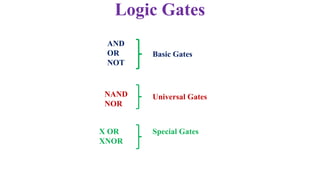
AND
OR
NOT
Basic Gates
NAND
NOR
Universal Gates
X OR
XNOR
Special Gates
Logic Gates
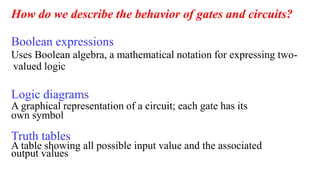
How do we describe the behavior of gates and circuits?
Boolean expressions
Uses Boolean algebra, a mathematical notation for expressing two-
valued logic
Logic diagrams
A graphical representation of a circuit; each gate has its
own symbol
Truth tables
A table showing all possible input value and the associated
output values
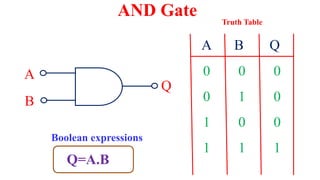
AND Gate
A
B
Q
A B Q
0 0 0
0 1 0
1 0
1 1 1
0
Truth Table
Q=A.B
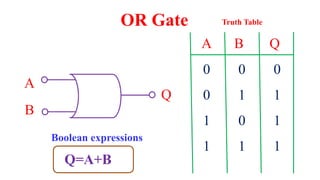
Boolean expressions
A
B
Q
A B Q
0 0 0
0 1 1
1 0 1
1 1 1
OR Gate Truth Table
Q=A+B
Boolean expressions
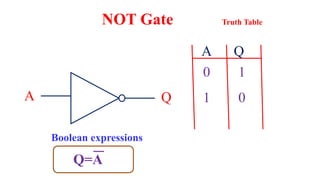
A Q
A Q
0 1
1 0
NOT Gate Truth Table
Q=A
Boolean expressions
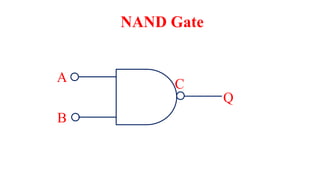
A
B
C
Q
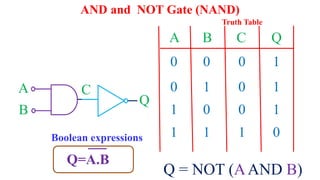
NAND Gate
A
B
C
Q
A B C Q
0 0 0
0 1 0
1 0 0
1 1 1
1
1
1
0
Q = NOT (AAND B)
AND and NOT Gate (NAND)
Truth Table
Q=A.B
Boolean expressions
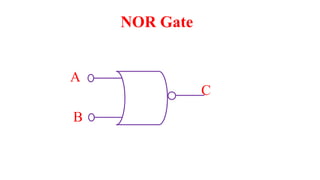
NOR Gate
A
B
C
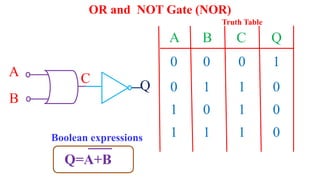
A
B
Q
C
A B C Q
0 0 0
0 1 1
1 0 1
1 1 1
1
0
0
0
OR and NOT Gate (NOR)
Truth Table
Q=A+B
Boolean expressions
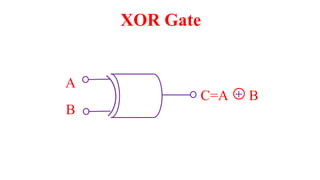
A
B
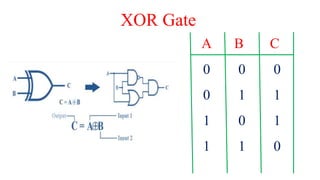
XOR Gate
C=A B
+
A B C
0 0 0
0 1 1
1 0 1
1 1 0
XOR Gate
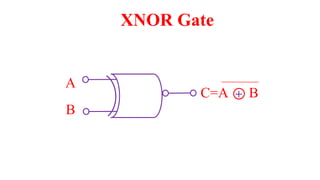
A
B
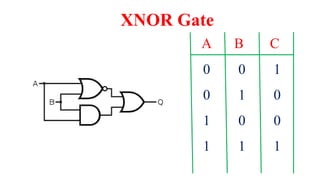
XNOR Gate
C=A B
+
A B C
0 0 1
0 1 0
1 0 0
1 1 1
XNOR Gate
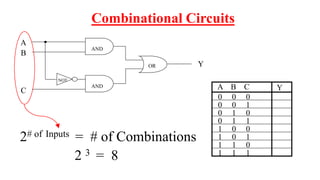
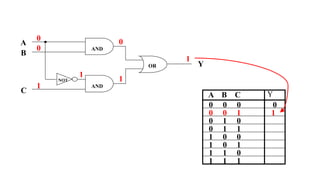
OR
A
Y
NOT
AND
B
C
AND
2# of Inputs = # of Combinations
2 3 = 8
0 0 0
0 0 1
0 1 0
0 1 1
1 0 0
1 0 1
1 1 0
1 1 1
A B C
Combinational Circuits
Y
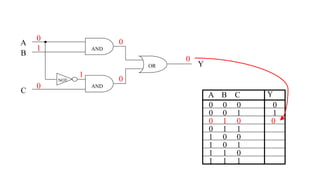
OR
A
Y
NOT
AND
B
C
AND
0 0 0
0 0 1
0 1 0
0 1 1
1 0 0
1 0 1
1 1 0
1 1 1
A B C
0
0
0
0
1
0
0
0
Y
0 0 0
0 0 1
0 1 0
0 1 1
1 0 0
1 0 1
1 1 0
1 1 1
A B C
0
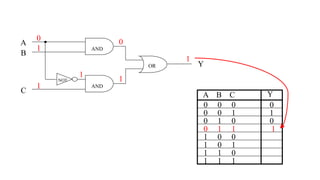
OR
A
Y
NOT
AND
B
C
AND
0
0
1
0
1
1
1
1
Y
0 0 0
0 0 1
0 1 0
0 1 1
1 0 0
1 0 1
1 1 0
1 1 1
A B C
0
1
0
OR
A
Y
NOT
AND
B
C
AND
0
1
0
0
1
0
0
0
Y
0 0 0
0 0 1
0 1 0
0 1 1
1 0 0
1 0 1
1 1 0
1 1 1
A B C
0
1
0
0
OR
A
Y
NOT
AND
B
C
AND
0
1
1
0
1
1
1
1
Y
0 0 0
0 0 1
0 1 0
0 1 1
1 0 0
1 0 1
1 1 0
1 1 1
A B C
0
1
0
1
0
0
1
0
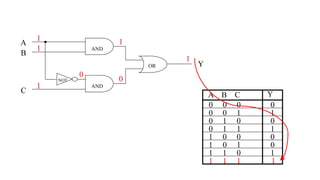
OR
A
Y
NOT
AND
B
C
AND
1
1
1
1
0
0
1
1
Y
65
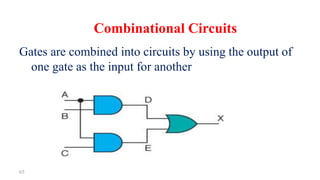
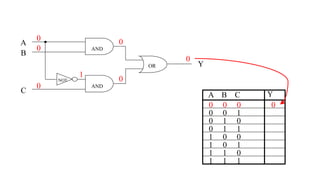
Gates are combined into circuits by using the output of
one gate as the input for another
Combinational Circuits
66
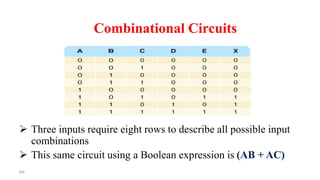
 Three inputs require eight rows to describe all possible input
combinations
 This same circuit using a Boolean expression is (AB + AC)
Combinational Circuits
67
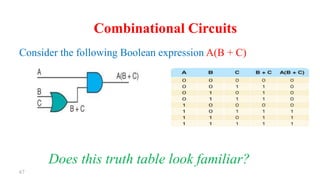
Consider the following Boolean expression A(B + C)
Does this truth table look familiar?
Combinational Circuits
68
Combinational Circuits
Circuit equivalence
 Two circuits that produce the same output for
identical input
 Boolean algebra allows us to apply provable
mathematical principles to help design circuits
 A(B + C) = AB + BC (distributive law) so circuits
must be equivalent
1’s and 2’s Complement
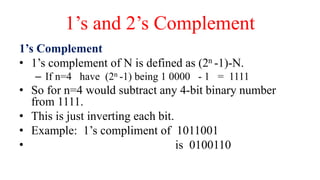
1’s Complement
• 1’s complement of N is defined as (2n -1)-N.
– If n=4 have (2n -1) being 1 0000 - 1 = 1111
• So for n=4 would subtract any 4-bit binary number
from 1111.
• This is just inverting each bit.
• Example: 1’s compliment of 1011001
• is 0100110
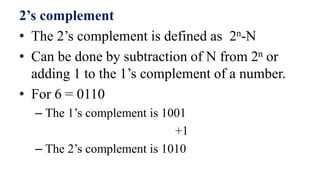
2’s complement
• The 2’s complement is defined as 2n-N
• Can be done by subtraction of N from 2n or
adding 1 to the 1’s complement of a number.
• For 6 = 0110
– The 1’s complement is 1001
+1
– The 2’s complement is 1010
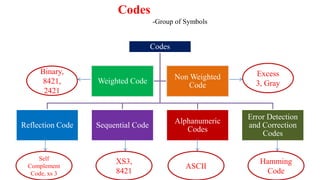
Codes
Reflection Code Sequential Code
Alphanumeric
Codes
Error Detection
and Correction
Codes
Weighted Code
Non Weighted
Code
Codes
-Group of Symbols
Binary,
8421,
2421
Excess
3, Gray
Self
Complement
Code, xs 3
XS3,
8421
ASCII
Hamming
Code
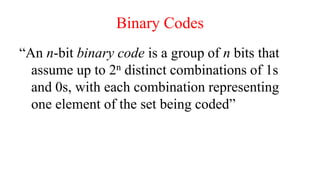
Binary Codes
“An n-bit binary code is a group of n bits that
assume up to 2n distinct combinations of 1s
and 0s, with each combination representing
one element of the set being coded”
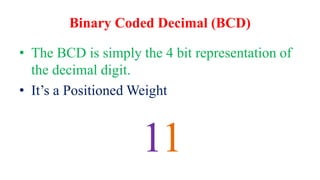
Binary Coded Decimal (BCD)
• The BCD is simply the 4 bit representation of
the decimal digit.
• It’s a Positioned Weight
11
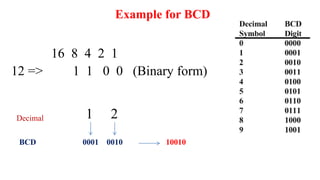
16 8 4 2 1
12 => 1 1 0 0 (Binary form)
Example for BCD
0001 0010
1 2
Decimal
BCD 10010
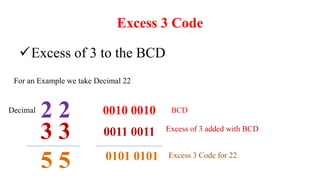
Excess 3 Code
Excess of 3 to the BCD
For an Example we take Decimal 22
2 2 0010 0010
Decimal BCD
3 3
5 5
0011 0011 Excess of 3 added with BCD
0101 0101 Excess 3 Code for 22
Alphanumeric Codes
• Alphanumeric codes, also called character codes, are
binary codes used to represent alphanumeric data
• ASCII
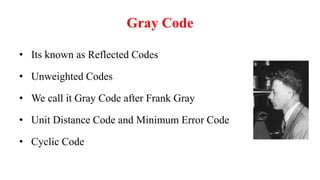
Gray Code
• Its known as Reflected Codes
• Unweighted Codes
• We call it Gray Code after Frank Gray
• Unit Distance Code and Minimum Error Code
• Cyclic Code
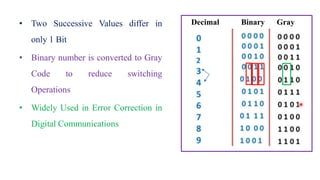
• Two Successive Values differ in
only 1 Bit
• Binary number is converted to Gray
Code to reduce switching
Operations
• Widely Used in Error Correction in
Digital Communications
Decimal Binary Gray
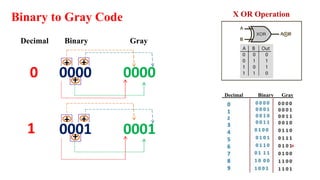
Binary to Gray Code
0000 0000
Decimal Binary Gray
+ +
+
0001 0001
+ +
+
X OR Operation
0
1
Decimal Binary Gray
Boolean Algebra
• VERY nice machinery used to manipulate (simplify) Boolean
functions
• George Boole (1815-1864): “An investigation of the laws of
thought”
• Terminology:
– Literal: A variable or its complement
– Product term: literals connected by •
– Sum term: literals connected by +
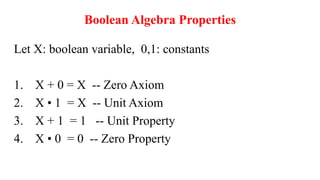
Boolean Algebra Properties
Let X: boolean variable, 0,1: constants
1. X + 0 = X -- Zero Axiom
2. X • 1 = X -- Unit Axiom
3. X + 1 = 1 -- Unit Property
4. X • 0 = 0 -- Zero Property
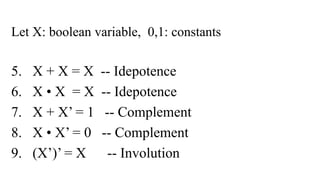
Let X: boolean variable, 0,1: constants
5. X + X = X -- Idepotence
6. X • X = X -- Idepotence
7. X + X’ = 1 -- Complement
8. X • X’ = 0 -- Complement
9. (X’)’ = X -- Involution
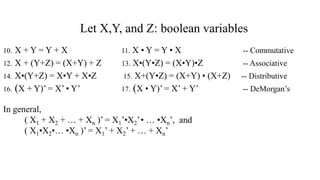
Let X,Y, and Z: boolean variables
10. X + Y = Y + X 11. X • Y = Y • X -- Commutative
12. X + (Y+Z) = (X+Y) + Z 13. X•(Y•Z) = (X•Y)•Z -- Associative
14. X•(Y+Z) = X•Y + X•Z 15. X+(Y•Z) = (X+Y) • (X+Z) -- Distributive
16. (X + Y)’ = X’ • Y’ 17. (X • Y)’ = X’ + Y’ -- DeMorgan’s
In general,
( X1 + X2 + … + Xn )’ = X1’•X2’• … •Xn’, and
( X1•X2•… •Xn )’ = X1’ + X2’ + … + Xn’
K Map Simplifications
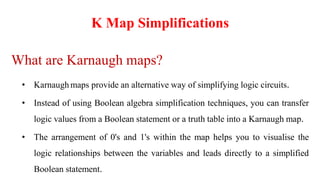
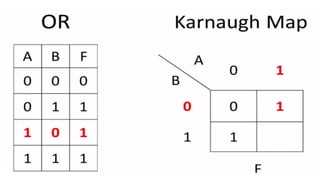
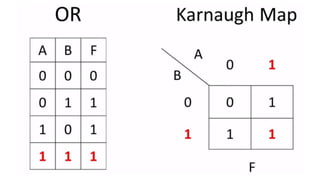
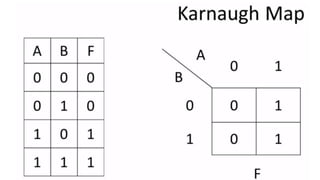
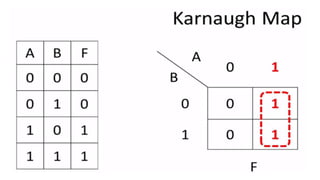
What are Karnaugh maps?
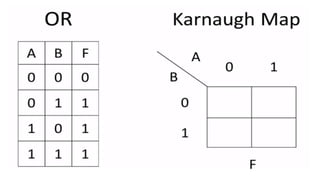
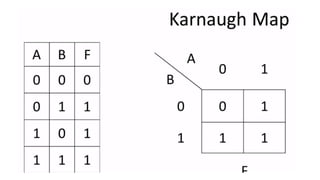
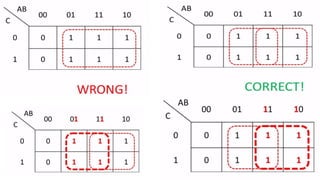
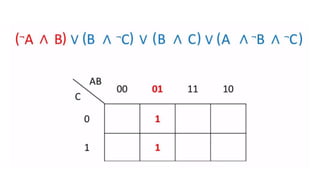
• Karnaugh maps provide an alternative way of simplifying logic circuits.
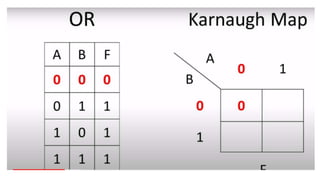
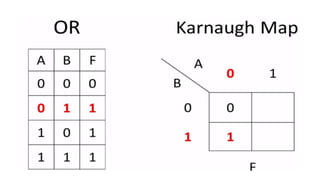
• Instead of using Boolean algebra simplification techniques, you can transfer
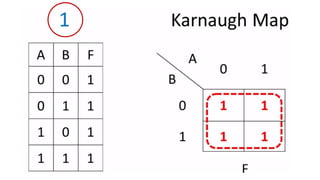
logic values from a Boolean statement or a truth table into a Karnaugh map.
• The arrangement of 0's and 1's within the map helps you to visualise the
logic relationships between the variables and leads directly to a simplified
Boolean statement.
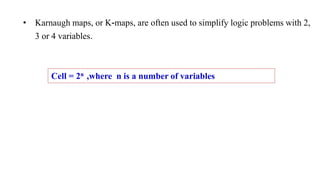
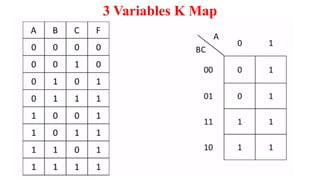
• Karnaugh maps, or K-maps, are often used to simplify logic problems with 2,
3 or 4 variables.
Cell = 2n ,where n is a number of variables
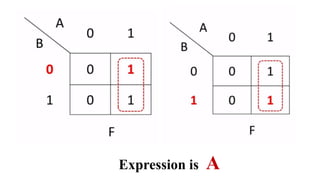
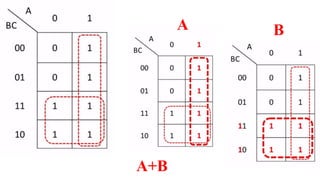
Expression is A
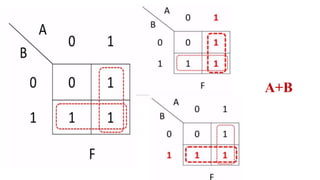
A+B
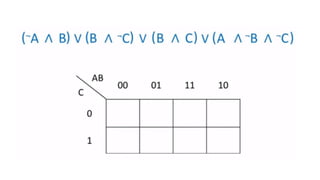
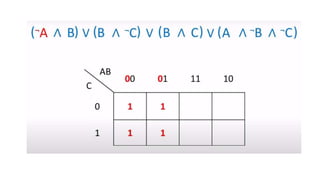
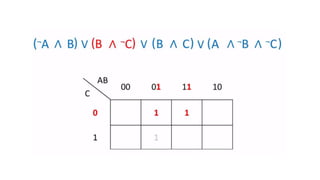
3 Variables K Map
A B
A+B
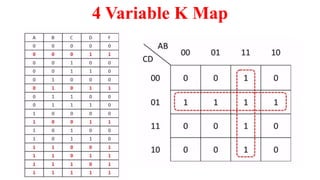
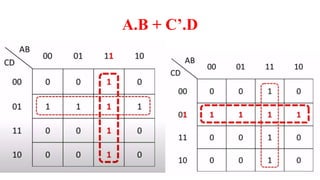
4 Variable K Map
A.B + C’.D
Thank you

21EC201– Digital Principles and system design.pptx

  • 1.
  • 2.
    UNIT I -DIGITAL FUNDAMENTALS
  • 3.
    Outline  Number Systems– Decimal, Binary, Octal, 1’s and 2’s complements,  Codes-Binary, BCD, Excess 3,Gray, Alphanumeric codes, Boolean theorems  Logic gates,  Universal gates,  Sum of products and product of sums, Minterms and Maxterms,  Karnaugh map minimization,  NAND and NOR Implementations.
  • 4.
  • 5.
    A set ofvalues used to represent different quantities is known as number system Ex: Number of student in online classes In general term computer represent information in different types of data forms i.e. number , character ,picture ,audio , video etc Number Systems
  • 6.
    Computers are madeof a series of switches/ gates. Each switch has two states: ON(1) or OFF(0).That's why computer works on the basis of binary number system(0/1).But for different purpose different number systems are used in computer world to represent information. E.g. Octal, Decimal, Hexadecimal Number Systems
  • 7.
     This numbersystems is composed of 10 Symbols (0,1,2,3,4,5,6,7,8,9)  the decimal system has 10 numerical characters and so has a base of 10 Decimal Number System
  • 8.
     Binary hasonly two values 0 and 1  If larger values than 1 are needed, extra columns are added to the left. Each column value is now twice the value of the column to its right. For example the decimal value three is written 11 in binary Binary Number System
  • 9.
    Octal • Octal haseight values 0 to 7. • If larger values than 7 are needed, extra columns are added to the left. Each column value is now 8 times the value of the column to its right. For example the decimal value twenty-seven is written 33 in octal Hexadecimal • Hexadecimal number system uses base 16 from 0-9 and a,b,c,d,e,f as 16 symbols Octal and HexaDecimal Number system
  • 10.
    • 1010 representsthe decimal value ten. (1 ten + 0 units) • 102 represents the binary value two. (1 two + 0 units) • 108 represents the octal value eight. (1 eight + 0 units) • 1016 represents the hexadecimal value sixteen. (1 sixteen + 0 units) Examples
  • 11.
    Decimal to AnyBase • Decimal to Binary • Decimal to Octal • Decimal to Hexadecimal Any base to Decimal • Binary to Decimal • Octal to Decimal • Hexadecimal to Decimal Not Involving Decimal • Binary to Octal • Octal to Hexa • Hexa to Binary Conversions Between Number Systems
  • 12.
  • 13.
  • 14.
  • 15.
  • 16.
  • 17.
  • 18.
    Binary to Octal Toconvert a binary number to octal number, these steps are followed Starting from the least significant bit, make groups of three bits. If there are one or two bits less in making the groups, 0s can be added after the most significant bit Convert each group into its equivalent octal number 101100101012 = 26258 8421 0 1 0 001 100 101 010 011 421421 421 421 421 1 4 5 2 3
  • 19.
    Binary to Hexadecimal Toconvert a binary number to hexadecimal number, these steps are followed − Starting from the least significant bit, make groups of four bits. If there are one or two bits less in making the groups, 0s can be added after the most significant bit. Convert each group into its equivalent octal number. 1101101101012 = DB516
  • 20.
    Octal to hexadecimal Usingthe below two methods, we can convert the octal number system into the hexadecimal number system. 1. Convert the octal number into binary and then convert the binary into hexadecimal. 2. Convert the octal number into decimal and then convert the decimal into hexadecimal. Let's convert the octal number into the hexadecimal number system
  • 21.
    Octal -> Binary-> Hexadecimal Let's convert (56)8 into hexadecimal Step 1 : Convert (56)8 into Binary In order to convert the octal number into binary, we need to express every octal value using 3 binary bits. Binary equivalent of 5 is (101)2. Binary equivalent of 6 is (110)2. = (56)8 = (101)(110) = (101110)2 Step 2 : Convert (101110)2 into Hexadecimal In order to convert the binary number into hexadecimal, we need to group every 4 binary bits and calculate the value[From left to right]. (101110)2 in hexadecimal = (101110)2 = (10)(1110) = (2)(14) = = (2E)16
  • 22.
    (2C1)16 = (1011000001)2 2C 1 2 12 1 8421 8421 8421 0010 1100 0001 Hex to binary conversion 9DB2)16 = (1001110110110010)2 9 D B 2 9 13 11 2 8421 8421 8421 8421 1001 1101 1011 0010 Every Hexadecimal digits grouping by 4.
  • 23.
    Decimal to Binary (10.25)10 Keepmultiplying the fractional part with 2 until decimal part 0.00 is obtained. (0.25)10 = (0.01)2 Example for Fractional part 1010.01
  • 24.
    Binary to Decimal (1010.01)2101101.1001 1x23 + 0x22 + 1x21+ 0x20 + 0x2 -1 + 1x2 -2 = 8+0+2+0+0+0.25 = 10.25 (1010.01)2 = (10.25)10
  • 25.
    Decimal to Octal (10.25)10 (10)10= (12)8 Fractional part: 0.25 x 8 = 2.00 Note: Keep multiplying the fractional part with 8 until decimal part .00 is obtained. (.25)10 = (.2)8 Answer: (10.25)10 = (12.2)8
  • 26.
    Octal to Decimal (12.2)8 1x 81 + 2 x 80 +2 x 8-1 = 8+2+0.25 = 10.25 (12.2)8 = (10.25)10
  • 27.
    Arithmetic Operations Basic Additionand Subtraction • Binary numbers are added like decimal numbers. – In decimal, when numbers sum more than 9, a carry results. – In binary when numbers sum more than 1, a carry takes place • Addition is the basic arithmetic operation used by digital devices for subtraction, multiplication & division
  • 28.
    Binary Addition Addition Rules 0+0=0 0+1= 1 1+0= 1 1+1= 0 (Sum) with carry 1 1+1+1=1 (Sum) with carry 1
  • 29.
    Example 1: 9 10 0 1 11 1 0 1 1 (1) (1) 20 1 0 1 0 0 Carry Apply 8421 Code equivalent decimal Value 8 4 2 1 1 0 0 1 1 0 1 1 1 0 1 0 0 8421 Code 9 11 168421 Code +
  • 30.
    Example 2: 10 10 1 0 9 1 0 0 1 19 1 0 0 1 1 Apply 8421 Code equivalent decimal Value 8 4 2 1 1 0 1 0 1 0 0 1 1 0 0 1 1 8421 Code 10 9 168421 Code +
  • 31.
    Example 3: 38 10 0 1 1 0 53 1 1 0 1 0 1 91 1 0 1 1 0 1 1 + 64 32 16 8 4 2 1 64+16+8+2+1=91
  • 32.
    106 1 10 1 0 1 0 Example 3: 45 1 0 1 1 0 1 61 1 1 1 1 0 1 + 64 32 16 8 4 2 1 64+16+8+2+1=91 1 1 1 1 Carry
  • 33.
    Subtraction Rules 0-0= 0 0-1=1 with Borrow 1 1-0= 1 1-1= 0 Binary Subtraction
  • 34.
    Example 1: Subtract (0011)2from (1100)2 12 1 1 0 0 3 0 0 1 1 9 1 0 0 1 (-) Borrow 8 4 2 1 8+1=9
  • 35.
    Example 2: Subtract (10100)2from (101101)2 45 1 0 1 1 0 1 20 1 0 1 0 0 25 0 1 1 0 0 1 (-) 32 16 8 4 2 1 16+8+1=25
  • 36.
    Multiplication Rules 0 x0= 0 0 x 1= 0 1 x 0= 0 1 x 1= 1 Binary Multiplication
  • 37.
    Example 1: (1011)2 Multiplicationwith (111)2 11 1 0 1 1 7 1 1 1 (x) 64 32 16 8 4 2 1 64+8+4+1=77 1 0 1 1 1 0 1 1 1 0 1 1 Binary Addition 1 0 0 1 1 0 1 (1) (1) (1) (1) 77
  • 38.
    Example 2: (101)2 Multiplicationwith (11)2 5 1 0 1 3 1 1 (x) 8 4 2 1 8+4+2+1=15 1 0 1 Binary Addition 1 1 1 1 1 0 1 15
  • 39.
    Example 3: (110)2 Multiplicationwith (101)2 6 1 1 0 5 1 0 1 (x) 16 8 4 2 1 16+8+4+2=30 1 1 0 Binary Addition 1 1 1 1 0 0 0 0 30 1 1 0
  • 40.
    Binary Division Example 1: Divide(1001110)2 by (100)2 1 0 0 1 1 1 0 1 0 0 1 0 0 0 0 0 1 1 1 1 0 0 0 1 1 0 1 0 0 0 1 0 0 1 0 0 0 0 0 1 0 0 1 1 . 1 78 4 1 0 0 1 1 . 1 16 8 4 2 1 16+2+1=19 Integer Part Fractional Part 1x2 -1 0.5
  • 41.
    Binary Division Example 2: Divide(1010)2 by (10)2 1 0 1 0 1 0 1 0 0 0 1 0 1 0 0 1 0 1
  • 42.
  • 43.
     Identify thebasic gates and describe the behavior of each  Combine basic gates into circuits  Describe the behavior of a gate or circuit using Boolean expressions, truth tables, and logic diagrams Outline
  • 44.
    Birth of LogicGates Semiconductor Diode Transistor Logic Gates
  • 45.
    Logic Gates • Alogic gate is a device that acts as a building block for digital circuits • They perform basic logical functions that are fundamental to digital circuits • Most electronic devices we use today will have some form of logic gates in them • For example, logic gates can be used in technologies such as smartphones, tablets or within memory devices • In a circuit, logic gates will make decisions based on a combination of digital signals coming from its inputs. Most logic gates have two inputs and one output • At any given moment, every terminal is in one of the two binary conditions, false or true. False represents 0, and true represents 1 • Logic gates are commonly used in integrated circuits (IC)
  • 46.
    AND OR NOT Basic Gates NAND NOR Universal Gates XOR XNOR Special Gates Logic Gates
  • 47.
    How do wedescribe the behavior of gates and circuits? Boolean expressions Uses Boolean algebra, a mathematical notation for expressing two- valued logic Logic diagrams A graphical representation of a circuit; each gate has its own symbol Truth tables A table showing all possible input value and the associated output values
  • 48.
    AND Gate A B Q A BQ 0 0 0 0 1 0 1 0 1 1 1 0 Truth Table Q=A.B Boolean expressions
  • 49.
    A B Q A B Q 00 0 0 1 1 1 0 1 1 1 1 OR Gate Truth Table Q=A+B Boolean expressions
  • 50.
    A Q A Q 01 1 0 NOT Gate Truth Table Q=A Boolean expressions
  • 51.
  • 52.
    A B C Q A B CQ 0 0 0 0 1 0 1 0 0 1 1 1 1 1 1 0 Q = NOT (AAND B) AND and NOT Gate (NAND) Truth Table Q=A.B Boolean expressions
  • 53.
  • 54.
    A B Q C A B CQ 0 0 0 0 1 1 1 0 1 1 1 1 1 0 0 0 OR and NOT Gate (NOR) Truth Table Q=A+B Boolean expressions
  • 55.
  • 56.
    A B C 00 0 0 1 1 1 0 1 1 1 0 XOR Gate
  • 57.
  • 58.
    A B C 00 1 0 1 0 1 0 0 1 1 1 XNOR Gate
  • 59.
    OR A Y NOT AND B C AND 2# of Inputs= # of Combinations 2 3 = 8 0 0 0 0 0 1 0 1 0 0 1 1 1 0 0 1 0 1 1 1 0 1 1 1 A B C Combinational Circuits Y
  • 60.
    OR A Y NOT AND B C AND 0 0 0 00 1 0 1 0 0 1 1 1 0 0 1 0 1 1 1 0 1 1 1 A B C 0 0 0 0 1 0 0 0 Y
  • 61.
    0 0 0 00 1 0 1 0 0 1 1 1 0 0 1 0 1 1 1 0 1 1 1 A B C 0 OR A Y NOT AND B C AND 0 0 1 0 1 1 1 1 Y
  • 62.
    0 0 0 00 1 0 1 0 0 1 1 1 0 0 1 0 1 1 1 0 1 1 1 A B C 0 1 0 OR A Y NOT AND B C AND 0 1 0 0 1 0 0 0 Y
  • 63.
    0 0 0 00 1 0 1 0 0 1 1 1 0 0 1 0 1 1 1 0 1 1 1 A B C 0 1 0 0 OR A Y NOT AND B C AND 0 1 1 0 1 1 1 1 Y
  • 64.
    0 0 0 00 1 0 1 0 0 1 1 1 0 0 1 0 1 1 1 0 1 1 1 A B C 0 1 0 1 0 0 1 0 OR A Y NOT AND B C AND 1 1 1 1 0 0 1 1 Y
  • 65.
    65 Gates are combinedinto circuits by using the output of one gate as the input for another Combinational Circuits
  • 66.
    66  Three inputsrequire eight rows to describe all possible input combinations  This same circuit using a Boolean expression is (AB + AC) Combinational Circuits
  • 67.
    67 Consider the followingBoolean expression A(B + C) Does this truth table look familiar? Combinational Circuits
  • 68.
    68 Combinational Circuits Circuit equivalence Two circuits that produce the same output for identical input  Boolean algebra allows us to apply provable mathematical principles to help design circuits  A(B + C) = AB + BC (distributive law) so circuits must be equivalent
  • 69.
    1’s and 2’sComplement 1’s Complement • 1’s complement of N is defined as (2n -1)-N. – If n=4 have (2n -1) being 1 0000 - 1 = 1111 • So for n=4 would subtract any 4-bit binary number from 1111. • This is just inverting each bit. • Example: 1’s compliment of 1011001 • is 0100110
  • 70.
    2’s complement • The2’s complement is defined as 2n-N • Can be done by subtraction of N from 2n or adding 1 to the 1’s complement of a number. • For 6 = 0110 – The 1’s complement is 1001 +1 – The 2’s complement is 1010
  • 71.
    Codes Reflection Code SequentialCode Alphanumeric Codes Error Detection and Correction Codes Weighted Code Non Weighted Code Codes -Group of Symbols Binary, 8421, 2421 Excess 3, Gray Self Complement Code, xs 3 XS3, 8421 ASCII Hamming Code
  • 72.
    Binary Codes “An n-bitbinary code is a group of n bits that assume up to 2n distinct combinations of 1s and 0s, with each combination representing one element of the set being coded”
  • 73.
    Binary Coded Decimal(BCD) • The BCD is simply the 4 bit representation of the decimal digit. • It’s a Positioned Weight 11
  • 74.
    16 8 42 1 12 => 1 1 0 0 (Binary form) Example for BCD 0001 0010 1 2 Decimal BCD 10010
  • 75.
    Excess 3 Code Excessof 3 to the BCD For an Example we take Decimal 22 2 2 0010 0010 Decimal BCD 3 3 5 5 0011 0011 Excess of 3 added with BCD 0101 0101 Excess 3 Code for 22
  • 76.
    Alphanumeric Codes • Alphanumericcodes, also called character codes, are binary codes used to represent alphanumeric data • ASCII
  • 77.
    Gray Code • Itsknown as Reflected Codes • Unweighted Codes • We call it Gray Code after Frank Gray • Unit Distance Code and Minimum Error Code • Cyclic Code
  • 78.
    • Two SuccessiveValues differ in only 1 Bit • Binary number is converted to Gray Code to reduce switching Operations • Widely Used in Error Correction in Digital Communications Decimal Binary Gray
  • 79.
    Binary to GrayCode 0000 0000 Decimal Binary Gray + + + 0001 0001 + + + X OR Operation 0 1 Decimal Binary Gray
  • 80.
    Boolean Algebra • VERYnice machinery used to manipulate (simplify) Boolean functions • George Boole (1815-1864): “An investigation of the laws of thought” • Terminology: – Literal: A variable or its complement – Product term: literals connected by • – Sum term: literals connected by +
  • 81.
    Boolean Algebra Properties LetX: boolean variable, 0,1: constants 1. X + 0 = X -- Zero Axiom 2. X • 1 = X -- Unit Axiom 3. X + 1 = 1 -- Unit Property 4. X • 0 = 0 -- Zero Property
  • 82.
    Let X: booleanvariable, 0,1: constants 5. X + X = X -- Idepotence 6. X • X = X -- Idepotence 7. X + X’ = 1 -- Complement 8. X • X’ = 0 -- Complement 9. (X’)’ = X -- Involution
  • 83.
    Let X,Y, andZ: boolean variables 10. X + Y = Y + X 11. X • Y = Y • X -- Commutative 12. X + (Y+Z) = (X+Y) + Z 13. X•(Y•Z) = (X•Y)•Z -- Associative 14. X•(Y+Z) = X•Y + X•Z 15. X+(Y•Z) = (X+Y) • (X+Z) -- Distributive 16. (X + Y)’ = X’ • Y’ 17. (X • Y)’ = X’ + Y’ -- DeMorgan’s In general, ( X1 + X2 + … + Xn )’ = X1’•X2’• … •Xn’, and ( X1•X2•… •Xn )’ = X1’ + X2’ + … + Xn’
  • 100.
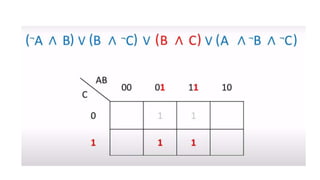
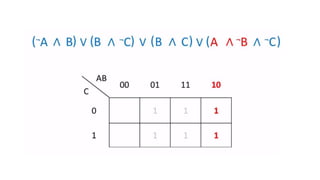
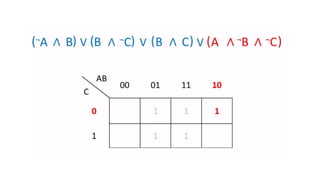
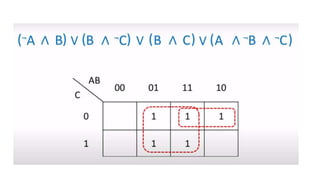
    K Map Simplifications Whatare Karnaugh maps? • Karnaugh maps provide an alternative way of simplifying logic circuits. • Instead of using Boolean algebra simplification techniques, you can transfer logic values from a Boolean statement or a truth table into a Karnaugh map. • The arrangement of 0's and 1's within the map helps you to visualise the logic relationships between the variables and leads directly to a simplified Boolean statement.
  • 101.
    • Karnaugh maps,or K-maps, are often used to simplify logic problems with 2, 3 or 4 variables. Cell = 2n ,where n is a number of variables
  • 109.
  • 111.
  • 113.
  • 114.
  • 116.
  • 117.
  • 132.